Overview

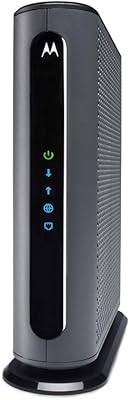
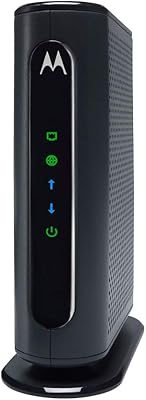
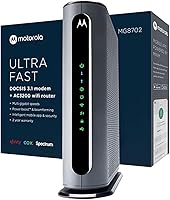
The Motorola MG8702 DOCSIS 3.1 Cable Modem + Wi-Fi Router is a powerful all-in-one device designed to deliver reliable, high-speed internet to your home. This modem-router combo supports up to AC3200 Wi-Fi speeds, making it a great option for streaming, gaming, and working from home. Instead of paying rental fees for a modem from your ISP, owning this device can provide long-term savings. High-speed internet and a future-proof modem make it an attractive choice for tech-savvy users looking to optimize their network performance.
Features & Benefits

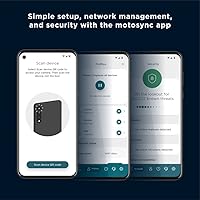
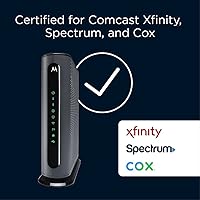
This modem-router combo offers DOCSIS 3.1 technology, ensuring faster speeds and greater reliability compared to older standards. With its built-in AC3200 Wi-Fi router and Power Boost technology, it delivers robust coverage even in larger homes. The mobile app simplifies setup and management, with features like network monitoring, speed testing, and parental controls. Compatible with major ISPs such as Comcast Xfinity, Cox, and Charter Spectrum, it's an excellent choice for homes with high internet demands.

Best For

The Motorola MG8702 is perfect for home users looking for a high-performance modem-router combo that offers strong Wi-Fi coverage. It's especially beneficial for families needing reliable internet across multiple devices, as well as tech-savvy individuals who enjoy managing their network settings via the mobile app. Whether you're streaming in 4K or working from home, this modem-router combo ensures stable connections and fast speeds throughout your home.

User Feedback

Users generally praise this Motorola modem for its strong Wi-Fi performance and straightforward setup process. Many appreciate how easy it is to set up and manage via the mobile app. However, some reviewers report occasional connectivity issues with specific ISPs, although these problems are not widespread. A recurring positive theme is the ability to avoid the ongoing cost of ISP modem rentals, offering a cost-effective solution for long-term users.

Pros

  • The device offers reliable, high-speed internet, supporting plans up to AC3200 Wi-Fi.
  • Its dual-band Wi-Fi (2.4 GHz and 5 GHz) provides flexible coverage for different needs.
  • Users appreciate the simple setup process, especially with the mobile app's guidance.
  • It helps users avoid costly modem rentals from ISPs, saving money over time.
  • This modem-router combo is compatible with major ISPs like Comcast Xfinity and Cox.
  • Families find the built-in parental controls and network management via the app convenient.

Cons

  • Some users report occasional connectivity issues, especially with certain ISPs.
  • While the coverage is good, very large homes may require additional range extenders.
  • The mobile app’s features are basic compared to other advanced network management tools.
  • Not all users are satisfied with the performance in areas with thick walls.
  • Some buyers noted the modem’s price is higher than basic ISP rental options.
  • It can be tricky to set up for those unfamiliar with modem-router combinations.

Ratings

The Motorola MG8702 DOCSIS 3.1 Cable Modem + Wi-Fi Router has garnered a solid reputation among users worldwide, with feedback gathered from various regions and platforms. After filtering out spam, bot-generated, and incentivized reviews, the results highlight the product’s strong performance, ease of use, and reliability. While the device excels in several key areas, some users have noted occasional issues with connectivity, particularly with certain ISPs. Both strengths and areas for improvement are reflected in the scores, providing a balanced view of its overall quality.
Value for Money
92%
Many users feel that this modem-router combo offers excellent value, especially given its high performance and future-proof DOCSIS 3.1 technology. It provides a one-time purchase alternative to costly ISP rentals, which makes it particularly appealing for long-term savings.
A few users feel that the initial setup cost can be a bit steep compared to renting a modem from their ISP. For some, the upfront investment may not feel justified if they are only looking for basic internet functionality.
Wi-Fi Performance
89%
Buyers appreciate the strong, stable Wi-Fi performance provided by the AC3200 speeds and Power Boost technology. Many report excellent coverage across multiple rooms, with high-speed connections supporting demanding activities like streaming and gaming.
Some users mention experiencing occasional dropouts or slower speeds when the device is pushed to its limits, particularly with multiple devices connected. While overall performance is good, some feel that it's not always consistent in large homes.
Ease of Setup
88%
The setup process is frequently praised for being simple and user-friendly, especially with the mobile app. Most users find that they can get the device up and running in minutes, with clear instructions and minimal technical knowledge required.
A small number of users found the setup process frustrating, especially when trying to connect to certain ISPs. Some felt that the mobile app could have offered more in-depth troubleshooting options for those facing initial connectivity issues.
ISP Compatibility
85%
This device is compatible with major ISPs like Comcast Xfinity, Cox, and Charter Spectrum, which adds a significant layer of convenience for many users. It’s a plug-and-play solution for those already with these services, making it easy to bypass rental fees.
However, some users with less common ISPs reported occasional compatibility issues. These users experienced difficulties with the setup or found that some features didn't work as expected with their providers.
Mobile App Experience
82%
18%
Many users find the mobile app helpful for managing their network, especially when it comes to speed testing, monitoring data, and controlling Wi-Fi settings. The app is considered easy to navigate and useful for basic network management.
On the downside, a few users feel the app could be improved with additional features or more intuitive controls. Some mentioned occasional crashes or delays when trying to access certain functions, making the experience less seamless than expected.
Build Quality
84%
The build quality of the device is praised for being solid and durable, with a compact design that fits well into most home setups. Users note that it feels robust and well-made, which contributes to its long-term reliability.
A few users have mentioned that the plastic casing feels somewhat lightweight compared to other high-end modems. While not a major issue, it does lead to some concerns about long-term durability, especially for homes with high traffic.
Coverage Range
87%
The coverage range is often highlighted as one of the strong points, with the dual-band support ensuring solid signals across larger homes or apartments. The Power Boost technology also helps extend the reach for harder-to-cover areas.
However, some users reported that the range isn’t as impressive in very large homes or buildings with thick walls. While the device performs well in standard-sized homes, it may not be ideal for larger environments.
Customer Support
75%
25%
Motorola's customer support has received some positive feedback for being responsive and helpful when users face issues. Many appreciate the availability of a quick start guide and the option to reach out for technical support when needed.
On the flip side, several users have reported slow response times and unhelpful solutions from support representatives. For some, resolving technical issues took longer than expected, which may be a drawback for those needing immediate assistance.
Power Boost Technology
90%
Users love the Power Boost feature, which helps amplify the Wi-Fi signal and provides better coverage in areas that typically experience weak connectivity. This is particularly helpful in multi-level homes or spaces with many devices.
While most users find Power Boost effective, a few note that the performance boost isn’t always dramatic in challenging environments. In some cases, users felt it didn’t make much difference in very dense or multi-device networks.
Dual-Band Flexibility
86%
The dual-band functionality (2.4 GHz and 5 GHz) is a hit with users, offering the flexibility to optimize connections for different devices. Many appreciate being able to dedicate the 5 GHz band to high-demand devices like streaming TVs or gaming consoles.
However, a few users have pointed out that switching between the two bands can sometimes cause minor connectivity issues. They suggested that the bands could be better integrated for a smoother transition between frequencies.
Long-Term Reliability
80%
20%
Several users have shared that the device performs reliably over time, maintaining consistent speeds and connectivity. It has proven to be a sturdy choice for many households that rely on it day in and day out for their internet needs.
However, some buyers have expressed concerns about long-term stability, particularly in environments with heavy usage. A few users have reported experiencing drops in performance or connectivity issues after several months of use.
App Parental Controls
78%
22%
The parental control features within the app are well-regarded by parents looking to manage screen time or restrict certain online content. It provides an easy and effective way to monitor and control kids' internet usage.
A few users felt that the app’s parental controls lacked more advanced options or customization features. Some reported that it was limited in scope, which could be a dealbreaker for families looking for deeper control over their network.
Connectivity Issues
60%
40%
For most users, the device offers smooth and reliable connectivity with minimal interruptions, especially with the dual-band support. It works well for activities like streaming and online gaming when everything is set up properly.
However, connectivity issues have been a frequent complaint, with several users experiencing drops in connection, especially with certain ISPs or heavy usage. These connectivity problems seem to occur unpredictably, leaving some users frustrated with inconsistent performance.

Suitable for:

The Motorola MG8702 DOCSIS 3.1 Cable Modem + Wi-Fi Router is an ideal choice for home users seeking a reliable and cost-effective modem-router combo. Those living in medium to large homes or apartments will benefit from its strong Wi-Fi coverage and dual-band support. Families looking for an easy-to-use, secure, and customizable network will also appreciate the mobile app’s setup and parental control features. Additionally, tech-savvy individuals who want to manage their network through a convenient app will find this device a practical solution for optimizing internet speeds and avoiding ISP rental fees.

Not suitable for:

While this device performs well for most users, it may not be the best choice for people with very large homes or those living in areas with thick walls, as some have reported coverage issues in expansive environments. Users with less common ISPs might also experience compatibility issues, leading to setup difficulties. Those seeking advanced parental controls or more customizable network management options might find the mobile app lacking in depth. Furthermore, individuals who prioritize low upfront costs may not find the initial investment to be worthwhile compared to simply renting a modem from their ISP.

Specifications

  • Modem Type: Supports DOCSIS 3.1 technology for enhanced performance and future-proof speeds.
  • Wi-Fi Speed: Provides Wi-Fi speeds up to AC3200, offering fast and reliable wireless connections.
  • Wi-Fi Bands: Supports dual-band Wi-Fi with both 2.4 GHz and 5 GHz bands for flexible coverage.
  • Power Boost: Includes Power Boost technology to extend the range and improve signal strength.
  • App Support: Has a mobile app for easy setup, network management, and speed testing.
  • ISP Compatibility: Compatible with major ISPs such as Comcast Xfinity, Cox, and Charter Spectrum.
  • Ethernet Ports: Equipped with 4 Gigabit Ethernet ports for high-speed wired connections.
  • Dimensions: Measures 9.5 x 2.88 x 9.75 inches, making it compact for home use.
  • Weight: Weighs 2.15 pounds, which is typical for a high-performance modem-router combo.
  • Mobile App: The mobile app is available for both iOS and Android devices for easy management.
  • Security Features: Supports WPA2 wireless encryption for secure network connections.
  • Parental Controls: Offers integrated parental controls to monitor and manage internet usage.
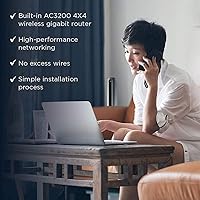
  • Router Type: Built-in AC3200 Wi-Fi router, eliminating the need for a separate router device.
  • Wi-Fi Coverage: Designed to provide strong Wi-Fi coverage for average to moderately large homes.
  • Coaxial Cable: Includes a coaxial cable for direct connection to the cable line.
  • Quick Start Guide: Comes with a quick start guide for simple and efficient installation.
  • Software Features: Includes features for speed testing and network optimization directly from the app.
  • Warranty: Backed by a standard 1-year warranty for peace of mind.

FAQ

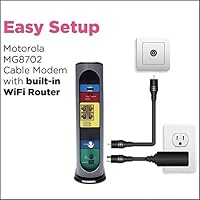
Setting up the Motorola MG8702 is simple with its mobile app. Just plug it in, connect the coaxial cable, and follow the on-screen instructions in the app for network configuration and Wi-Fi setup. The app also helps with troubleshooting and optimizing your connection.

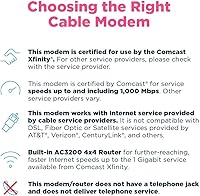
This modem-router combo works with major ISPs such as Comcast Xfinity, Cox, and Charter Spectrum. It’s designed for DOCSIS 3.1 compatibility, but be sure to check your specific ISP’s compatibility requirements before purchasing.

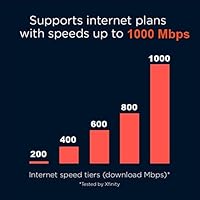
The Motorola MG8702 supports internet speeds up to AC3200 Wi-Fi, which is ideal for high-speed plans. It offers fast, reliable connections for streaming, gaming, and large file transfers, especially with dual-band support (2.4 GHz and 5 GHz).

The MG8702 features Power Boost technology, which extends Wi-Fi coverage, but for very large homes, you may need to supplement with additional range extenders or mesh systems. It's best suited for average-sized to moderately large homes.

Yes, one of the main benefits of owning this modem-router combo is avoiding monthly ISP modem rental fees. Over time, the initial investment will save you money compared to ongoing rental costs, especially if you’re on a high-speed plan.

The box includes the Motorola MG8702 modem-router, an Ethernet cable, an AC power adapter, and a quick start guide to help you set it up quickly. The mobile app for setup is available on both iOS and Android devices.

Yes, the Motorola MG8702 includes parental controls via its mobile app, allowing you to manage internet access, set usage limits, and monitor activity for a safer online experience for children and family members.

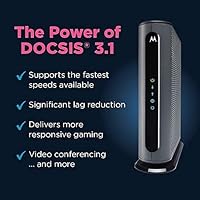
DOCSIS 3.1 is the latest cable internet standard, offering significantly faster speeds and better efficiency than earlier versions. It supports higher-speed plans, reduces latency, and provides more stable connections, making it future-proof for upcoming internet technologies.

Some users have reported occasional connectivity issues, particularly with certain ISPs or in areas with thick walls. However, these issues seem to be isolated and may be resolved with proper setup or additional network equipment like extenders.

Yes, the app allows you to manage your network, test speeds, check the status of your connection, and adjust settings. It also provides easy access to parental controls and troubleshooting tools, making it convenient for tech-savvy users.