Overview

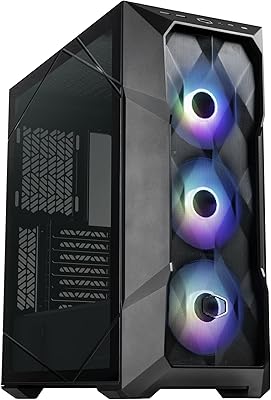
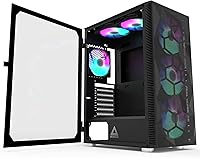
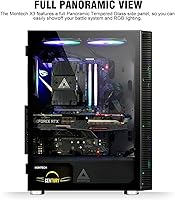
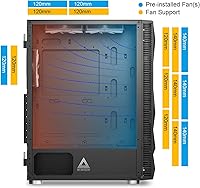
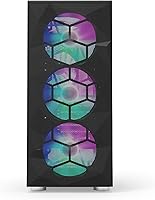
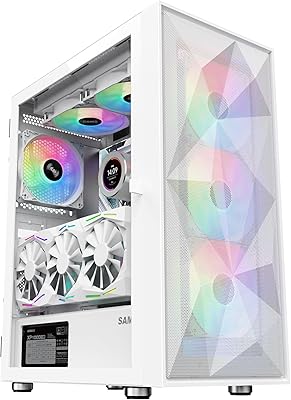
The Montech X3 Mesh ATX Mid-Tower Case is Montech's answer to builders who want solid airflow and a visually striking interior without stretching their budget. It ships with six pre-installed fans — three 140mm up front and three 120mm split between the top and rear — which is genuinely unusual at this price point. Both the front and side panels are tempered glass, giving you a full panoramic view of your components. One thing worth flagging early: the RGB lighting is fixed, not addressable, so if you are running an ARGB ecosystem, that is a real consideration before buying. The case comes in black and white; this review covers the black version.

Features & Benefits

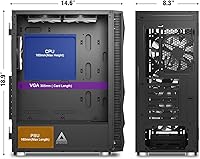
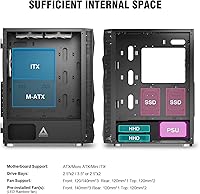
The front mesh intake paired with three 140mm fans pulls in a serious volume of air, keeping CPU and GPU temperatures in check even under sustained load. Two 120mm fans on top and one at the rear handle exhaust efficiently. The case supports ATX, Micro-ATX, and Mini-ITX motherboards, offers up to 305mm of GPU clearance, and fits CPU coolers up to 160mm tall — enough for most tower air coolers. Dust filters on the top and bottom are a practical touch. The swivel tempered glass panel is genuinely worth highlighting: it hinges open like a cabinet door with no screws involved, making component installs and quick hardware swaps noticeably less of a hassle.

Best For

The X3 Mesh makes the most sense for first-time builders who want an attractive, well-ventilated system without sourcing fans separately — the six-fan bundle alone saves real money and setup time. Gamers running mid-range hardware will appreciate the thermal headroom, and the generous GPU clearance means most mainstream cards fit without issues. If you regularly open your case for upgrades or cleaning, the swivel side panel will genuinely change how you feel about that process. However, if your build revolves around a synced ARGB setup controlled through motherboard software, the fixed RGB fans will not cooperate with that. This is a case for people who prioritize airflow over lighting control.

User Feedback

Across more than 600 ratings, the X3 Mesh holds a 4.4-star average, and the consensus in buyer comments is fairly clear. Airflow performance draws the most consistent praise — buyers are genuinely surprised by how much cooling capacity comes out of the box. The swivel panel gets called out repeatedly as a convenience highlight. On the critical side, cable management space behind the motherboard tray is tighter than expected, which frustrates builders aiming for a clean routing job. The non-addressable RGB also catches some buyers off guard, particularly those expecting ARGB compatibility. Fan noise at full speed is flagged occasionally, though the majority of reviewers find it acceptable under normal use.

Pros

  • Six fans come pre-installed, covering front intake, top exhaust, and rear exhaust with no extra purchases needed.
  • Three 140mm front fans deliver strong airflow that keeps mid-range gaming hardware running cool under load.
  • The swivel tempered glass side panel opens like a door — no screws, no dropped panels, no cracked glass.
  • Both the front and side panels are tempered glass, giving a full panoramic view of the build inside.
  • Supports ATX, Micro-ATX, and Mini-ITX boards, making it flexible for a wide range of build configurations.
  • Up to 305mm GPU clearance accommodates most mainstream and mid-range discrete graphics cards comfortably.
  • Dust filters on the top and bottom help reduce buildup and make periodic cleaning straightforward.
  • The RGB lighting can be completely toggled off if you prefer a clean, dark aesthetic.
  • At its price point, the overall build quality and fan bundle represent strong value in a competitive segment.
  • A 4.4-star average across 600-plus reviews reflects consistent real-world satisfaction from a broad buyer base.

Cons

  • The pre-installed fans use fixed RGB, not addressable lighting, making them incompatible with ARGB motherboard headers.
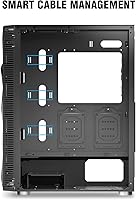
  • Cable management space behind the motherboard tray is tighter than expected, which can frustrate detail-oriented builders.
  • Fans running at full speed can be audibly noticeable, which may bother users in quiet environments.
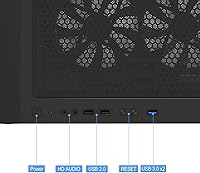
  • The front I/O includes only one USB 3.0 port, which feels limiting for users with multiple high-speed peripherals.
  • Drive bay options are modest — only two dedicated 2.5-inch SSD slots and two convertible 3.5-inch bays.
  • Replacing the fixed RGB fans to achieve ARGB sync means additional cost that partially offsets the case's value advantage.
  • The panoramic front glass panel, while attractive, reduces front airflow slightly compared to a fully open mesh design.
  • No fan controller or hub is included, so managing fan speeds requires a motherboard header or separate controller.

Ratings

The scores below for the Montech X3 Mesh ATX Mid-Tower Case were generated by our AI after analyzing verified buyer reviews from multiple global markets, with spam, bot-submitted, and incentivized feedback actively filtered out. Each category reflects the honest balance of what real builders praised and where they ran into friction — nothing is glossed over. Strengths and pain points are weighted equally so you get a clear, unbiased picture before committing.

Airflow Performance
91%
The combination of a front mesh panel and three 140mm intake fans creates strong positive pressure that genuinely keeps mid-range gaming hardware cool under sustained load. Builders running warm CPUs and GPUs consistently report lower idle and load temperatures compared to similarly priced cases with fewer or smaller fans.
At full fan speed the airflow is impressive but audible, and some users in quiet environments notice the noise during light tasks when fan curves ramp up unexpectedly. The front glass panel, while attractive, does restrict intake slightly compared to a fully open mesh design.
Out-of-Box Fan Value
93%
Six pre-installed fans at this price tier is genuinely rare, and buyers repeatedly call it the single biggest reason they chose this case over competitors. The fact that the front, top, and rear positions are all covered means most builders can complete a functional, well-cooled system without spending another dollar on fans.
The fans are functional but not premium — at full speed they are louder than aftermarket options from brands like Noctua or be quiet!, and long-term bearing quality is not on par with dedicated fan purchases. Users who eventually want a quieter or fully ARGB setup will likely replace all six, which adds future cost.
Side Panel Design
89%
The swivel tempered glass panel is consistently one of the most praised features in buyer feedback — opening it feels intuitive and the zero drill-hole design means the glass is structurally stronger than panels held by traditional thumbscrews. Builders who upgrade components frequently or work inside their case regularly find this a genuine time-saver.
The hinge mechanism, while clever, can feel slightly loose on some units according to a small subset of reviewers, and the latch does not always seat with the satisfying firmness that premium cases offer. It is not a widespread issue, but worth noting for buyers who are particular about panel rigidity.
RGB Lighting
61%
39%
All six fans glow with a fixed rainbow RGB pattern that looks visually appealing in a dark room, and the ability to toggle lighting completely off via the front I/O button is a practical touch for users who want a cleaner aesthetic during the day. For builders who just want ambient color without software complexity, it gets the job done.
The lighting is fixed and non-addressable, which is a hard dealbreaker for anyone invested in a synced ARGB ecosystem through ASUS Aura, MSI Mystic Light, or similar platforms. Several buyers admitted they did not realize this limitation before purchasing, and replacing all six fans to achieve proper ARGB sync adds meaningful cost.
Cable Management
58%
42%
The case provides enough routing channels and tie-off points to produce a reasonably tidy build, and most first-time builders with standard modular PSU cables will be able to close the panel without too much struggle. For basic builds, it is workable.
The space behind the motherboard tray is noticeably tighter than competing cases at similar price points, and builders using thicker sleeved cables or trying to achieve a show-quality cable layout will find it genuinely frustrating. Multiple experienced builders in reviews specifically flagged this as the case's most disappointing aspect.
Build Quality & Materials
78%
22%
The steel chassis feels solid for the price, and the tempered glass on both the front and side panels adds a premium visual quality that buyers do not always expect at this tier. Panel alignment is generally consistent out of the box, and the overall assembly tolerances are tighter than many budget competitors.
The steel is not particularly thick, and the case does flex slightly when lifted or moved, which is typical for this price range but noticeable if you have handled higher-end enclosures. A few buyers reported minor sharp edges inside the chassis during component installation, which is worth being aware of.
Component Compatibility
86%
Support for ATX, Micro-ATX, and Mini-ITX motherboards combined with 305mm GPU clearance and 160mm CPU cooler headroom means the vast majority of mainstream gaming builds will fit without modifications. Seven expansion slots add flexibility for users with multi-card or accessory-heavy configurations.
The 305mm GPU limit is adequate for most mid-range cards but could be a concern for users planning to install some of the longer high-end models, particularly those exceeding 320mm. There is no explicit support for vertical GPU mounting without a third-party riser bracket, which may matter to aesthetics-focused builders.
Dust Filtration
74%
26%
Dust filters on both the top and bottom intake areas do a solid job of reducing particulate buildup over time, and both filters are easy to remove and rinse clean without tools. Builders in dustier environments appreciate the added layer of protection for their components.
The filters are on the thinner side and will not catch the finest particles as effectively as denser aftermarket mesh filters. The front panel area, despite being a primary intake zone, lacks a dedicated fine-mesh filter, which means some dust does reach the fans over extended use.
Front I/O Ports
63%
37%
Having a USB 3.0 port on the front panel is useful for fast data transfers and charging, and the audio and mic jacks are well-positioned and function reliably according to buyer feedback. The LED toggle button is a convenient physical control that most users actually use.
Only one USB 3.0 port on the front is limiting for users with multiple high-speed peripherals, and the two USB 2.0 ports feel dated for a case released in 2021. Buyers who regularly plug in external SSDs, controllers, and headsets simultaneously will find themselves reaching around to the rear panel more often than they would like.
Ease of Assembly
82%
18%
The interior layout is logical and well-documented, making it a genuinely approachable first build experience, and the swivel side panel removes one of the most anxiety-inducing steps for new builders. Motherboard standoffs and drive mounting points are clearly marked.
Pre-routing the included fan cables can get messy given the tighter rear channel space, and the fan cable lengths are just adequate rather than generous, which limits placement flexibility if you want to reroute them differently. First-time builders may need extra time managing the six individual fan connectors.
Noise Level
66%
34%
Under typical gaming workloads where motherboard fan curves keep speeds in the mid-range, the case runs at an acceptable noise level that most users describe as background white noise rather than distracting. Turning the fans down via BIOS curves helps considerably.
At maximum RPM the fans are noticeably loud, and users in quiet home offices or shared spaces report that full-load operation becomes intrusive. The fans do not come with rubber dampening mounts, which means vibration noise is slightly more present than in cases with isolated fan mounting.
Value for Money
92%
When you account for the six pre-installed fans, the tempered glass front and side panels, and the overall thermal performance, the price-to-feature ratio is difficult to match in this segment. Buyers consistently describe it as one of the best spending decisions in their build, particularly those who researched fan costs separately before buying.
The value equation shifts if you need to replace the fans for ARGB compatibility or upgrade to quieter units, since that additional spend closes the gap with more premium options. The case is best value when accepted as-is rather than as a platform for immediate fan upgrades.
Storage Options
57%
43%
Two dedicated 2.5-inch SSD mounts are sufficient for most modern gaming builds that run one or two SSDs, and the two convertible bays give flexibility for builders who still use traditional hard drives for bulk storage. Installation is straightforward.
The overall drive bay count is modest for a mid-tower of this size, and builders with larger media libraries or NAS-style storage plans will quickly find themselves limited. There is no tool-free SSD mounting mechanism — screws are required — which feels like a missed convenience opportunity given the otherwise user-friendly design.
Thermal Layout Efficiency
84%
The front-to-rear and front-to-top airflow paths are well-thought-out, creating a clean positive pressure environment that expels warm air efficiently without dead zones near the GPU. The positioning of intake and exhaust fans works cohesively rather than fighting each other.
The lack of dedicated bottom intake fan support beyond the dust filter means GPU cooling relies primarily on the front fans, which can be a mild limitation for particularly power-hungry graphics cards generating large amounts of heat downward. Adding a bottom fan configuration is not officially supported.

Suitable for:

The Montech X3 Mesh ATX Mid-Tower Case is a strong pick for budget-conscious builders who want a thermally capable, good-looking system without the extra cost of sourcing fans separately. First-time builders in particular will appreciate arriving at a nearly complete airflow setup right out of the box — six fans already mounted and ready to go removes a real planning headache. Gamers running mid-range CPUs and GPUs will find the front mesh intake and three 140mm fans keep temperatures comfortable even during longer sessions. The generous internal clearances — up to 305mm for GPUs and 160mm for CPU coolers — mean most mainstream air-cooling and discrete card combinations will fit without drama. Anyone who opens their case regularly for upgrades or cleaning will also find the swivel tempered glass side panel a genuine quality-of-life improvement over traditional screw-mounted designs.

Not suitable for:

The Montech X3 Mesh ATX Mid-Tower Case is not the right choice for builders who have invested in an addressable RGB ecosystem. The pre-installed fans use fixed RGB lighting that cannot be controlled through motherboard software like ASUS Aura, MSI Mystic Light, or any ARGB header — you get a single on/off toggle from the front panel, and that is the extent of it. Enthusiasts chasing a tightly synced lighting setup will find this frustrating and may need to replace all six fans, which quickly erodes the value proposition. The case also has tighter-than-expected space behind the motherboard tray, so builders who prioritize immaculate cable routing or plan to use thick, sleeved cables may run into real frustration. Those building compact or small-form-factor systems should look elsewhere, as this is a full ATX mid-tower with a footprint to match.

Specifications

  • Form Factor: ATX Mid-Tower chassis compatible with ATX, Micro-ATX, and Mini-ITX motherboard standards.
  • Dimensions: The case measures 370 x 210 x 480mm (14.57 x 8.27 x 18.9 inches) in length, width, and height.
  • Weight: Shipping weight comes in at approximately 11.95 pounds, typical for a steel mid-tower of this size.
  • Pre-installed Fans: Six fans are included from the factory: three 140mm units at the front, two 120mm at the top, and one 120mm at the rear.
  • Fan Lighting: All six fans feature fixed RGB lighting that can be toggled on or off via the front I/O button; the lighting is not addressable.
  • Side Panel: The tempered glass side panel uses a zero drill-hole swivel design, opening on a hinge without requiring screws to remove.
  • Front Panel: A full panoramic tempered glass front panel provides an unobstructed view of the interior and installed components.
  • GPU Clearance: Maximum GPU length supported is 305mm, accommodating most mainstream and mid-range discrete graphics cards.
  • CPU Clearance: CPU cooler height clearance is rated up to 160mm, suitable for the majority of tower-style air coolers.
  • Expansion Slots: Seven expansion slots are available to support multi-GPU setups, large cooler brackets, or additional PCIe cards.
  • Drive Bays: Storage options include two dedicated 2.5-inch SSD bays and two convertible bays supporting either 3.5-inch HDDs or 2.5-inch SSDs.
  • Front I/O: The front panel includes one USB 3.0 port, two USB 2.0 ports, a headphone jack, a microphone jack, and an RGB toggle button.
  • Dust Filters: Removable dust filters are positioned at both the top and bottom of the chassis to reduce particulate buildup on components.
  • Fan Support: Beyond the pre-installed fans, the case supports up to three 120mm or 140mm fans at the front, two 120mm at the top, and one 120mm at the rear.
  • PSU Mount: The power supply mounts at the rear bottom of the chassis in the standard ATX orientation.
  • Materials: The chassis is constructed from steel with tempered glass used for both the front and side panels.
  • Color Options: The case is available in two colorways: black and white, with identical specifications across both variants.
  • Model Identifier: The official model number is X3 MESH, and the product has been available since April 2021.

Related Reviews
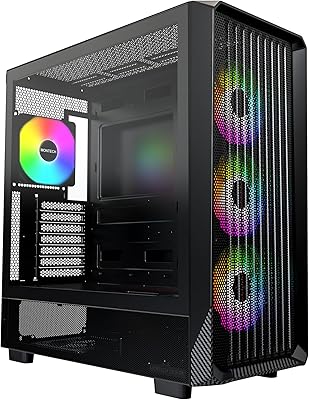
Montech X5 ATX Mid-Tower Gaming PC Case
86%
88%
Build Quality
93%
Airflow & Cooling
87%
Aesthetics & Design
84%
Installation Ease
90%
GPU Compatibility
More
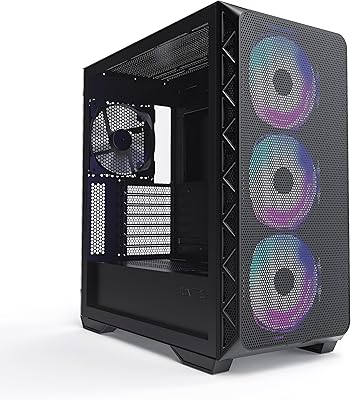
Cooler Master TD500 Mesh V2 ATX Mid-Tower Case
84%
91%
Cooling Performance
88%
Ease of Installation
84%
Build Quality
67%
Cable Management
92%
ARGB Lighting Customizability
More
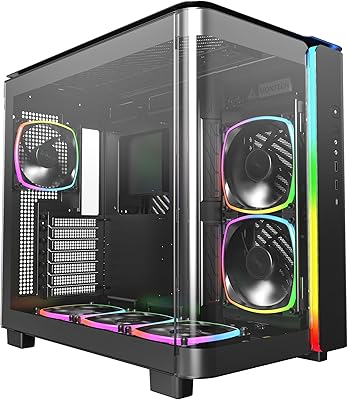
Montech AIR 903 MAX Mid Tower Case
79%
93%
Airflow Performance
89%
Value for Money
78%
Build Quality & Materials
61%
Fan Noise Levels
91%
GPU Clearance & Compatibility
More
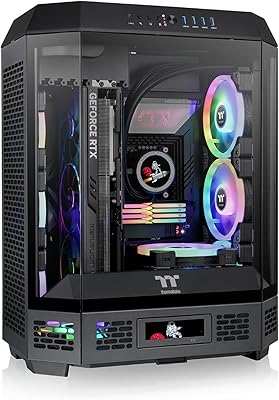
Montech KING 95 PRO ATX Mid-Tower PC Gaming Case
85%
91%
Cooling Performance
87%
Cable Management
88%
Build Quality
90%
Aesthetics
82%
Ease of Assembly
More
Thermaltake Tower 600 Mid-Tower ATX Case
79%
91%
Build Quality
93%
Aesthetic Design
88%
Cable Management
94%
Cooling Capacity
71%
Installation Experience
More
HYTE Y40 Mid-Tower ATX Case
85%
89%
Design & Aesthetics
86%
Cooling Performance
91%
Cable Management
93%
Build Quality
72%
GPU Compatibility
More
KEDIERS P6 Mid Tower ATX PC Case

75%
88%
Aesthetic Design
71%
Build Quality
84%
Included Fans & Lighting
78%
Airflow & Thermal Performance
81%
Radiator & Cooling Support
More
SAMA 3509 ATX Mid Tower PC Case
74%
88%
Value for Money
74%
Build Quality
81%
Airflow & Cooling Performance
67%
Pre-installed Fan Quality
86%
Tempered Glass Panel
More
Corsair 6500D Airflow Mid-Tower ATX Case
85%
88%
Cooling Performance
93%
Build Quality
91%
Airflow Efficiency
85%
Ease of Setup
90%
Cable Management
More
SAMA V Mesh Mid Tower PC Case
86%
94%
Cooling Performance
88%
Build Quality
91%
Airflow Efficiency
89%
Ease of Maintenance
87%
Compatibility with Components
More
Zalman S3 ATX Mid-Tower PC Case
74%
83%
Value for Money
71%
Build Quality
58%
Airflow & Cooling Performance
86%
Ease of Assembly
67%
Acrylic Side Panel
More

FAQ

They are genuinely functional fans, not decorative additions. The three 140mm units at the front move a solid volume of air, and combined with the top and rear 120mm fans, the airflow path is well-organized. Most builders running mid-range hardware report comfortable temperatures without adding anything extra.

No, and this is worth being clear about before you buy. The fans use fixed RGB lighting, which means they run a set color pattern and cannot be synced or customized through motherboard software like ASUS Aura or MSI Mystic Light. You can only turn the lighting on or off using the button on the front I/O panel. If ARGB sync is important to your build, you would need to replace these fans.

It works like a cabinet door. The panel is hinged on one side and latches on the other, so you just release the latch and swing it open. There are no thumbscrews to lose and no panel to set down carefully on your desk. Once you have used it, going back to a traditional screw-mounted panel feels like a step backward.

The case supports GPUs up to 305mm in length, which covers the vast majority of mainstream and upper-mid-range cards. If your card is unusually long — some high-end models stretch past 320mm or more — it is worth measuring before committing. For most builders, clearance will not be an issue.

Honestly, it is tighter than ideal. There is enough room to route cables and close the panel, but if you plan on using thick sleeved cables or want a very clean build with organized runs, you will need to be patient and deliberate. It is manageable, but experienced builders who are particular about tidiness may find it a bit frustrating.

It is one of the better options at this price for someone building for the first time. The fans are already installed, the layout is intuitive, and the swivel panel makes it easier to work inside without worrying about dropping a glass panel. The main thing first-timers should know upfront is that the RGB is fixed — if they are planning around a specific lighting theme, that matters.

At maximum RPM they are audible, particularly in a quiet room. Under typical gaming loads where fan curves are managed by the motherboard, most users find the noise levels acceptable. If you are sensitive to fan noise or building a near-silent system, you may want to swap to quieter fans or run them at reduced speeds through your BIOS.

The front of the case supports up to three 140mm fans, which means it can fit a 420mm radiator there — but 360mm radiators, which use 120mm fan spacing, are also supported at the front. The top supports two 120mm fans and can fit a 240mm radiator. Always check your specific radiator thickness against the GPU clearance if mounting at the front with a long graphics card installed.

The top and bottom filters are straightforward to remove and rinse under water. They are not the thickest filters on the market, but they do catch a meaningful amount of dust over time. Pulling them out every few weeks for a quick clean is all it really takes to keep airflow unobstructed.

No, the specifications, dimensions, fan configuration, and feature set are identical between the two colorways. The choice is purely aesthetic — the white version uses white fans and a lighter chassis finish, while the black version has a darker overall look. Both are priced the same and use the same construction.

Where to Buy