Overview

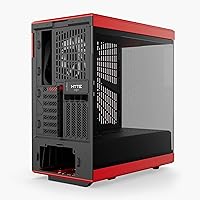
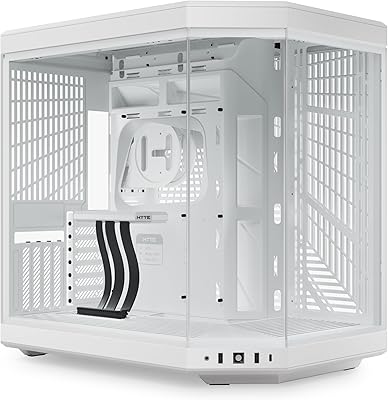
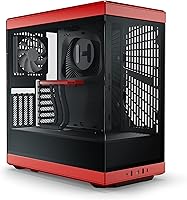
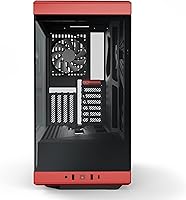
The HYTE Y40 Mid-Tower ATX Gaming Case is HYTE's refined take on the vertical GPU showcase concept they introduced with the Y60, now packaged in a more accessible mid-tower format that targets serious ATX builds. The panoramic tempered glass side panel is the first thing you notice — it wraps around the front and side, turning your components into the centerpiece of the build. What separates this case from competitors at the same tier is that a PCIe 4.0 riser cable comes included in the box, which is genuinely useful and not something most cases bother with. This is a style-forward chassis, but HYTE hasn't ignored thermals entirely — there's real cooling infrastructure here if you're willing to invest in it.
Features & Benefits

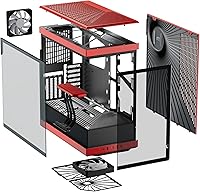
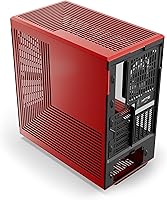
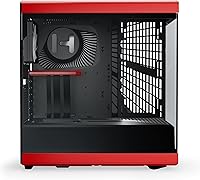
The vertical GPU mount is the Y40's headline feature, and the color-matched canopy above it ties the whole interior together in a way that feels intentional rather than tacked on. Beyond the aesthetics, the side panel accommodates a radiator up to 280mm with a combined thickness of 120mm — meaning custom loop builders with chunky radiators actually have a home here. Two 120mm fans come pre-installed at 1300 RPM, covering the rear exhaust and PSU shroud, so you won't be scrambling for fans on day one. Cable management is well thought out, with tie-downs and routing channels behind the motherboard tray and inside the PSU shroud. Front I/O covers USB 3.2 Type-C, two USB 3.0 ports, and an audio jack.

Best For

The Y40 makes the most sense for builders who want their GPU on display rather than hidden behind a conventional shroud. If you're dropping serious money on a graphics card, this HYTE case lets that investment actually be seen. Custom water-cooling enthusiasts will appreciate the thick side radiator clearance — 280mm support with up to 120mm combined depth isn't common at this price tier. That said, storage is limited: one 3.5-inch HDD bay or two 2.5-inch SSD slots won't satisfy anyone with a large media library. Also worth checking before you buy — GPU height maxes at 94mm, with 80mm recommended for best airflow. If your card is a wide triple-slot design, measure before purchasing.

User Feedback

Owners of this glass mid-tower consistently praise the build quality — panels feel solid, the frame doesn't flex, and the overall fit and finish punches above the price point. The included riser cable gets called out frequently as a genuine perk; it removes one line item from the shopping list and works reliably with current-gen GPUs. On the flip side, airflow limitations come up regularly from users running power-hungry CPUs and GPUs together — the enclosed glass design restricts natural convection, and two stock fans aren't enough for a high-TDP system without adding more. A handful of buyers have also flagged GPU height clearance as a real concern with wider cards. For most mid-to-high-end builds, though, the Y40 earns its strong reputation.

Pros

  • Vertical GPU mount turns your graphics card into a visual focal point inside the build
  • Panoramic tempered glass panel offers a genuinely impressive view of internal components
  • Included PCIe 4.0 riser cable removes an annoying extra purchase from your shopping list
  • Side radiator support handles up to 280mm with 120mm depth, which is rare at this price tier
  • Cable management is well thought out, with tie-downs and routing channels in all the right places
  • Front I/O includes USB 3.2 Type-C alongside two USB 3.0 ports, covering modern connectivity needs
  • Build quality of the panels and frame feels solid and premium relative to the price point
  • Supports ITX, mATX, and ATX motherboards, giving you flexibility for future upgrades
  • Top radiator support goes up to 360mm, leaving room to grow your cooling setup
  • Color-matched canopy gives the interior a cohesive, finished look rather than a DIY-feeling assembly

Cons

  • Only two fans come pre-installed, which is not enough for high-TDP systems without buying extras
  • Enclosed glass design limits natural airflow and can cause heat buildup in demanding configurations
  • Storage options are severely limited — just one 3.5-inch HDD slot or two 2.5-inch SSD mounts
  • GPU height clearance maxes at 94mm, with 80mm recommended, which excludes some wide triple-slot cards
  • The aesthetic-first design means builders prioritizing raw cooling performance may feel under-served
  • At 19 lbs, the case is on the heavier side for a mid-tower, which matters when moving or transporting
  • PSU length capped at 224mm may rule out some longer high-wattage power supplies
  • Only four full expansion slots, which limits multi-card or heavy add-in card configurations
  • The glass panel, while striking, is a fingerprint magnet that needs regular cleaning to look its best

Ratings

Our AI rating engine analyzed thousands of verified global reviews for the HYTE Y40 Mid-Tower ATX Gaming Case, actively filtering out incentivized, bot-generated, and outlier submissions to surface what real builders actually experienced. The scores below reflect a transparent synthesis of both the genuine strengths and the recurring frustrations that show up across independent buyer feedback worldwide. Where the Y40 earns high marks, it truly earns them — and where it falls short, those trade-offs are scored honestly.

Aesthetics & Design
94%
The panoramic tempered glass panel and vertical GPU showcase architecture consistently draw the strongest praise from owners. Builders report that the color-matched canopy and clean interior layout make this one of the most visually cohesive mid-tower cases they have owned, especially when lit with RGB components.
A small number of users feel the glass-dominant exterior prioritizes looks over practicality, and the large panel surface becomes a fingerprint and dust magnet almost immediately after a build is completed. Regular cleaning is essentially non-negotiable if you want it to stay sharp.
Build Quality
88%
Panels feel dense and well-fitted for the price tier, with very little flex in the steel frame during assembly. Most buyers coming from budget cases describe a noticeable step up in material quality, particularly in how the glass panel is seated and how the side panels attach.
A handful of reviewers noted minor sharp edges along internal metal cutouts during cable routing, which is a common mid-tower complaint but worth flagging for first-time builders. Some also felt the ABS plastic accents feel slightly less premium than the steel and glass portions.
Cooling Performance
62%
38%
The side radiator mount supporting up to 280mm with 120mm combined thickness is a genuine advantage for custom loop builders, and the top supports radiators up to 360mm, giving enthusiasts real flexibility. Builders running moderate systems with added case fans report perfectly acceptable temperatures.
Two stock 120mm fans at 1300 RPM are simply not enough for high-TDP configurations, and the enclosed glass design restricts passive airflow more than open-mesh alternatives. Owners running powerful CPU and GPU combinations consistently report needing additional fan investment to keep temperatures reasonable under sustained load.
Value for Money
83%
The inclusion of a PCIe 4.0 riser cable is the single most frequently cited value differentiator among buyers — it removes a separate purchase that can cost a meaningful amount on its own. For the overall package of materials, aesthetics, and included accessories, most buyers feel they paid a fair price.
Buyers who are primarily focused on airflow and thermal performance may feel underserved given the price, since similarly priced mesh-front competitors offer better out-of-box cooling without the need for fan upgrades. The value calculus really depends on how much you weight the visual and design aspects.
Cable Management
81%
19%
HYTE built dedicated routing channels and tie-down points behind the motherboard tray and inside the PSU shroud, which makes achieving a clean build much more approachable for mid-level builders. Most users report finishing with a tidy interior on their first attempt.
The space behind the motherboard tray is functional but not especially generous, and builders using thick aftermarket cables or a large modular PSU may find routing tighter than expected. A few reviewers noted that the tie-downs, while useful, could benefit from additional anchor points.
GPU Compatibility
71%
29%
The vertical mount accommodates GPUs up to 422mm in length, which covers virtually every current consumer card on the market. Builders using standard dual-slot or moderate triple-slot cards report a clean installation experience with the included riser cable.
The height restriction of 94mm maximum — with 80mm or less recommended for proper airflow — catches some buyers off guard, particularly with tall triple-slot flagship GPUs that exceed that threshold. This is a real compatibility check buyers need to perform before purchasing, and it remains one of the most common complaints in negative reviews.
Storage Options
41%
59%
For builds that rely primarily on NVMe SSDs mounted to the motherboard, the limited internal drive bays are not a daily pain point. Builders running lean, fast storage setups report the two 2.5-inch SSD slots are perfectly adequate for their needs.
One 3.5-inch HDD bay or two 2.5-inch SSD mounts is a significant limitation for anyone managing a large game library or media archive on traditional drives. This is arguably the weakest specification of the entire case and consistently appears as a disappointment in reviews from users who did not check the specs beforehand.
Assembly Experience
79%
21%
The layout is fairly intuitive and the manual is clear enough that builders with one previous build under their belt report a smooth process. The PSU shroud design simplifies hiding bulky cables and contributes to a manageable assembly overall.
First-time builders occasionally struggle with seating the vertical GPU and routing the riser cable correctly, since the orientation is different from a traditional horizontal mount. A few users also flagged that the glass panel requires careful handling during installation to avoid accidental contact with components.
Front I/O
77%
23%
Having a USB 3.2 Gen 2 Type-C port on the front panel is a practical inclusion that future-proofs the case for fast external drives and modern peripherals. The two USB 3.0 ports alongside it cover most day-to-day connectivity needs without reaching around the back.
There is no second Type-C port, which some power users feel is a missed opportunity at this price tier as more peripherals migrate to that standard. The audio jack works reliably but is a single combined port rather than separate headphone and microphone connections, which matters to streamers and audio-focused users.
Radiator & Liquid Cooling Support
86%
The side mount accepting 280mm radiators with up to 120mm combined thickness is notably generous for a mid-tower and opens the door for serious custom loop configurations with thick, high-performance radiators. Top support for up to 360mm radiators means all-in-one cooler users also have plenty of room.
Rear radiator support is limited to 120mm, which restricts options for compact 240mm AIOs at the back. Users planning extremely ambitious multi-radiator loops may still find the internal volume slightly constrained compared to larger full-tower alternatives.
Fan Expandability
74%
26%
The fan mounting positions are well distributed across side, top, rear, and bottom locations, and the case accepts 140mm fans in several positions which allows for higher airflow at lower noise levels. Builders who invest in a full fan complement report a meaningful improvement in thermal performance.
None of the fan headers include PWM controllers or a built-in hub, meaning fan management depends entirely on your motherboard headers or a separately purchased controller. The stock fan count of two also means most performance-oriented builders will be spending extra from day one.
Noise Levels
72%
28%
With the glass panels dampening some internal noise and the stock fans running at a moderate 1300 RPM, the baseline noise floor is acceptable for a living room or bedroom setup during light gaming sessions. Builders who swap in higher-quality fans report a noticeably quieter result.
Under heavy load, without additional fans or a robust cooling strategy, the stock fans can ramp up audibly in an attempt to compensate for heat buildup. The glass enclosure, while visually appealing, does not provide the same acoustic absorption as foam-dampened panels found on dedicated silent cases.
Motherboard & Component Compatibility
84%
Supporting ITX, mATX, and ATX boards gives buyers flexibility across the most common form factors, and the 183mm CPU cooler clearance accommodates most large air coolers on the market. The 422mm GPU length limit ensures virtually no modern graphics card is excluded on that dimension.
E-ATX boards are not supported, which matters for high-end workstation or HEDT platform builders. The PSU length cap of 224mm also rules out some premium high-wattage units that exceed that measurement, which could be a constraint for future system upgrades.
Packaging & Unboxing
78%
22%
Most buyers report that the case arrives well-protected, with the glass panels intact and components individually bagged. The inclusion of the PCIe 4.0 riser cable in its own packaging adds to the sense of a thoughtfully assembled retail experience.
A minority of buyers reported minor scuffs on the ABS accents or protective film adhesive residue on the glass, which while cosmetic, is frustrating on a premium-priced product. The instruction manual, while adequate, lacks detailed guidance for custom water-cooling installation scenarios.

Suitable for:

The HYTE Y40 Mid-Tower ATX Gaming Case is purpose-built for PC enthusiasts who treat their build as much as a display piece as a performance machine. If you're investing in a high-end GPU and want it mounted vertically so it's actually visible through that wide glass panel, this case was designed with you in mind. Custom water-cooling builders will find the side radiator support — up to 280mm with 120mm combined thickness — unusually generous for a mid-tower at this price tier. It's also a strong fit for anyone moving up from a basic budget enclosure who wants a cohesive, premium-feeling build without committing to the footprint of a full tower. The included PCIe 4.0 riser cable is a legitimate perk that saves you from a separate purchase and ensures day-one compatibility with modern graphics cards.
Not suitable for:

The HYTE Y40 Mid-Tower ATX Gaming Case is not the right choice if maximum airflow is your primary concern. The panoramic glass panel looks fantastic, but it restricts passive airflow, and two stock 120mm fans are not sufficient to keep a high-TDP CPU and GPU running cool without adding more fans yourself. Buyers with large storage needs should also look elsewhere — a single 3.5-inch HDD bay or two 2.5-inch SSD slots is a real constraint if you're running multiple drives. Before committing, check your GPU's physical height: cards exceeding 80mm height may fit technically but will sacrifice cooling headroom, and anything over 94mm won't fit at all. If you're building a compact NAS-style rig, a workstation with lots of drives, or a pure performance build where every degree of thermals counts, the Y40 is probably not your best match.
Specifications

  • Form Factor: ATX Mid Tower design supports ITX, mATX, and ATX motherboards.
  • Dimensions: The case measures 439mm x 240mm x 472mm (approximately 17.3″ x 9.4″ x 18.6″) in length, width, and height.
  • Weight: Fully assembled unit weighs 19 lbs (8.6 kg) without components installed.
  • Materials: Constructed from a combination of ABS plastic, steel, and tempered glass panels.
  • Pre-installed Fans: Two 120mm fans are included at 1300 RPM — one at the rear exhaust and one beneath the PSU shroud.
  • Fan Support: Supports up to 2x 120mm or 140mm on the side, 3x 120mm on top, 1x 120mm at the rear, and 1x 120mm or 140mm at the bottom.
  • Radiator Support: Side panel supports radiators up to 280mm with a combined thickness of up to 120mm; top supports up to 360mm; rear supports 120mm.
  • GPU Clearance: Maximum GPU length is 422mm and maximum height is 94mm, with 80mm height or less recommended for optimal airflow.
  • CPU Cooler Height: Maximum supported CPU cooler height is 183mm.
  • PSU Compatibility: Fits standard ATX power supplies up to 224mm in length, mounted at the rear.
  • Storage Bays: Accommodates either one 3.5-inch HDD or two 2.5-inch SSDs — not both simultaneously at full capacity.
  • Expansion Slots: Provides 4 full-height and 6 half-height expansion slots for add-in cards.
  • Front I/O: Front panel includes two USB 3.0 ports, one USB 3.2 Gen 2 Type-C port, and a combined audio and microphone jack.
  • Riser Cable: A PCIe 4.0 luxury riser cable is included in the box to support the vertical GPU mounting system.
  • GPU Orientation: Features HYTE's proprietary vertical graphics card architecture with a color-matched canopy above the GPU slot.
  • Cable Management: Dedicated cable tie-down points and routing channels are located behind the motherboard tray and inside the PSU shroud.
  • Color Options: Available in multiple colorways; canopy panel is color-matched to the chosen case variant.
  • Availability Date: This case was first made available in January 2023.

Related Reviews

HYTE Y70 Mid-Tower ATX Gaming Case
80%
93%
Build Quality
96%
Aesthetic Design
78%
Cooling Potential
91%
Vertical GPU Mounting
88%
Cable Management
More
SZSKYING CMSVB-1 Mid-Tower PC Gaming Case
74%
91%
Value for Money
88%
Included Fans
86%
Aesthetics & RGB
61%
Build Quality
74%
Airflow Performance
More
FOIFKIN F1 Mid-Tower Gaming PC Case
74%
83%
Cooling Performance
74%
Build Quality
61%
Cable Management
88%
Tempered Glass Panel
86%
ARGB Lighting
More
KEDIERS C570 ATX Mid Tower PC Case
76%
88%
Value for Money
84%
Airflow & Cooling
86%
Aesthetics & Design
73%
Build Quality
78%
Ease of Assembly
More
darkFlash DRX70 ATX Mid-Tower PC Case
74%
83%
Value for Money
78%
Airflow Performance
89%
Ease of Assembly
67%
RGB Lighting
71%
Build Quality & Materials
More
MOROVOL P5 Mid Tower ATX PC Case
75%
83%
Airflow Performance
88%
Value for Money
71%
Build Quality
58%
Noise Levels
84%
Ease of Assembly
More
Montech X5 ATX Mid-Tower PC Case
81%
88%
Airflow Performance
91%
Value for Money
79%
Build Quality & Materials
93%
GPU Compatibility & Support
84%
Cable Management
More
MUSETEX K2
MUSETEX K2
80%
93%
Aesthetic Design
74%
Build Quality & Materials
78%
Cooling Performance
61%
Fan Noise Levels
91%
Hardware Compatibility & Clearance
More
Zalman Chronix Mid Tower ATX PC Case
78%
88%
Aesthetic Design
74%
Build Quality
83%
Included ARGB Fans
86%
Cooling Potential
84%
Internal Clearance
More
Zalman i3 NEO ATX Mid Tower PC Case
80%
72%
Build Quality
88%
Value for Money
68%
Airflow Performance
91%
Aesthetics & Design
83%
Ease of Assembly
More

FAQ

It works with most modern GPUs, but there is a height limit to keep in mind. Cards up to 94mm tall will physically fit, but HYTE recommends staying at 80mm or under for the best airflow around the card. Length-wise, you have up to 422mm, which covers virtually all current consumer GPUs. Just double-check your specific card's dimensions before ordering.

It comes in the box — a PCIe 4.0 riser cable is included, which is genuinely useful since quality riser cables can cost a fair amount on their own. It supports the latest GPU generations without any bandwidth penalty when properly seated.

You have quite a bit of expansion room. The side panel supports 2x 120mm or 140mm fans, the top can take up to 3x 120mm, the rear already has one pre-installed, and the bottom supports one more 120mm or 140mm fan. So realistically, you could run a heavily populated fan configuration if your system demands it.

Yes, and this is actually one of the stronger use cases for the Y40. The side mount supports radiators up to 280mm with a combined thickness of up to 120mm, which means even large 60mm-thick radiators can fit for custom loop builds. The top also supports radiators up to 360mm, giving you solid flexibility for a full custom loop setup.

The case supports ITX, mATX, and standard ATX motherboards, so it covers the most common form factors for gaming and enthusiast builds. E-ATX is not officially supported, so if you're running an oversized workstation board, you'll want to check compatibility carefully.

Honestly, storage is where the HYTE Y40 Mid-Tower ATX Gaming Case shows its biggest limitation. You get either one 3.5-inch HDD bay or two 2.5-inch SSD mounts — not a combination of all three simultaneously. If you're running multiple drives, you may want to reconsider or plan to use an NVMe SSD on your motherboard as your primary storage to compensate.
Easier than average, actually. There are dedicated cable routing channels and tie-down points behind the motherboard tray and inside the PSU shroud. It's not the most spacious case behind the tray, but HYTE clearly thought through the routing paths, and most builders report clean results with some patience.

Yes, it will. Tempered glass looks stunning but requires regular wiping to stay looking clean, especially on the large side panel. A microfiber cloth works well. If you're not prepared to do occasional maintenance, the fingerprints can pile up quickly, especially during and after the build process.

It can be, and it's worth being upfront about this. The enclosed glass panel restricts passive airflow, and the two stock fans are a baseline rather than a robust cooling solution. For a high-TDP system — think a top-tier CPU paired with a power-hungry GPU — you'll want to add more fans and potentially plan your radiator placement carefully. Builders running more moderate systems generally report no issues.

The Y40 is a more accessible mid-tower interpretation of the same core idea. It retains the vertical GPU architecture and panoramic glass aesthetic but brings it to a smaller footprint and a lower price point. The Y60 is larger and offers more room for components and cooling, while the Y40 is the right pick if you want that same design language without the physical size or cost of the flagship.

Where to Buy