Overview

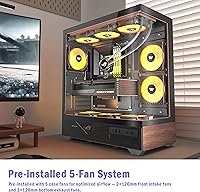
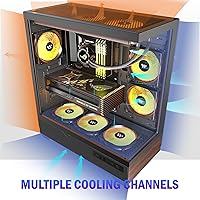
The KEDIERS P6 Mid Tower ATX PC Case enters a crowded market with a clear visual identity: a 270° panoramic glass enclosure that wraps the front and side panels in tempered glass, giving your components a stage rather than a box. What separates it further from the sea of black mid towers is a printed walnut wood-grain accent on the metal panels — not real wood, worth noting, but convincing enough to add warmth to a desk setup. Five ARGB fans come pre-installed, which is genuinely useful at this price point. You're not paying extra just to see your build light up.
Features & Benefits

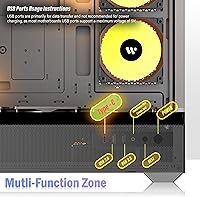
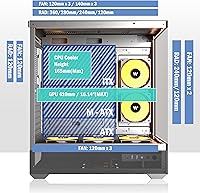
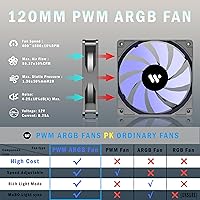
All five PWM ARGB fans route through a single 5V ARGB header, which keeps cable clutter minimal and eliminates the need for a standalone controller — a practical decision that builders will appreciate on their first power-on. The 1.2mm steel mesh is noticeably finer than the 3.0mm mesh common in competing cases, which helps with both dust filtration and airflow consistency. The side glass pops off without tools thanks to a rivet-mounted quick-release mechanism, making future upgrades less frustrating. Front I/O includes a Type-C port, two USB 3.0 connections, and full audio — and there's legitimate 360mm radiator clearance with room to spare from the RAM slots.

Best For

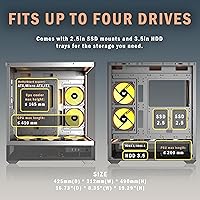
This gaming chassis makes the most sense for first-time builders who want an eye-catching result without hunting down fans, controllers, or extra cables post-purchase. The compatibility range — ATX, Micro-ATX, and Mini-ITX — keeps options open as builds evolve. Anyone drawn to something other than the standard aggressive-gamer aesthetic will find the wood-grain paneling a refreshing change. It's also a reasonable starting point for builders planning a custom water loop, since 360mm radiator support in a mid tower under this price is not a given. The internal storage layout, with three SSD slots and one HDD bay, suits most modern builds without feeling cramped.

User Feedback

Across its 200-plus ratings, the KEDIERS P6 holds a 4.0-star average, with most buyers landing on satisfied. The glass coverage and the included fan bundle draw consistent praise — people feel they're getting more than the price suggests. Where the feedback gets mixed is around fan noise at higher speeds and occasional reports of ARGB sync hiccups depending on the motherboard brand, particularly with non-ASUS and non-Gigabyte setups. A handful of buyers mentioned the side panel alignment required minor adjustment out of the box. Cable management opinions split fairly evenly — straightforward for experienced builders, slightly fiddly for newcomers working in the rear tray for the first time.

Pros

  • Five ARGB fans come pre-installed and daisy-chained through a single header, saving real money and setup time.
  • The 270° tempered glass coverage gives your components a proper showcase from three sides.
  • 360mm radiator support with genuine RAM clearance is rare in mid towers at this price.
  • Type-C front I/O is a practical inclusion that most competing budget cases still skip.
  • The wood-grain panel detail adds a warm, distinctive look that breaks from typical gaming case monotony.
  • 1.2mm mesh filtration outperforms the coarser mesh common in similarly priced competitors.
  • ATX, Micro-ATX, and Mini-ITX compatibility keeps the KEDIERS P6 relevant across a range of build configurations.
  • The quick-release side panel saves time during assembly without the risk of losing screws.
  • Cable routing space behind the motherboard tray is workable, with three SSD mounts keeping storage tidy.

Cons

  • Fan noise at full speed is a real issue in quiet rooms or shared living spaces.
  • ARGB sync is unreliable on some MSI and ASRock motherboards, which the product does not disclose upfront.
  • The wood-grain panels are printed metal — convincing from a distance, but not up close.
  • Panel fitment occasionally requires minor adjustments straight out of the box.
  • Only one HDD bay limits this chassis for anyone needing bulk mechanical storage.
  • Rear cable tray space becomes genuinely tight when routing five fan cables alongside full ATX power connectors.
  • Glass surface quality can show faint scuffs or minor imperfections when lit from within.
  • The included assembly manual lacks detail on front panel header connections, a stumbling block for true beginners.
  • Dust filters on the front and top mesh panels are not removable, making thorough cleaning awkward over time.

Ratings

The KEDIERS P6 Mid Tower ATX PC Case has been scored by our AI system after analyzing verified buyer reviews from global markets, with spam, bot-generated, and incentivized feedback actively filtered out before any scoring was applied. The result is an honest breakdown that captures what real builders experienced — the genuine highlights and the frustrations that don't always show up in star ratings. Both ends of the spectrum are reflected here.
Aesthetic Design
88%
The 270° glass coverage is the feature buyers talk about most, and for good reason — seeing a fully lit build through three glass faces at a desk makes a real impression. The wood-grain printed panels are a distinctive touch that sets it apart from the monotonous aggressive-gamer look most competitors default to.
The wood panels are printed metal, not real wood, and close-up inspection makes that obvious to detail-oriented buyers. A small number of users felt the overall aesthetic leaned more novelty than premium, particularly when the ARGB lighting washes out the wood-tone detail in a dark room.
Build Quality
71%
29%
The steel frame feels adequately rigid for a mid-range mid tower, and most builders reported no flexing during assembly. Panel fitment was consistent enough that the majority of first-time builders completed their builds without needing adjustments.
Recurring feedback mentions that panel alignment occasionally requires minor repositioning out of the box, and the tempered glass edges on some units had slight imperfections at the corners. The overall fit-and-finish does not match what you would expect from higher-tier brands at a similar price point.
Included Fans & Lighting
84%
Getting five PWM ARGB fans pre-installed is a legitimate value add — most competing cases at this price include two or three at best. The single-header daisy-chain setup means your first boot lights up cleanly without sourcing extra cables or a separate hub.
The fans run noticeably loud at full speed, which is a common complaint from users in quieter setups or smaller rooms. At lower PWM speeds the noise is manageable, but buyers who expected near-silent operation were disappointed, especially since the product does not prominently advertise its noise floor.
Airflow & Thermal Performance
78%
22%
The 1.2mm mesh is genuinely finer than what most budget cases use, and users building mid-range gaming rigs reported stable thermals under load. The side intake fan placement contributes meaningfully to GPU cooling when the build is configured thoughtfully.
With all five fans installed and a full ATX build inside, airflow paths can become slightly restricted around the PSU shroud area. A few users noted that the mesh, while fine, accumulates dust quickly and requires more frequent cleaning than the case's design implies.
Radiator & Cooling Support
81%
19%
360mm radiator support in a mid tower at this price is not a given, and the KEDIERS P6 delivers it with RAM clearance intact — a detail that matters because some competing cases technically fit a 360mm rad but force you into low-profile RAM. Builders running 240mm and 280mm rads reported straightforward installation with room to work.
Taller RAM kits can create a tighter fit than the spec sheet suggests, and a handful of water-cooling builders noted they had to angle the radiator slightly to avoid contact. The mounting points are functional but not as polished as dedicated water-cooling cases, so experienced loop builders may find the tolerances limiting.
Cable Management
67%
33%
The rear cable channel has decent depth and multiple routing cutouts, which experienced builders used effectively to achieve clean-looking results. The three SSD mounting points behind the tray help keep storage cables organized and out of sight.
Newer builders found the rear tray tighter than expected, especially when routing the five fan cables alongside ATX power and GPU connectors. Cable tie anchors are sparse, and several users noted that closing the side panel cleanly required compressing cables more than they were comfortable with.
Front I/O & Connectivity
83%
The Type-C port on the front panel is a practical inclusion for a case at this price, and buyers who regularly transfer files or charge devices via Type-C appreciated not having to reach around to the back of their machine. The dual USB 3.0 and audio ports cover daily needs without compromise.
The reset button placement drew minor complaints from users who accidentally triggered it while reaching for USB ports in low-light conditions. There is no USB-C Gen 2 or Thunderbolt support, which is expected at this price but still limits forward compatibility for users building a workstation-adjacent rig.
Ease of Assembly
76%
24%
The screwless quick-release glass mechanism is genuinely useful during a build — removing the side panel repeatedly to seat components, route cables, and check fitment is far less tedious without a screwdriver. Most first-time builders described the overall assembly process as straightforward relative to their expectations.
The motherboard standoff layout was occasionally misaligned for Micro-ATX boards, requiring re-checking before committing screws. A small portion of buyers noted that the manual was sparse on detail for the front panel connectors, which caused confusion for those building their first system.
Storage Options
72%
28%
Three SSD mounting positions behind the motherboard tray keep drives hidden and cabling tidy, which is a meaningful upgrade over cases that expose drives through the glass. The single HDD bay is accessible and solidly mounted.
One HDD bay is limiting for users who still rely on mechanical storage for bulk files or media libraries. Builders wanting to run two or more HDDs will need to look elsewhere or use creative mounting solutions, which is a real constraint for home server-adjacent builds.
Value for Money
86%
Five ARGB fans, 270° glass coverage, Type-C front I/O, and 360mm radiator support in a single mid-tower purchase represents genuine value density at this price tier. Buyers consistently noted that replicating this hardware bundle with separate purchases would cost noticeably more.
The value perception softens slightly once buyers notice the build quality gaps — the printed wood panels, occasional panel fitment issues, and noisy fans at high speed suggest cost-cutting in areas that matter to long-term ownership. It is excellent value for a first build, less so as a long-term investment.
Noise Level
58%
42%
At low-to-mid fan speeds, the acoustic profile is acceptable for a gaming setup where ambient desk noise is already present. Users who capped fan curves in BIOS reported a noticeable improvement in day-to-day noise levels.
At full speed, the five included fans produce a combined noise level that several buyers described as distracting during non-gaming tasks or in shared spaces. The fans lack the dampening design features found in premium quiet cases, and replacement with lower-noise aftermarket fans is a real consideration for noise-sensitive users.
Tempered Glass Quality
74%
26%
The glass panels are thick enough to feel solid during handling, and the 270° configuration means the viewing experience is genuinely impressive when the system is powered on. Buyers who transport their build occasionally noted the quick-release mechanism added reassurance during disassembly.
Some units arrived with minor scuffs or faint scratches on the interior glass surface, which became visible once ARGB lighting was active. The glass quality is functional but not optically pristine, and buyers comparing it to mid-range cases from established brands noticed the difference in clarity.
ARGB Sync Compatibility
63%
37%
On ASUS Aura and Gigabyte RGB Fusion-equipped motherboards, buyers reported that ARGB sync worked reliably out of the box with no additional configuration needed. The single-header setup keeps the sync chain clean and reduces the chance of conflicting signals.
Users with MSI Mystic Light and ASRock Polychrome setups reported inconsistent sync behavior, with some fans defaulting to static colors or cycling through modes independently. This is a known limitation of generic ARGB implementations, but the product does not disclose compatibility constraints, which led to frustration among affected buyers.
Dust Filtration
69%
31%
The 1.2mm mesh performs better than average for dust resistance, and buyers who kept their cases for several months noted less internal dust accumulation than they experienced with previous builds. The bottom PSU filter is removable and easy to clean.
The fine mesh, while effective, is not easily removable for cleaning on the front and top panels — buyers had to use compressed air in place rather than washing the filters separately. Over time, the mesh begins to visibly clog, which can subtly degrade airflow if cleaning is neglected for more than a few months.

Suitable for:

The KEDIERS P6 Mid Tower ATX PC Case is an ideal choice for first-time builders who want their rig to look impressive without spending extra time and money sourcing fans, lighting controllers, and cables separately. If you are building a mid-range gaming PC and care about how the finished product looks on your desk, the 270° glass coverage and warm wood-grain panel detail deliver a setup that stands out without demanding a premium budget. Builders planning to run a 360mm liquid cooler will find the internal clearance accommodating, particularly if they are using standard-height RAM. The broad motherboard compatibility — ATX, Micro-ATX, and Mini-ITX — also makes this gaming chassis a practical pick for builders who want flexibility across future upgrades. Those drawn to a less aggressive, more nature-inspired desktop aesthetic will find the printed wood-grain paneling a genuinely refreshing alternative to the sharp angular styling that dominates this price tier.
Not suitable for:

Builders who prioritize near-silent operation should approach the KEDIERS P6 Mid Tower ATX PC Case with realistic expectations — the five included fans generate noticeable noise at higher speeds, and there is no acoustic dampening built into the design. Enthusiasts who run non-ASUS or non-Gigabyte motherboards may encounter ARGB sync inconsistencies, which can be frustrating if a cohesive lighting setup is important to you. Those building a dedicated home server or media storage rig will find the single HDD bay limiting, as the internal layout clearly prioritizes the clean, glass-visible aesthetic over raw storage expansion. Experienced builders who scrutinize fit-and-finish closely may find the panel alignment and glass quality underwhelming compared to established brands. If you are putting together a long-term flagship build and expect the case to last through multiple hardware generations without showing its budget origins, this gaming chassis will likely fall short of those expectations.
Specifications

  • Form Factor: Mid Tower design compatible with ATX, Micro-ATX, and Mini-ITX motherboards.
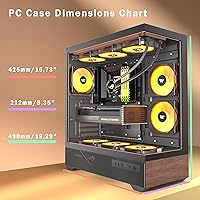
  • Dimensions: The case measures 16.73″ deep, 8.35″ wide, and 19.29″ tall.
  • Weight: Shipping weight is approximately 15.47 pounds fully assembled without components.
  • Materials: Primary construction uses alloy steel panels and tempered glass, with printed wood-grain decoration on metal accent panels.
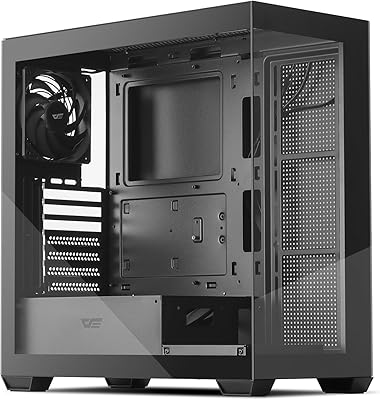
  • Glass Coverage: 270° panoramic tempered glass spans the front and full side panel for wide internal visibility.
  • Pre-installed Fans: Five PWM ARGB fans come factory-installed, connected through a single daisy-chain cable to one 5V ARGB motherboard header.
  • Fan Header: All five fans operate from a single 5V 3-pin ARGB header on the motherboard — no external controller is included or required.
  • Mesh Thickness: Steel mesh on intake areas uses a 1.2mm fine grid, finer than the 3.0mm mesh standard found in most competing cases.
  • Radiator Support: Supports radiators up to 360mm in length, with confirmed RAM slot clearance at standard memory heights.
  • Front I/O: Front panel includes one Type-C port, two USB 3.0 ports, a combo audio jack, and a reset button.
  • Storage Mounts: Internal storage support includes one 3.5″ HDD bay and three 2.5″ SSD mounting positions behind the motherboard tray.
  • PSU Mounting: Power supply is bottom-mounted with a dedicated shroud to conceal cables and improve internal cable aesthetics.
  • Cable Management: A dedicated rear cable channel sits behind the motherboard tray with multiple routing cutouts and enough depth for standard ATX cable bundles.
  • Expansion Slots: The chassis provides seven expansion slots to accommodate standard dual-slot and multi-slot GPU configurations.
  • Panel Release: The tempered glass side panel uses a screwless quick-release mechanism secured by a rivet-mounted system for tool-free removal.
  • Model: This unit is the P6 model from KEDIERS, first listed in May 2025.

Related Reviews

KEDIERS K4 ATX Mid Tower PC Case
80%
91%
Value for Money
93%
Aesthetic Design
74%
Build Quality
72%
Cooling Performance
84%
Ease of Assembly
More
Zalman S2 ATX Mid-Tower PC Case
83%
88%
Cooling Performance
80%
Build Quality
85%
Ease of Setup
70%
Cable Management
92%
Value for Money
More
Vetroo AL800 Mid Tower ATX PC Case
76%
78%
Build Quality
84%
Tempered Glass Panel
76%
Airflow Performance
61%
Fan Included & Expandability
69%
Cable Management
More
Zalman S4 Mid-Tower ATX PC Case
81%
88%
Airflow and Cooling
80%
Build Quality and Materials
92%
Ease of Installation
60%
Acrylic Panel Durability
70%
Cable Management
More
SAMA S40 Mid Tower ATX PC Case
79%
88%
Airflow Performance
83%
Included Fan Quality
79%
Build Quality & Finish
92%
GPU Compatibility
61%
Cable Management
More
darkFlash DS900 ATX Mid-Tower PC Case

84%
89%
Cooling Performance
88%
Build Quality
91%
Ease of Installation
85%
Design & Aesthetics
92%
Value for Money
More
Zalman S3 ATX Mid-Tower PC Case
74%
83%
Value for Money
71%
Build Quality
58%
Airflow & Cooling Performance
86%
Ease of Assembly
67%
Acrylic Side Panel
More
SZSKYING ATX Mid-Tower PC Gaming Case
85%
92%
Cooling Performance
85%
Build Quality
88%
Aesthetic Design
74%
Cable Management
78%
Ease of Setup
More
darkFlash DRX70 ATX Mid-Tower PC Case
74%
83%
Value for Money
78%
Airflow Performance
89%
Ease of Assembly
67%
RGB Lighting
71%
Build Quality & Materials
More
Antec Flux Mid-Tower E-ATX PC Case
85%
93%
Build Quality
88%
Cooling Performance
91%
Design & Aesthetics
87%
Ease of Assembly
72%
Cable Management
More

FAQ

Yes, it does — but with a caveat. Standard-height DDR4 and DDR5 sticks clear without issue, but if you are running tall heatspreaders over 45mm, you may need to angle the radiator slightly or check your specific RAM profile before committing. Most builders using standard RAM had no problems.

No, they are printed metal panels designed to mimic a walnut wood-grain texture. They look convincing from normal desk viewing distance, but up close the metallic surface is obvious. It is a decorative finish, not actual wood, which is worth knowing before you buy.

You do not. All five fans connect to each other in a daisy-chain and plug into a single 5V 3-pin ARGB header on your motherboard. As long as your board has that header, you can control the lighting through your motherboard software — no hub or external controller needed.

The fans will spin and provide airflow on any motherboard, but ARGB lighting sync can be inconsistent on MSI Mystic Light and ASRock Polychrome setups. Some users got full sync working fine, while others found fans defaulting to a static color or cycling independently. ASUS Aura and Gigabyte RGB Fusion tend to work more reliably with this case.

At full speed, they are noticeably loud — not obnoxious, but definitely audible in a quiet room. If you set a custom fan curve in your BIOS and keep them running at 60 to 70 percent, the noise drops to a comfortable background level. They are not designed for silent builds, so manage expectations if acoustic performance matters to you.

Yes, this is one of the better aspects of the build experience. The side glass releases with a simple pull — no screwdriver needed — thanks to the rivet-mounted quick-release system. Reinstalling it clicks back firmly. Builders who open their cases frequently for upgrades or cleaning will appreciate this.

Yes, full ATX boards fit as intended, and GPU length clearance is generous enough to handle most modern cards including longer triple-fan models. Just double-check your specific GPU length against the case's internal depth of 16.73″ if you are running an extended-length card.

It is workable but tight if you are running a lot of cables. Experienced builders who pre-plan their routing typically get clean results using the rear channel and the three SSD mounts to keep things tucked. First-time builders may find it slightly cramped when fitting all five fan cables alongside the ATX power harness.

The front and top mesh panels are not removable for washing, which is a minor frustration. The most practical approach is to use short bursts of compressed air from the outside every month or two, or a soft brush to clear surface buildup. The bottom PSU filter is removable and can be rinsed under water.

For most first-time builders, this gaming chassis is a solid starting point. You get fans, lighting, and a visually impressive result without buying extra components. The assembly process is fairly straightforward, though the front panel connector section of the manual is thin on detail — having a build guide or YouTube tutorial open alongside it is a good idea.