Overview

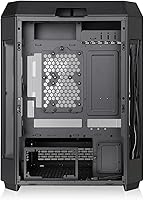
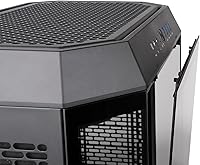
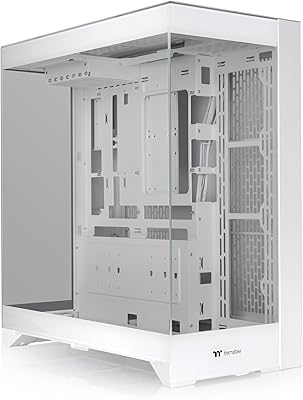
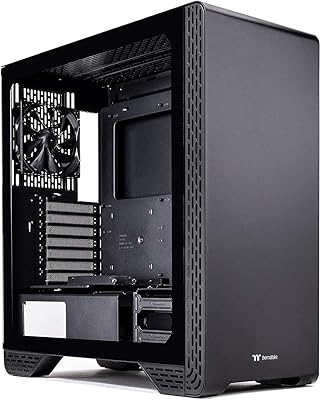
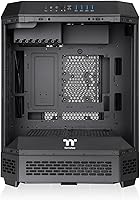
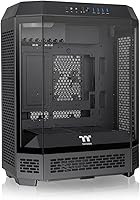
The Thermaltake Tower 600 Mid-Tower ATX Case arrived in August 2024 with an octagonal silhouette that immediately sets it apart from the sea of rectangular black boxes crowding the enthusiast market. Three tempered glass panels wrap around the chassis, giving you visibility from multiple angles — not just the usual left-side window. What really caught attention, though, is its hidden-connector motherboard support, designed for a new generation of boards that route cables entirely through the back, eliminating front-facing connectors altogether. It's a forward-thinking choice that signals where PC building is headed. With over 760 ratings and a 4.5-star average, early reception has been notably strong.

Features & Benefits

The octagonal chassis is more than a style statement — all three glass panels pop off without tools, which matters when you're actually inside the case routing cables or swapping components. For builders using hidden-connector boards from ASUS, MSI, or Gigabyte, the Tower 600 is built to complement that ecosystem: no visible power or data connectors cluttering the front of your motherboard. The GPU mounting situation is unusually flexible, with rotational PCIe slots and a floating bracket that support three different orientations. Cooling capacity is substantial — nine fans and radiators up to 420mm fit inside, with rear PSU mounting keeping the lower chamber unobstructed.

Best For

This mid-tower case is a natural fit for anyone who has already committed to — or is planning to invest in — a hidden-connector motherboard. These boards, offered by ASUS, MSI, and Gigabyte, push all cabling to the rear, and the Tower 600 is purpose-built to match that clean aesthetic. Beyond the cable management angle, it suits high-end cooling setups that need serious radiator real estate. Streamers and creators who want a distinctive rig on camera will appreciate the multi-angle glass visibility. There is also an optional kit for displaying the case horizontally — an unusual but genuinely interesting option for shelf or desk showcase builds.

User Feedback

The overall response from buyers has been positive, with most praising the build quality and the visual impact of the three-panel glass design. Recurring compliments center on how clean a finished build looks inside the case. That said, at 21.4 pounds before any components, this Thermaltake build is genuinely heavy — a few users flagged that moving or repositioning it is not trivial. Installation complexity gets occasional mentions, particularly from first-time builders. The tool-free panel removal works as described for most, though a handful of reviewers found it less intuitive than expected. The horizontal stand kit draws mixed opinions: some appreciate the novelty, others view it as an unnecessary additional cost.

Pros

  • Three tempered glass panels offer multi-angle visibility that most mid-tower cases simply cannot match.
  • Tool-free panel removal makes accessing the interior genuinely quick during builds and maintenance.
  • Hidden-connector motherboard support is rare at this price tier and future-proofs the build nicely.
  • Nine-fan capacity and 420mm radiator support give serious cooling flexibility for demanding hardware.
  • Rotational PCIe slots allow three distinct GPU orientations, including a vertical display option.
  • The octagonal silhouette is distinctive enough to stand out on a desk without looking gimmicky.
  • Rear PSU mounting keeps the lower chamber clean and maximizes airflow through the main compartment.
  • A three-year warranty provides solid long-term coverage for a premium chassis investment.
  • Four USB 3.0 front-panel ports is a genuinely practical number for daily use.
  • Early buyer reception is strong, with consistent praise for build quality and structural rigidity.

Cons

  • At 21.4 pounds before components, moving or transporting this mid-tower case is genuinely cumbersome.
  • The horizontal display stand is sold separately, which feels like a missed inclusion at this price.
  • Hidden-connector compatibility only benefits builders using specific ASUS, MSI, or Gigabyte motherboards.
  • Some buyers report the tool-free panel removal has a steeper learning curve than expected.
  • Only one USB 2.0 port on the front I/O is a limitation if you rely on older peripherals or dongles.
  • Installation complexity may frustrate less experienced builders, particularly around the rotational PCIe setup.
  • The premium price is difficult to justify if you are using a conventional ATX board with standard cabling.
  • The case size and weight require a sturdy, spacious desk — it is not a compact or space-efficient option.

Ratings

The scores below reflect our AI-driven analysis of verified global buyer reviews for the Thermaltake Tower 600 Mid-Tower ATX Case, with spam, bot activity, and incentivized feedback actively filtered out before scoring. Every category captures what real builders experienced — the genuine strengths and the frustrations that showed up repeatedly across hundreds of purchases. Nothing has been smoothed over; if a category divided opinion, the score and commentary reflect that honestly.

Build Quality
91%
Buyers consistently praised the rigidity of the steel chassis — panels feel solid, there is minimal flex, and the glass panels do not rattle once seated. For a case that gets handled repeatedly during a long build session, that structural confidence matters.
A small number of users reported minor finishing inconsistencies on interior edges and panel contact points, particularly with early production units. Nothing structurally concerning, but noticeable to detail-oriented builders.
Aesthetic Design
93%
The octagonal silhouette genuinely stands out in a market full of rectangular cases, and the three-panel glass wrap gives it a 360-degree showroom quality. Streamers and creators who keep their rig on camera found it particularly effective at drawing attention without looking overdone.
The design is bold enough that it will not suit everyone — builders who prefer understated or minimalist cases may find the octagonal shape polarizing. It is a statement piece, and that cuts both ways depending on personal taste.
Cable Management
88%
For builders using hidden-connector motherboards, the cable management experience is genuinely exceptional — with all cabling routed behind the board, the visible interior stays completely clean. Even with conventional boards, the routing channels and rear-mount PSU placement help keep things organized.
The full cable management payoff is only realized with compatible hidden-connector boards from ASUS, MSI, or Gigabyte. Standard builds still benefit, but the gap between a conventional build and a BTF or PROJECT ZERO build inside this case is substantial.
Cooling Capacity
94%
Nine fan mounting positions and support for radiators up to 420mm means the Tower 600 can handle virtually any thermal load a high-end gaming or workstation build can produce. Builders running custom loops with thick, high-fin-density radiators specifically called out the headroom as a major selling point.
The maximum cooling potential requires purchasing fans and cooling hardware separately, which adds meaningful cost to an already premium investment. Buyers expecting bundled fans were occasionally surprised to find none included at this price tier.
Installation Experience
71%
29%
Experienced builders found the layout logical once oriented, and the tool-free panel removal genuinely speeds up component access during and after the build. The rotational PCIe slot system, while unfamiliar at first, was described as well-engineered by those who took time to read the documentation.
First-time builders and those unfamiliar with rotational PCIe slots or hidden-connector ecosystems reported a steeper learning curve than expected. Several reviewers wished the manual were more detailed, and the tool-free panel mechanism took some trial and error before feeling natural.
Glass Panel Quality
89%
All three tempered glass panels are thick enough to feel premium and resist fingerprints better than thinner glass used in budget cases. The multi-angle visibility is a practical benefit during builds, not just an aesthetic one — you can check cable routing from multiple sides without removing panels.
Three glass panels also means three surfaces to clean regularly, and the case does attract dust and smudges on the exterior glass. A few buyers noted that one panel was slightly misaligned out of the box, though this appeared to be isolated rather than systematic.
GPU Mounting Flexibility
86%
Three distinct GPU installation orientations — including vertical display — give builders more configuration options than most mid-tower cases offer. The floating VGA bracket held cards securely without sag in reported builds, even with heavier triple-fan GPUs.
Vertical GPU mounting still requires a PCIe riser cable that is not included, which is a common industry standard but worth flagging for newer builders budgeting their build. Some users also found the rotational mechanism required more careful alignment than expected during initial setup.
Front I/O Ports
74%
26%
Four USB 3.0 ports on the front panel is a genuinely useful number for day-to-day use — comfortably covering a headset, flash drive, and peripherals simultaneously without reaching around to the back of the machine.
The single USB 2.0 port feels limited for a case at this price point, especially for users who still rely on older peripherals or wireless dongles. A USB-C front port would have been a meaningful addition that several reviewers specifically requested.
Portability & Weight
47%
53%
The weight is primarily a reflection of the dense steel construction and three glass panels — buyers who valued structural integrity accepted the trade-off. For a stationary desktop that never needs to move, the weight is essentially irrelevant.
At 21.4 pounds empty, this Thermaltake build becomes genuinely difficult to transport once loaded with components — realistically 45 to 55 pounds for a fully built system. Users who attend LAN events or frequently rearrange their workspace flagged weight as a real inconvenience.
Value for Money
76%
24%
For builders who will use the hidden-connector motherboard support, rotational GPU mounting, and large radiator capacity, the feature set justifies the premium positioning. The three-year warranty also adds long-term confidence that budget cases rarely offer.
For builders who do not need or want the more advanced features, the price is harder to rationalize against simpler mid-towers with equally good airflow. The optional horizontal stand being sold separately also leaves some buyers feeling the base price should include more.
Noise Dampening
61%
39%
The steel chassis provides a reasonable baseline of structural noise reduction, and the rear PSU placement helps isolate fan vibration from the main chamber. Builders running quiet fan profiles found the case acceptable for near-silent builds.
There is no dedicated acoustic dampening material on the panels, which is common at this tier but still worth noting. Users running high-RPM fans for maximum airflow found the case offered little help containing noise compared to cases with foam-lined side panels.
Compatibility Range
83%
ATX support covers the vast majority of consumer motherboards, and the internal dimensions are generous enough to accommodate long GPUs, tall CPU coolers, and large radiator brackets simultaneously. Most standard components fit without layout conflicts.
The case is built around ATX and does not natively support E-ATX motherboards, which may exclude some high-end workstation or HEDT platform builders. Smaller form factors like mATX or Mini-ITX technically fit but leave a lot of unused interior space.
Horizontal Display Option
66%
34%
The concept of displaying the case horizontally is genuinely creative and appealing for shelf or low-profile desk setups. Buyers who purchased the stand kit reported it was well-made and held the case securely in the alternative orientation.
Selling the horizontal stand as a separate purchase at this price tier frustrated a meaningful portion of buyers who expected it included. Functionality that appears central to the product identity being paywalled — even modestly — left a negative impression on otherwise satisfied customers.
Thermal Airflow Design
87%
The rear PSU mount and multi-position fan support allow builders to create dedicated intake and exhaust zones without competing airflow paths. Builders running high-TDP CPUs and GPUs simultaneously reported stable thermals with a reasonable fan configuration.
The octagonal chassis design, while visually distinctive, means some standard fan bracket configurations do not translate directly from rectangular cases — requiring a brief adjustment period when planning the airflow layout for the first time.

Suitable for:

The Thermaltake Tower 600 Mid-Tower ATX Case is purpose-built for enthusiast builders who are already invested in — or actively planning to move to — hidden-connector motherboards from ASUS, MSI, or Gigabyte. These are boards that route all power and data cables through the rear panel, leaving the front of the motherboard completely clean, and this mid-tower case is one of the few on the market designed to complement that ecosystem from the ground up. Beyond the cable management angle, it suits builders who want serious thermal headroom: nine-fan support and 420mm radiator compatibility means you are not going to outgrow the cooling layout on even a demanding high-end gaming or workstation build. Content creators and streamers who want a visually striking rig visible on camera will also find the three-panel glass design genuinely rewarding. The optional horizontal stand makes it a reasonable choice for anyone wanting an unconventional desk or shelf display piece as well.
Not suitable for:

The Thermaltake Tower 600 Mid-Tower ATX Case is a harder sell for builders who are not planning to use a hidden-connector motherboard, since the clean-build aesthetic that justifies much of its premium positioning simply does not apply to a standard ATX board with conventional cabling. At 21.4 pounds empty, this Thermaltake build is also a real consideration for anyone who moves their PC frequently — to LAN events, between rooms, or in and out of a vehicle — where portability actually matters. Budget-conscious builders will find the price hard to justify if they are not taking full advantage of the case's more advanced features, and the horizontal display stand costs extra on top of an already premium purchase. First-time builders may also find the installation experience more involved than a straightforward mid-tower, particularly if they are unfamiliar with rotational PCIe slots or rear-routed motherboard ecosystems. If you want a simple, no-frills enclosure that just gets the job done, the Tower 600 is probably more case than you need.
Specifications

  • Form Factor: The Tower 600 is a mid-tower chassis designed to house standard ATX motherboards along with smaller form factors.
  • Dimensions: The case measures 11.28″ x 16.54″ x 21.65″ (L x W x H), requiring a reasonably spacious desk or tower footprint.
  • Weight: At 21.4 pounds empty, this is a notably heavy mid-tower that benefits from a stable, dedicated surface.
  • Glass Panels: Three tempered glass panels wrap the octagonal chassis and can each be removed without tools for unobstructed interior access.
  • Motherboard Support: The case supports standard ATX motherboards, including hidden-connector variants from ASUS BTF, MSI PROJECT ZERO, and GIGABYTE PROJECT STEALTH lineups.
  • Fan Support: Up to nine fans can be installed simultaneously across available mounting positions for comprehensive airflow coverage.
  • Radiator Support: The case accommodates radiators up to 420mm, making it compatible with large custom-loop and all-in-one liquid cooling solutions.
  • GPU Mounting: Rotational PCIe slots paired with a floating VGA bracket allow the GPU to be installed in three distinct orientations, including vertical.
  • PSU Mounting: The power supply mounts at the rear of the chassis, helping to isolate it from the main airflow path in the interior.
  • Front I/O Ports: The front I/O panel provides four USB 3.0 ports and one USB 2.0 port for connecting peripherals and storage devices.
  • Cooling Methods: The case supports both air cooling and water cooling configurations, giving builders full flexibility in their thermal setup.
  • Chassis Material: The primary structure uses steel paneling with tempered glass side and front panels for structural rigidity and visibility.
  • Color: The Tower 600 reviewed here is finished in black, covering both the steel frame and non-glass exterior surfaces.
  • Display Orientation: An optional horizontal display stand kit (sold separately) allows the entire case to be oriented and showcased on its side.
  • Warranty: Thermaltake backs this mid-tower case with a three-year manufacturer warranty covering defects in materials and workmanship.

Related Reviews

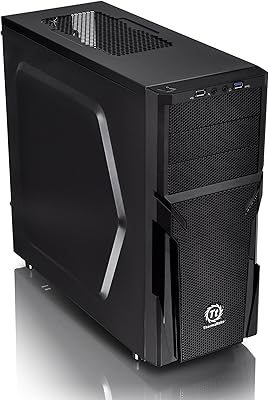
Thermaltake Versa H21 ATX Mid Tower Case
69%
91%
Ease of Assembly
86%
Interior Space
73%
Airflow & Ventilation
58%
Build Quality & Materials
67%
Cable Management
More
Thermaltake E550 TG Mid Tower ATX Case
79%
93%
Aesthetic Design
88%
Build Quality
84%
Cable Management
91%
Cooling Potential
86%
GPU Installation Flexibility
More
Thermaltake S300 Tempered Glass Edition ATX Mid-Tower Case
85%
88%
Build Quality
85%
Cooling Performance
91%
Ease of Setup
90%
Design and Aesthetics
87%
Compatibility with Motherboards
More
SAMA 3509 ATX Mid Tower PC Case
74%
88%
Value for Money
74%
Build Quality
81%
Airflow & Cooling Performance
67%
Pre-installed Fan Quality
86%
Tempered Glass Panel
More
HYTE Y40 Mid-Tower ATX Case
85%
89%
Design & Aesthetics
86%
Cooling Performance
91%
Cable Management
93%
Build Quality
72%
GPU Compatibility
More
KEDIERS P6 Mid Tower ATX PC Case
75%
88%
Aesthetic Design
71%
Build Quality
84%
Included Fans & Lighting
78%
Airflow & Thermal Performance
81%
Radiator & Cooling Support
More
Zalman S2 ATX Mid-Tower PC Case
83%
88%
Cooling Performance
80%
Build Quality
85%
Ease of Setup
70%
Cable Management
92%
Value for Money
More
SAMA S40 Mid Tower ATX PC Case
79%
88%
Airflow Performance
83%
Included Fan Quality
79%
Build Quality & Finish
92%
GPU Compatibility
61%
Cable Management
More
SZSKYING ATX Mid-Tower PC Gaming Case
85%
92%
Cooling Performance
85%
Build Quality
88%
Aesthetic Design
74%
Cable Management
78%
Ease of Setup
More
darkFlash DS900 ATX Mid-Tower PC Case
84%
89%
Cooling Performance
88%
Build Quality
91%
Ease of Installation
85%
Design & Aesthetics
92%
Value for Money
More

FAQ

It works perfectly with standard ATX motherboards. The hidden-connector compatibility is an added feature for builders using newer boards from ASUS, MSI, or Gigabyte that route cables through the rear — but you are not required to use one. A conventional ATX board fits and functions without any issues.

Hidden-connector motherboards move all power and data cable connections to the back of the board, so the front-facing side stays completely clear of cables. Brands like ASUS call theirs BTF, MSI uses PROJECT ZERO, and Gigabyte has PROJECT STEALTH. You do not need one to use this case, but if you want the ultra-clean look this Thermaltake build is designed to showcase, a hidden-connector board is what makes that possible.

Yes. The rotational PCIe slots and floating VGA bracket give you three different GPU installation orientations, including a vertical mount that puts your graphics card on display through the glass panels. Keep in mind that vertical GPU mounting typically requires a PCIe riser cable, which may be sold separately depending on your setup.

The case supports radiators up to 420mm, which is among the largest available for consumer liquid cooling loops. This covers most 360mm and 420mm all-in-one units, as well as custom loop configurations with thick radiators and high-fin-density cores.

Most buyers find it works as described once they get familiar with the mechanism, but there is a short learning curve. A handful of reviewers noted it was not immediately intuitive the first time. After the first removal, the process becomes straightforward and noticeably faster than dealing with screws.

The empty chassis already weighs 21.4 pounds, so with a motherboard, GPU, cooling hardware, PSU, and drives installed, you are realistically looking at 40 to 50-plus pounds depending on your components. It is not a portable setup — plan to place it somewhere you do not need to move it often.

No, the horizontal stand is an optional kit sold separately. The case ships in its standard vertical orientation. If displaying it on its side is important to you, factor in the additional cost of that kit before purchasing.

At just over 21.6 inches tall, it should fit under most standard desks with clearance to spare, but it is worth measuring your specific setup. The footprint is also wider than average for a mid-tower due to the octagonal shape, so check depth and width clearance as well.

Thermaltake covers the Thermaltake Tower 600 Mid-Tower ATX Case with a three-year warranty. For shipping damage, it is best to document and report it to the retailer immediately, as that typically falls under the seller's return policy rather than the manufacturer warranty.
Four USB 3.0 ports is a solid front I/O offering for most users, and covers the typical combination of keyboard, mouse, headset, and an occasional flash drive simultaneously. The single USB 2.0 port is more limited, so if you rely heavily on older USB devices or need more than five front ports regularly, a hub may still be useful.

Where to Buy