Overview

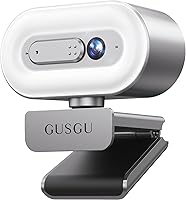
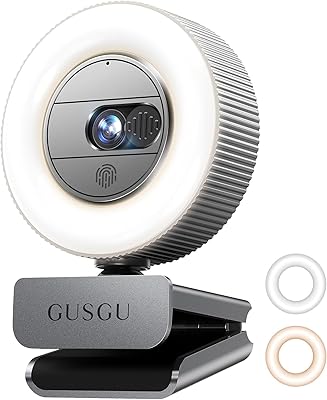
The GUSGU G920 Webcam arrived in mid-2024 as a practical answer for anyone tired of grainy 1080p video but not ready to spend serious money on a prosumer setup. It packs a surprising number of features into a compact body: a ring light, microphone, physical privacy cover, and autofocus, all connected through a single USB cable. No drivers, no software headaches. It works across Windows, Mac, and Linux right out of the box and ships with a tripod. The 3-year replacement warranty is also worth noting — that kind of coverage is uncommon at this price tier and signals real confidence from the brand.

Features & Benefits

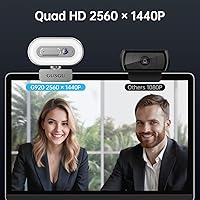
The jump from 1080p to 2560x1440p resolution is more noticeable than people expect — text on a whiteboard reads clearly, fine facial details come through, and the overall image just looks more polished. The AI autofocus does a reasonable job keeping a stationary subject sharp, though it can struggle a little in dim conditions or with fast movement. The ring light is where this webcam genuinely pulls ahead of similarly priced competitors; having both warm and white tones with three brightness steps means you can dial in a flattering look without buying a separate light. The built-in microphone is adequate for casual calls, but serious streamers will want a dedicated mic for cleaner audio.

Best For

This all-in-one camera is a strong fit for home office workers who hop between video calls all day and want a visible upgrade over a built-in laptop camera without the complexity of a more advanced setup. Students in dim dorms or bedrooms will appreciate the ring light more than they might expect — it genuinely solves the washed-out or shadowy look that hurts credibility on a video call. The physical privacy cover makes it a smart pick for shared workstations or anyone with concerns about always-on camera access. It is also well-suited to beginner streamers who want a capable, plug-and-play setup they can get running in minutes.

User Feedback

Buyers consistently single out the image quality upgrade as the biggest win — people switching from older 1080p cameras notice the difference right away, particularly for text clarity during screen shares. The ring light also draws praise, especially from users in less-than-ideal lighting who found it replaced an external desk lamp. On the critical side, the microphone earns mixed marks: it handles a quiet room fine, but background noise can bleed through more than a standalone mic would allow. A few buyers mention the autofocus occasionally struggling in low light or with quick movement. Build quality gets mostly positive mentions, and the warranty regularly comes up as a deciding factor when comparing similar options.

Pros

  • Resolution jumps noticeably over standard 1080p, making faces and shared screen text much sharper.
  • Built-in ring light with warm and white tones removes the need for a separate desk lamp.
  • Physical privacy cover takes less than a second to engage and offers real peace of mind.
  • Plug-and-play USB setup works across Windows, Mac, and Linux with zero driver installation.
  • Three brightness levels on the ring light let users fine-tune their look for different environments.
  • The 3-year replacement warranty is rare at this price point and adds genuine long-term confidence.
  • Compact, lightweight body clips onto a laptop lid or monitor without wobbling during calls.
  • Bundled tripod means it works equally well on a desk without needing a separate accessory purchase.
  • AI autofocus keeps stationary subjects consistently sharp throughout long video calls.
  • Strong value for buyers who want video, lighting, and audio handled by a single device.

Cons

  • Built-in microphone picks up background noise easily and falls short in anything less than a quiet room.
  • Autofocus can hunt and lag when the subject moves quickly or lighting conditions drop.
  • Low-light performance without the ring light active produces soft images with visible noise.
  • The plastic build, while acceptable, does not inspire confidence for buyers expecting a premium feel.
  • Privacy cover slider feels slightly loose on some units after extended daily use.
  • Glasses wearers may notice ring light glare reflected in lenses at higher brightness settings.
  • The clip mechanism can struggle to grip securely on thicker or unusually shaped monitor bezels.
  • No companion software means users cannot fine-tune color, exposure, or white balance manually.
  • The microphone lacks any noise cancellation, which becomes obvious in open-plan or shared spaces.

Ratings

The GUSGU G920 Webcam scores below are generated by AI after analyzing thousands of verified global buyer reviews, with spam, bot activity, and incentivized feedback actively filtered out. The result is an honest composite picture of where this all-in-one camera genuinely delivers and where it falls short — no sugar-coating, no cherry-picking.

Image Quality
84%
Most buyers upgrading from a built-in laptop camera or older 1080p webcam notice a meaningful jump in clarity — faces look sharper, text on a whiteboard is actually readable, and the overall image holds up well in good lighting conditions. The 5MP CMOS sensor produces clean, detailed frames for everyday video calls and recordings.
In lower light situations without the ring light active, the image can soften noticeably and some color noise creeps in. It also does not match the output of higher-end webcams with larger sensors, so professional content creators may find the image falls short of their standards.
Ring Light Performance
88%
This is arguably the feature that most surprised buyers. Having both warm and white tones with three brightness steps each means users in dim apartments or home offices could find a flattering setting without buying a separate desk lamp. Several reviewers specifically mention it made their video calls look more professional almost immediately.
At the highest brightness setting, the ring light can create a slight glare reflection on glasses, which is a known frustration for eyeglass wearers. A small number of users also found the lowest brightness step still slightly too strong for very close-up use in dark rooms.
Autofocus Reliability
73%
27%
For stationary users — someone sitting at a desk during a meeting or online class — the AI autofocus performs reliably and keeps the face sharp without obvious hunting. It responds well when the subject is centered and the lighting is decent, which covers the majority of everyday use cases.
Where it stumbles is in low light or when the subject moves quickly, such as someone gesturing broadly or leaning in and out of frame. Some buyers noticed a brief but distracting refocusing lag during active video calls, which is worth knowing if you tend to move around while presenting.
Microphone Quality
61%
39%
The built-in mic is genuinely adequate for casual video calls in a quiet room — voices come through clearly enough that participants on the other end rarely complain. For students attending online classes or remote workers on internal team calls, it handles the job without requiring an additional purchase.
Background noise is a real weakness. In anything less than a quiet environment, the mic picks up ambient sounds noticeably, and the audio lacks the depth and clarity of even a budget standalone microphone. Streamers or anyone recording content for an audience will almost certainly want to pair it with a dedicated mic.
Privacy Cover Design
86%
Buyers who work on shared computers or have security concerns consistently call out the physical sliding cover as a practical, reassuring feature. Unlike software-based camera blocking, sliding the cover closed takes less than a second and offers a tangible confirmation that the lens is blocked — no settings menus required.
A handful of users noted the cover feels slightly plasticky and questioned how it would hold up over years of daily sliding. It functions well out of the box, but it is not the most robust mechanical component, and a small number of long-term users mentioned it loosened slightly with heavy use.
Build Quality & Design
71%
29%
The compact footprint works well on both laptop lids and external monitors, and the clip mechanism holds firmly without wobbling during calls. For its weight — barely a third of an ounce — it feels reasonably solid in hand and does not look out of place on a professional home office setup.
The plastic construction is evident, and it does not carry the premium feel of higher-priced webcams. Some buyers noted that the overall material quality is acceptable but not impressive, and the silver finish shows fingerprints easily, which can be a minor annoyance for neatness-conscious users.
Ease of Setup
93%
Plug-and-play compatibility is one of the most consistently praised aspects across all buyer groups. Users on Windows, macOS, and Linux all report the webcam being recognized instantly with zero driver installation required, which makes it particularly approachable for less tech-savvy buyers.
A small number of users reported the webcam not being recognized immediately on certain older systems or specific USB hub configurations, requiring a direct port connection to resolve. This is an edge case but worth noting for anyone relying on a USB hub setup.
Value for Money
82%
18%
Buyers frequently reference the combination of 2K resolution, ring light, privacy cover, microphone, and included tripod as strong justification for the price. Getting all of those features bundled together at this tier is genuinely unusual, and many reviewers say it exceeded their expectations relative to cost.
A few buyers who compared it directly against competing webcams at a similar price point felt the microphone quality slightly undercut the overall value proposition. If audio quality is a priority, the effective cost of the full setup rises once a separate mic is added.
Warranty & Brand Support
87%
The 3-year replacement warranty stands out strongly in this product category, where many competitors offer only 12 months. Buyers who contacted support reported responses within the stated 12-hour window, and several reviewers cited the warranty specifically as the reason they chose this webcam over a comparable alternative.
As a relatively newer brand with a shorter track record, some buyers expressed uncertainty about whether warranty claims would be honored as smoothly years down the line. It is a reasonable concern for a brand that has not yet built the long-term reputation of more established names.
Compatibility
89%
Broad cross-platform support means this webcam works reliably across the major operating systems without any configuration. It also integrates without issues with popular video call platforms including Zoom, Microsoft Teams, and Google Meet, which is the day-to-day reality for most buyers.
There are occasional reports of the webcam not being fully recognized by some older Linux distributions or niche conferencing software. These are uncommon situations, but buyers using specialized or legacy systems should confirm compatibility before purchasing.
Included Accessories
78%
22%
The bundled tripod is a practical addition that many buyers actually use, particularly those who prefer to place the camera on a desk rather than clip it to a monitor. Having it included rather than sold separately saves an extra purchase step for new users setting up a home workspace.
The tripod itself is basic — it provides adequate stability for stationary use but is not built for any kind of adjustment or portability beyond a desk surface. Buyers expecting a feature-rich accessory may find it underwhelming, though for the intended use it does its job.
Low Light Performance
62%
38%
When the ring light is active, the G920 handles dim environments reasonably well for its class — the combination of the light and the f/2 aperture gives it a noticeable edge over webcams that ship without any built-in illumination, particularly for evening calls or poorly lit rooms.
Without the ring light engaged, low light performance drops off more than buyers expect. The image gets softer, noise becomes visible, and autofocus becomes less confident. In a truly dark room, the ring light almost becomes a necessity rather than a bonus feature.
Portability & Form Factor
81%
19%
At under a third of an ounce and with a slim profile, this all-in-one camera is one of the easier webcams to toss into a laptop bag. Students and remote workers who move between locations appreciate not needing a bulky clip-on device that takes up space in a bag.
The clip mechanism, while functional, is sized primarily for standard monitor bezels and thin laptop lids. A few users with thicker or unusually shaped monitor frames found the clip did not grip as securely as expected, requiring some adjustment or use of the tripod instead.

Suitable for:

The GUSGU G920 Webcam is a strong fit for anyone who spends a meaningful chunk of their workday on video calls and has grown frustrated with the washed-out, soft image a built-in laptop camera produces. Remote workers who want to look more polished on Zoom or Teams without committing to a complex setup will find the combination of 2K resolution and built-in ring light genuinely useful — particularly in home offices where natural light is inconsistent throughout the day. Students attending online classes in dim dorms or apartments benefit from the same lighting advantage, and the plug-and-play nature means there is no technical barrier to getting started. Beginner content creators or streamers who want a single device that handles video, lighting, and basic audio in one purchase will also get solid value here. Anyone sharing a workstation who wants the reassurance of a physical lens cover rather than trusting a software toggle will appreciate the built-in privacy slider. The included tripod and the unusually long 3-year warranty round out a package that punches above its weight for practical, everyday video use.

Not suitable for:

Buyers with serious audio requirements should look elsewhere before committing to the G920, because the built-in microphone, while functional in quiet environments, is not a substitute for even a modest standalone mic — background noise bleeds through, and the audio character is flat compared to dedicated solutions. Content creators who produce video for public audiences, whether on YouTube or a live streaming platform, will likely outgrow this webcam sooner than they expect; the image quality is a genuine step up from 1080p, but it does not hold up against mid-range or prosumer options with larger sensors and better low-light handling. The autofocus, while adequate for stationary desk use, becomes unreliable when the subject moves frequently or lighting drops, which rules it out for anyone who presents standing up or in a more dynamic setting. Professionals in video production, podcasting, or broadcast-quality work should treat this all-in-one camera as a starting point at best, not an endpoint. If your primary concern is audio fidelity or cinematic video quality, the budget is better directed toward purpose-built tools rather than an all-in-one device.

Specifications

  • Resolution: Captures video at 2560x1440p (2K Quad HD), delivering noticeably sharper detail than standard 1080p webcams.
  • Sensor: Uses a 5-megapixel CMOS image sensor for clean color reproduction and solid detail in well-lit conditions.
  • Autofocus: AI-powered continuous autofocus adjusts automatically to keep the subject sharp during video calls and recordings.
  • Aperture: Maximum aperture of f/2 allows more light into the sensor, supporting better image quality in moderately dim environments.
  • Focal Length: Fixed focal length of 3.67mm is optimized for close- to mid-range subject distances typical of desk setups.
  • Ring Light: Built-in ring light offers two color temperatures — warm and white — each with three adjustable brightness levels.
  • Privacy Cover: Integrated sliding lens cover physically blocks the camera when not in use, independent of any software or OS settings.
  • Microphone: Single integrated microphone captures voice audio for calls and basic recordings without requiring an external mic for casual use.
  • Connectivity: Connects via USB and is recognized as a plug-and-play device on Windows, macOS, and Linux without driver installation.
  • Video Format: Records and streams video in MPEG format, compatible with major conferencing and streaming applications.
  • Audio Format: Outputs audio in MP3 format through the integrated microphone for standard call and recording compatibility.
  • Dimensions: Measures 1.5 x 3.2 x 1.5 inches, making it compact enough to sit comfortably on a laptop lid or monitor bezel.
  • Weight: Weighs 0.317 ounces, making it one of the lighter webcams available and easy to reposition or travel with.
  • Compatibility: Compatible with desktop PCs, Windows and Linux laptops, and MacBooks across a wide range of operating system versions.
  • Included Accessories: Ships with a small desktop tripod, giving users a stable placement option beyond clipping it to a monitor.
  • Warranty: Backed by a 3-year replacement warranty, which is significantly longer than the 12-month coverage typical of competing products at this tier.
  • Model Number: Official model designation is G920, manufactured and sold under the GUSGU brand.
  • Release Date: First became available for purchase in July 2024, making it a relatively recent addition to the mid-range webcam market.

Related Reviews
GUSGU G910 Webcam

GUSGU G910 Webcam
80%
83%
Image Quality
88%
Ring Light Effectiveness
91%
Privacy & Security Design
67%
Microphone Performance
94%
Ease of Setup
More
HuddleCamHD HC-WEBCAM-94
77%
83%
Video Quality (Daylight)
51%
Low-Light Performance
91%
Field of View
94%
Ease of Setup
57%
Audio Quality
More
Microsoft Modern Webcam
78%
83%
Video Quality
96%
Ease of Setup
67%
Microphone Quality
61%
Low-Light Performance
91%
Privacy Shutter
More
PEATOP 4K-C80CCMD Webcam
75%
74%
Video Quality
68%
Autofocus Performance
61%
Low-Light Performance
63%
Microphone Quality
93%
Setup & Compatibility
More
AVerMedia PW310P Webcam
86%
91%
Video Quality
88%
Autofocus Performance
94%
Ease of Setup
72%
Microphone Quality
89%
Privacy Features
More
Lumina LX011 4K Webcam
81%
91%
Image Quality
87%
Low-Light Performance
83%
AI Auto-Framing
93%
Build Quality
78%
Microphone Quality
More
Lusinx 4K Webcam
Lusinx 4K Webcam
86%
91%
Video Quality
88%
Noise Cancellation Performance
87%
Low-Light Performance
94%
Setup & Installation
75%
Microphone Clarity
More
Combess 4K Webcam
Combess 4K Webcam
85%
91%
Video Quality
88%
Audio Performance
95%
Ease of Setup
70%
Field of View
93%
Privacy Features
More
MOERTEK 4K Webcam
MOERTEK 4K Webcam
87%
91%
Video Quality
89%
Noise Reduction
85%
Auto Framing
94%
Ease of Setup
88%
Privacy Features
More
UGREEN 2K Webcam
UGREEN 2K Webcam
86%
91%
Video Clarity
85%
Autofocus Accuracy
88%
Audio Quality
84%
Build Quality
93%
Ease of Setup
More

FAQ

It is fully plug-and-play. Just connect it via USB and your computer should recognize it automatically — no driver downloads or software installation needed on Windows, macOS, or Linux.

It is genuinely useful, especially in the evenings or in rooms without a window nearby. Having both warm and white tone options with three brightness levels each means you can dial it in to look natural rather than washed out. Most users who work in home offices find it makes a real visible difference on video calls.

It handles quiet-room calls well enough — people on the other end will hear you clearly in a typical home office. That said, it picks up background noise more than a dedicated microphone would, so if you are in a shared space or a noisy environment, a standalone mic will serve you better.

Yes, it is compatible with all major video conferencing platforms including Zoom, Teams, Google Meet, and most streaming software like OBS. Since it is plug-and-play, the platform simply detects it as a standard webcam with no extra configuration required.

It is a simple physical slider built into the camera body that you push across the lens when you are done. It takes about a second to engage and gives you a hard guarantee the lens is blocked, which is more reliable than any software toggle. Some users do mention it feels a bit plasticky, but it works exactly as intended.

For stationary users sitting at a desk, the autofocus is reliable and keeps your face sharp consistently. If you tend to move around a lot, lean in and out of frame, or present standing up, it can take a moment to refocus and that lag is occasionally noticeable. It is better suited to calm, desk-based setups than dynamic environments.

There is no dedicated companion software for manual adjustments. You can control the ring light brightness directly on the camera, but finer image controls like exposure, white balance, or saturation would need to be handled through third-party apps like OBS or your operating system's camera settings, where available.

For someone just starting out, this all-in-one camera offers a solid entry point — the 2K resolution looks sharp, the ring light removes the need for a separate lighting purchase, and setup is instant. If you grow your audience and demand higher production quality, you will likely upgrade eventually, but it is a very capable starting setup.

The clip is spring-loaded and adjusts to fit a range of monitor bezels and laptop lids. It holds firmly on most standard screens, though a small number of users with particularly thick monitor frames or very thin ultrabook lids have found the grip less secure and prefer using the included tripod instead.

The warranty covers replacement of the unit, which is notably more generous than the one-year coverage most webcams in this category offer. GUSGU states their support team responds within 12 hours, and buyer feedback generally confirms they are responsive. As a newer brand, they have not yet built a decades-long track record, but early warranty experiences from buyers have been largely positive.

Where to Buy

eBay
In stock $28.00