GUSGU G910 Webcam

Overview
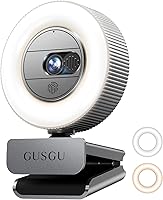
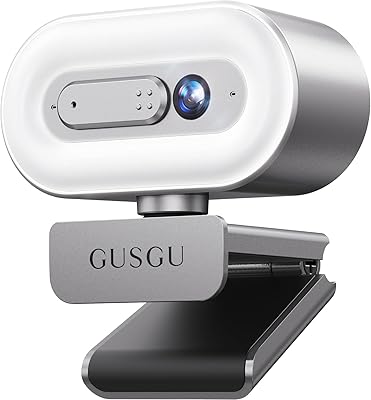
The GUSGU G910 Webcam is one of the more thoughtfully equipped budget cameras to arrive in recent years, bundling a ring light and physical privacy cover at a price most competitors charge for just the lens alone. It shoots at 2K QHD resolution, connects via USB with zero driver installation required, and works across Windows, Mac, and Linux without fuss. The compact, nearly cube-shaped housing clips onto most monitors or mounts on the included tripod. Since its late 2022 launch, the G910 has gathered over 1,100 ratings and holds a 4.5-star average — a solid track record for a newcomer in a crowded category.
Features & Benefits
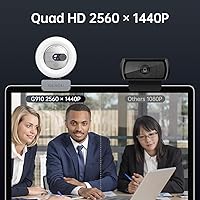
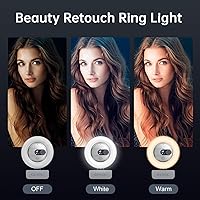
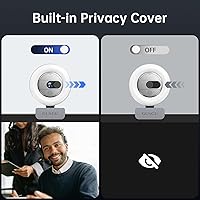
The jump from 1080p to 2K QHD resolution is more noticeable than it sounds — faces look sharper, text on a shared screen is legible, and background details stop looking like watercolor blobs. The dual-tone ring light is arguably the G910's biggest practical advantage; switching between warm and white light, with three brightness steps each, lets you dial in flattering illumination for a dim bedroom or a yellow-tinted office without hauling in a separate lamp. The built-in privacy shutter physically blocks the lens, which is far more reassuring than relying on software alone. The CVC microphone handles everyday call audio competently, and the three-year replacement warranty adds peace of mind rarely seen at this price tier.
Best For
This webcam makes the most sense for people who spend a chunk of their day on video calls and are tired of looking like a blurry thumbnail. It is also a natural pick for students in dorms or apartment bedrooms where overhead lighting is harsh or nonexistent — the ring light does real work in those situations. Beginner streamers who want a step-up camera without juggling separate lighting gear will find the all-in-one setup genuinely convenient. Privacy-focused users who would otherwise stick tape over a lens will appreciate the proper sliding cover. Where this streaming camera fits less well is in professional studio setups demanding broadcast-quality audio — for those, individual dedicated components will outperform a bundled solution.
User Feedback
Among the 1,100-plus buyers who have weighed in, the ring light draws the most consistent praise — several reviewers specifically mentioned it changed how they look on calls in poorly lit rooms. Image sharpness in good lighting also earns frequent compliments. On the flip side, a handful of users noticed the autofocus can hesitate or hunt when the scene is very dark, even with the ring light active. The microphone gets a passing grade for calls but falls short of anything you would use for recording voiceovers or podcasts. A smaller number of reviewers flagged that the warm and white modes feel closer in tone than expected. Setup, though, is almost universally described as completely painless — plug in, and it works.
Pros
- 2K QHD resolution delivers noticeably sharper video than standard 1080p webcams in good lighting.
- The built-in ring light genuinely replaces a separate lamp purchase for most home-office setups.
- Physical privacy shutter mechanically blocks the lens — far more reliable than any software toggle.
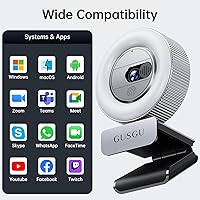
- Plug-and-play USB setup works instantly on Windows, Mac, and Linux with zero driver installation.
- Dual-tone ring light with six total brightness steps gives real flexibility for different room conditions.
- A three-year replacement warranty is unusually strong coverage for a budget peripheral.
- The included mini tripod adds desk or shelf placement options beyond the standard monitor clip.
- CVC microphone reduces background noise and keyboard clatter enough for clean everyday call audio.
- Compact form factor fits neatly on most monitors without blocking content or looking oversized.
- Over 1,100 real-world ratings averaging 4.5 stars signals consistent satisfaction across a broad buyer base.
Cons
- Autofocus visibly hunts in dim conditions, even with the ring light switched on at full brightness.
- Onboard microphone is inadequate for any recording beyond basic video calls.
- No companion software means zero manual control over exposure, white balance, or color settings.
- Warm and white ring light modes are closer in tone than the labeling suggests, limiting useful distinction.
- Monitor clip lacks a rotational lock, so camera angle can drift on rounded or thick bezels.
- Low-light image quality without the ring light active is mediocre for the sensor size advertised.
- Color accuracy shifts noticeably under mixed ambient lighting with no way to manually correct it.
- Plastic housing picks up fingerprints easily and may feel lightweight to buyers used to premium peripherals.
- Users on older USB 2.0 ports or aging hardware occasionally report dropped connections requiring re-plug.
- No 60fps mode available, which limits the camera for fast-motion streaming or demonstration content.
Ratings
The GUSGU G910 Webcam scores below are generated by AI after analyzing thousands of verified global buyer reviews, with spam, bot-submitted, and incentivized feedback actively filtered out. The G910 has been stress-tested by remote workers, students, and casual streamers across multiple continents, and both its genuine strengths and recurring frustrations are transparently reflected in every score. No category has been softened or inflated — what you see is what real buyers consistently reported.
Image Quality
Ring Light Effectiveness
Privacy & Security Design
Microphone Performance
Ease of Setup
Build Quality
Value for Money
Low-Light Performance
Autofocus Reliability
Mounting & Placement Flexibility
Compatibility
Warranty & After-Sales Support
Color Accuracy
Audio-Visual Sync
Suitable for:
The GUSGU G910 Webcam is a strong fit for anyone who spends a meaningful chunk of their week on video calls and is tired of looking underlit or blurry on screen. Remote workers in home offices with inconsistent overhead lighting will get immediate, practical value from the built-in ring light — it replaces a separate purchase most people would eventually make anyway. Students living in dorms or rented rooms, where you rarely control the lighting setup, will find the warm and white light modes genuinely useful for evening classes and virtual study sessions. Beginner content creators and casual streamers who want a camera-and-lighting combo without managing multiple devices and cables will appreciate how self-contained the G910 is out of the box. Privacy-focused users who feel uncomfortable with a lens that is always technically active will find the physical shutter a meaningful step up from software workarounds. Anyone upgrading from a grainy 720p or 1080p built-in laptop camera will notice a real difference in sharpness during calls, particularly when sharing screens or presenting slides.
Not suitable for:
The GUSGU G910 Webcam is not the right tool for users who need professional-grade audio alongside their video — the onboard microphone handles casual calls adequately, but anyone recording podcasts, voiceovers, or tutorial content will quickly find its ceiling. Serious streamers or video producers who need precise manual control over exposure, white balance, and color grading will also be frustrated, as the G910 offers no companion software or hardware controls for fine-tuning the image. Users who work in genuinely dark environments and plan to skip the ring light should look elsewhere, since the autofocus and low-light performance without supplemental illumination fall short of expectations. If you need a webcam primarily for high-motion content — fitness streaming, physical demonstrations, or fast-paced tutorials — the autofocus limitations will become apparent faster than they would in a static seated setup. Power users who want 60 frames per second output or 4K resolution for future-proofing will need to invest in a higher-tier camera, as this streaming camera is built around the needs of everyday users rather than enthusiast-level creators.
Specifications
- Resolution: The camera captures video at 2560x1440p (QHD/2K), delivering noticeably sharper output than standard 1080p webcams.
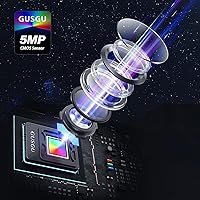
- Sensor: A 5-megapixel CMOS sensor handles image capture, offering improved light sensitivity compared to lower-spec budget webcams.
- Aperture: The fixed lens aperture is f/2, which allows a reasonable amount of light in for a camera in this price tier.
- Focal Length: The lens has a fixed focal length of 3.67mm, optimized for typical desktop working distances of roughly 1.5 to 3 feet.
- Ring Light: The built-in ring light offers two color temperatures — warm and white — each with three adjustable brightness levels controlled directly on the unit.
- Microphone: An onboard CVC (Clear Voice Capture) digital microphone provides noise reduction to suppress background hum and ambient noise during calls.
- Privacy Cover: A physical sliding shutter is built into the camera housing, mechanically blocking the lens when closed without requiring any software interaction.
- Connectivity: The camera connects via a standard USB-A cable and is plug-and-play compatible with no driver installation required on supported operating systems.
- Video Format: Captured and streamed video is encoded in MPEG format, compatible with all major conferencing and streaming platforms.
- Audio Format: The microphone supports AAC and MP3 audio output formats for broad software compatibility.
- Dimensions: The camera housing measures 3.94 x 3.94 x 3.94 inches, forming a compact near-cube shape suited to monitor clips and small desk setups.
- Weight: The unit weighs 4.8 oz (approximately 136g), making it light enough to mount on a monitor without stressing the bezel.
- Compatibility: The G910 is confirmed compatible with Windows, macOS, Linux, and most standard video conferencing applications including Zoom, Teams, and Google Meet.
- Accessories: The package includes a mini desktop tripod in addition to the standard monitor clip, offering two mounting options out of the box.
- Warranty: GUSGU provides a 3-year replacement warranty on this product, which is significantly longer than the 12-month coverage typical in this category.
- Item Weight: 4.8 ounces
- Cable Type: The camera uses a fixed, non-detachable USB-A cable, so compatibility with USB-C-only devices requires a separate adapter.
Related Reviews
GUSGU G920 Webcam

HuddleCamHD HC-WEBCAM-94


Lusinx TW 4K Webcam
UGREEN 25442 2K Webcam

Lumina LX011 4K Webcam

MOERTEK MT 4K Webcam

ZIQIAN 1080P USB-C Webcam

PEATOP 4K-C80CCMD Webcam