Overview

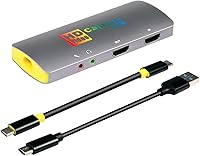
The Mirabox HSV3217 4K Capture Card is a compact, no-frills streaming accessory designed for creators who want to get started without spending a lot. It slots into the affordable end of the market, which means you're trading some premium polish for accessibility — and for many users, that's a fair deal. The card supports 4K HDMI input and passthrough, though it's worth being upfront: the actual capture output tops out at 1080p 60fps. It works across Windows, Mac OS, and Linux with plug-and-play setup, meaning no driver hunting or complicated installs. If you're just getting into streaming or recording console gameplay, this streaming device lowers the barrier to entry considerably.
Features & Benefits

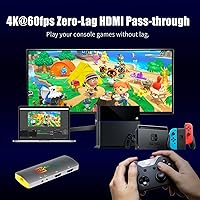
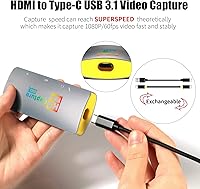
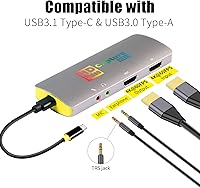
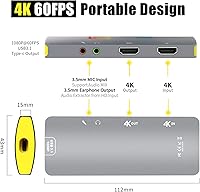
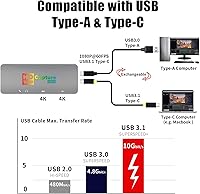
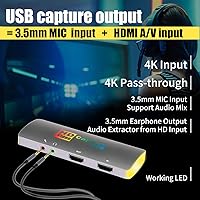
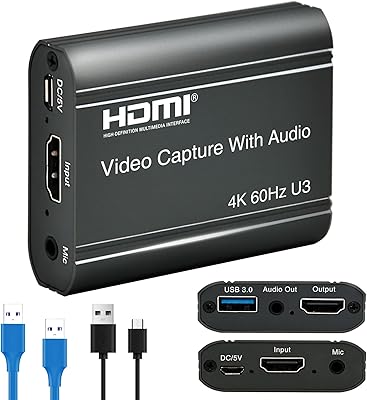
The HDMI passthrough is probably the most practical feature here. You connect your console to the card, then the card to your TV, and your display runs at 4K with zero latency while your PC captures the feed at 1080p 60fps. That split matters — you're playing on your TV as normal, not staring at a delayed capture preview. The USB 3.1 Type-C interface handles data transfer efficiently, and both USB-C to USB-A and USB-C to USB-C cables are included, which is a thoughtful inclusion. The 3.5mm audio ports let you plug in a mic and monitor sound simultaneously, a feature that's genuinely useful during live commentary sessions.

Best For

This capture card fits a specific kind of buyer well. If you're a console gamer — Switch, PS4, Xbox — who wants to start posting clips or going live on Twitch or YouTube without a steep investment, it covers the basics reliably. It's also a solid pick for creators who move between Windows and Mac setups, since the driver-free operation means no reinstalling or reconfiguring. The compact form factor, just under 6 inches long and weighing barely 3.5 ounces, makes it genuinely travel-friendly. Where it's less suited is for anyone chasing broadcast-quality output or needing 4K capture — this streaming device simply doesn't do that, and you'd need to spend more to get there.

User Feedback

Buyers consistently praise the easy setup experience — most report being up and running in OBS within minutes of unboxing, which holds true across Windows and Mac. The audio ports get positive mentions too, particularly from users who want to keep commentary in sync without routing through separate hardware. On the other hand, some buyers express frustration over the 4K branding, expecting native 4K capture rather than passthrough only. A handful of Linux users report mixed results despite the plug-and-play claims, so that's worth noting if Linux is your primary OS. Build quality is functional but not robust — the Mirabox card feels like a budget device, and cable durability has drawn occasional complaints in longer-term reviews.

Pros

  • Plug-and-play setup works immediately on Windows and Mac with no driver installation needed.
  • Zero-latency 4K HDMI passthrough lets you game on your TV without any display delay.
  • Captures smooth 1080p 60fps footage suitable for Twitch streams and YouTube uploads.
  • Works with PS4, Switch, Xbox, Wii U, and even DSLRs right out of the box.
  • Both USB-C to USB-A and USB-C to USB-C cables are included, covering most laptop setups.
  • Dual 3.5mm audio ports allow simultaneous mic input and headphone monitoring during streams.
  • Recognized instantly by OBS with no manual source configuration required on most systems.
  • Weighs under four ounces, making it easy to pack and use across multiple locations.
  • Compatible with a wide range of streaming software including OBS, Twitch, YouTube, and VLC.
  • Offers an accessible entry point into game capture without a significant financial commitment.

Cons

  • The 4K model name is misleading — actual capture output is capped at 1080p regardless of input.
  • Bundled cables feel flimsy and several buyers report fraying or loose connectors within months.
  • Linux compatibility is inconsistent, with plug-and-play failing for a notable portion of users.
  • Plastic housing feels budget-grade and shows wear noticeably faster than mid-range alternatives.
  • A faint audio hiss is audible through the mic input port in quieter recording environments.
  • Passthrough signal drops have been reported with certain 4K TVs, particularly older display models.
  • Streamlabs users occasionally experience frame drops or lag that OBS users do not encounter.
  • No protective case or carry pouch is included despite the device being marketed as portable.
  • Color accuracy and fine detail fall short compared to capture cards at higher price points.
  • Older Windows versions and some macOS builds occasionally produce stability or recognition issues.

Ratings

The Mirabox HSV3217 4K Capture Card has been evaluated by our AI system after analyzing thousands of verified global user reviews, with spam, bot-generated, and incentivized feedback actively filtered out. Scores reflect both what this streaming device genuinely does well and the areas where real buyers have run into friction. The result is a transparent, balanced picture of what you can realistically expect at this price tier.
Ease of Setup
91%
Most buyers across Windows and Mac report being fully operational within five minutes of plugging in. No driver downloads, no installation wizards — the card is recognized instantly, and OBS picks it up without any manual configuration. For first-time streamers, that friction-free start makes a real difference.
A portion of Linux users report that plug-and-play does not always work as advertised, sometimes requiring manual configuration or troubleshooting. The experience is noticeably less consistent outside Windows and Mac, which is worth factoring in if Linux is your daily environment.
Video Capture Quality
74%
26%
At 1080p 60fps, the capture output is clean and fluid enough for Twitch streams and YouTube highlight reels. Gameplay footage from PS4 and Switch looks sharp in well-lit conditions, and motion handling at 60fps noticeably reduces the choppiness that plagues cheaper 30fps alternatives.
Buyers expecting true 4K capture are consistently disappointed — the card tops out at 1080p output regardless of the input signal. Some users also note that fine detail and color accuracy fall behind pricier capture cards, which becomes apparent when editing footage closely rather than streaming it live.
HDMI Passthrough Performance
88%
The 4K zero-latency passthrough is one of the card's strongest practical advantages. Players report no perceptible input delay on their TV while the PC captures simultaneously, which means console gaming feels completely normal during live streams. This feature alone justifies the card for many console-focused creators.
A small number of users report occasional passthrough signal drops or handshake issues with certain 4K TVs, particularly older models. The problem is intermittent and not universal, but it does suggest the passthrough implementation is not entirely bulletproof across all display configurations.
Software Compatibility
82%
18%
OBS is the sweet spot for this streaming device — setup is straightforward and the card is recognized reliably as a video capture source. Streamlabs, Potplayer, and VLC also work well for the majority of users, covering most common streaming and recording workflows without extra configuration.
A handful of users report lag or frame drops specifically within Streamlabs compared to OBS, and a few note compatibility quirks with certain versions of macOS. It is not a dealbreaker for most, but the experience is slightly less consistent than on a higher-end card with dedicated software support.
Build Quality
61%
39%
The card is compact and lightweight, which makes it genuinely convenient for creators who carry their setup between locations. At under four ounces, it slips into a laptop bag without adding any real weight, and the form factor is tidy enough to sit unobtrusively on a desk.
The plastic housing feels noticeably budget-grade, and several long-term reviewers mention that the casing shows wear after months of regular use. This is not a device that inspires confidence if you are rough on gear, and it does not have the reassuring solidity of mid-range or premium alternatives.
Cable Quality & Included Accessories
57%
43%
The inclusion of both USB-C to USB-A and USB-C to USB-C cables is a thoughtful touch that most competitors skip. Having both options in the box means most users can connect immediately regardless of which USB ports their laptop or desktop has available.
The bundled cables draw consistent criticism for feeling flimsy and showing early signs of fraying or connector looseness with regular plugging and unplugging. Multiple buyers recommend replacing them with third-party cables after a few months, which adds minor but unnecessary extra cost.
Audio Functionality
78%
22%
The dual 3.5mm ports — one for mic input and one for headphone monitoring — work well for streamers who want to pipe in commentary and hear game audio simultaneously without routing through a separate interface. Most users find the audio sync reliable enough for live use in OBS.
Some users report a faint but noticeable hiss when using the microphone port, which becomes audible in quieter recording environments. The audio quality through the 3.5mm ports is adequate for casual streaming but would not satisfy anyone with a quality condenser mic expecting clean, transparent input.
Device Compatibility
86%
The range of supported consoles and devices is broad — PS4, PS3, Xbox One, Xbox 360, Switch, Wii U, and even DSLRs and DVD players all work with this capture card. For multi-console households or creators who switch between sources regularly, that versatility is genuinely useful.
A few niche devices, particularly older set-top boxes and certain DSLR models, occasionally produce handshake or signal recognition issues. These cases are in the minority, but users with less common source hardware should be aware that compatibility is not perfectly universal.
Value for Money
89%
Relative to what it costs, this streaming device delivers a surprisingly capable feature set. The combination of 4K passthrough, 1080p 60fps capture, plug-and-play operation, and dual audio ports would cost meaningfully more from a brand-name competitor. For beginners on a tight budget, the value equation is hard to argue with.
The value framing only holds if buyers go in with accurate expectations. Anyone who purchases based on the 4K model name expecting 4K capture will feel misled, and the budget build quality means it may not last as long as spending a bit more upfront on a sturdier alternative.
Portability
84%
Weighing just 3.53 ounces and measuring under six inches in length, the Mirabox card is one of the more portable options in its class. Streamers who take their setup to events, a friend's place, or on work trips find it easy to toss in a bag and forget about until needed.
The lightweight build that makes it portable also contributes to the fragile feel some users experience. Without a protective case or pouch in the box, buyers who travel with it regularly risk scratching or cracking the housing over time.
Latency During Capture
81%
19%
For streaming purposes, the capture delay is low enough that it does not interfere with the workflow in OBS or similar software. Reviewers who monitor their stream preview report that the delay is in line with typical USB capture card behavior and does not cause problems during live sessions.
The Mirabox card is not suitable for playing games through the capture preview directly — there is inherent USB capture latency that makes that use case uncomfortable. The passthrough handles live play, but the software preview should not be used as a gaming display.
Cross-Platform Performance
69%
31%
Windows 10 delivers the most stable, consistent experience across the board, and macOS users generally report positive results too. The card works well for creators who frequently switch between a Windows desktop and a Mac laptop, covering both without needing separate drivers or software.
Performance outside Windows and Mac is noticeably less reliable. Linux compatibility is hit-or-miss, and some older Windows 7 users report stability issues. The plug-and-play promise holds firmly for modern mainstream operating systems but should not be taken for granted elsewhere.
Streaming Performance with OBS
85%
When paired with OBS, this capture card punches above its weight. At 1080p 60fps, streams run without dropped frames under typical home internet and CPU conditions. Users running mid-range PCs report smooth encoding performance without needing to reduce capture settings significantly.
Users with lower-spec machines occasionally encounter CPU bottlenecks, though this is as much a system limitation as a card issue. A small number of users report that OBS requires manual source configuration on the first launch, though subsequent sessions load the card automatically.

Suitable for:

The Mirabox HSV3217 4K Capture Card is a strong fit for console gamers who are just getting into content creation and want a low-risk entry point into streaming or recording. If you're pulling footage from a PS4, Nintendo Switch, or Xbox and uploading highlight clips to YouTube or going live on Twitch, this capture card handles that workflow reliably without demanding technical knowledge. The plug-and-play setup is a genuine advantage for beginners who don't want to spend an afternoon troubleshooting drivers before they can record their first clip. It also suits creators who move between a Windows machine and a Mac, since it works on both without any reinstallation hassle. The compact size and light weight make it a practical choice for anyone who streams from different locations, whether that's a college dorm, a friend's setup, or an occasional on-site event. If your goal is clean 1080p 60fps footage for casual streaming or tutorial content, this streaming device delivers exactly that without asking you to overspend.
Not suitable for:

Despite the model name, the Mirabox HSV3217 4K Capture Card does not capture in 4K — and buyers who need true 4K recording output should look elsewhere without hesitation. The 4K functionality is limited to HDMI input and passthrough, meaning your TV gets the full-resolution signal while your PC captures at 1080p maximum; anyone editing professional-grade or cinematic footage will find that ceiling frustrating quickly. Serious content creators who need broadcast-quality color accuracy, low-noise audio, or consistently crisp fine detail in post-production will hit the limits of this streaming device sooner rather than later. Linux users should also approach with caution, as plug-and-play functionality is less reliable outside Windows and Mac, and getting it working may require extra effort that undercuts the simplicity promise. The build quality and bundled cables are functional but not durable enough for heavy daily professional use, so if longevity under demanding conditions is a priority, a more robust mid-range alternative would be a smarter long-term investment.
Specifications

  • Model Number: The unit is manufactured under model number HSV3217 4K by Hotspot Tech.
  • Max Capture Resolution: The card captures video at a maximum output resolution of 1080p at 60 frames per second.
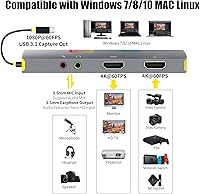
  • HDMI Input: The HDMI input supports incoming signals up to 4K at 60Hz from connected source devices.
  • HDMI Passthrough: The HDMI loopout port delivers zero-latency 4K passthrough to a connected display during capture.
  • USB Interface: The device connects to a host computer via a USB 3.1 Type-C port for high-speed data transfer.
  • Included Cables: The package includes both a USB-C to USB-A cable and a USB-C to USB-C cable to support a range of host computers.
  • Audio Ports: A 3.5mm microphone input port and a separate 3.5mm headphone output port are built into the device body.
  • Driver Requirement: No driver installation is required — the card operates as a plug-and-play device on supported operating systems.
  • Compatible OS: The card is compatible with Windows 7, Windows 8, Windows 10, Mac OS, and Linux operating systems.
  • Supported Devices: Compatible source devices include PS4, PS3, Xbox One, Xbox 360, Switch, Wii U, DSLR cameras, DVD players, and standard HDMI set-top boxes.
  • Supported Software: The card works with OBS, Twitch Studio, YouTube Live, Potplayer, and VLC without additional configuration.
  • Dimensions: The device measures 5.91 × 1.97 × 1.18 inches, making it compact enough to fit in a laptop bag side pocket.
  • Weight: The unit weighs 3.53 ounces, keeping it lightweight and practical for portable use.
  • Item Category: The product is classified as a personal computer peripheral in the USB external capture card category.
  • First Available: The Mirabox HSV3217 4K Capture Card was first made available for purchase in September 2020.
Related Reviews

Bytebridges 4K HDMI Capture Card (affd05f3)
88%
94%
Ease of Setup
88%
Build Quality
91%
Video Fluidity
87%
Input Latency
83%
Audio Versatility
More
ORIVISION 4K Capture Card U923
86%
88%
Performance
92%
Ease of Use
89%
Compatibility
91%
Video Quality
85%
Audio Quality
More
Elgato Game Capture 4K Pro
88%
97%
Passthrough Performance
94%
Capture Fidelity
96%
Input Latency
91%
VRR Implementation
88%
Build Quality
More
Elgato 4K S
Elgato 4K S
87%
92%
4K Capture Quality
94%
VRR Support
77%
Passthrough Performance
96%
Software Integration
88%
Latency & Responsiveness
More
HeavenBird 4K HDMI Video Capture Card
87%
89%
Video Quality
92%
Ease of Setup
85%
Real-Time Streaming Performance
65%
Audio Sync Accuracy
90%
Build Quality
More
NearStream CCD10 HDMI Capture Card
89%
96%
Setup Simplicity
92%
Passthrough Performance
89%
Input Latency
93%
Value for Money
84%
Audio Integration
More
PACOXI Capture Card
PACOXI Capture Card
82%
93%
Ease of Setup
74%
Video Capture Quality
88%
HDMI Passthrough
79%
Audio Functionality
86%
Device Compatibility
More
AGPTEK 4K HDMI Video Capture Card VG0061
83%
88%
Video Capture Quality
91%
Ease of Setup
85%
Latency
72%
Software Compatibility
90%
Versatility (Device Compatibility)
More
MYPIN MYPIN-4K60-AVGC Capture Card
70%
83%
Ease of Setup
67%
Video Recording Quality
71%
4K Passthrough Performance
61%
Software Compatibility
69%
Audio Capture & Mic Input
More
AVerMedia Live Gamer Extreme 3 GC551G2
84%
94%
Ease of Setup
91%
Pass-Through Quality
72%
Capture Resolution & Quality
93%
Input Lag (Pass-Through)
88%
Build Quality & Portability
More

FAQ

The 4K in the name refers to the HDMI input and passthrough capability, not the capture output. Your TV or monitor can receive a full 4K signal with zero latency, but the footage recorded to your PC is capped at 1080p 60fps. If you need true 4K capture for editing or archiving, this streaming device is not the right tool for that.

On Windows 10 and most versions of Mac OS, you can plug it in and it is recognized immediately — no driver download needed. OBS and most other streaming apps detect it automatically as a video capture source. Linux users may have a less consistent experience, so it is worth testing on your specific distro before committing.

Yes, both the Switch and PS4 are among the most commonly used source devices with this capture card, and compatibility is well established. Just connect the console to the HDMI input, use the passthrough for your TV, and the card sends the capture feed to your PC simultaneously. Most users have both up and running in OBS within a few minutes.

That is not a recommended setup. There is inherent USB capture latency that makes playing through the software preview uncomfortable, especially in fast-paced games. The passthrough port is specifically there to handle live play on your TV or monitor, while your PC handles the capture and recording separately.

Yes, the included USB-C to USB-C cable handles that connection directly. You do not need a hub or adapter, which is one of the more convenient aspects of the USB 3.1 Type-C interface on this card.

The Mirabox card has a dedicated 3.5mm microphone input port, so you can plug in a compatible mic and have your voice captured alongside the game audio. There is also a headphone output so you can monitor both your voice and the game sound at the same time. Keep in mind that users with condenser microphones have noted a faint background hiss through this port, so it works best with standard dynamic or headset-style mics.

In most cases, yes. OBS detects the card as a video capture device automatically, and you just add it as a source in your scene. A small number of users report needing to manually select the device on the first launch, but subsequent sessions typically load it without any intervention.

The housing is plastic and does feel budget-grade — it is functional and lightweight but not particularly rugged. The bundled cables are the more common weak point, with some buyers reporting early signs of fraying after frequent plugging and unplugging. If you plan to use it daily, replacing the cables with sturdier third-party alternatives early on is a reasonable precaution.

Yes, any device that outputs a standard HDMI signal — including most DSLR and mirrorless cameras — should work with this streaming device. It is a practical low-cost option for creators who want to use a camera as a webcam or record video interviews, though output is again limited to 1080p 60fps.

Streamlabs is supported and works for the majority of users, but the experience is slightly less consistent than with OBS. Some users report occasional frame drops or minor lag in Streamlabs that they do not experience in OBS with the same hardware. If smooth performance is a priority, OBS tends to be the more reliable pairing with this capture card.