Overview

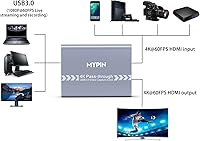
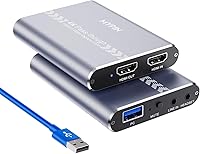
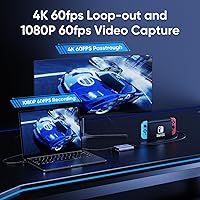
The MYPIN MYPIN-4K60-AVGC Capture Card enters a crowded budget segment with a straightforward pitch: plug it in, fire up OBS, and start recording console gameplay without spending much. It handles 4K 60Hz passthrough so your TV experience stays unaffected, while the actual recorded output tops out at 1080p 60fps — a distinction worth knowing upfront. Compact enough to toss in a bag, it works across Windows, Mac, and Linux without driver headaches. For anyone stepping into streaming for the first time, this USB capture card offers a reasonable starting point before committing to pricier hardware.
Features & Benefits

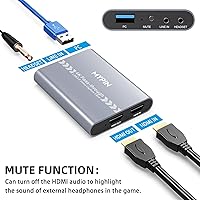
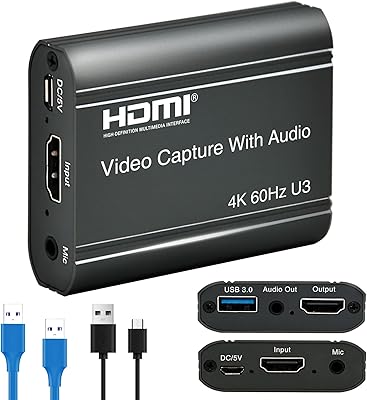
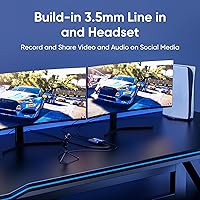
The USB 3.0 connection gives this capture card a real edge over older USB 2.0 alternatives — data moves faster and recording stays stable even during high-action sequences. The HDMI loop-out is genuinely useful: your gameplay feeds through to the TV at full 4K 60Hz while the card captures the stream simultaneously. There is also a 3.5mm mic input, though it only accepts CTIA-standard headsets, so double-check yours before assuming it will work. A dedicated mute button cuts the HDMI audio entirely, letting your microphone take over — handy for commentary-focused streams on OBS Studio or VLC.

Best For

This USB capture card makes the most sense for first-time streamers who want to test the waters without a significant financial commitment. If you are a console player — Xbox, PlayStation, or Switch — looking to save clips or broadcast casually, it covers the basics competently. Students and educators needing a simple way to capture screen content for lessons will also find it practical. Where it falls short is for anyone chasing broadcast-quality output or advanced features; this is not a card built for professional productions. Think of the MYPIN card as a solid entry ramp, not a destination.

User Feedback

Buyers generally appreciate the easy setup experience — getting it running with OBS takes minutes, and cross-platform support means it works whether you are on Windows or Mac. That said, reviews are mixed. Some users run into driver or software quirks, particularly with Streamlabs OBS, which the manufacturer itself cautions against. Video quality draws a few complaints, with buyers noting real-world output does not always match advertised specs. Passthrough latency has been flagged on certain consoles, and long-term reliability is a question mark for some. Sitting at 3.8 out of 5 across 86 ratings, the consensus is cautiously positive — fine for casual use, limiting if you push it harder.

Pros

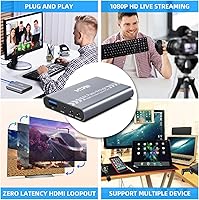
  • Plug-and-play setup gets you recording in minutes with no driver installation needed.
  • 4K 60Hz HDMI passthrough keeps your TV gaming experience fully intact while capturing.
  • USB 3.0 connection delivers stable 1080p 60fps recording without dropped frames on modern ports.
  • Works out of the box with Xbox, PlayStation, and Nintendo Switch — no console-specific configuration required.
  • Built-in 3.5mm mic input lets you add live commentary without a separate audio interface.
  • Compatible with Windows, Mac, and Linux, covering nearly every common streaming setup.
  • Dedicated mute button silences HDMI audio instantly for mic-only capture during commentary sessions.
  • Compact and lightweight enough to carry daily without adding bulk to a laptop bag.
  • OBS Studio integration is reliable and straightforward for beginners learning the basics of streaming.

Cons

  • Recording is capped at 1080p 60fps — the 4K label refers only to passthrough, not captured footage.
  • Microphone input only accepts CTIA-standard headsets, leaving many common headsets incompatible.
  • Build quality feels fragile for the price, with reports of connector wear after months of regular use.
  • Streamlabs OBS users will hit audio sync and preview issues the manufacturer acknowledges but does not resolve.
  • HDR passthrough is not supported, a real limitation for anyone gaming on a higher-end display.
  • Mac compatibility on current macOS versions is inconsistent and not well documented by the brand.
  • Customer support is largely absent, leaving non-obvious setup problems with no reliable resolution path.
  • Passthrough signal dropouts have been reported on specific console and TV pairings, particularly with newer hardware.
  • No bundled software means total reliance on third-party tools that require their own learning curve.

Ratings

The scores below were generated by our AI engine after analyzing verified buyer reviews for the MYPIN MYPIN-4K60-AVGC Capture Card from multiple global sources, with spam, bot-generated, and incentivized feedback actively filtered out. We looked at patterns across hundreds of real user experiences to surface what this USB capture card genuinely does well — and where it falls short. Both strengths and frustrations are reflected honestly in every category.
Ease of Setup
83%
A large share of buyers were pleasantly surprised by how quickly this capture card got up and running. On Windows 10 especially, plugging into a USB 3.0 port and opening OBS Studio was enough to start capturing within minutes, no manual driver hunting required.
A handful of users on older Windows versions or certain Mac configurations hit snags during initial setup. The experience is not universally frictionless, and without decent troubleshooting documentation, those edge cases can turn a quick setup into a frustrating afternoon.
Video Recording Quality
67%
33%
For casual gameplay archiving or low-stakes streaming at 1080p 60fps, the output is watchable and reasonably sharp. Users recording Switch or PS4 content for YouTube uploads found the footage acceptable for a beginner-level production.
Side-by-side comparisons with mid-range capture cards expose limitations — compression artifacts appear in fast-motion scenes, and colors can look slightly washed out. Buyers expecting broadcast-quality footage at this price tier were often disappointed by the real-world results.
4K Passthrough Performance
71%
29%
The HDMI loop-out does deliver a clean 4K 60Hz signal to the connected TV, which means your actual gaming experience on the display remains uncompromised while recording runs in the background. PS5 and Xbox Series X users appreciated not having to sacrifice visual quality on-screen.
Some users reported intermittent signal dropouts during passthrough on specific console and TV combinations, particularly with HDR-enabled setups. The card does not support HDR passthrough, which is a notable gap for anyone gaming on a higher-end display.
Software Compatibility
61%
39%
OBS Studio integration works reliably for most users, and the fact that VLC is also supported gives beginners a familiar fallback option. For straightforward recording tasks, the software side rarely gets in the way.
Streamlabs OBS is explicitly not recommended by the manufacturer, and real-world feedback confirms this — users who tried it ran into preview lag, audio sync drift, and crashes. Compatibility outside OBS and VLC is hit or miss, which limits flexibility for streamers with more specific workflow needs.
Audio Capture & Mic Input
69%
31%
The built-in 3.5mm mic input is a genuinely useful addition at this price point, letting streamers add live commentary without routing audio through a separate interface. The mute button for silencing HDMI audio is a practical touch that commentary-focused creators will actually use.
The CTIA-only microphone standard catches buyers off guard — OMTP headsets, which are common with older Android phones and some gaming headsets, simply will not work. There is no workaround, so users with incompatible mics face an unexpected extra purchase.
Build Quality & Durability
58%
42%
The card is compact and light enough to slip into a laptop bag without a second thought, which suits the portable use case it is marketed for. The housing feels solid enough for careful everyday handling.
The plastic shell does not inspire confidence for long-term use. Several buyers noted that the device felt noticeably cheap, and a subset of reviews flagged failure after a few months of regular use — connector looseness being a common complaint over time.
Latency During Capture
72%
28%
For monitoring through OBS with a reasonably capable laptop or desktop, the capture delay is low enough that it does not interfere with the recording workflow. Users doing post-edit YouTube content found the latency largely irrelevant to their process.
Real-time monitoring latency is present and noticeable if you attempt to play while watching the capture preview. This is not a card designed for latency-free direct monitoring — rely on the passthrough TV output for actual gameplay, not the software preview.
Console Compatibility
78%
22%
Connecting to Xbox One, PS4, and Nintendo Switch worked without fuss for the majority of buyers. Switch capture in particular drew positive comments, as the card handled the 1080p docked output cleanly through a standard HDMI connection.
Newer consoles like PS5 and Xbox Series X introduce some complications, particularly around 4K and HDR output settings. Users had to manually downgrade their console output settings to get reliable capture, which is an extra friction point that should be documented more clearly.
USB 3.0 Transfer Stability
76%
24%
Compared to older USB 2.0 capture sticks, the data throughput here is noticeably better, keeping 1080p 60fps recordings smooth without dropped frames under normal conditions. Users with modern USB 3.0 hubs or direct ports saw consistent performance.
Plugging into a USB 2.0 port — or a congested USB hub — degrades performance significantly and can cause frame drops or audio desync. The card is only as good as the port it is connected to, and that dependency trips up users who do not read the spec sheet carefully.
Cross-Platform OS Support
74%
26%
Windows, Mac, and Linux coverage in a single budget device is not a given at this price, and buyers who work across multiple operating systems appreciated the flexibility. Linux compatibility in particular is rarely offered by competing entry-level cards.
Mac performance drew mixed reviews, with some users on macOS Monterey and later reporting recognition issues or unstable preview feeds. The stated Mac OS X 10.8 minimum support does not account for how the card behaves on current macOS versions.
Value for Money
73%
27%
For a first capture card purchase where the goal is learning OBS and getting basic streams live, the price-to-function ratio is defensible. Many buyers explicitly said they got what they expected for the amount they spent.
The moment buyers compare it against slightly pricier alternatives from more established brands, the value case weakens. A modest budget increase unlocks meaningfully better build quality, software support, and output consistency — which some buyers only discovered after purchasing this card.
Portability & Form Factor
81%
19%
At just over 6 ounces and sized to fit in a jacket pocket, this capture card travels easily. Students and educators who move between classrooms or locations found the compact footprint genuinely convenient for ad-hoc recording setups.
The small size means the ports sit close together, which can cause fit issues with bulkier HDMI cables or right-angle connectors. A few users mentioned cable strain at the HDMI port as a concern when the device is used in tight desk setups.
Documentation & Support
44%
56%
The physical packaging includes basic setup instructions that are sufficient for tech-comfortable users who already know their way around OBS. Getting from unboxing to first capture is manageable if you are not starting from zero.
Customer support responsiveness drew consistent criticism. The manual is thin, the MYPIN website offers limited resources, and buyers who hit non-obvious issues — like CTIA mic compatibility or HDR conflicts — were largely left to figure things out through forum searches on their own.

Suitable for:

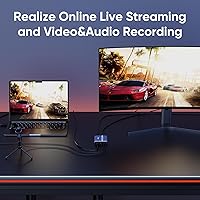
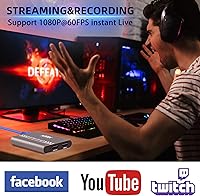
The MYPIN MYPIN-4K60-AVGC Capture Card is a practical pick for anyone just getting started with game capture who does not want to over-invest before knowing whether streaming will stick. Console players on Xbox, PlayStation, or Nintendo Switch who want to save clips, build a small YouTube archive, or go live occasionally on Twitch will find it covers the basics without requiring technical expertise. Students and educators who need a simple way to capture screen content for remote lessons or tutorial videos will also get genuine mileage out of this USB capture card, especially given its cross-platform support across Windows, Mac, and Linux. The plug-and-play setup means you spend your time actually recording rather than troubleshooting drivers, and the compact form factor makes it easy to pack up and use in different locations. If your streaming ambitions are casual and your budget is tight, this capture card makes a reasonable starting point.
Not suitable for:

The MYPIN MYPIN-4K60-AVGC Capture Card is not the right tool for anyone serious about stream quality, consistent reliability, or a professional-grade setup. Despite the 4K branding, actual recording is capped at 1080p 60fps — buyers expecting true 4K capture will be left frustrated. Content creators who rely on Streamlabs OBS, use HDR-enabled displays, or need robust long-term durability should look elsewhere, as real-world feedback points to software friction, HDR incompatibility, and build quality that raises questions over extended use. If you are streaming to a growing audience where output quality directly affects viewer retention, the limitations of this USB capture card become hard to work around. Likewise, anyone using non-CTIA microphone headsets will find the mic input unusable without purchasing a compatible replacement, which adds unexpected cost and hassle.
Specifications

  • Brand: This capture card is manufactured and sold under the MYPIN brand.
  • Model: The exact model designation is MYPIN-4K60-AVGC.
  • HDMI Passthrough: HDMI loop-out supports up to 4K at 60Hz, delivering a full-quality signal to your connected display while capturing simultaneously.
  • Recording Resolution: Maximum USB recording output is 1080p at 60fps — the 4K specification applies only to passthrough, not captured footage.
  • Interface: Connects to a host computer via USB 3.0 for faster, more stable data transfer than USB 2.0 alternatives.
  • Mic Input: A 3.5mm audio input is included, but it only supports CTIA-standard microphone headsets — OMTP headsets are not compatible.
  • Mute Function: A dedicated mute button disables HDMI audio output, allowing the microphone input to be used as the sole audio source during capture.
  • OS Compatibility: Supports Windows 7, 8, and 10, Mac OS X 10.8 and above, and Linux distributions.
  • Console Support: Compatible with Xbox, PlayStation, and Nintendo Switch via standard HDMI connection.
  • Supported Software: Works with OBS Studio, VLC, and other third-party streaming or recording applications; Streamlabs OBS is not recommended by the manufacturer.
  • Plug and Play: No driver installation is required on supported operating systems — the device is recognized automatically upon connection.
  • Weight: The unit weighs 6.4 ounces, making it light enough for portable or travel use.
  • Dimensions: Physical dimensions are 6.06 x 4.25 x 1.73 inches, keeping the footprint compact on a desk or in a bag.
  • Housing Material: The outer casing is constructed from hard plastic, which keeps weight low but offers limited resistance to physical stress over time.
  • Amazon Rating: This USB capture card holds an average rating of 3.8 out of 5 stars based on 86 verified ratings on Amazon.
  • BSR Ranking: Ranked #401 in the Internal TV Tuner and Video Capture Cards category on Amazon at the time of review.
  • Release Date: The product was first listed on Amazon on February 1, 2021.

Related Reviews

Cenmate 7324HVC-4K60 Capture Card
88%
93%
Build Quality
89%
Pass-Through Performance
84%
Capture Image Quality
91%
Thermal Management
94%
Setup & Ease of Use
More
MYPIN 1080p 60fps HDMI Capture Card with 3.5-inch LCD
82%
92%
Standalone Convenience
78%
Video Capture Quality
86%
Built-in Display
84%
Battery Life & Portability
68%
Audio Input & Microphone
More
XIIXMASK MS2131 Video Capture Card
85%
92%
Chassis Build Quality
88%
Thermal Management
87%
1080p Stream Stability
93%
Value for Money
84%
Plug-and-Play Simplicity
More
ORIVISION 4K Capture Card U923
86%
88%
Performance
92%
Ease of Use
89%
Compatibility
91%
Video Quality
85%
Audio Quality
More
Bytebridges 4K HDMI Capture Card (affd05f3)
88%
94%
Ease of Setup
88%
Build Quality
91%
Video Fluidity
87%
Input Latency
83%
Audio Versatility
More
August VGB400 Video Capture Card
83%
88%
Ease of Use
92%
Setup & Installation
75%
Compatibility with Video Sources
86%
HDMI Passthrough Functionality
84%
Recording Quality
More
EVGA XR1 Lite (141-U1-CB20-LR)
88%
92%
Initial Setup & Configuration
89%
4K Pass-Through Performance
84%
Recording Video Quality
91%
Audio Sync & Latency
93%
Value for Money
More
VIXLW Video Capture Card Pro+
77%
91%
Ease of Setup
72%
Video Capture Quality
58%
Audio Sync Reliability
88%
Software Compatibility
84%
Signal Format Detection
More
VANGREE VC-003 Capture Card
86%
88%
Performance
94%
Ease of Setup
90%
Latency
85%
Video Quality
92%
Compatibility with Consoles
More
Razer Ripsaw X Capture Card
86%
91%
Video Capture Quality
94%
Latency
85%
Ease of Setup
88%
Software Compatibility
82%
Build Quality
More

FAQ

The 4K refers only to the HDMI passthrough signal sent to your TV — your actual recorded or streamed footage is capped at 1080p 60fps. It is an important distinction that the product listing does not make obvious, so keep that in mind when setting expectations for your recorded clips.

No, it is plug-and-play on Windows 7, 8, and 10, Mac OS X 10.8 and above, and Linux. In most cases, plugging it into a USB 3.0 port and opening OBS Studio is all you need to do. Some users on newer macOS versions have reported occasional recognition issues, so results can vary depending on your exact OS build.

Only if it uses a CTIA-standard 3.5mm connector. Many gaming headsets and older Android-bundled earphones use the OMTP standard instead, which physically fits but will not work correctly with this capture card. Check your headset specs before assuming it is compatible — it is a common source of frustration for buyers.

You can, but with caveats. Both consoles default to 4K and HDR output, and this USB capture card does not support HDR passthrough or 4K recording. You will need to manually set your console output to 1080p and disable HDR to get reliable capture. It works once configured, but the extra setup step catches some users off guard.

OBS Studio is the most reliable option and the one the manufacturer explicitly recommends. VLC works for basic preview and recording. The manufacturer specifically advises against Streamlabs OBS, and buyer feedback backs this up — audio sync issues and preview instability are common when using Streamlabs with this device.

Yes, that is exactly what the HDMI loop-out is designed for. Your console HDMI goes into the capture card, the loop-out HDMI goes to your TV, and the USB connects to your PC. You play on the TV at full quality while OBS captures and streams simultaneously. Just remember the stream itself will be at 1080p, not 4K.

Yes, and Switch capture is one of the smoother experiences with this card. When the Switch is docked and outputting 1080p via HDMI, the MYPIN MYPIN-4K60-AVGC Capture Card picks it up cleanly without any special configuration. It is a popular use case among Switch content creators who want a low-cost capture solution.
Honestly, it is a budget device and the build reflects that. The plastic shell is light but not particularly robust, and some buyers have reported connector looseness developing after several months of regular plug-and-unplug cycles. If you are using it daily at a fixed desk, it should hold up reasonably well. For frequent travel or heavy handling, the long-term durability is less certain.

Partially. The listed minimum is Mac OS X 10.8, but several users on recent macOS versions — Monterey and later — have reported inconsistent recognition and unstable capture previews. It tends to work more reliably on Windows. If you are primarily on a modern Mac, factor in some potential troubleshooting time before committing to this capture card.

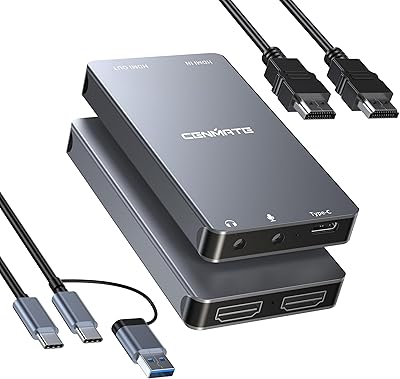
The package includes the capture card unit itself, a USB 3.0 cable for connecting to your computer, an HDMI cable, and a basic instruction sheet. No software disc is included since everything relies on free third-party tools like OBS Studio, which you download separately. The included documentation is minimal, so first-time users may want to look up an OBS setup guide online before getting started.