Overview

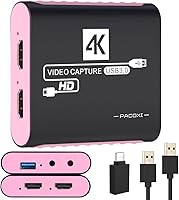
The PACOXI Capture Card entered the market in early 2024 as a no-fuss option for beginners who want to start streaming without a big upfront investment. It records footage at full 1080p 60fps while feeding a 4K passthrough signal to your TV or monitor, so your display quality stays intact during play. The compact, pink-tinted body is a nice contrast to the generic black dongles that dominate this price range. Thanks to its plug-and-play design, you just connect it to a USB 3.0 port and you are ready to go — no driver hunting, no software installs. For a first capture card, it holds its own at this tier.

Features & Benefits

What stands out about this capture card is how much ground it covers at an accessible price. The HDMI passthrough is the headline feature — your console video feeds directly to your TV with no perceptible delay, while capture happens independently on your PC. That distinction matters; do not confuse it with lag-free capture preview, which still depends on your software pipeline. A built-in 3.5mm audio jack lets you plug in a microphone or monitor sound directly, something cheaper alternatives often skip entirely. It works out of the box with OBS, VLC, and most major streaming platforms, and the included USB-C adapter is a thoughtful addition for modern laptop users with limited ports.

Best For

This streaming adapter is a natural fit for anyone new to capture cards who wants a low-risk starting point. Console players — whether on a Switch, PS5, or Xbox — can clip and share gameplay without complicated setup or configuration. Students and remote workers have also found it useful for routing a clean HDMI signal into a PC for video calls or screen sharing. Its compact build means it travels well and fits easily into a laptop bag. If you are still deciding whether streaming is worth pursuing long-term, this is a sensible first step before committing to a higher-end investment with more demanding technical requirements.

User Feedback

Buyer sentiment leans positive overall, with much of the praise focused on how quickly people get up and running — some mention being live within minutes of unboxing. The 4K passthrough gets repeated nods, with users noting their TV picture stays sharp while they record separately. On the downside, a small number of buyers report inconsistent performance when connected through older USB hubs, and the card clearly works best plugged directly into a motherboard port. A few users expected more from capture quality on high-end rigs, which is a fair reminder this is an entry-level device. Most complaints reflect mismatched expectations rather than outright defects, which is telling for this price bracket.

Pros

  • Plug-and-play setup works out of the box — no driver downloads or manual configuration needed.
  • 4K HDMI passthrough keeps your TV display sharp while recording separately on your PC.
  • Compatible with a remarkably wide range of consoles, from PS5 and Switch down to older Xbox and Wii hardware.
  • Works immediately with OBS, Streamlabs, VLC, and most major streaming platforms without manual source tweaking.
  • Built-in 3.5mm audio jack lets you add basic commentary without routing through your PC headphone port.
  • USB-A to USB-C adapter included in the box covers modern laptop users without an extra purchase.
  • Compact enough to fit in a jacket pocket, making it genuinely useful for creators who move between locations.
  • Strong value proposition for a first capture card — includes everything needed to start streaming immediately.

Cons

  • Capture performance drops noticeably on PCs with older or congested USB controllers — direct motherboard ports are essential.
  • The passthrough delay-free experience applies to your TV only; software preview latency depends entirely on your PC.
  • Included USB cable is short, which can create awkward cable runs on larger desks.
  • Audio input via the 3.5mm jack is functional but limited — not suitable for serious commentary or podcast-style recording.
  • No color option other than pink, which will not suit every desk setup or professional environment.
  • Extended streaming sessions beyond a couple of hours can cause the dongle to warm up more than expected.
  • Sparse documentation makes software-side setup unclear for true beginners unfamiliar with OBS or Streamlabs.
  • Occasional compatibility issues reported with specific DSLR models and niche set-top boxes despite broad claimed support.

Ratings

The PACOXI Capture Card has been scored by our AI engine after processing verified buyer reviews from multiple global marketplaces, with spam, bot activity, and incentivized feedback actively filtered out. Ratings reflect real-world usage patterns from beginner streamers, console gamers, and casual content creators — not just spec sheets. Both the genuine strengths and the recurring frustrations are factored transparently into every score below.

Ease of Setup
93%
Users consistently report that getting started takes only a few minutes — plug it in, open OBS or your preferred software, and the device is recognized automatically. No driver downloads or manual configuration needed, which makes a real difference for first-timers who are not comfortable tinkering with system settings.
A small number of buyers on older Windows 7 machines or niche Linux distributions found the plug-and-play promise less reliable than expected. These edge cases are rare, but worth noting if your system is outside the mainstream Windows 10/11 and modern Mac range.
Video Capture Quality
74%
26%
For the price tier, capturing full-resolution 1080p footage at 60 frames per second delivers a smooth, watchable result that holds up well for YouTube uploads and live Twitch streams. Casual viewers will not notice quality shortfalls compared to more expensive cards.
Performance is noticeably sensitive to the host PC's USB controller quality. On older desktops or machines with congested USB bandwidth, some users report dropped frames or minor stutter during longer sessions. It is not a card that forgives a weak system.
HDMI Passthrough
88%
The 4K passthrough is a genuine highlight — gamers on PS5 or Switch can keep their TV display running at full quality while recording simultaneously, which is exactly what most console streamers need. The separation between display output and capture signal works reliably in everyday use.
It is important to set expectations correctly: the zero-latency benefit applies only to the passthrough to your TV, not to the capture preview window on your PC. New users sometimes expect both to be instant, and the software preview delay can catch people off guard initially.
Audio Functionality
79%
21%
Having a dedicated 3.5mm combo jack built into the dongle is genuinely useful — you can plug in a basic microphone or monitor your audio directly without routing everything through your PC's headphone port. For a compact streaming adapter at this price, that is a meaningful inclusion.
Audio quality via the 3.5mm input is functional but not exceptional. Users recording serious commentary or podcast-style content will likely notice limitations compared to dedicated audio interfaces. It works well for casual commentary but struggles to handle professional-level input.
Device Compatibility
86%
The breadth of supported consoles and devices is genuinely impressive for a budget dongle. Switch, PS5, PS4, Xbox, Steam Deck, and even older Wii hardware all connect without fuss, which makes this adapter unusually versatile compared to many similarly priced options on the market.
A handful of users flagged occasional recognition issues with certain DSLR models and older set-top boxes. Compatibility is broad but not universal, and some niche devices may require troubleshooting or may simply not work as expected.
Software Compatibility
91%
OBS, Streamlabs, VLC, Potplayer, and most major streaming tools detect this card immediately without any manual source configuration in most cases. For a beginner opening OBS for the first time, having the device show up automatically removes a real barrier to getting live.
Twitch Studio and some less common broadcast tools occasionally require users to manually select the correct video source, which can confuse first-time streamers. Documentation included in the box does not cover software-side setup in much depth.
Build Quality & Durability
67%
33%
The compact form factor feels reasonably solid for a lightweight USB dongle, and the connector housing does not feel flimsy during typical desktop use. For stationary setups or light travel use, most buyers find it holds up without issue over several months.
The plastic casing does show wear over time, and the USB cable included feels thinner than ideal for a device that may be frequently connected and disconnected. Users who travel frequently or handle their gear roughly may find durability a concern over a longer ownership period.
Portability & Form Factor
89%
Weighing under six ounces and small enough to drop into a jacket pocket, this streaming adapter genuinely earns its place in a travel kit. Students and remote workers who move between locations appreciate not needing to carry bulky PCIe cards or additional power adapters.
The compact size does mean the USB cable is relatively short, which can create cable management issues depending on your desk setup. A longer cable option in the box would have made the portable use case even more practical.
Value for Money
84%
Measured purely against what you get — passthrough, audio jack, broad compatibility, and plug-and-play convenience — the price-to-feature ratio is strong for an entry-level product. Buyers who approach it as a learning tool or starting point consistently rate it well on value.
Buyers who compare it against more established mid-range cards may feel the gap in performance is not worth overlooking. The value argument holds only as long as expectations are calibrated to the entry-level segment rather than professional-grade output.
Design & Aesthetics
78%
22%
The pink colorway is a genuine differentiator in a category dominated by plain black and grey hardware. Several buyers — particularly female content creators — mention choosing this card partly because it fits their setup aesthetic, which is a surprisingly underserved consideration in tech accessories.
For buyers who prefer neutral or darker setups, the pink finish may clash visually. There does not appear to be a standard black variant available, so color preference is effectively a non-negotiable factor in the purchase decision.
Streaming Platform Support
87%
YouTube, TikTok Live, and Twitch all work reliably when paired with compatible capture software. The setup process for going live on these platforms with this card is straightforward enough that new streamers can follow tutorials written for generic USB capture devices without modification.
Advanced platform features like multi-stream outputs or hardware-level encoding are not supported at this tier. Users wanting to push to multiple destinations simultaneously or offload encoding from their CPU will hit a ceiling quickly with this hardware.
Latency Performance
72%
28%
For the passthrough display signal, latency is imperceptible during normal gameplay, which is the primary use case most buyers care about. Playing fast-paced games on a PS5 or Switch without noticing any lag on your TV is a realistic expectation here.
Capture preview latency inside software like OBS varies based on system performance and is not governed by the hardware alone. Users running modest PCs sometimes experience a noticeable delay in the preview window, which can make live commentary timing difficult.
Package Contents
82%
18%
Including a USB-A to USB-C adapter in the box is a practical touch that competitors sometimes skip. Most buyers find everything they need to get started without a separate accessory run, which matters when you just want to unbox and use the device immediately.
The included USB cable, while functional, is on the shorter side. Users who need to route cables across a desk to reach their capture PC may need to source a longer replacement, which adds minor friction to an otherwise complete out-of-box experience.
Thermal Management
71%
29%
During typical one-to-two hour streaming sessions, the dongle stays reasonably cool and does not throttle performance in most reported use cases. Casual users streaming at standard settings rarely mention heat as a concern in their day-to-day experience.
Extended sessions beyond two hours, particularly at full 1080p 60fps, lead some users to notice the device warming up more than expected. While no thermal failures have been widely reported, sustained heavy use may affect long-term reliability for users who stream daily.

Suitable for:

The PACOXI Capture Card is a practical pick for anyone stepping into content creation without wanting to wrestle with complicated hardware or software configuration. Console players on Switch, PS5, Xbox, or Steam Deck who simply want to clip highlights or go live on YouTube and TikTok will find the setup refreshingly straightforward. Students and remote workers who need a clean HDMI video feed into their laptop for presentations, online classes, or video calls will also get real mileage out of this adapter. Travelers and creators on the move benefit from its compact, lightweight build — it slips into a bag without adding noticeable bulk. Anyone who is genuinely unsure whether streaming is a long-term hobby will appreciate having a low-stakes way to learn the basics of OBS and broadcast software before spending significantly more.

Not suitable for:

The PACOXI Capture Card is not the right tool for streamers who have outgrown basic 1080p output and are chasing broadcast-quality results or hardware encoding support. If your PC runs older USB controllers or relies on a USB hub to expand ports, you may encounter inconsistent performance that undermines the plug-and-play promise. Professional content creators who record long daily sessions will likely find the thermal behavior and capture ceiling limiting over time. Gamers who want a single card to handle multi-platform streaming simultaneously or offload encoding from their CPU entirely should be looking at a different category of hardware altogether. The pink colorway is also a fixed characteristic — buyers who need neutral hardware to fit a professional or monochrome setup have no alternative finish option to choose from.

Specifications

  • Brand: Manufactured and sold under the PACOXI brand, first listed on Amazon in January 2024.
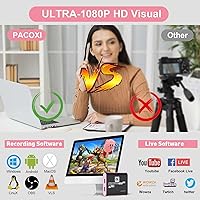
  • Capture Resolution: Records video at up to 1080p at 60 frames per second for smooth, full-HD footage.
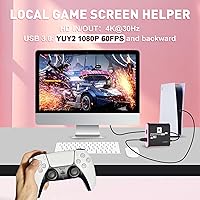
  • HDMI Passthrough: Supports 4K input and passthrough output at 30Hz, keeping your display at full quality while recording separately.
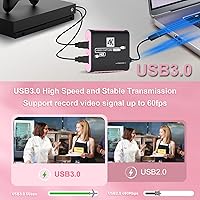
  • Interface: Connects to a host PC via USB 3.0 for fast data transfer and reduced risk of dropped frames.
  • Driver Requirement: Fully plug-and-play — no driver installation is required on any supported operating system.
  • Audio I/O: Features a built-in 3.5mm combo jack that supports both microphone input and headphone monitoring output.
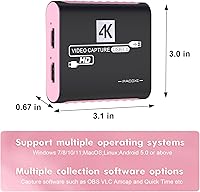
  • Compatible OS: Works across Windows 7, 8, 10, and 11, macOS, Linux, and Android 5.0 and above.
  • Supported Software: Compatible out of the box with OBS, Streamlabs, Twitch Studio, VLC, Potplayer, and YouTube Live.
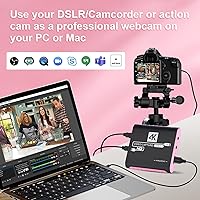
  • Device Support: Works with Nintendo Switch, PS4, PS5, Xbox One, Xbox 360, Steam Deck, Wii, DSLR cameras, and set-top boxes.
  • Color: Available in a pink finish — no alternative color variants are currently offered.
  • Weight: Weighs approximately 5.9 ounces, making it lightweight enough for travel or portable setups.
  • Package Dimensions: The retail package measures 5.67 x 4.96 x 1.3 inches, compact enough to store in a laptop bag pocket.
  • In-Box Contents: Includes the capture device, a USB 3.0 cable, a USB-A to USB-C adapter, and a printed user manual.
  • Model Number: Listed under model identifier 717225044954 for warranty and support reference purposes.
  • Amazon Ranking: Holds a position of #144 in the Internal TV Tuner and Video Capture Cards category on Amazon at time of review.
  • User Rating: Carries an average rating of 4.4 out of 5 stars based on 150 verified customer ratings on Amazon.

Related Reviews

XIIXMASK MS2131 Video Capture Card
85%
92%
Chassis Build Quality
88%
Thermal Management
87%
1080p Stream Stability
93%
Value for Money
84%
Plug-and-Play Simplicity
More
August VGB400 Video Capture Card
83%
88%
Ease of Use
92%
Setup & Installation
75%
Compatibility with Video Sources
86%
HDMI Passthrough Functionality
84%
Recording Quality
More
VIXLW Video Capture Card Pro+
77%
91%
Ease of Setup
72%
Video Capture Quality
58%
Audio Sync Reliability
88%
Software Compatibility
84%
Signal Format Detection
More
ORIVISION 4K Capture Card U923
86%
88%
Performance
92%
Ease of Use
89%
Compatibility
91%
Video Quality
85%
Audio Quality
More
Narvitech NJ300
Narvitech NJ300
85%
94%
Initial Setup Ease
88%
Recording Stability
92%
Passthrough Latency
86%
Party Chat Integration
67%
Thermal Management
More
VANGREE VC-003 Capture Card

86%
88%
Performance
94%
Ease of Setup
90%
Latency
85%
Video Quality
92%
Compatibility with Consoles
More
Qonakism Dual HDMI Capture Card
83%
91%
Video Quality
88%
Ease of Use
94%
Setup/Installation
89%
Latency
84%
Build Quality
More
EVGA XR1 Lite (141-U1-CB20-LR)
88%
92%
Initial Setup & Configuration
89%
4K Pass-Through Performance
84%
Recording Video Quality
91%
Audio Sync & Latency
93%
Value for Money
More
Bytebridges 4K HDMI Capture Card (affd05f3)
88%
94%
Ease of Setup
88%
Build Quality
91%
Video Fluidity
87%
Input Latency
83%
Audio Versatility
More
Razer Ripsaw X Capture Card
86%
91%
Video Capture Quality
94%
Latency
85%
Ease of Setup
88%
Software Compatibility
82%
Build Quality
More

FAQ

No, you do not. The PACOXI Capture Card is fully plug-and-play, meaning your operating system recognizes it automatically once connected via USB. You will still need streaming or recording software like OBS to actually capture footage, but the card itself needs no separate driver installation.

The card itself requires a PC or Mac as the capture host — it does not record independently to a storage device. Your Switch connects via HDMI into the card, and the card connects to your computer via USB, which then handles the recording or streaming.

Yes, that is exactly what the HDMI passthrough is designed for. Your game signal passes through to your TV at full quality without any perceptible delay, while your PC captures the footage separately. Just keep in mind this passthrough benefit applies to your display — the software preview on your PC will have its own latency depending on your system.

Yes, this streaming adapter is compatible with macOS and works with OBS on Mac without requiring any additional configuration steps. Just plug it in, open OBS, and select it as your video capture source.

The package includes a USB-A to USB-C adapter specifically to cover this situation. You attach the adapter to the card's USB cable and it plugs directly into your USB-C port — no separate purchase needed.

For casual streaming and most YouTube content, yes — 1080p at 60 frames per second looks clean and smooth for viewers. If you are aiming at a professional broadcast audience or plan to heavily edit and re-export footage, you may eventually want to move to a higher-end card, but for getting started it is more than adequate.

Yes, the audio jack on this capture card supports both input and output, so you can plug in headphones to monitor your stream audio in real time, or connect a basic microphone to add live commentary. It is a handy feature for solo streamers who do not have a separate audio interface.

It may work, but a direct connection to a motherboard USB port is strongly recommended. Several users have reported inconsistent performance — including dropped frames — when running the card through older or lower-powered USB hubs. For the most reliable experience, plug directly into your PC.

Based on current listings, yes — the pink finish is the only available color variant. If your setup requires a neutral or darker aesthetic, that is worth factoring into your decision since there is no black or grey alternative listed at this time.

Start by trying a different USB 3.0 port directly on your motherboard rather than a hub or front-panel port, as these can sometimes have bandwidth limitations. If the issue persists, try a different USB cable, restart your PC with the device connected, or check that your operating system is updated. Most recognition issues stem from USB controller compatibility rather than a fault with the device itself.