Overview

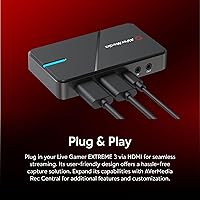
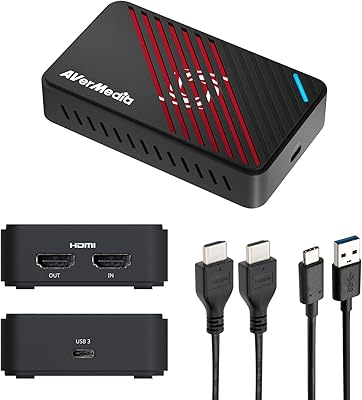
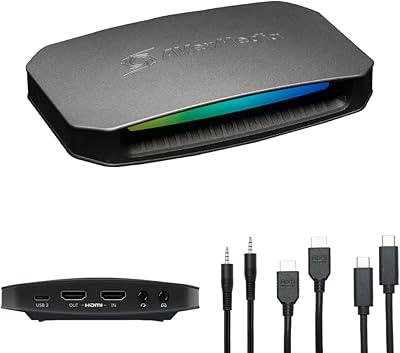
The AVerMedia Live Gamer Extreme 3 GC551G2 sits squarely in the mid-to-high-end bracket of external capture cards, targeting console and PC streamers who want reliable performance without the complexity of PCIe installations. At $129.99, it competes directly with options like the Elgato HD60 X, but brings a notable angle: VRR pass-through at 1440p120, which most rivals at this price skip entirely. The unit is surprisingly compact — barely the size of a deck of cards and weighing just 85 g — making it easy to toss in a bag. Plug it in via USB Type-C and your OS recognizes it instantly. No driver disc, no software gate.
Features & Benefits

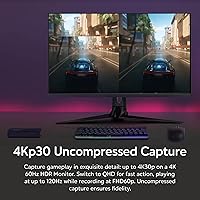
The Live Gamer Extreme 3 records gameplay at up to 4K30 — worth stating clearly, because pass-through and capture are two different things here. Your TV or monitor receives the full HDR signal at up to 4K60, so there is no visual compromise while you play. What gets saved to your PC tops out at 4K30 or 1080p60, which is more than adequate for most streaming platforms. The standout spec is that VRR pass-through at 1440p120, keeping adaptive sync intact on compatible displays. Audio flexibility is solid too, with both HDMI and a 3.5 mm jack for external mics. Mac, Windows, and even iPadOS are all supported natively via UVC — no proprietary software required.

Best For

This capture card makes the most sense for PS5 and Xbox Series X/S owners who game on a 1440p high-refresh display and do not want to sacrifice VRR just because they are streaming. It is also a strong pick for anyone who needs portable capture — the bus-powered USB design means you only need one cable and a laptop. Nintendo Switch users get clean, stable 1080p60 output that looks great on Twitch or YouTube. Apple users will appreciate that macOS and iPadOS support is built in, not an afterthought. If you are coming from an older 1080p60 card and want room to grow without breaking the bank, this capture card is a logical step up.

User Feedback

With a 4.4 out of 5 rating across 166 verified buyers, AVerMedia's GC551G2 earns its score honestly. The most consistent praise centers on how effortless the setup is — buyers routinely mention being up and running in minutes, and build quality draws favorable comparisons to pricier alternatives. The main sticking point is the 4K30 capture ceiling. Some buyers arrive expecting 4K60 recording and feel let down when they discover that spec belongs to the pass-through, not the capture. A handful of users also flagged occasional compatibility hiccups on certain Mac configurations. At $129.99, the general consensus is that the value holds up well, especially for console-focused creators who prioritize a reliable pass-through over maximum capture resolution.

Pros

  • Plug-and-play USB-C setup — recognized instantly by OBS, Streamlabs, and XSplit with zero driver installs.
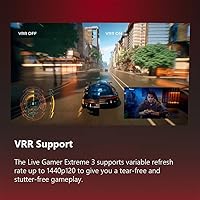
  • VRR pass-through at 1440p120 keeps adaptive sync fully active on your monitor while streaming.
  • HDR signal passes through at up to 4K60, so your display experience is completely uncompromised.
  • Genuinely portable — 85 g and smaller than most phones, with no external power brick needed.
  • Works natively on macOS 13/14 and iPadOS 17, a rare and practical advantage for Apple-ecosystem creators.
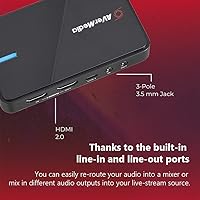
  • The 3.5 mm audio jack adds headset and external mic flexibility beyond what HDMI alone provides.
  • Solid build quality that punches above its weight class for a sub-$130 external capture card.
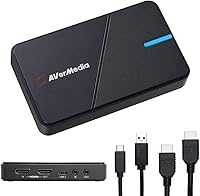
  • Includes both a USB-C cable and HDMI 2.0 cable in the box — ready to use without extra purchases.
  • Compatible with PS5, Xbox Series X/S, and Nintendo Switch without any additional configuration.

Cons

  • Capture is capped at 4K30 — buyers expecting 4K60 recording will need to look elsewhere.
  • The product listing blurs the line between pass-through and capture resolution, which misleads some shoppers.
  • High-frame-rate capture modes like 1080p240 demand a powerful CPU and will drop frames on mid-range rigs.
  • The 3.5 mm jack is 3-pole only, so standard 4-pole headsets with built-in mics need a separate adapter.
  • Some Mac users on specific OS builds have reported audio sync drift during long recording sessions.
  • No USB Type-C to Type-C cable included, which is an inconvenience for modern laptops without Type-A ports.
  • AVerMedia's own RECentral software feels bloated and underwhelming compared to third-party alternatives.
  • The device occasionally loses recognition after a Windows PC wakes from sleep, requiring a manual USB reconnect.
  • Ultra-wide 3440x1440 capture is not supported, which rules it out for widescreen PC gaming setups.

Ratings

The AVerMedia Live Gamer Extreme 3 GC551G2 earns a strong 4.4 out of 5 across 166 verified global purchases, and the scores below reflect an AI-assisted analysis of that feedback — filtering out incentivized reviews and bot patterns to surface what real streamers and content creators actually experienced. Strengths in setup simplicity and pass-through quality come through clearly, but so does the frustration around capture resolution expectations and occasional software edge cases.
Ease of Setup
94%
Buyers consistently describe a near-frictionless first experience — plug in the USB-C cable, connect the HDMI, and OBS or Streamlabs detects the device within seconds. No driver downloads, no software installs, no reboot loops. For streamers who just want to go live fast, this is one of the most plug-and-play capture cards at this price.
A small number of Mac users on older Ventura builds reported needing to manually select the correct input source in their streaming software, which caught them off guard. It is not a widespread issue, but it does mean the out-of-the-box experience is not perfectly universal across every OS configuration.
Pass-Through Quality
91%
The HDR and VRR pass-through is where this capture card genuinely earns its price tag. PS5 and Xbox Series X/S owners report that their 1440p120 gaming experience is completely intact on their monitor — no added input lag, no color degradation, no loss of adaptive sync. It feels like the capture card is not even in the chain.
Pass-through tops out at 4K60 for HDR content, so users with 4K120 OLED setups will notice the ceiling. It is a legitimate limitation for high-end display owners who expected the full signal to pass through unchanged at maximum refresh rates.
Capture Resolution & Quality
72%
28%
For the majority of streaming destinations — Twitch, YouTube, Facebook Live — the 1080p60 and 1440p60 capture output is clean and well-compressed. Footage holds up well at standard streaming bitrates, and the color accuracy in captured video draws favorable comments from creators who care about how their content looks on upload.
The 4K30 capture ceiling is the most divisive spec on this device. Buyers who expected to record 4K60 footage locally are disappointed, and the product listing does not make the distinction between pass-through and capture resolution obvious enough. For 4K60 recording workflows, this capture card simply cannot deliver.
Input Lag (Pass-Through)
93%
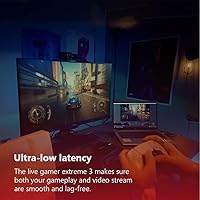
Zero perceptible latency on the pass-through signal is the one claim that holds up in real-world use. Competitive players on PS5 and Xbox report no detectable lag difference compared to a direct HDMI connection, which matters enormously for fast-paced titles where split-second reactions count.
The ultra-low-latency pass-through applies to the monitor output only — preview latency inside OBS or streaming software still exists, as it does with every capture card at this price. A handful of users expected the software preview to match the monitor delay and were briefly confused.
Build Quality & Portability
88%
At 85 g and roughly the footprint of a large matchbox, this capture card is genuinely portable in a way that most competitors are not. The casing feels solid — no flex, no cheap plastic rattle — and the HDMI ports seat firmly without wobble. Several buyers specifically mention taking it to LAN events or a friend's setup without any issues.
There is no dedicated clip or mount for cable management, so the two HDMI cables and USB-C lead can create a minor desk clutter situation. The matte black finish also picks up fingerprints and light scratches over time if it lives in a bag without a sleeve.
Software Compatibility
86%
UVC compliance is a genuine advantage that buyers notice immediately. OBS, Streamlabs, XSplit, and even some browser-based streaming tools recognize the device without any extra configuration. Creators switching from capture cards that required proprietary software feel genuine relief at how broadly compatible this device is.
AVerMedia's own RECentral software receives lukewarm feedback — some users find it functional but bloated compared to OBS. A few creators also reported that after a Windows 11 update, they had to re-select the capture device in their software, which was minor but annoying mid-stream.
macOS & iPadOS Support
83%
Native macOS support up to Sonoma 14 is a real differentiator at this price point, and Apple users who found other capture cards finicky or unsupported are notably grateful. iPad Pro users running iPadOS 17 have successfully used the device for on-the-go capture, which opens up genuinely flexible portable workflows.
macOS support works, but it is not as polished as the Windows experience. Some users on macOS 13 Ventura encountered audio sync drift during longer recording sessions, requiring a restart of the capture source. Dedicated Mac streaming software options remain limited compared to the Windows ecosystem.
Audio Performance
79%
21%
Having both HDMI audio passthrough and a physical 3.5 mm line-in jack gives streamers genuine flexibility. Creators who use a dedicated USB microphone alongside a headset appreciate being able to route game audio and commentary through separate channels, keeping their audio setup clean without an external mixer.
The 3.5 mm jack is a 3-pole connection, which means standard 4-pole TRRS headsets with built-in mics may not behave as expected without an adapter. A few buyers flagged audio desync between captured video and the 3.5 mm input under certain OBS configurations, which required manual offset adjustments.
Value for Money
81%
19%
At $129.99, the Live Gamer Extreme 3 lands in a spot where its VRR pass-through and broad OS support justify the price for the right buyer. Users upgrading from older 1080p60 capture cards feel they are getting meaningful headroom without paying flagship prices. The included HDMI 2.0 cable is a small but appreciated touch.
Buyers who primarily want 4K60 capture rather than 4K30 will find the Elgato HD60 X tempting at a similar price. The value equation shifts depending entirely on whether VRR pass-through matters to your specific setup — if it does not, the price advantage over cheaper alternatives narrows considerably.
Console Compatibility
89%
PS5, Xbox Series X/S, and Nintendo Switch all work reliably with this capture card out of the box. Console streamers on PS5 particularly appreciate the VRR-intact pass-through, which preserves the console's variable refresh output without requiring any workaround settings in the capture software.
Xbox One and older PlayStation consoles work technically, but buyers looking for high-refresh capture from those older systems will find little advantage over cheaper capture cards. Compatibility with some lesser-used console outputs — like older Nintendo hardware via adapters — is inconsistent according to a small subset of users.
High Frame Rate Capture
68%
32%
Capturing at 1080p240 is a standout option for slow-motion replay content, and a niche but vocal group of creators — particularly fighting game players — specifically sought this card out for that capability. For sports games and fast-action titles, the high-frame-rate capture produces noticeably smoother footage.
The 1080p240 capture mode is CPU-intensive and requires a capable PC to process without dropped frames. Several buyers with mid-range rigs reported that their systems struggled to keep up at maximum frame rates, pushing them down to 1080p120 as a practical ceiling for reliable recording.
In-Box Contents
77%
23%
Including both a USB Type-C to Type-A cable and an HDMI 2.0 cable means most buyers can set up without hunting for additional accessories. The quick start guide is brief but functional — enough to get someone who has never used a capture card through the initial connection without a YouTube tutorial.
The quick start guide is thin on troubleshooting guidance, and buyers who hit any edge-case setup issues are left to navigate online forums or AVerMedia's support pages. A USB Type-C to Type-C cable is not included, which matters for laptop users with only USB-C ports who need a separate adapter.
Driver Stability & Reliability
82%
18%
Long-term stability is generally strong. Users who have run this capture card through dozens of multi-hour streaming sessions report no unexpected disconnections or capture drops. The UVC architecture keeps things simple — there is no proprietary driver layer to go wrong after an OS update.
A handful of users experienced a device recognition failure after waking Windows from sleep, requiring a USB reconnect. It is an intermittent issue that does not affect most buyers, but it is worth knowing about if your streaming PC regularly sleeps between sessions.
Streaming Platform Integration
87%
OBS integration is as clean as it gets — select the capture device, configure your scene, and you are live. Twitch, YouTube, and Facebook Live all work without any additional configuration beyond what OBS requires normally. The device behaves exactly like a standard video input, which is the right approach for a tool meant to disappear into a workflow.
There is no dedicated mobile streaming support or companion app beyond iPadOS compatibility via a supported USB-C hub. Streamers who want to push directly to TikTok Live or use mobile-first workflows will need to manage that entirely through third-party software, with no native guidance from AVerMedia.

Suitable for:

The AVerMedia Live Gamer Extreme 3 GC551G2 is the right pick for console streamers who game on a 1440p high-refresh monitor and refuse to give up VRR or HDR just because a capture card is in the chain — that is the core scenario this device was built around. PS5 and Xbox Series X/S owners will get the most out of it, since the pass-through keeps adaptive sync intact while OBS quietly records in the background. Nintendo Switch players who want clean, upload-ready footage for Twitch or YouTube without any complex setup will also find it a reliable fit. It is equally well-suited to creators who move around — the bus-powered USB design means a laptop, two cables, and this small device are all you need to stream from a hotel room or a friend's place. Apple users who have struggled to find a capture card that works natively on macOS or iPadOS without driver headaches will appreciate that this one does, without fuss.
Not suitable for:

If your primary goal is recording 4K60 footage locally — for a cinematic YouTube channel or high-end archival work — the AVerMedia Live Gamer Extreme 3 GC551G2 will leave you frustrated, because the capture ceiling is 4K30, full stop. The pass-through can handle 4K60 HDR to your display, but what actually gets saved to your drive tops out at half that frame rate, and no software workaround changes that. Hardcore PC gamers who want to capture ultra-wide 3440x1440 resolution footage are also out of luck, as that format is not supported. Users with only a mid-range CPU should be cautious about the high-frame-rate capture modes, since 1080p240 recording is demanding enough to cause dropped frames on slower systems. Anyone hoping for a fully polished mobile streaming workflow or a slick companion app will find the experience barebones — this card expects you to already know your way around OBS or a similar tool.
Specifications

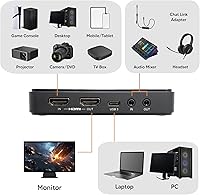
  • Interface: Connects to your PC or Mac via USB 3.2 Gen 1 Type-C, operating as a UVC device with true plug-and-play functionality — no drivers required.
  • Video Input: Accepts video signal through a single HDMI 2.0 port, supporting input resolutions from 480p up to 2160p.
  • Video Pass-Through: Outputs the full video signal to your display via HDMI 2.0, passing HDR content at up to 4K60 without any processing delay.
  • Max Capture Res.: Records gameplay footage at a maximum of 2160p30 (4K30), with additional modes at 1440p60 and 1080p60 for lower-demand workflows.
  • High Frame Rate: Supports capture at up to 1080p240 for high-frame-rate slow-motion recording, subject to the host PC having sufficient CPU headroom.
  • VRR Pass-Through: Variable Refresh Rate (VRR) is preserved on the pass-through signal at resolutions up to 1440p120 and 1080p120, keeping adaptive sync active on compatible displays.
  • HDR Pass-Through: HDR metadata passes through intact at up to 2160p60, 1440p120, or 1080p240, so the monitor receives the full high-dynamic-range signal while capture runs simultaneously.
  • Audio Input: Accepts audio via HDMI 2.0 or a 3.5 mm line-in jack (3-pole), allowing connection of an external microphone or line-level audio source.
  • Audio Output: Routes audio to headphones or speakers through HDMI 2.0 pass-through or a 3.5 mm line-out jack (3-pole) for monitoring during capture.
  • OS Support: Officially compatible with Windows 10 x64 and Windows 11 x64, macOS 13 (Ventura) and macOS 14 (Sonoma), and iPadOS 17 or later.
  • Console Support: Works with PS5, Xbox Series X/S, Xbox One X/S, and Nintendo Switch, covering all current-generation major gaming consoles.
  • Streaming Software: Compatible with OBS Studio, Streamlabs, XSplit, Twitch Studio, and most other UVC-compliant streaming and recording applications.
  • Dimensions: Measures 112.5 x 66.1 x 20.9 mm (4.43 x 2.6 x 0.82 in), making it compact enough to fit in a jacket pocket or small gear bag.
  • Weight: Weighs 85 g (3 oz), light enough to carry daily without adding noticeable bulk to a travel or streaming kit.
  • Power Source: Bus-powered entirely via the USB connection — no external power adapter or wall outlet is needed during operation.
  • In the Box: Package includes the GC551G2 capture unit, one USB Type-C to Type-A cable, one HDMI 2.0 cable, and a printed quick start guide.
  • Avg. Rating: Holds a 4.4 out of 5 star rating based on 166 verified buyer reviews at time of publication.
  • Market Rank: Ranked #41 in the TV Tuner and Video Capture Cards category on Amazon, indicating strong and sustained sales performance.

Related Reviews

AVerMedia Live Gamer Mini GC311
84%
91%
Video Quality (1080p60)
94%
Ease of Setup
89%
Portability/Size
90%
Latency (Pass-Through)
85%
Compatibility (Consoles & PCs)
More
AVerMedia Live Gamer 4K GC573
85%
93%
4K Video Fidelity
91%
High Frame Rate Support
88%
System Latency
86%
Build & Form Factor
72%
Setup & Installation
More
AVerMedia Live Gamer Bolt GC555
82%
91%
Video Quality
88%
Latency
75%
Compatibility with Devices
87%
Ease of Setup
89%
Streaming Software Compatibility
More
AVerMedia Live Gamer HD 2 GC570
84%
91%
Video Capture Quality
93%
Latency
89%
Ease of Setup
75%
Software Compatibility
82%
Audio Input Flexibility
More
AVerMedia Live Gamer Ultra S (GC553Pro)
86%
91%
Capture Quality
94%
Ease of Setup
89%
Low Latency Performance
88%
Compatibility with Platforms
85%
Build Quality
More
AVerMedia Live Gamer Ultra 2.1 GC553G2
83%
97%
Video Passthrough Quality
88%
Capture Resolution & Framerate
84%
Setup & Software Integration
82%
Audio Routing & Party Chat
86%
Mac Compatibility
More
AVerMedia Live Streamer Cam 313 (PW313)
73%
74%
Video Quality
91%
Ease of Setup
88%
Privacy Shutter
58%
Microphone Quality
61%
Build Quality
More
AVerMedia Live Streamer CAM 315
76%
83%
Video Quality
88%
Field of View
51%
Focus Performance
62%
Built-in Microphone
91%
Privacy Shutter
More
AVerMedia Live Streamer ULTRA HD GC571
88%
93%
Ease of Installation
91%
Pass-Through Visuals
94%
VRR Implementation
78%
Capture Performance
96%
System Latency
More
Living Proof Scalp Care Exfoliator 3.53oz
84%
88%
Effectiveness in Reducing Scalp Flakes
83%
Oil Regulation and Control
75%
Scent (Citrus Freshness)
92%
Ease of Application
85%
Long-Term Results
More

FAQ

No, you do not. The AVerMedia Live Gamer Extreme 3 GC551G2 is a UVC-compliant device, which means Windows, macOS, and iPadOS all recognize it automatically the moment you plug it in. Just connect the USB-C cable, open OBS or your preferred streaming software, and select it as your capture source — that is the entire setup process for most users.
This is the question that trips up the most buyers, so it is worth being direct: the capture ceiling is 4K30, not 4K60. Your monitor will receive a full 4K60 HDR signal via pass-through, so your gaming experience is unaffected, but the video file saved to your PC tops out at 4K30. If 4K60 local recording is a hard requirement for your workflow, you will need to look at a different card.

Yes, and this is honestly one of the strongest reasons to choose this capture card over cheaper alternatives. The pass-through preserves both VRR and HDR on your display while the capture runs in the background, so your PS5 gaming experience stays completely intact. You set up your console normally, connect through the card, and your monitor receives the full signal as if the capture card were not there.

It works natively on macOS 13 (Ventura) and macOS 14 (Sonoma) without any additional software. OBS for Mac will detect it as a standard capture device. A small number of users on specific Ventura builds have reported needing to manually re-select the audio input in OBS after initial setup, but this is not a widespread issue and is typically resolved in seconds.

Absolutely. The Switch outputs via HDMI, which goes into the capture card, and your docked Switch gameplay is captured cleanly at up to 1080p60 — more than enough quality for Twitch or YouTube uploads. The setup is identical to any other console: HDMI from Switch to capture card input, HDMI from capture card output to your TV or monitor, and USB-C to your laptop or PC.

It runs entirely off the USB connection — no external power brick, no wall outlet required. This is what makes it genuinely portable. As long as your PC or laptop USB port delivers adequate power, the device operates without any additional cables.

It depends on your headset. The 3.5 mm jack on this capture card is a 3-pole connection, which handles stereo audio but does not carry a microphone signal. Most gaming headsets use a 4-pole TRRS connector that combines stereo audio and mic in one plug. For those headsets, you would need a 3.5 mm TRRS to dual TRS splitter adapter to separate the audio and mic channels, or simply route your mic through your PC or a USB audio interface instead.

It works with OBS out of the box. Add a new video capture device source in OBS, select the GC551G2 from the device list, and your gameplay feed will appear immediately. There are no unusual settings or workarounds needed. Some users adjust the resolution and frame rate in the OBS source properties to match their preferred capture mode, but that is standard practice for any capture card.

The included cable is USB Type-C to Type-A, which means it plugs into a standard rectangular USB-A port on one end and the capture card on the other. If your laptop only has USB-C ports, that cable will not fit without an adapter. You would need either a USB-C to USB-C cable or a USB-C hub with a Type-A port — neither of which is included in the box.

Both cards occupy a similar price bracket and serve console streamers well, so the decision usually comes down to one key difference: this capture card supports VRR pass-through, while the HD60 X does not at the same price point. If you game on a VRR-capable display and do not want to disable that feature while streaming, the AVerMedia card has a genuine edge. If VRR does not matter to your setup and you prefer Elgato's software ecosystem, the HD60 X is a reasonable alternative. Neither card captures 4K60, so that is a wash between them.