Overview

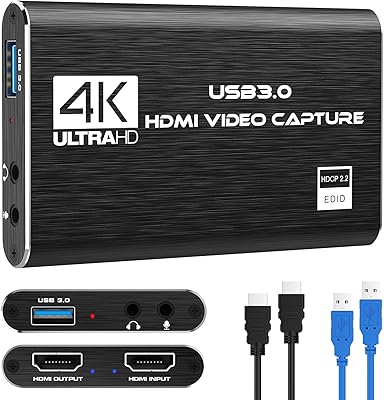
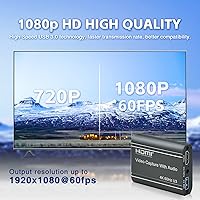
The ORIVISION U923 4K HDMI Video Capture Card is a compact, no-frills device built for streamers and content creators who want a working setup without spending a fortune. It accepts HDMI input at up to 4K 60fps, though it is worth being upfront: what actually gets recorded and sent to your PC is capped at 1080p 60fps. That is a meaningful distinction. The U923 also includes an HDMI loopout port, so your TV or monitor keeps displaying the source signal uninterrupted while capture happens in the background. No drivers, no external power brick — just plug it in and it works.

Features & Benefits

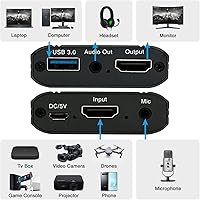
The U923 connects via USB 3.0, which keeps latency low and transfer speeds high — noticeably better than older USB 2.0 capture sticks that struggle with higher frame rates. The HDMI passthrough is genuinely useful: your console feeds your display normally, and the card quietly handles capture on the side. There is also a 3.5mm mic input alongside a stereo audio output, so you can plug a microphone directly into the dongle and overlay your voice without needing a separate audio interface. It works with OBS, VLC, and Amcap out of the box, across Windows, Mac, and Android — all without installing a single driver.

Best For

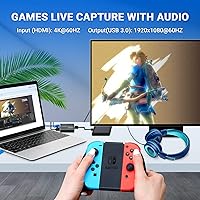
This streaming dongle is clearly aimed at people just starting out — someone picking up their first capture card to stream Nintendo Switch or PS5 gameplay does not need to spend three times more for basic 1080p output. It also fits neatly into non-gaming workflows: educators broadcasting slides over HDMI, remote workers using a DSLR as a webcam, or anyone who needs a simple, driver-free capture solution for meetings or online classes. Experienced streamers running multi-camera setups might find it useful as a secondary capture device too. If you want something that works out of the box without a steep learning curve, the U923 delivers reliably.

User Feedback

Across roughly 230 ratings, this capture card holds a 4.4-star average — a solid score that reflects genuine satisfaction rather than hype. Buyers consistently highlight how quickly it gets up and running, particularly with OBS, which matters a lot for people who have never configured a stream before. The loopout feature earns specific praise for working reliably without signal degradation. On the flip side, some users report occasional audio sync issues, and a few note the device can be sensitive to cable quality, with lower-grade HDMI cables occasionally causing dropped frames or stuttering. Build quality gets mixed mentions — functional rather than premium, which is fair at this price tier.

Pros

  • Genuinely plug and play — no driver installation needed on Windows, Mac, or Android.
  • HDMI loopout keeps your TV or monitor running normally while capture happens in the background.
  • USB 3.0 connection reduces latency noticeably compared to older USB 2.0 capture devices.
  • Built-in 3.5mm mic input lets you add voice commentary without buying a separate audio interface.
  • Works straight away with OBS, VLC, and Amcap — ideal for first-time streamers.
  • Bus-powered via USB, so no external power adapter clutters your desk.
  • Compact enough to slip into a laptop bag — barely larger than a deck of cards.
  • Broad source compatibility covers consoles, DSLRs, cameras, and set-top boxes.
  • Holds a 4.4-star average across over 230 ratings, suggesting consistent real-world satisfaction.
  • Solid entry point for educators or remote workers who need simple, reliable HDMI broadcast capability.

Cons

  • Recorded output is capped at 1080p 60fps — the 4K label refers only to input acceptance, not capture quality.
  • Audio sync drift has been reported by a portion of buyers, which can require manual correction in post.
  • Cable sensitivity is a known issue — lower-quality HDMI cables can trigger stuttering or dropped frames.
  • Build materials feel lightweight and plastic-heavy, raising questions about long-term durability.
  • No dedicated capture software is included, so beginners must source and configure OBS on their own.
  • Android compatibility can be inconsistent depending on the device model and USB implementation.
  • The loopout port does not upscale signal — what goes in is exactly what comes out on your display.
  • Limited official support documentation makes troubleshooting harder if problems arise after purchase.

Ratings

Our AI rating system analyzed verified global buyer reviews for the ORIVISION U923 4K HDMI Video Capture Card, actively filtering out incentivized, bot-generated, and outlier feedback to surface what real users consistently experience. Scores below reflect a balanced picture — drawing on patterns from hundreds of verified purchases to highlight what this streaming dongle genuinely gets right and where it falls short.

Ease of Setup
93%
This is where the U923 earns its strongest marks across the board. Buyers — including complete beginners setting up their first stream — consistently report having it recognized and working inside OBS within a few minutes of plugging it in, with no driver hunting or configuration headaches on Windows or Mac.
A small but recurring group of Android users report inconsistent device recognition depending on their phone or tablet model, which can make the plug-and-play promise feel less reliable on mobile. First-time OBS users still need to configure the software themselves, as no bundled guide covers that part.
Video Capture Quality
74%
26%
At 1080p 60fps, the captured footage is clean and smooth enough for Twitch and YouTube streams without obvious compression artifacts under normal conditions. Gamers streaming Switch or PS5 gameplay find the output perfectly watchable, and educators recording screen presentations report similarly solid results.
The 4K branding creates expectations this streaming dongle cannot meet on the capture side — recorded footage is hard-capped at 1080p, and buyers expecting 4K files will be disappointed. In demanding scenes with fast motion, some users notice minor softness compared to higher-end capture cards in the same footage review.
HDMI Loopout Performance
81%
19%
The passthrough port is widely praised for keeping the gaming experience uninterrupted — players see their console output on the TV with native latency while the card quietly captures in the background. Switch and PS5 users in particular appreciate not having to choose between playing comfortably and recording simultaneously.
Some buyers initially expect the loopout to upscale or enhance the signal, which it does not — it simply passes the source signal through unchanged. A handful of users report the loopout signal flickering briefly on connection or when switching software states, though this appears cable-quality-dependent.
Audio Functionality
67%
33%
The built-in 3.5mm mic input is a genuine convenience for entry-level streamers who do not own a separate audio interface — plugging a headset microphone directly into the capture card and having voice overlaid in OBS is a real time-saver. Stereo audio from HDMI sources comes through cleanly in most setups.
Audio sync drift is the most frequently cited frustration, with a meaningful portion of buyers needing to manually offset audio in OBS to correct misalignment that appears over longer recordings. The mic input is basic and lacks any gain control, so users with quieter microphones may find their voice levels inconsistent.
Latency
76%
24%
The USB 3.0 connection keeps preview latency low enough for most streaming and recording scenarios, and the loopout means players never actually game through the capture card's preview delay. For non-gaming use cases like lecture recording or webcam replacement, latency is effectively a non-issue.
The software preview window in OBS does show a noticeable delay compared to premium cards, which can be disorienting for users who try to monitor their stream output in real time on a single screen. This is less of an issue with the loopout in play, but users without a second display may find it limiting.
Compatibility
79%
21%
Compatibility across the main use cases — Nintendo Switch, PS4, PS5, Xbox, DSLR cameras, and most Windows and Mac machines — is well-established and consistently confirmed by buyers. The UVC standard means it also works in Zoom, Teams, and other video call platforms without any special configuration.
Android compatibility varies noticeably by device, and a small segment of buyers with older or less common hardware report detection failures. Chromebook support is largely untested and unconfirmed, which is worth knowing if that is your primary machine.
Build Quality
58%
42%
The compact plastic shell is small and light enough to sit unobtrusively on a desk or pack into a laptop bag without adding bulk. For occasional-use setups or travel kits, the form factor is genuinely practical.
Buyers who handle it daily describe the casing as feeling thin and somewhat fragile compared to competing devices at slightly higher price points. The USB and HDMI port housings in particular draw concern about long-term durability under repeated plug-in-and-out use, which is common in content creation workflows.
Cable Sensitivity
54%
46%
When paired with a quality HDMI cable, the U923 typically delivers a stable, stutter-free signal, and many buyers go weeks or months without any signal issues once their initial setup is dialed in.
The device is notably sensitive to HDMI cable quality, and this is one of the more common sources of frustration in negative reviews — users reporting dropped frames or a blank capture feed often trace the issue back to a cheap or aging cable rather than the card itself. It is an avoidable problem but adds an unspoken extra requirement to the purchase.
Software Experience
71%
29%
Working with OBS specifically is smooth and well-documented by the broader streaming community, meaning first-time users have access to a huge library of tutorials that apply directly to this setup. VLC and Amcap also recognize it without fuss for simpler recording tasks.
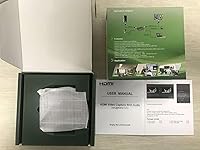
No proprietary software or quick-start guide is included, so buyers who have never used OBS are on their own for the learning curve. Amcap, while functional, feels dated, and the experience is noticeably less polished than the software ecosystems bundled with premium capture cards.
Value for Money
84%
For buyers who understand what they are getting — reliable 1080p 60fps capture, HDMI loopout, and plug-and-play simplicity — the U923 delivers a lot of functional capability at a budget-friendly price. It sits at a rank of #36 in its category on Amazon, reflecting genuine market demand rather than novelty.
Buyers who enter expecting 4K recording or premium build materials often feel misled, which drags perceived value down significantly for that group. The modest price gap between this and more established mid-range alternatives starts to look smaller once you factor in the cable quality requirement and the audio sync troubleshooting time.
Portability
88%
At 6.4 oz and roughly the size of a thick business card, this capture card is one of the easier devices to toss into a bag for travel recording, remote teaching setups, or on-location streaming. Bus-powered USB means there is one fewer cable to carry.
The compact size also means port spacing is tight, and wider USB connectors or stiff HDMI cables can create awkward angles that put minor stress on the connections. A short cable extension can solve this but adds a small setup step.
Streaming Platform Support
82%
18%
The U923 slots neatly into Twitch, YouTube, and Facebook Live workflows when routed through OBS, and buyers report no platform-specific issues with stream key setup or encoder compatibility. It handles simultaneous capture and stream output reliably under standard bitrate settings.
Higher-bitrate streams targeting professional-quality output may expose the 1080p ceiling as a constraint, particularly for creators whose audiences expect 1440p or 4K streams. Platform support is effectively only as strong as the OBS configuration the user manages themselves.
Power & Connectivity
86%
The bus-powered design is a practical win for anyone building a minimal-cable desk setup or streaming from a laptop on the go — there is no wall adapter to forget or power brick to manage. USB 3.0 keeps the connection reliable across the range of supported devices.
On laptops with limited USB bandwidth shared across multiple ports, running the capture card alongside other high-throughput USB devices can occasionally cause performance dips. Users with USB-C-only machines will need an adapter, which is an extra purchase not mentioned in the packaging.

Suitable for:

The ORIVISION U923 4K HDMI Video Capture Card is a strong fit for anyone taking their first real steps into streaming or video recording without wanting to invest heavily upfront. New streamers who play Nintendo Switch, PS4, PS5, or Xbox will find it handles the basics well — plug it in, open OBS, and you are live within minutes. Educators and remote workers who need to broadcast HDMI content from a laptop or presentation device will appreciate how little setup is involved, since there are no drivers to wrestle with across Windows, Mac, or Android. DSLR owners who want to use their camera as a higher-quality webcam via HDMI will also find this a practical, low-cost bridge. It also works well as a secondary capture device for multi-source creators who already own a flagship card and need a reliable backup.

Not suitable for:

Anyone expecting true 4K recorded output should look elsewhere — the U923 captures and outputs footage at a maximum of 1080p 60fps, regardless of what the HDMI source feeds in, and the product name should not be mistaken as a promise of 4K recording capability. Serious streamers who broadcast at high bitrates, rely on ultra-low latency monitoring, or need precise color accuracy for professional productions will likely hit the ceiling of what this streaming dongle can deliver. The build quality is functional rather than robust, so heavy daily use in a professional environment may expose durability concerns over time. Users who are sensitive to audio sync or have experienced audio drift issues with budget capture hardware should be aware this is a reported pain point with the U923 as well. If your workflow demands reliability and consistency at a professional level, the modest price difference between this and a more established capture card is worth taking seriously.

Specifications

  • Brand: Manufactured by Nantong ZYDZ Electronic Co., Ltd. and sold under the ORIVISION brand.
  • Model: The unit carries the model designation U923, part of the ORIVISION 4K Capture Card series.
  • Video Input: Accepts HDMI video input at up to 4K resolution at 60fps from connected source devices.
  • Capture Output: Records and streams footage to the host computer at a maximum of 1080p at 60fps.
  • Host Interface: Connects to the host PC or Mac via a USB 3.0 port for higher bandwidth and reduced latency.
  • Loopout: Includes a dedicated HDMI passthrough port so the source signal is simultaneously output to a display without degradation.
  • Audio Ports: Features a 3.5mm microphone input and a 3.5mm stereo audio output for direct voice capture and monitoring.
  • Power Supply: Bus-powered entirely through the USB connection — no external power adapter or wall outlet required.
  • Driver Support: Operates as a plug-and-play device with no driver installation needed on any supported operating system.
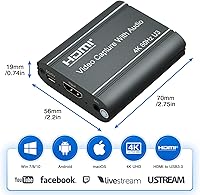
  • Compatible OS: Officially compatible with Windows, Mac OS, and Android operating systems.
  • Software Support: Works out of the box with OBS Studio, VLC Media Player, Amcap, and most other UVC-compliant capture applications.
  • Console Support: Confirmed compatible with Nintendo Switch, PlayStation 4, PlayStation 5, and Xbox consoles via HDMI.
  • Source Devices: Also supports DSLRs, mirrorless cameras, set-top boxes, DVD players, and smartphones using HDMI adapter cables.
  • Dimensions: The unit measures 2.76 x 2.20 x 0.75 inches, making it compact enough to fit in a jacket pocket.
  • Weight: Weighs 6.4 oz, which is light enough to travel with a laptop without adding meaningful bulk.
  • Streaming Platforms: Supports direct streaming workflows to Twitch, YouTube, Facebook Live, and Twitter through compatible broadcast software.

Related Reviews

HeavenBird 4K HDMI Video Capture Card
75%
91%
Ease of Setup
78%
Video Output Quality
74%
4K Passthrough Performance
69%
Audio Functionality
82%
Build Quality
More
AGPTEK VG0061 HDMI Capture Card
71%
88%
Ease of Setup
83%
1080p Capture Quality
47%
4K Capture Performance
79%
Value for Money
38%
Software Experience
More
AVerMedia BU113 Live Streamer Cap 4K
87%
94%
Video Fidelity
91%
Build Quality
87%
Plug-and-Play Stability
92%
Latency Performance
78%
Software Utility
More
Bytebridges 4K HDMI Capture Card (affd05f3)
88%
94%
Ease of Setup
88%
Build Quality
91%
Video Fluidity
87%
Input Latency
83%
Audio Versatility
More
Rybozen V316B-FR Capture Card
84%
88%
Build Durability
93%
Setup Simplicity
84%
Video Capture Fidelity
89%
Passthrough Performance
81%
Thermal Management
More
NearStream CCD10 HDMI Capture Card
89%
96%
Setup Simplicity
92%
Passthrough Performance
89%
Input Latency
93%
Value for Money
84%
Audio Integration
More
PACOXI Capture Card
PACOXI Capture Card
82%
93%
Ease of Setup
74%
Video Capture Quality
88%
HDMI Passthrough
79%
Audio Functionality
86%
Device Compatibility
More
MYPIN MYPIN-4K60-AVGC Capture Card
70%
83%
Ease of Setup
67%
Video Recording Quality
71%
4K Passthrough Performance
61%
Software Compatibility
69%
Audio Capture & Mic Input
More
Plugable USBC-CAP60 HDMI Video Capture Card

86%
92%
Value for Money
89%
Performance
94%
Ease of Use
85%
Compatibility
93%
Setup/Installation
More
XIIXMASK MS2131 Video Capture Card
85%
92%
Chassis Build Quality
88%
Thermal Management
87%
1080p Stream Stability
93%
Value for Money
84%
Plug-and-Play Simplicity
More

FAQ

The 4K figure refers strictly to what the device can accept as an HDMI input signal — the footage that actually gets recorded or streamed to your computer is capped at 1080p 60fps. So if you plug in a 4K source, your TV or monitor still sees the full 4K signal via the loopout, but your capture software will be working with a 1080p feed. For most streamers and content creators, 1080p 60fps is more than adequate.

No, this is a true plug-and-play device. On Windows, Mac OS, and Android, the operating system recognizes it as a standard USB video capture device without any driver installation. You open OBS or your preferred software, select it as your capture source, and you are ready to go.

The loopout is a passthrough port, not an upscaler. It simply passes the original HDMI signal from your source device straight through to your TV or monitor, completely unmodified. This means your display continues to receive the full native signal from your console or camera while the capture card simultaneously sends the 1080p version to your PC. Do not expect any image enhancement from it.

Yes, it works on Mac OS without drivers. In OBS, you add a Video Capture Device source and select the U923 from the device list. A quality HDMI cable helps avoid any signal issues, which is worth keeping in mind if you run into stuttering on first use.

It should, as long as your camera has a clean HDMI output. Most modern Sony, Canon, and Fujifilm mirrorless cameras can output a live, unencumbered HDMI signal. Connect the camera to the HDMI input on the capture card, plug the USB into your computer, and your camera will appear as a webcam source in OBS, Zoom, or any UVC-compatible app.

The loopout signal itself passes through with negligible delay — your TV receives the HDMI signal directly, so you play with your display's own native latency rather than adding any from the capture card. The latency you might notice is on the preview window inside your capture software, but that is a software preview delay, not what your TV shows.

Yes, the U923 has a 3.5mm mic input port that lets you connect a standard headset or condenser microphone with a 3.5mm plug. Your voice is then overlaid with the captured video audio inside your recording software. Keep in mind this works best with simple dynamic or condenser mics — it is not a dedicated audio interface, so expectations should be set accordingly.

Audio drift does come up in a portion of user reports, though it is not universal. When it does occur, the most common fix is using OBS's audio sync offset setting to manually realign the audio track. Using a high-quality USB 3.0 cable and a reliable HDMI cable tends to reduce the likelihood of this issue appearing in the first place.

Yes, this is one of the more common and well-confirmed use cases for this streaming dongle. Connect the Switch dock's HDMI output to the capture card's HDMI input, run the loopout to your TV, and the card handles the capture while you play on the big screen as normal. No additional setup or adapter is needed.

Several buyers have flagged this as a real issue. Low-quality or damaged HDMI cables can cause intermittent frame drops, signal flickering, or a completely blank capture feed. If you run into problems on first setup, swapping to a better HDMI cable is almost always the first thing worth trying before assuming the device is faulty.