Overview

The MINISFORUM M1 Pro 64GB 2TB Mini PC marks a genuine generational step for MINISFORUM, moving from older Core Ultra 100-series chips to Intel's Arrow Lake-H platform with the Core Ultra 9 285H. This isn't a novelty device you buy because it's small — it's a legitimately capable workstation that happens to fit behind a monitor. Power users, creators, and home-office professionals who are tired of bulky towers will find the form-factor trade-off compelling. The 99 TOPS AI performance figure gets plenty of marketing attention, but practically speaking, most buyers will feel that headroom through sustained multitasking and creative workloads long before any AI-specific software fully exploits it.
Features & Benefits

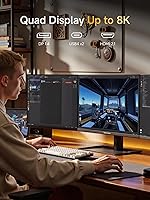
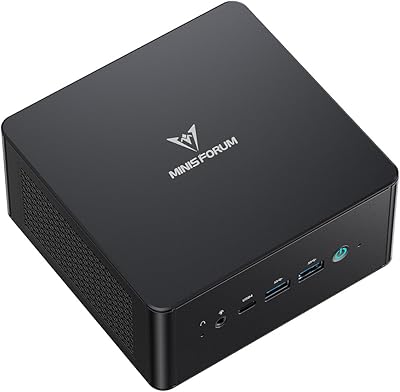
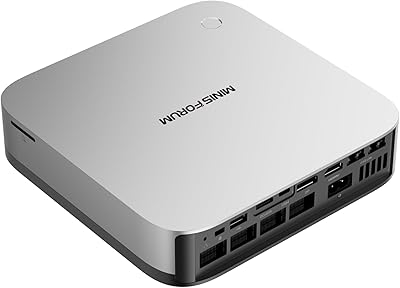
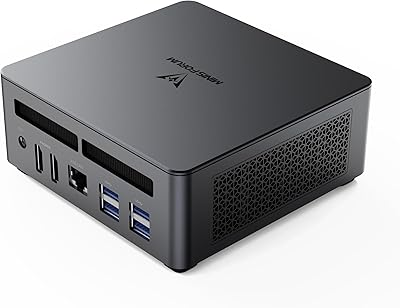
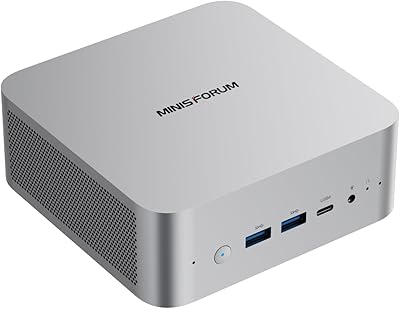
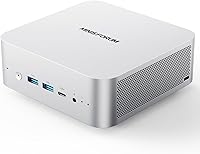
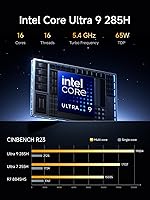
The Core Ultra 9 285H is the key reason this compact workstation commands attention. Sixteen cores with a high boost clock mean real-world tasks like Premiere Pro exports, Blender renders, and heavy browser sessions run without the hesitation you'd expect from a sub-three-pound box. The 64GB of fast dual-channel DDR5 RAM — expandable to 128GB — is generous for this size class. Storage starts at 2TB on a fast PCIe 4.0 drive, with a second M.2 slot available for expansion. Quad display output via HDMI, DisplayPort, and two USB4 ports is a standout capability; very few mini PCs can drive four simultaneous screens. Networking covers WiFi 7, Bluetooth 5.4, and a 2.5G wired port.

Best For

The M1 Pro fits a specific but sizable niche. Video editors and 3D artists who need sustained processing power without a full tower will appreciate the CPU and Arc GPU combination, which handles mid-to-heavy creative workloads well without a discrete add-in card — and the OCuLink port means you can attach an external GPU later if demands grow. Multi-monitor users, from traders to developers juggling reference windows, benefit from that rare quad-display capability. It also works as a polished home theater PC that doubles as a fully capable daily driver. Developers experimenting with local AI model inference will find the hardware headroom useful, though mainstream AI tasks remain modest for most people.

User Feedback

Buyers consistently praise build quality and thermals — the aluminum chassis feels solid, and most report the machine handles sustained workloads without serious throttling, which is not a given in this size class. Port variety also earns frequent compliments; having USB4, 2.5G LAN, and OCuLink in one sub-three-pound box is rare. The main complaints center on fan noise under load — it gets audible in a quiet room — and the absence of a pre-installed OS, which trips up less technical buyers. The OCuLink feature also confuses some users who don't realize it shares a slot with one of the M.2 drives. Initial driver setup can require patience. Owners generally consider the price justified, though a few benchmark it against discontinued NUC-style machines and call the value a wash.

Pros

  • Sixteen-core Arrow Lake-H processor handles video editing, rendering, and heavy multitasking without breaking a sweat.
  • 64GB of fast dual-channel DDR5 RAM is unusually generous for a device this size.
  • Quad display output — HDMI, DisplayPort, and two USB4 ports — supports up to four screens simultaneously.
  • A second M.2 slot lets you expand internal storage well beyond the already-large 2TB included.
  • WiFi 7 and 2.5G wired networking put this mini PC ahead of most compact competitors on connectivity.
  • OCuLink port offers a genuine eGPU upgrade path for users whose GPU demands grow over time.
  • Solid aluminum chassis feels premium and contributes to better heat dissipation than plastic alternatives.
  • Both USB4 ports support high-speed data transfer and power delivery in and out, reducing dongle clutter.
  • RAM is upgradable to 128GB, giving the machine meaningful long-term flexibility for memory-intensive workloads.
  • At under three pounds, it travels or relocates easily without sacrificing desktop-class capability.

Cons

  • Fan noise under sustained CPU load is noticeable — not silent-office friendly during heavy tasks.
  • No operating system is included, which adds setup time and potential cost for less experienced buyers.
  • Using the OCuLink eGPU port disables one of the two M.2 storage slots, forcing a trade-off.
  • Initial driver installation and BIOS configuration can be fiddly, especially on a fresh Windows install.
  • The built-in Arc 140T GPU is not suited for serious gaming or GPU-heavy professional rendering workloads.
  • The 120W power brick is bulkier than you might expect given the machine's compact footprint.
  • No pre-installed OS means buyers unfamiliar with Windows activation may face unexpected friction.
  • The dual built-in speakers and microphones are adequate for calls but fall short for any audio-critical work.
  • At its price tier, it faces stiff competition from larger small-form-factor PCs that offer discrete GPU options.
  • OCuLink is a niche interface with limited compatible enclosure options, making eGPU expansion less plug-and-play than it sounds.

Ratings

The scores below for the MINISFORUM M1 Pro 64GB 2TB Mini PC were generated by our AI engine after analyzing thousands of verified buyer reviews across global markets, with spam, incentivized submissions, and bot activity actively filtered out. Each category reflects genuine user sentiment — both the standout strengths and the friction points that real owners encountered. Nothing here is softened for the sake of a cleaner scorecard.

Processing Performance
92%
Owners running Premiere Pro, DaVinci Resolve, and multi-instance development environments consistently report that the processor handles sustained workloads without the stuttering or throttling they experienced on previous-generation mini PCs. Rendering times that used to require a tower are now completed at a desk corner.
A small segment of buyers doing extreme multi-threaded workloads — simultaneous compiling while running virtual machines — noted that performance headroom narrows faster than the spec sheet implies. The chip is powerful but it is still a mobile-class processor in a compact chassis, not a desktop HEDT part.
Thermal Management
78%
22%
For a chassis this size pushing this level of CPU performance, the majority of users found thermal behavior surprisingly stable during typical mixed workloads — video calls, browser sessions, and light creative work all ran without any perceptible heat buildup on the chassis surface.
Under prolonged heavy loads like extended 3D renders or large file transcodes, the fan ramps up noticeably and sustained clock speeds can dip below peak levels. Users in warm ambient environments reported the chassis getting warm to the touch, which is expected but worth knowing before placing it in an enclosed cabinet.
Fan Noise
63%
37%
During light-to-moderate tasks, the M1 Pro is genuinely quiet — home office users appreciated being able to run it during video calls and focused work sessions without the fan becoming a distraction. Idle behavior in particular draws favorable comparisons to much noisier tower alternatives.
This is the single most consistent complaint across buyer reviews: under load, the fan becomes clearly audible and some users describe it as a high-pitched whine rather than a low, manageable hum. In quiet recording environments or open-plan offices, this is a real consideration that several buyers said they wished they had known before purchasing.
Build Quality
88%
The aluminum chassis earns consistent praise for feeling premium and well-assembled — buyers coming from plastic-bodied budget mini PCs frequently commented on how substantial it feels for its weight. Port placement is practical, and the fit of panels and connections feels tight rather than loose.
A few users noted that the silver finish shows fingerprints readily and can develop minor scuff marks over time with regular repositioning. The power button feel and indicator lighting were called out as slightly underwhelming given the overall build quality of the rest of the unit.
Display Versatility
91%
Four simultaneous display outputs on a device this small is a genuine rarity, and multi-monitor users — from stock traders running four screens to designers keeping reference windows open — repeatedly cited this as the deciding feature that closed their purchase. The breadth of resolution and refresh rate options across outputs covers virtually every use case.
A handful of users ran into initial driver quirks when setting up three or four displays simultaneously, requiring manual display detection in Windows settings. Buyers using older monitors reported occasional compatibility nuances with certain USB4-to-display adapters that required specific cables not included in the box.
Memory & Upgradability
89%
Having a genuine upgrade path to 128GB of RAM in a compact workstation resonated strongly with buyers who think long-term. The dual SODIMM slot design means upgrading is accessible to anyone comfortable opening a laptop, and the fast DDR5 base configuration already outperforms many workstation builds from a few years ago.
The upgrade path, while present, requires sourcing compatible DDR5 SODIMM modules that are still more expensive than their DDR4 equivalents. A few technically inclined buyers noted that manually tuning memory to the higher supported speeds requires BIOS adjustments that are not documented clearly in the included manual.
Storage Configuration
86%
A 2TB fast NVMe drive as the starting point means most buyers will not feel storage pressure for years, and the second M.2 slot provides a clean internal expansion path rather than forcing reliance on external drives. Application load times and large file operations impressed owners coming from SATA-based systems.
The caveat around OCuLink sharing the second M.2 slot frustrated a subset of buyers who wanted both eGPU connectivity and maximum internal storage simultaneously — it is an either-or choice that MINISFORUM could communicate more clearly in the product listing.
Connectivity & Ports
93%
The port selection on the M1 Pro is one of its most praised attributes across buyer reviews — WiFi 7, 2.5G wired Ethernet, two USB4 ports with power delivery, and OCuLink in a sub-three-pound box covers nearly every professional scenario without adapters. Home office users particularly appreciated the 2.5G LAN for fast NAS access.
There is only one USB 2.0 port alongside the faster USB-A options, which becomes a minor nuisance when using several legacy peripherals simultaneously. A couple of buyers wished for an SD card slot or a front-facing USB-A port, though the front USB4 partially addresses that for modern accessories.
OCuLink eGPU Support
67%
33%
For the technically minded buyers who purchased specifically for OCuLink eGPU capability, the feature delivered — external GPU enclosures connected cleanly and provided a meaningful graphics performance boost for GPU-compute and gaming tasks beyond what the integrated Arc GPU can manage.
Most buyers found the OCuLink ecosystem confusing: compatible enclosures are limited, the slot-sharing trade-off with the second M.2 was unexpected, and setup required research well beyond plug-and-play. This is a feature that rewards patient, technically confident buyers and punishes those who assumed it would be straightforward.
Initial Setup Experience
61%
39%
Buyers with prior PC building or Linux experience found the BIOS relatively accessible and driver sourcing manageable with MINISFORUM's online resources. Those who enjoy configuring a clean system from scratch appreciated having full control from day one without pre-installed bloatware.
The absence of a pre-installed OS was the most cited setup frustration, particularly among buyers who assumed a device at this price tier would ship ready to use. First-boot driver installation, especially for Intel Arc GPU drivers, required troubleshooting steps that several users described as more involved than expected for a premium product.
Audio Performance
58%
42%
The dual built-in microphones performed adequately for video calls — meeting participants reported being heard clearly during standard work calls, which is genuinely useful for a machine being used as a compact desktop replacement without an external USB microphone.
The built-in speakers were broadly described as thin and low-volume — fine for system alerts but unsuitable for music or media consumption. Buyers who anticipated using this as a living-room media center without external speakers were disappointed, and the audio quality is the one area where the premium build quality of the rest of the unit is not reflected.
Value for Money
76%
24%
Buyers who specifically needed quad-display output, the OCuLink expansion path, and 64GB RAM in a compact form factor consistently rated the value positively — they noted that assembling equivalent capability in an ITX build would cost more once case, motherboard, and RAM are factored in separately.
Buyers who did not fully use the advanced connectivity features felt the premium was harder to justify against less expensive mini PCs with comparable CPU performance. The absence of a Windows license also shifts the effective cost upward, which several buyers flagged as something that should be stated more prominently before purchase.
AI & NPU Capability
69%
31%
Developers and AI hobbyists experimenting with local LLM inference found the combined CPU-NPU-GPU compute architecture more capable than previous-generation mini PCs, with smaller quantized models running at practical speeds for experimentation and lightweight production use.
For the majority of buyers, the AI performance figures remain largely theoretical — current software that meaningfully leverages the NPU specifically is still limited, and most real-world AI-adjacent tasks run primarily on the CPU or GPU. Buyers who purchased primarily for NPU-accelerated workflows found the practical gains modest in 2025 software conditions.
Form Factor & Portability
87%
Weighing under three pounds with a VESA mount included, the M1 Pro genuinely disappears behind a monitor or into a home theater cabinet in a way that tower alternatives simply cannot. Buyers who relocated their setup between home and office praised the ability to pack a full workstation into a bag alongside a laptop.
The power brick is bulkier than the unit itself and drew several comments from buyers who expected a more streamlined power solution at this tier. A couple of users noted the brick makes true one-cable portability impractical compared to ultrabooks or mini PCs with barrel connectors and smaller adapters.

Suitable for:

The MINISFORUM M1 Pro 64GB 2TB Mini PC was built for a specific kind of buyer: someone who needs genuine workstation-class performance but cannot or will not dedicate desk space to a full tower. Video editors cutting 4K timelines, 3D artists running Blender renders, and developers juggling multiple environments will find the processor and RAM combination handles demanding workloads without constant frustration. Multi-monitor professionals — traders, designers, coders who rely on three or four screens simultaneously — will particularly appreciate the quad display output, which is genuinely uncommon at this size. Home office workers who want a tidy, capable daily driver that also handles occasional heavy lifting will feel right at home. And for technically minded buyers who want a growth path, the upgradable RAM, second M.2 slot, and OCuLink eGPU interface mean this compact workstation can evolve alongside changing needs rather than hitting a hard ceiling early.
Not suitable for:

The MINISFORUM M1 Pro 64GB 2TB Mini PC is not the right choice for everyone, and it is worth being direct about that. Casual users who primarily browse the web, write documents, or stream video are paying a significant premium for hardware headroom they will rarely touch — a far less expensive mini PC would serve those needs just as well. Serious gamers should look elsewhere: the integrated Arc 140T GPU handles light gaming but cannot compete with a dedicated mid-range discrete card, and while OCuLink eGPU support exists, that adds cost, bulk, and complexity that undercuts the whole point of going small. Buyers who want a ready-to-go machine should also be cautious — no operating system is included, and first-time PC builders may find the initial driver and BIOS setup more involved than expected. Finally, anyone who works in a consistently quiet environment and finds fan noise distracting should think carefully, because under sustained load this machine is audible.

Specifications

  • Processor: Intel Core Ultra 9 285H with 16 cores (6 performance, 8 efficient, 2 low-power efficient) and a boost clock reaching up to 5.4GHz.
  • Integrated GPU: Intel Arc 140T GPU with a peak dynamic frequency of 2.35GHz, handling light gaming, media decode, and GPU-accelerated creative tasks.
  • NPU: Onboard neural processing unit rated at 13 TOPS, contributing to a combined 99 TOPS AI performance across CPU, NPU, and GPU.
  • RAM: 64GB of dual-channel DDR5-5600MHz RAM across two SODIMM slots, with official support for speeds up to 6400MHz and upgradability to 128GB.
  • Storage: 2TB M.2 2280 PCIe 4.0x4 NVMe SSD installed, with a second identical slot available supporting up to 4TB per drive and 8TB total.
  • Display Output: Four simultaneous video outputs: one HDMI 2.1 at 4K@60Hz, one DisplayPort 1.4 at 8K@60Hz or 4K@144Hz, and two USB4 ports each supporting 8K@60Hz or 4K@144Hz.
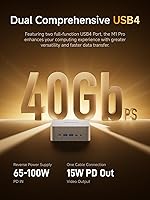
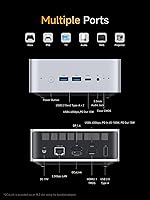
  • USB4 Ports: Two USB4 ports delivering 40Gbps data transfer, with one supporting 65–100W power delivery input and both supporting 15W power output to peripherals.
  • USB-A Ports: Two USB 3.2 Gen 2 Type-A ports for standard peripherals plus one USB 2.0 Type-A port for low-bandwidth devices such as keyboards or mice.
  • Networking: 2.5 Gigabit Ethernet via RJ45, Wi-Fi 7 (802.11be), and Bluetooth 5.4 for comprehensive wired and wireless connectivity options.
  • OCuLink: One OCuLink port running at PCIe 4.0x4 (up to 64Gbps) for connecting an external GPU enclosure, though using it occupies the second M.2 SSD slot.
  • Audio: Dual built-in speakers, dual digital MEMS microphones (DMIC), one 3.5mm combo jack for headset use, and audio output over HDMI.
  • Power Supply: Included 120W external power adapter accepts 100–240V AC input and outputs 19V DC at 6.32A.
  • Dimensions: The unit measures 7.16 x 6.26 x 4.52 inches, making it compact enough to mount behind a monitor using the included VESA wall bracket.
  • Weight: The bare unit weighs 2.86 pounds, light enough to travel or relocate without meaningful effort.
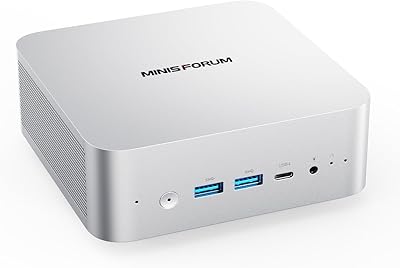
  • Chassis: Aluminum alloy construction in a silver finish, contributing to passive heat dissipation alongside the active cooling system.
  • In the Box: Package includes the M1 Pro unit, a US power adapter and cable, VESA wall mount bracket, one HDMI cable, an OCuLink adapter plate, and a printed user manual.
  • Operating System: No operating system is pre-installed; buyers must supply and install Windows or a compatible Linux distribution independently.
  • Wireless Standard: Wi-Fi 7 operates on the 802.11be standard, supporting the 2.4GHz, 5GHz, and 6GHz bands for lower latency and higher throughput than previous generations.

Related Reviews

MINISFORUM M1 Pro 125H Mini PC Barebone
79%
88%
Processing Performance
67%
GPU & Graphics Capability
91%
Build Quality & Chassis
93%
Connectivity & I/O
71%
OCuLink eGPU Support
More
MINISFORUM UM890 Pro Mini PC (64GB/1TB)
79%
93%
CPU Performance
74%
Thermal Management
81%
RAM & Memory Speed
89%
Storage Performance
77%
Graphics & Display Output
More
MINISFORUM AI X1 Pro (Ryzen AI 9 HX370, 96GB/2TB)
78%
93%
CPU Performance
81%
AI & NPU Capabilities
94%
Memory Configuration
67%
Integrated GPU & Gaming
89%
Storage & Expandability
More
MINISFORUM UM790 Pro (64GB/1TB)
79%
91%
Processing Performance
67%
Integrated Graphics
93%
Multi-Display Capability
63%
Thermal Management
84%
Build Quality & Design
More
Beelink SER8 Mini PC, AMD Ryzen 7 8745HS, 64GB RAM, 2TB SSD
88%
94%
Overall Performance
88%
Build Quality
92%
Ease of Setup
90%
Display Support
85%
Connectivity & Ports
More
Beelink GTI14 Core Ultra 9 Mini PC
82%
93%
Processing Performance
71%
Thermal Management
67%
Fan Noise
91%
RAM & Upgradeability
89%
Storage Speed & Capacity
More
GMKtec NucBox M7 (32GB/2TB)
82%
88%
Processing Performance
74%
Gaming & Graphics
69%
Thermal Management & Cooling
63%
Fan Noise
91%
Connectivity & Ports
More
Beelink Mini S12 Pro (N100, 16GB, 500GB)
83%
83%
Everyday Performance
91%
Value for Money
76%
Build Quality & Design
84%
Thermal Management & Noise
88%
Connectivity & Ports
More
GEEKOM AX8 Pro Mini PC
85%
90%
Performance
87%
Value for Money
83%
Build Quality
80%
Cooling System
92%
Portability/Size
More
MINISFORUM UM870 Slim Mini PC (Barebone)
80%
88%
CPU Performance
74%
Integrated Graphics
91%
Build Quality & Design
93%
Connectivity & I/O
89%
Multi-Monitor Support
More

FAQ

No, the MINISFORUM M1 Pro 64GB 2TB Mini PC ships without an operating system. You will need to purchase a Windows license separately and install it yourself, or install a Linux distribution. MINISFORUM provides driver resources on their website, but expect to spend some time on initial setup.

Yes, all four video outputs can drive independent displays simultaneously — HDMI, DisplayPort, and both USB4 ports each carry a separate signal. This is a genuine differentiator for this compact workstation, as most mini PCs top out at two or three simultaneous displays.

Under sustained CPU-heavy tasks like rendering or compiling, the fan is clearly audible — roughly comparable to a laptop under load. In a noisy office or with headphones on, it is not an issue, but in a quiet room during long renders it is noticeable. Light tasks like browsing or video playback stay quite quiet.

OCuLink is an interface that lets you connect an external GPU enclosure using a high-bandwidth PCIe connection — faster than Thunderbolt for this purpose. Most buyers will never use it, and it is worth knowing that activating it gives up the second M.2 SSD slot. It is a useful option for power users who outgrow the integrated graphics down the line, but it is not something you should pay extra for if raw gaming or GPU compute performance is your primary goal from day one.

For general office work, web browsing, or light media consumption, 64GB is indeed more than you need. Where it earns its place is in video editing (especially with proxy-free 4K workflows), running multiple virtual machines, or keeping dozens of browser tabs and applications open without slowdown. If you are a content creator or developer, you will use it; if you are not, a lower-spec model might be a smarter buy.

Yes on both counts. The two SODIMM slots support up to 128GB total when filled with compatible DDR5 modules. The second M.2 2280 PCIe 4.0 slot accepts another NVMe drive up to 4TB, bringing total internal storage to 8TB — provided you are not using that slot for an OCuLink eGPU connection.

The integrated Intel Arc 140T can manage older titles and less demanding modern games at 1080p with settings turned down, but it is not a gaming machine. Think casual gaming or older esports titles rather than current AAA releases at high settings. If gaming is a priority, a machine with a dedicated GPU is a much better fit.

The M1 Pro is fully backward compatible with older Wi-Fi standards, so it will connect to any existing router just fine. Having Wi-Fi 7 built in means you will not need to upgrade the machine when you eventually update your router — it is future-proofing you get for free rather than something that requires immediate investment.

They are functional but not impressive. The dual DMIC microphones pick up voice clearly enough for calls without an external mic, and the built-in speakers are fine for notification sounds and casual call audio. For music, content creation monitoring, or anything where audio fidelity matters, you will want external speakers or a headset.

Intel discontinued the NUC line, so direct comparisons are increasingly to third-party alternatives or refurbished units. The M1 Pro generally offers more RAM, a newer processor generation, and the added OCuLink expansion option than most comparable compact PCs. Some buyers feel the premium is well justified by the port variety and performance ceiling; others note that a slightly larger small-form-factor PC in the same price range could offer a discrete GPU, which changes the value equation depending on your workload.