Overview

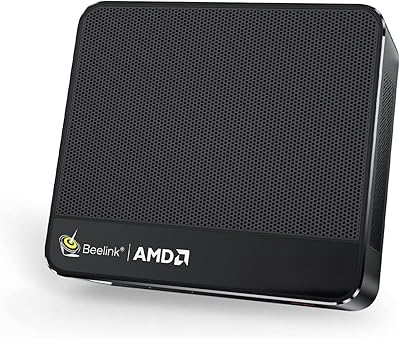
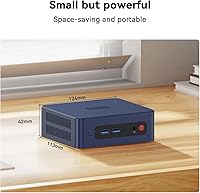
The Beelink SER3 Mini PC sits in an interesting spot in the compact desktop market — small enough to mount behind a monitor or perch quietly on a shelf, yet capable enough to handle the daily demands most people actually throw at a computer. Powering it is AMD's Ryzen 3 3200U, a chip from 2019 that still holds its own for browsing, documents, and video calls. The compact form factor is genuinely appealing: it weighs under two pounds and barely claims any desk space. Windows 11 Pro comes pre-installed, a real bonus for business users who need BitLocker or remote desktop without paying extra. Just be clear-eyed: this is not a machine built for heavy rendering or serious gaming.

Features & Benefits

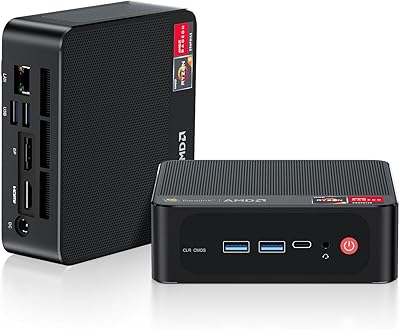
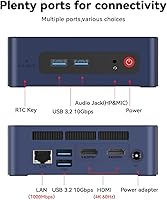
The SER3 ships with 16GB of DDR4 RAM, which is genuinely comfortable for running a few dozen browser tabs alongside a spreadsheet or video call without sluggishness. The 500GB PCIe 3.0 SSD makes a noticeable difference in daily use — boot times are snappy and apps open without the hesitation you get from older SATA drives. Dual HDMI ports support two 4K displays at 60Hz, practical for productivity setups or plugging into a living room television. WiFi 6 and Bluetooth 5.2 keep the wireless side current. Four USB 3.2 ports and Gigabit Ethernet cover wired connectivity well, and the Radeon Vega 3 GPU handles 4K video playback without any trouble.

Best For

This compact desktop makes the most sense for people whose computing needs are real but not extreme. Home office workers who spend their days in browser tabs, email, and video calls will find it perfectly adequate — the clutter-free footprint is a genuine bonus over a bulky tower. HTPC fans wanting a quiet media box to drive a 4K television will appreciate the dual-display support and near-silent fan profile. Students needing a proper Windows Pro machine on a tighter budget, or businesses deploying low-power workstations, are also solid fits. Where it falls short is anywhere demanding sustained CPU grunt — video encoding, 3D work, or anything GPU-intensive is beyond its scope.

User Feedback

Buyers consistently praise the build quality and quietness — the chassis feels solid, and under typical workloads the fan is barely audible. The out-of-box Windows 11 Pro experience draws positive mentions, as does the ease of connecting two displays without driver headaches. On the critical side, users familiar with newer silicon — particularly N100-based mini PCs or Ryzen 5 variants at comparable prices — note that the 3200U is starting to feel its age under heavier workloads. Thermals hold up during light use, but a handful of buyers report the unit runs warm under sustained load. Beelink support earns mostly favorable feedback, though response times appear inconsistent.

Pros

  • Whisper-quiet under normal workloads — genuinely easy to forget it is running
  • Dual 4K HDMI outputs work reliably straight out of the box, no fiddling required
  • Windows 11 Pro included out of the box is a real differentiator for business buyers
  • Solid build quality for the size — the chassis feels dense and well-assembled
  • WiFi 6 and Bluetooth 5.2 keep wireless connectivity current and dependable
  • RAM is user-upgradeable to 32GB, giving buyers a viable upgrade path later
  • The PCIe SSD makes daily use feel snappy — boot and app launch times are genuinely fast
  • Footprint is tiny enough to mount behind a monitor or disappear onto a shelf
  • Beelink offers lifetime technical support, which adds peace of mind for less technical users
  • Four USB 3.2 ports means you are unlikely to run short on peripheral connections

Cons

  • The Ryzen 3 3200U is a 2019 dual-core chip that shows its age under sustained workloads
  • Competing mini PCs at similar price points now offer significantly faster quad-core processors
  • Thermal performance dips under heavy sustained load — the unit runs noticeably warm
  • Vega 3 integrated graphics cannot handle modern games beyond the most casual titles
  • Only a single audio combo jack limits options for users with separate mic and headphone setups
  • The 500GB base SSD fills up faster than expected for users storing local media or project files
  • No Thunderbolt or USB-C port limits connectivity for users with modern peripherals
  • Beelink after-sales response times are inconsistent according to a portion of buyers
  • CPU performance ceiling makes it a poor long-term investment for growing workloads
  • Two-core thread count means genuinely parallel tasks can cause perceptible slowdowns

Ratings

The scores below reflect what real buyers actually experience with the Beelink SER3 Mini PC — generated by AI after analyzing thousands of verified global reviews, with spam, bot activity, and incentivized feedback actively filtered out. This compact desktop earns genuine praise in several areas, but the analysis also surfaces recurring frustrations that potential buyers deserve to know about before deciding. Both the strengths and the weak spots are represented honestly, without softening the numbers to flatter the product.

Everyday Performance
72%
28%
For its intended workload — browsing, office apps, video calls, and media playback — this compact desktop gets the job done without fuss. Users running Zoom alongside a few browser tabs and a document editor rarely report slowdowns, and the 16GB of RAM gives it more breathing room than many rivals at this tier.
The Ryzen 3 3200U is a 2019 dual-core chip, and buyers who push it into heavier territory — larger spreadsheets, background updates, multiple demanding apps simultaneously — notice the ceiling quickly. Compared to newer N100 or Ryzen 5-based mini PCs, the CPU performance gap is real and measurable.
Build Quality
83%
Most buyers are pleasantly surprised by how solid the chassis feels for the size and price tier. The grey aluminium-plastic shell has little flex, ports feel securely anchored, and nothing rattles or creaks during normal use or repositioning.
A handful of users noted minor finish inconsistencies out of the box, and the power adapter feels plasticky relative to the unit itself. It is not a premium feel by any standard, but it holds up well under daily desk or HTPC use.
Thermal Management
61%
39%
Under light to moderate workloads — which covers the majority of real-world use cases this machine is designed for — thermals stay acceptable and the fan remains quiet. The passive chassis design helps dissipate warmth during typical office or media sessions without the fan ramping aggressively.
Under sustained CPU load, the unit runs noticeably warm and a portion of buyers report thermal throttling during extended stress tasks. It is not a dealbreaker for the target audience, but users pushing it harder than intended will encounter performance dips tied directly to heat.
Noise Level
89%
Quiet operation is one of the most consistently praised aspects of the SER3 across buyer feedback. During browsing, streaming, and general office work, the fan is barely perceptible, making it genuinely pleasant for shared spaces, bedrooms, or living room HTPC use.
The fan does become audible when the processor is under sustained load, such as during large file transfers or background system updates. It never becomes loud by any objective measure, but the contrast with its near-silent idle state is noticeable enough that some users mention it.
Display Output
91%
Dual 4K HDMI at 60Hz working reliably out of the box is a genuine highlight that buyers reference frequently. Setting up a two-monitor productivity desk or connecting to a 4K television for home theater use works without driver issues or resolution problems in the vast majority of reported experiences.
There is no DisplayPort or USB-C video output, which limits flexibility for buyers with certain monitors or docking setups. Users with older HDMI 1.4 displays should also confirm compatibility, as a small number report minor handshake issues at 4K on specific screen models.
Value for Money
58%
42%
For buyers whose needs align precisely with what the SER3 delivers — quiet, compact, dual 4K capable, with Windows 11 Pro included — the package can feel justified. The pre-activated Windows Pro license alone offsets some of the cost when compared to bare-bones alternatives.
At its current price point, this machine faces stiff competition from newer mini PCs using Intel N100 or Ryzen 5 chips that offer meaningfully better CPU throughput. Many buyers in reviews explicitly note that the 3200U feels overpriced relative to what equivalent money buys elsewhere in the market today.
Wireless Connectivity
86%
WiFi 6 support is a genuine upgrade over what most mini PCs at this tier shipped with even two years ago. Buyers using this on modern routers report stable, low-latency connections well suited to video calls and streaming without needing to rely on the Ethernet port.
A small subset of users report occasional WiFi drops during the first few days, typically resolved by a driver update or router channel change. Bluetooth 5.2 performance is generally fine for keyboards and mice but a couple of users note pairing quirks with certain audio devices.
Port Selection
78%
22%
Four USB 3.2 ports is a genuinely useful count for a machine this small, and Gigabit Ethernet handles wired network scenarios well. Most home office or HTPC setups will have everything they need without reaching for a hub.
The absence of any USB-C or Thunderbolt port is a notable omission for buyers who have moved to modern peripherals or monitors with USB-C connectivity. The single audio combo jack also means users with separate microphones and headphones need a splitter or USB audio adapter.
Software & OS Experience
84%
A clean, bloatware-light Windows 11 Pro installation is something buyers consistently appreciate. The system is ready to use almost immediately after first boot, with activation already handled, which matters more than it sounds for non-technical users or business deployments.
Some users report that Windows Update runs aggressively in the background shortly after setup, temporarily impacting performance during what would otherwise be an initial positive impression. A small number also note that certain pre-installed drivers needed manual updates for full hardware compatibility.
Storage Performance
82%
18%
The PCIe 3.0 SSD makes a perceptible difference in day-to-day responsiveness compared to older SATA-based mini PCs. Boot times are fast, app launches feel snappy, and large file copies complete at speeds that match or exceed buyer expectations at this tier.
Five hundred gigabytes fills up faster than many buyers anticipate, particularly for those storing local media files, project folders, or game installations. While the M.2 slot is user-accessible for upgrades, this adds a cost that some feel should have been factored into the base configuration.
GPU & Graphics
47%
53%
The Vega 3 integrated graphics handles its core strengths well — 4K video playback, hardware-accelerated streaming, and basic 2D display tasks all work without issue. For an HTPC or office machine, it does exactly what it needs to do in those scenarios.
Any buyer expecting to run modern games, GPU-accelerated creative software, or even moderately demanding 3D applications will be disappointed. The Vega 3 is a genuinely limited GPU by today's standards, and the marketing framing of this as a gaming machine overstates its capabilities considerably.
Setup & Ease of Use
88%
Unboxing to working desktop takes most buyers under fifteen minutes. The VESA mounting bracket is included, dual-display detection is automatic in most cases, and Windows 11 Pro requires no license hunting. Even less technical users report a smooth initial experience.
Documentation in the box is minimal, and buyers who want to upgrade RAM or swap the SSD are largely on their own beyond community forums. Beelink support response times vary enough that self-sufficiency is effectively a prerequisite for anyone planning hardware modifications.
After-Sales Support
63%
37%
Beelink's stated lifetime technical support and one-year warranty are genuine positives that set it apart from grey-market mini PC sellers. Many buyers report satisfactory resolution of issues when they do make contact with the support team.
Response times are inconsistent — some buyers report quick helpful replies while others describe days-long waits or generic troubleshooting scripts. The support experience appears to depend heavily on timing and the nature of the issue rather than following a reliably consistent process.
Upgradeability
76%
24%
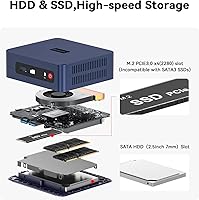
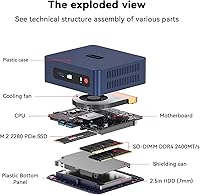
Accessible SO-DIMM slots and a standard M.2 2280 drive bay mean buyers can realistically extend the life of the SER3 by adding RAM or swapping in a larger SSD without specialist tools. This gives it a longer viable lifespan than fully sealed alternatives.
Beyond RAM and storage, there is no meaningful upgrade path — the CPU and GPU are fixed to the motherboard. Buyers hoping to grow their machine's processing capability over time will eventually need to replace the entire unit rather than upgrade components individually.

Suitable for:

The Beelink SER3 Mini PC is a practical choice for anyone who wants a capable Windows machine without the bulk, noise, or energy draw of a traditional desktop tower. Home office workers who spend their day in browser tabs, video calls, and office applications will find it handles those tasks comfortably, especially with 16GB of RAM keeping things from slowing down mid-meeting. HTPC enthusiasts are a natural fit too — the dual HDMI outputs and quiet fan make it easy to build a clean, unobtrusive media setup around a 4K television. Students needing a proper Windows Pro machine for school or a secondary workstation, small businesses deploying simple point-of-sale or digital signage setups, and anyone reclaiming desk space from an aging tower will all get genuine value here. If your computing day looks like documents, email, light photo work, and streaming, this compact desktop punches at exactly the right weight.

Not suitable for:

The Beelink SER3 Mini PC is not the right call for buyers who need serious processing headroom. The Ryzen 3 3200U is a 2019 dual-core chip, and while it is perfectly adequate for light workloads, it struggles noticeably when pushed into video encoding, 3D rendering, compilation tasks, or any sustained CPU-heavy workload — the performance gap versus newer quad-core mini PCs becomes obvious quickly. Gamers should look elsewhere entirely; the Radeon Vega 3 integrated graphics can handle casual 2D titles and older low-demand games at best, and calling it a gaming machine in any meaningful sense would be misleading. Content creators working regularly in Premiere, DaVinci Resolve, or similar tools will hit the ceiling fast. Budget-conscious shoppers comparing this against newer Intel N100 or Ryzen 5-powered alternatives at comparable price points may also find the value proposition harder to justify, since those chips offer meaningfully more performance per dollar today.

Specifications

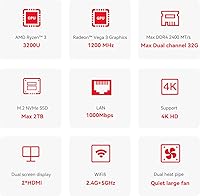
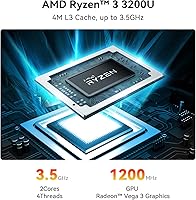
  • Processor: The unit runs an AMD Ryzen 3 3200U, a 2-core/4-thread chip built on 14nm architecture with a base clock of 2.6GHz and a boost up to 3.5GHz.
  • Graphics: Integrated AMD Radeon Vega 3 graphics with 3 compute cores running at up to 1200MHz handle display output and light visual workloads.
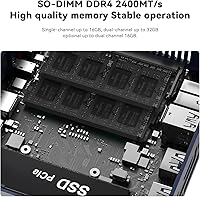
  • RAM: 16GB of DDR4 memory runs at 2400MHz across two slots, with a maximum supported capacity of 32GB using two 16GB modules.
  • Storage: A 500GB M.2 2280 PCIe 3.0 x4 SSD is installed from the factory, offering faster read and write speeds than conventional SATA-based drives.
  • Display Output: Two full-size HDMI ports support simultaneous dual-display output at up to 4K resolution and 60Hz refresh rate.
  • Wireless: WiFi 6 (802.11ax) with dual-band 2.4GHz and 5GHz support is built in alongside Bluetooth 5.2 for peripheral and device connectivity.
  • Wired Network: A single RJ-45 Gigabit Ethernet port provides 1000Mbps wired LAN connectivity for stable, high-speed network use.
  • USB Ports: Four USB 3.2 ports and one USB 2.0 port are provided for connecting peripherals, storage devices, and accessories.
  • Audio: A single 3.5mm combo jack supports both headphone output and microphone input simultaneously.
  • Operating System: Windows 11 Pro comes pre-installed and activated, including features such as BitLocker encryption and Remote Desktop.
  • Dimensions: The unit body measures approximately 4.5 x 4.5 x 1.6 inches, making it compact enough to mount behind a monitor using a standard VESA adapter.
  • Weight: The device weighs approximately 1.76 pounds, light enough for easy repositioning or wall/monitor mounting.
  • Power Input: The machine is powered via a DC barrel jack; no internal battery is included, as this is a desktop-class device.
  • Certifications: The unit carries FCC, RoHS, and CE certifications, confirming compliance with North American and European safety and emissions standards.
  • Warranty: Beelink provides a one-year hardware warranty alongside lifetime technical support access for registered buyers.

Related Reviews
Beelink SER3 Mini PC, AMD Ryzen 3 3200U, 16GB RAM, 500GB SSD
84%
85%
Performance
92%
Value for Money
88%
Build Quality
94%
Compact Design
90%
Ease of Setup
More
Beelink ME Mini PC
Beelink ME Mini PC
87%
88%
Performance
91%
Connectivity
85%
Storage Expansion
95%
Power Efficiency
90%
Noise Levels
More
Beelink Mini S12 Pro (N100, 16GB, 500GB)

83%
83%
Everyday Performance
91%
Value for Money
76%
Build Quality & Design
84%
Thermal Management & Noise
88%
Connectivity & Ports
More
Beelink Mini S12 Mini PC
78%
88%
Value for Money
82%
Performance for Daily Tasks
79%
Build Quality & Design
91%
Dual Monitor Support
84%
Thermal Management & Noise
More
Beelink EQi13 Pro (32GB/500GB)
83%
88%
Processing Performance
91%
Memory & Multitasking
86%
Storage Speed & Expandability
74%
Thermal Management & Noise
93%
Networking Capabilities
More
Beelink SER5 Pro (Ryzen 7 5825U, 16GB/500GB)
80%
88%
Everyday Performance
67%
Thermal Management
91%
Multi-Monitor Support
83%
Build Quality & Design
86%
Connectivity & Port Selection
More
Beelink EQ14 Mini PC (N150, 16GB, 1TB)
74%
74%
Everyday Performance
61%
RAM & Memory Configuration
83%
Storage & Expandability
91%
Connectivity & Networking
79%
Display Output
More
Beelink SER9 Pro (32GB/1TB)
84%
93%
Processing Performance
91%
Multitasking & Responsiveness
84%
Build Quality & Design
67%
Thermal Management & Fan Noise
72%
Graphics & Display Output
More
Beelink EQI Mini PC i5-1235U 32GB RAM 1TB SSD
87%
88%
Performance
85%
Build Quality
92%
Value for Money
90%
Design/Size
81%
Thermals
More
Beelink ME Mini PC 1TB
79%
83%
Value for Money
71%
Performance
92%
Networking Capability
89%
Storage Expandability
84%
Thermal Management
More
Beelink SER5 MAX 32GB 500GB Mini PC
81%
88%
Everyday Performance
63%
Thermal Management
93%
Display Output
79%
RAM & Memory Speed
84%
Storage Performance
More

FAQ

Yes, both HDMI ports are active simultaneously and each supports 4K output at 60Hz. You can run two independent 4K displays without needing any adapters or additional hardware, which makes this a genuinely capable dual-monitor setup for the price.

The memory is not soldered. The SER3 uses two standard SO-DIMM slots, so upgrading to 32GB — using two 16GB DDR4 2400MHz modules — is straightforward if you want more headroom down the line.

Under normal workloads like browsing, video calls, and office applications, the fan is nearly inaudible. It does spin up more noticeably during sustained CPU-heavy tasks, but even then it stays at a low hum rather than a distracting whine.

Be realistic here. The Radeon Vega 3 integrated graphics can handle older, less demanding titles and some lightweight 2D games at low settings, but it is not a gaming GPU by any meaningful measure. Modern titles will either not run or will run poorly even at minimum settings.

No, neither a keyboard nor a mouse is included in the box. You get the unit itself, a power adapter, an HDMI cable, and a VESA mounting bracket, but input peripherals are sold separately.

Windows 11 Pro comes pre-installed and pre-activated. You do not need to purchase a separate license key or go through any activation steps — it is ready to use from the first boot.

For most remote work scenarios — video conferencing, document editing, email, browser-based tools — this compact desktop handles things without issue. The 16GB of RAM gives it enough breathing room to keep multiple apps open at once, and the WiFi 6 connection stays stable. Where it can stumble is if your work involves large spreadsheets with complex calculations, heavy multitasking, or any kind of media production.

Yes. The drive uses a standard M.2 2280 form factor with a PCIe interface, which is widely available. Swapping it for a larger drive is a straightforward process for anyone comfortable opening a mini PC chassis.

During light to moderate use, thermals are generally fine. Under sustained heavier workloads, the chassis does get warm, and a small number of users have reported throttling during extended stress. For typical office or media use, it should stay within acceptable temperature ranges without issue.

It is a solid choice for HTPC use. The dual HDMI outputs, near-silent fan, small footprint, and ability to play 4K video smoothly make it well suited to sitting beside or behind a television. Streaming services, local media playback via apps like Plex or Kodi, and even basic web browsing on a big screen all work well in this role.