Overview

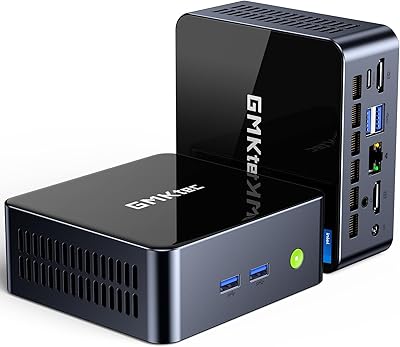
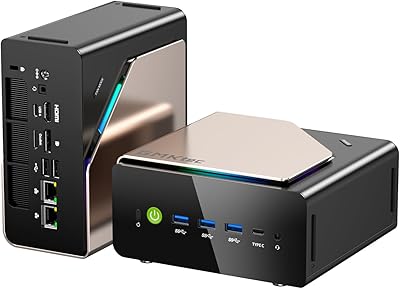
The Beelink GTI14 Core Ultra 9 Mini PC is one of the few compact machines that doesn't ask you to make painful compromises to get it on your desk. Beelink built the GTI14 around Intel's Core Ultra 9 185H — a 16-core chip that typically lives inside premium laptops, not palm-sized boxes. That alone sets it apart from the crowded budget end of the mini PC market. It competes squarely with NUC successors and other high-performance small-form-factor machines. What makes it worth a closer look is how much I/O Beelink packed into a compact chassis barely larger than a thick hardcover book.
Features & Benefits

The Core Ultra 9 185H is the standout component here. With 16 cores handling everything from performance bursts to background efficiency tasks, this mini PC manages heavy workloads — simultaneous 4K editing, virtual machines, multiple IDEs — without the throttling you might expect from something this compact. Sixty-four gigs of dual-channel DDR5 is generous headroom from day one, and because both SODIMM slots are user-accessible, bumping to 96GB later is a real option. Two PCIe 4.0 NVMe drives totaling 2TB keep file operations fast. Triple 4K display output via HDMI, DisplayPort, and Thunderbolt 4 USB-C handles multi-monitor setups. The port roster — five USB 3.2 ports, dual 2.5G Ethernet, WiFi 7, SD 4.0 — is unusually complete for the form factor.

Best For

Beelink's flagship compact desktop makes the most sense for people who need real computational muscle without sacrificing desk space. Home office workers running resource-heavy applications — large spreadsheets, design tools, remote desktop sessions — will find it comfortable and unobtrusive. It's also a strong pick for 4K video editors and photographers who want fast storage throughput without the noise of a full workstation. Developers juggling containers or spinning up multiple VMs will appreciate the headroom 64GB provides. Casual and indie gamers can get by on the Intel Arc integrated graphics for lighter titles, though anyone expecting demanding modern games to run at high settings should temper their expectations accordingly.

User Feedback

Buyers consistently highlight one theme: the GTI14 simply works out of the box, with minimal configuration friction. The 64GB RAM configuration draws specific appreciation from users running virtual machines, who report noticeably smoother performance compared to lower-spec mini PCs. Fan noise under sustained load is an honest pain point — not loud enough to derail a focused work session, but definitely present during extended renders or compilations. Thermal behavior in enclosed or poorly ventilated spots is a related concern worth planning around. On the support side, Beelink's lifetime technical support commitment and one-year warranty are referenced frequently as meaningful reassurances given the premium investment this machine represents.

Pros

  • The Core Ultra 9 185H is a genuinely high-end mobile chip rarely found in the mini PC segment.
  • Sixty-four gigs of DDR5 RAM handles heavy multitasking, VMs, and demanding creative apps with headroom to spare.
  • Both SODIMM slots are user-accessible, making a future RAM upgrade to 96GB straightforward.
  • Dual PCIe 4.0 NVMe drives deliver fast read and write speeds for large file workflows.
  • Triple 4K display support via three different output types covers almost any monitor configuration.
  • The port selection — five USB 3.2 ports, dual 2.5G Ethernet, SD 4.0 — is exceptional for a machine this small.
  • WiFi 7 and Bluetooth 5.4 are genuinely forward-looking and ready for next-generation peripherals and networks.
  • Setup is plug-and-play for most users, with Windows 11 ready to go out of the box.
  • Beelink backs the GTI14 with a one-year warranty and lifetime technical support, which is rare at any price tier.
  • The physical footprint is small enough to mount behind a monitor or tuck beside a keyboard without crowding the desk.

Cons

  • Fan noise under sustained CPU load is noticeable and may bother users in quiet environments.
  • Integrated graphics cap the machine out of serious gaming territory regardless of the powerful processor.
  • Placing this mini PC in a closed or poorly ventilated space can cause thermal throttling during long render sessions.
  • Some buyers report needing to sort out Windows activation independently, which adds friction at first boot.
  • No discrete GPU slot means GPU-accelerated workloads like 3D rendering or ML training are a non-starter here.
  • At its price point, buyers pay a premium for compactness — a traditional tower would offer more raw upgradeability for similar money.
  • The included thermal solution is adequate for typical workloads but can struggle during prolonged maximum-load scenarios.
  • Dual 2.5G Ethernet is useful but requires compatible networking hardware most home users may not already own.
  • No optical audio output may matter to users with older home-theater receivers or audio equipment.

Ratings

The scores below reflect an AI-driven analysis of verified global user reviews for the Beelink GTI14 Core Ultra 9 Mini PC, with spam, bot-submitted, and incentivized feedback actively filtered out before scoring. Each category was weighted against real purchase-verified experiences from buyers across professional, creative, and home office contexts. Both the genuine strengths and the honest frustrations are reflected — nothing has been softened to protect the product's image.

Processing Performance
93%
The Core Ultra 9 185H consistently impresses users who come from older mini PCs or entry-level desktops. Developers running Docker stacks, editors cutting 4K timelines, and analysts processing large datasets all report that the chip handles sustained workloads without the sluggishness typical of compact machines. Multi-threaded tasks in particular draw frequent praise.
A subset of users note that during extreme sustained loads — think hour-long 4K exports or large-scale compilation jobs — the processor does show some thermal throttling, slightly dampening peak throughput. This is a form-factor constraint more than a chip deficiency, but it is worth knowing if your workloads are relentlessly continuous.
Thermal Management
71%
29%
For everyday mixed workloads — browsing, video calls, office applications, moderate coding sessions — the GTI14 manages heat quietly and efficiently. Many users are surprised by how cool it runs during typical office use, and the chassis itself rarely feels warm to the touch under normal conditions.
Under prolonged heavy CPU loads, the cooling system struggles to keep temperatures fully in check, leading to audible fan ramp-up and occasional throttling. Users who place this mini PC in enclosed cabinets or entertainment units report noticeably worse sustained performance, and at least a few have had to reposition the unit to a more open surface to stabilize it.
Fan Noise
67%
33%
At idle and during light work, the fan is nearly inaudible — users in shared office environments report no complaints from colleagues, and the machine sits quietly under the kind of tasks most people do most of the time. This is a real win for desk-side placement.
Ramp-up under load is the consistent pain point. Once the CPU is genuinely pushed — rendering, compiling, running multiple VMs — the fan becomes clearly audible and stays that way until the workload eases. For podcasters, voice-over artists, or users with open-concept audio setups, this is a meaningful limitation to plan around.
RAM & Upgradeability
91%
Starting at 64GB of dual-channel DDR5 is genuinely generous for a mini PC, and the fact that both SODIMM slots are user-accessible without voiding the warranty is a strong differentiator. Users running heavy virtual machine environments specifically call out how much smoother their VM sessions feel compared to machines with half the RAM.
The maximum supported ceiling of 96GB — two 48GB SODIMMs — is slightly below what some power users might wish for as AI and ML workloads grow more memory-hungry. A small number of users also note that sourcing high-capacity DDR5 SODIMMs at reasonable prices can be tricky depending on region.
Storage Speed & Capacity
89%
PCIe 4.0 NVMe storage is fast enough that most users never feel a storage bottleneck, even when scrubbing through large 4K media files or running multiple VMs off the same drive. Having two slots already filled — and both replaceable — gives meaningful headroom for growth without requiring an immediate purchase.
Some users note that the included drives, while fast, are not top-tier branded units, and sequential write speeds under sustained conditions can dip slightly below advertised peaks. For most workflows this is inconsequential, but users doing heavy sustained write tasks like long continuous recording may want to verify drive specifications before assuming maximum performance.
Multi-Monitor Support
88%
Triple 4K simultaneous output via HDMI, DisplayPort, and USB-C is one of the GTI14's standout real-world advantages. Users building triple-monitor productivity stations — traders, developers, video editors — report that all three displays work reliably right out of the box without additional configuration or driver headaches.
A handful of users ran into confusion getting the USB-C display output working, usually traced back to cables that did not explicitly support video alternate mode. The GTI14 itself functions correctly, but the setup experience can catch buyers off guard if they assume any USB-C cable will carry a display signal.
Port Selection & I/O
94%
The I/O layout on this mini PC is legitimately exceptional for the form factor. Five USB 3.2 Type-A ports, dual 2.5G Ethernet, Thunderbolt 4, an SD 4.0 slot, and a 3.5mm audio jack mean most users can connect everything they need without reaching for an external hub — a rare luxury in a machine this compact.
The two Ethernet ports are useful for power users but require a 2.5G-capable router or switch to realize their full throughput — hardware many home users do not yet own. A few buyers also wish for a second Thunderbolt 4 port, particularly those with high-bandwidth peripherals that want to daisy-chain devices.
Wireless Connectivity
87%
WiFi 7 and Bluetooth 5.4 represent genuinely forward-looking wireless specs for a machine in this segment. Users with WiFi 7 routers report noticeably lower latency and more stable throughput compared to older WiFi standards, and the Bluetooth 5.4 connection handles modern wireless peripherals — keyboards, headphones, speakers — without pairing instability.
WiFi 7 only benefits users who have already upgraded their router infrastructure, which remains a minority. In standard WiFi 6 or older environments, the wireless experience is solid but not meaningfully different from what a cheaper machine would provide. Buyers on older home networks should not factor this in as a compelling reason to choose this machine.
Integrated Graphics
62%
38%
Intel Arc integrated graphics handle 4K video playback, light creative work, and casual gaming titles more capably than older Intel integrated solutions. Users primarily using the GTI14 for productivity with occasional lighter gaming or media tasks are generally satisfied with what the integrated GPU delivers in that context.
For anyone who bought this expecting meaningful gaming performance in modern titles, the integrated GPU is a consistent disappointment. Demanding games at higher settings produce frame rates that feel unacceptable to most gamers, and GPU-accelerated creative workloads like heavy 3D rendering or real-time effects are clearly bottlenecked by the lack of dedicated VRAM.
Build Quality & Design
83%
The chassis feels solid and well-assembled for a mini PC at this price tier — users consistently describe it as more premium-feeling than they expected. The compact footprint is genuinely desk-friendly, and the port placement on front and rear is thoughtfully arranged for everyday cable management.
The exterior finish is a fingerprint magnet and shows smudges quickly in bright lighting conditions. A small number of users have also noted that the plastic-adjacent housing, while sturdy, does not carry the same premium tactile feel as aluminum-bodied NUC-style competitors at comparable price points.
Setup & Out-of-Box Experience
84%
The initial setup process is smooth for the vast majority of buyers — Windows 11 is pre-installed, peripherals are detected reliably, and the machine is generally usable within minutes of first boot. Non-technical users appreciate the lack of configuration complexity compared to building a traditional desktop.
Windows activation has been a recurring frustration for a meaningful minority of buyers, requiring a call or contact with support before the system is fully set up. Additionally, some users find the pre-installed software environment could be leaner, with a few unnecessary bundled utilities that take time to clean up before the machine feels truly fresh.
Value for Money
76%
24%
When measured in performance-per-cubic-inch or watts-per-dollar, the GTI14 makes a reasonable case for itself — you are getting flagship mobile CPU performance, 64GB DDR5, and a future-proof port roster in a device smaller than most office staplers. For buyers who specifically need that combination, the pricing reflects real component costs.
Users who do not need 64GB of RAM or a 16-core processor out of the box may feel they are paying a significant premium for capability they will rarely use. At this tier, a traditional small-form-factor desktop or a competing mini PC with a lower-spec chip can cover most casual-to-moderate workloads at a noticeably lower outlay.
Warranty & Support
81%
19%
Beelink's combination of a one-year hardware warranty and lifetime technical support is regularly cited as a meaningful reassurance, particularly by users who are less experienced with mini PC hardware. The lifetime support commitment signals genuine brand confidence, and most users who needed help report that Beelink responded within a reasonable window.
Support quality is not always consistent — response times and resolution depth vary depending on the complexity of the issue and the time of year. Users dealing with nuanced problems like Windows activation or driver conflicts report more varied experiences than those with straightforward hardware replacement requests.
Noise During Idle
88%
At rest or during light browsing and document work, the GTI14 runs whisper-quiet — users in shared bedrooms, library-style home offices, and quiet studio environments report no audible fan noise during these conditions. For anyone replacing a loud tower desktop, the idle noise reduction alone is a notable lifestyle improvement.
There is an occasional fan flutter — a brief spin-up during short background processes — that catches some users off guard in otherwise silent rooms. It is a minor observation rather than a real complaint, but users extremely sensitive to intermittent noise should be aware it can occur even outside of heavy workloads.

Suitable for:

The Beelink GTI14 Core Ultra 9 Mini PC is purpose-built for people who genuinely push their hardware and need it to keep up without occupying half a desk. Content creators — video editors, photographers, motion designers — who regularly process large 4K files will find the combination of a 16-core processor and fast PCIe 4.0 storage meaningfully reduces wait times in their day-to-day workflow. Developers who live inside resource-hungry environments like Docker containers, virtual machines, or multiple simultaneous IDEs will get real breathing room from 64GB of DDR5 RAM with the option to go higher. Home office professionals running multi-monitor setups will appreciate triple 4K output and an unusually complete port selection that eliminates the need for an additional hub or dock. If desk real estate matters and performance cannot be sacrificed, this machine fits that brief well.
Not suitable for:

The Beelink GTI14 Core Ultra 9 Mini PC is a poor match for anyone whose primary use case is serious gaming. The integrated Intel Arc GPU handles lighter indie titles adequately, but modern AAA games at high settings are simply beyond what integrated graphics can deliver, regardless of how capable the CPU is. Buyers on a tight budget should also look elsewhere — this is a premium-tier machine, and there are capable mini PCs at lower price points for users whose needs stop at web browsing, document editing, or media consumption. Anyone who requires a discrete graphics card for GPU-accelerated workloads — 3D rendering, machine learning training, heavy video encoding with NVENC — will need to look at a full desktop build instead. Finally, users who plan to tuck this into a closed cabinet or poorly ventilated enclosure should be cautious, as thermal constraints in confined spaces can affect sustained performance and longevity.
Specifications

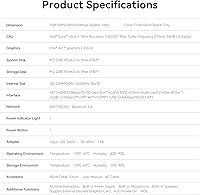
  • Processor: Intel Core Ultra 9 185H with 16 cores, 22 threads, and a maximum boost frequency of 5.1GHz, built on Intel's Meteor Lake architecture.
  • RAM: 64GB of dual-channel DDR5 memory installed as two 32GB SODIMM modules, with both slots user-accessible and upgradable to a maximum of 96GB.
  • Storage: Two 1TB PCIe 4.0 NVMe M.2 2280 SSDs installed by default for 2TB total capacity, with each slot independently expandable up to 2TB for a maximum of 4TB.
  • Graphics: Intel Arc integrated GPU, included as part of the Core Ultra 9 185H die, supporting hardware-accelerated media decode and light GPU workloads.
  • Display Output: Triple simultaneous 4K output supported via one HDMI port, one DisplayPort, and one USB-C port with DisplayPort 1.4 alternate mode.
  • USB Ports: Five USB 3.2 Type-A ports, one USB-C with Thunderbolt 4, DisplayPort 1.4, and Power Delivery, plus one additional USB-C port for data transfer only.
  • Networking: Dual 2.5 Gigabit Ethernet ports provide wired network redundancy or simultaneous connection to two separate networks.
  • Wireless: WiFi 7 and Bluetooth 5.4 are built in, supporting the latest wireless networking standards for high-throughput and low-latency connections.
  • Card Reader: One SD 4.0 card slot is included, supporting high-speed read and write transfers from modern SD and UHS-II cards.
  • Audio: A single 3.5mm combo audio jack supports both headphone output and microphone input simultaneously.
  • Operating System: Windows 11 comes pre-installed on the machine and is ready to use after initial setup.
  • Dimensions: The unit measures approximately 7.68 x 7.68 x 4.76 inches, making it small enough to mount behind a monitor with a standard VESA adapter.
  • Weight: The GTI14 weighs approximately 4.38 pounds, which is compact but substantial enough to stay stable on a desk without additional anchoring.
  • Memory Type: Both memory slots use the SODIMM form factor with DDR5 specification, which is the same standard found in premium laptops.
  • Certifications: The unit carries FCC and CE certifications, confirming it has passed electromagnetic compatibility and safety testing for North American and European markets.
  • Warranty: Beelink provides a one-year worry-free warranty covering hardware defects, along with a commitment to lifetime technical support via their customer service team.

Related Reviews
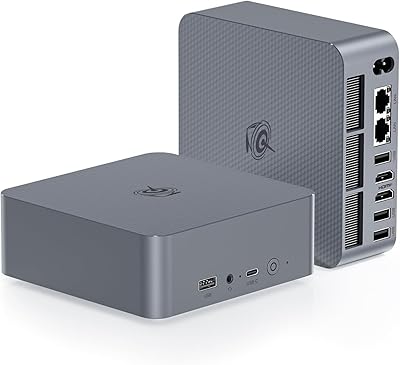
Beelink EQI i3-1220P 16GB Mini PC
79%
83%
Everyday Performance
88%
Dual Display Reliability
91%
Setup & Out-of-Box Experience
86%
Port Selection & Layout
67%
Thermal Management & Fan Noise
More
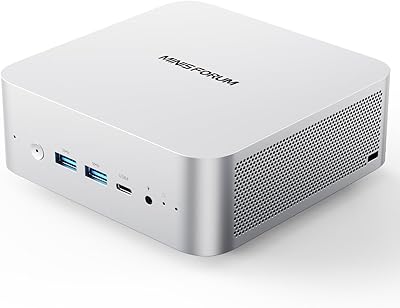
MINISFORUM M1 Pro 64GB 2TB Mini PC
78%
92%
Processing Performance
78%
Thermal Management
63%
Fan Noise
88%
Build Quality
91%
Display Versatility
More
Beelink EQi12 Mini PC (i5-1235U, 16GB, 500GB)
80%
83%
Processing Performance
67%
Thermal Management
79%
RAM & Expandability
86%
Storage Speed & Flexibility
88%
Display Output
More
Beelink EQI12 Mini PC (i3-1220P, 16GB/500GB)
81%
84%
Everyday Performance
89%
Boot & Load Speed
71%
Thermal Management & Cooling
86%
Display & Dual Monitor Support
82%
Build Quality & Design
More
GMKtec M3 Ultra Mini PC with Intel Core i7-12700H, 32GB RAM, 1TB SSD
86%
88%
Overall Performance
91%
Multitasking & Processing Power
78%
Graphics Performance
84%
Build Quality & Design
93%
Ease of Setup
More
Beelink EQI13 PRO Mini PC, Intel Core i7-13620H, 32GB RAM, 500GB SSD
87%
88%
Performance
91%
Multitasking
84%
Build Quality
93%
Connectivity
89%
Display Quality
More
GMKtec EVO-T1 Ultra 9 285H Mini PC
82%
91%
CPU Performance
67%
GPU & Graphics
93%
RAM & Memory
94%
Storage & Expandability
89%
Multi-Display Support
More
GMKtec Nucbox K9 Mini PC Intel Core Ultra 5 125H 32GB RAM 1TB SSD
85%
89%
Performance
85%
Build Quality
90%
Energy Efficiency
88%
Connectivity Options
87%
Display Support
More
Beelink ME Mini PC
Beelink ME Mini PC
87%
88%
Performance
91%
Connectivity
85%
Storage Expansion
95%
Power Efficiency
90%
Noise Levels
More
Beelink Mini S12 Pro (N100, 16GB, 500GB)
83%
83%
Everyday Performance
91%
Value for Money
76%
Build Quality & Design
84%
Thermal Management & Noise
88%
Connectivity & Ports
More

FAQ

You can absolutely do it yourself. Both SODIMM slots are user-accessible, meaning you just need a small Phillips screwdriver to open the case. The machine supports up to 96GB using two 48GB DDR5 SODIMM modules, and the process is straightforward enough that most users comfortable with basic PC maintenance can handle it in under 15 minutes.

It depends entirely on what you want to play. The Intel Arc integrated GPU in the GTI14 handles lighter indie titles, older games, and less graphically demanding releases reasonably well. If you are hoping to run modern AAA games at high settings and smooth frame rates, integrated graphics simply cannot deliver that regardless of how powerful the CPU is. Dedicated GPU systems are the right tool for serious gaming.

Under light-to-moderate loads, the GTI14 runs quietly enough that you would not notice it in a typical home office. During prolonged heavy tasks — sustained video rendering, large compilation jobs, extended VM activity — the fan does ramp up and becomes audible. It is not disruptive in most environments, but if you work in a very quiet room or record audio nearby, it is worth factoring in.

Triple simultaneous display output is genuine and functional. You use the HDMI port, the DisplayPort, and the USB-C port that supports DisplayPort 1.4 alternate mode — all three at once, each capable of 4K resolution. Just make sure your monitors have the corresponding inputs, and that the USB-C cable you use explicitly supports video output.

Windows 11 comes pre-installed, but some buyers have reported needing to complete activation manually after first boot. It is worth checking the activation status under Settings immediately after setup. If there is an issue, Beelink's support team is generally responsive and can help resolve it.

WiFi 7 is genuinely useful if your router supports it, offering significantly lower latency and higher throughput than WiFi 6 or 6E — especially relevant in crowded wireless environments. If your current router is WiFi 5 or 6, the connection will still work fine; it will just negotiate down to the router's capability. Think of WiFi 7 support as buying you relevance for the next several years as router hardware catches up.

Both M.2 slots are available and each can take up to a 2TB PCIe 4.0 NVMe drive, so in theory you can reach 4TB total just by swapping or adding drives. The slots use the standard M.2 2280 form factor, which is widely available. If you ever need even more storage, the USB 3.2 ports handle external drives without much fuss.

It really shines in scenarios that need sustained CPU throughput rather than GPU power — running multiple virtual machines, compiling large codebases, editing and color-grading 4K footage, managing heavy spreadsheet models, or running several resource-hungry applications simultaneously. The 64GB RAM configuration in particular makes a tangible difference for anyone who keeps a lot of processes running at once.

It is capable of it, especially with dual 2.5G Ethernet and expandable storage, but it is probably overkill and energy-inefficient for a pure NAS role compared to dedicated network storage hardware. As a light home server handling media streaming, self-hosted apps, or a development environment that also doubles as a desktop, it makes more practical sense.

The standard warranty covers manufacturing defects and hardware failures for one year from purchase. Beelink also advertises lifetime technical support, which buyers tend to reference positively — meaning help with configuration questions, driver issues, and compatibility concerns beyond the warranty period. Response times and quality can vary, but the consensus from user feedback is that support is more accessible than you would expect from a smaller brand.