Overview

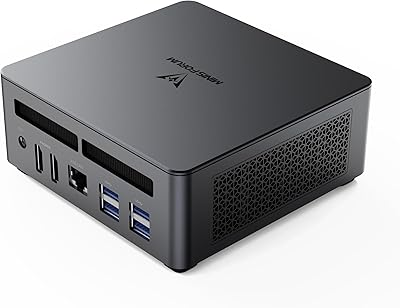
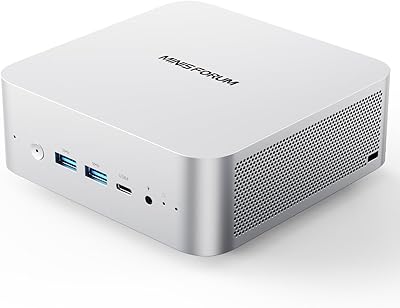
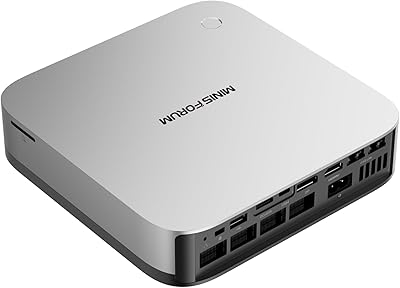
The MINISFORUM UM890 Pro Mini PC (64GB/1TB) is one of the more serious small-form-factor desktops available today, packing an AMD Ryzen 9 8945HS processor that boosts up to 5.2GHz into a box that weighs barely three and a half pounds. The configuration out of the box is genuinely strong — 64GB of DDR5 RAM and a 1TB PCIe 4.0 SSD are not compromises you would normally expect at this tier. What really separates this mini PC from the crowd, though, is the inclusion of an OCuLink port, dual 2.5G Ethernet, and Wi-Fi 6E. That combination points to a machine built for people who actually push hardware, not just browse the web.
Features & Benefits

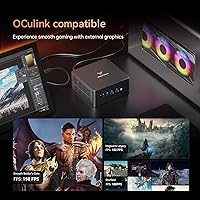
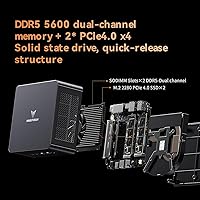
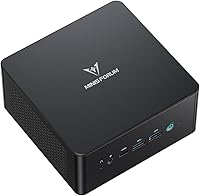
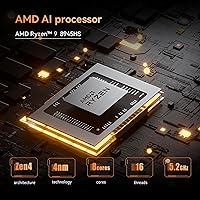
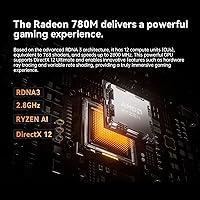
The Ryzen 9 8945HS at the heart of this compact desktop is genuinely capable — eight cores and sixteen threads let it handle video transcoding, multi-tab research sessions, and light gaming without obvious bottlenecks. The AMD Radeon 780M integrated GPU can drive four displays simultaneously, topping out at 4K/144Hz or even 8K/60Hz, which is remarkable for integrated graphics. Storage expansion is straightforward, with two M.2 PCIe 4.0 slots supporting up to 8TB total. The OCuLink port allows pairing with an external GPU, though you will need a compatible eGPU enclosure to actually use it. Thermally, liquid metal cooling and active heatsink fans keep things in check, though expect the fan to spin up audibly under sustained loads.

Best For

This mini PC punches well above its size for a few specific types of buyers. Home office workers who need a quiet machine running three or four monitors will feel right at home here. Content creators — photographers, video editors working with proxies, or anyone managing large file libraries — will appreciate the fast storage and RAM. Dual 2.5G LAN makes the UM890 Pro a compelling pick for developers, homelabbers, and IT professionals who need network segmentation or run virtual machines locally. It also works well as a 4K media center in a living room setup. Just keep in mind that demanding 3D gaming is not its primary strength, even with capable integrated graphics.

User Feedback

Buyers who have spent time with this compact desktop generally praise the build quality and responsiveness under real workloads — the 64GB configuration in particular gets positive mentions for keeping multitasking smooth. On the flip side, a recurring point of friction is the lack of a pre-installed operating system; less technical buyers have been caught off-guard by receiving what is effectively a bare machine. Fan noise in performance mode is also worth noting, with several users reporting the fan becomes audible during prolonged CPU-heavy tasks. OCuLink feedback is relatively sparse but largely positive among those who have tested external GPU enclosures. Shipping and QC consistency appear solid based on verified purchase reviews.

Pros

  • Ships with 64GB DDR5 and a 1TB PCIe 4.0 SSD — a genuinely complete configuration requiring no immediate upgrades.
  • Drives four displays simultaneously, including 4K at 144Hz, which is rare at this size.
  • OCuLink port provides a real eGPU upgrade path that almost no rival mini PC offers.
  • Dual 2.5G Ethernet is a standout feature for developers, homelabbers, and network-heavy workflows.
  • Liquid metal CPU cooling and active SSD and RAM heatsinks show serious thermal engineering for the form factor.
  • Two M.2 PCIe 4.0 slots make storage expansion straightforward and tool-free.
  • Wi-Fi 6E keeps wireless performance strong in congested network environments.
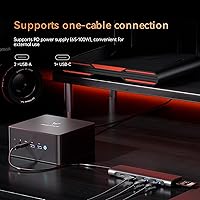
  • USB4 ports double as high-wattage charging inputs, reducing cable clutter on the desk.
  • Compact and light enough to mount behind a monitor or pack in a bag for mobile workstation use.
  • Build quality feels solid and deliberate, not hollow or cheap for the price tier.

Cons

  • No operating system is included — buyers must install Windows or Linux themselves before the machine is usable.
  • Fan noise in performance mode is noticeable and can be disruptive in quiet work environments.
  • RAM may not initialize at full 5600MHz speed without manually adjusting BIOS settings after first boot.
  • OCuLink is only useful with a compatible eGPU enclosure, a separate costly purchase with limited documentation.
  • BIOS customization options are poorly documented, leaving power users reliant on community forums for guidance.
  • The power adapter is bulkier than expected for a machine marketed on its compact size.
  • No pre-configured thermal or fan curve software makes noise management less accessible for non-technical users.
  • Minor cosmetic inconsistencies in fit and finish have been reported across a subset of units at this price tier.

Ratings

The MINISFORUM UM890 Pro Mini PC (64GB/1TB) scores here reflect AI-driven analysis of verified global buyer reviews, with spam, incentivized feedback, and bot activity actively filtered out before any score was calculated. This compact desktop earns strong marks in several key areas, but the analysis also surfaces real friction points that prospective buyers deserve to know before committing. Both the highs and the honest shortcomings are represented in every category below.
CPU Performance
93%
Buyers consistently report that the Ryzen 9 8945HS handles demanding daily workloads without hesitation — compiling code, running virtual machines, and editing mid-resolution video all feel fluid. The boost to 5.2GHz keeps single-threaded tasks snappy, which matters for everyday responsiveness just as much as raw multi-core throughput.
A small number of users note that the processor can throttle slightly during very prolonged, all-core workloads in warm ambient conditions. This is rarely an issue for typical office or creative tasks, but buyers planning continuous heavy rendering runs should be aware of the thermal ceiling.
Thermal Management
74%
26%
The liquid metal TIM and active heatsink fans for both the DDR modules and SSD are genuine engineering choices that most rivals skip. Users doing photo editing or light video work report the chassis stays warm but never alarmingly hot, and the system recovers quickly after burst workloads.
Under sustained CPU stress — long video exports, extended compilation jobs — the fan ramps up noticeably and several buyers describe it as distracting in a quiet room. The 43dB figure applies specifically to performance mode, and real-world noise under full load strikes many users as higher than marketing materials imply.
RAM & Memory Speed
81%
19%
Shipping with 64GB DDR5 dual-channel out of the box is a meaningful advantage for users who keep dozens of browser tabs open alongside productivity apps or lightweight VMs. The headroom alone reduces the need for immediate upgrades that plague lower-configured mini PCs.
Several technically minded buyers have observed that real-world RAM speeds do not always hit the advertised 5600MHz without manually enabling XMP-equivalent profiles in the BIOS. Out of the box, some units initialize at lower speeds, which is a minor but avoidable performance loss for buyers who do not dig into firmware settings.
Storage Performance
89%
The 1TB PCIe 4.0 SSD delivers fast sequential reads and writes that make large file transfers, application launches, and OS boot times genuinely quick. Buyers moving large media libraries or working with raw photo files notice the difference compared to older PCIe 3.0 configurations.
The second M.2 slot, while a welcome expansion option, is empty by default — buyers expecting dual-drive flexibility need to budget separately for an additional SSD. A minority of users also report the pre-installed drive runs warmer than expected, though the active heatsink fan largely keeps it within safe limits.
Graphics & Display Output
77%
23%
Driving four monitors simultaneously from a machine this size is legitimately impressive, and users running multi-screen home office setups report sharp, stable output at 4K. The 780M integrated GPU handles media playback, light photo editing, and even some casual older titles at reasonable settings without an eGPU attached.
Buyers expecting to run modern 3D games at high settings will hit the iGPU ceiling quickly — titles released after 2022 often require dialing back resolution and detail significantly. The 780M is competitive for integrated graphics, but it is not a substitute for a discrete card, and some users have expressed disappointment after misreading marketing language about gaming capability.
OCuLink & eGPU Usability
68%
32%
Among buyers who have actually paired this mini PC with a compatible eGPU enclosure, feedback is largely positive — the OCuLink interface delivers enough bandwidth to make discrete GPU performance feel tangible, which is a rare capability at this form factor. Enthusiasts appreciate having a clear upgrade path without buying a full tower.
Most buyers never use the OCuLink port because compatible enclosures are a separate, costly purchase that the listing does not make obvious. Setup requires some technical confidence, and documentation on compatible enclosures is thin. Casual buyers have described the port as confusing or useless without realizing what it is actually designed for.
Connectivity & Ports
91%
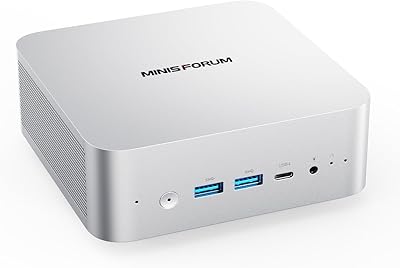
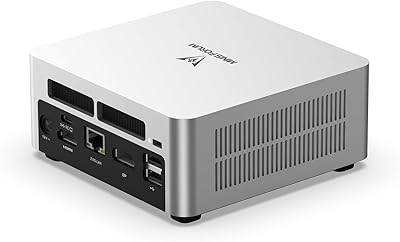
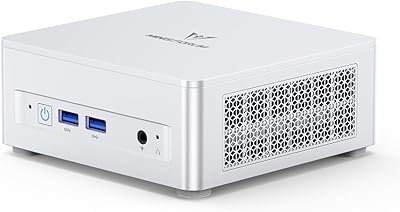
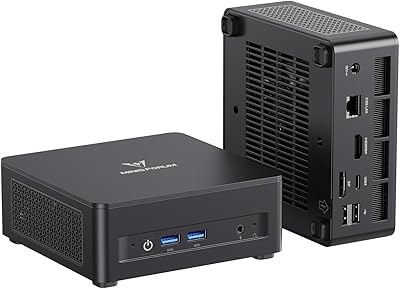
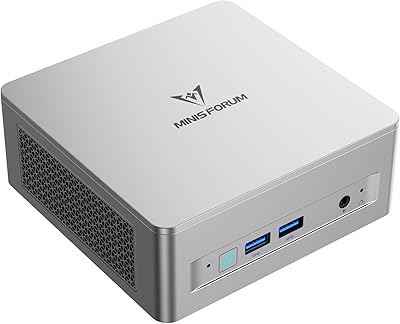
Dual 2.5G Ethernet is a standout for developers and homelabbers who need to segregate network traffic or max out local NAS transfer speeds. The four USB 3.2 Gen2 Type-A ports plus two USB4 ports cover virtually every peripheral scenario without reaching for a hub immediately.
The audio jack and microphone port setup is functional but basic — users in video calls or podcast setups will likely want an external audio interface. A few buyers have also noted that the port labeling on the chassis is small and hard to read in low-light desk environments.
Build Quality
86%
The chassis feels solid and purposeful in hand — not the hollow plasticky feel common in cheaper mini PCs. Buyers describe the fit and finish as premium relative to expectations, and the tool-free quick-release mechanism for storage access gets repeated praise for making upgrades straightforward.
Some users have noted minor cosmetic inconsistencies in units received, such as slightly uneven panel gaps or scratched bottom rubber feet out of the box. These are aesthetic rather than functional concerns, but at this price tier, a few buyers feel the attention to detail should be tighter.
Out-of-Box Setup Experience
58%
42%
For technically comfortable buyers, the bare-metal state is actually welcome — it means no bloatware, and you install exactly the OS you want. Buyers who ordered with this expectation report a clean, fast setup experience and appreciate the flexibility.
A meaningful number of verified buyers were genuinely surprised to receive a machine with no operating system installed. The listing communicates this, but not prominently enough — less technical users have left frustrated reviews after expecting Windows to be ready to go. Minisforum should make this clearer at point of purchase, and it remains a consistent source of negative first impressions.
Wi-Fi & Wireless Performance
83%
Wi-Fi 6E support keeps wireless throughput fast and stable in congested network environments, and buyers using this mini PC in open-plan offices or apartments with many competing networks notice appreciably better reliability than with older Wi-Fi standards. Bluetooth pairing with peripherals is reported as quick and stable.
A small subset of users report inconsistent Wi-Fi speeds in environments with older routers, where the Wi-Fi 6E advantage disappears entirely. The antenna placement inside the compact chassis also means walls and distance affect signal strength more than on larger desktop builds with external antennas.
Noise Level
71%
29%
In balanced or silent mode for light workloads — web browsing, document editing, media playback — most buyers describe this compact desktop as acceptably quiet and comfortable to have on a desk. The fan profile in these modes is genuinely unobtrusive for office or living room use.
Switching to performance mode for sustained tasks pushes audible fan noise to a level several buyers describe as distracting in quiet environments. The 43dB specification is real but context-dependent, and users who expected near-silence under all conditions have expressed disappointment in reviews.
Value for Money
79%
21%
The combination of a top-tier mobile processor, 64GB DDR5, a fast SSD, OCuLink, and dual 2.5G LAN in one compact package delivers a configuration that would cost more to assemble individually. Buyers comparing total cost of ownership against larger workstations consistently acknowledge the value density.
The price point is not entry-level, and buyers who do not need the full spec — particularly the 64GB RAM — may find similarly capable machines at lower cost by accepting smaller memory configurations. The no-OS situation also adds an implicit Windows license cost that some buyers did not factor in initially.
Size & Portability
88%
At under 3.6 pounds and fitting comfortably in a backpack, the UM890 Pro appeals to buyers who move between home and office or travel with their workstation setup. VESA mount compatibility is frequently cited as a clean desk solution that makes the machine effectively disappear behind a monitor.
While portable in principle, the power brick adds meaningful bulk for travel, and some users note the adapter is larger than expected for a machine marketed partly on compactness. It is still far more portable than a tower, but less grab-and-go than a laptop.
Software & Driver Support
72%
28%
Buyers who installed Linux report excellent hardware compatibility with minimal driver friction, which is a genuine plus for developers and power users who prefer open-source operating systems. Windows 11 installation is also straightforward for users comfortable with USB bootable media.
BIOS documentation is sparse, and buyers who want to fine-tune RAM speeds, fan curves, or power limits often have to rely on community forums rather than official guidance. Minisforum's support responsiveness for firmware questions has received mixed reviews, with some buyers waiting longer than expected for replies.

Suitable for:

The MINISFORUM UM890 Pro Mini PC (64GB/1TB) is a strong fit for anyone who needs genuine workstation-level computing power without dedicating a corner of the room to a tower. Home office professionals running multi-monitor setups will find the quad-display output and dual 2.5G Ethernet genuinely useful day-to-day, not just impressive on paper. Content creators who work with large photo libraries, proxy video editing, or run resource-heavy browser workflows will notice the 64GB DDR5 doing real work rather than sitting idle. Developers and IT admins who need to segment networks, spin up virtual machines, or test across isolated environments will appreciate the dual LAN in a way most buyers simply won't. For living room use, the machine handles 4K playback and streaming without any strain, and its small footprint means it tucks behind a monitor or mounts on a VESA arm without disrupting the space. Technically confident enthusiasts who want a future eGPU upgrade path — without the bulk of a full desktop build — will also find the OCuLink port a compelling reason to choose this over comparable mini PCs.
Not suitable for:

The MINISFORUM UM890 Pro Mini PC (64GB/1TB) is not the right purchase for buyers expecting to unbox a ready-to-use Windows computer — it ships with no operating system installed, and that single fact has frustrated a notable share of less technical buyers who were not prepared for it. If your primary goal is modern 3D gaming at high settings, this machine will disappoint; the Radeon 780M is a capable integrated GPU, but it cannot replace a dedicated graphics card for titles released in the last few years, and marketing language around gaming should be read carefully. Buyers who work in near-silent environments and run sustained CPU-heavy workloads — long renders, continuous compilation jobs — should know the fan becomes audible under those conditions, and the 43dB noise rating only tells part of the story. If your workload doesn't actually need 64GB of RAM, there are more affordable configurations in the same family that would serve equally well. Finally, anyone uncomfortable navigating BIOS settings or installing an OS from a bootable USB drive will likely have a rough first experience, as Minisforum's out-of-box documentation and support responsiveness have received mixed feedback from buyers who needed guided setup help.
Specifications

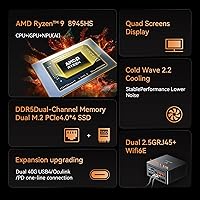
  • Processor: AMD Ryzen 9 8945HS with 8 cores and 16 threads, base clock at 4GHz and boost up to 5.2GHz, built on TSMC 4nm architecture.
  • L3 Cache: 16MB L3 cache shared across all cores, supporting faster data access during multi-threaded workloads.
  • RAM: 64GB DDR5 dual-channel memory across two SODIMM slots running at 5600MHz, expandable to a maximum of 96GB.
  • Storage: 1TB PCIe 4.0 NVMe SSD installed in one of two M.2 2280 slots, with total expandable storage capacity of up to 8TB.
  • Integrated GPU: AMD Radeon 780M integrated graphics with a peak operating frequency of 2800MHz, supporting hardware-accelerated video decode and light 3D rendering.
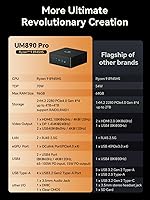
  • Display Output: Quad-display support via one HDMI 2.1, one DisplayPort 1.4, and two USB4 ports, with maximum resolution of 8K at 60Hz or 4K at 144Hz.
  • USB Ports: Four USB 3.2 Gen2 Type-A ports and two USB4 ports, with the USB4 ports supporting 65–100W power delivery input and 15W output.
  • OCuLink Port: One OCuLink port enabling external GPU enclosure connectivity for discrete GPU-level graphics performance beyond the integrated Radeon 780M.
  • Ethernet: Dual 2.5 Gigabit Ethernet RJ45 ports for wired network connectivity, supporting link aggregation or dual-network configurations.
  • Wireless: Wi-Fi 6E (802.11ax) with Bluetooth support for fast, low-latency wireless connectivity in congested network environments.
  • Audio: One 3.5mm combo audio jack and one integrated digital microphone (DMIC) for basic audio input and output without external hardware.
  • Cooling System: Dual 8mm heat pipes paired with a high-density offset blade fan, active DDR and SSD heatsink fans, and liquid metal thermal interface material on the CPU.
  • Noise Level: Approximately 43dB in performance mode under full CPU load; noise levels are lower in balanced and silent operating modes.
  • Operating System: Ships without a pre-installed operating system; buyers must install Windows, Linux, or another supported OS independently before first use.
  • Power Input: USB4 ports accept 65W to 100W USB Power Delivery input, allowing the machine to be powered via compatible USB-C chargers in addition to the included adapter.
  • Weight: 3.52 pounds (approximately 1.6kg) for the unit itself, not including the power adapter.
  • Dimensions: Package dimensions measure 7.17 x 6.22 x 4.8 inches, with the chassis itself being significantly more compact than the shipping box.
  • CMOS Reset: A dedicated Clear CMOS button is included on the chassis for quick BIOS reset without disassembly.
  • NPU: An integrated Neural Processing Unit (NPU) is included within the Ryzen 9 8945HS for offloading select AI-accelerated tasks from the CPU.
  • Availability: First made available for purchase in July 2024, ranked in the top 60 mini computers on Amazon by sales volume.

Related Reviews

MINISFORUM UM790 Pro (64GB/1TB)
79%
91%
Processing Performance
67%
Integrated Graphics
93%
Multi-Display Capability
63%
Thermal Management
84%
Build Quality & Design
More
MINISFORUM M1 Pro AI Mini PC Intel Core Ultra 9 285H 64GB RAM 2TB SSD
87%
94%
Performance
91%
AI Capabilities
88%
Build Quality
92%
Connectivity Options
85%
Usability
More
MINISFORUM M1 Pro-125H Mini PC
84%
88%
Performance
85%
Build Quality
90%
Multitasking Capability
92%
Connectivity & Ports
70%
Graphics Performance
More
MINISFORUM UM773 Lite Mini PC, 32GB RAM, 1TB SSD
83%
88%
Performance
85%
Cooling System
92%
Value for Money
83%
Build Quality
89%
Connectivity Options
More
Beelink SER9 Pro (32GB/1TB)
84%
93%
Processing Performance
91%
Multitasking & Responsiveness
84%
Build Quality & Design
67%
Thermal Management & Fan Noise
72%
Graphics & Display Output
More
MINISFORUM UN1290 Mini PC Core i9-12900HK 32GB RAM 1TB SSD
88%
93%
Performance
88%
Build Quality
89%
Ease of Setup
91%
Multitasking Efficiency
67%
Cooling & Thermals
More
MINISFORUM UM880 Plus Mini PC AMD Ryzen 7 8845HS 32GB RAM 1TB SSD
83%
93%
Performance
89%
Connectivity Options
91%
Multitasking Capability
88%
Build Quality
84%
Graphics Performance
More
MINISFORUM UM750L Slim Mini PC, AMD Ryzen 5 7545U, 16GB RAM, 1TB SSD
85%
91%
Performance
88%
Connectivity
85%
Cooling & Noise
80%
Setup & Installation
93%
Portability & Size
More
MINISFORUM UM870 Slim Mini PC AMD Ryzen 7 8745H 32GB RAM 1TB SSD
86%
89%
Performance
90%
Multitasking Capability
78%
Gaming Performance (Light Titles)
92%
Triple Display Support
94%
Compact Design/Size
More
Intel NUC 13 Pro Mini PC, Core i7-1360P, 32GB RAM, 1TB SSD
86%
92%
Performance
89%
Value for Money
94%
Compact Size
88%
Multitasking Capabilities
78%
Setup/Installation
More

FAQ

No, it does not. The UM890 Pro ships as a bare machine with no operating system pre-loaded. You will need to create a bootable USB drive and install Windows 11, Linux, or your preferred OS yourself. This catches a lot of buyers off guard, so it is worth budgeting for a Windows license if you need one.

It depends on what you want to play. The Radeon 780M is one of the stronger integrated GPUs available right now, so older titles and less demanding games run reasonably well at 1080p. Modern AAA games released in the last couple of years will struggle at higher settings, though. This compact desktop was not designed as a gaming rig, and treating it as one will likely lead to disappointment.

OCuLink is a high-bandwidth interface that lets you connect an external GPU enclosure to the machine, effectively giving it discrete graphics performance. To use it you need a separate eGPU enclosure and a compatible graphics card, which adds meaningful cost on top of the machine itself. If you are not already planning an eGPU setup, you can safely ignore it — but for enthusiasts who want that upgrade path, it is a genuine differentiator that most rival mini PCs simply do not offer.

Not always. Some units initialize the memory at a lower default speed until you manually enable the relevant XMP-equivalent profile in the BIOS. It is a straightforward setting change, but buyers who skip it may not be getting the full memory performance they paid for. Worth checking during initial setup.

In balanced or silent mode during light tasks, the MINISFORUM UM890 Pro Mini PC (64GB/1TB) is quiet enough to sit on a desk without distraction. Under sustained CPU loads — long video exports, compilation runs, heavy multitasking — the fan ramps up to around 43dB, which is audible in a quiet room. It is not uncomfortably loud, but if you were expecting near-silence under all conditions, adjust your expectations before buying.
Yes, and it is designed to make that fairly accessible. There are two SODIMM slots, and the system supports up to 96GB of DDR5 total, so you could upgrade from the stock 64GB if needed. The second M.2 2280 slot is empty and ready for an additional PCIe 4.0 SSD, taking total storage up to 8TB. Minisforum uses a quick-release access mechanism, so you do not need specialized tools.

Yes, VESA mount compatibility is supported, and many buyers use this as the primary way to deploy the machine — it disappears cleanly behind a monitor and removes it entirely from the desk surface. Just confirm the VESA adapter or bracket is included or budgeted separately, as this can vary by configuration.

It works well in that role, yes. The dual 2.5G LAN lets you segment traffic between, say, a NAS network and a regular home or office network, or use both ports for link aggregation if your switch supports it. The Ryzen 9 processor handles virtualization workloads comfortably, making this mini PC a compact but capable alternative to dedicated server hardware for home lab use.

Generally yes — the Ryzen 9 8945HS and Radeon 780M have solid Linux kernel support, and most buyers who have installed recent Ubuntu, Fedora, or Arch-based distributions report a smooth experience. Wi-Fi and Bluetooth typically work without manual driver installation on up-to-date kernels. Edge cases around suspend and resume behavior can sometimes require minor BIOS tweaks, but nothing that requires significant troubleshooting for an experienced Linux user.

For typical productivity, creative, and developer workloads, thermal management holds up well — the liquid metal TIM and active heatsink fans do meaningful work. Under extreme all-core sustained stress, some thermal throttling can occur in warm ambient conditions, but this is rarely triggered by everyday tasks. If you plan to run continuous CPU-intensive jobs for hours at a stretch, placing the machine in a well-ventilated area and enabling performance mode will give you the best results.