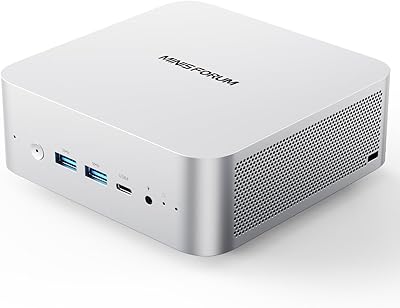
Overview

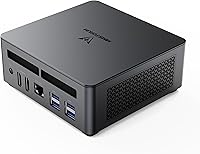
The MINISFORUM UM790 Pro (64GB/1TB) arrives at a moment when compact desktops are proving they can genuinely replace full-size towers for most everyday workloads. Powering it is AMD's Ryzen 9 7940HS, a processor built on a 4nm process with an integrated AI engine — real engineering substance, not just a marketing badge. Out of the box, you get 64GB of DDR5 RAM and a 1TB SSD, which is a notably generous configuration for this price tier. Keep expectations calibrated, though: there is no discrete GPU here. This mini PC is built for home office users, media enthusiasts, developers, and digital signage operators — not for running the latest AAA titles at high settings.
Features & Benefits

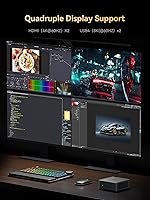
Eight cores, sixteen threads, and a boost clock that pushes past 5GHz — in practice, the UM790 Pro handles heavy browser sessions, video editing timelines, and parallel compilation tasks without much strain. The Radeon 780M integrated graphics, running on AMD's RDNA 3 architecture, handles 4K video playback well and can manage older or less demanding games at decent frame rates, though it won't compete with a discrete card. What really sets this mini PC apart is the quad-display output: two HDMI and two USB4 ports can simultaneously drive up to four screens, with USB4 capable of pushing 8K resolution. A 2.5Gbps LAN port adds real network flexibility, and a second M.2 slot makes storage upgrades approachable for any technically curious user.

Best For

MINISFORUM's compact desktop is a natural fit for remote workers who want a clean desk setup without sacrificing processing muscle. Multi-monitor power users — traders, developers, anyone juggling several windows at once — will find the four-display capability hard to beat at this size and price. It also works well as a home theater hub, where its compact footprint and quiet idle behavior make it easy to tuck behind a TV. Casual gamers can run lighter titles on the integrated Radeon, but this is not the right pick if you play demanding modern games regularly. Home lab builders will appreciate the 2.5G networking and advanced boot options, while schools and businesses will value the low power draw and minimal footprint for digital signage deployments.

User Feedback

Buyers consistently highlight fast boot times and day-to-day responsiveness as standout qualities — the combination of DDR5 memory and a fast NVMe drive makes a real difference in feel. The port selection also earns consistent praise; most users can connect everything they need without an extra hub. On the critical side, fan noise under load comes up regularly. It is not loud enough to be disruptive in most settings, but in a quiet home office or bedroom it is noticeable during sustained tasks. Some users also report the chassis running warm under heavy workloads, though not alarmingly so. A few buyers were surprised to find no included OS, and a handful note that the BIOS can feel unintuitive at first. Overall sentiment leans clearly positive, but informed buyers will get the most out of it.

Pros

  • Handles demanding multitasking — code compilation, video editing, and heavy browsing — without noticeable slowdown.
  • Generous 64GB DDR5 RAM and 1TB fast SSD are ready to use straight out of the box.
  • Four simultaneous display outputs is a rare capability at this form factor and price point.
  • The UM790 Pro draws far less power than a comparable tower, keeping long-term running costs low.
  • 2.5Gbps LAN makes it a practical pick for home lab builds, NAS connections, and software router setups.
  • A second M.2 slot means storage can be expanded without replacing the existing drive.
  • Wi-Fi 6E and Bluetooth 5.2 cover modern wireless needs without any additional hardware.
  • Build quality feels solid and professional — port layout is practical for everyday cable management.
  • Advanced BIOS options including WOL, PXE boot, and scheduled power-on suit IT and home server use cases.
  • The small footprint genuinely disappears on a desk, behind a monitor, or inside an entertainment unit.

Cons

  • Fan noise under sustained CPU load is a real concern in quiet home office or bedroom environments.
  • No operating system is included, which adds unexpected setup complexity and possible cost for some buyers.
  • The chassis runs noticeably warm during extended heavy workloads, though not to a damaging degree.
  • USB4 ports are not Thunderbolt-certified, limiting compatibility with some professional peripherals.
  • The BIOS interface is dated and unintuitive, with a learning curve for less technically experienced users.
  • Wireless signal strength has been reported as slightly below average compared to other devices on the same network.
  • The pre-installed SSD is not a recognized tier-one brand, leaving some buyers uncertain about long-term reliability.
  • Driving all four displays simultaneously requires specific cable and monitor configurations that not all buyers have ready.
  • A small number of buyers encountered Windows activation complications due to the bare-metal shipping state.
  • No SD card slot, which is a minor but recurring complaint from photographers and content creators.

Ratings

The MINISFORUM UM790 Pro (64GB/1TB) earns a well-rounded but nuanced scorecard — our AI has processed verified global buyer reviews, actively filtering out incentivized and bot-generated feedback to surface what real users actually experience. Across categories ranging from raw processing performance to everyday acoustics, both the genuine strengths and the honest trade-offs are reflected below.
Processing Performance
91%
Users running demanding workloads — compiling code, editing multi-track video, or juggling dozens of browser tabs — consistently report that the UM790 Pro keeps pace without hesitation. The eight-core CPU handles parallel tasks in a way that genuinely surprised buyers who expected compromises from a machine this small.
Under prolonged all-core stress, such as long rendering jobs or extended compilation, sustained clock speeds can dip slightly as the thermal system works to keep temperatures in check. For short bursts this is invisible, but professional workloads that run continuously for hours may notice the ceiling.
Integrated Graphics
67%
33%
For 4K media playback, light creative work, and older or indie titles, the Radeon 780M performs well above what buyers expect from integrated graphics. Streaming services at full 4K resolution play back flawlessly, and casual games like Minecraft or older esports titles run at comfortable frame rates.
Anyone hoping to play modern AAA titles at high settings will hit a hard wall — this is integrated graphics with shared memory, not a discrete card. Users who purchased expecting solid 1080p gaming in recent releases were disappointed, and this is the single most common source of buyer frustration in reviews.
Multi-Display Capability
93%
The ability to drive four monitors simultaneously — including two at 4K and two via USB4 — is a standout feature that buyers with multi-screen setups rave about. Traders, developers, and content creators frequently cite this as the primary reason they chose this mini PC over competing options in the same tier.
Getting all four displays running optimally can require some BIOS and driver configuration, which caught a few less technical buyers off guard. Additionally, true 8K output via USB4 demands a monitor and cable combination that most users don't already own, making that headline spec aspirational for the average buyer.
Thermal Management
63%
37%
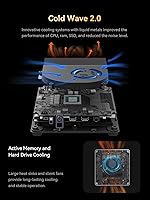
During typical office workloads — documents, video calls, web browsing — the chassis stays reasonably cool and the fan rarely intrudes. Users who keep their workloads moderate report it running comfortably for hours without becoming a distraction.
Under sustained CPU-heavy tasks, the machine gets noticeably warm to the touch and the fan ramps up audibly. In a quiet home office or bedroom environment this is a real consideration; several buyers described the fan noise under load as more prominent than expected for a compact premium desktop.
Build Quality & Design
84%
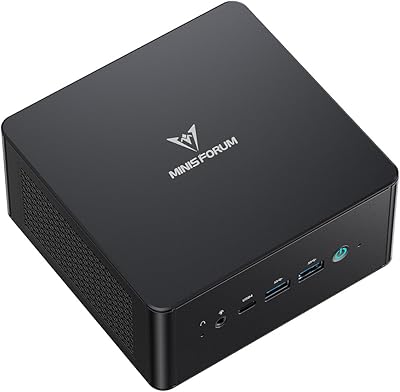
The chassis feels solid and purposeful — not plasticky or cheap despite the compact dimensions. Buyers frequently comment that it looks professional on a desk and that the port placement is thoughtfully arranged, with front-facing USB ports that are genuinely convenient in daily use.
A small number of users noted minor fit-and-finish inconsistencies, such as slightly uneven panel gaps or a bottom rubber foot that came loose over time. Nothing structurally problematic, but it prevents the build from feeling truly premium compared to higher-priced mini PC competitors.
Port Selection & Connectivity
89%
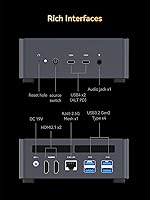
Four USB 3.2 Type-A ports, two USB4 ports, dual HDMI, a 2.5Gbps LAN port, and an audio jack cover virtually every peripheral scenario without needing a hub. Home lab users specifically appreciate the 2.5G networking for NAS connections and router experiments.
There is no SD card slot or Thunderbolt certification, which matters to photographers and some creative professionals. The USB4 ports pulling double duty for display output and data transfer means that on a four-monitor setup, available high-speed USB bandwidth is reduced.
Memory & Storage Value
88%
Arriving with 64GB of DDR5 RAM and a 1TB PCIe 4.0 SSD pre-installed is a genuinely strong out-of-the-box proposition. Most users find they have no immediate need to upgrade, and boot times consistently earn praise across reviews.
The pre-installed SSD, while fast and spacious, is a house brand drive rather than a recognized tier-one component, which makes some technically savvy buyers mildly uneasy about long-term reliability. Those who checked reported it is a functional performer, but transparency about the exact drive model would be welcome.
Upgradability & DIY Friendliness
82%
18%
The second M.2 slot is a practical and well-received feature — buyers appreciate being able to add a second SSD without replacing anything. The RAM slots are also user-accessible, giving this mini PC a longer useful lifespan than sealed competitors.
Disassembly requires care and the right screwdriver, and the internal layout is tight enough that some users found cable management around the second M.2 slot awkward. The teardown process is not difficult for experienced hands, but it is not as tool-friendly as some competing mini PCs.
Wireless Performance
78%
22%
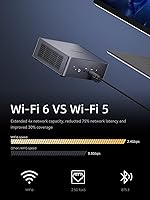
Wi-Fi 6E support means this mini PC is ready for modern routers and congested wireless environments. Users in home offices report stable connections during video calls and file transfers without needing to rely on the wired port.
A handful of buyers reported that Wi-Fi signal strength felt slightly below average compared to other devices on the same network, particularly through walls. The wireless module is user-replaceable if needed, but it is an irritation that should not require a fix on a new machine.
Acoustic Performance (Fan Noise)
61%
39%
At idle and during light tasks, the UM790 Pro is quiet enough to sit in a living room or bedroom without being noticeable. Users running it as a home theater PC or for casual browsing report it blends into the background comfortably.
This is one of the most consistently raised concerns in buyer reviews. When the CPU is pushed hard, the fan becomes clearly audible — not obnoxiously loud, but noticeable enough to distract in quiet rooms. Users expecting near-silent operation under all conditions should calibrate their expectations accordingly.
Software & BIOS Experience
58%
42%
Advanced users report the BIOS offers genuinely useful options — Wake-on-LAN, PXE boot, RTC scheduling, and Auto Power On are all present and functional. Home lab builders and IT-minded buyers appreciate having these controls without needing a workaround.
The BIOS interface is dated and not particularly intuitive for buyers who are not already comfortable in firmware settings. Several reviewers flagged confusing menu organization and at least one reported a Windows activation complication tied to the bare-metal shipping state, which required a support interaction to resolve.
Power Efficiency
86%
For the level of performance delivered, power consumption is impressively low. Users running this mini PC continuously — as a home server, media center, or always-on workstation — report noticeably lower electricity costs compared to their previous full-size desktops.
Under peak all-core load the power draw climbs more than some users anticipated from a compact machine, and the included adapter runs warm during extended heavy sessions. The adapter is compact and functional, but a replacement or upgrade may be worth considering for users running sustained workloads around the clock.
Value for Money
83%
At its price point, the combination of a high-core-count CPU, generous DDR5 memory, fast SSD, and an extensive port array is difficult to match in this form factor. Most buyers feel the hardware-to-cost ratio is strong, especially given the four-display capability that competitors charge more for.
Some buyers feel the premium over entry-level mini PCs is hard to justify if they do not actively use the multi-display output or high-end connectivity features. And without a bundled OS, first-time mini PC buyers may face unexpected additional costs to get the system fully operational.

Suitable for:

The MINISFORUM UM790 Pro (64GB/1TB) is an excellent fit for remote workers and home office professionals who want genuine processing muscle without surrendering desk space to a full tower. If your daily reality involves juggling video calls, large spreadsheets, code compilation, or multi-tab research sessions, this mini PC handles all of it without breaking a sweat. Multi-monitor users — stock traders, developers, video editors, or anyone who thrives with three or four screens — will find the quad-display output a rare and practical advantage at this size and price. It also makes a compelling home theater hub, tucking neatly behind a TV or monitor while driving high-resolution content with ease. Home lab enthusiasts who want Wake-on-LAN, PXE boot, and a fast 2.5Gbps network connection in a low-power package will feel right at home here. Even educators and IT administrators deploying digital signage or classroom workstations will appreciate the efficiency and the room it leaves on a crowded desk.
Not suitable for:

The MINISFORUM UM790 Pro (64GB/1TB) is the wrong choice if your primary goal is gaming — not because it is a bad machine, but because integrated graphics have a firm ceiling and modern AAA titles will run poorly or not at all at playable settings. If you are upgrading from a gaming desktop expecting similar frame rates in demanding titles, you will be disappointed and should budget for a system with a discrete GPU instead. Buyers who work in thermally sensitive or acoustically demanding environments — recording studios, library-quiet offices, or shared bedrooms — should know that under heavy CPU loads the fan is audible enough to be a distraction. The machine ships without an operating system, which adds a step and potentially a cost that first-time builders or less technical buyers may not anticipate. If you rely on Thunderbolt certification for professional audio interfaces or specific creative peripherals, note that the USB4 ports here are not Thunderbolt-certified, which may create compatibility friction. Finally, anyone needing truly silent, fanless operation for a 24/7 deployment should look at purpose-built fanless mini PCs instead.
Specifications

  • Processor: AMD Ryzen 9 7940HS with 8 cores and 16 threads, built on a 4nm process with a base clock of 4.0GHz and a maximum boost of 5.2GHz.
  • Integrated GPU: AMD Radeon 780M based on the RDNA 3 architecture, running at up to 2800MHz graphics frequency with no discrete card present.
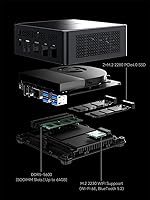
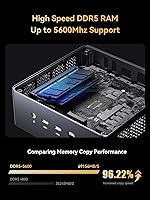
  • RAM: 64GB DDR5 dual-channel memory across two SODIMM slots, supporting speeds up to 5600MHz with a maximum supported capacity of 64GB.
  • Primary Storage: 1TB M.2 2280 PCIe 4.0 SSD pre-installed, offering fast read and write speeds suitable for OS, applications, and media libraries.
  • Storage Expansion: A second M.2 2280 PCIe 4.0 slot is included and empty, supporting drives up to 2TB for user-installed storage expansion.
  • Display Outputs: Two HDMI ports supporting up to 4K at 120Hz and two USB4 ports supporting up to 8K at 60Hz, enabling simultaneous quad-display configurations.
  • USB Ports: Four USB 3.2 Gen 2 Type-A ports and two USB4 ports with alternate-mode Power Delivery provide broad peripheral and display connectivity.
  • Wired Networking: A single RJ45 2.5Gbps Ethernet port supports high-speed wired connections, software router configurations, and advanced network topologies.
  • Wireless: Wi-Fi 6E (802.11ax) via an M.2 2230 module provides tri-band wireless connectivity, paired with Bluetooth 5.2 for peripheral support.
  • Audio: Audio output is available via two HDMI ports for monitor or receiver passthrough, plus a single 3.5mm analog audio jack on the chassis.
  • Power Input: The unit runs on DC 19V supplied by the included external power adapter; no internal power supply is present given the compact form factor.
  • Boot Features: BIOS-configurable advanced boot options include Wake-on-LAN, PXE boot, RTC scheduled boot, and Auto Power On after power loss.
  • Operating System: No operating system is pre-installed; the unit ships bare-metal and requires the buyer to install Windows, Linux, or another compatible OS.
  • Form Factor: Compact mini tower desktop measuring approximately 5.1 x 4.9 x 2.2 inches, designed for placement on a desk, behind a monitor, or inside an AV cabinet.
  • Weight: The unit weighs approximately 2.2 pounds without peripherals, making it easy to relocate or mount with an optional VESA adapter.
  • Microphone: A built-in digital microphone (DMIC) is integrated into the chassis for voice input without requiring an external microphone for basic calls.
  • CMOS Reset: A dedicated Clear CMOS button is accessible on the chassis, allowing firmware resets without needing to open the unit or remove a battery.
  • Color & Finish: The chassis is finished in matte black, giving it a neutral, professional appearance that suits both office and home entertainment setups.

Related Reviews

MINISFORUM UM890 Pro Mini PC (64GB/1TB)
79%
93%
CPU Performance
74%
Thermal Management
81%
RAM & Memory Speed
89%
Storage Performance
77%
Graphics & Display Output
More
MINISFORUM M1 Pro AI Mini PC Intel Core Ultra 9 285H 64GB RAM 2TB SSD
87%
94%
Performance
91%
AI Capabilities
88%
Build Quality
92%
Connectivity Options
85%
Usability
More
Apple MacBook Pro 14-inch M1 Pro 16GB RAM 1TB SSD
87%
95%
Performance
92%
Display Quality
89%
Battery Life
91%
Build Quality
82%
Value for Money
More
HP Pro Tower 290 G9 Desktop (i5-12500, 32GB RAM, 1TB SSD)
81%
96%
Multitasking Capability
91%
Value for Money
88%
Port Selection
84%
Thermal & Acoustic Performance
93%
Boot Speed & Storage
More
LaCie Rugged SSD Pro 1TB
87%
94%
Performance
92%
Build Quality & Durability
90%
Speed & Data Transfer Rates
88%
Portability & Size
91%
Waterproof & Shockproof Resistance
More
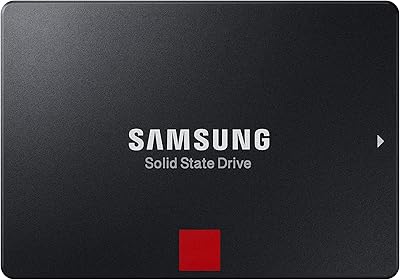
Samsung 860 PRO SSD 1TB
88%
93%
Performance Speed
91%
Reliability & Lifespan
89%
Data Security (Encryption)
85%
Power Efficiency
90%
Ease of Installation
More
SAMSUNG 990 PRO SSD 1TB
89%
96%
Performance
98%
Read Speed
94%
Write Speed
78%
Thermal Management
90%
Reliability
More
Samsung 970 PRO SSD 1TB
88%
94%
Performance
92%
Speed & Data Transfer
90%
Reliability
88%
Thermal Management
87%
Ease of Setup
More
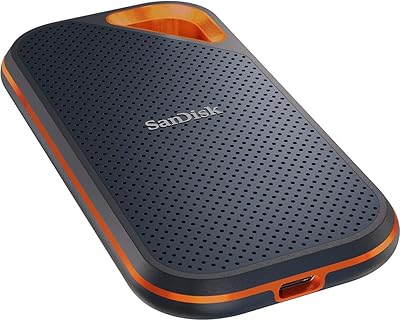
SanDisk Extreme Pro Portable SSD 1TB
88%
91%
Performance
94%
Build Quality
88%
Portability
90%
Compatibility
89%
Transfer Speed
More
Fanxiang S500 Pro 1TB NVMe SSD
86%
88%
Performance
91%
Value for Money
85%
Reliability
92%
Read Speed
88%
Write Speed
More

FAQ

No, the MINISFORUM UM790 Pro (64GB/1TB) ships without any operating system. You will need to install Windows, Linux, or your preferred OS yourself. MINISFORUM provides BIOS access and the hardware is compatible with Windows 11, but you will need to source and activate a license separately, which is something first-time buyers occasionally overlook.

Yes, and it works well in practice. You have two HDMI outputs and two USB4 outputs, so connecting four displays simultaneously is supported. The main thing to plan for is having the right cables — the USB4 ports require monitors or adapters that support DisplayPort Alt Mode to get video output, so standard USB-A cables will not work there.

At idle and during light tasks like browsing or document work, the fan is very quiet and barely noticeable. Under sustained heavy loads — long rendering jobs, large file compression, or extended compilation — it does spin up and becomes audible. It is not disruptive in a typical office, but if you are in a very quiet room or recording audio nearby, you will hear it.

Absolutely, and this is one of the better aspects of the UM790 Pro. The two SODIMM slots are user-accessible, and the unit already comes with a second empty M.2 slot where you can drop in a second SSD without touching the existing drive. Just make sure any RAM upgrade uses DDR5 SODIMMs — DDR4 modules are not compatible.

It depends heavily on what you want to play. Older titles, indie games, and less demanding esports games run well on the integrated Radeon 780M. Modern AAA games at high settings are where you will run into trouble — there is no discrete GPU, and integrated graphics have real limits. If gaming is your main priority, a system with a dedicated graphics card will serve you much better.

It handles them with ease. Video conferencing, screen sharing, and running multiple productivity apps simultaneously is well within its capability. The built-in digital microphone works for basic calls, though most users will prefer a dedicated headset or USB microphone for better audio quality in professional settings.

Yes, and the feature set actually supports this use case well. Wake-on-LAN, PXE boot, RTC scheduled startup, and Auto Power On after power loss are all configurable in the BIOS. Power consumption at idle is low enough that running it around the clock is not expensive. Just be aware that sustained heavy server workloads can warm the chassis and keep the fan active.

For most household internet connections, your ISP speed is the bottleneck rather than the LAN port, so day-to-day web browsing will feel the same as with a standard gigabit port. Where it genuinely matters is on a local network — transferring large files to a NAS, connecting to a multi-gig switch, or running a software router where internal bandwidth is the constraint.

The BIOS is functional and packed with useful options, but the interface is dated and not the most intuitive if you are used to modern UEFI environments with visual menus. Most users only need to visit it once to configure boot order or enable WOL, and that is straightforward enough. Where people run into friction is if they need to troubleshoot or fine-tune settings — the menu organization takes some getting used to.

It is a strong fit for that use case. The compact chassis tucks neatly behind most TVs or inside AV cabinets, and the HDMI outputs support 4K at up to 120Hz for fluid video playback. At idle, it is quiet enough not to intrude during movies or TV shows. The one consideration is making sure your TV remote or HDMI-CEC setup works as expected for power management, which may need a small amount of configuration.