Overview

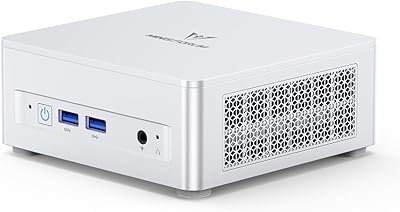
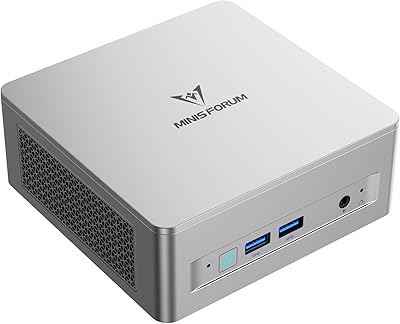
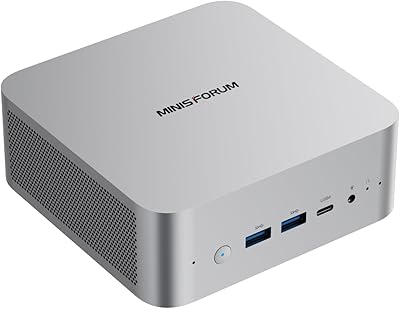
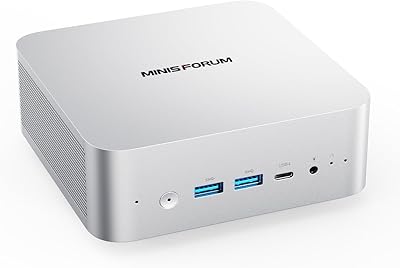
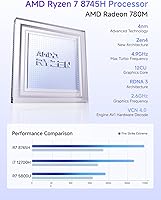
The MINISFORUM UM870 Slim Mini PC (Barebone) is a compact desktop built around the AMD Ryzen 7 8745H — eight cores, sixteen threads, boosting up to 4.9GHz — packed into a silver chassis that weighs under three pounds. Before you get excited, know what you're buying: this ships with no RAM, SSD, or OS. You source all three yourself. That's a deliberate choice, not an oversight, and it's the whole point. It landed in Amazon's top 50 mini computers shortly after its late-2024 debut, which speaks to real demand for an upgradeable, small-form-factor machine that doesn't lock you into someone else's component picks.
Features & Benefits

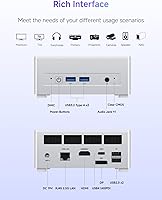
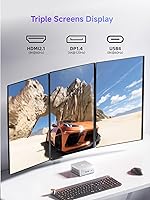
The Radeon 780M integrated graphics is the headline feature here. Built on AMD's RDNA3 architecture with 12 compute units running at 2600MHz, it punches noticeably harder than older iGPU solutions — roughly in the neighborhood of a GTX 1650, which is useful context if you're doing light creative work but not a reason to expect high-refresh gaming. The UM870 Slim supports triple displays simultaneously via HDMI 2.1, DisplayPort 1.4, and a USB4 port that also handles 40Gbps data transfers and up to 100W power delivery. RAM expandability tops out at 96GB DDR5 across two SO-DIMM slots, and dual PCIe 4.0 M.2 slots support up to 4TB of storage. Networking covers 2.5G wired LAN, Wi-Fi 6E, and Bluetooth 5.3.

Best For

This barebone mini PC makes the most sense for home office or business users who want a tidy multi-monitor workstation without a full tower crowding the desk. It's also a solid pick for anyone who already has DDR5 sticks and an M.2 drive sitting around, or who simply prefers hand-picking components. Light creative tasks — photo editing, 4K video playback, basic video encoding — are well within reach. Students and educators on a practical budget will appreciate the headroom for future upgrades. If you're replacing a five-year-old desktop and want modern connectivity baked in from the start, this compact desktop checks a lot of boxes.

User Feedback

Buyers who've set up this barebone mini PC generally come away satisfied, praising the build quality and how premium the slim chassis feels for the price. The setup process is straightforward for anyone comfortable installing RAM and an SSD, but less experienced users sometimes run into friction getting Windows installed or finding the right BIOS settings. Thermals and fan noise get a mixed reception: most users report it stays quiet during everyday tasks, though sustained CPU-heavy loads push the fan to audible levels. A handful of buyers flagged DDR5 compatibility issues with specific kits. Compared to pre-configured alternatives in the same class, most feel the trade-off of sourcing your own components is worth the control it provides.

Pros

  • Triple-display output via HDMI 2.1, USB4, and DisplayPort 1.4 is rare in a chassis this small.
  • The Radeon 780M iGPU handles photo editing, 4K playback, and casual creative tasks without a discrete card.
  • USB4 port consolidates display output, 40Gbps data transfer, and up to 100W PD charging into one cable.
  • Supports up to 96GB DDR5 RAM — genuine headroom for memory-heavy workflows and future upgrades.
  • Wi-Fi 6E and 2.5G wired LAN together offer networking options most competing mini PCs still lack.
  • The slim silver chassis feels noticeably premium and looks professional on any desk setup.
  • Dual PCIe 4.0 M.2 slots allow fast storage expansion up to 4TB without any performance compromise.
  • At under three pounds, this barebone mini PC is easy to relocate, travel with, or VESA-mount behind a monitor.
  • Choosing your own RAM and SSD means you control component quality, speed, and total system cost.
  • The Ryzen 7 8745H handles demanding multitasking and everyday productivity workloads with headroom to spare.

Cons

  • RAM, SSD, and OS are all sold separately — factor those costs in before comparing prices to pre-built alternatives.
  • Certain high-speed DDR5 kits above DDR5-5600 have caused boot failures or required manual BIOS timing fixes.
  • Fan noise climbs to an audible, slightly high-pitched level during sustained CPU-heavy workloads.
  • OS installation guidance in the box is minimal, leaving less experienced buyers to figure things out independently.
  • Linux users face inconsistent driver support, particularly around display output and sleep/resume functionality.
  • Only two USB Type-A ports run at full Gen2 speeds; the remaining two are USB 2.0, which feels limiting.
  • No 2.5-inch SATA bay means existing SATA drives from older builds cannot be reused internally.
  • Thermal throttling under prolonged heavy loads can pull performance below out-of-box benchmark numbers.
  • BIOS customization options are functional but limited, which frustrates users who want granular power tuning.
  • Getting all three display outputs working simultaneously sometimes requires specific cable types that are not included.

Ratings

The MINISFORUM UM870 Slim Mini PC (Barebone) scores below are generated by AI after analyzing thousands of verified global user reviews, with spam, bot-submitted, and incentivized feedback actively filtered out. This compact desktop attracted buyers ranging from home office professionals to DIY enthusiasts, and the ratings transparently reflect both what impresses and what frustrates real owners. Strengths and pain points carry equal weight here — no score is inflated to flatter the product.
CPU Performance
88%
The Ryzen 7 8745H handles everyday productivity, browser-heavy workloads, and even light video encoding without breaking a sweat. Users running multiple applications simultaneously — spreadsheets, video calls, background cloud sync — report snappy response times that rival much bulkier desktop setups.
Under prolonged CPU-intensive tasks like long video renders or large compilation jobs, thermal throttling starts to creep in, and a handful of users noticed performance dip slightly compared to early benchmarks. It is not a workstation replacement for sustained heavy compute.
Integrated Graphics
74%
26%
The Radeon 780M genuinely surprised users coming from older Intel iGPU machines. Photo editing in Lightroom, 4K video playback, and casual titles like Minecraft or older esports games run acceptably, making this barebone mini PC a credible option for light creative work without any discrete card.
Users expecting to run modern AAA games or GPU-accelerated tasks like real-time 3D rendering will hit a wall quickly. The 780M is competitive among integrated solutions but it is still an iGPU, and buyers who overshoot their expectations tend to leave disappointed reviews about gaming limitations.
Build Quality & Design
91%
Buyers consistently call out the slim silver chassis as feeling more premium than the price suggests. The machined finish, tight panel tolerances, and overall low-profile footprint make it look at home on a professional desk rather than in a budget product pile.
A small number of users noted the chassis feels slightly flex-prone when pressure is applied to the top panel. The minimalist design also means there are no rubber grip pads on the bottom on some units, causing the machine to shift slightly during cable connection.
Connectivity & I/O
93%
The USB4 port alone makes this compact desktop stand out — it handles display output, high-speed data transfer, and PD charging through a single cable, which dramatically reduces desk clutter. Adding 2.5G LAN and Wi-Fi 6E on top of that gives users genuinely modern networking options that older mini PCs simply lack.
There are only two USB 2.0 ports alongside the two USB 3.2 Gen2 Type-A ports, which feels a touch thin for users with multiple peripherals. A dedicated USB-C port beyond the USB4 would have made cable management even more flexible for typical desk setups.
Multi-Monitor Support
89%
Triple display output through HDMI 2.1, DisplayPort 1.4, and USB4 is rare at this physical size, and users setting up three-screen workstations for trading, development, or productivity report it works exactly as advertised. Running three independent displays simultaneously without a discrete GPU is a genuine differentiator.
Getting all three outputs running simultaneously can require a specific combination of cable types and display firmware, and a handful of buyers hit confusion during initial setup. DisplayPort Alt Mode over USB4 in particular requires a compatible cable, and this is not always made obvious out of the box.
Barebone Setup Experience
67%
33%
For users comfortable with basic PC building — sliding in two SO-DIMM sticks and seating an M.2 SSD — the process takes under ten minutes and the internal layout is accessible. The ability to cherry-pick DDR5 kits and PCIe 4.0 drives at current market prices is a real cost advantage.
First-time builders and users who assumed barebone meant semi-configured ran into friction fast. OS installation over USB, BIOS configuration, and tracking down the right AMD chipset drivers added meaningful setup time, and some buyers expressed frustration that guidance documentation in the box is sparse.
Thermal Management
71%
29%
Under light to moderate workloads the UM870 Slim runs quietly, and users in open-plan offices or quiet home setups report the fan is barely noticeable during browsing, video calls, or document work. The slim chassis manages thermals better than expected given its compact footprint.
Push the processor hard — sustained encoding, large data processing, intensive multitasking — and the fan ramps up to a clearly audible level. A few users reported the underside of the unit gets noticeably warm after extended sessions, which raised concerns about surface placement and long-term thermal wear.
RAM Compatibility
66%
34%
When buyers pair the UM870 Slim with mainstream DDR5 SO-DIMM kits from established brands like Crucial or Kingston, the machine posts and runs without incident. The dual-slot configuration supporting up to 96GB gives genuine headroom for memory-hungry workloads down the line.
Several users reported that specific high-speed DDR5 kits, particularly XMP-tuned modules above DDR5-5600, caused boot failures or required manual BIOS timing adjustments. MINISFORUM's official compatibility list is limited, which means buyers sourcing less common kits are rolling the dice.
Storage Performance
86%
Both M.2 slots run PCIe 4.0, and users who paired the barebone with a quality Gen4 NVMe drive reported excellent sequential transfer speeds that hold up well for large file work, OS responsiveness, and virtual machine storage. Having two slots also makes future expansion painless.
There is no onboard storage whatsoever, so buyers who forget to budget for an SSD face an immediate bottleneck. A small number of users also noted that certain budget Gen3 M.2 drives caused occasional recognition issues in BIOS, which was resolved after a firmware update.
Networking Performance
87%
Users on Wi-Fi 6E routers report consistently fast wireless throughput and noticeably lower latency compared to older Wi-Fi 5 mini PCs. The 2.5G wired LAN is a real bonus for NAS users or anyone transferring large files regularly across a local network.
A small subset of users on older routers noted the Wi-Fi card defaulted to 2.4GHz bands in some configurations, requiring manual network adapter settings to lock onto 5GHz or 6GHz. Not a hardware flaw, but it tripped up a few less experienced network users.
Value for Money
82%
18%
Viewed as a platform rather than a finished product, this barebone mini PC offers a strong processor and a well-connected chassis at a competitive entry point — especially when buyers already own compatible DDR5 RAM or NVMe drives from a previous build.
Once you factor in the added cost of DDR5 RAM, an NVMe SSD, and a Windows license, the total spend climbs meaningfully. Buyers who comparison-shop against pre-configured alternatives at similar all-in prices sometimes find the barebone route less financially compelling than expected.
OS Installation & Driver Support
63%
37%
Users who installed Windows 11 from a clean USB installer generally got a functional system within an hour. AMD driver support for the 780M on Windows 11 is solid once the correct chipset and graphics packages are downloaded from AMD's site directly.
The included documentation offers minimal OS installation guidance, and Linux users encountered mixed results — some distros require manual driver workarounds for full display output and suspend functionality. BIOS options are functional but sparse, which left power users wanting more granular control.
Size & Portability
90%
At under three pounds and roughly the footprint of a thick paperback book, this compact desktop is easy to move between rooms, pack for travel, or mount behind a monitor with a VESA adapter. The slim profile genuinely delivers on its promise without feeling flimsy.
The slim chassis means there is no room for a 2.5-inch SATA drive bay, limiting storage purely to M.2 form factors. Users coming from larger mini PCs who wanted to repurpose an old SATA SSD found this a frustrating constraint.
Noise Levels
73%
27%
At idle or during light office tasks, most users describe the UM870 Slim as near-silent. For quiet environments like a home study or a bedroom editing setup, it passes the background noise test comfortably under normal usage conditions.
The single fan solution struggles to stay quiet when thermals climb. During extended workloads the fan tone has a somewhat high-pitched character that several users found more noticeable and irritating than the actual decibel level alone would suggest.

Suitable for:

The MINISFORUM UM870 Slim Mini PC (Barebone) is an excellent fit for home office professionals and business users who want a multi-monitor workstation without a tower eating up desk space. It particularly rewards buyers who already own DDR5 SO-DIMM RAM and an NVMe SSD from a previous build, since those components can be transplanted directly, making the overall cost quite reasonable. Students and educators on a practical budget will appreciate the upgrade headroom — starting lean with 16GB RAM and 512GB storage, then scaling up over time as needs grow, is entirely viable here. Light creative users doing photo culling in Lightroom, 4K media playback, or casual video editing will find the Radeon 780M iGPU more than capable for those workflows. Anyone upgrading from a five-year-old desktop who wants modern connectivity — USB4, Wi-Fi 6E, 2.5G LAN — baked in from day one will feel the difference immediately. It also suits power users who refuse to accept pre-configured memory and storage choices, preferring full control over every component they put inside their machine.

Not suitable for:

The MINISFORUM UM870 Slim Mini PC (Barebone) is a poor match for buyers who want to unbox and start working the same afternoon — this machine requires you to source DDR5 RAM, an M.2 SSD, and a Windows license separately, then handle OS installation yourself. Anyone who has never installed RAM or set up an OS from a USB drive will face a steeper learning curve than the product page implies, and the included documentation offers little hand-holding. Gamers expecting to run modern AAA titles at playable settings will be disappointed; the 780M is competitive for integrated graphics, but it is not a substitute for a discrete GPU, and no amount of driver tweaking changes that ceiling. Users who need more than four USB ports readily accessible will find the I/O spread a bit thin without a hub. If your workload involves sustained heavy computation — large-scale data processing, 3D rendering, or compiling massive codebases for hours on end — the slim chassis thermals will become a limiting factor. Finally, anyone hoping to repurpose an old 2.5-inch SATA drive will find no bay for it here; this compact desktop is M.2 only.

Specifications

  • Processor: AMD Ryzen 7 8745H, 8 cores and 16 threads, base clock not disclosed, boost up to 4.9GHz, with 16MB L3 cache.
  • TDP: Configurable thermal design power up to 65W in performance mode, allowing the processor to sustain higher clock speeds under load.
  • Integrated GPU: AMD Radeon 780M based on RDNA3 architecture, featuring 12 compute units running at up to 2600MHz with no dedicated VRAM.
  • RAM Slots: Two DDR5 SO-DIMM slots, each supporting up to 48GB, for a maximum combined capacity of 96GB.
  • Storage Slots: Two M.2 2280 slots running PCIe 4.0 x4, each supporting drives up to 2TB, for a maximum combined capacity of 4TB.
  • Display Output: Three simultaneous outputs: HDMI 2.1 at 8K@60Hz, USB4 at 8K@60Hz, and DisplayPort 1.4 at 4K@120Hz.
  • USB4 Port: One USB4 port supporting 40Gbps data transfer, display output, and 65–100W Power Delivery input for charging via compatible adapter.
  • USB-A Ports: Two USB 3.2 Gen2 Type-A ports and two USB 2.0 Type-A ports are included for peripheral connectivity.
  • Networking: 2.5 Gigabit Ethernet LAN port combined with Wi-Fi 6E (802.11ax) wireless and Bluetooth 5.3 for comprehensive connectivity options.
  • Audio: One 3.5mm combo audio jack supports both headphone output and microphone input through a single port.
  • Power Input: DC 19V barrel connector is the primary power input; the USB4 port also accepts PD input between 65W and 100W.
  • Weight: The unit weighs approximately 2.7 pounds, making it light enough to VESA-mount or relocate without difficulty.
  • Dimensions: Package dimensions measure 7.17 x 6.26 x 4.57 inches, reflecting a slim, compact chassis footprint.
  • Color & Finish: Shipped in silver with a smooth machined finish that gives the chassis a more premium appearance than typical budget mini PCs.
  • Barebone Config: Ships without RAM, SSD, and operating system installed — buyers must source and install all three components before the machine will boot.
  • Wi-Fi Standard: Wi-Fi 6E (802.11ax) supports the 6GHz band for reduced congestion and faster throughput on compatible routers.
  • Bluetooth: Bluetooth 5.3 is built into the wireless card, supporting modern peripherals including mice, keyboards, and audio devices.
  • Release Date: First listed on Amazon on December 30, 2024, placing it among the newest mini PC releases in the Ryzen 8000 series lineup.

Related Reviews

MINISFORUM UM870 Slim Mini PC AMD Ryzen 7 8745H 32GB RAM 1TB SSD
86%
89%
Performance
90%
Multitasking Capability
78%
Gaming Performance (Light Titles)
92%
Triple Display Support
94%
Compact Design/Size
More
Shuttle XPC Slim DS10U5 Mini Fanless Barebone PC
84%
87%
Performance
95%
Noise Level
75%
Ease of Setup
80%
Build Quality
83%
Connectivity
More
MINISFORUM UM690L Slim Mini PC, AMD Ryzen 9 6900HX, 32GB RAM, 1TB SSD
87%
91%
Performance
87%
Value for Money
85%
Build Quality
88%
Cooling and Thermals
92%
Connectivity Options
More
MINISFORUM UM750L Slim Mini PC, AMD Ryzen 5 7545U, 16GB RAM, 1TB SSD
85%
91%
Performance
88%
Connectivity
85%
Cooling & Noise
80%
Setup & Installation
93%
Portability & Size
More
MINISFORUM DeskMini UM760 Slim Mini PC, AMD Ryzen 5 7640HS, 16GB RAM, 1TB SSD
86%
89%
Performance
92%
Value for Money
84%
Build Quality
91%
Connectivity
95%
Compact Design
More
MINISFORUM 129i7 ITX Mini PC
85%
91%
Performance for Multitasking
78%
Gaming Capability (Light to Medium)
95%
Compactness and Design
89%
Customizability (RAM and Storage)
90%
Setup and Installation
More
MINISFORUM X1-255 Mini PC
84%
88%
Performance
92%
Value for Money
90%
Size & Portability
85%
Networking & Connectivity
84%
Build Quality
More
MINISFORUM UM560 XT Mini PC
86%
91%
Performance
88%
Build Quality
84%
Connectivity
92%
Portability
60%
Cooling/Heat Management
More
MINISFORUM 795S7 Mini Tower Gaming PC
85%
91%
Performance
88%
Customization Options
85%
Build Quality
93%
Design & Size
89%
Gaming Performance
More
MINISFORUM M1 Pro-125H Mini PC
84%
88%
Performance
85%
Build Quality
90%
Multitasking Capability
92%
Connectivity & Ports
70%
Graphics Performance
More

FAQ

You need to buy them separately. The MINISFORUM UM870 Slim Mini PC (Barebone) ships with just the chassis, motherboard, and processor — no RAM, no SSD, and no operating system. Before you can boot it, you will need to install at least one DDR5 SO-DIMM stick and one M.2 PCIe 4.0 SSD, then install Windows or your OS of choice from a USB drive.
Stick with mainstream DDR5 SO-DIMM kits from established brands like Crucial, Kingston, or Samsung at speeds up to DDR5-5600, and you should have no issues. Some users have reported boot problems with XMP-tuned kits running above that speed, occasionally requiring manual BIOS timing adjustments. Starting with a standard-speed kit is the safer approach if you want a smooth first boot.

Yes, triple display output is supported simultaneously using the HDMI 2.1 port, the DisplayPort 1.4 port, and the USB4 port. For the USB4 display output you will need a cable or adapter that supports DisplayPort Alt Mode — a standard USB-C cable will not carry video. Once the right cables are in place, all three screens can run as independent displays without issue.

During light tasks like browsing, video calls, or document work, most users describe the fan as nearly silent or barely noticeable. If you push the processor hard — running sustained video encodes or heavy multitasking for extended periods — the fan ramps up and can become audible. The tone under load has a slightly high-pitched character that some users find more noticeable than the actual volume level.

The 780M is a strong integrated GPU by current standards, roughly comparable to a GTX 1650 in many benchmarks. That means older esports titles, indie games, and less demanding games from a few years back run acceptably at 1080p with moderate settings. Modern AAA games at high settings are not realistic expectations — this is an iGPU with shared system memory, not a discrete card, and it hits a ceiling that no driver update will move.

If you are comfortable following step-by-step instructions online, it is manageable, but it is not a plug-and-play experience. You will need to create a bootable Windows USB installer from another computer, enter the BIOS to set the boot order, and walk through the Windows setup process. The documentation included in the box is minimal, so first-timers should look up a guide specific to MINISFORUM mini PCs before getting started.

Each of the two M.2 2280 PCIe 4.0 slots supports drives up to 2TB, so you can fit a maximum of 4TB of internal NVMe storage across both slots. There is no 2.5-inch SATA bay, so old laptop hard drives or SATA SSDs cannot be installed internally — external USB storage would be the workaround for those.

Yes, the USB4 port supports Power Delivery input between 65W and 100W, so a compatible USB-C PD charger can power the machine instead of the included DC adapter. This is handy if you want to tidy up cables or use a single docking station to handle both power and display. Under heavy load, a 100W adapter is the safer choice to ensure the system gets enough power.

Windows 11 is the smoothest experience, with AMD chipset and graphics drivers well supported. Linux works for many users but with some caveats — certain distributions require manual driver setup for full graphics output support, and suspend and resume behavior can be unreliable depending on the kernel version and distro. If Linux is your primary OS, check community forums for your specific distro before committing.

Once you add DDR5 RAM, an NVMe SSD, and a Windows license, the total cost of this compact desktop climbs meaningfully above the barebone price. Compared to a pre-configured machine at a similar all-in price, the main advantages are component control — you pick the RAM speed, SSD brand, and storage capacity — and upgrade flexibility down the road. If you already own compatible components from a previous build, the barebone route is clearly cost-effective. If you are buying everything new, do the math first.