Overview

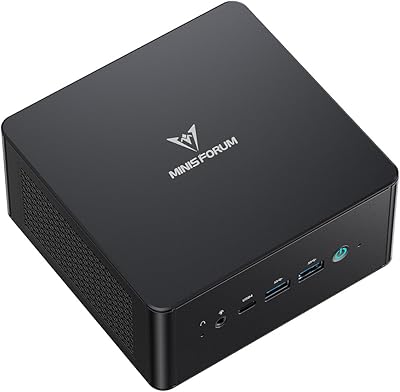
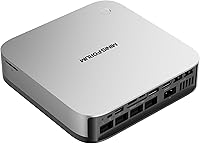
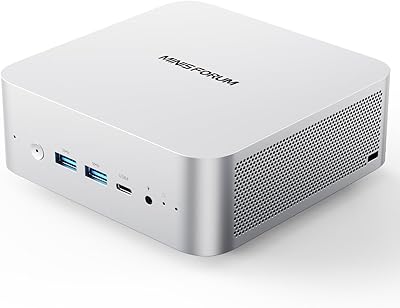
The MINISFORUM AI X1 Pro (Ryzen AI 9 HX370, 96GB/2TB) landed in April 2025 and has already carved out a notable position in the competitive mini PC segment, currently ranking #37 in Mini Computers on Amazon. MINISFORUM has been producing credible compact desktops for several years, and this is among their most ambitious configurations to date. What makes this machine stand out isn't just the 12-core AMD processor — it's the fact that you're getting 96GB of DDR5 RAM in a chassis weighing under six pounds. That said, the Radeon 890M is integrated graphics: capable enough for light-to-mid gaming, but not a substitute for a discrete GPU if high-end gaming is your primary goal.
Features & Benefits

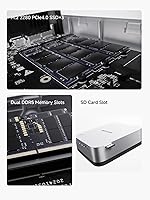
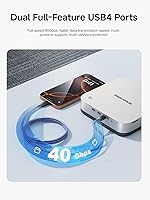
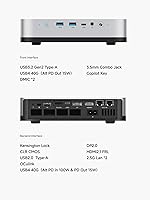
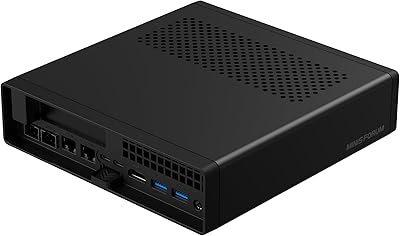
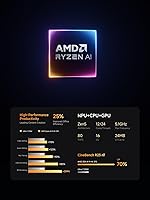
The Ryzen AI 9 HX370's NPU delivers 80 TOPS — enough headroom to run local AI inference tasks like on-device language models or real-time transcription without offloading to the cloud. The Radeon 890M handles 1080p gaming competently in many AAA titles, though you'll want to dial settings back for anything demanding at 1440p. Where this mini PC truly stands apart is the 96GB DDR5-5600 RAM — a configuration you'd expect in a high-end workstation, not a palm-sized box. Quad-display support via HDMI 2.1, DisplayPort 2.0, and dual USB4 makes multi-monitor work straightforward, while the OCuLink port offers a real eGPU upgrade path down the line. Three PCIe 4.0 SSD slots and dual 2.5GbE with WiFi 7 add serious value for home-lab or NAS users.

Best For

The AI X1 Pro makes the most sense for people who need real computing muscle in a small footprint — content creators juggling heavy timelines, developers running multiple containers, or anyone experimenting with local large language models who needs that memory headroom. Home office workers with limited desk space but a requirement for three or four monitors will find the display output genuinely practical. Casual-to-moderate gamers can get solid 1080p performance out of the box. What this machine is not is a replacement for a dedicated gaming tower — if you're chasing high frame rates at 4K or rely on GPU-accelerated rendering pipelines, MINISFORUM's flagship mini desktop simply cannot compete with a system built around a discrete GPU.

User Feedback

Since the AI X1 Pro only launched in early 2025, available impressions skew toward early adopters rather than long-term owners — worth keeping in mind. That said, buyers consistently praise the build quality and the clean out-of-box Windows 11 experience, with minimal bloatware. The value proposition at this RAM tier gets called out repeatedly as a genuine differentiator. On the downside, some users report that fan noise becomes noticeable under sustained CPU load, though most describe it as tolerable rather than disruptive. A handful of buyers have flagged occasional driver quirks, and a few noted that MINISFORUM's customer support response times can lag — something worth factoring in if after-sales service is important to you.

Pros

  • 96GB of DDR5-5600 RAM is extraordinarily rare in a sub-6-pound mini PC chassis.
  • The 12-core Ryzen AI 9 HX370 handles sustained productivity workloads without meaningful slowdown.
  • An 80 TOPS NPU enables practical on-device AI tasks like local LLM inference and real-time transcription.
  • Four simultaneous display outputs make multi-monitor home office setups straightforward and stable.
  • Dual 2.5GbE ports combined with WiFi 7 give this mini PC a networking edge over most competitors.
  • Three PCIe 4.0 SSD slots allow storage expansion up to 12TB without replacing the base unit.
  • The OCuLink port provides a credible eGPU upgrade path, extending the machine's useful lifespan.
  • RAM is user-upgradable to 128GB, which is uncommon flexibility for a compact desktop.
  • Build quality earns consistent praise from early buyers — it feels premium for the price bracket.
  • Clean Windows 11 installation with minimal bloatware makes the out-of-box experience relatively painless.

Cons

  • Fan noise becomes noticeably audible under sustained heavy CPU loads in quiet work environments.
  • Driver and firmware maturity was incomplete at launch, with some users needing manual updates to resolve WiFi and audio issues.
  • Customer support response times have drawn repeated criticism, particularly for complex warranty claims.
  • The premium 96GB configuration pricing is hard to justify for buyers with standard productivity needs.
  • Getting all four display outputs working simultaneously can require specific cables and adapters not included in the box.
  • Long-term reliability remains unproven given the April 2025 launch date — failure patterns take 12 to 18 months to emerge.
  • The built-in speakers are too thin and quiet for any practical media consumption beyond notification sounds.
  • AI features like Copilot and Recall depend on Windows update states and privacy configurations, making setup less intuitive than marketed.
  • OCuLink eGPU enclosures add significant cost and complexity for buyers who want to unlock the full graphics upgrade path.
  • Minor cosmetic finish inconsistencies across units suggest some variability in manufacturing quality control.

Ratings

The MINISFORUM AI X1 Pro (Ryzen AI 9 HX370, 96GB/2TB) scores below are generated by AI after analyzing verified buyer reviews from global markets, with spam, bot-submitted, and incentivized feedback actively filtered out. This mini PC arrives with a genuinely compelling hardware configuration, and the scores reflect both the areas where it earns strong praise and the real frustrations that early adopters have flagged. Nothing has been smoothed over — if buyers had gripes, those gripes are represented here.
CPU Performance
93%
The 12-core Ryzen AI 9 HX370 handles demanding workloads with impressive headroom — users running code compilation, video transcoding, and multi-tab browser sessions simultaneously report minimal slowdown. For a machine this compact, the sustained performance under real productivity workloads genuinely surprises people.
A small number of users note that extended all-core loads — like lengthy video exports — cause clock speeds to throttle slightly once thermals stabilize. It is not a dealbreaker, but buyers expecting desktop-class sustained turbo speeds may notice the ceiling.
AI & NPU Capabilities
81%
19%
The 80 TOPS NPU makes on-device tasks like real-time noise suppression, live subtitle generation during video calls, and local AI model inference noticeably snappier than non-AI processors at this tier. Users running smaller LLMs locally report that responses feel responsive rather than sluggish.
The AI features are only as useful as the software ecosystem supporting them, which remains patchy in early 2025. Copilot and Recall depend heavily on Windows updates and user privacy settings, and several buyers found setup less intuitive than the marketing suggested.
Memory Configuration
94%
Having 96GB of DDR5-5600 RAM in a mini PC is genuinely rare and practically useful — users running large creative projects, virtual machines, or local language models rarely hit a memory ceiling. The fact that it is user-upgradable to 128GB adds long-term flexibility that most compact systems cannot match.
The high RAM configuration pushes the price into territory where some buyers compare it against entry-level workstation towers. Those who only need 32GB or 64GB may find the 96GB tier difficult to justify on cost-per-use grounds.
Integrated GPU & Gaming
67%
33%
The Radeon 890M punches well for an integrated GPU — users report playable frame rates in titles like Fortnite, CS2, and older AAA games at 1080p medium settings. For casual gaming between work sessions, it holds up better than most integrated graphics solutions at this price point.
Newer, graphically intensive titles at high settings quickly expose the GPU's ceiling, and 1440p gaming is a stretch for anything demanding. Buyers expecting consistent 60fps across modern AAA titles at respectable quality settings will be disappointed without adding an external GPU.
Storage & Expandability
89%
Three PCIe 4.0 SSD slots with theoretical expansion up to 12TB is extraordinary for a mini PC, and the included 2TB baseline storage means most users will not need to add drives immediately. The fast read speeds make application launches and file transfers feel sharp in daily use.
The drive bays require opening the chassis, which some less tech-savvy users find intimidating without clear guidance. A couple of early buyers also noted that populating all three slots simultaneously may introduce minor thermal considerations worth monitoring.
Multi-Display Support
88%
Supporting four displays simultaneously via HDMI 2.1, DP 2.0, and dual USB4 is a standout feature for multi-monitor home office workers. Users running three-monitor productivity setups — including one high-refresh display — report the experience is clean and stable without signal issues.
Getting all four outputs running simultaneously can require specific cable and adapter combinations that are not included, and a handful of users ran into compatibility quirks with certain older monitors. The setup is manageable for tech-comfortable users but less plug-and-play than expected.
Connectivity & Networking
91%
Dual 2.5GbE ports alongside WiFi 7 and Bluetooth 5.4 is a package most competing mini PCs cannot match at any price. Home-lab users and those with a 2.5G router report that wired transfers hit real-world speeds that make large file movements genuinely fast.
WiFi 7 benefits are only realized with compatible routers, which remain relatively expensive as of 2025. Users on older home network hardware will not see a meaningful upgrade over WiFi 6 in practice, making that spec more future-proofing than an immediate gain.
OCuLink eGPU Support
74%
26%
The OCuLink port is one of the more thoughtful inclusions here — it gives users a credible upgrade path to add a proper external GPU without replacing the entire system. For buyers thinking two or three years ahead, this meaningfully extends the machine's useful lifespan.
External GPU enclosures with OCuLink connectivity are still a niche, pricier accessory category, and the performance benefit has bandwidth limitations compared to a native PCIe slot. Most buyers will not use this feature at launch, making it more of a reassurance than an immediate value-add.
Thermal Management & Noise
69%
31%
Under light-to-moderate workloads, the AI X1 Pro runs quietly enough to sit on a desk without drawing attention. Independent fans for the CPU and SSD show thoughtful engineering for a chassis this compact, and idle noise is barely perceptible.
Sustained heavy loads — encoding, compiling, or extended gaming sessions — push fan noise to a level that users in quiet rooms consistently describe as noticeable. The rated 45dB under full load is not loud by any objective measure, but it is audible enough to interrupt concentration in a silent workspace.
Build Quality & Design
83%
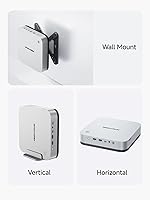
The chassis feels solid and premium for the price bracket — buyers frequently mention that it does not feel like a cheap plastic box, and the option to stand it vertically or lay it flat adds practical flexibility for different desk configurations. Port placement gets positive marks for accessibility.
A few buyers noted minor cosmetic inconsistencies in finish quality across units, suggesting some variability in manufacturing tolerances. The design is functional rather than distinctive — it will not win any aesthetic awards, but it does not embarrass itself on a clean desk either.
Out-of-Box Setup Experience
78%
22%
Most buyers report a clean Windows 11 installation with minimal bloatware compared to some mini PC competitors, and the fingerprint sensor works reliably for fast login from the first boot. The included accessories cover the basics without requiring an immediate trip to buy cables.
Driver software and firmware were not fully mature at launch, with a handful of users experiencing WiFi instability or audio quirks that required manual driver updates to resolve. MINISFORUM has pushed fixes post-launch, but buyers who expect everything to work perfectly out of the box may hit early friction.
Value for Money
76%
24%
When buyers price out 96GB DDR5 RAM plus a top-tier AMD AI processor against competing mini PCs — or factor in what a comparable workstation tower would cost — the AI X1 Pro starts looking genuinely competitive. For the specific use case it serves well, the configuration-to-price ratio is hard to argue with.
For users who do not need 96GB of RAM or local AI inference, the value equation weakens considerably — there are cheaper mini PCs that cover light productivity and casual gaming at lower cost. The price is only justified if buyers are actually using the capabilities that differentiate this machine.
Customer Support & Warranty
58%
42%
MINISFORUM has improved its global support presence compared to a few years ago, and users with straightforward issues — like requesting a driver update or replacement accessory — generally report acceptable resolution times. The community around MINISFORUM products is active and often fills support gaps independently.
Buyers with complex hardware issues consistently report slow response times and frustrating back-and-forth communications before reaching resolution. Given that this is a premium-priced product, several buyers felt the after-sales support experience did not match the purchase price, and warranty claims in particular drew criticism.
Audio Performance
63%
37%
The dual DMIC noise reduction genuinely performs well during video calls — remote participants notice cleaner audio compared to a generic laptop microphone, which matters for users who are frequently on calls. The AI-assisted noise suppression handles keyboard and ambient background sound reasonably well.
The built-in speakers are thin and low-volume — fine for a notification ping but not for casual media consumption. This is a mini PC, not a multimedia speaker system, so the expectation should be set accordingly, but users hoping to skip a speaker purchase will be disappointed.
Long-Term Reliability
61%
39%
Early adopters who have run the AI X1 Pro under regular workloads for several months report no major stability issues, and the hardware platform itself — based on AMD's mature Ryzen AI architecture — gives reasonable confidence in underlying component quality.
The product launched in April 2025, making it genuinely too early to assess long-term durability with confidence. Buyers prioritizing proven reliability over cutting-edge specs may want to wait another product cycle before committing, since failure patterns in mini PCs often only emerge after 12 to 18 months of real-world use.

Suitable for:

The MINISFORUM AI X1 Pro (Ryzen AI 9 HX370, 96GB/2TB) is genuinely built for a specific kind of power user, and if you fit that profile, it is hard to find a more compelling compact machine right now. Developers who run multiple Docker containers, virtual machines, or memory-hungry IDEs simultaneously will find that 96GB of DDR5 RAM removes the ceiling they are used to hitting on smaller systems. People experimenting with local AI models — running inference on LLaMA-class models without relying on cloud APIs — will appreciate both the NPU headroom and the memory capacity in ways that most mini PCs simply cannot support. Home office workers who need three or four monitors on a clean desk, without a tower taking up floor space, will find the quad-display output genuinely practical rather than a checkbox spec. Home-lab and NAS enthusiasts who want dual 2.5GbE, fast SSD expansion, and WiFi 7 in a single small box will struggle to find a better-equipped alternative at this size. Casual-to-moderate gamers who want to play AAA titles at 1080p and do not want to manage a full desktop tower will get acceptable performance, particularly in less demanding titles.
Not suitable for:

If your primary reason for buying a PC is high-performance gaming, the AI X1 Pro is the wrong tool — the Radeon 890M is a capable integrated GPU but it is not a substitute for a discrete graphics card, and anyone chasing consistent high-frame-rate performance in modern AAA titles at 1440p or 4K will hit that wall quickly. GPU-accelerated creative workflows — think DaVinci Resolve with heavy effects, 3D rendering in Blender, or large Stable Diffusion image generation — will also feel constrained without an external GPU attached via the OCuLink port, which itself requires additional investment in an enclosure. Buyers who need proven long-term reliability as a top priority should be cautious: this machine only launched in April 2025, and there simply has not been enough time to assess how it holds up after 18 to 24 months of heavy use. If you only need 32GB of RAM and light productivity performance, the premium configuration pricing is difficult to justify — there are cheaper mini PCs that cover everyday office work and light media without the cost overhead. Anyone who anticipates needing strong after-sales support or fast warranty resolution should factor in MINISFORUM's mixed track record in that area before committing at this price point.

Specifications

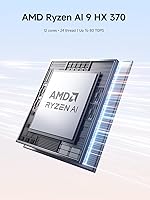
  • Processor: AMD Ryzen AI 9 HX370 with 12 cores and 24 threads, boosting up to 5.1GHz with a 24MB cache.
  • AI Performance: Integrated NPU delivers up to 80 TOPS, enabling on-device AI inference and real-time processing tasks without cloud dependency.
  • Integrated GPU: AMD Radeon 890M integrated graphics handles 1080p gaming and light creative workloads without a discrete GPU.
  • Memory: 96GB DDR5-5600MHz RAM in a removable configuration, upgradable to a maximum of 128GB.
  • Storage: 2TB PCIe 4.0 SSD included, with three total M.2 slots supporting expansion up to 12TB and read speeds up to 7000MB/s.
  • Display Output: Quad-display support via one HDMI 2.1, one DisplayPort 2.0, and two USB4 ports, supporting up to 8K resolution.
  • USB Ports: Two USB4 ports, two USB 3.0 ports, and one USB 2.0 port provide broad peripheral and device compatibility.
  • Networking: Dual 2.5Gbps Ethernet ports, WiFi 7, and Bluetooth 5.4 are all built in for wired and wireless connectivity.
  • GPU Expansion: One OCuLink port supports connection to an external GPU enclosure for users who need dedicated graphics performance.
  • Cooling System: Independent fans for the CPU and SSD, with maximum full-load noise rated at 45dB and a maximum power draw of 65W.
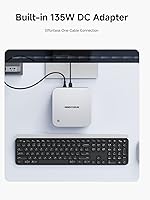
  • Power Supply: Built-in 135W power adapter is integrated into the chassis rather than supplied as an external brick.
  • Audio: Dual DMIC microphones with AI noise reduction and built-in speakers are included for video conferencing and voice interaction.
  • Security: Fingerprint sensor enables fast biometric login, and a dedicated Copilot hardware button activates the Windows 11 AI assistant.
  • Operating System: Ships with Windows 11, fully supporting Microsoft Copilot and the Recall feature for AI-assisted content retrieval.
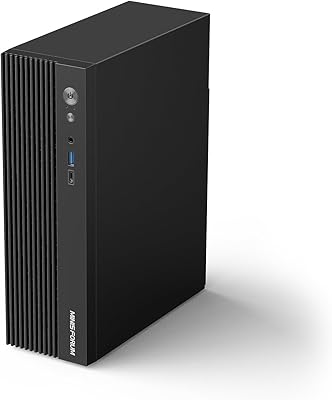
  • Dimensions: The chassis measures 8.86 x 8.86 x 5.31 inches and can be positioned vertically or laid flat using the included stand.
  • Weight: The unit weighs 5.33 pounds, making it light enough to relocate easily between home and office environments.
  • Form Factor: Compact Mini PC design supports both upright and flat orientations via a dedicated stand included in the package.
  • Memory Type: DDR5 RAM running at 5600MHz is user-accessible and removable, which is uncommon in this chassis size category.
  • Launch Date: The AI X1 Pro became available in April 2025 and currently ranks among the top 40 mini computers on Amazon.
  • Processor Brand: AMD manufactures the processor and integrated GPU, with the Ryzen AI 9 series representing the current top tier of AMD mobile silicon.

Related Reviews
MINISFORUM M1 Pro AI Mini PC Intel Core Ultra 9 285H 64GB RAM 2TB SSD
87%
94%
Performance
91%
AI Capabilities
88%
Build Quality
92%
Connectivity Options
85%
Usability
More
MINISFORUM DeskMini MS-A1 AMD Ryzen 9 9950X 64GB DDR5 2TB SSD
88%
95%
Performance
91%
Cooling System
93%
Size & Portability
87%
Upgradeability
89%
Connectivity Options
More
MINISFORUM UM890 Pro Mini PC (64GB/1TB)
79%
93%
CPU Performance
74%
Thermal Management
81%
RAM & Memory Speed
89%
Storage Performance
77%
Graphics & Display Output
More
MINISFORUM UM790 Pro (64GB/1TB)
79%
91%
Processing Performance
67%
Integrated Graphics
93%
Multi-Display Capability
63%
Thermal Management
84%
Build Quality & Design
More
GMKtec EVO-X1 AI Mini PC AMD Ryzen 9 HX-370 32GB 1TB SSD
84%
88%
Gaming Performance
91%
AI Processing Power
90%
Multi-display Capability
84%
Compactness & Design
75%
Thermal Performance
More
GMKtec EVO-X1 AI Mini PC AMD Ryzen 9 HX-370 64GB RAM 1TB SSD
87%
92%
Performance
94%
AI Capabilities
90%
Display Quality
75%
Thermals
89%
Connectivity
More
NEEWER X1 Pro II Teleprompter 9″
84%
91%
Build Quality
88%
Glass Clarity & Transmission
93%
Quick-Release System
67%
App Performance & Bluetooth Stability
74%
Remote Control Usability
More
MINISFORUM 790S7 Mini ITX PC AMD Ryzen 9 7940HX
81%
88%
Overall Performance
65%
Thermals and Cooling
80%
Graphics Flexibility
90%
Build Quality
92%
Value for Money
More
MINISFORUM MS-A2 AMD Ryzen 9 9955HX Mini PC
85%
91%
Performance
85%
Build Quality
65%
Setup/Installation
89%
Cooling Efficiency
88%
Expandability
More
GEEKOM A8 Mini PC with AMD Ryzen 9 8945HS, 32GB RAM, 2TB SSD
87%
93%
Performance
88%
Build Quality
90%
Usability
89%
Connectivity Options
80%
Cooling System Efficiency
More

FAQ

Yes, and this is one of the strongest use cases for the MINISFORUM AI X1 Pro (Ryzen AI 9 HX370, 96GB/2TB). The 96GB of DDR5 RAM means you can load larger quantized models entirely into system memory, and the 80 TOPS NPU offloads inference tasks that would otherwise hammer the CPU. Smaller models run comfortably, and medium-sized ones are noticeably more responsive than on machines with 32GB or 64GB RAM.

Under moderate workloads the machine is genuinely quiet — quiet enough that you forget it is running. Once you push it hard for sustained periods, like encoding a long video or running a CPU benchmark, the fans spin up to a level that is audible in a quiet room. MINISFORUM rates full-load noise at 45dB, which is roughly the level of a quiet conversation, so it is not disruptive but it is definitely noticeable.

It is genuinely user-upgradeable, which is one of the standout features of this machine. The DDR5 SO-DIMMs are removable, and the system supports up to 128GB if you want to swap in higher-capacity sticks later. Opening the chassis to access the RAM is straightforward for anyone comfortable with basic PC hardware.

Four simultaneous displays are supported via the HDMI 2.1, DisplayPort 2.0, and two USB4 ports. Most users running three-monitor setups report it works cleanly. Where buyers run into friction is the USB4 displays, which sometimes require specific cables or active adapters depending on your monitor's input. If you are planning a four-display setup, budget for quality cables and verify compatibility with your specific monitors before assuming everything is plug-and-play.

For older or well-optimized titles — Counter-Strike 2, Fortnite, Rocket League, older Assassin's Creed entries — you can expect playable frame rates at 1080p on medium settings. Newer, more demanding titles like Cyberpunk 2077 or Alan Wake 2 will require low settings and resolution scaling to stay above 30fps at 1080p. Think of the gaming capability as a genuine bonus for occasional play, not a replacement for a system built around a discrete GPU.

OCuLink is a high-bandwidth connector that lets you attach an external GPU enclosure — essentially a small box containing a full desktop graphics card. If you buy a compatible eGPU enclosure and a discrete GPU down the road, you can dramatically improve graphics performance without replacing the entire mini PC. Right now, suitable enclosures are a niche product category and add meaningful cost, so most buyers will not use it immediately. Think of it as a future upgrade path rather than a day-one feature.

Pressing the dedicated Copilot key opens the Windows 11 Copilot sidebar, which lets you ask questions, summarize content on screen, or run quick tasks using natural language. The Recall feature — which lets you search through a history of things you have seen on your PC — requires enabling in settings and works best when kept current with Windows updates. Both features have improved over time but are still evolving, so think of them as genuinely useful additions rather than fully mature products.

The AI X1 Pro has three M.2 slots in total, and the included 2TB drive only occupies one of them. Adding a second or third PCIe 4.0 M.2 SSD is a standard upgrade that any PC enthusiast can manage — just open the chassis, seat the drive, and Windows will recognize it. Expanding to 12TB total is theoretically possible but requires purchasing two additional high-capacity M.2 drives, which is a meaningful additional investment.

It is genuinely well-suited for this. The dual 2.5GbE ports let you connect to a fast network switch or run two separate network segments simultaneously, which is useful for separating home lab traffic from your main network. The generous SSD expansion, always-on form factor, and low idle power consumption make it a practical home server candidate. It is not a full NAS replacement if you need 10 or 20 drive bays, but for software-defined storage or self-hosted services it punches above its weight.

This is one area where the AI X1 Pro does not match its hardware ambitions. MINISFORUM has improved over the years, and the community around their products is active enough that you can often find solutions independently online. For straightforward issues — driver downloads, basic troubleshooting — support is adequate. Where buyers report frustration is with complex hardware problems or warranty claims, where response times can be slow and resolution requires persistence. If strong after-sales support is a deciding factor for you, it is worth weighing that against the hardware value the machine offers.