Overview

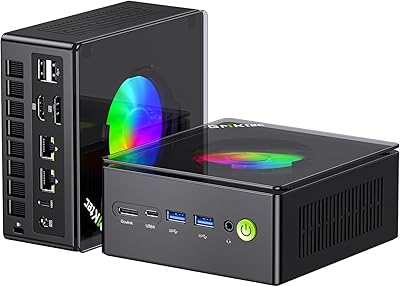
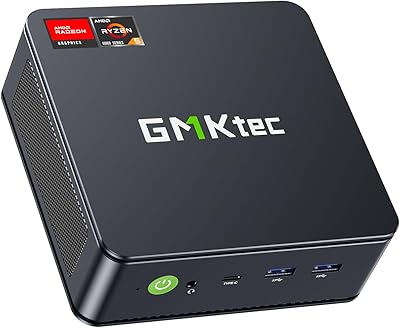
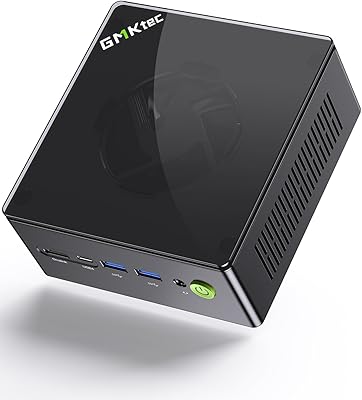
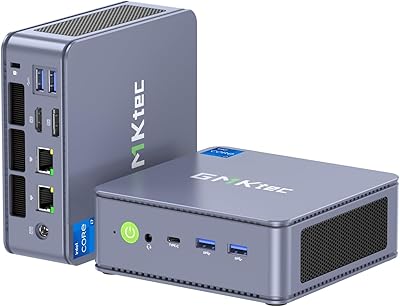
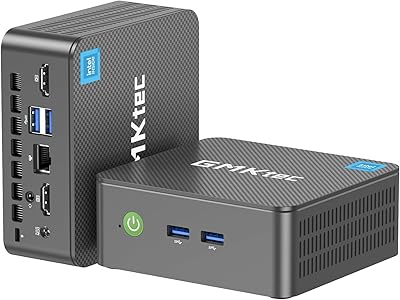
The GMKtec NucBox M7 (32GB/2TB) sits in a genuinely interesting spot in the compact desktop market — more capable than the basic NUC-style boxes that defined the category, yet a fraction of the footprint of a traditional tower. The key differentiator is AMD's Ryzen 7 Pro 6850H, an eight-core processor that regularly outperforms Intel-based rivals at this price tier. Physically, it's about the size of a hardback novel, yet can drive four displays at once. It also includes an OCuLink port — a niche but meaningful feature that enables external GPU expansion with more bandwidth than Thunderbolt. That said, integrated graphics are impressive for this class of machine, but it isn't a replacement for a discrete GPU setup. Calibrate your expectations accordingly.
Features & Benefits

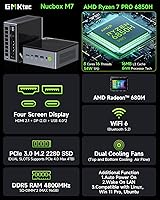
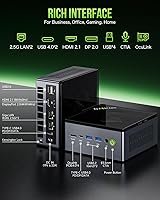
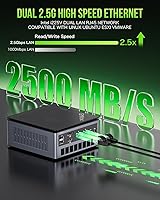
Where the NucBox M7 genuinely earns its keep is in its feature set. The Radeon 680M integrated graphics handle esports titles and older AAA games at 1080p without complaint, and emulation performance is strong. The OCuLink port — think of it as a high-speed external GPU socket — gives this machine a real upgrade path if your workload eventually demands a discrete card. Four simultaneous display outputs, including HDMI 2.1 and DisplayPort, make it a viable multi-monitor productivity hub. The dual 2.5G LAN ports open the door to homelab use cases like soft routing or network-attached storage. Cooling holds up in daily use, and the three TDP modes let you tune between quiet operation and full performance on demand.

Best For

GMKtec's compact desktop makes the most sense for a specific kind of buyer. Home office workers who need a quiet, space-efficient machine with genuine multi-monitor support will find it hard to fault. Emulation enthusiasts and casual gamers — think older console libraries, indie titles, competitive shooters — will get solid mileage from the Radeon 680M without spending on a full gaming tower. Networking hobbyists get dual 2.5G LAN to play with, and homelab tinkerers can put it to work as a soft router or lightweight NAS. Content creators editing short-form video or handling light rendering will appreciate the DDR5 bandwidth. And if you're already thinking about an eGPU setup, the OCuLink connection makes this a rare find at this price tier.

User Feedback

Buyer sentiment around the NucBox M7 is generally positive, with most praise directed at the out-of-the-box configuration — 32GB of RAM and a 2TB drive ready to go is hard to argue with. Build quality earns consistent compliments, and the included VESA mount is a small but appreciated touch. The criticism that surfaces most often is fan noise under load: in Performance mode, the dual fans become audible in a quiet room, which matters if your desk is right beside you. A handful of users noted some friction with driver setup and Windows activation at first boot, though most resolved it without major drama. A few buyers also flagged thermal throttling during sustained heavy workloads — worth knowing if you plan to push it hard for hours at a stretch.

Pros

  • Ships with 32GB DDR5 RAM and a 2TB NVMe drive — no immediate upgrades needed.
  • The Ryzen 7 Pro 6850H outperforms Intel-based rivals at this price point in real-world tasks.
  • Drives up to four displays simultaneously, a rare capability in this form factor.
  • Dual 2.5G LAN ports open up genuine homelab, NAS, and soft-router use cases.
  • OCuLink port provides a real GPU upgrade path at PCIe x4 bandwidth when you are ready.
  • Quiet mode keeps fan noise under 35dB — unobtrusive during everyday office work.
  • Three selectable TDP modes let you tune the balance between performance and heat on your own terms.
  • Solid build quality with a VESA mount included — attaches cleanly behind any compatible monitor.
  • Wi-Fi 6 and Bluetooth 5.2 cover wireless connectivity without needing any adapters.
  • Wake-on-LAN and Auto Power On make it practical as a lightweight always-on home server.

Cons

  • Fan noise in Performance mode is intrusive enough in quiet rooms to require headphones.
  • Sustained heavy workloads trigger thermal throttling that shows up in benchmarks and real tasks.
  • Windows activation issues at first boot are a recurring complaint among verified buyers.
  • Factory AMD drivers often need a manual update before the system hits its performance ceiling.
  • The bundled 120W power brick is disproportionately large and undercuts portability.
  • The SSD runs on PCIe 3.0, not the PCIe 4.0 the slots technically support — a quiet missed opportunity.
  • Only two USB 2.0 ports remain, which frustrates users with older peripherals that need reliable bandwidth.
  • No SD card slot, a small but real inconvenience for photographers and content creators.
  • One of the 2.5G LAN ports occasionally drops link after sleep on some units, requiring a driver or BIOS fix.
  • OCuLink eGPU enclosures add significant extra cost that the initial price does not account for.

Ratings

The GMKtec NucBox M7 (32GB/2TB) scores below were generated by AI after systematically analyzing verified global buyer reviews, actively filtering out incentivized, bot-generated, and low-quality feedback to surface what real users actually experience. This mini PC draws an unusually diverse crowd — home office workers, homelab enthusiasts, casual gamers, and network tinkerers — and the ratings reflect the honest spread of their feedback, strengths and frustrations alike.
Processing Performance
88%
The Ryzen 7 Pro 6850H punches well above what most buyers expect from a box this size. Daily workloads — browser tabs, video calls, spreadsheets, light video editing — run without hesitation, and users doing code compilation or data processing report noticeably faster results than Intel N-series or older Ryzen 5000 mini PCs they upgraded from.
Under sustained multi-threaded loads lasting more than 20–30 minutes, some users report the chip begins to throttle slightly in Balance mode. Switching to Performance mode addresses it, but that brings its own noise tradeoff that not everyone is willing to accept at a desk.
Gaming & Graphics
74%
26%
The Radeon 680M is the best integrated GPU available in a mini PC at this price tier, and buyers who use it for esports titles, emulation, or older console libraries are genuinely impressed. Games like Fortnite, Rocket League, and PS2-era emulation run smoothly at 1080p with settings adjusted appropriately.
Modern AAA titles at high settings are a stretch. Users trying to run demanding games like Cyberpunk 2077 or Alan Wake 2 at playable frame rates are disappointed — this is an iGPU, and it behaves like one. Managing expectations here is critical; calling it a gaming PC without caveats would be misleading.
Thermal Management & Cooling
69%
31%
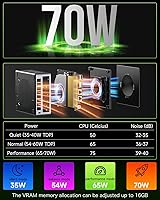
In Quiet mode at 35W, the NucBox M7 stays genuinely cool and nearly inaudible during light to moderate tasks. The dual-fan Hyper Ice Chamber design keeps temperatures from becoming alarming even during longer work sessions, and the copper base does appear to help stabilize thermals compared to earlier GMKtec models.
Push it into Performance mode for extended periods — rendering, sustained gaming, large file transfers — and thermal throttling shows up in benchmark logs and user reports alike. The fans also ramp up aggressively under these conditions, hitting noise levels that a desk-side user in a quiet room will definitely notice.
Fan Noise
63%
37%
Quiet mode lives up to its name for office work and media consumption. Users who primarily browse, stream, or handle productivity tasks report the machine is almost silent in everyday use, which is a meaningful improvement over previous-generation compact desktops that would spin up constantly.
Performance mode is the recurring complaint in user reviews. Several buyers describe the fan noise as intrusive enough to require headphones during gaming sessions or intensive tasks. It is not extraordinarily loud by any objective measure, but for a machine marketed as a quiet desktop, it falls short of expectations under load.
Connectivity & Ports
91%
The port selection on a machine this small is genuinely remarkable. Dual USB4 ports, dual 2.5G LAN, HDMI 2.1, DisplayPort, and an OCuLink socket cover nearly every use case a power user could want. Homelab users in particular rave about having two independent 2.5-gigabit network interfaces without adding a single adapter.
The two USB 2.0 ports feel like a concession to the form factor and will frustrate users who still rely on older peripherals needing consistent bandwidth. There is also no SD card slot, which content creators occasionally flag as a small but real inconvenience.
OCuLink eGPU Support
83%
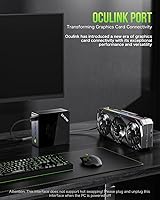
Having an OCuLink port on a sub-500-dollar mini PC is a genuinely rare feature, and enthusiasts who understand what it offers — PCIe x4 bandwidth to an external GPU enclosure — find it a compelling future-proofing argument. Users who have already paired it with an eGPU report a dramatic jump in graphics performance that effectively transforms the machine.
The barrier to entry for OCuLink eGPU setups remains high — compatible enclosures are not cheap, and the whole workflow requires some technical comfort. For the average buyer, this port is invisible value until they decide to invest further, and GMKtec could do more to document the setup process clearly.
Multi-Display Output
87%
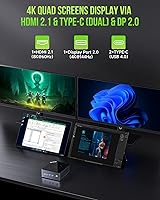
Running four monitors simultaneously from a device smaller than most external hard drives is a genuine selling point for multi-taskers and trading desk setups. Users who have connected HDMI, DisplayPort, and both USB4 outputs report a stable and responsive experience across all four screens without signal issues.
A few users report that achieving the advertised 8K output via HDMI 2.1 or 4K at 144Hz via DisplayPort requires specific cables and compatible monitors — the machine supports it, but the real-world ceiling depends heavily on what you plug in. Display configuration can also get finicky after sleep cycles.
RAM & Storage Configuration
93%
Shipping with 32GB of DDR5 dual-channel RAM and a 2TB NVMe drive is one of the strongest out-of-the-box configurations in this price bracket. Buyers consistently highlight that they did not need to immediately upgrade storage, which is a meaningful departure from mini PCs that ship with token 256GB or 512GB drives.
The SSD runs on PCIe 3.0 rather than the faster PCIe 4.0 standard the slots technically support. For most users this is invisible, but those doing large sequential file transfers — video editors moving raw footage, for example — will notice the ceiling compared to a PCIe 4.0 drive they could slot in themselves.
Networking Performance
89%
Both Intel i226V 2.5G LAN ports perform reliably and are recognized immediately by Windows without additional driver hunting. Homelab users running pfSense, OPNsense, or Proxmox on the machine report stable throughput and consistent link speeds, and the combination of wired plus Wi-Fi 6 covers both high-bandwidth and flexible placement needs.
A small subset of users have reported occasional link drops on one of the LAN ports after waking from sleep, which required a driver update or BIOS tweak to resolve. It is not a widespread issue, but network-critical setups should be aware that initial configuration may need some tuning.
Build Quality & Design
82%
18%
The aluminum-accented chassis feels substantially more premium than the all-plastic shells that define budget mini PCs. Users who have owned older GMKtec models specifically mention the build feels more refined, and the included VESA mount — which lets you attach it directly to the back of a monitor — is a practical touch that buyers consistently appreciate.
The bottom intake vents collect dust faster than expected, and a few users note that the chassis runs noticeably warm to the touch in Performance mode. Nothing alarming, but it is a reminder that the thermal demands of a high-end mobile chip in a compact enclosure have real physical consequences.
Software & Out-of-Box Experience
71%
29%
Windows 11 Pro comes pre-installed and most buyers report a reasonably clean setup experience. Drivers for the core hardware — networking, display outputs, audio — are generally in good shape from the factory, and GMKtec has been improving BIOS options meaningfully over earlier generations, with VRAM allocation and TDP mode controls now accessible without deep technical knowledge.
Windows activation hiccups at first boot are a recurring thread in user reviews — not universal, but common enough to be worth flagging. Some buyers also encounter generic or outdated AMD drivers that benefit from a manual update before the system performs at its best, which is an extra step that should not be necessary on a new machine.
Value for Money
86%
When you account for the included RAM, storage, Windows license, and the breadth of connectivity — especially the dual 2.5G LAN and OCuLink — the value proposition is hard to dismiss. Buyers who comparison-shopped against Intel NUC-style competitors or barebones alternatives consistently conclude that the NucBox M7 offers more for the money.
The value calculus shifts if you compare it against a slightly older used workstation or a budget tower build where discrete GPU performance matters. For buyers whose primary goal is gaming, the price is harder to justify without committing to an eGPU investment on top of it.
Power Efficiency
78%
22%
In Quiet mode, the 35W TDP ceiling keeps power consumption genuinely low — users running it as a always-on home server or NAS replacement report electricity costs that are a fraction of a traditional desktop tower. Wake-on-LAN and Auto Power On support add to the appeal for light server and automation use cases.
Stepping into Performance mode at 65–70W narrows the efficiency advantage considerably. It is still more efficient than a full tower, but less compelling compared to ARM-based mini PCs or Intel N-series machines that idle at single-digit wattage for purely passive workloads.
Size & Portability
91%
At roughly the dimensions of a thick hardback book and just under four pounds, the NucBox M7 is easy to carry between a home office and a secondary location. Users who split time between spaces — or who needed to reclaim desk real estate — consistently call out the compact footprint as a genuine quality-of-life improvement over what they replaced.
The 120W power brick is disproportionately large relative to the PC itself and is the one component that undercuts the portability story. A few buyers specifically wish GMKtec had included a more compact or USB-C-based power solution given how otherwise travel-friendly the machine is.

Suitable for:

The GMKtec NucBox M7 (32GB/2TB) is a natural fit for home office workers who want a capable, quiet desktop that does not dominate their workspace — especially those running two, three, or even four monitors simultaneously for productivity or trading setups. Emulation fans and casual gamers who enjoy older console libraries, indie titles, or competitive shooters at 1080p will find the Radeon 680M more than adequate without needing a dedicated GPU. Homelab and networking enthusiasts get a rare treat in the dual 2.5G LAN ports, which make the NucBox M7 a credible soft router, lightweight NAS, or Proxmox node without any additional hardware. Content creators handling short-form video edits, light color grading, or graphic design tasks will appreciate the DDR5 bandwidth and ample storage headroom right out of the box. Finally, forward-thinking buyers who plan to attach an external GPU down the line via OCuLink will find this one of the very few compact desktops in this price range that actually supports that upgrade path in a meaningful way.
Not suitable for:

If your primary goal is playing modern AAA titles at high settings with smooth frame rates, the GMKtec NucBox M7 (32GB/2TB) will leave you frustrated — the Radeon 680M is the best integrated GPU in this class, but it is still an integrated GPU, and demanding games like Cyberpunk 2077 or Hogwarts Legacy are not its territory without an eGPU investment on top. Buyers who need truly silent operation at all times should also think carefully, because Performance mode generates fan noise that becomes noticeable in a quiet room, and sustained workloads will eventually push the cooling system hard regardless of the mode selected. Professional video editors or 3D rendering artists who regularly run multi-hour compute jobs will hit thermal and throughput ceilings that a dedicated workstation or tower with discrete graphics would handle far more comfortably. Those who rely on a large ecosystem of USB peripherals may also find the two USB 2.0 ports limiting, and anyone expecting a compact, travel-friendly power solution will be disappointed by the bulky 120W power brick that comes with it.
Specifications

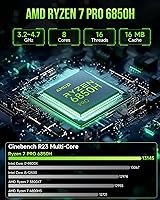
  • Processor: AMD Ryzen 7 Pro 6850H with 8 cores and 16 threads, boosting up to 4.7GHz, with 8MB L2 and 16MB L3 cache.
  • Integrated GPU: AMD Radeon 680M with 12 compute units running at up to 2200MHz, sharing system memory via VRAM allocation in BIOS.
  • RAM: 32GB DDR5 dual-channel at 4800MHz (2x16GB SO-DIMM), expandable up to 96–128GB across two slots.
  • Storage: 2TB M.2 2280 PCIe 3.0 NVMe SSD installed, with a second M.2 slot supporting PCIe 4.0 drives up to 2TB for a 4TB total.
  • Display Output: Quad-display support via HDMI 2.1 (up to 8K@60Hz), one DisplayPort (4K@144Hz), and two USB4 ports each capable of 4K video output.
  • Networking: Dual Intel i226V 2.5Gbps RJ45 LAN ports, Wi-Fi 6 (802.11ax, 2.4GHz and 5GHz), and Bluetooth 5.2.
  • USB Ports: Two USB4 Type-C ports (supporting power delivery, display, and data), two USB 3.2 Gen2 Type-A ports at 10Gbps, and two USB 2.0 Type-A ports.
  • Expansion Port: One OCuLink port operating at PCIe x4 bandwidth, compatible with external GPU enclosures for discrete graphics expansion.
  • Cooling System: Hyper Ice Chamber 2.0 dual-fan design with a copper base, rated at approximately 35dB in Quiet mode.
  • TDP Modes: Three selectable power profiles via BIOS: Quiet at 35W, Balance at 50W, and Performance at 65–70W.
  • Power Supply: 120W external adapter with DC input at 19V and 6.32A; accepts universal AC input from 100–240V at 50/60Hz.
  • Operating System: Windows 11 Pro pre-installed from the factory.
  • Audio: One 3.5mm combo headphone and microphone jack, plus digital microphone (DMIC) support built in.
  • Dimensions: 7.36 x 7.32 x 4.8 inches (approximately 187 x 186 x 122mm), weighing around 4 lbs including the chassis.
  • Operating Environment: Rated for operation between -10°C and 45°C at 30–85% relative humidity (non-condensing).
  • BIOS Features: BIOS supports VRAM allocation adjustment, Wake-on-LAN, Auto Power On, fan speed control, and performance mode switching.
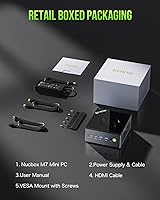
  • In the Box: Includes the mini PC unit, 120W power adapter, VESA mount with screws, one HDMI cable, and a printed user manual.
  • Warranty: GMKtec provides a one-year limited warranty covering defects in design and workmanship from the original purchase date.

Related Reviews

GMKtec Nucbox K11 (Ryzen 9 8945HS, 32GB, 2TB)
89%
94%
CPU Performance
96%
Expansion & Upgradability
92%
Connectivity & Ports
87%
Thermal Management
89%
Build Quality
More
GMKtec Nucbox M6 Ryzen 6600H Mini PC, 32GB RAM, 1TB SSD
86%
90%
Performance for Office Tasks
75%
Gaming Performance (Casual)
84%
Build Quality
91%
Compact Design
89%
Storage Speed (SSD)
More
GMKtec K8 Plus AMD Ryzen 7 8845HS Mini PC, 32GB RAM, 2TB SSD
88%
91%
Performance
89%
Multitasking Capability
82%
Gaming Performance
95%
Storage Capacity
88%
Build Quality
More
GMKtec NucBox K7 Plus 32GB/2TB
80%
88%
Processing Performance
63%
Thermal Management & Cooling
91%
Memory & Storage Configuration
94%
Networking — Dual 2.5G LAN
84%
Display Output & Multi-Monitor Support
More
GMKtec Nucbox K9 Mini PC Intel Core Ultra 5 125H 32GB RAM 1TB SSD
85%
89%
Performance
85%
Build Quality
90%
Energy Efficiency
88%
Connectivity Options
87%
Display Support
More
Meebook M7 E-Reader 6.8″ 32GB
85%
94%
Display Quality
91%
Battery Life
88%
Build Quality
89%
Portability
85%
App Compatibility (Android 11)
More
Dell 16 Business Laptop - 32GB RAM, 2TB SSD, Core i7
85%
93%
Performance
88%
Display Quality
81%
Battery Life
90%
Multitasking Ability
68%
Portability
More
GEEKOM GT1 Mega AI Mini PC, 32GB RAM, 2TB SSD
87%
93%
Performance
88%
Graphics Quality
85%
Build Quality
91%
Multitasking Efficiency
84%
Cooling System Efficiency
More
GMKtec Nucbox G5 Mini PC Intel N97 12GB RAM 512GB SSD
85%
85%
Performance
94%
Compact Design
88%
Connectivity Options
90%
4K Display Support
91%
Noise Level
More
HP 255 G10 Laptop 15.6″ Ryzen 5 7530U 32GB RAM 2TB SSD
71%
83%
Value for Money
79%
Processing Performance
91%
RAM & Storage Configuration
58%
Display Quality
72%
Build Quality & Design
More

FAQ

It depends entirely on what you mean by gaming. The Radeon 680M handles esports titles like Fortnite and Valorant, older console emulation, and indie games at 1080p without much trouble. For demanding modern AAA games at high settings, it will struggle — this is an integrated GPU, and you should go in with that understanding. If you eventually want more graphics horsepower, the OCuLink port lets you connect an external GPU enclosure, which genuinely transforms what the machine can do.

OCuLink is essentially a high-speed connector that lets you plug in an external graphics card enclosure — think of it as a more capable alternative to Thunderbolt for GPU expansion. It runs at PCIe x4 bandwidth, which means an external GPU loses very little performance compared to being inside a desktop tower. Most buyers will never use it, but if you want a future upgrade path without buying a whole new machine, it is a genuinely useful option to have available.

In Quiet mode, the NucBox M7 is nearly silent during everyday tasks like browsing, video calls, and document work — most people sitting a couple of feet away would not notice it. Switch to Performance mode and run something demanding for a sustained period, and the fans ramp up to a level that is noticeable in a quiet room. It is not loud by any absolute standard, but if you need silence during gaming or heavy workloads, Quiet or Balance mode with slightly reduced performance is the better trade-off.

Yes, and it works well for productivity setups. You can use the HDMI 2.1 port, the DisplayPort output, and both USB4 Type-C ports simultaneously for a four-screen configuration. The key thing to note is that achieving the higher resolution and refresh rate specs — like 4K at 144Hz on DisplayPort — requires a cable and monitor that actually supports those standards. Generic cables can be a bottleneck, so use quality cables if you are pushing the limits.

Very much so. Both Intel i226V ports are recognized out of the box by Windows and by popular homelab operating systems like pfSense, OPNsense, and Proxmox without needing additional drivers in most cases. Having two independent 2.5Gbps interfaces on a machine this compact — with Wake-on-LAN and Auto Power On support — makes it a practical and energy-efficient option for routing or lightweight NAS duties.

Usually yes, but activation hiccups at first boot show up often enough in buyer reviews that it is worth being aware of. Some users need to manually enter a product key or contact GMKtec support to resolve activation. It is not a universal problem, and GMKtec does appear to respond when contacted, but budget a few minutes for troubleshooting during initial setup rather than assuming it will be completely hands-off.

Yes, and it is reasonably straightforward. The GMKtec NucBox M7 (32GB/2TB) has two SO-DIMM slots, so you can swap or add DDR5 RAM up to 96–128GB total. The second M.2 slot accepts PCIe 4.0 drives up to 2TB, giving you up to 4TB of NVMe storage if you add a second drive. Just note that any upgrades you source yourself are not covered by the factory warranty, so keep that in mind if you are opening it up.
For short-form content, YouTube edits, and lighter color grading work in software like DaVinci Resolve or Premiere Pro, the combination of a fast eight-core CPU and 32GB of DDR5 RAM makes it a capable machine. Where it hits limits is with heavy effects stacks, long-form 4K timelines, or any workflow that relies heavily on GPU acceleration — the Radeon 680M helps, but a discrete GPU would make a meaningful difference there. For casual to intermediate content creators, though, it handles the workload better than most buyers expect.

Build quality is a consistent bright spot in user feedback. The chassis has an aluminum-accented finish that feels noticeably more premium than the all-plastic mini PCs common in this category. The included VESA mount is a practical bonus — it lets you bolt the machine directly behind a compatible monitor, which keeps your desk completely clear. It does run warm to the touch under load, which is expected given the thermal demands of the chip inside.

After confirming Windows activation, the first thing worth doing is heading to AMD's website and downloading the latest Radeon Software drivers directly — the factory-installed version is often not current, and updating it improves both gaming and media performance noticeably. After that, head into the BIOS and set your preferred TDP mode based on your typical workload and noise tolerance. If you plan to use it as a server or have it auto-start after a power outage, enable the Wake-on-LAN and Auto Power On settings there as well.