Overview

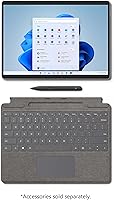
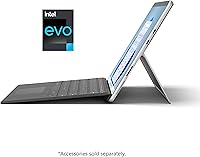
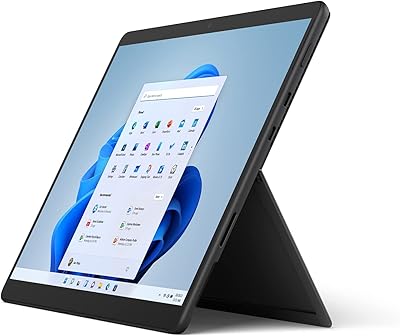
The Microsoft Surface Pro 8 1TB 2-in-1 Tablet sits at the top of Microsoft's portable lineup, built for professionals who genuinely need laptop-grade performance in a form factor that doubles as a tablet. The Intel Evo certification here is not window dressing — it signals that the machine has cleared strict benchmarks for responsiveness, battery behavior, and connectivity. That said, this listing covers the device only, so buyers need to separately budget for the Type Cover keyboard and Surface Slim Pen 2, which can add considerably to the total cost. The jump to 32GB of RAM and a 1TB drive is meaningful for heavy workloads, not just a spec upgrade on paper.
Features & Benefits

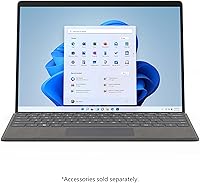
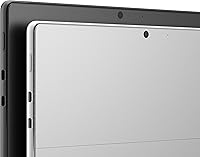
The 13-inch PixelSense display runs at 2880x1920 with a 120Hz refresh rate, and that smoother motion genuinely matters when inking notes or scrolling dense documents. The Core i7 paired with 32GB of RAM handles demanding multitasking without hesitation — multiple browser tabs, video calls, and large spreadsheets open simultaneously rarely cause slowdowns. The 1TB SSD keeps storage anxiety off the table for most users. Intel Iris Xe handles light creative work well, covering photo editing and basic illustration, but this is not a machine for 3D rendering or serious video production. Battery life is rated at 16 hours, though real-world usage under moderate load typically lands closer to nine or eleven hours.

Best For

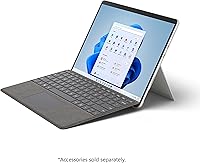
This 2-in-1 tablet is a strong fit for remote professionals who constantly shift between conference rooms, coffee shops, and home offices — the adjustable Kickstand means you are never hunting for a stand, and the thin chassis does not punish your bag. Digital artists and heavy note-takers will appreciate the Slim Pen 2 compatibility, though budgeting for the pen and keyboard separately is a must. Students in design or architecture programs get a device that handles demanding software without needing a separate laptop. It also suits anyone deeply embedded in the Microsoft 365 ecosystem who wants hardware and software to feel naturally aligned. Those needing discrete GPU performance will likely need to look elsewhere.

User Feedback

Buyers consistently praise the build quality and display — the magnesium chassis feels premium, and the screen wins over nearly everyone who uses it daily. The keyboard-to-tablet transition gets high marks for feeling natural rather than clunky. But the conversation shifts on cost: the device-only price already positions this at the high end, and adding a compatible keyboard and pen pushes the total noticeably higher, frustrating buyers who expected a complete package. Fan noise under sustained CPU load is a recurring complaint given how slim the machine is. Port selection draws friction too — no USB-A means older peripherals require an adapter. On the software side, Windows 11 touch integration draws consistent praise for feeling genuinely considered.

Pros

  • The 120Hz PixelSense display makes touch and pen input feel noticeably more responsive than lower-refresh screens.
  • 32GB of RAM means heavy multitaskers rarely hit a wall, even with demanding apps running simultaneously.
  • The 1TB SSD provides enough local storage to avoid constant file management or cloud dependency.
  • Intel Evo certification guarantees a baseline of real-world performance, not just a spec-sheet promise.
  • At under two pounds, the Surface Pro 8 is genuinely easy to carry through a full travel day.
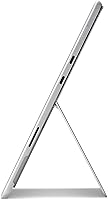
  • The built-in adjustable Kickstand works across a wide range of angles, reducing the need for a separate stand.
  • WiFi 6 support keeps connectivity fast and stable on modern routers and in busy network environments.
  • Windows 11 touch integration feels cohesive and well-considered, especially for gesture-heavy workflows.
  • The magnesium build feels premium and durable without adding bulk.
  • Switching between laptop and tablet mode takes seconds and holds up well in daily practice.

Cons

  • The keyboard and pen are sold separately, making the true out-of-pocket cost considerably higher than the device price alone.
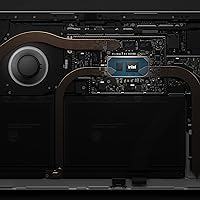
  • Fan noise under sustained CPU load is noticeable and can be distracting in quiet environments.
  • No USB-A port means older peripherals require an adapter, which is an ongoing inconvenience.
  • Rated battery life of 16 hours rarely reflects actual usage — expect significantly less under real working conditions.
  • Intel Iris Xe graphics hit a hard ceiling for GPU-intensive work like 3D modeling or serious video editing.
  • The high price tier is difficult to justify for users who only need basic productivity without the tablet functionality.
  • Thermal management in such a slim chassis means sustained performance tasks can trigger throttling over time.
  • The device-only listing can catch buyers off guard if they assume accessories are bundled at this price point.
  • Limited port selection overall requires buyers to carry additional accessories for a complete desktop-style setup.
  • Heavier creative professionals may find Windows 11 Home lacks some enterprise-grade tools without an upgrade.

Ratings

Our AI rating engine analyzed thousands of verified global purchases of the Microsoft Surface Pro 8 1TB 2-in-1 Tablet, actively filtering out incentivized reviews, duplicate submissions, and bot-generated feedback to surface what real buyers actually experience. The scores below reflect an honest cross-section of sentiment — the genuine strengths that keep users loyal to this machine and the recurring pain points that consistently show up in critical feedback. Both sides of the story are represented here, so you can make a fully informed decision before committing.

Display Quality
93%
The 2880x1920 PixelSense Flow panel earns near-universal praise from users across creative and business backgrounds. Designers working in Illustrator and architects reviewing technical drawings consistently call out color accuracy and sharpness as standout traits. The 120Hz refresh rate makes scrolling and pen interaction feel noticeably more fluid than competing tablets at this tier.
A small segment of buyers note that peak brightness can feel limiting when working outdoors or near a bright window. A few users upgrading from OLED screens find the contrast ratio slightly less punchy in dark-heavy content, though this is a niche complaint for most professional use cases.
Build Quality
91%
The magnesium alloy chassis consistently draws compliments for feeling genuinely premium without adding unnecessary bulk. Business travelers in particular appreciate that the device shows minimal flex and holds up well through daily bag commutes. The Kickstand hinge feels solid and well-engineered, with no reports of loosening after extended use.
Some users point out that the matte finish, while attractive, picks up light scratches over time without a case. The device-only nature of the listing means the full premium feel — kickstand plus keyboard — requires additional investment that catches some buyers off guard.
Performance
88%
The Core i7 and 32GB RAM combination handles demanding multitasking with ease — users running large Excel models, video calls, and multiple browser sessions simultaneously report no meaningful slowdowns. Professionals switching between heavy applications throughout the day find the machine responsive and consistent, even after hours of continuous use.
Under sustained CPU-heavy workloads — long export queues, batch processing, or extended compilation tasks — the slim thermal design leads to throttling, and the fan becomes audible. Users expecting desktop-grade sustained performance from such a compact chassis may find the ceiling lower than anticipated.
Pen Experience
86%
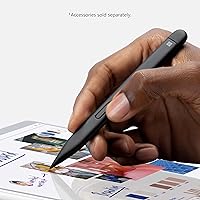
Users who invest in the Surface Slim Pen 2 consistently describe the inking experience as one of the best available on a Windows device, citing low latency and the haptic feedback that mimics writing on textured paper. Note-takers in medical, legal, and academic settings find handwriting recognition reliable and the overall feel natural enough to replace paper notebooks.
The pen is not included with this listing, which frustrates buyers who expected it given the price point. Without the Signature Keyboard, there is also no convenient storage solution for the pen, making it easy to misplace during mobile use.
Value for Money
61%
39%
For buyers who need the specific combination of high RAM, large storage, and a tablet-laptop hybrid in one device, the configuration justifies itself — there are few direct competitors offering the same balance in this form factor. Long-term users note the device ages well and remains capable well beyond the typical two-year upgrade cycle.
The device-only listing creates a genuine value problem: adding a keyboard and pen pushes total cost considerably higher, making the complete package one of the most expensive Windows portable setups available. Buyers who do not regularly use tablet mode may find a conventional laptop delivers more raw performance per dollar.
Battery Life
67%
33%
Under light use — document editing, note-taking, and occasional video calls — the Surface Pro 8 gets through most professionals' working days without needing a charge. Users who primarily use it in low-brightness tablet mode for reading or inking report endurance closer to the higher end of real-world expectations.
The gap between Microsoft's 16-hour rating and everyday reality is a recurring complaint. Most users under moderate workloads report 9 to 11 hours, and those running demanding applications regularly see less. The charging solution is proprietary, which limits flexibility when traveling without the right adapter.
Portability
89%
At under two pounds, the device is genuinely easy to carry for extended periods, and frequent travelers consistently note it fits into slim bags and overhead compartments with minimal hassle. The thin profile means it does not dominate a desk or table when set up in kickstand mode, making it practical in tight spaces like airplane trays.
Without the keyboard attached, the balance in portrait mode can feel slightly top-heavy for some users holding it single-handed for extended reading sessions. The lack of a USB-A port means an adapter is a near-mandatory travel companion, adding a small but consistent inconvenience.
Keyboard Experience
74%
26%
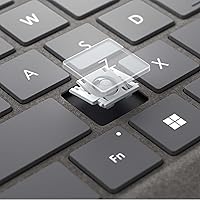
Users who purchase the Surface Pro Signature Keyboard separately consistently praise the key travel and backlit layout for a detachable accessory. The magnetic attachment mechanism is secure enough for lap use, and the trackpad receives positive marks for precision in Windows 11 gesture navigation.
The keyboard being sold separately is the central frustration here — it makes fair evaluation difficult since the core laptop experience is gated behind additional cost. Some users also note that the keyboard wobbles slightly when typing with the device on an uneven surface.
Display Refresh & Touch
87%
The 120Hz adaptive display makes the touch interface feel responsive in a way that stands out from most Windows tablets. Users switching from older Surface models or standard 60Hz tablets consistently report that gesture navigation and scrolling feel substantially smoother in daily use.
The refresh rate advantage is most apparent in pen and touch scenarios; users primarily using a keyboard and mouse see less day-to-day benefit. A handful of buyers report occasional touch registration inconsistencies at screen edges, though this appears infrequent and not widespread.
Graphics & Visuals
63%
37%
Intel Iris Xe handles everyday visual tasks — photo review, light Lightroom editing, UI design work, and smooth 4K video playback — without any visible struggle. For the majority of professional users who are not running GPU-heavy pipelines, the integrated graphics stay out of the way and perform reliably.
Buyers with any intention of 3D rendering, serious video production, or gaming quickly hit the ceiling of integrated graphics. This is a hard limitation of the form factor, and users who discover it post-purchase are consistently among the most disappointed reviewers.
Port Selection
52%
48%
The two Thunderbolt 4 USB-C ports support fast data transfer and 4K external display output, which satisfies users who have already transitioned to a USB-C accessory ecosystem. Power users who build a hub-based desktop setup find it workable once the right adapter is in place.
The absence of a USB-A port is one of the most frequently cited frustrations across buyer feedback, particularly among professionals who rely on legacy peripherals, encrypted USB drives, or standard flash storage. The Surface Connect port adds a charging option but does not compensate for the connectivity gaps.
Software Integration
84%
Windows 11 runs cohesively on this hardware, and users embedded in the Microsoft 365 ecosystem find the experience feels intentionally unified — pen input in OneNote, touch-friendly layouts in Teams, and snap window management all work reliably. The operating system feels like it was designed alongside the device rather than adapted for it.
Some legacy desktop applications still lack proper touch optimization, requiring a stylus or mouse for comfortable use. Users who work heavily in third-party tools outside the Microsoft ecosystem occasionally find Windows 11 touch navigation less intuitive than expected.
Thermal Management
66%
34%
During typical use — web browsing, document editing, and light multitasking — the device stays cool and quiet, rarely triggering the fan. Users who spend most of their time in productivity workflows report a comfortable, distraction-free experience with surface temperatures remaining manageable.
Under sustained heavy loads, the thermal constraints of the slim chassis become apparent. Fan noise reaches a level that several users describe as distracting in quiet offices or during video calls, and CPU throttling under prolonged stress affects performance in a way that is noticeable to power users.
Webcam & Audio
71%
29%
The 8MP rear camera handles document scanning and whiteboard capture well, and the front camera performs adequately for video conferencing in good lighting conditions. Studio microphones in the chassis receive consistent praise from users who regularly take calls or record voice memos.
In lower light environments, video call quality drops noticeably compared to dedicated webcam setups. Buyers who conduct frequent professional video presentations find the camera output adequate but not competitive with external webcam options at this price tier.
Setup & Out-of-Box Experience
79%
21%
Windows 11 setup is guided and relatively painless, and users already signed into a Microsoft account find their preferences, apps, and cloud files sync quickly. The hardware itself requires no assembly, and the Kickstand is immediately intuitive to deploy from the first use.
First-time Surface buyers frequently report mild frustration discovering that the keyboard and pen require separate purchases before the device feels complete. The onboarding experience does not clearly communicate these missing components, which sets an expectation mismatch early in the ownership experience.

Suitable for:

The Microsoft Surface Pro 8 1TB 2-in-1 Tablet is purpose-built for professionals who genuinely live between two modes — working heads-down at a desk and then needing to grab their device and walk into a meeting without hauling a full laptop bag. Executives, consultants, and remote workers who deal with large files, dense spreadsheets, or multiple applications simultaneously will find the 32GB of RAM and 1TB SSD a practical foundation rather than overkill. Digital artists and dedicated note-takers who want a pen-first experience on Windows will also get a lot out of this machine, provided they invest in the Slim Pen 2. Students in architecture, design, or business programs who need one device that handles both creative tools and productivity software will find it holds up well across a long day. It is equally strong for anyone already committed to the Windows and Microsoft 365 ecosystem who wants hardware that feels like it was designed alongside the software.
Not suitable for:

The Microsoft Surface Pro 8 1TB 2-in-1 Tablet is a poor fit for buyers who need serious graphics horsepower — the Intel Iris Xe handles light photo editing and illustration capably, but anyone doing 3D rendering, GPU-accelerated video production, or gaming will run into its ceiling quickly. Buyers on a tight budget should also think carefully before committing: the device ships without a keyboard or pen, and adding both accessories brings the real cost of ownership meaningfully higher than the listed price. People who rely on USB-A devices daily — external drives, peripherals, older accessories — will find the port selection frustrating without a dedicated hub or dongle. Those expecting all-day battery life in heavy use conditions will likely be disappointed; real-world endurance under sustained load falls well short of the rated 16 hours. Finally, anyone who prefers macOS or ChromeOS, or who does not need the flexibility of a detachable form factor, would get better value from a conventional laptop at a lower price point.

Specifications

  • Display Size: The 13-inch PixelSense Flow touchscreen offers a sharp, high-contrast viewing area well-suited for both detailed creative work and everyday productivity.
  • Resolution: The screen renders at 2880 x 1920 pixels, producing crisp text and fine detail that holds up under close inspection during inking or photo review.
  • Refresh Rate: A 120Hz adaptive refresh rate makes pen strokes and touch gestures respond with noticeably less lag than standard 60Hz displays.
  • Processor: An Intel Core i7 chip rated up to 4.8GHz, certified under the Intel Evo platform for consistent responsiveness across demanding workloads.
  • RAM: 32GB of DDR4 SDRAM at 1300MHz provides enough headroom for heavy multitasking, large creative files, and virtual machines without slowdown.
  • Storage: A 1TB internal SSD delivers fast read and write speeds while offering enough local capacity to store large project files, media, and applications.
  • Graphics: Intel Iris Xe integrated graphics handles light image editing, illustration, and video playback well, but is not suited for GPU-intensive 3D or rendering tasks.
  • Operating System: Ships with Windows 11 Home, which includes native touch and pen optimizations that work cohesively with the 2-in-1 form factor.
  • Battery Life: Microsoft rates battery life at up to 16 hours, though real-world usage under moderate to heavy workloads typically yields between 9 and 11 hours.
  • Weight: The device body weighs 1.96 pounds, making it comfortable to carry through a full travel day without straining a bag or shoulder.
  • Dimensions: At 9.06 x 12.22 x 1.97 inches, the Surface Pro 8 fits within most standard laptop sleeves and bags designed for 13-inch devices.
  • Wireless: WiFi 6 (802.11ax) support enables faster throughput and more stable connections on modern routers, particularly in congested network environments.
  • Rear Camera: An 8MP rear-facing camera supports document scanning, video conferencing from a stand position, and casual photo capture.
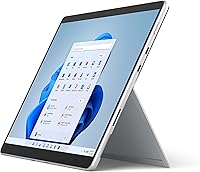
  • Kickstand: The built-in adjustable Kickstand props the device at a wide range of angles for desk use, studio drawing, or presentation viewing without an external stand.
  • Keyboard: A detachable backlit keyboard with a full function row is available separately and connects magnetically; it is not included with this listing.
  • Form Factor: The 2-in-1 hybrid design allows the device to operate as a full Windows laptop with keyboard attached or as a standalone tablet independently.
  • Power Source: The device charges via a proprietary Surface Connect port and runs on an included lithium-ion battery rated at 37.24 volts.
  • Connectivity Ports: Two Thunderbolt 4 USB-C ports and one Surface Connect port are included; there is no native USB-A port on the device body.

Related Reviews
Microsoft Surface Pro 2024 1TB 2-in-1 Laptop
76%
93%
Display Quality
88%
Performance & Speed
81%
Battery Life
63%
Value for Money
86%
Form Factor & Portability
More
Microsoft Surface Pro 2-in-1 Laptop/Tablet (2025), 16GB RAM, 256GB Storage
86%
89%
Performance
92%
Battery Life
91%
Portability
88%
Display Quality
85%
AI Tools (Windows 11 Copilot)
More
Microsoft Surface Pro 8 512GB 2-in-1 Tablet
78%
93%
Display Quality
91%
Build Quality
88%
Pen & Stylus Experience
79%
Performance
58%
Battery Life
More
Microsoft Surface Pro 9 1TB 2-in-1 Tablet
79%
94%
Display Quality
91%
Performance & Speed
92%
Portability
93%
Build Quality
88%
Pen Input
More
KOOFORWAY BP8 8″ 2-in-1 Mini Laptop (1TB)
69%
91%
Portability & Form Factor
54%
Keyboard Usability
58%
Display Quality
72%
Performance (Daily Tasks)
79%
RAM & Multitasking
More
Microsoft Surface Pro 8 13-inch, Intel Core i5, 8GB RAM, 256GB SSD
82%
90%
Performance
88%
Display Quality
93%
Portability & Weight
70%
Battery Life
85%
Build Quality
More
Microsoft Surface Laptop 2024 1TB Laptop
76%
92%
Build Quality
89%
Display Quality
91%
Keyboard & Trackpad
78%
Battery Life
86%
Performance (Everyday)
More
Microsoft Surface Pro 8 (i7, 16GB, 256GB)
78%
93%
Display Quality
88%
Performance & Speed
91%
Build Quality & Design
62%
Battery Life
58%
Value for Money
More
Microsoft Surface Laptop Studio 2 1TB Laptop
78%
93%
Display Quality
91%
Build Quality
88%
Performance
89%
Pen & Touch Experience
58%
Battery Life
More
LG gram Pro 16T90SP-G 16-inch 2-in-1 Laptop Intel Core Ultra 7 16GB RAM 1TB SSD
86%
91%
Performance
93%
Portability
88%
Display Quality
77%
Battery Life
89%
Build Quality
More

FAQ

No, this listing covers the device only. The Surface Slim Pen 2 and the Surface Pro Signature Keyboard are both sold separately. If you plan to use this as a laptop replacement, factor those costs in before purchasing — together they add a significant amount to the total.

Microsoft rates it at up to 16 hours, but that figure reflects light use under optimized conditions. In practice, with a mix of browser tabs, Office apps, and video calls, most users see between 9 and 11 hours. It will get most professionals through a standard day, but heavy workloads will drain it faster.

It depends on the scale of the work. Editing 1080p footage in apps like Adobe Premiere or DaVinci Resolve is workable thanks to the i7 and 32GB of RAM, but the Intel Iris Xe integrated graphics will slow things down on 4K timelines or heavy effects rendering. It is not the right tool for professional-grade video production.

The Surface Pro 8 has two Thunderbolt 4 USB-C ports and one Surface Connect charging port. There is no USB-A port, so if you use older peripherals — external drives, a wired mouse, or a USB flash drive — you will need a USB-C hub or adapter. It is a real inconvenience if you rely on legacy accessories regularly.

Under light to moderate use, the device is quiet. But when the processor is under sustained load — compiling files, running large exports, or working through a demanding creative task — the fan does kick in audibly. It is not unusually loud, but in a quiet room or during a call it can be noticeable.

Yes, the Surface Pro 8 was designed alongside the Slim Pen 2 and supports its haptic feedback feature, which simulates a slight texture when writing on screen. The 120Hz display reduces visible pen lag significantly. Most users who draw or take handwritten notes regularly find it one of the better pen experiences on a Windows device.

Yes, both Thunderbolt 4 USB-C ports support video output, so you can connect to an external 4K monitor through a compatible cable or hub. With a keyboard, mouse, and external display, it works well as a compact desktop setup, though you will need a multiport adapter to run multiple connections at once.

The Kickstand is a hinged flap built into the back of the device that opens to a wide range of angles. On a desk it is very stable. On a lap it requires a flatter surface and works better with the keyboard attached for balance — without the keyboard, using it on your lap is awkward. Most users consider desk and table use to be the primary use case.

For most standard productivity tasks, 16GB would be sufficient, but the 32GB configuration makes a real difference if you work with large datasets, run virtual machines, keep dozens of browser tabs open, or use memory-hungry creative applications. It also extends the practical lifespan of the device as software becomes more resource-intensive over time.

Quite well, actually. Microsoft tuned Windows 11 with touch users in mind — gesture navigation, snap layouts, and on-screen keyboard behavior are all meaningfully improved over Windows 10. That said, some legacy desktop applications are still not optimized for touch input, so occasional use of a stylus or mouse makes those easier to navigate.