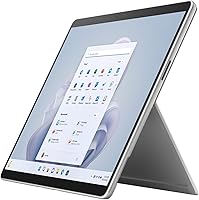
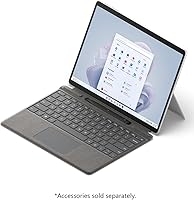
Overview

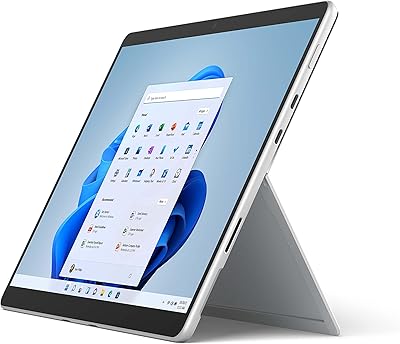
The Microsoft Surface Pro 9 1TB 2-in-1 Tablet represents Microsoft's most capable Surface yet, built squarely for professionals and creatives who need real computing power in a genuinely portable form. The move to Intel's 12th Gen Core i7 is meaningful in practice — the chip handles sustained workloads noticeably better than its predecessor, not just in benchmarks. The 13-inch PixelSense Flow display strikes a practical balance: large enough for serious work, compact enough to carry without thinking twice. One thing worth naming upfront: the keyboard and pen cost extra, and at this price point, that stings. Go in with clear eyes and this Surface Pro earns its position.

Features & Benefits

Start with the memory: 32GB of LPDDR5 RAM is not something you typically find in a device this thin, and it shows in daily use. Running Photoshop alongside a browser with thirty-plus tabs, a Teams call, and a local video render — the Surface Pro 9 does not flinch. The 1TB SSD means you are not making uncomfortable choices about what stays local versus what gets pushed to the cloud. The 2880x1920 resolution with Dolby Vision IQ delivers genuinely accurate color, useful for design and photo editing work. The 1080p front camera, with its repositioned angle, frames you properly on calls without any fuss. At 1.9 lbs, you barely notice it in a bag.

Best For

This Surface Pro fits a specific kind of buyer very well. Business professionals who travel regularly and cannot carry a heavy laptop will find the weight-to-performance ratio genuinely compelling. Creative professionals — architects, designers, illustrators — benefit most from the pen support and display accuracy. Graduate students in design, law, or engineering will appreciate being able to sketch notes, annotate documents, and run demanding software on the same device. If your workflow lives inside Microsoft 365, OneDrive, and Teams, the integration is natural. That said, if you expect a straight laptop replacement, factor in the accessory costs honestly before deciding.

User Feedback

Owners of Microsoft's 2-in-1 consistently point to the build quality and display as standouts — the magnesium chassis feels premium, and the screen draws near-universal praise. The accessory situation, though, remains a sore spot: many buyers feel a keyboard should not be an optional extra at this price. Battery life feedback is genuinely split. Light users doing document work and video calls often approach the rated 15.5 hours; anyone pushing the i7 hard for extended periods will land somewhere below that. Fan noise under load is noticeable enough that users in quiet settings have flagged it. Pen input earns consistent praise, but confirm Slim Pen 2 compatibility before purchasing.

Pros

  • 32GB of LPDDR5 RAM handles heavy multitasking without slowdown — creative apps, video calls, and large files run together without issue.
  • The 1TB SSD gives you enough local storage that cloud dependency becomes a choice, not a necessity.
  • At 1.9 lbs, the Surface Pro 9 is genuinely easy to carry all day without fatigue.
  • The 13-inch PixelSense Flow display at 2880x1920 is sharp and color-accurate, making it reliable for design and photo work.
  • The 120Hz adaptive refresh rate makes on-screen interaction feel noticeably smooth compared to standard 60Hz displays.
  • The 1080p front camera frames you well on video calls with minimal adjustment needed.
  • Wi-Fi 6E support means strong, stable wireless performance even in congested environments like offices or co-working spaces.
  • Pen input with the Slim Pen 2 feels natural enough that designers and note-takers consistently praise it in long-term use.
  • The magnesium build feels premium and durable without adding significant weight.
  • The adjustable kickstand covers a wide range of working angles, from lap use to near-flat drawing position.

Cons

  • The keyboard and pen are both sold separately, adding substantial cost to an already high base price.
  • Battery life under heavy processor load falls noticeably short of the rated 15.5 hours, making all-day unplugged work unreliable for power users.
  • Fan noise during sustained CPU-intensive tasks is audible enough to be distracting in quiet settings.
  • Intel Iris Xe integrated graphics cannot handle GPU-intensive workloads like 3D rendering or high-end gaming.
  • The lack of USB-A ports means most users will need a hub or adapter from day one.
  • Slim Pen 2 compatibility must be confirmed at purchase — not all Surface pens work with this model.
  • Windows 11 Home, rather than Pro, ships as the default OS, which may require an upgrade for enterprise or IT-managed environments.
  • The premium price point is difficult to rationalize for users who do not need the full performance ceiling the i7 and 32GB RAM provide.

Ratings

The Microsoft Surface Pro 9 1TB 2-in-1 Tablet earns strong marks from professionals and creatives worldwide, though the full picture is more nuanced than the spec sheet suggests. These scores were generated by AI after analyzing thousands of verified global user reviews, with spam, bot activity, and incentivized feedback actively filtered out. Both the genuine strengths and the recurring frustrations are reflected honestly in every category below.

Display Quality
94%
Owners consistently describe the 13″ PixelSense Flow panel as one of the best displays they have used on any portable device. The 2880x1920 resolution with Dolby Vision IQ makes color-critical work — photo retouching, design proofing, video review — look genuinely accurate rather than just sharp.
A small number of users working exclusively outdoors report that glare can be a challenge in bright sunlight, and the display's glossy finish does not help in those conditions. At this performance tier, an anti-reflective coating option would be welcomed.
Performance & Speed
91%
The Intel 12th Gen i7 paired with 32GB of LPDDR5 RAM handles demanding professional software without visible hesitation. Users running Photoshop, Premiere, or complex Excel models alongside Teams calls report that the machine holds up without slowdown throughout a full workday.
Integrated Intel Iris Xe graphics are the ceiling here — GPU-bound tasks like 3D rendering or high-end game play expose that limit quickly. Users coming from discrete-GPU laptops will notice the difference in GPU-intensive workloads, even with the strong CPU underneath.
Portability
92%
At 1.9 lbs, the Surface Pro 9 is easy to carry without thinking about it. Frequent travelers and commuters consistently mention that slipping it into a bag alongside other gear feels effortless compared to a conventional 13-inch laptop, which typically weighs noticeably more.
The portability advantage narrows once you add the keyboard and a USB-C hub, both near-essential for most work scenarios. With accessories attached, the total carry weight climbs enough that the ultralight advantage is partially offset.
Build Quality
93%
The magnesium chassis draws consistent praise for feeling premium and well-constructed. Users report minimal flex on the body, and the hinge and kickstand mechanism feel solid even after extended daily use — not the kind of component that loosens up noticeably over months.
A few users note that the platinum finish shows light surface scratches over time, particularly around the kickstand area where contact with hard surfaces is frequent. It remains structurally sound, but cosmetic wear is visible on older units.
Pen Input
88%
Writers, illustrators, and design students praise the Slim Pen 2 experience as feeling closer to actual pen on paper than most competing stylus implementations. Latency is low enough that sketching and handwriting annotation feel natural rather than slightly delayed.
The Slim Pen 2 must be purchased separately, and compatibility with older or third-party Surface pens is inconsistent. Buyers who already own a Surface pen from a previous generation should verify compatibility before assuming it will carry over.
Battery Life
68%
32%
Under light-to-moderate workloads — document editing, web browsing, video calls — many users hit 10 to 13 hours on a single charge, which covers a full working day comfortably without reaching for a charger.
Under sustained CPU load the battery drains considerably faster, with some users reporting 6 to 8 hours during creative or development work. The gap between the 15.5-hour rated figure and real-world heavy-use results is wide enough to be a genuine pain point for power users.
Value for Money
61%
39%
For a buyer who fully utilizes the i7 performance, 32GB of RAM, and 1TB of storage in a portable form factor, the total capability on offer is difficult to replicate at a lower price from a Windows device of comparable build quality.
The accessory cost gap is where value perception takes the hardest hit — the keyboard and pen push the real total well beyond the device price alone. Buyers who expected a complete laptop-replacement experience out of the box consistently rate value lower than those who budgeted for the full accessory set upfront.
Keyboard Experience
58%
42%
Users who purchase the Surface Pro Signature Keyboard report that typing feel and key travel are above average for a detachable cover-style keyboard, and the trackpad is responsive enough for full-day use without frustration.
The keyboard not being included remains the single most common complaint across user reviews at this price tier. Beyond the cost, the keyboard's lap stability on uneven surfaces — without a firm flat desk underneath — is a recurring usability complaint that limits true laptop-mode flexibility.
Camera Quality
82%
18%
The repositioned 1080p front camera frames users more naturally during video calls than the previous Surface Pro angle, and the image quality holds up well in office lighting. Remote workers and frequent Teams or Zoom users consistently find it adequate without needing an external webcam.
The rear 10MP camera, while capable for document scanning, does not compete with modern smartphone cameras for photo quality. Users who expected to use it for anything beyond practical capture — scanning whiteboards, photographing work — are often underwhelmed by the dynamic range.
Fan Noise & Thermals
72%
28%
For typical office and productivity tasks the fan remains inaudible or very quiet, making the Surface Pro 9 a comfortable device to use in meetings or shared workspaces during standard workloads.
During extended CPU-intensive tasks the fan ramps up to an audible level that some users describe as distracting in quiet environments. For professionals who regularly work in libraries, recording-adjacent spaces, or very quiet open offices, this is worth factoring in.
Connectivity & Ports
63%
37%
The two Thunderbolt 4 USB-C ports support fast data transfer and full-resolution external display output, and the Surface Connect port provides a reliable proprietary charging option that keeps both USB-C ports free during charging.
There is no USB-A port, no HDMI, and no SD card slot, which means a hub or dock is effectively mandatory for most professional setups. Users connecting external drives, mice, or monitors regularly find themselves managing cable adapters from day one.
Display Flexibility
86%
The 120Hz adaptive refresh rate makes scrolling and on-screen drawing feel noticeably smoother than standard 60Hz alternatives, and the touch responsiveness across the full 13-inch surface is consistent even at the screen edges.
The aspect ratio of 3:2 is excellent for productivity but results in black bars during widescreen video playback. Users who consume a lot of video content alongside their work find this a minor but persistent visual compromise.
Software & Ecosystem
84%
Running full Windows 11 means access to the complete range of professional Windows applications without compromise, and integration with Microsoft 365, OneDrive, and Teams is as tight as it gets on any hardware platform.
Windows 11 Home ships as default, and IT-managed enterprise environments often require a Pro license upgrade at additional cost. A small number of users also report occasional driver or update conflicts following major Windows updates, though these are typically resolved within a patch cycle.
Setup & Out-of-Box Experience
74%
26%
The physical setup is straightforward and the device is ready to use quickly after unboxing. Microsoft has streamlined the Windows 11 initial configuration process, and the hardware feels immediately premium from the first interaction.
The accessory situation creates a frustrating out-of-box experience for buyers who did not research thoroughly — arriving without a keyboard and realizing productivity use requires an additional purchase is a jarring first impression at this price level.

Suitable for:

The Microsoft Surface Pro 9 1TB 2-in-1 Tablet is purpose-built for professionals who need serious computing power without the bulk of a traditional laptop. Creative practitioners — graphic designers, architects, illustrators, and photographers — will find the combination of a color-accurate high-resolution display and natural pen input genuinely useful for daily work, not just occasional sketching. Frequent business travelers benefit enormously from the 1.9-pound chassis, since carrying a full laptop across airports and into back-to-back meetings adds up fast. Graduate and professional students in demanding fields like engineering, law, or design will appreciate the ability to annotate documents, run resource-heavy software, and take handwritten notes on one device. Anyone already working within the Microsoft ecosystem — relying on Teams, OneDrive, and Microsoft 365 daily — will find that this Surface Pro fits into those workflows with minimal friction.

Not suitable for:

Buyers expecting a ready-to-go laptop replacement should pause and do the full math before purchasing, because the Microsoft Surface Pro 9 1TB 2-in-1 Tablet ships without a keyboard or pen, both of which add meaningful cost on top of an already premium price. Casual users who primarily browse the web, stream video, or handle light productivity tasks will find the performance headroom largely wasted on their workload, making this a difficult spend to justify. Users who work in consistently quiet environments — libraries, open-plan offices, recording spaces — should know that the fan under sustained CPU load is audible enough to draw attention. Anyone who frequently works outdoors or away from power for extended stretches may find battery life unpredictable, particularly when pushing the processor hard. Budget-conscious buyers or those looking for a pure tablet experience without the intent to do any serious work would be better served by lighter, less expensive alternatives.

Specifications

  • Processor: Powered by an Intel 12th Gen Core i7 chip built on the Intel Evo platform, delivering strong sustained performance for professional workloads.
  • RAM: Equipped with 32GB of LPDDR5 memory running at 2400 MHz, supporting genuine heavy multitasking across demanding applications.
  • Storage: Includes a 1TB SSD with a Serial ATA interface, providing ample local storage without relying on cloud services for everyday files.
  • Display: Features a 13″ PixelSense Flow touchscreen with a 2880x1920 resolution and a 120Hz adaptive refresh rate for sharp, smooth visuals.
  • Display Tech: Supports Dolby Vision IQ, which dynamically adjusts picture quality based on ambient lighting conditions for more accurate color reproduction.
  • Graphics: Uses integrated Intel Iris Xe Graphics, suitable for creative and productivity tasks but not designed for GPU-intensive rendering or gaming.
  • Operating System: Ships with Windows 11 Home pre-installed, which covers most personal and professional use cases but may require an upgrade for enterprise environments.
  • Battery Life: Rated for up to 15.5 hours on a single charge under typical light-to-moderate usage conditions; real-world performance under sustained load will be lower.
  • Front Camera: A 1080p HD front-facing camera with an updated framing angle that positions the user more naturally within the video frame during calls.
  • Rear Camera: A 10MP rear camera capable of capturing detailed photos and scanning documents, though not intended as a primary camera replacement.
  • Wireless: Supports Wi-Fi 6E (802.11ax) for fast, low-latency wireless connectivity, particularly effective in dense or congested network environments.
  • Weight: The tablet itself weighs 1.9 lbs, making it one of the lighter options in the high-performance 2-in-1 category.
  • Dimensions: Measures 12.22 x 9.06 x 1.97 inches, keeping the footprint compact enough for use on a tray table or small desk.
  • Pen Support: Compatible with the Surface Slim Pen 2, which is sold separately and must be confirmed for compatibility before purchasing third-party alternatives.
  • Keyboard: The Surface Pro Signature Keyboard attaches magnetically and is sold separately, a critical additional cost buyers should budget for before purchase.
  • Kickstand: Includes a built-in adjustable kickstand that supports a wide range of working angles, from near-upright viewing to a nearly flat drawing position.
  • Form Factor: Designed as a 2-in-1 tablet that functions as a standalone device or as a laptop-style workstation when paired with the optional keyboard accessory.
  • Connectivity: Includes two USB-C Thunderbolt 4 ports; no USB-A ports are present, so most users will need a hub or adapter for legacy peripherals.
  • Memory Type: Uses DDR5 SDRAM architecture, which offers improved bandwidth and efficiency compared to the DDR4 used in previous Surface Pro generations.
  • Color: Available in Platinum, a neutral magnesium finish that resists fingerprints reasonably well and maintains a professional appearance over time.

Related Reviews
Microsoft Surface Pro 2024 1TB 2-in-1 Laptop
76%
93%
Display Quality
88%
Performance & Speed
81%
Battery Life
63%
Value for Money
86%
Form Factor & Portability
More
Microsoft Surface Pro 2-in-1 Laptop/Tablet (2025), 16GB RAM, 256GB Storage
86%
89%
Performance
92%
Battery Life
91%
Portability
88%
Display Quality
85%
AI Tools (Windows 11 Copilot)
More
Microsoft Surface Pro 8 1TB 2-in-1 Tablet
77%
93%
Display Quality
91%
Build Quality
88%
Performance
86%
Pen Experience
61%
Value for Money
More
Microsoft Surface Laptop Studio 2 1TB Laptop

78%
93%
Display Quality
91%
Build Quality
88%
Performance
89%
Pen & Touch Experience
58%
Battery Life
More
LG gram Pro 16T90SP-G 16-inch 2-in-1 Laptop Intel Core Ultra 7 16GB RAM 1TB SSD
86%
91%
Performance
93%
Portability
88%
Display Quality
77%
Battery Life
89%
Build Quality
More
RCA Cambio 10.1-inch 2-in-1 Tablet PC
79%
92%
Value for Money
88%
Portability
85%
Ease of Use
78%
Display Quality
82%
Keyboard Usability
More
Timetec 1TB Pro Portable USB 3.2 Gen 2 SSD
88%
93%
Performance
90%
Portability/Size/Weight
92%
Compatibility/Connectivity
95%
Speed (Read/Write)
85%
Value for Money
More
PNY Pro Elite V2 1TB Flash Drive
79%
91%
Transfer Speed
93%
Build Quality
67%
Thermal Management
88%
Capacity Utility
74%
Value for Money
More
Bliss Pro Fab Foaming 2-In-1 Cleanser and Exfoliator - 17.2 Fl Oz
85%
91%
Exfoliation Effectiveness
88%
Skin Sensitivity Compatibility
86%
Hydration and Moisture Retention
75%
Scent/Fragrance Appeal
89%
Ease of Use
More
Pantene Pro-V Sheer Volume 2 in 1 Shampoo & Conditioner, 20.1 fl oz
84%
87%
Volumizing Effect
92%
Ease of Use
84%
Fragrance
79%
Moisture and Smoothness
91%
Suitability for Chemically Treated Hair
More

FAQ

It does not come included. The Surface Pro Signature Keyboard is a separate purchase, and the same goes for the Surface Slim Pen 2. This is one of the most common surprises buyers encounter, so factor those accessory costs into your total budget before committing.

For most creative professionals — graphic designers, architects, video editors working with moderate project sizes — yes, it handles the workload well. The 32GB of RAM and the i7 chip give it real headroom. That said, if you are rendering complex 3D scenes or working with very large video files daily, a dedicated desktop GPU will still outperform the integrated Intel Iris Xe graphics significantly.

It depends heavily on what you are doing. For light tasks — document editing, browsing, video calls — many users get close to the rated 15.5 hours. Push the processor hard with creative apps or local rendering, and you will likely land somewhere between 6 and 9 hours. Keep a charger accessible if your day involves intensive work.

The Surface Pro 9 works specifically with the Surface Slim Pen 2 for the full experience, including haptic feedback. Some older Surface pens may work for basic input but will not support all features. Always verify compatibility before buying a third-party or used pen.

For most tasks — web browsing, Office apps, video calls — the fan is either quiet or inaudible. The noise becomes more noticeable during sustained CPU-heavy tasks like compiling code or exporting video. If you regularly work in a library or a very quiet open-plan office, it is worth knowing about, but it is not a constant issue for typical workloads.

It runs full Windows 11 Home — the same operating system you would find on any standard laptop or desktop. You can install any compatible Windows software, use external monitors, connect peripherals, and access the complete Windows ecosystem without restrictions.

Both are strong options, but they suit different workflows. The Surface Pro 9 offers pen-on-screen input, a touchscreen, and the flexibility of a tablet form factor, which is difficult to replicate on a MacBook. The MacBook Pro tends to have an advantage in GPU performance and sustained battery life under load. If your creative work involves illustration, annotation, or digital sketching, the Surface Pro 9 has a clear edge in that specific area.

The Surface Pro 9 has two USB-C Thunderbolt 4 ports and a Surface Connect port for charging. There is no USB-A, no HDMI, and no SD card slot built in. Most users will want a USB-C hub or dock to connect external drives, displays, and legacy accessories without swapping cables constantly.

As a pure tablet it works fine for reading, sketching, or media consumption on your lap. The kickstand does not grip fabric well, though, so using it in laptop mode on your lap without a firm surface underneath can feel unstable. The keyboard case helps significantly once attached.

No. Like most modern thin devices, the Surface Pro 9 has soldered RAM and a non-upgradeable SSD. What you buy is what you have for the lifetime of the device, which is a strong argument for choosing the 1TB configuration if you plan to keep this machine for several years.