Overview

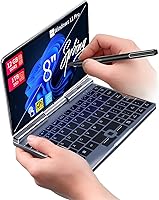
The KOOFORWAY BP8 8″ 2-in-1 Mini Laptop (1TB) sits in a genuinely niche corner of the Windows laptop market — a palm-sized convertible with a 180° rotating touchscreen that flips into tablet mode in seconds. The brand is a lesser-known Chinese OEM, and buyers should go in with eyes open about what that means for long-term support and software updates. Hardware is reasonably specced for its size class, but this compact 2-in-1 is not a workhorse replacement for your daily driver. It exists for a very specific use case: maximum portability with a full Windows environment crammed into a chassis that actually fits in a large coat pocket.
Features & Benefits

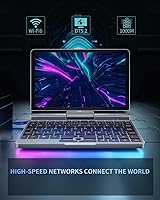
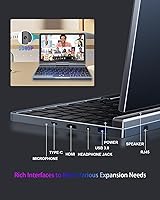
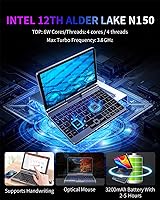
At the heart of this mini laptop is Intel's N150 chip — an Alder Lake-N processor that turbo boosts to 3.6 GHz. It handles email, web browsing, Office apps, and light multitasking without much friction, though anything CPU-intensive will push it to its limits quickly. The 12GB of LPDDR5 RAM is a genuine advantage over many competing devices in this size range, and the 1TB SSD is unusually generous — most palm-sized laptops ship with far less. Wi-Fi 6 and Bluetooth 5.2 keep connectivity current, and the port layout — USB 3.0, USB-C with DisplayPort, HDMI, and even a physical ethernet jack — is impressively practical for a machine this compact.

Best For

This compact 2-in-1 makes the most sense for people who value portability above almost everything else. Frequent travelers and daily commuters will appreciate a full Windows machine that weighs under two pounds and slides into a jacket pocket or small day bag. Students who want to annotate PDFs or sketch notes will find the tablet mode and stylus support genuinely useful. Remote workers looking for a secondary travel machine — not a primary workstation — are probably the sweet spot for the BP8. If your workflow centers on cloud-based apps, documents, and web browsing, this mini laptop can comfortably handle a full working day.

User Feedback

Owners tend to highlight the port selection and build quality as standout positives — it is unusual to find ethernet, HDMI, and USB-C together on a machine this small. That said, the 1280×800 screen resolution is a recurring complaint; by current standards it feels a step behind, particularly for extended reading or detailed work. The compact keyboard predictably divides opinion: some adapt quickly, others find sustained typing genuinely uncomfortable. Battery life in the two-to-five hour window is modest at best, and a handful of buyers have noted driver issues with Windows 11 Pro straight out of the box. Overall sentiment skews cautiously positive, with value perception closely tied to how well the form factor fits your specific needs.

Pros

  • Fits in a jacket pocket or small bag — genuinely one of the most portable full Windows machines available
  • 1TB of onboard SSD storage is unusually generous for a mini laptop this size
  • 12GB LPDDR5 RAM keeps everyday multitasking smoother than many competing devices in this category
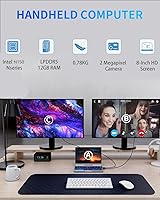
  • Impressive port selection includes HDMI, ethernet, USB-C, and USB 3.0 without needing a hub
  • Wi-Fi 6 delivers stable, fast connections in crowded environments like airports and coworking spaces
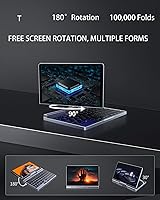
  • The 180° rotating touchscreen makes tablet mode practical for note-taking and annotation
  • Metal chassis feels solid and looks more premium than the price tier would suggest
  • Windows 11 Pro is included, offering features like BitLocker and Remote Desktop out of the box
  • G-Sensor automatically rotates the display when switching between orientations — a small but welcome touch

Cons

  • Keyboard is cramped and uncomfortable for extended typing sessions on the 8-inch chassis
  • Real-world battery life often falls between two and three hours under mixed use, not the advertised five
  • 1280×800 screen resolution feels behind current standards, especially for detailed or text-heavy work
  • The stylus is marketed as a feature but is not included in the box — a frustrating omission
  • Some buyers report driver and touchscreen calibration issues that require manual fixes after first boot
  • USB-C port doubles as the charging port, creating a conflict when using it for display output simultaneously
  • The compact keyboard layout requires a meaningful adaptation period and may never suit larger hands
  • Fan noise and thermal performance under sustained load have drawn complaints from users pushing the hardware
  • Long-term support and reliability are uncertain given KOOFORWAY's limited brand track record
  • The 2MP camera struggles noticeably in anything other than well-lit conditions, limiting video call quality

Ratings

The KOOFORWAY BP8 8″ 2-in-1 Mini Laptop (1TB) has been evaluated by our AI rating engine after analyzing verified purchase reviews from global buyers, with spam, bot-submitted, and incentivized feedback actively filtered out. Scores reflect the full spectrum of real ownership experiences — from the aspects that genuinely impress to the friction points that come up repeatedly in honest user accounts. Both strengths and frustrations are weighted transparently so you can judge fit for your own needs.
Portability & Form Factor
91%
This is where the BP8 earns its keep. Buyers consistently describe the ability to slip a full Windows machine into a jacket pocket or a small crossbody bag as genuinely liberating, especially on long travel days or back-to-back commutes. At under two pounds, it rarely registers as a burden.
The ultra-compact chassis is a deliberate trade-off, not a bonus. Users who expected a comfortable all-day machine were often surprised by how much the small footprint limits usability when placed on a lap or an uneven surface like a tray table.
Keyboard Usability
54%
46%
A handful of users with smaller hands report that the keyboard, while cramped by any standard, becomes workable after a short adaptation period for short bursts of typing like emails or quick notes. Key travel is described as acceptable given the size.
This is one of the most consistent pain points across reviews. Extended typing sessions on an 8-inch chassis are uncomfortable for the majority of buyers, and several noted that certain keys feel awkwardly positioned. It is simply not a machine designed for heavy text input.
Display Quality
58%
42%
The IPS panel produces decent color reproduction for casual use, and the touchscreen response is generally described as accurate and responsive in tablet mode. For quick web browsing or watching a video on a plane, it gets the job done without obvious complaints.
The 1280×800 resolution is the most polarizing aspect of the BP8. On an 8-inch screen it is passable, but users doing any detailed document work or extended reading notice the lack of sharpness compared to modern budget tablets at similar price points. Text rendering can look soft.
Performance (Daily Tasks)
72%
28%
For the core use cases this machine targets — Office documents, web browsing, video calls, and cloud apps — the Intel N150 chip holds its own. Users doing remote work over lightweight SaaS tools report a largely friction-free experience during typical working hours.
Push it beyond light multitasking and the limits become clear fast. Buyers who attempted to run heavier workloads or keep a large number of browser tabs open simultaneously reported noticeable slowdowns. The N150 is capable but not forgiving under sustained pressure.
RAM & Multitasking
79%
21%
12GB of LPDDR5 RAM is genuinely above average for this device category, and users notice it. Switching between a few apps or keeping a handful of tabs open simultaneously feels smoother than the processor alone would suggest, which reflects well on the memory configuration.
The RAM advantage is partly offset by the CPU ceiling. Even with headroom in memory, the system can struggle when the processor is the actual bottleneck, which happens more often than spec sheets imply during anything beyond routine task switching.
Storage Capacity
88%
The 1TB SSD is one of the BP8's clearest strengths relative to competing mini laptops. Buyers who previously carried external drives for overflow storage appreciated being able to consolidate everything onto the device itself, particularly useful when traveling light.
Some users flagged uncertainty about whether the installed drive is SATA or NVMe, as real-world speeds varied between units in buyer reports. Sequential read and write performance may not match what a full NVMe SSD would deliver, depending on the specific configuration shipped.
Battery Life
52%
48%
Under genuinely light use — reading documents, occasional email, or streaming video at moderate brightness — some users squeezed close to the upper end of the advertised range. For a short flight or a half-day away from an outlet, that can be enough.
Real-world battery life disappoints more often than not. The 3200 mAh cell is small, and most buyers report two to three hours under normal mixed-use conditions rather than the five hours advertised. Carrying the charger is essentially mandatory for a full workday.
Connectivity & Ports
86%
The port selection consistently surprises buyers expecting the usual single USB-C and a headphone jack. Having HDMI, a physical ethernet port, USB 3.0, and USB-C with DisplayPort on a device this small removes the need for a hub in most travel or hotel-desk scenarios.
The USB-C port combines charging, DisplayPort, and data — which means using it for an external display while charging simultaneously requires a compatible hub or dock. A small inconvenience, but one that a few users only discovered after the purchase.
Wi-Fi & Wireless Performance
81%
19%
Wi-Fi 6 support is a meaningful inclusion at this price and size tier. Users in congested environments like airports, coworking spaces, or dense apartment buildings noted noticeably stable connections compared to older-standard devices they had used previously.
Bluetooth 5.2 performs reliably for peripherals, though a small number of users reported occasional pairing inconsistencies with certain headphones. Nothing that appears to be a widespread defect, but worth noting for users who rely heavily on wireless audio.
2-in-1 & Tablet Mode
67%
33%
The 180° rotating hinge works smoothly and feels well-built for the price tier. Users who use the device for handwritten annotations or sketching with a stylus in meetings or lectures found the tablet mode genuinely useful rather than a gimmick.
The stylus is not included in the box, which frustrates buyers who assumed it would be given the heavy marketing around handwriting support. In tablet orientation the device is also a bit awkward to hold for long periods due to the keyboard remaining exposed.
Build Quality & Materials
74%
26%
The metal chassis earns consistent praise in reviews, particularly from buyers who compared it to plasticky alternatives in the mini-laptop space. It feels solid in hand, resists flex reasonably well, and carries a cleaner aesthetic than many similarly priced small laptops.
Some users noted that the hinge mechanism, while smooth initially, showed minor looseness after a few months of regular rotation between laptop and tablet modes. Long-term durability remains an open question given the brand's limited track record in this category.
Software & Out-of-Box Experience
61%
39%
Windows 11 Pro is a genuine inclusion and not a Home downgrade, which matters for users who need features like BitLocker, Remote Desktop, or group policy access. Most buyers reported a reasonably clean install with minimal bloatware compared to some OEM competitors.
A recurring complaint involves driver issues discovered shortly after setup — mostly around display scaling and touchscreen calibration. Some users needed to manually update or reinstall drivers to get full functionality, which is an unnecessary friction point for non-technical buyers.
Camera Quality
41%
59%
The 2MP front camera is adequate for basic video calls in good lighting. Users on short check-in calls or quick virtual meetings reported that it gets the job done when the lighting environment cooperates.
In any suboptimal lighting, image quality drops noticeably and becomes a distraction on calls. At this resolution and sensor size, do not expect anything beyond functional. Users who rely on video conferencing as a core part of their workday will likely find it underwhelming.
Value for Money
66%
34%
Buyers who bought the BP8 specifically as a travel companion or secondary device — and went in understanding its limitations — generally feel they got fair value. The port variety, metal build, and generous storage contribute meaningfully to the overall package at this tier.
For buyers expecting a capable primary computer, the price feels harder to justify given the screen resolution, modest battery, and keyboard constraints. The value equation depends almost entirely on how closely your use case matches the narrow sweet spot this machine occupies.

Suitable for:

The KOOFORWAY BP8 8″ 2-in-1 Mini Laptop (1TB) is built for a specific kind of buyer, and for that buyer it can be a genuinely practical tool. Frequent travelers and daily commuters who want a real Windows environment without the weight and bulk of a conventional laptop will find the form factor compelling — this is the kind of device you throw into a small day bag or even a large jacket pocket without thinking twice. Students who take handwritten notes or annotate PDFs in class will appreciate the tablet mode and stylus support, even if the stylus itself requires a separate purchase. Remote workers who already own a powerful desktop or primary laptop and simply need a lightweight companion for hotel rooms, airport lounges, or coffee shop catch-ups will get solid mileage from the BP8. Anyone whose daily workload stays within email, web browsing, cloud-based apps, and light document editing is unlikely to feel constrained by the hardware. Tech-curious buyers who want to explore the mini-laptop category without committing to a more expensive ultraportable will also find it a reasonable entry point.
Not suitable for:

If you are shopping for a single device to handle all your computing needs, the KOOFORWAY BP8 8″ 2-in-1 Mini Laptop (1TB) is not that machine and should not be treated as one. The Intel N150 processor is adequate for light tasks but hits a wall quickly under sustained workloads — creative professionals, developers, or anyone running local software with real processing demands will find it frustrating within hours. The keyboard, constrained by the 8-inch chassis, makes extended writing sessions uncomfortable for most adults; if you produce a lot of text daily, that becomes a daily annoyance rather than an occasional inconvenience. The 1280×800 display resolution, while passable for casual use, will feel noticeably soft to anyone accustomed to a modern 1080p or higher screen, particularly during long reading sessions or detailed spreadsheet work. Battery life in real-world use trends toward the lower end of the advertised range, so buyers who need reliable all-day unplugged performance should look elsewhere. Finally, those who expect polished out-of-box software support from a well-established brand may find the KOOFORWAY ownership experience — including potential driver issues and limited long-term update history — less reassuring than they would like.

Specifications

  • Screen Size: The device features an 8″ IPS touchscreen with a native resolution of 1280×800 pixels.
  • Hinge Design: A 180° rotatable hinge allows the screen to lay completely flat, enabling instant switching between laptop and tablet modes.
  • Processor: Powered by the Intel N150 (Alder Lake-N) chip with a base clock and a max turbo frequency of 3.60 GHz.
  • RAM: 12GB of LPDDR5 memory runs at 4800 MHz, providing responsive performance for everyday multitasking.
  • Storage: A 1TB M.2 SSD (B-key 2242 slot, SATA or NVMe depending on unit) handles all onboard storage.
  • Operating System: Windows 11 Pro comes pre-installed, including features like BitLocker encryption and Remote Desktop support.
  • Battery: A 3200 mAh lithium polymer cell delivers an estimated 2 to 5 hours of real-world use depending on workload.
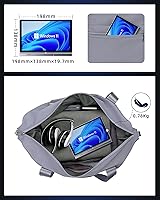
  • Weight: The device weighs 1.7 lbs (approximately 0.78 kg), making it among the lightest full Windows laptops available.
  • Dimensions: Physical footprint measures 198×138×19.7 mm, roughly the size of a large paperback book.
  • Wireless: Wi-Fi 6 (802.11ax) and Bluetooth 5.2 are both supported for fast, modern wireless connectivity.
  • Wired Network: A built-in RJ45 gigabit ethernet port (1000M) allows direct wired network connections without an adapter.
  • USB Ports: One USB 3.0 Type-A port and one USB 3.2 Gen 1 Type-C port (which also handles DisplayPort output and charging) are included.
  • Video Output: Full-size HDMI Type-A output is included alongside USB-C DisplayPort for connecting external displays.
  • Audio: A 3.5mm combo jack supports 4-pole headphones with an integrated microphone.
  • Camera: A 2MP front-facing camera is built in, suitable for basic video calls under adequate lighting conditions.
  • Sensors: A G-Sensor automatically detects device orientation and rotates the display when switching between modes.
  • Stylus Support: The touchscreen supports stylus input for handwriting and annotation, though no stylus is included in the box.
  • Graphics: Intel UHD Graphics (integrated) handles display output and light media tasks; dedicated GPU is not present.
  • Charging: The device charges via the USB-C port, which operates as a combo power input, DisplayPort, and data port.
  • Color & Material: The chassis is constructed from metal and is available in silver, contributing to both heat dissipation and structural rigidity.

Related Reviews
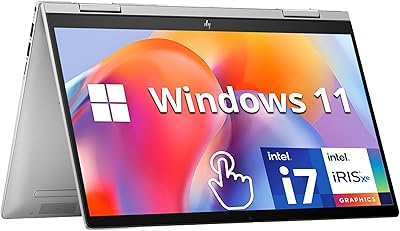
HP Envy x360 14″ 2-in-1 Laptop, Intel Core i7-1355U, 16GB RAM, 1TB SSD
85%
91%
Performance
70%
Battery Life
93%
Display Quality
88%
Portability & Weight
86%
Build Quality
More
HP Envy x360 16-inch 2-in-1 Laptop (Core Ultra 5 125U, 16GB, 1TB)
76%
88%
Display Quality
83%
Performance & Speed
79%
Build Quality & Design
61%
Portability & Weight
67%
Battery Life
More
Microsoft Surface Pro 2-in-1 Laptop/Tablet (2024), 13″ OLED, Snapdragon X Elite, 16GB RAM, 1TB Storage
82%
94%
Display Quality
91%
Performance
88%
Battery Life
89%
Portability
75%
Value for Money
More
HP 2025 OmniBook X Flip 16″ 2-in-1 Laptop, Intel Core Ultra 7, 16GB RAM, 1TB SSD
86%
91%
Performance
94%
Battery Life
88%
Display Quality
75%
Portability
87%
Build Quality
More
LG gram Pro 16T90SP-G 16-inch 2-in-1 Laptop Intel Core Ultra 7 16GB RAM 1TB SSD
86%
91%
Performance
93%
Portability
88%
Display Quality
77%
Battery Life
89%
Build Quality
More
Nutrafol Men’s Shampoo and Conditioner 2-in-1, 8.1 Fl Oz
85%
85%
Hair Strength Improvement
88%
Scalp Hydration
80%
Volume Boost
87%
Gentle on Color-Treated Hair
90%
Sulfate-Free Effectiveness
More
HP OmniBook X Flip 14″ 2K Touch-Screen 2-in-1 Laptop, AMD Ryzen AI 7 3500U, 24GB RAM, 1.5TB Storage
86%
92%
Performance
90%
Display Quality
88%
Multitasking & RAM
94%
Storage Capacity
84%
Portability & Weight
More
ASUS Chromebook 16 2-in-1 Laptop
82%
91%
Value for Money
87%
Display Quality
88%
Battery Life
82%
Performance for Everyday Use
85%
Portability
More
NAMON 2-in-1 Portable Laptop Floor & Desk Stand
79%
88%
Height Adjustability
82%
Stability & Base Design
79%
Build Quality
83%
Tilt & Angle Flexibility
74%
Tray Size & Usability
More
Svikou HL110YP 11″ 2-in-1 Laptop 512GB
72%
83%
Value for Money
71%
Performance & Speed
78%
Display Quality
66%
Build Quality & Design
89%
Portability
More

FAQ

No, it does not. The BP8 supports stylus input on its touchscreen, but the stylus itself is sold separately. Make sure to budget for a compatible active stylus if handwriting or annotation is a primary reason you are buying this device.

Yes, for that specific combination it performs reasonably well. With 12GB of RAM and the N150 processor, keeping a Word document open alongside a Teams or Zoom call is manageable. Just do not expect the same snappiness you would get from a more powerful machine — and close tabs you are not actively using.

It does multiple jobs at once — it handles charging, DisplayPort video output, and USB 3.2 data transfer. The trade-off is that if you plug in an external monitor through USB-C, you will need a compatible hub or dock to charge simultaneously, since there is only one such port on the device.

Most users report somewhere between two and three hours under typical mixed use — browsing, documents, occasional video. The advertised five hours is achievable only under very light, low-brightness conditions. Plan to carry the charger if you will be away from an outlet for more than a couple of hours.

It depends on what you are used to. For quick tasks, travel use, or video watching at this screen size, most people find it passable. However, if you spend long periods reading dense text, working on spreadsheets, or doing anything visually detailed, it will feel noticeably soft compared to a 1080p display. It is the single biggest visual compromise on the device.

It ships with Windows 11 Pro, which is a genuine advantage over many competing budget mini-laptops that only include the Home edition. Pro gives you access to BitLocker drive encryption, Remote Desktop, and group policy features — useful if you are connecting to a work network remotely.

Honestly, it is the aspect that divides buyers most sharply. People with smaller hands or those only typing short bursts — quick emails, notes, web searches — tend to adapt within a day or two. If you type for extended periods as part of your job, the cramped layout will become genuinely uncomfortable, and no amount of adaptation fully resolves that for most adults.

Yes, you can connect to an external display via either the HDMI port or the USB-C port using DisplayPort. This is actually one of the more practical use cases for the device — park it on a desk, plug into a full-size monitor, and use a wireless keyboard and mouse. It essentially becomes a compact desktop replacement for light work.

Under light tasks the fan is mostly inaudible. Push the processor harder — running multiple applications, extended video playback, or anything CPU-intensive — and the fan becomes noticeable. A small number of users have reported thermal throttling during sustained workloads, which is consistent with the compact chassis and the chip's power envelope. It is not unusual for this device class, but worth knowing.

Almost certainly not in a practical sense. Devices in this form factor typically use soldered RAM, meaning the 12GB is fixed. The M.2 B-key 2242 SSD slot may technically allow a drive swap if you are comfortable with disassembly, but the process voids any warranty and carries real risk given the compact build. Treat the specs as fixed before you buy.