Overview

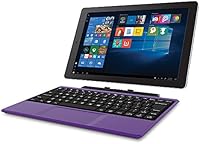
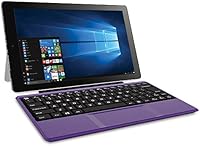
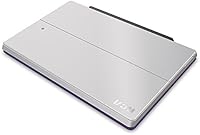
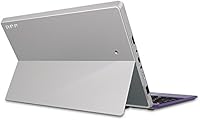
The RCA Cambio 10.1″ Windows 2-in-1 Tablet is a straightforward entry-level device built for casual, everyday use — not heavy lifting. What sets it apart from similarly priced Android tablets is the full Windows 10 experience, giving users access to a familiar desktop environment right out of the box. The detachable keyboard is the standout feature, transforming a basic tablet into something closer to a compact laptop. At just over a pound and with a 10.1-inch screen, it travels well. That said, buyers should come in with realistic expectations — this is a budget device, and it performs accordingly.

Features & Benefits

The heart of this Windows tablet is an Intel Atom quad-core processor paired with 2GB of RAM. For checking email, writing a Word document, or watching a video, it holds its own. Push it harder — five or six browser tabs open at once — and you will notice the slowdown. Storage starts at 32GB onboard, expandable via microSD up to 64GB, which is plenty for documents and a modest media library. The included keyboard, front and rear cameras suitable for video calls, plus Bluetooth and Wi-Fi connectivity round out a feature set that is genuinely practical for light daily tasks.

Best For

The Cambio 2-in-1 is a strong fit for a fairly specific type of buyer. Students who need a portable device for typing notes or working on assignments in Word or PowerPoint will find it surprisingly capable. It is also a natural choice for first-time Windows users — grandparents or retirees, for example — who want something familiar rather than a confusing mobile interface. Frequent travelers who just need to answer emails on the road will appreciate how light it is. As a secondary household device or a loaner machine, it fits the bill without putting a serious dent in your budget.

User Feedback

Owners of this detachable tablet tend to agree on a few things. On the positive side, value for money comes up repeatedly — most buyers feel they got a functional Windows machine at a price that is hard to argue with. The keyboard draws mixed opinions; some find it serviceable for quick typing, while others notice flex in the chassis. Battery life generally falls short of the six-hour claim under real-world conditions. A handful of users flagged pre-installed software bloat that needs clearing before the device runs smoothly. Build quality is described as adequate but not sturdy — it rewards gentle handling.

Pros

  • Full Windows 10 experience at an entry-level price point is genuinely rare and useful.
  • The detachable keyboard is included in the box — no extra purchase required.
  • At just over a pound, this Windows tablet is easy to carry anywhere without strain.
  • MicroSD expansion lets you add meaningful extra storage without replacing the device.
  • A clean Windows interface makes it accessible to users unfamiliar with Android or iOS.
  • Bluetooth support means you can pair a mouse or external keyboard for extended sessions.
  • The 10.1-inch screen offers a comfortable viewing size for reading, browsing, and video calls.
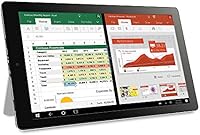
  • Comes with Microsoft Office Mobile apps pre-loaded, ready for basic document work immediately.
  • The compact dimensions fit easily into a small bag, backpack, or even a large purse.

Cons

  • Two gigabytes of RAM creates real slowdowns when more than one or two apps are open.
  • Battery life in real-world use tends to fall noticeably short of the advertised six hours.
  • Pre-installed software bloat can slow the device further and requires manual cleanup out of the box.
  • The keyboard shows flex under moderate typing pressure, which affects the feel during longer sessions.
  • 32GB of onboard storage fills up faster than expected once Windows updates and apps are installed.
  • Camera quality on both front and rear lenses is too limited for anything beyond bare-minimum video calls.
  • The product listing contains conflicting operating system information, which may cause confusion before purchase.
  • Build materials feel lightweight in ways that suggest limited durability under daily rough handling.
  • Performance lags significantly when running any browser-heavy tasks or streaming at higher quality settings.

Ratings

The scores below reflect our AI-powered analysis of verified global buyer reviews for the RCA Cambio 10.1″ Windows 2-in-1 Tablet, with spam, bot-generated, and incentivized feedback actively filtered out before any calculation. Ratings are drawn from real ownership experiences across a wide range of user types — from students and seniors to occasional travelers — and honestly reflect both what this device gets right and where it falls short.

Value for Money
78%
22%
For buyers who genuinely only need basic Windows functionality — typing documents, sending emails, browsing a few sites — the price-to-capability ratio lands reasonably well. Owners frequently note that getting a full Windows 10 machine with a keyboard included at this tier felt like a fair exchange.
Buyers who stretched their budget expecting near-laptop performance walked away disappointed. A few extra dollars toward a slightly more capable device would have meaningfully improved the day-to-day experience, and some users felt the gap between expectation and reality was wider than the price alone suggested.
Performance
47%
53%
For a single focused task — typing in Word, watching one video stream, or filling out a web form — the Cambio 2-in-1 is functional enough to get the job done. First-time users and those coming from older, slower hardware occasionally noted it felt adequate for their modest needs.
Opening more than two or three browser tabs simultaneously causes noticeable sluggishness, and the 2GB of RAM creates a hard ceiling on what the device can handle gracefully. Users doing anything beyond the most basic tasks — even light multitasking — consistently reported frustrating lag and occasional freezing.
Keyboard Quality
59%
41%
The fact that a physical keyboard is included in the box at all is something most buyers genuinely appreciated. For short typing sessions — filling in forms, writing a few paragraphs, taking brief notes — it functions well enough to avoid needing an additional purchase.
Longer typing sessions expose real weaknesses: the keyboard chassis flexes under moderate pressure, and key travel is shallow enough to feel imprecise at speed. Several users specifically mentioned that heavy typists or anyone writing more than a few hundred words at a stretch would find it uncomfortable over time.
Build Quality
52%
48%
The device is light and slim, which does contribute to its portability appeal. For users who handle it carefully and store it in a bag with a protective case, the construction holds up adequately for casual daily use over a reasonable period.
The plastic body feels noticeably lightweight in ways that suggest limited durability under real-world conditions. Long-term reviewers reported creaking, flex in the chassis, and concern about how well the hinge mechanism between the tablet and keyboard would hold up with repeated attachment and detachment over months of use.
Battery Life
54%
46%
Under very light use — screen at lower brightness, one app running, Wi-Fi connected but not streaming — some users managed to approach the rated endurance, which was enough for a short school day or a modest travel session without hunting for a plug.
In typical real-world conditions, most owners reported four to five hours of actual use before needing to charge, falling meaningfully short of the six-hour claim. Users relying on this detachable tablet for a full day away from a power outlet consistently found themselves recharging mid-day.
Display Quality
63%
37%
The 10.1-inch screen is a comfortable size for reading articles, watching standard-definition video, and working with documents side by side. Indoors under normal lighting, the display is bright enough for everyday use without causing eye strain during shorter sessions.
Resolution and color accuracy are noticeably limited compared to tablets even slightly higher in price. Outdoor visibility is poor in direct sunlight, and users who tried to use it for media consumption in a dark room noted that contrast levels left something to be desired.
Portability
83%
Weighing just over a pound and fitting neatly into a standard backpack or tote, this Windows tablet genuinely earns praise for how easy it is to carry. Commuters and students who brought it to class or onto public transit consistently highlighted its unobtrusive size as a practical advantage.
The included keyboard adds meaningful bulk and weight when attached, reducing the ultra-portable feel. A small number of users also noted the charging adapter is not the most compact travel companion, which adds to what you need to carry for a full on-the-go setup.
Setup & Out-of-Box Experience
51%
49%
The standard Windows 10 setup process is familiar to most users, and buyers who have used Windows before found the initial configuration reasonably straightforward. Once the setup bloat was cleared, the core interface worked as expected.
Multiple verified buyers flagged the pre-installed software as a significant friction point right out of the box, with the device running slowly until unnecessary apps were removed. Less tech-savvy users — precisely the audience this device is aimed at — struggled with that cleanup process and found the initial experience discouraging.
Camera Quality
38%
62%
For a quick video call with a family member or a basic Zoom check-in, the front camera is functional enough to show a clear-enough image in good lighting. Users with very low camera expectations — those who simply needed a working video conferencing option — found it passable.
Both cameras produce images that look notably soft and washed out even in ideal conditions, and the rear camera at 2MP is well below what any modern smartphone delivers. Anyone hoping to scan documents clearly or capture images with usable detail will be consistently let down by the output quality.
Software & App Compatibility
67%
33%
Running Windows 10 means access to a broad library of compatible applications beyond what Android or iOS tablets offer at this price. The pre-loaded Office Mobile apps — Word, Excel, and PowerPoint — work reliably for the core document tasks most buyers in this segment actually need.
The hardware limits which software runs comfortably in practice. Heavier Windows applications install but perform poorly, leading some users to feel the Windows OS promise was partially undermined by a processor and RAM combination that could not back it up for anything beyond lightweight programs.
Connectivity
72%
28%
Bluetooth and Wi-Fi both function reliably in normal home and office environments. Users who paired Bluetooth mice or headphones reported a smooth connection process, and the wireless range was consistent with what buyers would expect from a device in this category.
There is no Ethernet port for a wired connection, and the USB situation is limited — users looking to connect multiple peripherals simultaneously found the port configuration restrictive. A handful of buyers also noted Wi-Fi signal strength was average rather than strong in environments with weak router coverage.
Touchscreen Responsiveness
61%
39%
For basic navigation — tapping app icons, scrolling through a webpage, or pinching to zoom — the touchscreen responds accurately enough for casual interaction. Users who primarily used it as a tablet without the keyboard found touch input workable for everyday browsing.
Fast or complex touch gestures occasionally registered inconsistently, particularly when the processor was under load from background tasks. A noticeable lag between tap and response during busy moments frustrated users who expected the touch experience to feel as fluid as a dedicated tablet.
Storage Usability
64%
36%
The microSD expansion slot is a genuinely useful feature that adds flexibility for users who offload media, photos, or files onto a card. For document-heavy users who keep their media stored externally, the combination of onboard and expandable storage covers everyday needs.
The 32GB base storage fills up faster than expected once Windows 10 and Office updates are applied, leaving noticeably less usable space than the headline figure implies. Users who did not immediately add a microSD card found themselves managing storage constraints within weeks of purchase.
Ease of Use
74%
26%
For first-time computer users and seniors who grew up with Windows, the familiar desktop environment lowered the learning curve significantly compared to Android alternatives. Several reviewers specifically bought this device as a gift for an older relative and reported positive feedback on how approachable it felt.
The initial bloatware issue and occasional performance hiccups made the experience less smooth than it should be for the exact audience — less tech-confident users — who stand to benefit most from the Windows familiarity. When things slowed down or froze, those users had fewer tools to diagnose or resolve the problem on their own.

Suitable for:

The RCA Cambio 10.1″ Windows 2-in-1 Tablet is a practical pick for anyone whose daily computing needs are genuinely modest. Students who primarily need to type up assignments, take notes, or access school portals will find it covers those bases without the weight or cost of a full laptop. It is also a natural fit for older adults or first-time computer users who want the comfort of a familiar Windows environment rather than navigating a mobile operating system they have never used. Travelers who just need something light to check emails, browse, or hop on a video call during a trip will appreciate how little space it takes up in a bag. As a secondary device around the house — something for the kids, a guest, or a dedicated kitchen browsing machine — it holds up well without tying up serious money.

Not suitable for:

Buyers expecting a capable everyday workhorse should look elsewhere before committing to the Cambio 2-in-1. The processor and RAM combination genuinely struggles when pushed beyond simple, single-task use — multitasking across several applications or keeping multiple browser tabs open leads to noticeable lag that will frustrate anyone accustomed to a mid-range or better device. Creative professionals, even hobbyists doing light photo editing or video work, will hit walls quickly. The cameras are functional for a basic video call but are not suitable for anything requiring image quality. Anyone planning to use this as their sole computer for work or study at an intensive level will likely find themselves reaching for something more capable within a few months. The build also favors careful, light use — it is not a device that holds up well to rough handling or heavy daily travel.

Specifications

  • Screen Size: The tablet features a 10.1-inch touchscreen display, offering a comfortable viewing area for browsing, reading, and video calls.
  • Resolution: The display renders at 1280x800 pixels, providing adequate clarity for everyday tasks and standard-definition video content.
  • Processor: An Intel Atom quad-core chip handles the device's processing, suited to light workloads like document editing and casual web browsing.
  • RAM: The tablet comes with 2GB of system memory, which supports basic single-task use but shows strain under heavier multitasking.
  • Storage: Built-in flash storage sits at 32GB, with a microSD card slot that accepts cards up to 64GB for additional space.
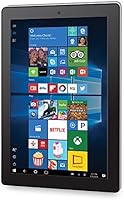
  • Operating System: The device runs Windows 10, giving users access to a full desktop-style interface and compatible Windows applications.
  • Front Camera: A 1MP front-facing camera is included, adequate for basic video conferencing and casual self-facing video calls.
  • Rear Camera: The rear camera captures at 2MP resolution, suitable for scanning documents or simple reference photos rather than quality photography.
  • Battery Life: Rated at up to 6 hours of use per charge, though real-world endurance may vary depending on screen brightness and active applications.
  • Wireless: Wi-Fi connectivity is built in, allowing the device to connect to standard home and public wireless networks for internet access.
  • Bluetooth: Bluetooth support enables pairing with compatible accessories such as wireless mice, headphones, and external keyboards.
  • Form Factor: The device functions as a 2-in-1 with a detachable physical keyboard included in the box, allowing use as both a tablet and a compact laptop.
  • Weight: The tablet weighs approximately 1.27 pounds, making it easy to carry in a bag for travel or between rooms at home.
  • Dimensions: Physical measurements come in at 9.5 x 7.54 x 1.16 inches, keeping the overall footprint compact and portable.
  • Graphics: Integrated Intel HD Graphics handle visual output, appropriate for standard video playback and basic display tasks.
  • Color Option: The device is available in a purple finish, which is the color variant associated with this listing.
  • In-Box Contents: The package includes the tablet, a detachable keyboard, a battery, and an AC power adapter.
  • Power Source: The tablet is powered by a rechargeable lithium-ion battery that is included and pre-installed in the unit.

Related Reviews
AWOW AiBook 10 10.1″ 2-in-1 Windows Tablet
65%
81%
Value for Money
88%
Portability
67%
Performance
61%
Display Quality
53%
Keyboard Quality
More
ZAOFEPU W101 10.1″ Windows 11 Tablet
79%
91%
Value for Money
84%
Performance for Basic Tasks
68%
Multitasking Capability
75%
Display Quality
80%
Build Quality
More
Fusion5 FWIN232+ 10.1″ Windows 11 Professional Tablet PC
85%
84%
Performance
88%
Display Quality
65%
Battery Life
80%
Build Quality
91%
Portability
More
WXUNJA X-C30 10.1-inch Kids Tablet
72%
83%
Value for Money
86%
Parental Controls
81%
Battery Life
78%
Parental App & Setup
63%
Display Quality
More
ITMEIPC T-10 10.1-inch Android Tablet
69%
83%
Value for Money
67%
Display Quality
62%
Performance
71%
Battery Life
58%
Build Quality
More
FEONAL K118 10.1-inch Android Tablet
68%
83%
Display Quality
67%
Performance & Speed
78%
Battery Life
44%
Camera Quality
81%
Value for Money
More
reMarkable 2 10.3-inch Paper Tablet

85%
94%
Tactile Writing Feel
92%
Build Quality & Design
97%
Distraction-Free Experience
89%
Battery Longevity
76%
Software Organization
More
YYSWIE CT1001 10.1-inch 64GB Kids Tablet
67%
83%
Value for Money
58%
Performance & Speed
76%
Battery Life
81%
Parental Controls
61%
Display Quality
More
Head & Shoulders Green Apple 2-in-1 Shampoo

81%
91%
Dandruff Control
67%
Conditioning Performance
88%
Scent Experience
86%
Value for Money
89%
Daily Usability
More
CFVOCUY TS-K109B 10.1″ Kids Tablet
67%
83%
Value for Money
79%
Ease of Setup
71%
Battery Life
66%
Durability & Build
74%
Parental Controls
More

FAQ

The keyboard is included in the box — no separate purchase needed. It attaches and detaches from the tablet, letting you switch between laptop-style typing and handheld tablet use depending on what you are doing.

This Windows tablet comes with the mobile versions of Word, PowerPoint, and Excel pre-loaded, which cover most everyday tasks like writing documents and editing spreadsheets. Full desktop Office can technically be installed, but given the processor and RAM, the mobile apps are the more practical and stable choice for day-to-day use.

It depends on how you use it. Once Windows updates and a few apps are installed, usable space shrinks faster than the number suggests. For light users sticking to documents and a few downloaded videos, 32GB is workable — and the microSD slot lets you add up to 64GB more for media or file storage.

For casual streaming at standard definition, the Cambio 2-in-1 gets the job done. Higher resolution streams may cause occasional stuttering, especially if other apps are running at the same time. Keeping background tasks closed helps noticeably.

The device runs Windows 10. The Android reference in the product listing appears to be a data entry error on the seller's part, and the hardware, software, and interface are all Windows-based. You will not find an Android environment on this device.

Yes, for that specific use case it is a reasonable fit. The RCA Cambio 10.1″ Windows 2-in-1 Tablet handles typing, basic research, and document work without much trouble. Just keep expectations in line — it is not built for gaming or running many apps at once, but for schoolwork it covers the essentials.

Users generally find it functional for short to medium typing sessions. The keys have a modest amount of flex when pressed firmly, and the key travel is shallower than a full laptop keyboard. For extended writing sessions, some users prefer pairing a Bluetooth keyboard instead.

Initial setup follows the standard Windows 10 process, which takes about 15 to 20 minutes. A number of pre-installed apps come loaded on the device that you may want to remove before regular use — clearing out that software bloat early helps the tablet run noticeably more smoothly.

In practice, most users report falling somewhere in the four to five hour range under normal conditions. Screen brightness and how many things are running simultaneously have a significant effect on how long each charge actually lasts.

It is reasonably well put together for its price tier, but the plastic build is not designed to take drops or rough daily handling. A protective case is a smart investment if this will be carried in a backpack regularly. Treated with reasonable care, it holds up fine for light everyday student use.