Overview

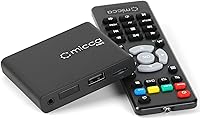
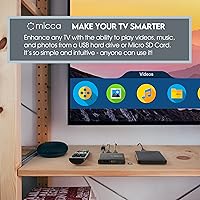
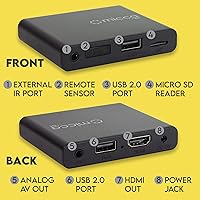
Welcome to our comprehensive review of the Micca Speck 4K, an ultra-compact solution that is decidedly not a streaming stick for Netflix or Hulu. Instead, it is an incredibly focused device designed strictly for local media playback. Whether you are trying to figure out how to play usb videos on tv for a family movie night or setting up professional displays, this ultra-compact media player handles the job effortlessly. Measuring just over two and a half inches wide, it boasts an extremely small footprint that allows it to be hidden entirely out of sight behind almost any display. It simply takes the media stored on your personal drives and puts it right onto the big screen without requiring a constant internet connection.

Features & Benefits

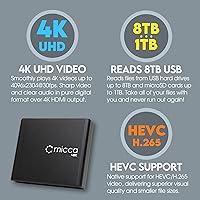
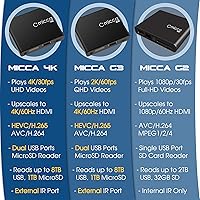
As arguably the best 4k media player for local files, the local playback device delivers exceptionally smooth 4K Ultra-HD video at 60Hz via HDMI. It boasts wide compatibility with storage drives, easily reading USB hard drives up to 8TB and MicroSD cards up to 1TB. You do not need a computer science degree to understand its broad file format support; it essentially works by playing almost any file you throw at it. Dedicated features allow it to auto-play and loop video continuously on tv, which is incredibly useful. Furthermore, the inclusion of an analog composite AV output makes it uniquely capable of breathing new life into older legacy televisions, bridging the gap between modern high-resolution files and classic tube TVs without any extra adapters.

Best For

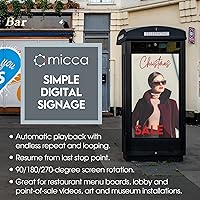
Small business owners will quickly realize that this affordable signage box is exactly what they need for creating dynamic lobby displays or restaurant boards. It is widely considered an excellent, cheap digital signage player for menus because it runs reliably without constant supervision. Home users who want a simple way to view downloaded movies or family photo slideshows offline will also appreciate its straightforward operation. Art installations and museums benefit heavily from its continuous, hands-off video looping capabilities, ensuring exhibits remain active all day without manual restarts. Finally, it remains a fantastic choice for retro enthusiasts or anyone looking to repurpose older analog televisions with composite inputs, bringing modern digital file compatibility to vintage screens with absolutely zero hassle.

User Feedback

Buyers consistently praise the sheer plug-and-play simplicity of the system, noting that the intuitive interface makes it accessible for non-technical staff. A major highlight in user reviews is its rock-solid reliability when running continuous media loops for days at a time without overheating or freezing. The compact lightweight design is frequently celebrated for enabling entirely hidden placement options behind flat screens. On the downside, some users note that navigating exceptionally large media libraries with the included remote can feel slightly tedious. However, buyers have found an easy workaround by using third-party air mouse remotes for out-of-sight control. Overall, feedback highlights that it does exactly what it promises, turning any standard screen into a highly reliable, standalone local media center.

Pros

  • Delivers extremely smooth 4K Ultra-HD video playback at 60Hz via HDMI for crisp, professional image quality.
  • Automatically resumes playback from the exact stopping point after an unexpected power outage.
  • The Micca Speck 4K boasts an ultra-compact footprint that easily hides completely out of sight behind any modern television.
  • Supports massive external storage drives, effortlessly reading USB hard drives up to 8TB and MicroSD cards up to 1TB.
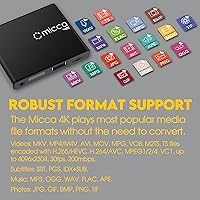
  • Plays almost any file you throw at it, boasting broad format support including MKV, MP4, and H.265 video codecs.
  • Features a highly intuitive, plug-and-play interface that requires zero technical expertise to set up and operate.
  • Includes a dedicated analog AV output, making it uniquely compatible with older CRT and legacy televisions.
  • Runs exceptionally reliably for days on end when configured to loop video continuously on tv for digital signage.

Cons

  • Strictly limited to playing local files and entirely lacks the ability to stream online video platforms.
  • Managing multiple digital signage displays requires physically moving USB drives since there is no centralized network management.
  • The basic infrared remote requires direct line-of-sight, which complicates operation if you hide the box behind a screen.
  • Navigating extremely large or unorganized media libraries feels tedious due to the lack of advanced search tools.
  • The incredibly lightweight chassis is easily pulled off shelves or flipped over by stiff, heavy HDMI cables.
  • Displaying complex text menus on older, low-resolution CRT televisions via composite output can be difficult to read clearly.
  • Does not support advanced visual formats like Dolby Vision or complex uncompressed professional video codecs.

Ratings

To help you decide if the Micca Speck 4K is right for your setup, our AI has analyzed thousands of verified user reviews worldwide, actively filtering out spam and incentivized feedback. We have synthesized these global experiences into the detailed rating schema below, transparently reflecting both the reliable strengths and real-world pain points of this ultra-compact media player.

Local Playback Reliability
94%
Buyers consistently rave about the rock-solid stability when running continuous media loops for days on end. Museum curators and small business owners appreciate that this affordable signage box simply does not crash or overheat during business hours.
A small subset of users noted occasional hiccups if the USB drive itself is heavily fragmented or extremely old. Operating the device in an enclosed, unventilated space behind a hot display can sometimes lead to thermal throttling over time.
Ease of Setup
92%
The sheer plug-and-play simplicity is a massive hit among non-technical users and staff. You essentially just plug in the power, connect the HDMI cable, and insert a thumb drive to get your family photos or digital menu boards running immediately.
The lack of built-in wireless or network connectivity means all updates and media transfers must be done manually by physically moving the storage drive. Users expecting a smart device experience are occasionally frustrated by this strictly offline approach.
Format Compatibility
88%
This local playback device truly shines when it comes to handling a massive variety of video and audio codecs. Whether it is an old AVI home movie or a modern H.265 encoded MKV file, it plays almost any file you throw at it smoothly.
While it supports a vast array of common formats, it struggles with highly specialized or uncompressed professional video codecs. Additionally, Dolby Vision and certain advanced HDR profiles are not fully supported, which might disappoint hardcore home theater enthusiasts seeking perfect color accuracy.
Digital Signage Functionality
96%
The dedicated auto-play and endless looping features make this an absolute favorite for restaurant menu boards and lobby welcome screens. The ability to automatically resume from the last stopping point after a power outage provides incredible peace of mind for business owners.
Managing multiple displays requires buying a separate unit for each screen, as there is no central management software. Adjusting the configurable rotation settings requires digging through the system menus manually using the remote, which can be tedious for larger installations.
Large Library Navigation
64%
36%
For users with just a few folders of organized movies or specific signage videos, finding files is quick and straightforward. The basic directory structure mimics a standard computer interface, which feels familiar and functional for locating a specific family video.
Browsing through massive 8TB hard drives packed with thousands of unorganized files is a painfully slow and tedious experience. The interface lacks advanced search functions, metadata scraping, or poster art displays, making it a chore for serious digital hoarders to find specific media.
Form Factor & Concealment
93%
Measuring under three inches wide, this ultra-compact media player is celebrated for its incredibly small footprint. It is easily tucked away behind wall-mounted TVs or slipped into tight entertainment centers without disrupting the aesthetic of the room.
Because the unit is so incredibly light at just over two ounces, stiff HDMI cables can easily flip it over or pull it off a shelf. You often need to use double-sided tape or hook-and-loop fasteners to keep it securely anchored in place.
Video Quality & Output
86%
Delivering smooth 4K Ultra-HD playback at 60Hz ensures that modern digital displays look crisp, vibrant, and professional. Buyers are frequently impressed by the sharp image clarity when showcasing high-resolution promotional videos or intricate digital art pieces.
The visual output is heavily dependent on the quality of the source file; it does not offer advanced AI upscaling for low-resolution content. Viewers playing heavily compressed 480p videos on a massive modern display will still see noticeable pixelation and visual artifacting.
Remote Control Usability
71%
29%
The included remote provides dedicated, straightforward buttons for essential functions like play, pause, and looping. It is lightweight, intuitive enough for basic operations, and relies on standard batteries that are easy to replace when they finally run out.
The standard infrared remote requires direct line-of-sight to the player, which completely defeats the purpose of hiding the box behind a television. Navigating large text menus using the basic directional pad feels clunky compared to modern smart remotes.
Legacy TV Compatibility
89%
The inclusion of an analog composite AV output is a rare and highly appreciated feature for retro tech enthusiasts. It offers a brilliantly simple way to repurpose older tube televisions for viewing classic home videos without needing a complicated chain of digital converters.
The necessary analog AV cable is sometimes not included or requires a very specific pinout, causing frustration for those wanting to use it immediately with older sets. The text menus can also be difficult to read clearly on smaller, low-resolution CRT displays.
Value for Money
94%
Providing reliable 4K playback and continuous video looping at this price point makes it an incredibly cost-effective solution. Small businesses can deploy cheap digital menu boards across multiple locations for a fraction of the cost of dedicated commercial signage players.
If you accidentally purchase this expecting it to stream online platforms, the value instantly drops to zero since it strictly plays local files. The total cost of ownership also increases if you need to buy large capacity storage drives separately.

Suitable for:

The ideal buyer for this device falls into two main camps: small business owners needing cheap digital menu boards and home users wanting a dead-simple way to play local files. The Micca Speck 4K excels for commercial applications like restaurant lobbies, art installations, and museums because it reliably loops video continuously on tv without supervision. It is also perfect for families who want to view offline downloaded movies or photo slideshows on the big screen without navigating complicated smart TV menus. Finally, retro tech enthusiasts will appreciate its ability to breathe life into older legacy televisions using the included analog AV output.

Not suitable for:

If your primary goal is to stream online content from platforms like Netflix, Hulu, or YouTube, this is absolutely not the right device for you. The Micca Speck 4K is strictly designed for offline, local media playback and has zero internet connectivity. It is also not suitable for digital hoarders trying to navigate massive, unorganized 8TB hard drives, as the interface lacks advanced search functions or visual poster art. Furthermore, business owners managing a large network of screens across multiple locations should avoid this affordable signage box, since updating media requires manually swapping physical USB drives rather than pushing wireless network updates.

Specifications

  • Video Output: Delivers smooth 4K Ultra-HD video playback at 60Hz via an HDMI connection.
  • USB Storage: Reads external USB flash drives and hard drives up to 8TB in capacity.
  • MicroSD Support: Supports MicroSD memory cards up to 1TB for ultra-compact media storage.
  • File Systems: Fully compatible with FAT, FAT32, exFAT, and NTFS drive formatting.
  • Video Codecs: Decodes H.265/HEVC, H.264/AVC, MKV, MP4, and various other standard video formats.
  • Digital Signage: Features dedicated auto-play, endless looping, and resume-from-stop functionality.
  • Video Rotation: Offers configurable 90, 180, and 270-degree output rotation for vertical displays.
  • Dimensions: Measures an incredibly compact 0.59 by 2.95 by 2.52 inches.
  • Weight: Weighs practically nothing at just 2.19 ounces.
  • AV Connections: Features both a modern HDMI port and an analog composite AV output.
  • Remote Control: Includes a dedicated infrared remote control for straightforward menu navigation.
  • Power Supply: Powered entirely by an included standard AC wall adapter.

Related Reviews
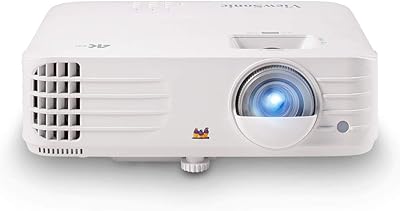
ViewSonic PX701-4K 4K Projector
87%
92%
Image Quality
94%
Gaming Performance
85%
Brightness
90%
Setup Ease
89%
Connectivity
More
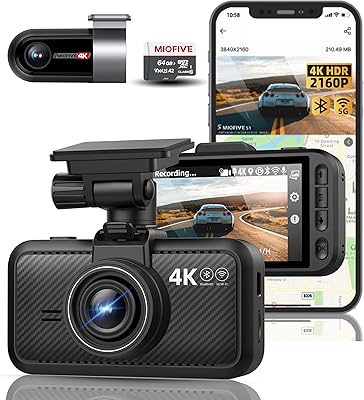
IIWEY Q5 4K+4K Dash Cam
86%
93%
Video Quality (4K Resolution)
89%
Night Vision Performance (STARVIS)
88%
Wi-Fi Data Transfer Speed (5G)
85%
Ease of Setup & Installation
82%
Parking Mode (24/7 with Hardwiring Kit)
More
Miofive S1 Ultra 4K+4K Dash Cam
85%
92%
Video Quality (Daytime)
89%
Night Vision Performance
84%
Ease of Setup
88%
App & Connectivity
91%
GPS Accuracy
More
ViewSonic VP2768a-4K 27-Inch 4K Monitor
86%
94%
Color Accuracy
88%
Ergonomics & Comfort
91%
Value for Money
89%
Build Quality
85%
Ease of Setup
More
ViewSonic VA2756-4K-MHD 27-Inch 4K Monitor
84%
92%
Display Quality
90%
Color Accuracy
88%
Design & Build Quality
85%
Ease of Setup
89%
Connectivity Options
More
Vantrue S1 Pro Max 4K+4K
79%
93%
Video Quality
91%
Night Vision Performance
74%
AI Safety Alerts (ADAS & BSD)
82%
Parking Mode
88%
Build Quality & Durability
More
ViewSonic VG2756-4K 27-inch 4K IPS Monitor
86%
92%
Display Quality
89%
Ergonomics
85%
Connectivity Options
88%
Build Quality
90%
Ease of Setup
More
ViewSonic VP3256-4K 32-Inch 4K UHD Monitor
88%
94%
Display Quality
92%
Color Accuracy
88%
Ergonomics & Comfort
86%
Build Quality
90%
Ease of Setup
More
ViewSonic VX3267U-4K 32-inch 4K UHD Monitor
86%
91%
Display Quality
88%
Ease of Setup
92%
Connectivity Options
85%
Color Accuracy
89%
Eye Comfort (Blue Light Filter/Flicker-Free)
More
ViewSonic VX4381-4K 43-Inch 4K UHD Monitor
84%
92%
Picture Quality
95%
Display Size & Immersion
89%
Ease of Setup
75%
Color Accuracy
84%
Build Quality
More

FAQ

No, this device does not support any streaming apps like Netflix, Hulu, or YouTube. It is strictly a local playback device designed to read video files directly from a physical USB drive or MicroSD card.

It is incredibly straightforward using the built-in system settings. Just drop your menu video onto a flash drive, plug it into this affordable signage box, and set the system to auto-play and loop that specific file indefinitely.

Yes, it has a highly requested auto-resume feature. If you lose power or turn the device off mid-movie, it will automatically offer to pick up right where you left off when you restart it.

Not at all. As long as your television or monitor has an HDMI port or standard red, white, and yellow composite inputs, this ultra-compact media player will work perfectly.

The included remote uses standard infrared technology, which requires a direct line of sight to the front of the unit. If you want to tuck the box completely out of sight, we highly recommend picking up a third-party wireless air mouse remote.

Absolutely. It is specifically designed to handle massive, high-resolution files encoded in modern formats like H.265 or MKV without stuttering. Just ensure your storage drive is formatted correctly to hold large files over 4GB.

You will need to check your specific package contents, but generally, it features the output port while the actual 3.5mm-to-RCA analog cable is sold separately. HDMI cables are typically not included in the base package either.

Yes, you can easily adjust the orientation directly in the system settings. It supports 90, 180, and 270-degree rotation, making it perfect for vertical digital art frames or tall lobby boards.

The interface relies strictly on how you organize the files into folders on your computer before plugging the drive in. It does not have built-in software for creating complex playlists, so organizing them by distinct folders is your best bet.

While it passes through standard audio effortlessly, it does not decode advanced HDR formats like Dolby Vision or uncompressed professional theater audio. It is best suited for standard high-definition playback rather than high-end audiophile setups.