Overview

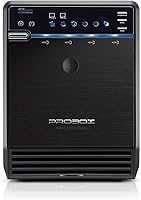
The Mediasonic ProBox HF2-SU3S3 4-Bay DAS Enclosure is a direct-attached storage unit built for home users and small offices that need serious local storage without the overhead of a full NAS setup. It connects via USB 3.0 or eSATA, which covers most desktop and laptop configurations reasonably well. The metal chassis — made in Taiwan — gives it a more substantial feel than the plastic-bodied alternatives clustered around the same price point. With support for up to four 30TB drives, this drive enclosure can realistically house a large media archive or serve as a centralized backup destination for a busy household.
Features & Benefits

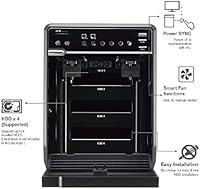
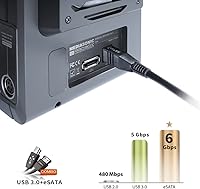
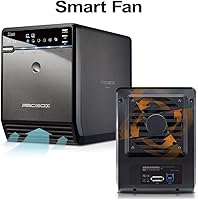
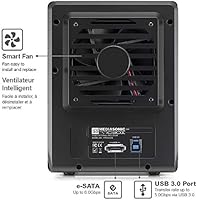
The most practical touch is one-button interface switching between USB 3.0 and eSATA, useful if you move the unit between machines with different port setups. Each drive mounts as a separate volume, so there is no RAID configuration to wrestle with — you plug in a drive and it just shows up. The built-in smart fan runs in auto mode by default, ramping up only when temperatures climb, keeping things quiet during lighter workloads. One caveat worth knowing upfront: eSATA requires port-multiplier support on the host side, and not all systems have it. Real-world throughput is capped by USB 3.0, not the drives themselves.

Best For

This 4-bay enclosure suits videographers or photographers who accumulate large raw files and need a structured local archive rather than relying on cloud storage. It works equally well for someone building a home backup system who has no interest in managing a NAS — there is no network sharing here, just direct-attached storage kept simple. IT hobbyists consolidating older 3.5-inch SATA drives into one tidy unit will find the setup refreshingly uncomplicated. One real limitation: Linux is not supported, making this squarely a Windows 10/11 and macOS solution. If that matches your environment, the storage-per-dollar ratio is genuinely competitive.

User Feedback

Across more than 4,000 reviews, the ProBox HF2-SU3S3 holds a 3.9-star average — broadly positive, though not without friction. Buyers frequently cite fast setup and quiet fan operation in auto mode as standout advantages. On the downside, eSATA compatibility trips up users whose host machines lack port-multiplier support, a frustration that pre-purchase research can prevent. Scattered reports of drive recognition inconsistencies over USB, especially through hubs, are worth factoring in. Longer-term, the most common durability concerns center on the power supply and fan holding up after extended daily use — something to weigh if you plan to run this unit around the clock.

Pros

  • Metal chassis feels genuinely durable and holds up better than plastic competitors at this price tier.
  • Supports up to four drives at 30TB each, giving serious room to grow a media or backup library.
  • Each drive mounts as its own volume — no RAID setup, no formatting surprises, just plug and go.
  • Smart fan in auto mode stays quiet during typical backup and archiving workloads.
  • One-button interface switching between USB 3.0 and eSATA is a practical, underrated convenience.
  • S.M.A.R.T. support lets you monitor drive health across all four bays with standard third-party tools.
  • Power Sync spins drives down automatically during idle periods, reducing unnecessary wear.
  • Works reliably across both Windows 10/11 and macOS without additional drivers or software.
  • Repurposing older SATA 1 and SATA 2 drives works without compatibility issues.
  • Competitive value for a four-bay metal enclosure with dual interface support.

Cons

  • eSATA port requires host-side port-multiplier support, which many modern systems simply do not have.
  • No RAID support means zero built-in redundancy — a total drive failure takes all data on that bay with it.
  • The 2.5-inch bracket adapter needed for SSDs is sold separately and not included in the box.
  • Long-term power supply reliability raises concerns among users running the enclosure continuously.
  • Fan noise climbs noticeably under sustained heavy transfer loads, which can irritate in quiet environments.
  • UASP support is unconfirmed, limiting the ability to optimize USB 3.0 throughput on compatible systems.
  • Drive recognition inconsistencies have been reported when connecting through USB hubs rather than directly.
  • No network sharing capability makes multi-user or multi-room access impossible without physically moving the unit.
  • Customer support response times for technical issues have drawn criticism from buyers needing troubleshooting help.
  • Taller vertical profile can be awkward in shelving setups with limited vertical clearance.

Ratings

The scores below for the Mediasonic ProBox HF2-SU3S3 4-Bay DAS Enclosure were generated by AI after analyzing thousands of verified global user reviews, with spam, bot-submitted, and incentivized feedback actively filtered out. Ratings reflect the full picture — where this drive enclosure genuinely earns its place and where real buyers have run into friction. Strengths and pain points are weighted equally so you can make a confident, informed call.
Ease of Setup
88%
Most users report having drives recognized within minutes of first connection on both Windows and macOS — no driver installation, no partitioning headaches for those using pre-formatted drives. The plug-and-play nature is a recurring highlight, especially among home users who are not particularly technical.
A small but consistent group of buyers encounters confusion around the eSATA interface, specifically the port-multiplier requirement that is easy to overlook. Users who expected eSATA to work out of the box on any machine were caught off guard.
Build Quality
82%
18%
The metal chassis stands out at this price point — most competing enclosures in the same range use plastic shells that flex and feel fragile. Buyers frequently note that the ProBox HF2-SU3S3 feels solid and well-assembled, with drive bays that hold HDDs firmly without rattling during operation.
Some users flag that the drive trays themselves feel slightly less premium than the outer shell, and a handful report fit tolerances that required minor adjustments when seating certain drive brands. Long-term hinge and latch durability on the bays is an occasional concern after extended daily use.
Cooling & Fan Performance
76%
24%
The smart fan in auto mode is genuinely quiet during light-to-moderate workloads — most users running backups or archiving tasks overnight barely notice it. The ability to switch to manual mode gives more control-focused users a useful option when sustained heavy transfers are expected.
At full speed under prolonged load, the fan generates noticeable noise that some users in quiet home office environments find distracting. A small number of reviews mention the fan becoming louder over time, which points to potential bearing wear after extended months of continuous operation.
Drive Compatibility
91%
Support for SATA 1, 2, and 3 drives up to 30TB per bay makes this enclosure unusually flexible — buyers repurposing a mix of older and newer HDDs from different manufacturers report broad compatibility without issue. S.M.A.R.T. support adds meaningful value for those monitoring drive health across all four bays.
The 2.5-inch SSD and HDD support requires a separate bracket adapter that does not come in the box, which frustrates users who assumed mixed-drive setups were fully supported out of the box. This omission feels like a missed opportunity given how common hybrid storage configurations have become.
Transfer Speed (Real-World)
67%
33%
For typical backup and archiving workloads — copying large video files, syncing photo libraries, offloading drone footage — USB 3.0 throughput is perfectly adequate. Users moving multi-hundred-gigabyte archives report reasonable transfer times that align with USB 3.0 bandwidth expectations.
The SATA 3 spec advertised is largely irrelevant in practice because USB 3.0 is the actual bottleneck. Power users hoping for speeds that justify the six gigabits per second claim will be disappointed, and the lack of confirmed UASP support means there is no easy path to squeezing extra performance out of the connection.
eSATA Functionality
58%
42%
When the host system does support port-multiplier over eSATA, the interface works reliably and delivers a notable speed improvement over USB 3.0. Users with compatible motherboards or eSATA expansion cards describe stable, consistent connections during extended transfer sessions.
The port-multiplier requirement catches a significant number of buyers off guard — many modern systems simply do not support it, making the eSATA port effectively unusable for them. This is a hardware-level limitation that Mediasonic could communicate more prominently in the product listing.
Software & OS Compatibility
73%
27%
Windows 10 and 11 users report a consistently smooth experience with no extra software required. macOS users also find the unit works well for individual drive access, making it a reasonable cross-platform option for households running both operating systems.
Linux compatibility is a hard no — the enclosure is explicitly unsupported and this rules out an entire segment of home server and NAS-adjacent users who might otherwise be strong candidates. There is no indication this will change, so Linux users should look elsewhere.
Value for Money
84%
For buyers who need four bays of local storage without the added cost and complexity of a full NAS, the price-to-capacity ratio here is genuinely strong. Getting a metal-chassis, four-bay DAS with S.M.A.R.T. support and dual interface at this tier is difficult to match from other brands.
The missing 2.5-inch bracket adapter and the eSATA port-multiplier limitation do chip away at the perceived value for some buyers who feel certain advertised capabilities require extra investment to actually use. Competitors offering UASP or broader interface support start to look more attractive once those gaps are factored in.
Noise Level
71%
29%
Under light loads — such as passive storage or infrequent file access — the enclosure runs quietly enough that most users in a typical home or office environment report no complaints. Auto mode fan management does a decent job of keeping noise low when thermal demands are minimal.
Under sustained read/write operations, fan noise climbs to a level that some users describe as noticeable or mildly annoying in a quiet room. The manual fan mode can help tune this, but the enclosure lacks a low-noise profile that some competing units at this price point have built in.
Power Supply Reliability
63%
37%
The included power brick handles four spinning drives without issue in standard operation, and the majority of users do not report power-related problems during the first year of use. Power Sync support for automated drive spin-down helps reduce unnecessary load during idle periods.
Long-term reliability of the power supply is a recurring concern in reviews from users who have owned the unit for more than a year. A disproportionate share of negative reviews cite the power brick as the point of failure, which raises questions about component longevity under 24/7 workloads.
Drive Indexing & Volume Management
86%
Each bay appearing as an independent volume is exactly what most buyers in this category want — no software, no RAID setup, no learning curve. Users managing backups across multiple drives with different purposes appreciate the clean, organized way each drive mounts separately.
The lack of any RAID option is a deliberate design choice, but it does mean there is no built-in redundancy. Users who later realize they want mirrored backups will need additional software or a different enclosure entirely — a consideration worth thinking through before buying.
Thermal Management
78%
22%
The combination of the smart fan and the metal chassis does a reasonable job of dissipating heat across four populated bays. Users running the unit in open, ventilated spaces report stable temperatures even during long backup windows.
Buyers who place the enclosure in enclosed spaces like AV cabinets or tight desk setups report higher temperatures and more aggressive fan behavior. The unit has no active thermal reporting to the host system beyond S.M.A.R.T., so real-time temperature monitoring requires third-party tools.
Physical Design & Footprint
79%
21%
The vertical tower form factor keeps the desk footprint relatively compact given that it houses four full-size 3.5-inch drives. The all-black metal exterior looks professional and blends into most workstation setups without drawing attention.
At 4 pounds with drives installed, the unit adds meaningful weight to a desk setup, and the taller profile can be awkward in shelving units with limited vertical clearance. The drive bay access requires the unit to be placed where the front panel is fully accessible, which limits positioning flexibility.
Documentation & Support
61%
39%
The user manual is available for download from the product page, and Mediasonic provides enough basic setup guidance to get most users running without needing outside help. The interface toggle is clearly labeled, reducing the chance of connection errors on first use.
Several users report difficulty getting timely responses from Mediasonic support when troubleshooting eSATA compatibility or drive recognition issues. The available documentation does not go deep enough on compatibility edge cases, which leaves buyers relying on community forums and Amazon Q&A threads for answers.

Suitable for:

The Mediasonic ProBox HF2-SU3S3 4-Bay DAS Enclosure is a strong fit for anyone who needs a large, organized local storage solution without the setup complexity or cost of a network-attached device. Videographers and photographers who regularly archive raw footage or high-resolution image libraries will appreciate having up to four independently mounted drives accessible from a single unit. Home users who want a centralized backup destination for multiple computers — and are happy to physically connect the enclosure rather than share it over a network — will find this drive enclosure hits a practical sweet spot. IT hobbyists and tinkerers with a drawer full of older 3.5-inch SATA drives from retired machines will get real value from consolidating those drives into one tidy, powered chassis. The straightforward individual-volume approach also suits anyone who has been burned by RAID complexity in the past and simply wants each drive to show up clean and ready to use on Windows 10, Windows 11, or macOS.
Not suitable for:

The Mediasonic ProBox HF2-SU3S3 4-Bay DAS Enclosure is not the right tool for anyone expecting network-sharing capabilities — this is a direct-attached device only, meaning it works for whoever is physically connected to it at any given time, not as a shared resource across a home or office network. Linux users should look elsewhere entirely, as the enclosure is explicitly unsupported on that platform with no indication of future compatibility. Anyone planning to use the eSATA port needs to verify their host system supports port-multiplier functionality first — a missing feature that renders the eSATA connection unusable on a surprisingly large number of modern motherboards. Users who need built-in redundancy or data mirroring should know there is no RAID support here; drive protection is entirely the buyer's responsibility through software or manual backup habits. Power users who need maximum sustained transfer speeds for real-time video editing directly off the enclosure may also find USB 3.0 throughput limiting, particularly without confirmed UASP support to help close that gap.
Specifications

  • Drive Bays: The enclosure houses up to four 3.5″ SATA hard drives simultaneously, each appearing as an independent volume on the connected host system.
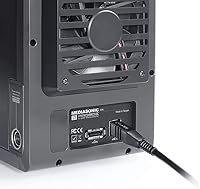
  • Interface: Connectivity is provided via USB 3.0 and eSATA, with a single physical button to switch between the two interfaces.
  • Max Capacity: Total supported storage reaches up to 120TB across all four bays, based on a maximum of 30TB per individual drive.
  • Drive Compatibility: Compatible with 3.5″ SATA 1, SATA 2, and SATA 3 hard drives; 2.5″ SATA SSDs and HDDs are supported with a separately sold bracket adapter.
  • Transfer Rate: The SATA 3 interface supports drive-level transfer rates up to 6 Gbps, though real-world throughput over USB 3.0 is constrained by that connection's bandwidth ceiling.
  • RAID Support: No hardware or software RAID modes are supported; each installed drive operates as a standalone, independently accessible volume.
  • Cooling System: A built-in smart fan operates in both automatic and manual modes to regulate internal temperature during sustained workloads.
  • Drive Health: S.M.A.R.T. monitoring support is included, enabling compatible third-party software to read drive health data from all four bays.
  • Power Sync: Power Sync functionality allows connected drives to spin down automatically when the host system enters sleep or powers off, reducing unnecessary wear.
  • OS Compatibility: Officially supported on Windows 10 and Windows 11 as well as macOS; Linux is explicitly not supported by the manufacturer.
  • eSATA Requirement: Using the eSATA port requires the host system's eSATA controller to support port-multiplier functionality, which is not universally available on modern motherboards.
  • Build Material: The outer chassis is constructed from metal, providing greater structural rigidity and heat dissipation compared to plastic-bodied alternatives in the same category.
  • Dimensions: The unit measures 8.5″ in length, 4.9″ in width, and 6.5″ in height, forming a compact vertical tower footprint for desktop use.
  • Weight: The enclosure weighs 4 pounds without drives installed, adding meaningful mass once four populated HDDs are seated inside.
  • UASP Support: UASP (USB Attached SCSI Protocol) support is not confirmed by the manufacturer for this model, which may limit peak USB 3.0 transfer optimization.
  • 2.5″ Adapter: A bracket adapter is required to mount 2.5″ drives in the standard 3.5″ bays; this adapter is sold separately and is not included in the box.
  • Origin: The ProBox HF2-SU3S3 is manufactured in Taiwan.
  • Color: The enclosure is available in black only.
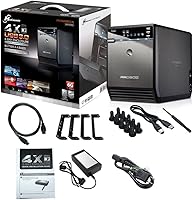
  • Power Input: The unit includes an external power brick to supply adequate power for up to four spinning hard drives simultaneously.
  • Model Number: The official model identifier for this enclosure is HF2-SU3S3, used for warranty registration, support requests, and accessory compatibility checks.

Related Reviews
Mediasonic HF7-SU31C 4-Bay USB 3.2 SATA Hard Drive Enclosure
87%
88%
Performance
92%
Setup & Installation
79%
Cooling Efficiency
95%
Compatibility with Operating Systems
85%
Build Quality
More
Cenmate 4-Bay RAID Enclosure 80TB
73%
83%
Build Quality
78%
RAID Functionality
71%
Cooling & Thermal Management
47%
Mac Compatibility
89%
Windows Compatibility
More
Yottamaster 4 Bay External Hard Drive Enclosure 64TB
82%
94%
Storage Capacity
88%
Ease of Setup
85%
Cooling Performance
90%
Build Quality
91%
Data Transfer Speed
More
ORICO Daisy Chain 4 Bay Hard Drive Enclosure 88TB
85%
97%
Storage Capacity
91%
Ease of Setup
89%
Data Transfer Speed
85%
Build Quality
78%
Thermal Management
More
QNAP TR-004-44WD-US 4 Bay DAS with 12TB Storage
85%
87%
Performance
92%
Ease of Setup
84%
Build Quality
65%
Noise Level
90%
Data Redundancy (RAID 5)
More
Syba SY-ENC50104 4-Bay 3.5” SATA III HDD Enclosure
85%
88%
Build Quality & Durability
91%
Ease of Setup & Installation
83%
Cooling Efficiency
72%
Noise Level
89%
Storage Capacity & Expansion
More
IO CREST SY-ENC50129 8-Bay USB4 40Gbps SATA Enclosure

76%
88%
Build Quality
83%
Drive Compatibility
86%
USB4 Interface & Compatibility
71%
Real-World Transfer Speed
74%
Fan Noise & Thermal Management
More
TerraMaster D4-320
TerraMaster D4-320
80%
93%
Ease of Setup
86%
Transfer Speed
71%
Build Quality
88%
Noise Level
82%
Thermal Management
More
ICY DOCK ToughArmor MB604SPO-B 4 Bay 2.5 SSD/HDD & Optical Disk Drive Enclosure
85%
88%
Build Quality
85%
Cooling Performance
91%
Ease of Installation
87%
Value for Money
89%
Compatibility with Drives
More
Asustor Drivestor 4 Pro AS3304T 4-Bay NAS
83%
91%
Network Performance
88%
Value for Money
94%
Ease of Setup
83%
Storage Expansion
85%
Build Quality
More

FAQ

No, you do not. The enclosure is plug-and-play on both Windows 10/11 and macOS — connect it via USB 3.0 and the drives show up just like any external storage device. No software installation is required for basic use, though you will want third-party tools if you plan to monitor S.M.A.R.T. data.

Each drive appears as its own independent volume, exactly as if you had plugged four separate external drives into your computer. There is no pooling, no RAID, and no special configuration — what you put in each bay is what you see on your desktop.

Not necessarily. The eSATA port on this drive enclosure requires the host system to support port-multiplier functionality over eSATA, which allows one port to communicate with multiple drives. Many modern motherboards do not support this feature, so before relying on eSATA, check your motherboard or expansion card specifications carefully. USB 3.0 is the more reliable fallback for most users.

No, Linux is explicitly not supported by Mediasonic for this model. If your workflow depends on Linux — whether for a home server, media center, or development machine — you will want to look at a different enclosure that has confirmed Linux compatibility.

In auto mode, the fan is quiet enough that most users in a typical home or office environment barely notice it during light-to-moderate workloads like backups or file transfers. Under sustained heavy use, it does spin up and become more audible. The manual mode option gives you some control if you want to tune it to your environment.

Yes, absolutely. The enclosure supports SATA 1, 2, and 3 drives from any manufacturer, and different capacities can coexist across the four bays without issue. Each drive operates independently, so a 4TB drive in one bay and a 12TB drive in another will each mount as their own separate volumes without conflict.

No, it does not. This is a direct-attached storage device, meaning it connects to one computer at a time via USB or eSATA. It has no network port, no Wi-Fi, and no sharing capability built in — if you need storage that multiple users or devices can access simultaneously over a network, you would need a NAS device instead.

Yes, but you will need a 2.5″ to 3.5″ bracket adapter, which is not included in the box and must be purchased separately. Once you have the adapter, 2.5″ SATA SSDs and HDDs seat into the standard bays just fine, with support for capacities up to 18TB per drive on compatible models.

Since there is no RAID or data mirroring, each drive is entirely independent. If the enclosure's power supply or controller fails, the drives themselves should remain intact and readable in another enclosure or docking station. The risk is not data loss across all drives simultaneously — it is more that a single drive failure in any one bay takes only that bay's data with it, with no redundancy to fall back on.

When your computer goes to sleep or shuts down, Power Sync signals the connected drives to spin down automatically alongside the host system. This reduces unnecessary mechanical wear on your hard drives during idle periods and means you do not have to manually power off the enclosure every time you step away from your desk.