darkFlash GK104 Wireless Mechanical Keyboard Mouse Combo





Overview
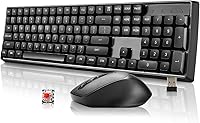
The darkFlash GK104 Wireless Mechanical Keyboard Mouse Combo is one of the few wireless mechanical combos you can find at a budget price point — and that alone makes it worth paying attention to. darkFlash is primarily known for PC cases and cooling hardware, so this keyboard-and-mouse set represents a deliberate push into everyday peripherals. The full-size 106-key layout and 2.4G wireless connection are the headline specs, but the real story here is whether a mechanical typing experience at this price holds up in daily use. It does — with some reasonable caveats you should know upfront.
Features & Benefits
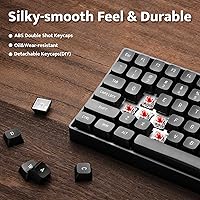
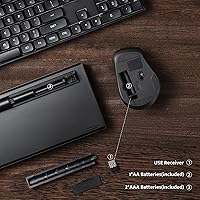
The red linear switches are the standout feature here. They actuate smoothly without the bump or click you get from tactile or clicky variants, which keeps things quiet enough for a shared office or apartment. Both the keyboard and mouse run off AA batteries and connect through a single 2.4G USB dongle — one port handles everything, which is a practical touch. The optical mouse tops out at 1600 DPI, covering most everyday tasks comfortably. Battery life is rated for months of normal use, and in practice that tracks. The numpad is a genuine differentiator; if you crunch numbers or work in spreadsheets regularly, having it built in rather than as an add-on matters.
Best For
This wireless mechanical combo makes the most sense for people stepping up from a basic membrane set who want better key feel without spending a lot. Office workers who type heavily all day will appreciate the linear switches more than casual users. Students setting up a home desk, remote workers who want fewer cables in view, and anyone who switches between Windows and Mac regularly will find the plug-and-play setup genuinely convenient. The numpad inclusion is meaningful for accountants, data entry roles, or anyone who lives in spreadsheets. If you already own a premium mechanical keyboard, this GK104 bundle won't tempt you — but that's not who it's for.
User Feedback
Buyers rate the GK104 bundle at 4.4 stars across nearly 30 reviews, and the praise consistently centers on two things: typing feel and perceived value. Most people coming from membrane keyboards are notably impressed by the switch response. Wireless reliability also earns consistent positive mentions — dropouts appear rare. On the critical side, a few users flag that the mouse feels lighter than expected, and the 1600 DPI ceiling can feel limiting for larger monitors. Some note the key sound is still audible enough to carry in a quiet room. Battery life, however, draws almost no complaints — a meaningful data point given how often it comes up negatively with budget wireless peripherals.
Pros
- Mechanical red switches deliver a noticeably smoother, more satisfying typing feel than any membrane keyboard at this price.
- Both devices share a single USB dongle, keeping desk port usage and cable clutter to a minimum.
- Battery life is genuinely strong — most users report going months between replacements without any performance issues.
- The full-size layout with a dedicated numpad is a rare offering among budget wireless combos.
- Wireless connection is reliable in daily use, with very few reports of signal drops or input lag.
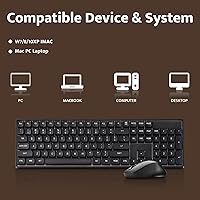
- Works plug-and-play on both Windows and Mac without installing any drivers or additional software.
- AA batteries are included in the box, so the GK104 bundle is ready to use right out of the packaging.
- A straightforward, low-friction upgrade for anyone moving away from a basic membrane setup for the first time.
Cons
- The mouse tops out at 1600 DPI, which feels restrictive on larger screens or high-resolution displays.
- Red linears produce a noticeable sound at typing speed, enough to carry in a very quiet shared space.
- The mouse feels lighter than expected, leaving some users wanting more weight and physical precision.
- There is no backlighting or RGB of any kind, which is a drawback for dimly lit workspaces.
- darkFlash is a relatively new peripheral brand, so long-term reliability data beyond a year or two is still thin.
- The mouse offers no extra buttons, adjustable weight, or meaningful ergonomic contouring for extended daily use.
- Relying on AA batteries rather than a built-in rechargeable cell adds an ongoing supply cost over time.
- Switch quality, while better than membrane, still reflects the entry-level tier and will not satisfy experienced mechanical keyboard users.
Ratings
The darkFlash GK104 Wireless Mechanical Keyboard Mouse Combo scores are generated by AI after deep analysis of verified global buyer reviews, with spam, bot-submitted, and incentivized feedback actively filtered out before scoring. This wireless mechanical combo earns genuinely strong marks in several areas — particularly typing feel, value, and setup convenience — but the scores also reflect real buyer frustrations around mouse performance and sound output without softening them. Where opinion is divided, the numbers show it.
Typing Feel
Wireless Reliability
Value for Money
Mouse Performance
Setup & Compatibility
Battery Life
Build Quality
Key Sound Level
Full-Size Layout
Mouse Ergonomics
Switch Consistency
Desk Aesthetics
DPI Flexibility
Suitable for:
The darkFlash GK104 Wireless Mechanical Keyboard Mouse Combo is a practical fit for anyone who wants the feel of mechanical keys without committing to a high-end setup. Office workers and students who spend long hours typing will notice an immediate improvement over a standard membrane combo, without needing to configure software or fiddle with drivers. The full-size layout with a dedicated numpad makes it especially useful for people who live in spreadsheets, handle data entry, or simply do not want to give up their number keys for a more compact board. Remote workers and home office users benefit from the wireless design — one small USB dongle connects both devices, keeping the desk clean and cable-free. Cross-platform users who move between a Windows machine and a Mac will also find this keyboard-and-mouse set genuinely hassle-free from the moment it is plugged in.
Not suitable for:
The darkFlash GK104 Wireless Mechanical Keyboard Mouse Combo is not the right choice for enthusiast typists who care about premium switch feel, custom keycaps, or programmable layouts. Gamers will find the mouse falls short quickly — the 1600 DPI ceiling and basic optical sensor cannot compete with dedicated gaming mice, and the keyboard offers no anti-ghosting or macro support to speak of. Anyone who needs high-sensitivity cursor control for graphic design, video editing, or a multi-monitor workstation will likely outgrow the mouse within weeks. Typists who strongly prefer a tactile bump or audible click will also find red linears unsatisfying, since smooth linear actuation gives no physical signal at the point of registration. If you are building a long-term, performance-focused peripheral setup, this wireless mechanical combo simply is not designed to grow with those demands.
Specifications
- Brand: This combo is manufactured by darkFlash, a brand primarily known for PC cases and cooling hardware that has expanded into everyday peripherals.
- Model Number: The model designation for this combo is GK104, first made available in December 2023.
- Switch Type: The keyboard uses linear red mechanical switches, which actuate smoothly without a tactile bump or audible click.
- Key Count: The keyboard includes 106 full-size keys, covering a complete layout with a numpad, function row, and standard navigation cluster.
- Wireless: Both devices connect to a computer via a single 2.4G USB dongle, occupying only one port for the entire combo.
- Mouse DPI: The optical mouse offers three selectable sensitivity levels at 800, 1200, and 1600 DPI, switchable via a dedicated button.
- Power Source: Both the keyboard and mouse are powered by AA batteries, which are included in the box at the time of purchase.
- OS Support: The combo operates plug-and-play on both Windows and macOS without requiring any proprietary drivers or companion software.
- Dimensions: The keyboard measures 16.92 × 5.03 × 1.63 inches, fitting comfortably on a standard full-size desk layout.
- Weight: The combined package weight of the keyboard and mouse is 2.6 pounds.
- Mouse Sensor: The mouse uses an optical sensor that tracks reliably on most standard desk and fabric mousepad surfaces.
- Layout: The full-size layout retains a dedicated numpad on the right side, a feature frequently dropped in compact or TKL wireless alternatives.
- Connectivity Type: The 2.4G radio connection provides a low-latency, cable-free link between the receiver and both input devices.
- Color: The combo is available in black, with a consistent finish applied across both the keyboard and mouse bodies.
Related Reviews

Arteck HW192 Wireless Keyboard and Mouse Combo

Mobifice Retro Wireless Keyboard and Mouse Combo

KNOWSQT Wireless Keyboard and Mouse Combo

JOYACCESS Wireless Keyboard and Mouse Combo

ULSOU Wireless Ergonomic Keyboard and Mouse Combo

FOPETT Retro Wireless Keyboard and Mouse Combo

Kootop Wireless Keyboard Mouse Combo

GEEZER Wireless Keyboard and Mouse Combo

EDJO Wireless Keyboard and Mouse Combo
