Overview

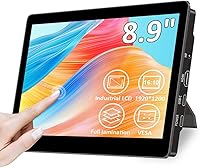
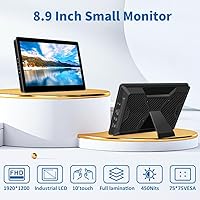
The Magedok T089B 8.9-inch Touchscreen Monitor sits in an interesting niche — compact enough to pair with a mini PC or single-board computer, yet capable enough to handle daily productivity without constant frustration. Its 1920x1200 resolution across a 16:10 aspect ratio gives you slightly more vertical screen space than typical widescreen panels, which actually matters when reading code or long documents. The glass is bonded directly to the panel, so there is no air gap to scatter ambient light or blur touch accuracy. A bundled adjustable stand and 75x75mm VESA support round out a well-considered package that lands between bare-bones budget options and pricier premium portables.

Features & Benefits

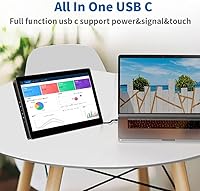
What stands out right away is how touch-friendly this compact touchscreen feels without any driver installation — just plug in via USB-C and it works. The optical bonding is the real story here: instead of having a gap between the glass and the panel underneath, they are fused together, so your finger lands exactly where the cursor goes and overhead glare is noticeably reduced. With 450 nits of brightness, it handles reasonably lit rooms well. The dual USB-C ports cover both power and video simultaneously, and HDMI adds compatibility for devices that lack DisplayPort Alt Mode. Worth flagging: Magedok explicitly warns to use only the included cable, which is a genuine inconvenience.

Best For

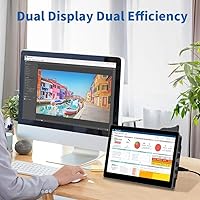
This small monitor makes the most sense for developers and hardware tinkerers already working with Raspberry Pi, Jetson Nano, or similar single-board computers — it supports a wide range right out of the box. Mini PC users running an Intel NUC or Mac mini will find it a natural fit as a space-saving companion screen. It also suits professionals who occasionally need a portable second display without lugging something full-sized. Industrial or in-vehicle builds that need a compact embedded panel are legitimate use cases too. That said, if color-critical work like photo editing is your priority, the 50% NTSC gamut puts this outside that territory.

User Feedback

Buyers tend to single out touch accuracy as a genuine strong point — the optical bonding appears to make a real difference compared to cheaper alternatives many had tried before, and the 450-nit brightness earns praise from people working near windows. On the other side, the USB-C cable restriction is a recurring complaint; third-party cables frequently fail to work, and the included one is short. The stand gets mixed reactions — fine for light tapping, but prone to wobble during more forceful gestures. At 60Hz, refresh rate rarely comes up as a problem for productivity use, though nobody is recommending this for fast-action video.

Pros

  • Optical bonding fuses the glass to the panel, so touch input lands precisely where you expect every time.
  • At 450 nits, this compact touchscreen is brighter than most small monitors in its class — noticeably so in office lighting.
  • Driver-free setup means you just plug in and it works, with no software installation needed on most systems.
  • The 16:10 aspect ratio gives more vertical real estate than standard widescreen panels, which helps when reading code or long documents.
  • Dual full-feature USB-C ports handle both power and video at once, keeping cable clutter minimal.
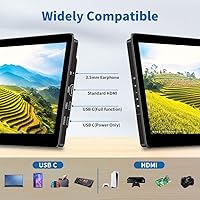
  • HDMI input makes it compatible with devices that lack USB-C DisplayPort Alt Mode, broadening its usefulness considerably.
  • At just 1.1 pounds, this small monitor is genuinely easy to carry without adding bulk to a bag.
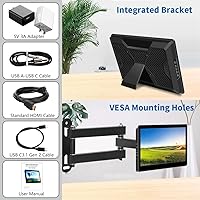
  • VESA mount support gives you real mounting flexibility — wall, arm, or desk stand all work.
  • Single-board computer compatibility is unusually broad, covering Raspberry Pi, Jetson Nano, Rock Pi, and more out of the box.

Cons

  • The included USB-C cable is short, and Magedok warns that third-party cables often fail to work — a recurring frustration for buyers.
  • 50% NTSC color gamut means colors look flat compared to nearly any mainstream consumer display on the market.
  • The stand wobbles under firm touch pressure, which is a problem given this is marketed as a touchscreen device.
  • Only one HDMI port and no DisplayPort means connectivity options are limited for desktop power users.
  • 60Hz refresh rate is fine for productivity but rules this display out for any fluid animation or media work.
  • No built-in speakers are included, so any audio-dependent workflow needs an external solution.
  • The 8.9-inch size is too small for comfortable extended desktop use without supplementing it with another display.
  • Brightness and color settings appear limited compared to larger monitors, with minimal on-screen menu depth reported by users.

Ratings

The scores below for the Magedok T089B 8.9-inch Touchscreen Monitor were generated by our AI rating engine after analyzing verified purchase reviews from buyers worldwide, with spam, bot-submitted, and incentivized feedback actively filtered out. Each category reflects the honest distribution of real user experiences — strengths are credited where earned, and recurring frustrations are scored accordingly without softening. This compact touchscreen sits in a specialized niche, and the ratings are calibrated to reflect how well it serves its actual target audience rather than general consumer expectations.

Touch Accuracy
84%
Buyers who came from cheaper air-gap touchscreens consistently note how much more precise this compact touchscreen feels in daily use. The optical bonding eliminates the offset between where your finger lands and where the cursor registers, which makes tapping small UI elements — like terminal buttons or Raspberry Pi desktop icons — feel reliable rather than frustrating.
A small number of users report occasional touch drift after extended sessions, suggesting calibration can shift slightly over time. It is not a widespread issue, but it is worth noting that optical bonding alone does not guarantee permanently perfect calibration on every unit.
Display Brightness
81%
19%
At 450 nits, this small monitor outperforms the majority of competing displays in its size class, which tend to cluster around 300 nits. Users working in home offices with overhead lighting or near moderately bright windows find the screen readable without straining, which is a genuine advantage over budget alternatives.
The glossy panel surface works against the brightness in strongly lit environments, producing noticeable reflections that can wash out the image. Users near large south-facing windows or bright workbenches mention this as a recurring issue that the raw nit rating alone does not solve.
Image Sharpness
78%
22%
The 1920x1200 resolution on an 8.9-inch panel produces a pixel density that makes text and fine UI details look crisp and easy to read. Developers using it for code editing or terminal work on a Raspberry Pi setup tend to be satisfied with how much readable content fits on screen at once.
Sharpness perception drops noticeably in portrait mode at certain viewing angles, where the glossy panel introduces color shifting. At normal desk viewing distances this is minor, but users who mount the display at arm height on a VESA bracket sometimes find it more pronounced.
Color Accuracy
51%
49%
For productivity tasks — reading documents, browsing, running dashboards, or monitoring system outputs — the color rendering is adequate and not visually unpleasant. Most SBC and mini PC users in this niche are not pushing color-sensitive workloads, so the limitation rarely surfaces as a practical problem for the core audience.
At 50% NTSC, the color gamut is genuinely below average and buyers who expected vibrant output for media or creative work are consistently disappointed. Skin tones look washed out in photos and saturation in videos feels flat, which makes this display a poor fit for any workflow where color fidelity matters.
USB-C Connectivity
62%
38%
Having two full-feature USB-C ports that handle both power and video simultaneously is a meaningful convenience, especially for users running a single-cable setup from a laptop or mini PC. The plug-and-play nature means there is no driver hunting involved — just connect and the display appears within seconds.
The mandatory use of the included cable is a real operational constraint that frustrates a significant portion of buyers. The supplied cable is short, limiting desk layout flexibility, and users who lose or damage it discover that finding a guaranteed-compatible replacement is not straightforward.
Build Quality
73%
27%
The overall chassis feels solid for its weight class, and the optical bonding gives the front glass a premium integrated look compared to monitors where the panel sits visibly behind a separate layer of glass. At 1.1 pounds it does not feel flimsy, and the port placement is practical rather than awkward.
The rear plastic shows minor flex under pressure, and the overall finishing quality has some unit-to-unit variation based on buyer reports. It is not a precision-built device, and buyers comparing it against more expensive portable monitors will notice the difference in material feel.
Stand Stability
58%
42%
The included stand covers the basics — it holds the monitor upright in landscape and portrait orientations and adjusts angle reasonably well for desk use. For users who primarily use the display as a stationary SBC screen with minimal touch interaction, it works fine day to day.
Under active touch use, particularly repeated taps or swipe gestures, the stand wobbles noticeably and can shift position on smooth desk surfaces. Multiple buyers specifically flag this as a frustration and recommend mounting on a VESA arm as the more reliable long-term solution.
SBC Compatibility
89%
Broad out-of-the-box compatibility with Raspberry Pi, Jetson Nano, Rock Pi, Banana Pi, Khadas, Odroid, and other popular single-board computers is one of this display's clearest strengths. Makers and developers rarely need to troubleshoot compatibility — in most cases it simply works on first connection via HDMI or USB-C.
Touch input compatibility on less common SBC operating systems can be inconsistent, and a handful of users report needing to manually configure touch device settings on custom Linux builds. It is a niche issue, but relevant for users running non-standard OS images.
Plug-and-Play Setup
86%
The driver-free experience is genuinely appreciated across the reviewer base — Windows, macOS, and mainstream Linux distributions all recognize this compact touchscreen without any additional software. For first-time SBC users especially, the absence of a complicated setup process removes a common point of frustration.
On a small number of systems, particularly custom Android builds and some older Windows configurations, touch input is detected as a mouse rather than a proper touch device, limiting gesture support. This is not the norm, but it is not isolated enough to ignore.
Portability
82%
18%
At just 1.1 pounds and with a footprint smaller than a sheet of A5 paper, this small monitor is easy to slip into a bag alongside a laptop for remote work or travel. Users who pair it with a compact mini PC for a portable dual-screen setup consistently praise how little space the whole arrangement occupies.
The stand adds some awkwardness when packing, as it is not detachable in a way that makes it truly flat to store. The short included USB-C cable also limits how easily you can reconfigure the setup in unfamiliar spaces like hotel desks or meeting rooms.
Value for Money
74%
26%
Within the niche of small touchscreen monitors with optical bonding, this Magedok display sits at a price point that is hard to match without stepping down to displays with noticeably weaker specs. The combination of 450 nits brightness, proper touch responsiveness, and broad SBC support for the asking price is competitive.
Buyers expecting the color accuracy and build refinement of pricier portable monitors will feel the compromises more acutely. The cable restriction and stand limitations are the kinds of issues that feel more acceptable on a budget device but sting slightly more at mid-range pricing.
HDMI Functionality
77%
23%
The HDMI input meaningfully extends the compatibility of this display to TV sticks, older laptops, and devices that lack USB-C video output, which is a practical advantage over USB-C-only alternatives in this form factor. Users building HTPC setups or plugging in Chromecast-style dongles find this port genuinely useful.
There is only one HDMI port and no DisplayPort option, which limits multi-source switching for users who want to connect more than one device. Buyers looking to hot-swap between a laptop and a mini PC without USB-C on both will find the single HDMI a bottleneck.
Glare Resistance
67%
33%
The optical bonding reduces internal reflections between the glass and panel layers, which is a real improvement over air-gap displays in mixed lighting. Users working in dimmer environments or with controlled lighting note a cleaner, less washed-out image than they experienced with similarly sized competitors.
The glossy screen surface still picks up environmental reflections from windows and overhead lighting, which the bonding alone cannot eliminate. Users in brighter workspaces will likely want to adjust monitor placement, and a matte screen protector is a commonly suggested workaround in buyer discussions.
Refresh Rate Experience
71%
29%
For the primary use cases this display targets — coding, document review, terminal monitoring, light media playback — 60Hz is entirely adequate and no buyers in productivity roles flag it as a shortcoming. Video playback at standard frame rates looks smooth enough for casual viewing on a secondary screen.
Anyone hoping to use this compact touchscreen for gaming or high-frame-rate video will find 60Hz a ceiling that quickly becomes noticeable. It is not a flaw for the intended audience, but it does close off a segment of buyers who might otherwise consider it for light entertainment use.

Suitable for:

The Magedok T089B 8.9-inch Touchscreen Monitor was clearly built with a specific type of user in mind, and for that user it delivers real value. Developers and hardware enthusiasts working with Raspberry Pi, Jetson Nano, Rock Pi, or similar single-board computers will find broad compatibility and a plug-and-play setup that removes the usual headaches. Mini PC users — whether running an Intel NUC, a Mac mini, or a compact Windows box — get a tidy companion screen that does not dominate the desk. Professionals who occasionally need a portable second display for travel or remote work will appreciate the lightweight build and the flexibility of USB-C connectivity. Those building embedded, in-vehicle, or light industrial setups will find the VESA mount and durable form factor genuinely practical rather than just a checkbox feature.

Not suitable for:

The Magedok T089B 8.9-inch Touchscreen Monitor is not the right call for everyone, and it is worth being direct about where it falls short. Photographers, video editors, or anyone who relies on accurate color reproduction should look elsewhere — a 50% NTSC color gamut means hues will appear noticeably muted compared to even a mid-tier consumer display. Users who want a general-purpose desktop monitor will quickly outgrow 8.9 inches; this is a specialized tool, not a replacement for a proper workstation screen. The USB-C cable restriction is a real operational friction point — third-party cables frequently fail, and the included one is short, so buyers who want flexibility in cable management will find that frustrating. Anyone expecting the stand to hold firm under heavy touch use should be cautious, as it is better suited for occasional taps than sustained stylus-style interaction.

Specifications

  • Screen Size: The display measures 8.9 inches diagonally, making it one of the more compact touchscreen monitors available for mini PC and SBC setups.
  • Resolution: Native resolution is 1920x1200 pixels (FHD), delivering sharp text and fine detail across the full panel.
  • Aspect Ratio: The 16:10 aspect ratio provides slightly more vertical screen space than standard 16:9 widescreen displays, which is useful for reading documents and code.
  • Brightness: Peak brightness is rated at 450 nits, which is meaningfully higher than most competing small monitors and holds up reasonably well in ambient light.
  • Contrast Ratio: The panel offers a 900:1 contrast ratio, providing adequate differentiation between light and dark content for productivity tasks.
  • Refresh Rate: The display runs at 60Hz, which is standard for productivity and general media use but is not suited for high-frame-rate applications.
  • Color Gamut: Color coverage is rated at 50% NTSC, which is below average and means color-critical work such as photo or video editing is not well served by this display.
  • Touch Input: The touchscreen supports 10-point capacitive touch and requires no driver installation on compatible operating systems.
  • Panel Bonding: Optical bonding fuses the cover glass directly to the LCD panel, reducing glare reflection and eliminating the parallax gap that causes touch inaccuracy on cheaper displays.
  • Connectivity: The monitor includes two full-feature USB-C ports supporting both power delivery and DisplayPort Alt Mode video signal, plus one HDMI input.
  • Power Input: The display is powered via USB-C at 5V, drawing power directly from the connected device or a USB-C power adapter.
  • VESA Mount: Standard 75x75mm VESA mounting holes (M4 screw size) are located on the rear of the unit for wall or arm mounting.
  • Weight: The monitor weighs 1.1 pounds, keeping it light enough for portable use or travel without adding significant bag weight.
  • Dimensions: Overall dimensions with stand measure 6.69 x 8.27 x 5.91 inches, occupying a very small desk footprint.
  • Surface Finish: The display uses a glossy screen surface, which enhances color vibrancy but may show reflections in strongly lit environments.
  • Driver Support: The unit is driver-free and operates as a plug-and-play display on Windows, macOS, Linux, and most SBC operating systems without additional software.
  • SBC Compatibility: Confirmed compatible single-board computers include Raspberry Pi, Jetson Nano, Rock Pi, Tinker Board, Banana Pi, Khadas, Odroid, and others.
  • Stand Type: The included stand is adjustable and supports both landscape and portrait orientation, though it is not rated for heavy-duty repeated touch pressure.

Related Reviews
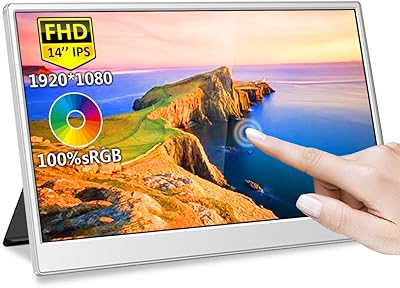
Magedok MG140-FT02 14-Inch Portable Touchscreen Monitor
74%
91%
Portability
74%
Display Quality
77%
Color Accuracy
63%
Touchscreen Responsiveness
79%
Connectivity & Compatibility
More
Magedok T101F 10.1-inch Portable Touchscreen Monitor
72%
88%
USB-C Connectivity
63%
Touch Accuracy
79%
Display Quality
84%
Aspect Ratio Fit
76%
Setup Experience
More
Magedok 16-inch 4K OLED Touchscreen Portable Monitor
85%
91%
Display Quality
89%
Portability
75%
Touchscreen Performance
65%
Brightness in Bright Environments
88%
Gaming Performance
More
CAMECHO 9 Inch LCD Monitor
82%
89%
Value for Money
78%
Display Quality
92%
Portability
84%
Ease of Use
88%
Mounting Flexibility
More
Eyoyo EM08B 8″ Monitor
75%
91%
Input Versatility
88%
BNC Connectivity
84%
Setup & Plug-and-Play Experience
82%
Mirror Flip Functionality
76%
Image Clarity for Surveillance Use
More
Eyoyo EM101T 10-inch Touchscreen Monitor
75%
83%
Touch Responsiveness
78%
Image Quality
91%
Ease of Setup
76%
Build Quality
87%
Input Versatility
More
Prechen 24-Inch Touchscreen Monitor
83%
92%
Value for Money
88%
Display Quality
90%
Touchscreen Responsiveness
84%
Build Quality
80%
Gaming Performance
More
ELECROW 10.1 Inch Touchscreen Monitor
86%
88%
Display Quality
80%
Touchscreen Responsiveness
94%
Portability
92%
Ease of Setup
85%
Build Quality
More
ViewSonic TD2220 22-Inch Touchscreen Monitor
68%
83%
Touch Responsiveness
81%
Build Quality
76%
Screen Clarity
87%
Scratch Resistance
58%
Connectivity
More
Pisichen 27-Inch 2K QHD Touchscreen Monitor
72%
88%
Image Clarity
83%
Touch Responsiveness
81%
Value for Money
69%
Build Quality
52%
Ergonomics & Adjustability
More

FAQ

Yes, it does. The Magedok T089B 8.9-inch Touchscreen Monitor is broadly compatible with Raspberry Pi boards and a wide range of other single-board computers. You connect via HDMI or USB-C depending on which Pi model you have, and touch input typically works without any driver installation on Raspberry Pi OS.

This is genuinely important to know before you buy: Magedok specifically warns to use only the included USB-C cable for video and power transmission. Many buyers have reported that third-party cables either fail to carry the display signal or cause intermittent issues. The included cable works reliably, but it is short, so plan your desk setup accordingly.

It should, as long as your MacBook supports USB-C with DisplayPort Alt Mode, which most modern MacBook Pro and MacBook Air models do. Plug in the included USB-C cable and the display should be detected automatically. Touch input may require macOS to recognize it as a valid HID device, which typically happens without extra steps on recent versions.

Noticeably better than most budget alternatives in this size range. The optical bonding means the glass sits directly on the panel with no air gap, so your finger registers exactly where it appears to land rather than slightly offset. It makes a real difference when tapping small interface elements or dragging content around.

It holds up reasonably well in moderately lit rooms, which is better than most small monitors in this category. That said, the glossy screen surface will produce reflections in direct sunlight or very bright environments, so placing it directly opposite a bright window is not ideal. In a typical indoor setting it is perfectly workable.

For light tapping it is fine, but if you are doing a lot of repeated or forceful touch gestures, the stand does tend to wobble. Several users mention this as a minor frustration. If you plan to interact with it heavily via touch, mounting it on a VESA arm is a much more stable solution.

Yes. Both the included stand and the VESA mount support portrait orientation, which can be genuinely useful for reading long documents, monitoring logs, or running vertical app layouts on a mini PC or SBC setup.

For casual viewing it is fine. The resolution is sharp and 60Hz is smooth enough for standard video playback. The color gamut is on the lower side at 50% NTSC, so colors will look somewhat flat compared to a quality consumer TV or monitor, but for background content or secondary screen media it is not a dealbreaker.

The HDMI input is there specifically for devices that do not support USB-C DisplayPort Alt Mode. Some mini PCs, TV sticks, and older laptops output video only through HDMI, so having that port makes this small monitor compatible with a much broader range of hardware than a USB-C-only display would be.

Yes, the 75x75mm VESA mount on the back is designed exactly for that kind of installation. Builders using it in automotive dashboards, industrial panels, or custom enclosures can attach it to a standard VESA bracket with M4 screws. Just make sure your power source can supply stable 5V via USB-C, as voltage inconsistency can cause display issues in vehicle environments.