Overview

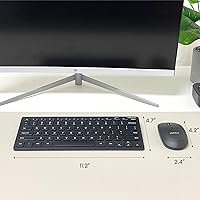
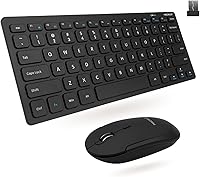
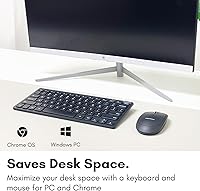
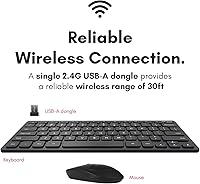
The Macally RFCOMPACTKEYCB Wireless Keyboard and Mouse Combo is a no-fuss bundle aimed at anyone who wants a cleaner desk without spending a lot. It connects via a single USB dongle that handles both devices at once — plug it in and you're typing within seconds. The 78-key layout drops the numpad to shrink the footprint but keeps function shortcuts intact so daily tasks don't feel compromised. Worth noting: it runs on AAA batteries rather than a built-in rechargeable cell. That's a minor inconvenience for some, but swappable batteries mean zero downtime waiting for a charge. For a secondary workstation or travel kit, this compact combo punches above its price.
Features & Benefits

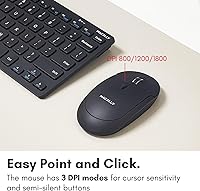
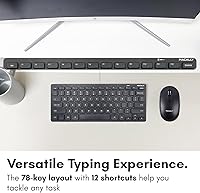
The scissor-flex keys are probably the biggest surprise here — they feel noticeably more responsive than the mushy membranes you often find at this price. Twelve built-in shortcuts handle things like volume and media controls without needing extra software. The mouse covers three DPI steps (800, 1200, and 1600), which is enough range for general productivity tasks even if it won't satisfy a power user. Quiet-click buttons make a real difference in shared spaces — coworkers won't hear every click across the room. The 30-foot wireless range is generous for typical home office distances, and the single nano-dongle keeps your USB ports nearly free. A two-year warranty rounds things out.

Best For

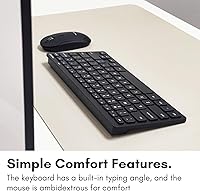
This keyboard and mouse bundle suits a pretty specific type of buyer, and knowing that upfront saves frustration. If you're tight on desk space, working from a small apartment, or setting up a spare workstation for occasional use, it fits those situations well. Students and remote workers who carry peripherals between locations will appreciate how light and compact everything is. That said, it's optimized for Windows and ChromeOS — the layout is designed around PC conventions, so Mac users who rely on specific modifier keys may find it awkward. People with larger hands might find the mouse a touch small for longer sessions. It's a practical choice, not a premium one.

User Feedback

Buyers tend to highlight two things right away: typing feel and the compact size. Many mention that the keys feel better than expected and that the overall footprint genuinely freed up desk space. The quiet mouse clicks also earn consistent praise in shared or open-office settings. On the downside, a recurring thread in reviews flags the lack of a rechargeable battery — some buyers find swapping AAAs more often than expected. A few users with larger hands report that the mouse feels undersized over long sessions. On a more encouraging note, a meaningful portion of reviewers mention buying the Macally wireless set a second time after their first unit wore out, which says something real about long-term satisfaction.

Pros

  • Plug-and-play setup via a single nano-dongle — no drivers, no pairing, no delays.
  • Scissor-flex keys feel noticeably responsive and comfortable for a combo at this price tier.
  • Quiet-click mouse buttons are genuinely office-friendly and unobtrusive in shared spaces.
  • The compact footprint frees up real desk space without removing essential keys or shortcuts.
  • A 2-year warranty and lifetime support commitment add meaningful reassurance for budget buyers.
  • Wireless connection holds steady for typical home office and living-room distances without lag.
  • Three DPI settings give enough cursor flexibility for switching between browsing and document work.
  • Light enough to pack into a bag, making it a practical carry for remote workers or students on the move.
  • Many buyers repurchase this keyboard and mouse bundle after their first unit wears out — a real signal of satisfaction.
  • Works reliably across a wide range of Windows and ChromeOS devices straight out of the box.

Cons

  • No built-in rechargeable battery means ongoing AAA replacements that add up in cost and inconvenience.
  • Mouse DPI tops out at 1600, which feels limiting on high-resolution monitors or detail-oriented tasks.
  • The plastic build shows wear over time, and the scroll wheel can lose precision after extended months of use.
  • Occasional wireless stutters have been reported when the dongle is obstructed or plugged into a distant rear port.
  • Mac users will encounter persistent modifier key mismatches that make the layout feel awkward long-term.
  • No backlighting on the keyboard makes low-light or nighttime use noticeably harder.
  • The mouse is too small for users with large hands, causing grip fatigue during longer work sessions.
  • No customization software means key remapping, macro creation, and DPI fine-tuning are completely off the table.

Ratings

The scores below for the Macally RFCOMPACTKEYCB Wireless Keyboard and Mouse Combo were generated by AI after analyzing thousands of verified global buyer reviews, with spam, bot-submitted, and incentivized feedback actively filtered out. The result is an honest, balanced summary that reflects what real users actually experienced day-to-day — strengths and frustrations alike. Every category score is weighted against both the product's price tier and how it performs relative to buyer expectations in that class.
Typing Feel
83%
Most buyers are genuinely surprised by how responsive the scissor-flex keys feel at this price point. The keys have a satisfying, controlled travel that makes extended typing sessions more comfortable than the mushy alternatives common in budget combos. Office workers and students regularly call it out as one of the main reasons they recommend this set.
A small but consistent group of users — especially those coming from mechanical keyboards — find the feedback too shallow for fast, accurate typing. Key chatter under heavy use has also been mentioned by a handful of reviewers, though it appears to be less common than the praise.
Mouse Comfort & Ergonomics
67%
33%
For users with average or smaller hands, the mouse fits naturally during normal workday tasks like browsing, document editing, or light spreadsheet work. The slim profile keeps wrist strain low for shorter sessions, and the quiet-click buttons add a genuinely pleasant tactile experience in quiet environments.
Users with larger hands consistently flag the mouse as too small for extended use, leading to finger fatigue and an awkward grip after an hour or more. It is clearly sized for compact convenience rather than all-day ergonomic performance, and buyers should factor that in honestly before purchasing.
Wireless Reliability
78%
22%
In typical home office and single-room setups, the 2.4GHz RF connection holds steady without noticeable lag or drop. The single nano-dongle pairing is reliable enough that most users simply forget there is any wireless tech involved — it just works consistently for daily productivity tasks.
A recurring thread in reviews mentions occasional micro-stutters or brief disconnections, particularly when the USB dongle is plugged into a rear port on a desktop tower placed under a desk. Distance and obstructions matter more than Macally's 30-foot claim suggests in less-than-ideal real-world environments.
Value for Money
91%
At its price point, this keyboard and mouse bundle is difficult to fault as a practical everyday tool. Buyers consistently describe it as one of the better-value combos they have tried, especially when used as a secondary workstation setup or a travel-friendly spare. The included warranty adds meaningful reassurance that most rivals at this tier do not offer.
Expectations need to be calibrated correctly — buyers who compare it to mid-range or premium peripherals will notice the compromises in mouse size and build materials. A few reviewers felt the overall plastic construction felt lighter than hoped, which can read as cheap even when the functional performance holds up fine.
Build Quality & Durability
72%
28%
The keyboard shell feels reasonably solid for daily desk use, and a notable share of long-term reviewers report the unit still performing well after a year or more of regular typing. The fact that many buyers mention repurchasing after their first unit wore out suggests the lifespan is acceptable for the price.
The all-plastic construction does show wear over time, particularly around high-contact keys. Some users also noted that the mouse scroll wheel feels less precise after extended months of use, and the light body of the combo makes it feel less premium than photos suggest when you first pick it up.
Setup & Ease of Use
94%
Plug-and-play is one area where this combo genuinely delivers without exception. Users across all technical skill levels describe the setup as completely effortless — plug the nano-dongle in, and both devices work immediately. There is no driver installation, no pairing mode, and no configuration needed.
The simplicity of setup also means there is no customization software available. Users who want to remap keys, adjust mouse acceleration curves, or create macros will find nothing here — what you see is what you get, which is fine for basic use but limiting for anyone with specific workflow needs.
Battery Life
61%
39%
Swappable AAA batteries do have a practical upside — when power runs out, a quick battery change gets you back to work in under a minute with no waiting for a charge cycle. For users in situations where USB charging is inconvenient, this setup can actually be preferable to a rechargeable design.
The lack of a built-in rechargeable battery is the single most common complaint across buyer reviews. Users report needing to replace batteries more often than expected, particularly in the keyboard, and the ongoing cost of AAAs adds up over time. In a product category where rechargeable options exist at similar prices, this is a real trade-off.
Keyboard Layout & Shortcuts
81%
19%
The 78-key layout manages to feel complete for general productivity tasks despite the missing numpad. The 12 built-in function shortcuts for media, volume, and system controls work reliably without extra software, which most buyers appreciate as a practical touch for day-to-day use.
Number-heavy users — accountants, data entry workers, or anyone accustomed to a full-size layout — will miss the numpad and may find themselves adjusting their workflow more than expected. The compact layout also places some keys in slightly non-standard positions that can cause brief muscle-memory friction for fast typists switching from a full-size board.
Mouse DPI & Precision
69%
31%
Having three DPI options (800, 1200, and 1600) gives everyday users enough range to tailor cursor sensitivity to their monitor setup. The 1200 setting hits a sweet spot for most standard tasks, and switching between modes is quick enough that it becomes a minor but useful habit for users who move between tasks.
The DPI ceiling of 1600 is noticeably low by modern standards, and users who do any kind of graphic work, detailed spreadsheet navigation, or even moderate gaming will likely find it insufficient. Precision at the lower DPI settings can also feel jittery on higher-resolution monitors, which a number of reviewers flagged.
Noise Level
88%
The quiet-click mouse mechanism earns consistent, unprompted praise from buyers working in open offices, shared apartments, or late-night home setups. It is noticeably quieter than standard click switches without sacrificing the tactile feedback needed to know a click registered, which is a harder balance to strike than it sounds.
A small group of users found the quiet clicks slightly too soft, making it occasionally unclear whether a click had registered — particularly for double-click actions. The keyboard is quieter than a mechanical board but still produces enough keystroke noise to be audible in silent rooms.
Portability & Size
86%
The reduced footprint is a genuine, practical advantage for anyone working in tight quarters. The combo is light enough to slip into a bag without adding noticeable weight, and the compact keyboard in particular makes it one of the more travel-friendly wired-replacement options in its price range.
The smaller size is a deliberate trade-off, not a universal win. Desktop users who had a full-size layout before may feel the loss of spread-out key spacing over longer sessions. The mouse, while easy to pack, is not compact enough to qualify as a true travel mouse by strict standards.
Compatibility
74%
26%
Out of the box, the combo works cleanly with Windows and ChromeOS machines without any setup friction. Users on those platforms — the clear majority of buyers — report no compatibility issues across a wide range of devices including older laptops, desktops, and Chromebooks.
Mac users face a meaningful layout mismatch. The keyboard is built around PC conventions, so key labels and modifier positions do not map naturally to macOS workflows. Macally lists Apple devices as compatible, but the layout friction is real enough that Mac-primary users should look elsewhere or prepare for a period of relearning.
LED Indicators
77%
23%
The keyboard LED indicators for Caps Lock, Num Lock, and similar states are clearly visible without being distracting. Users working in dimmer environments appreciate being able to glance down and confirm lock states without toggling a key just to check — a small but genuinely useful touch.
There is no keyboard backlighting, which limits usability in low-light environments beyond the basic indicator lights. Buyers who work frequently in dark or dimly lit rooms will likely find this a real gap, especially since some competing combos at a similar price offer at least a basic backlight option.
Warranty & Support
85%
Macally's up to 2-year warranty and stated lifetime support commitment stands out positively in a product category where many competitors offer limited or no post-purchase coverage. Buyers who have needed to contact support report generally positive outcomes, and the hassle-free return policy adds extra peace of mind.
Warranty terms can vary depending on region and purchase channel, and a handful of reviewers note that the claims process required more back-and-forth than expected. Lifetime support sounds impressive, but its practical scope — software updates, replacement parts — is unclear for a product this simple.

Suitable for:

The Macally RFCOMPACTKEYCB Wireless Keyboard and Mouse Combo is a strong fit for anyone who wants a functional, no-fuss wireless setup without a significant financial commitment. It works particularly well for students setting up a dorm desk, remote workers who need a lightweight travel-friendly spare, or anyone adding a second workstation to a tight space. People switching away from a laptop-only workflow will find it a practical and affordable first step into external peripherals — the plug-and-play setup removes every barrier to getting started. Office workers in shared or open-plan environments will appreciate the quiet-click mouse, which keeps noise to a minimum during calls and focused work hours. Windows and ChromeOS users get the most out of this bundle since the layout maps naturally to those platforms with zero configuration needed.
Not suitable for:

Buyers who rely heavily on a numpad for data entry, accounting, or spreadsheet-heavy work should look elsewhere, as this keyboard and mouse bundle simply was not designed with that workflow in mind. Users with large hands are likely to find the mouse undersized for full-day use — it is genuinely more comfortable for average or smaller hands, and that becomes a real fatigue issue over long sessions. Anyone expecting rechargeable peripherals will be disappointed, since both devices run on AAA batteries, and the replacement frequency catches some buyers off guard over time. Mac-primary users should also be cautious: while Macally lists Apple devices as compatible, the layout is built around PC conventions and the modifier key placement creates friction that never fully goes away. Finally, anyone who needs high-precision cursor control for graphic design, video editing, or even moderate gaming will hit the ceiling of the 1600 DPI mouse quickly.

Specifications

  • Connectivity: Both the keyboard and mouse connect via a single 2.4GHz RF USB nano-dongle with no Bluetooth pairing required.
  • Wireless Range: The combo operates reliably at distances up to 30 feet from the USB receiver under typical line-of-sight conditions.
  • Keyboard Keys: The keyboard features 78 scissor-flex keys including 12 built-in function shortcut keys for media and system controls.
  • Key Type: Scissor-switch mechanism under each key provides a controlled, low-profile keystroke with moderate tactile feedback.
  • Mouse DPI: The mouse offers three selectable DPI sensitivity levels — 800, 1200, and 1600 — switchable via a dedicated button.
  • Mouse Buttons: The mouse has a 3-button layout consisting of left click, right click, and a center scroll wheel with click function.
  • Click Mechanism: Mouse buttons use a quiet-click mechanism engineered to significantly reduce audible click noise compared to standard switches.
  • Power Source: The combo requires 4 AAA batteries in total — no built-in rechargeable cells are included or supported.
  • LED Indicators: The keyboard includes LED status indicators for Caps Lock, Num Lock, and other toggle states.
  • Combo Weight: The combined weight of the keyboard and mouse is approximately 12 oz, making the set notably lightweight for portability.
  • OS Compatibility: Fully compatible with Windows and ChromeOS; Mac is listed as supported but the layout is optimized for PC key conventions.
  • Device Compatibility: Works with desktops, laptops, and supported devices from brands including Dell, HP, Lenovo, Asus, Acer, and Samsung.
  • USB Requirement: A single standard USB-A port is required to connect the nano-dongle, which handles both devices simultaneously.
  • Warranty: Macally provides up to a 2-year limited warranty and offers lifetime customer support for this product.
  • Model Number: The official model number is RFCOMPACTKEYCB, manufactured by Mace Group Inc under the Macally Peripherals brand.
  • Availability: This product was first made available in November 2019 and is not discontinued as of the most recent listing data.
  • BSR Ranking: The combo holds a Best Sellers Rank of #169 in the Computer Keyboard and Mouse Combos category on Amazon.
  • Drivers Required: No driver installation is needed — the combo is fully plug-and-play on all supported operating systems.

Related Reviews

Arteck HW192 Wireless Keyboard and Mouse Combo
78%
78%
Build Quality
72%
Typing Experience
63%
Mouse Comfort & Ergonomics
81%
Battery Life
69%
Wireless Connectivity
More
MARVO Wireless Keyboard and Mouse Combo
76%
91%
Value for Money
88%
Wireless Connectivity
79%
Mouse Performance
63%
Keyboard Typing Feel
67%
Ergonomics & Comfort
More
Atelus Wireless Keyboard and Mouse Combo
83%
94%
Ease of Setup
88%
Ergonomics & Comfort
90%
Design & Aesthetics
80%
Mouse Performance
86%
Keyboard Performance
More
QUASIO Wireless Keyboard and Mouse Combo
77%
88%
Value for Money
93%
Setup & Ease of Use
79%
Typing Comfort
84%
Wireless Connectivity & Range
72%
Mouse Performance
More
SABLUTE Wireless Keyboard and Mouse Combo
84%
88%
Typing Comfort
92%
Battery Life
85%
Ergonomics
73%
Connectivity Stability
80%
Backlighting Performance
More
GEEZER Wireless Keyboard and Mouse Combo
72%
83%
Value for Money
91%
Aesthetic Design
94%
Ease of Setup
67%
Typing Feel
62%
Mouse Quality
More
VEILZOR UK418 Wireless Keyboard and Mouse Combo
81%
91%
Value for Money
84%
Typing Comfort
89%
Noise Level
82%
Wireless Reliability
76%
Mouse Ergonomics
More
MPTOG S801AG Wireless Keyboard and Mouse Combo
75%
88%
Aesthetic Design
93%
Ease of Setup
78%
Typing Feel
61%
Mouse Tracking Accuracy
82%
Wireless Reliability
More
Vssoplor Wireless Keyboard and Mouse Combo
82%
91%
Value for Money
84%
Keyboard Typing Experience
61%
Mouse Ergonomics
88%
Wireless Connectivity & Stability
72%
Battery Life
More
Hayyiesh KG659-01 Wireless Keyboard and Mouse Combo
75%
88%
Value for Money
79%
Keyboard Comfort & Ergonomics
74%
Key Feel & Typing Experience
58%
Mouse Build Quality
86%
Noise Level
More

FAQ

No, there is nothing to install. Just plug the nano-dongle into a USB port and both the keyboard and mouse are recognized immediately. It works on Windows and ChromeOS right out of the box without any setup steps.

Technically yes, but with some friction. The Macally RFCOMPACTKEYCB Wireless Keyboard and Mouse Combo is designed around PC conventions, so key labels and modifier positions do not map naturally to macOS. If you are a casual Mac user it is workable, but if you rely on specific macOS shortcuts daily, the layout mismatch will likely frustrate you over time.
Because both devices share a single nano-dongle, they are paired together as a unit. You cannot split them across two separate devices simultaneously — both must be connected through the same dongle plugged into one host device.

Battery life varies depending on usage intensity, but most users report needing to replace the keyboard batteries every few months under regular daily use. The mouse tends to last a bit longer between changes. Keeping a spare set of AAA batteries on hand is a good habit with this combo.

That depends on your hand size. Users with average or smaller hands generally find it comfortable enough for a full workday. Those with larger hands, however, consistently report grip fatigue after extended sessions because the mouse body is on the smaller side. If you have large hands and work long hours, it is worth considering a larger dedicated mouse instead.

For most typical desk setups the connection is solid and lag-free. Issues tend to crop up when the dongle is plugged into a rear port on a desktop tower placed under a desk, or when there is significant interference in the environment. If you experience any stuttering, try moving the dongle to a front USB port or using a short USB extension cable to bring it closer to the devices.

No, there is no backlight on the keyboard. It has small LED indicators for Caps Lock and similar toggle states, but the keys themselves are not illuminated. If you work in low-light or dark environments, that is a notable limitation to factor in before buying.

Honestly, not really. The mouse tops out at 1600 DPI, which is on the low side for precision-heavy tasks like graphic design, photo retouching, or any work where fine cursor control on a high-resolution display matters. It performs fine for general productivity tasks like document editing and browsing, but creative professionals should look for a higher-DPI dedicated mouse.

Since both devices share one USB dongle, replacing just one piece with a third-party peripheral would require that replacement to have its own separate receiver or connectivity method. The keyboard and mouse in this bundle are not individually sold as replacements through the same dongle pairing, so if one fails under warranty, contacting Macally support directly is the best path forward.

The 78-key layout means the numpad is gone, and a few keys are in slightly different positions than a full-size board, so there is a short adjustment period for fast typists. That said, the scissor-flex switches feel noticeably responsive for the price, and most users adapt within a day or two. If you never use the numpad to begin with, the transition feels almost effortless.