Overview

The M-Audio Midisport Uno USB MIDI Interface has been quietly doing its job since 2006 — and that kind of staying power says a lot in a market where gear comes and goes fast. This is a single-in/single-out MIDI bridge, which is exactly what most solo musicians need when connecting a keyboard or controller to a computer. It draws power directly from your USB port, works on both Windows and macOS, and requires no external adapter. Don't expect multiple ports or advanced routing options. What you get instead is a focused, no-frills workhorse that handles the one job it was built for, reliably.
Features & Benefits

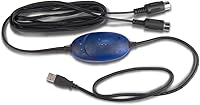
One of the most practical things about the Midisport Uno is that it pulls power straight from your USB port — no wall adapter, no hunting for an outlet. The built-in USB cable is a small but genuinely useful touch; one fewer loose cable rattling around in your bag. At under four ounces, this little interface is light enough to forget about until you need it on stage or in the studio. It supports 16 MIDI channels in each direction, covering the full range of standard DAW workflows — picture a synth keyboard plugged into Ableton or Logic without any fuss. You can also stack extra units across available USB ports if your rig eventually grows.

Best For

This MIDI adapter is an obvious fit for anyone just starting out with MIDI — someone who bought their first keyboard and wants to get it talking to GarageBand or FL Studio without overcomplicating things. Home studio producers who only need a single keyboard or controller connected at a time will find everything they need here. It also works well for gigging musicians who want something lightweight and reliable to throw in a backpack. Teachers setting up simple MIDI stations for students will appreciate how little setup it demands. And if your old interface finally gave out, this little interface is a dependable replacement that won't require much of an adjustment period.

User Feedback

Across more than 700 ratings, this MIDI adapter holds a solid 4.3-star average — a respectable score for something that has been on the market for nearly two decades. Most buyers highlight ease of setup and consistent day-to-day reliability as its strongest points. Where things get more nuanced is with drivers: a portion of users have reported hiccups after major OS updates, particularly on newer macOS versions, though the majority get it running without incident. A few buyers also wished the built-in cable were a bit longer for certain desk arrangements. On durability, long-term owners are split — many report years of trouble-free use, while others note the rubber body showing wear earlier than expected.

Pros

  • Bus-powered design means you can use it anywhere without hunting for a power outlet.
  • The built-in USB cable keeps your cable situation cleaner and removes one potential failure point.
  • At under four ounces, this little interface is light enough to forget you packed it.
  • Works with virtually every standard DAW and MIDI-compatible software right out of the box.
  • Solid 4.3-star average across 700-plus real-world ratings reflects genuinely consistent performance.
  • Compatible with both Windows and macOS, covering the vast majority of musician setups.
  • Supports 16 MIDI channels in each direction, more than enough for any solo keyboard or controller workflow.
  • Has been in continuous production since 2006, which speaks to its reliability and ongoing manufacturer support.
  • Multiple units can be added across USB ports if your MIDI needs grow over time.
  • Setup is fast and uncomplicated — most users are up and running within minutes.

Cons

  • Limited to a single MIDI input and output, so it cannot handle multi-device hardware rigs on its own.
  • A number of users have reported driver issues after major macOS updates, requiring extra troubleshooting steps.
  • The fixed-length built-in cable can feel restrictive depending on your desk or studio layout.
  • The rubber housing shows cosmetic and physical wear faster than expected under regular gigging conditions.
  • No MIDI activity indicator lights, so diagnosing connection issues requires guesswork or software monitoring.
  • Not ideal as a long-term solution if you plan to expand into a more complex studio setup.
  • Some users on newer operating systems have had to manually locate and install updated drivers.
  • The device offers no onboard controls, status LEDs, or any visual feedback whatsoever.

Ratings

The scores below were generated by our AI after analyzing hundreds of verified buyer reviews for the M-Audio Midisport Uno USB MIDI Interface from global marketplaces, with spam, bot activity, and incentivized feedback actively filtered out. Each category reflects the real distribution of user sentiment — not a sanitized average — so genuine pain points are weighted just as seriously as the strengths. Where buyers consistently agree, the scores are decisive; where experiences diverge, that uncertainty is built into the number.
Ease of Setup
83%
The majority of users report being up and running within minutes — plug in the USB, grab the driver from M-Audio's site, and most DAWs recognize it immediately. Beginners especially appreciate that there is no complex configuration involved for a basic keyboard-to-laptop workflow.
A consistent minority of reviewers hit a wall with driver installation, particularly after macOS major version updates. Those users sometimes spent an hour or more troubleshooting before finding a working driver, which is a frustrating experience for anyone who expected true plug-and-play behavior.
Driver Reliability
67%
33%
For users on stable, non-bleeding-edge OS versions, the drivers hold up well over time with no recurring disconnects or errors during normal sessions. Many long-term owners report years of uninterrupted use without ever needing to reinstall anything.
Driver compatibility after OS updates is the single most cited complaint across the review pool. macOS users in particular report that a system update can silently break functionality, requiring a manual driver hunt that is not always straightforward for less technical buyers.
Portability
93%
Weighing under four ounces and drawing power directly from the USB port, this MIDI adapter disappears into any gig bag without adding bulk or requiring a separate power brick. Performing musicians specifically call it out as the kind of thing you can forget you packed until you actually need it.
The fixed built-in cable, while tidier than a loose cable, limits flexibility in terms of where you can position the unit relative to your laptop. If your keyboard and computer are more than a short arm's reach apart, you will need to rethink your desk or stage layout.
Build Quality
61%
39%
The rubber housing provides a decent grip and enough basic protection to survive being tossed into a bag repeatedly. Several users who have owned the Midisport Uno for five or more years report that it still functions perfectly even if it looks a little worn.
The rubber casing is a recurring concern for users who rely on it heavily — it can degrade, crack, or peel faster than expected with consistent gigging use. A number of reviewers felt the physical construction does not quite match the durability implied by the no-nonsense reputation.
MIDI Performance
88%
In actual studio and live use, this little interface transmits MIDI data cleanly and with timing accuracy that satisfies both hobbyists and working musicians. Users running it between a synth keyboard and Ableton or Logic report no perceivable timing drift or dropped notes under normal conditions.
A small number of users report occasional data dropouts under heavy MIDI load, though these cases appear to be edge scenarios rather than a widespread pattern. For straightforward one-keyboard-to-DAW setups, performance issues are rarely mentioned.
Software Compatibility
84%
Because it adheres to standard MIDI protocol, the Midisport Uno works with essentially every DAW and MIDI-compatible software without requiring any special configuration. GarageBand, Logic Pro, Ableton Live, FL Studio, and Reaper users all confirm out-of-the-box recognition once drivers are installed.
Compatibility with newer or niche software is occasionally inconsistent, and some users on the latest Windows releases have noted that the device shows up but behaves erratically in certain environments. These are minority cases, but they are worth flagging for anyone on a non-standard setup.
Cable Design
58%
42%
Having the USB cable built directly into the unit is genuinely convenient — there is one fewer accessory to lose or forget, and the overall cable situation on your desk stays cleaner as a result. Users who pack and unpack gear frequently appreciate not having to hunt for a matching cable.
The cable length is fixed and on the shorter side, which becomes a real constraint when the keyboard sits on a stand a few feet from the laptop. Because the cable cannot be swapped out, users in this situation have no clean solution other than repositioning their gear entirely.
Value for Money
86%
For a solo musician who just needs a clean MIDI connection between one device and a computer, this adapter delivers exactly what is promised at a price point that is easy to justify. Long-term owners who have gotten years of reliable use out of it consistently rate it as one of the better investments in their basic studio kit.
Users who later discovered they needed more than one MIDI port felt in hindsight that the money might have been better spent on a modestly priced multi-port interface from the start. As a stepping stone it is fine, but it can end up being a short-term purchase for a growing rig.
Latency
89%
MIDI latency through this adapter is effectively imperceptible in real-world playing scenarios — most users report that notes feel immediate and responsive when triggering virtual instruments or recording into a DAW. For keyboard players who need a tight, natural feel, it holds up well.
A handful of users reported noticing slight inconsistencies in timing during complex multi-channel MIDI sequences, though these reports are uncommon and may relate to DAW buffer settings rather than the hardware itself. For straightforward use cases, latency is not a meaningful concern.
OS Update Resilience
54%
46%
When the OS environment stays stable, the Midisport Uno keeps working without any intervention needed — many users go months or years between driver interactions. The fact that M-Audio has continued to release updated drivers since 2006 shows some commitment to ongoing support.
This is arguably the weakest aspect of the ownership experience. Post-update driver failures are common enough to appear as a recurring theme in reviews, and the process of resolving them requires a level of technical comfort that not all buyers have. It is a meaningful risk for anyone who updates their OS frequently.
Long-Term Durability
72%
28%
A substantial portion of the review base includes users who have owned the same unit for five to ten years and report that it still works flawlessly from a functional standpoint. The core electronics appear to hold up well when the device is not subjected to significant physical stress.
Physical deterioration of the rubber housing is a recurring complaint among heavy users, with some reporting cracking or stickiness over time. The built-in cable junction is also a potential weak point — if the cable connection to the body fails, the entire unit is effectively unusable.
Scalability
66%
34%
The ability to connect multiple units across available USB ports gives users a genuine expansion path if their MIDI needs grow gradually. For someone who starts with one keyboard and eventually adds a drum machine, this approach can work without purchasing an entirely new interface.
Scaling by stacking multiple units is an inelegant solution that eats up USB ports quickly and adds per-unit cost in a way that does not make financial sense at a certain point. Users with more than two MIDI devices consistently find that a dedicated multi-port interface is the more practical answer.
Visual Feedback
41%
59%
The minimalist design keeps the unit small and simple, which some users prefer — there is nothing to distract from the actual work of making music, and the lack of LEDs means one fewer thing to fail over time.
The complete absence of any activity indicators means there is no quick way to confirm the device is transmitting or receiving MIDI data without opening a software MIDI monitor. During live performance especially, this makes troubleshooting a connection problem significantly harder and more stressful.
Documentation & Support
63%
37%
M-Audio provides downloadable drivers and basic setup documentation through their support portal, and the product has enough of an online community presence that most common problems have been discussed and solved somewhere accessible. Community resources largely fill the gaps in official materials.
The official documentation provided in the box is minimal, and some users feel M-Audio's support responsiveness has declined over the years. Buyers who are not comfortable searching for third-party help online can find themselves stuck with limited options when something does not work as expected.

Suitable for:

The M-Audio Midisport Uno USB MIDI Interface is purpose-built for musicians who need a simple, dependable connection between a single MIDI device and their computer — nothing more, nothing less. It's a natural fit for beginners who just picked up their first keyboard and want to record into GarageBand, Logic, Ableton, or any other standard DAW without wading through complicated hardware setups. Gigging musicians who travel light will appreciate that it draws power from the laptop itself and tucks easily into any bag. Home studio producers running a single controller or synth keyboard at a time will find it handles every real-world session without issue. It also makes a lot of sense for music teachers setting up classroom rigs, or for anyone whose old MIDI interface died and just needs a reliable, straightforward replacement that works out of the box on both Windows and macOS.
Not suitable for:

If you are running a production setup with multiple keyboards, drum machines, or hardware synthesizers that all need to communicate simultaneously, the M-Audio Midisport Uno USB MIDI Interface will quickly become a bottleneck — it offers only one input and one output, full stop. Producers who need to route MIDI between several devices at once should look at multi-port interfaces instead of stacking several of these units as a workaround. Users on the latest macOS versions should also be aware that driver compatibility has caused friction for a subset of buyers after system updates, so it may require a bit of troubleshooting if you are not comfortable with that. The built-in cable, while convenient, is fixed in length, which can be limiting if your keyboard sits far from your computer. And if you are expecting premium build quality or long-term physical durability from the rubber housing, some owners report it shows wear faster than expected under regular use.
Specifications

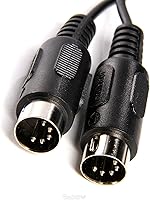
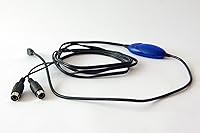
  • MIDI I/O: The interface provides one standard 5-pin DIN MIDI input and one standard 5-pin DIN MIDI output.
  • MIDI Channels: Supports 16 channels per direction, covering the full range of standard MIDI communication in both send and receive modes.
  • Connection Type: Connects to a host computer via a built-in, fixed USB cable — no separate USB cable is required.
  • Power Source: Entirely bus-powered through the USB connection, requiring no external power supply or batteries.
  • Weight: The unit weighs 3.52 oz, making it one of the lightest MIDI interfaces in its category.
  • Dimensions: Physical dimensions are 9 x 9 x 3 inches, keeping the footprint compact enough for any bag or desktop.
  • Housing Material: The outer casing is constructed from rubber, providing basic grip and impact resistance during transport.
  • Color: Available in black only.
  • OS Compatibility: Compatible with both Windows and macOS operating systems; users should check M-Audio's support page for the latest driver versions.
  • Software Support: Works with any standard MIDI-compatible software, including popular DAWs such as Ableton Live, Logic Pro, GarageBand, and FL Studio.
  • Model Number: The official M-Audio model designation for this unit is UNO.
  • Manufacturer: Designed and sold by M-Audio, a brand with a long history in music production hardware and accessories.
  • Release Date: This product was first made available in April 2006 and remains in active production as of this writing.
  • Scalability: Multiple units can be connected simultaneously to a single computer, each occupying its own available USB port for expanded MIDI I/O.
  • MIDI Extension: The package includes MIDI extension cables to give users additional reach between the interface and their MIDI devices.

Related Reviews

M-Audio M-Track 2X2 USB Audio Interface
76%
84%
Build Quality
76%
Preamp Performance
82%
Ease of Setup
58%
Driver Stability
79%
Value for Money
More
M-Audio M-Track Duo
M-Audio M-Track Duo
83%
88%
Preamp Clarity
93%
Value for Money
62%
Build Quality
91%
Ease of Installation
87%
Portability
More
M-Audio M-Track Eight USB Audio Interface
67%
78%
Preamp Quality
84%
Channel Count Value
53%
Driver Stability
58%
Build Quality
76%
Ease of Setup
More
M-Audio AIR 192|4
M-Audio AIR 192|4
85%
93%
Build Durability
91%
Tactile Control Experience
88%
Preamplifier Transparency
87%
Recording Latency
86%
Software Bundle Value
More
MOTU MIDI Express XT 8x8 MIDI Interface
71%
83%
Build Quality
88%
MIDI Routing
47%
Driver Stability
61%
Value for Money
86%
Port Density
More
Black Lion Audio Revolution 2x2 Audio Interface
75%
88%
Preamp Quality
91%
Audio Transparency
86%
Clocking Performance
87%
Build Quality
73%
Value for Money
More
Antelope Audio Zen Go Synergy Core Interface
76%
93%
Preamp Quality
88%
Onboard Effects
54%
Software Experience
57%
Windows Stability
91%
Portability
More
MOTU 8pre USB Audio Interface
80%
86%
Preamp Quality
91%
Build Quality
88%
Channel Count & I/O
79%
Value for Money
61%
CueMix DSP Software
More
Behringer UMC1820
Behringer UMC1820
86%
96%
Value for Money
91%
Preamplifier Clarity
88%
Build Quality
94%
Input/Output Versatility
67%
Driver Stability (Windows)
More
iConnectivity PlayAUDIO12 Audio & MIDI Interface
75%
93%
Failover Reliability
89%
Audio Output Quality
86%
MIDI Capability
54%
Setup & Configuration
82%
Build Quality & Portability
More

FAQ

For most users on Windows and macOS, the M-Audio Midisport Uno USB MIDI Interface does require a driver installation before the computer will recognize it. The good news is that M-Audio provides drivers on their support website, and the process is straightforward for the majority of users. That said, a handful of people have run into friction after major OS updates, so it is worth bookmarking the M-Audio support page in case you need to grab a refreshed driver down the line.
It generally does, but compatibility with the very latest macOS releases has been a sticking point for some users in online reviews. M-Audio periodically updates their drivers to keep up with Apple's changes, so the safest move is to check the M-Audio support page for a driver version that explicitly mentions your macOS version before buying.

Not through a single unit — this little interface has exactly one MIDI input and one MIDI output, so it handles one device at a time. If you need to connect multiple keyboards or hardware synthesizers simultaneously, you would either need a MIDI thru box, a MIDI merger, or a multi-port interface designed for more complex rigs.

M-Audio does not publish an official cable length spec, but user feedback consistently suggests the built-in cable is on the shorter side. If your keyboard sits far from your computer, this can be a real inconvenience since you cannot swap the cable out for a longer one — it is permanently attached to the unit.

The Midisport Uno is designed for Windows and macOS computers and is not officially supported for use with iOS or Android devices. Some users have experimented with USB adapters and OTG connections, but results are inconsistent and not guaranteed by M-Audio.

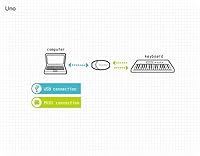
Yes, for the most part. Plug the USB end into your computer, install the driver from M-Audio's website, connect your keyboard to the MIDI ports, and open your DAW — your keyboard should show up as a MIDI input source. Most beginners get through this process without issues. The one area where things occasionally get tricky is the driver install on certain operating systems, but there are plenty of step-by-step guides available online if you get stuck.

In real-world use, the latency introduced by this MIDI adapter is negligible for the vast majority of users. MIDI data is a very lightweight signal, and USB transmission at this level is fast enough that you will not notice a timing difference when playing keys or triggering drums. If you are experiencing latency, it is almost always coming from your audio interface or DAW buffer settings, not this device.

No, there are no LED activity lights on this unit. If you want to confirm data is flowing correctly, you will need to check your DAW's MIDI monitor or use a free MIDI diagnostic tool. It is a minor omission, but worth knowing if quick visual feedback matters to you during a live performance.

The rubber housing offers decent basic protection, and plenty of gigging musicians have used theirs for years without problems. That said, a portion of long-term users report that the rubber casing shows wear and can degrade over time with heavy use. It is not a tank, but it is sturdy enough for regular transport if you treat it reasonably well.

Yes, you can connect multiple units to separate USB ports on the same computer, and each one will appear as its own independent MIDI interface. It is not the most elegant solution for a complex studio rig, but it works perfectly well as a cost-effective way to expand if your needs grow gradually over time.