Overview

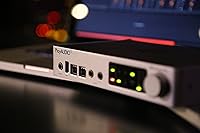
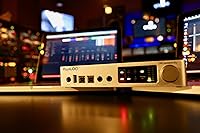
The iConnectivity PlayAUDIO12 Audio & MIDI Interface was built with one environment in mind: the live stage. Unlike general-purpose interfaces that happen to work at gigs, this live interface exists specifically to keep your show running when everything else threatens to go sideways. iConnectivity has spent years focused on MIDI connectivity innovation, and that expertise shows in every design decision here. The build is compact and road-ready — roughly the size of a thick hardback book — solid enough to handle the realities of touring life. This is not a beginner purchase. It targets working musicians and engineers who treat downtime as unacceptable.
Features & Benefits

At the heart of the PlayAUDIO12 is its dual-computer failover system — connect two laptops simultaneously via the pair of USB-B ports, and if one crashes mid-set, the unit switches to the other automatically. You can also trigger the switch manually if you prefer to control the timing yourself. Ten balanced quarter-inch TRS outputs keep audio clean across any stage setup, and they are even resistant to phantom power accidents. A dedicated USB MIDI host port handles up to eight class-compliant controllers or modules. For large-scale productions, the built-in Ethernet port extends MIDI networking across the full length of a stage.

Best For

This stage interface is squarely aimed at touring musicians and live engineers who run backing tracks, virtual instruments, or multi-stem playback from a laptop. If you have ever had a computer freeze ten minutes before showtime — or worse, mid-song — you understand exactly what this device is designed to prevent. It also suits productions deploying multiple MIDI controllers or sound modules on stage, where centralized routing matters. Hobbyists or occasional performers will likely find it overkill. But for anyone building a professional live rig where reliability is non-negotiable, it is a purpose-built answer to a very real problem.

User Feedback

Among experienced users, the failover switching draws consistent praise — professionals report that it has genuinely saved shows when a laptop crashed without warning mid-performance. The initial setup process, however, is where opinions split. Less technical users frequently mention a steep configuration learning curve, and some report driver compatibility hiccups on certain OS versions. Those already familiar with iConnectivity's ecosystem tend to adapt more quickly. Customer support receives mostly positive mentions, though response times can vary. The consensus from touring pros is clear: once dialed in, this live interface is rock-solid. Hobbyists expecting plug-and-play simplicity should temper those expectations before buying.

Pros

  • Automatic failover between two connected computers can genuinely save a live show when a laptop crashes.
  • Ten balanced outputs deliver clean, low-noise audio across even large stage environments.
  • Manual switching mode gives engineers precise, deliberate control over when computers swap over.
  • The USB MIDI host port handles up to eight class-compliant devices without needing an extra computer.
  • Compact and light enough at 2.29 pounds to fit comfortably into a standard backline or fly rig.
  • Expandable by linking additional units, so output count can grow with the size of your production.
  • Built-in Ethernet port extends MIDI networking across full stage lengths without extra adapters.
  • Phantom power resistant outputs reduce the risk of damage from accidental console routing errors.
  • Once properly configured, touring professionals consistently report rock-solid reliability night after night.
  • iConnectivity customer support receives generally positive marks from users who engage with them directly.

Cons

  • Initial setup and routing configuration has a steep learning curve that trips up less technical users.
  • Driver compatibility issues have been reported on certain operating system versions and update cycles.
  • No audio inputs whatsoever, so live recording or mic capture requires entirely separate hardware.
  • Documentation can feel sparse for users who are new to iConnectivity's software ecosystem.
  • Full redundancy benefits only apply when you invest in and maintain a second complete laptop rig.
  • Hobbyist users with simple playback needs are unlikely to justify the complexity involved.
  • The Ethernet MIDI networking feature, while powerful, adds configuration overhead most smaller acts won't need.
  • Feedback from newer users skews toward frustration, suggesting the learning curve is real and significant.

Ratings

The scores below for the iConnectivity PlayAUDIO12 Audio & MIDI Interface were generated by our AI after analyzing verified purchaser reviews from around the world, with spam, bot-submitted, and incentivized feedback actively filtered out. Ratings reflect the honest distribution of real user sentiment — covering both what this stage interface does exceptionally well and where it genuinely falls short. Both touring professionals and less experienced buyers are represented, so the results give you a transparent picture before you commit.

Failover Reliability
93%
The automatic computer-switching capability is what most buyers come here for, and it consistently delivers in real show conditions. Touring engineers report that the unit has caught live laptop crashes mid-set and switched over without producing an audible gap that reached the front of house. For performers who have previously lost a show to a single point of failure, this feature alone justifies the purchase.
A small number of users noted that the failover response can vary slightly depending on how tightly the two computers are synchronized before the show. If the backup machine is not properly configured to mirror the primary in real time, the switch can feel less clean than expected.
Audio Output Quality
89%
The ten balanced TRS outputs consistently earn praise for their low noise floor, with musicians noting that the signal reaching the PA or monitor system is clean and stable even at loud stage volumes. Phantom power resistance on the outputs adds a layer of protection that experienced engineers particularly appreciate when working with unfamiliar front-of-house setups.
A handful of users running very high-output productions noted that the outputs, while clean, do not quite match the headroom of top-tier dedicated audio interfaces. This is rarely a practical issue for backing track playback, but it has been flagged by users with demanding signal chains.
MIDI Capability
86%
The USB MIDI host port is a genuine differentiator — being able to connect up to eight class-compliant controllers or modules directly without routing through a separate computer simplifies stage rigs considerably. Users running complex setups with multiple keyboards, drum pads, and sound modules report that the MIDI routing is stable and responsive across long sets.
Some users found that not all MIDI controllers behaved consistently under the USB host port, particularly older or less common devices that fall outside strict class-compliant specifications. This required workarounds or equipment substitutions that were not immediately obvious from the documentation.
Setup & Configuration
54%
46%
For users with a background in audio networking or prior experience with iConnectivity products, the setup process is logical and well-structured once the learning curve is cleared. The iConfig software provides meaningful control over routing, and engineers who invest time in understanding the system tend to arrive at a stable, repeatable configuration they trust.
This is the most common complaint across user reviews, and it is significant. Less experienced users frequently describe the initial configuration as confusing and poorly documented, with driver issues on certain OS versions adding extra friction. Several buyers reported spending multiple hours — sometimes days — before achieving a reliable working setup.
Build Quality & Portability
82%
18%
At 2.29 pounds and with a compact footprint, the unit travels well and fits neatly into standard fly rigs or equipment bags. The chassis feels solid and road-worthy, and touring musicians report that it holds up well to the physical demands of regular travel and frequent setup-teardown cycles.
A few users wished the unit had rack-mount ears included as standard, since mounting it cleanly in a standard rack requires an optional bracket. The overall dimensions work well for portable rigs but are slightly awkward for traditional rack integration without additional hardware.
Driver Stability
61%
39%
When drivers are installed correctly on a compatible OS version, most users report stable, drop-out-free performance across extended live sets. Engineers who lock their show laptops to a tested OS version and avoid automatic updates tend to experience consistent, trouble-free operation over time.
Driver issues following OS updates are a recurring theme in user feedback. Several musicians reported losing functionality after routine system updates on both Mac and Windows, requiring driver reinstallation or firmware checks at inconvenient times. This is a real concern for anyone who does not actively manage their laptop environment.
Ethernet MIDI Networking
77%
23%
For large-stage productions where running physical MIDI cables the full length of the stage is impractical, the built-in Ethernet MIDI networking is a thoughtful and genuinely useful inclusion. Users on arena-scale and festival setups have praised it for enabling clean, long-distance MIDI routing without additional hardware.
For the majority of users — those playing club-sized or theater venues — this feature simply goes unused, and setting it up correctly adds another layer of configuration complexity. Documentation on the Ethernet networking workflow is sparse, which limits its accessibility to engineers already comfortable with network-based audio protocols.
Headphone Monitoring
71%
29%
The dedicated headphone output gives performers a convenient way to monitor their playback privately during a set, which is useful for click track monitoring or checking a cue before it hits the PA. It is a straightforward, functional addition that users appreciate as a built-in convenience.
The headphone output is not particularly powerful, and users with high-impedance headphones or in-ear monitors requiring more drive reported that the output level fell short of comfortable listening levels. It works well for standard consumer headphones but is not a substitute for a dedicated headphone amplifier in demanding monitor setups.
Expandability
78%
22%
The ability to link multiple units and scale output count as productions grow is a practical design choice that future-proofs the investment. Users who started with a single unit and later expanded to larger stage setups appreciate that they could add a second PlayAUDIO12 without redesigning their entire signal chain.
Linking multiple units introduces additional cost and configuration complexity that not all buyers anticipate upfront. Some users also noted that managing a multi-unit linked setup requires a solid understanding of the routing software, which raises the barrier further for less technical operators.
Value for Money
74%
26%
For working touring musicians and production engineers, the failover protection alone reframes the value calculation — a single saved show easily justifies the cost in both financial and reputational terms. Professionals who have experienced a silent show due to a laptop crash almost universally regard this live interface as a worthwhile investment.
Hobbyists and occasional performers who do not fully utilize the redundancy system consistently feel the cost-to-utility ratio is hard to justify. Without a genuine backup laptop rig in place, buyers are effectively paying a premium for a feature they cannot even use.
Software Bundle
66%
34%
The included Ableton Live 9 Lite license gives new users a functional starting point for live playback without needing to immediately invest in full DAW software. For performers just beginning to build a laptop-based live rig, it removes one barrier from the initial setup process.
Ableton Live 9 Lite is a dated and feature-limited version of the software, and most serious users will quickly outgrow it or already own a full DAW license. Long-term, it adds little practical value for the professional audience this stage interface primarily targets.
Documentation & Support
63%
37%
iConnectivity's customer support team receives generally positive mentions from users who reach out directly, with staff described as knowledgeable and willing to walk buyers through complex configuration issues. The online community around iConnectivity products also provides a useful supplemental resource.
The official documentation bundled with the unit and available on the manufacturer's website is frequently cited as insufficient for the complexity of the product. Users without a strong technical background often feel the manual assumes a level of prior knowledge that leaves real gaps in the onboarding experience.
Manual Switching Control
83%
The option to switch between computers manually gives engineers who prefer deliberate, controlled transitions a meaningful alternative to fully automatic mode. Several live engineers noted that having this option allowed them to pre-plan transitions during rehearsal and execute them confidently during the show.
The manual switching workflow requires a clear operational protocol between the engineer and the performer, and users who have not rehearsed the process report that it can create confusion under the pressure of a live show. Without a clear cue system in place, the manual mode can introduce more risk than it eliminates.
Warranty & Longevity
69%
31%
The one-year limited warranty is standard for professional audio hardware in this category, and units that make it past the initial setup phase and regular firmware updates appear to perform reliably over extended periods. Users who maintain a stable OS and driver environment report multi-year trouble-free operation.
One year of warranty coverage feels conservative for a piece of gear that is expected to anchor a professional touring rig. Users who tour heavily and expose the unit to the physical rigors of the road would welcome either a longer coverage period or a more accessible extended warranty option.

Suitable for:

The iConnectivity PlayAUDIO12 Audio & MIDI Interface is the right tool for working musicians and live audio engineers who simply cannot afford a show-stopping technical failure. If you are running backing tracks, click tracks, or virtual instruments from a laptop on stage, the dual-computer failover capability addresses one of the most nerve-wracking risks in modern live performance. Touring bands with a dedicated tech, solo performers managing complex playback rigs, and production engineers handling large-scale stage setups will find real, practical value here. It also suits anyone orchestrating multiple MIDI controllers or sound modules, since the USB MIDI host port centralizes that connectivity without requiring an additional computer in the chain. Musicians transitioning from hardware-based live rigs to laptop-dependent setups will appreciate having a structured redundancy solution baked into a single compact unit rather than cobbled together from separate components.

Not suitable for:

The iConnectivity PlayAUDIO12 Audio & MIDI Interface is not the right fit for hobbyists, bedroom producers, or casual performers who play occasional small gigs from a single laptop. The setup process demands genuine technical patience — routing, configuration, and driver management are not beginner-friendly, and users who expect to unbox and perform the same evening are likely to be frustrated. It offers no audio inputs at all, so anyone needing to record microphones or instruments live will need additional gear. Studio-focused engineers looking for a recording interface will find the feature set misaligned with their needs entirely. If your live rig is straightforward — one laptop, simple stereo output, no redundancy concerns — the investment and complexity here go well beyond what your situation actually calls for.
Specifications

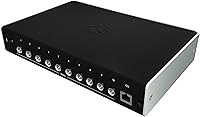
  • Audio Outputs: The unit provides 10 balanced 1/4-inch TRS audio outputs designed for low-noise, professional-grade stage connections.
  • Headphone Output: A single 1/4-inch TRS stereo headphone output is included for private monitoring during live performance.
  • USB Host Ports: Two USB-B ports allow simultaneous connection of up to two computers for redundancy and failover switching.
  • Failover Switching: Both automatic and manual computer switching modes are supported, enabling fast transitions between connected computers during live shows.
  • MIDI Connectivity: A USB MIDI host port supports up to 8 class-compliant MIDI controllers or sound modules without requiring a dedicated computer connection.
  • Network Port: A built-in Ethernet port enables long-distance MIDI networking, suitable for routing MIDI signals across large stages.
  • Phantom Resistance: All audio outputs are rated as phantom power resistant up to +48V, reducing the risk of damage from accidental console routing.
  • Expandability: Multiple units can be linked together to increase the total output count as production requirements grow.
  • Dimensions: The unit measures 9.8 x 10.9 x 3.1 inches, offering a compact footprint suitable for fly rigs and standard rack setups.
  • Weight: The PlayAUDIO12 weighs 2.29 pounds, making it easy to transport as part of a touring rig.
  • Connectivity Type: Primary computer connectivity is via USB, with Ethernet provided specifically for MIDI network expansion.
  • Bundled Software: The unit includes a license for Ableton Live 9 Lite, offering a starting point for playback and live performance software.
  • Warranty: iConnectivity covers the unit with a 1-year limited warranty from the date of purchase.
  • Manufacturer: The PlayAUDIO12 is designed and sold by iKingdom Corporation, operating commercially as iConnectivity.
  • Power Requirements: No batteries are required; the unit is powered via its USB connection to a host computer or external USB power source.
  • Assembly: No assembly is required out of the box; the unit is ready for connection and configuration immediately upon unboxing.
  • Channel Count: The device supports 10 output channels, covering the needs of most multi-stem live playback and virtual instrument setups.
  • Input Capability: The unit does not include audio inputs and is designed exclusively as an output and routing device for live stage use.

Related Reviews

Behringer UMC1820
Behringer UMC1820
86%
96%
Value for Money
91%
Preamplifier Clarity
88%
Build Quality
94%
Input/Output Versatility
67%
Driver Stability (Windows)
More
M-Audio Midisport Uno MIDI Interface
86%
92%
Ease of Use
90%
Portability
88%
Compatibility with Software
91%
Setup and Installation
85%
Build Quality
More
M-Audio AIR 192|4
M-Audio AIR 192|4
85%
93%
Build Durability
91%
Tactile Control Experience
88%
Preamplifier Transparency
87%
Recording Latency
86%
Software Bundle Value
More
JK Audio Autohybrid Telephone Audio Interface
75%
88%
Audio Signal Clarity
84%
Sidetone Rejection
86%
Build Quality
61%
Ease of Setup
31%
VoIP Compatibility
More
Universal Audio Arrow Thunderbolt 3 Audio Interface
77%
93%
Audio Conversion Quality
91%
Unison Preamp Performance
88%
Real-Time UAD Processing
58%
Thunderbolt 3 Connectivity
61%
Windows Compatibility
More
M-Audio M-Track Duo
M-Audio M-Track Duo
83%
88%
Preamp Clarity
93%
Value for Money
62%
Build Quality
91%
Ease of Installation
87%
Portability
More
M-Audio M-Track 2X2 USB Audio Interface
76%
84%
Build Quality
76%
Preamp Performance
82%
Ease of Setup
58%
Driver Stability
79%
Value for Money
More
Universal Audio Apollo X16 Audio Interface
82%
94%
Conversion Quality
91%
UAD DSP Performance
89%
Build & Hardware Quality
92%
Low-Latency Tracking
88%
I/O Flexibility
More
Black Lion Audio Revolution 2x2 Audio Interface
75%
88%
Preamp Quality
91%
Audio Transparency
86%
Clocking Performance
87%
Build Quality
73%
Value for Money
More
MOTU MIDI Express XT 8x8 MIDI Interface
71%
83%
Build Quality
88%
MIDI Routing
47%
Driver Stability
61%
Value for Money
86%
Port Density
More

FAQ

Yes, that is exactly what the iConnectivity PlayAUDIO12 Audio & MIDI Interface is built for. You connect both computers via the two USB-B ports, keep them running synchronized content, and if one fails, the unit detects it and switches over automatically. You can also trigger the switch manually if you want full control over the timing.
The switching time is very fast — most users describe it as near-instant in real show conditions. Whether there is any audible gap depends on how your two computers are synchronized and how your DAW is set up, but the hardware side of the transition is designed to be as quick as possible.

No, the PlayAUDIO12 has no audio inputs at all. It is purely an output and routing device. If you need to capture live audio or record a feed from stage, you will need a separate interface alongside it.

The unit is generally compatible with both Mac and Windows systems. That said, some users have reported driver issues following certain OS updates, so it is worth checking iConnectivity's current compatibility documentation before committing, particularly if you are running a newer operating system version.

Honestly, yes — for a single-laptop setup at small venues, this stage interface is more complexity than you need. The real value here is the redundancy system, and if you are not running a backup computer alongside your primary rig, you are leaving the most important feature unused. A simpler, more affordable interface would likely serve you better.

This is one area where the PlayAUDIO12 gets mixed feedback. Experienced audio engineers and users already familiar with iConnectivity's software tend to get up and running without much trouble. Newer or less technical users frequently find the routing configuration confusing and the documentation thinner than they would like. Budget extra time for the setup process and lean on the iConnectivity support team if you get stuck.

It works with most major DAWs, and it actually ships with a copy of Ableton Live 9 Lite included. For live playback purposes, the unit is software-agnostic as long as your DAW supports standard audio drivers. Ableton Live is a popular choice among users running backing tracks with this live interface.

No, the Ethernet port has nothing to do with internet access. It is used specifically for long-distance MIDI networking — essentially letting you route MIDI signals across a large stage to remote locations without running long physical MIDI cables. It is a feature that becomes genuinely useful on large productions but is largely irrelevant for smaller setups.

Yes. The USB MIDI host port allows you to connect up to eight class-compliant MIDI controllers or modules directly to the unit. This is a useful capability for performers who want centralized MIDI routing without adding another computer or dedicated MIDI interface to their rig.

You can link multiple units together to expand your total output count. There is no hard ceiling imposed by a single unit — as your production grows, you can add another PlayAUDIO12 and chain them. It is not the most budget-friendly way to scale, but it keeps your setup consistent and avoids introducing incompatible hardware into the signal chain.