
Overview

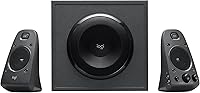
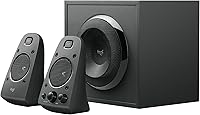
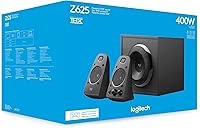
The Logitech Z625 has been a fixture in the mid-range desktop speaker market since 2016, and its staying power says a lot. THX certified at this price point is genuinely rare — most competitors at this tier skip the certification entirely and let buyers guess at sound quality. What you get here is a 2.1 system tuned to a specific standard right out of the box, no fiddling required. Expect a sound profile that leans into bass — the subwoofer is the centerpiece. Multiple input options keep things flexible, and the controls are refreshingly straightforward. It is not a subtle, reference-grade listening setup; it is loud, impactful, and built for everyday use.

Features & Benefits

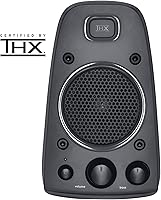
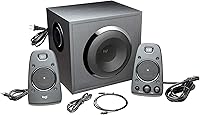
The Z625 setup runs on 200 watts RMS, which is substantial for a desktop system — you will feel the subwoofer's wooden enclosure doing real work when bass hits in movies or games. The THX tuning means the audio is calibrated out of the box, so the balance between highs and lows is intentional rather than accidental. Where this system genuinely earns points is simultaneous connectivity: you can have your TV plugged in via optical, your game console through RCA, and your laptop through the 3.5mm input — all at once, no switching required. The right satellite handles volume, bass level, and a front-facing headphone jack, which turns out to be more practical than it first sounds.

Best For

This speaker system suits a specific kind of buyer well. If you are a PC gamer who wants real low-end impact without committing to a full surround setup, this 2.1 desktop system covers that need without much compromise. It also works well in secondary home theater rooms where a soundbar simply does not push enough air. The multi-input flexibility makes it practical for anyone running several devices from one spot — a TV, a console, and a work laptop all feeding into the same speakers simultaneously. Those stepping up from basic two-channel desktop speakers will notice a clear and immediate difference. If you want wireless connectivity, an app, or preset EQ profiles, look elsewhere.

User Feedback

With nearly 17,000 ratings and a 4.5-star average, this speaker system has clearly found its audience. Buyers consistently highlight the subwoofer punch and how much volume the system produces relative to its footprint. The optical input earns specific praise from people pairing it with TVs and consoles — it is not a feature you always find at this tier. On the downside, a recurring complaint is that the satellites can sound a bit congested in the mids when pushed hard. A handful of long-term owners have flagged control knob durability as a concern after extended use. There is also a consistent ask for a remote; reaching to the desk every time gets old quickly.

Pros

  • THX-certified audio calibration means the sound is properly tuned right out of the box — no guesswork needed.
  • Three simultaneous inputs let you connect a TV, console, and PC without ever unplugging a cable.
  • The wooden subwoofer enclosure produces noticeably tighter, more physical bass than plastic-cabinet alternatives.
  • 200 watts RMS gives this speaker system enough headroom to fill a medium-sized room comfortably.
  • The front-panel headphone jack on the satellite makes switching to private listening completely effortless.
  • Setup takes under ten minutes with all required cables included in the box.
  • The control pod puts volume and bass adjustment within easy reach without digging through menus or apps.
  • A 4.5-star rating across nearly 17,000 verified reviews reflects consistently satisfied buyers over many years.
  • Optical input support makes this 2.1 desktop system a practical choice for modern TVs and AV receivers.

Cons

  • No remote control means physically reaching the desk every time you want to adjust volume.
  • The volume knob on the control pod has a documented pattern of loosening or degrading after extended daily use.
  • Satellite speakers lose composure in the midrange when pushed to high volumes, introducing harshness.
  • No Bluetooth or wireless connectivity — incompatible with phones or tablets that lack a headphone jack.
  • Bass tuning skews aggressive out of the box, which can overwhelm small or reflective room environments.
  • The subwoofer cable is fixed and non-detachable, limiting placement flexibility and complicating cable management.
  • No virtual surround processing makes this a poor fit for buyers prioritizing immersive home theater audio.
  • High-impedance headphones will sound underpowered through the satellite jack — no dedicated headphone amplification is present.
  • The plastic satellite housings feel visually and physically budget relative to the system's overall price point.

Ratings

The Logitech Z625 has accumulated one of the largest verified review pools in its category, and our AI rating engine has processed that feedback globally — filtering out incentivized, duplicate, and bot-generated submissions — to produce the scores below. Strengths are recognized where they are genuine, and recurring pain points are reflected honestly, not smoothed over. The result is a balanced picture of what this 2.1 desktop system actually delivers across real-world use cases.

Bass Performance
88%
The wooden subwoofer enclosure produces low-end output that genuinely surprises people coming from standard desktop speakers. In gaming sessions and action-heavy movie scenes, the physical impact of bass is something users consistently call out as a highlight — it adds presence without needing any extra configuration.
In smaller rooms or on desks pushed against walls, the bass can overwhelm the overall mix and become boomy rather than controlled. Some users find themselves dialing the bass knob back significantly just to achieve a balanced sound, which suggests the default tuning skews aggressive.
Overall Sound Quality
79%
21%
THX certification gives this speaker system a calibrated starting point that most competitors in this tier simply do not offer. Dialogue clarity in movies and instrument separation in music are noticeably above what buyers expected at this price, particularly for casual listening at moderate volumes.
The satellite speakers show their limits when pushed hard, with the midrange becoming congested and slightly harsh at high volumes. Audiophiles or anyone used to dedicated bookshelf speakers will find the sound profile too bass-forward and not refined enough for critical listening.
Connectivity & Input Options
93%
Having optical, RCA, and 3.5mm inputs all active simultaneously is a genuinely practical setup. Users running a TV via optical, a console through RCA, and a PC through aux can switch between sources simply by controlling output at the source device — no physical cable swapping needed.
There is no Bluetooth or wireless option, which increasingly feels like a gap as more devices move away from wired audio. Users with newer laptops or phones lacking a headphone jack will need an adapter, which is a minor but real inconvenience.
Volume Output
91%
200 watts RMS is not just a spec number here — users in medium-sized living rooms and home offices report being able to fill the space comfortably without approaching the upper range of the volume dial. For gaming and home theater use, headroom is rarely a concern.
At very high volumes, distortion creeps into the satellite speakers before the subwoofer hits its limit, meaning the loudest settings are not the cleanest. This is not an issue for most users but worth knowing if you regularly push speakers to their ceiling.
Build Quality
71%
29%
The overall construction feels solid for the price tier — the subwoofer in particular has a reassuring weight and rigidity to it. Most users report no issues during the first year or two of daily use, and the cables and connections hold up well with regular plugging and unplugging.
The control pod on the right satellite is the weak point flagged most consistently by long-term owners. The volume knob in particular has drawn complaints about loosening or developing a scratchy feel after extended use, which is a concern given how frequently it gets touched.
Setup & Ease of Use
94%
Unboxing to audio takes under ten minutes. All necessary cables are included, inputs are clearly labeled, and the control pod is intuitive enough that no one needs to consult a manual. For buyers who just want to plug in and have things work, this system delivers exactly that.
The quick-start guide is minimal, and users who want to understand optimal placement for the subwoofer or input priority behavior are largely on their own. Not a serious issue, but a more detailed setup guide would help less experienced buyers get the best out of the system.
Control & Interface
67%
33%
Having the volume knob, bass dial, headphone jack, and auxiliary input all on the front of the right satellite is genuinely convenient during daily use. Adjusting bass for different content types — quieter for late-night work, higher for gaming — takes a second.
The absence of a remote control is the single most repeated complaint across user reviews. When the speakers are positioned on a desk or entertainment unit slightly out of comfortable reach, getting up to adjust volume becomes a recurring annoyance that a basic IR remote would solve entirely.
Value for Money
82%
18%
At this price point, finding a THX-certified 2.1 system with three simultaneous input types and genuine bass output is not easy. Buyers consistently describe the Z625 setup as delivering more than they expected for the money, particularly those comparing it to cheaper desktop speaker alternatives.
As the price approaches the higher end of the mid-range bracket, competition from soundbars and entry-level stereo receiver setups with passive speakers starts to look more attractive. For buyers willing to spend a bit more time on setup, those alternatives can offer better overall fidelity.
Design & Aesthetics
63%
37%
The matte black finish is neutral enough to blend into most desk or entertainment setups without drawing attention. The subwoofer's compact footprint for its output level is something users appreciate, especially in tighter spaces where a larger cabinet would not fit.
The design is purely functional — there is nothing visually distinctive about this speaker system compared to its competition. Users who care about RGB lighting, premium materials, or a more modern industrial look will find it underwhelming. The plastic satellite housings in particular look budget relative to the overall price.
Subwoofer Quality
86%
The wooden enclosure makes a measurable difference in how the low end feels — it is tighter and more defined than plastic-cabinet subwoofers at a similar price. The 35 Hz response floor means it handles movie soundtracks and bass-heavy music without rolling off prematurely.
The subwoofer connects to the right satellite via a fixed wired cable, which limits placement flexibility. Users who want to tuck the sub behind furniture or route it across the room will find the cable length restrictive, and there is no option to extend it without third-party solutions.
Compatibility & Versatility
89%
The combination of optical, RCA, and 3.5mm inputs makes this speaker system genuinely device-agnostic. It works equally well with older TVs and consoles via RCA, modern displays and receivers via optical, and computers or phones via the 3.5mm jack — all without adapters in most cases.
The system is strictly stereo — 2.1 channel output only. Users hoping for virtual surround sound processing or multi-channel expansion will need to look at more complex systems. What you see is what you get, which is fine for most use cases but limiting for dedicated home theater rooms.
Headphone Integration
74%
26%
The front-panel headphone jack on the right satellite is a thoughtful inclusion. Plugging in headphones automatically cuts the speakers, which makes late-night switching between speaker and headphone listening completely effortless — no hunting for a mute button or reaching behind a monitor.
The headphone output is functional rather than high-fidelity — it does not include an independent headphone amplifier, so high-impedance headphones will sound underpowered and flat. For users with quality headphones, a dedicated DAC or amp will still be necessary for the best experience.
Cable Management
58%
42%
The included cable set covers all three input types, which means most buyers can connect their devices without purchasing anything extra. Cable lengths are generally sufficient for standard desk setups, and the connectors feel secure once inserted.
The fixed subwoofer cable and non-detachable satellite cable create a somewhat messy wiring situation behind a desk. Users who have invested in clean cable management setups will find this system uncooperative — nothing is removable, and no cable routing features are built into the hardware.
Long-Term Reliability
69%
31%
The majority of users report stable performance over one to three years of regular use, with no significant degradation in sound output. The core audio components — drivers, subwoofer, and amplification — appear to hold up well under everyday conditions.
The control pod is the reliability weak link over time. Beyond the knob issues already noted, a subset of users have reported intermittent crackling through the satellite speakers after extended use, which some trace back to the pod's internal connections rather than the drivers themselves.

Suitable for:

The Logitech Z625 is a strong match for anyone who wants a meaningful audio upgrade without the complexity of a full receiver-and-speakers setup. PC gamers will get the most out of it — the subwoofer adds genuine low-end impact to explosions, engines, and in-game environments that standard desktop speakers simply cannot replicate. It also suits people running multiple devices from a single listening spot: having a TV, a game console, and a computer all connected simultaneously — each through a different input — is a practical advantage that saves constant cable swapping. Buyers setting up a secondary media room or a bedroom entertainment corner will find this 2.1 desktop system punches well above its size in terms of raw output. Those who want a plug-in-and-done experience with no app to configure, no firmware to update, and no learning curve will find it especially satisfying.

Not suitable for:

The Logitech Z625 will frustrate buyers who care deeply about sound accuracy and tonal balance across all frequencies. The satellite speakers are not the strong suit of this system — they can sound congested in the mids at higher volumes, and anyone coming from quality bookshelf or studio monitor speakers will notice the difference immediately. People in small rooms or apartments should be cautious: the subwoofer's output is tuned assertively, and in tight spaces it tends to dominate the mix in a way that becomes fatiguing rather than enjoyable. If wireless connectivity matters — Bluetooth from a phone, a tablet, or a laptop without a headphone jack — this speaker system offers nothing; every connection is wired. Those who want virtual surround sound for immersive home theater use, or who expect remote control functionality as standard at this price, will find the experience incomplete. And if long-term durability is a top priority, the control pod's track record gives enough reason for pause.

Specifications

  • Audio Configuration: The system uses a 2.1 channel setup consisting of two satellite speakers and one subwoofer for combined stereo and bass output.
  • Total Power: The system delivers 200 watts RMS continuous power with a peak capacity of 400 watts.
  • Satellite Power: Each satellite speaker is rated at 40 watts maximum output power.
  • Frequency Response: The subwoofer reaches down to 35 Hz, covering the full range of bass content found in music, games, and film soundtracks.
  • THX Certification: The system carries official THX certification, meaning its audio output has been tuned and verified to meet a defined standard of accuracy.
  • Inputs: Three input types are supported simultaneously: one optical (Toslink), one RCA stereo pair, and one 3.5mm auxiliary connection.
  • Subwoofer Build: The subwoofer enclosure is constructed from wood, which contributes to tighter bass resonance compared to all-plastic cabinet designs.
  • Control Interface: A control pod on the right satellite provides a volume knob, a dedicated bass dial, a headphone output jack, and a front-facing auxiliary input.
  • Headphone Output: A 3.5mm headphone jack on the right satellite automatically mutes the speakers when headphones are connected.
  • Connectivity Type: All connections are wired; no Bluetooth, Wi-Fi, or any other wireless connectivity is supported.
  • Power Source: The system runs on AC power at 120 volts and is not compatible with battery or USB power sources.
  • Audio Driver Type: Dynamic drivers are used in the satellite speakers for mid and high frequency reproduction.
  • Subwoofer Connection: The subwoofer connects to the right satellite speaker via a fixed wired cable.
  • Dimensions: The overall system footprint measures 10.4″ deep by 11.9″ wide by 11.1″ high as a combined unit reference.
  • Weight: The complete system, including subwoofer and satellites, weighs approximately 18.1 pounds.
  • Enclosure Material: Satellite speaker housings are constructed from plastic, while the subwoofer enclosure uses a wood-based cabinet.
  • Compatible Devices: The system is compatible with personal computers, televisions, gaming consoles, and any device with an optical, RCA, or 3.5mm audio output.
  • Warranty: Logitech provides a limited warranty with this product; buyers should verify the current duration directly with Logitech at time of purchase.
  • What Is Included: The package includes the subwoofer, two satellite speakers, a quick-start guide, and the cables needed to connect via each supported input type.
  • Release Date: This speaker system was first made available in August 2016 and has not been discontinued by the manufacturer.

Related Reviews

Logitech POP Mouse

Logitech POP Mouse
82%
93%
Silent Click Performance
89%
SmartWheel Scrolling
87%
Multi-Device Connectivity
91%
Battery Life
71%
Ergonomics & Hand Fit
More
Logitech Pebble M350
88%
88%
Build Quality
85%
Ergonomics & Comfort
94%
Battery Life
90%
Connectivity Reliability
87%
Tracking Precision
More
Logitech ERGO K860
Logitech ERGO K860
81%
93%
Ergonomic Comfort
89%
Wrist Rest Quality
84%
Typing Feel & Accuracy
67%
Adjustment Period
81%
Build Quality & Materials
More
Logitech Wireless Touchpad
84%
80%
Performance
85%
Ease of Use
88%
Wireless Connectivity
83%
Build Quality
82%
Ergonomics
More
Logitech X-530
Logitech X-530
75%
82%
Sound Quality
80%
Bass Performance
86%
Dialogue / Center Channel
84%
Surround Imaging
75%
Build Quality
More
Logitech MX Keys Mini
87%
94%
Portability & Size
88%
Typing Comfort & Ergonomics
85%
Multi-Device Compatibility
72%
Backlighting & Visibility
90%
Battery Life
More
Logitech Trackman Wheel Optical
86%
92%
Ergonomics
89%
Tracking Precision
88%
Build Quality
94%
Comfort During Long Sessions
65%
Learning Curve
More
Logitech B525 HD Webcam
85%
88%
Video Quality
90%
Portability
92%
Ease of Setup
85%
360-Degree Swivel
83%
Low-Light Performance
More
Logitech BRIO Stream Webcam
87%
94%
Video Quality
91%
Low Light Performance
72%
Field of View
95%
Ease of Setup
85%
Audio Quality
More
Logitech Zone Wired
Logitech Zone Wired
79%
88%
Microphone Clarity
91%
Call Performance
74%
Comfort & Wearability
83%
Build Quality
67%
Sound Quality for Music
More

FAQ

Yes, and this is one of the most practical things about this speaker system. You can plug your TV into the optical input, your console into the RCA input, and your PC into the 3.5mm aux — all simultaneously. To switch between them, you just control the audio output at the source device rather than physically swapping cables.

Yes, it works with both current-generation consoles. You can connect via optical if your TV passes audio through, or directly via RCA if your console or TV supports that output. The 3.5mm aux is also an option through an adapter if needed.

The bass is fully adjustable via the dedicated bass dial on the right satellite control pod. If you find the default output too heavy — which some users in smaller rooms do — you can dial it back to get a more balanced sound without any software involved.

No software, drivers, or apps are required. You plug it in, connect your source device, and it works. There are no companion apps, no firmware updates to manage, and no EQ profiles to configure — it is entirely plug-and-play.

It depends on the headphones. For standard consumer headphones, the output is perfectly functional. However, if you own high-impedance headphones designed for dedicated amplifiers, they will likely sound underpowered and flat through this jack. For serious headphone listening, a dedicated DAC or headphone amp is still the better route.

The subwoofer connects to the right satellite via a fixed cable, and the length limits how far you can position it from the control pod. Most users can place it under or beside a standard desk, but routing it to a corner of the room is not really possible without extension solutions. Placement directly on or beside the desk is the intended setup.

Unfortunately, no. There is no remote control included, and no wireless or app-based control option exists for this system. The volume knob on the right satellite is the only way to adjust levels, which is the most commonly cited frustration among long-term users. If remote access matters to you, this is a genuine limitation to factor into your decision.

Quite loud. In a medium-sized bedroom or home office, most users find they rarely push the volume knob past the halfway point. At full output, the Z625 setup can fill a living room without straining. If anything, the concern is not whether it gets loud enough — it is whether the clarity holds up at those high volumes, which is where the satellites show some strain.

This is a real concern raised by a subset of long-term owners. The volume knob on the control pod has been reported to develop a scratchy or loose feel after one to three years of frequent daily use. It is not universal, but it happens often enough to be a legitimate consideration if you plan to use the system heavily for several years.

Yes, inserting a headphone plug into the 3.5mm jack on the right satellite cuts the speaker output automatically. This makes switching between speakers and headphones for late-night use completely effortless — no mute button, no menu, just plug in and the speakers go silent.