





Overview

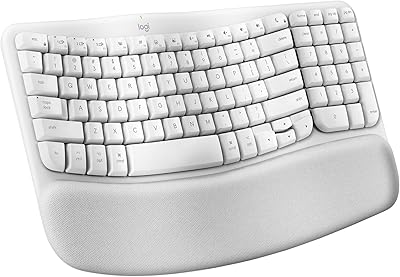
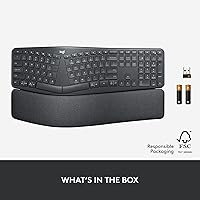
The Logitech ERGO K860 was built for one specific type of person: someone who spends the better part of their day at a keyboard and is starting to feel it in their wrists or forearms. Its curved, split keyframe is the defining design choice — it angles your hands outward into a position that feels far less forced than a flat board after hour three or four. It works across Windows, macOS, Linux, and Chrome OS, and connects via Bluetooth or a USB receiver, which covers most real-world desk setups. Certified by United States Ergonomics, it has professional backing to match its intentions. That said, this is a tool for serious desk typists, not gamers or anyone after a compact setup.

Features & Benefits

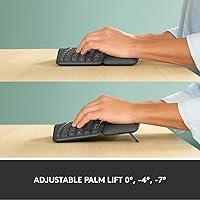
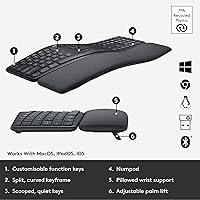
The split wave layout is the heart of what makes the K860 work. Rather than forcing your arms to angle inward toward a straight keyboard, the curve lets your elbows settle at a more natural width — a difference you really feel after a long writing or coding session. The memory foam wrist rest is genuinely thick and supportive, not the thin rubber strip you get on cheaper boards. Three negative-tilt leg positions let you dial in the angle whether you are sitting or at a standing desk. Keys are quiet and slightly concave, helping fingers land cleanly without hunting. Battery life stretches up to 24 months on two AAA cells, and multi-device pairing supports up to three connected machines.

Best For

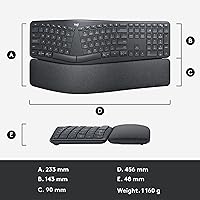
Worth flagging upfront: this split keyboard is wide. If you are working on a cramped desk, that footprint alone may be a dealbreaker before anything else. For everyone else — remote workers, writers, developers, anyone clocking six or more hours at a keyboard daily — it makes a strong case. People coming from a standard flat keyboard will find the adjustment real but manageable; most get comfortable within a couple of weeks. It also suits anyone who regularly switches between a Mac and a PC, since the K860 pairs with up to three devices and makes cross-platform switching genuinely low-friction.

User Feedback

Among people who switched to this ergonomic keyboard after struggling with wrist pain, the response skews strongly positive — many report noticeable relief within the first few weeks of regular use. The wrist rest draws consistent praise for feeling more substantial than what you find on boards at lower price points. Not everyone has a frictionless start, though. A real adjustment period of one to two weeks is a recurring theme, as fingers have to relearn the split layout. A smaller number of long-term users note that keycap legends fade with sustained heavy use. Even so, comfort and build quality are the two reasons buyers most often recommend it.

Pros

  • The curved split layout noticeably reduces wrist and forearm tension during long typing sessions.
  • Memory foam wrist rest is thicker and more supportive than what most competing boards offer.
  • Battery life stretches up to 24 months — it is a peripheral you almost never have to think about charging.
  • Connects to up to three devices; switching between a Mac and a PC takes a single keypress.
  • Works natively on Windows, macOS, Linux, and Chrome OS with no driver installation required.
  • Quiet keys are office-friendly and do not bleed into microphones during video calls.
  • Three negative-tilt positions make the K860 adaptable to both seated and standing desk setups.
  • Certified by United States Ergonomics, giving the comfort claims independent professional backing.
  • Scooped keycaps help fingers land accurately, which reduces typos during fast, sustained typing.
  • Housing uses 71% post-consumer recycled plastic — a meaningful sustainability detail at this price tier.

Cons

  • The wide footprint crowds smaller desks and forces the mouse further right than most users prefer.
  • Keycap legends show visible wear after several months of heavy daily use.
  • A one-to-two week adjustment period is real — expect a temporary drop in typing speed and accuracy.
  • No battery level display; the only warning is a low-power indicator light that appears when it is nearly depleted.
  • The tilt leg clips feel plasticky and require careful alignment to lock in properly.
  • Function key customization through Logitech Options software hits a ceiling quickly for power users.
  • No positive tilt option, which rules it out for users whose posture benefits from a raised back edge.
  • Wrist rest is fixed and non-removable, limiting flexibility for users who prefer typing without one.
  • Bluetooth re-pairing is occasionally needed after extended idle periods on some device configurations.
  • The value case is weak for casual typists who do not have an existing wrist or forearm discomfort problem.

Ratings

The Logitech ERGO K860 has been scored by our AI engine after processing thousands of verified global purchases, with spam, bot-submitted, and incentivized reviews actively filtered out before any score was calculated. The ratings below reflect the full picture — what heavy typists genuinely love about this split keyboard and where real friction points exist. Strengths and shortcomings are weighted equally so you can make a confident, informed call.

Ergonomic Comfort
93%
For people who type five or more hours a day, the curved split layout produces a tangible difference in how their wrists feel by end of day. Writers and developers consistently report less tension in their forearms after switching, with many noting the relief within the first week of regular use.
Users with very small hands occasionally find the key spacing slightly wide, making the natural resting position feel slightly stretched rather than relaxed. The comfort gains are real, but they are most pronounced for average to large hand sizes.
Wrist Rest Quality
89%
The multi-layer memory foam rest is noticeably thicker and more supportive than what ships with competing boards in lower price brackets. During all-day desk sessions, it holds its shape well and does not flatten out the way thinner foam pads tend to after a few months.
The fabric covering, while stain-resistant, can trap warmth during long sessions in warmer environments. A small number of users also note that the rest is fixed and cannot be detached, which limits flexibility if you prefer typing without one.
Typing Feel & Accuracy
84%
The scooped keycaps do genuine work here — fingers land more consistently in the center of each key, which reduces misstrikes during fast typing. The keys are quiet enough for open-plan offices without feeling mushy or unresponsive under the fingers.
Tactile feedback is softer than what mechanical keyboard users expect, and some fast typists find the low actuation feel slightly ambiguous. Those coming from a clicky or tactile mechanical board will likely notice the difference immediately.
Adjustment Period
67%
33%
Most users settle into the split layout within one to two weeks of daily use, after which typing speed largely returns to normal. The curve is gentler than fully split designs, which helps people transition without completely relearning hand positioning.
The first few days can be genuinely frustrating — error rates spike noticeably as muscle memory recalibrates. Users who cannot afford any drop in productivity during a transition period should plan the switch around a lighter workweek.
Build Quality & Materials
81%
19%
The keyboard feels substantial on the desk without being unnecessarily heavy. The housing, made partly from post-consumer recycled plastic, does not feel cheap — there is no flex or creak when pressing keys firmly across the full board.
Keycap legend durability is a recurring complaint from power users after six or more months of heavy use, with printed characters showing visible wear. The recycled plastic finish, while solid, does attract fine scratches over time with daily handling.
Multi-Device Connectivity
86%
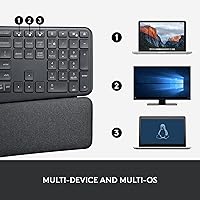
Pairing with up to three devices and switching between them is reliable and fast in practice. For anyone running a Mac alongside a Windows machine — common in hybrid work setups — this feature alone saves real desk space and mental overhead.
Switching between paired devices requires pressing a dedicated key, which is straightforward but not instantaneous. Occasional re-pairing is needed after extended idle periods on some Bluetooth configurations, which a small subset of users find mildly irritating.
Desk Footprint
58%
42%
The full-size layout means every key is present and accounted for — number pad, function row, navigation cluster — which is genuinely useful for anyone who relies on those inputs for spreadsheets or data entry work.
At nearly 18 inches wide, this split keyboard dominates a standard desk. Users with compact workspaces consistently flag this as a problem, and pairing it with a mouse means your mousing arm gets pushed further right than most people prefer.
Battery Life
91%
Up to 24 months on two AAA batteries is exceptional by any standard — it is the kind of peripheral you simply forget needs power. Batteries are included in the box, so it is functional from the moment it is unboxed.
There is no battery level indicator beyond a low-battery warning light, which means you cannot easily check remaining charge until it is nearly depleted. A few users have been caught off guard mid-session when the warning appears during a critical work period.
Software & Customization
73%
27%
Logitech Options software allows remapping of function keys and some macro customization, which is genuinely useful for power users who want to trim repetitive actions. Setup is straightforward for anyone comfortable with basic desktop software.
The software is not required for everyday use, but those who want deeper customization quickly hit its ceiling — key remapping options are limited compared to enthusiast-grade alternatives. Some macOS users report occasional compatibility hiccups after system updates.
Tilt & Posture Adjustment
83%
Three negative-tilt positions give meaningful flexibility for both seated and standing desk configurations. The -7 degree setting in particular makes a noticeable difference in keeping wrists flat when the desk surface is higher than ideal.
The tilt legs feel plasticky compared to the rest of the board and require careful alignment to click securely into position. There is no positive tilt option, which rules out the K860 for users whose existing posture or desk setup benefits from a raised back edge.
Cross-Platform Compatibility
88%
Windows, macOS, Linux, and Chrome OS are all supported without installing any drivers, which makes setup on any machine genuinely plug-and-play. Mac-specific key labels for function row shortcuts are printed on the keys, a small detail that reduces friction for Apple users.
Some Linux distributions require minor manual configuration to get all function keys behaving as expected. There is no official Android or iOS optimization for the layout, so mobile pairing works but feels like an afterthought rather than a supported use case.
Noise Level
87%
The quiet key mechanism makes this a comfortable choice for shared office environments or video calls where keyboard noise bleeds into the microphone. Colleagues in open-plan spaces rarely notice when someone nearby is actively typing.
The quiet feel comes at the cost of satisfying tactile feedback for users who prefer a crisper, more audible keystroke. People who enjoy the sound and feel of louder mechanical boards will find the typing experience here relatively muted.
Value for Money
76%
24%
For buyers experiencing genuine wrist or forearm discomfort, the comfort improvements justify the premium price point relatively quickly — especially when weighed against the cost of ergonomic consultations or physiotherapy. The build and feature set align well with what is being charged.
For casual typists or those without any repetitive strain concerns, the price is hard to justify when capable standard keyboards exist at a fraction of the cost. The value proposition hinges almost entirely on how much daily typing discomfort the buyer is trying to solve.

Suitable for:

The Logitech ERGO K860 was built for people whose work lives revolve around a keyboard — writers, developers, analysts, and office professionals who regularly clock six or more hours of typing per day and are starting to feel the cumulative toll in their wrists or forearms. If you have been putting off addressing repetitive strain discomfort because most ergonomic keyboards look intimidating or require a total relearning of your typing habits, this split keyboard strikes a reasonable middle ground: the curve is noticeable but not radical. Standing desk users will appreciate the three negative-tilt leg options, which make it genuinely easier to keep wrists flat regardless of desk height. It also suits people who bounce between a Mac and a PC daily, since pairing up to three devices and switching between them is reliable and low-effort. Anyone willing to invest in a premium peripheral for the sake of long-term physical comfort — rather than hunting for the cheapest functional option — will find the trade-off worthwhile.

Not suitable for:

The Logitech ERGO K860 is a poor fit for anyone working on a small or cluttered desk — at nearly 18 inches wide, it consumes a substantial amount of surface area, and adding a mouse pushes your arm noticeably further out than most people prefer. Gamers should look elsewhere entirely: there is no backlighting worthy of a gaming setup, no macro engine, and the quiet low-profile keys offer none of the tactile or audible feedback that fast-paced gaming demands. If you are a touch typist who relies on muscle memory built over years on a standard flat keyboard and cannot afford even a week of reduced typing speed, the adjustment period here will feel disruptive. Buyers on a tight budget will also struggle to justify the price if they do not have an existing comfort problem to solve — the value proposition collapses when ergonomic relief is not the primary goal. Minimalists or anyone who prefers a tenkeyless or compact layout will find the full-size format unnecessarily bulky from day one.

Specifications

  • Dimensions: The keyboard measures 17.95″ long by 9.17″ wide by 1.89″ high, making it one of the larger footprints in the ergonomic keyboard category.
  • Layout: Full-size curved split layout with a QWERTY key arrangement and a dedicated number pad, function row, and navigation cluster.
  • Connectivity: Connects via Bluetooth (up to 3 paired devices) or a 2.4 GHz USB Unifying Receiver, both included in the box.
  • Multi-Device: Supports pairing with up to 3 devices simultaneously, switchable via dedicated keys on the top row.
  • OS Compatibility: Compatible with Windows, macOS, Linux, and Chrome OS; Android and iOS are supported for basic Bluetooth use.
  • Battery: Powered by 2 AAA batteries (included), with a rated battery life of up to 24 months under typical use conditions.
  • Wrist Rest: Integrated multi-layer memory foam wrist rest with a stain-resistant fabric cover, fixed to the keyboard frame and not removable.
  • Tilt Options: Adjustable tilt legs offer three negative-tilt positions at 0°, -4°, and -7° to support neutral wrist posture at varying desk heights.
  • Keycap Profile: Keys feature a scooped concave profile designed to cup fingertips and improve landing accuracy during sustained typing.
  • Key Feel: Quiet, low-profile scissor-switch keys with a soft actuation designed to minimize noise in shared office or home environments.
  • Housing Material: The keyboard body incorporates 71% certified post-consumer recycled plastic, with FSC-certified paper used for the product packaging.
  • Certification: Certified by United States Ergonomics as a product that measurably improves typing posture and reduces muscle strain.
  • Color: Available in Graphite, a dark charcoal tone that resists visible smudging and blends with most professional desk setups.
  • Weight: The keyboard weighs approximately 1.87 lbs (850 g) with the wrist rest attached, giving it a stable, grounded feel on the desk.
  • Software: Compatible with Logitech Options software on Windows and macOS for function key remapping and basic macro customization.
  • Backlighting: No RGB or full backlighting; a single-color CAPS LOCK indicator LED is the only lighting element on the board.
  • Warranty: Covered by a 2-year limited hardware warranty from Logitech, applicable in most regions where the product is sold officially.
  • Model Number: Official model number is 920-009166, useful when checking compatibility with Logitech accessories or ordering replacement parts.

Related Reviews
Logitech Ergo M575S
Logitech Ergo M575S
79%
93%
Ergonomic Comfort
78%
Trackball Precision
61%
Learning Curve
88%
Click Noise Level
91%
Battery Life
More
Logitech MX Ergo S
Logitech MX Ergo S
81%
91%
Ergonomic Comfort
88%
Trackball Precision
93%
Battery Life
86%
Click Noise Reduction
79%
Software & Customization
More
Logitech Wireless Touchpad
84%
80%
Performance
85%
Ease of Use
88%
Wireless Connectivity
83%
Build Quality
82%
Ergonomics
More
Logitech X-530
Logitech X-530
75%
82%
Sound Quality
80%
Bass Performance
86%
Dialogue / Center Channel
84%
Surround Imaging
75%
Build Quality
More
Logitech Pebble M350
88%
88%
Build Quality
85%
Ergonomics & Comfort
94%
Battery Life
90%
Connectivity Reliability
87%
Tracking Precision
More
Logitech POP Mouse
Logitech POP Mouse
82%
93%
Silent Click Performance
89%
SmartWheel Scrolling
87%
Multi-Device Connectivity
91%
Battery Life
71%
Ergonomics & Hand Fit
More
Logitech C270 HD Webcam
76%
94%
Ease of Setup
74%
Video Quality
51%
Low-Light Performance
63%
Built-in Microphone
67%
Build Quality & Durability
More
Logitech B910 HD Webcam
82%
87%
Video Quality
94%
Ease of Setup
80%
Audio Performance
82%
Build Quality
90%
Compatibility
More
Logitech Wireless Combo MK520
88%
93%
Ease of Setup
94%
Battery Life
88%
Comfort & Ergonomics
91%
Wireless Connectivity
75%
Mouse Size & Design
More
Logitech K270 Wireless Keyboard
86%
91%
Battery Life
88%
Build Quality
85%
Typing Comfort
83%
Wireless Range
92%
Ease of Setup
More

FAQ

Most people find their rhythm within one to two weeks of daily use. The first few days are the hardest — expect more typos than usual as your muscle memory adjusts. If you can time the switch around a lighter workload, that helps considerably.

Yes, it connects immediately via Bluetooth or USB receiver on macOS without needing any drivers. Mac-specific function key labels are printed directly on the keys, which makes the transition from an Apple keyboard fairly intuitive.

Unfortunately, no. The memory foam rest is permanently integrated into the keyboard frame and cannot be detached. If you are someone who prefers a bare keyboard surface, this is worth factoring in before buying.

It is best suited for office and productivity use. There is no per-key backlighting, no high-actuation mechanical switches, and the layout is not optimized for gaming keybinds. Gamers looking for ergonomic options would be better served by dedicated gaming ergonomic keyboards.

Not at all. There are dedicated device-select keys along the top of the keyboard. You press the key corresponding to the device you want, and the switch happens within a second or two. Pairing new devices initially takes a couple of minutes but is straightforward.

Yes, it is a recurring complaint from heavy users, particularly those who type eight or more hours daily. The printed legends on the keycaps can wear visibly over six to twelve months of sustained use. It does not affect function, but it is worth knowing if sharp-looking key labels matter to you long-term.

It will fit, but it takes up noticeably more space than a standard full-size keyboard — nearly 18 inches wide. If your desk is on the smaller side or already has a monitor, speakers, and other accessories taking up real estate, the footprint can feel tight, especially once you factor in mouse space.

Yes, and standing desk users are actually one of the best use cases for this split keyboard. The -7° tilt setting works well for most standing configurations because it compensates for the slightly downward wrist angle that tends to happen when typing at a raised surface. Try the -4° first and adjust from there based on how your wrists feel.

Under typical usage, the two included AAA batteries last up to 24 months — so in practice, most users replace them once every one to two years. The only battery indicator is a low-power warning light, so do not expect a percentage readout; just keep a spare pair of AAAs in your desk drawer.

The fabric cover is described as stain-resistant, and light surface dirt can generally be wiped off with a damp cloth. It holds up reasonably well day-to-day, though it can trap warmth in hot environments and may show gradual discoloration around the palm contact area over time with very heavy use.