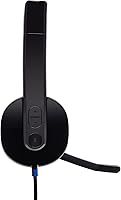
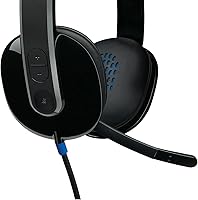
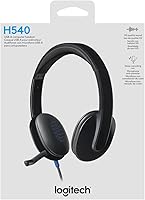
Overview

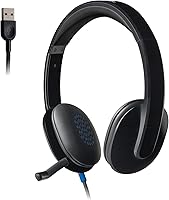
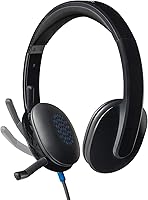
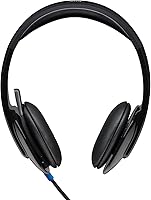
The Logitech H540 has been around since 2012, and the fact that it still ranks among the top computer headsets says something real about its staying power. It's a wired USB-A headset — plug it in, and it works. No driver installation, no pairing rituals. The over-ear design with padded leatherette cushions makes it comfortable enough for extended sessions, which matters when you're on back-to-back calls. It occupies a practical price point between bare-bones office headsets and more premium options from Jabra or Plantronics, and it's certified for both Skype and Chromebook use straight out of the box.

Features & Benefits

The 32mm dynamic drivers are tuned to lean into bass — handy for music and movies, though voice calls come through clear and full too. A built-in EQ handles the audio shaping without requiring any software, which keeps setup refreshingly simple. The bi-directional microphone does a decent job filtering out ambient noise in a reasonably quiet room; just don't expect it to neutralize a loud open-plan office. On-ear controls let you adjust volume or bass without reaching for your keyboard. The nearly 6-foot cable gives enough slack for a relaxed desktop setup, and since it's wired, latency is essentially zero — no Bluetooth hiccups mid-call.

Best For

This USB headset makes the most sense for people who spend a significant chunk of their day on calls — remote workers, students attending virtual classes, or anyone whose job involves heavy VoIP use. It's also a solid pick for Chromebook users who want a certified peripheral that works without compatibility headaches. If you need one device that handles Zoom meetings in the morning and background music in the afternoon, the H540 covers both reasonably well. Those chasing wireless freedom or studio-grade audio will want to look elsewhere, but for practical everyday use, this Logitech headset strikes a sensible, no-fuss balance.

User Feedback

Across a large pool of reviews, the pattern is fairly consistent: people appreciate the comfortable fit and how reliably the mic performs in home or quiet office environments. The plug-and-play convenience gets mentioned constantly — no software to maintain, works the first time. On the critical side, some owners find the bass tuning a bit heavy for pure voice use, and a number of longer-term users have flagged earcup padding wear after extended ownership — the leatherette doesn't hold up especially well over years of daily use. Still, a 4.1-star rating on a product this mature reflects genuine satisfaction rather than early enthusiasm.

Pros

  • Plug-and-play USB setup works instantly on Windows, Mac, and Chrome OS — no drivers needed.
  • The bi-directional mic delivers clear voice pickup in quiet home-office environments.
  • On-ear volume and bass controls mean quick adjustments without touching your computer.
  • Wired connection eliminates latency completely, making it ideal for real-time calls.
  • Comfortable leatherette padding holds up well during long daily sessions.
  • At its price tier, the Logitech brand adds a layer of reliability trust competitors struggle to match.
  • The nearly 6-foot cable gives enough slack for relaxed desktop use without feeling tethered.
  • Certified for both Skype and Chromebook, removing compatibility guesswork for those users.
  • Lightweight build means no noticeable head pressure even after hours of continuous wear.

Cons

  • No flip-to-mute button makes silencing the mic during calls slower than it should be.
  • Leatherette earcups are prone to peeling and hardening after roughly 12 to 24 months of daily use.
  • The bass-heavy audio tuning can make voices sound unnaturally warm on voice-only calls.
  • No USB-C option means modern thin laptops require a separate adapter to use this headset.
  • Passive noise isolation is only moderate — loud surroundings still intrude during listening.
  • No companion app or adjustable EQ means you cannot tune the audio profile to your preference.
  • Microphone struggles noticeably in louder environments like open offices or busy households.
  • No carrying case or collapsible design makes this headset impractical for commuting or travel.

Ratings

The scores below were generated by AI after analyzing thousands of verified global user reviews for the Logitech H540, with spam, bot-submitted, and incentivized feedback actively filtered out. This USB headset has accumulated a substantial review history since its 2012 launch, giving us a rare depth of long-term ownership data to work with. Both the genuine strengths and the recurring pain points are reflected transparently in every category score.

Microphone Clarity
83%
For home-office calls and online classes, the bi-directional mic performs well above what you'd expect at this price tier. Colleagues and classmates consistently report hearing voices clearly without excessive background hiss or room echo in typical quiet-to-moderate environments.
Put this headset in a louder setting — a busy household, a shared workspace — and the mic starts to struggle. It reduces ambient noise rather than eliminating it, so loud surroundings still bleed through noticeably during calls.
Comfort & Fit
78%
22%
The padded leatherette earcups and headband make wearing this USB headset for two or three hours at a stretch genuinely comfortable. Remote workers report being able to get through a full morning of calls without the ear fatigue that plagues cheaper headsets with thin foam pads.
The leatherette material, while comfortable initially, retains heat during longer sessions and has a tendency to peel or crack after a year or more of daily use. This is the most consistent long-term durability complaint among owners who use it heavily every day.
Audio Quality
74%
26%
The built-in EQ and laser-tuned drivers produce a warm, bass-forward sound that works well for music and video content. Casual listeners find it a solid upgrade over laptop speakers or basic earbuds without spending much.
The bass tuning that makes music enjoyable can feel excessive during voice-only calls, making some speakers sound unnaturally warm or boomy. Audiophiles or anyone expecting balanced, flat audio reproduction will find the sound signature a bit too colored.
Build Quality & Durability
61%
39%
The overall frame feels sturdy enough for desk use, and the headband mechanism adjusts smoothly without feeling flimsy. Many owners have used this Logitech headset for several years without any structural failures to the main chassis or cable connection.
The earcup padding is the clear weak point — multiple long-term reviewers report visible wear, flaking, and hardening of the leatherette within 18 to 24 months of regular use. The headset works fine mechanically but starts to look and feel worn relatively quickly.
Plug-and-Play Convenience
94%
This is arguably where the H540 earns its loyal following. Plug it into any USB-A port on Windows, Mac, or a Chromebook and it is recognized instantly — no software to install, no settings to configure. For non-technical users or anyone who just wants it to work, this reliability is genuinely valuable.
The simplicity is also a limitation for power users. There is no companion app, no equalizer customization, and no firmware update path. What you hear out of the box is what you always get, with no option to tune it further.
Value for Money
88%
At its price point, the combination of a reputable brand, a functional noise-reducing mic, and decent audio drivers is hard to beat. For students or remote workers who need a dependable daily-use headset without a large investment, the value proposition holds up well.
The long-term durability of the earcups slightly undermines the value case — if you need to replace it after 18 months due to padding degradation, the cost-per-year calculation becomes less favorable compared to slightly pricier but more durable alternatives.
Cable Quality & Length
81%
19%
The nearly 6-foot cable comfortably reaches from a tower PC or a laptop on a desk without pulling or creating tension. The tangle-resistant design holds up in real daily use, staying reasonably manageable even when coiled and uncoiled repeatedly.
There is no in-line remote or mute button on the cable itself, which means you rely entirely on the on-ear controls. Users who prefer to manage calls from the cable rather than reaching to their head will find this a minor but recurring inconvenience.
On-Ear Controls
72%
28%
Having volume and bass adjustment directly on the earcup means you can make quick changes mid-call without touching your computer. The controls are tactile enough to use without looking, which becomes second nature after a few days of use.
The absence of a flip-to-mute mechanism or a dedicated mute button on the headset is a genuine gap. Users who mute frequently during calls — a very common habit in remote work — have to either reach for a software button or use the microphone arm, which is less intuitive.
Compatibility
91%
Windows, Mac, and Chrome OS all recognize this USB headset without any additional steps. The official Chromebook certification and Skype certification provide extra confidence for users in those specific ecosystems who want confirmed compatibility before buying.
There is no 3.5mm analog option, so if your device lacks a USB-A port — a growing reality with modern thin laptops — you will need a USB-C adapter. This is not a dealbreaker but is worth checking before purchasing.
Noise Isolation (Passive)
67%
33%
The over-ear design and padded cushions provide a moderate amount of passive isolation from surrounding noise, enough to keep you focused during calls in a reasonably quiet home office or private room.
The isolation is adequate rather than impressive. In shared living spaces or open offices, ambient noise is still very much present. Do not mistake the noise-canceling mic label for any kind of active noise cancellation — there is none on the listening side.
Weight & Portability
76%
24%
At just over 4 ounces, the H540 is light enough that you stop noticing it during extended wear. It does not create the top-of-head pressure that heavier headsets often cause after an hour or two.
The headset is sized for desk use and does not fold flat or come with a carrying case. It is technically portable, but the rigid form factor makes tossing it in a bag less practical compared to collapsible headsets designed with travel in mind.
Microphone Placement & Flexibility
69%
31%
The microphone boom is adjustable and can be positioned close to the mouth for better pickup, which helps with clarity when the mic is tuned to your voice rather than left in a default position.
There is no flip-to-mute feature, so there is no quick physical way to silence the mic without using software controls. For users who jump in and out of conversations frequently, this is a workflow friction point that competing headsets at similar prices have already solved.
Setup & Software Experience
86%
The complete absence of required software is, for most buyers, a feature rather than a limitation. There is nothing to install, no account to create, and no background application running. It just works, which is exactly what most people in this category want.
For the minority who want EQ presets, call management software, or audio profiles for different use cases, there is simply nothing available. The built-in EQ is fixed and non-adjustable, so you accept the audio signature as-is.

Suitable for:

The Logitech H540 is a strong fit for remote workers and home-office regulars who spend the bulk of their day on Zoom, Skype, or Teams calls and want a reliable headset that requires zero configuration. Students attending virtual classes will appreciate that it works the moment it is plugged in — no IT support required, no software to wrestle with. Chromebook users in particular benefit from the official certification, which removes any guesswork about compatibility. Casual listeners who want one headset that handles both work calls and background music will find the audio quality more than adequate for that dual purpose. If your work environment is reasonably quiet and you simply need a dependable, comfortable headset from a trusted brand without paying a premium, this USB headset delivers exactly that, day in and day out.

Not suitable for:

The Logitech H540 is not the right choice for anyone working in a noisy open-plan office or a loud shared household, since the microphone reduces background noise rather than cancelling it electronically — colleagues will still hear your environment in challenging conditions. If wireless freedom matters to you — walking around during calls, moving between rooms — this headset offers none of it; the wired-only design is a hard constraint, not a trade-off. Power users who want customizable EQ settings, dedicated call-control software, or a flip-to-mute mechanism will find the feature set limiting. Buyers with modern laptops that have only USB-C ports will need an adapter, which adds friction. And if you plan to use it heavily every day for multiple years, be aware that the leatherette earcup padding has a well-documented tendency to degrade, so long-term durability is a genuine concern worth factoring into the decision.

Specifications

  • Connection: Uses a standard USB-A connector with plug-and-play support — no adapter or driver installation required on Windows, Mac, or Chrome OS.
  • Cable Length: The attached cable measures 5.9 ft (1.8m), providing comfortable reach from a desktop tower or a laptop placed on a standard desk.
  • Driver Size: Each earcup houses a 32mm dynamic audio driver tuned to emphasize bass response via a built-in hardware EQ.
  • Microphone Type: A bi-directional noise-reducing microphone is mounted on an adjustable boom arm to help focus on the speaker's voice in moderately quiet environments.
  • Impedance: The headset operates at 20 Ohm impedance, which is well-suited for USB-powered audio output without requiring an external amplifier.
  • Frequency Response: Audio reproduction covers a frequency range up to 20,000 Hz, handling the full spectrum of human hearing for calls and casual music listening.
  • Ear Placement: Over-ear design fully encircles the ear using padded leatherette earcups intended to reduce contact pressure during extended sessions.
  • Headband Material: The headband is padded with soft leatherette material to distribute clamping force across the top of the head during long wear periods.
  • Weight: The complete headset weighs approximately 4.2 oz (119g), keeping it light enough that most users stop noticing it during extended wear.
  • On-Ear Controls: Physical controls mounted directly on the earcup allow independent adjustment of volume and bass level without interacting with the connected device.
  • Mute Mechanism: There is no flip-to-mute arm or dedicated hardware mute button; muting must be handled through software on the connected device.
  • Wireless: This headset is entirely wired with no Bluetooth or wireless functionality of any kind.
  • Battery: No battery is required; the headset draws power directly from the host device via its USB-A connection for unlimited continuous use.
  • Compatibility: Officially compatible with Windows, macOS, and Chrome OS, and carries both Skype certification and Works With Chromebook (WWCB) certification.
  • Noise Cancellation: Noise reduction is achieved passively through microphone directionality — there is no active electronic noise cancellation on either the mic or the listening side.
  • Cable Design: The cable uses a tangle-resistant construction to reduce knots and snags during daily coiling and uncoiling at a desk.
  • Earcup Shape: Earcups are rounded in shape and sized to sit fully over the ear rather than resting on the outer ear.
  • Certifications: Carries Skype for Business certification and official Works With Chromebook certification for confirmed out-of-the-box compatibility in those ecosystems.
  • Product Dimensions: The headset measures approximately 8.86 x 7.05 x 3.03 inches in its default unfolded position, sized for desktop storage rather than travel.
  • Manufacturer: Designed and manufactured by Logitech, a Swiss-American peripheral brand, under model number 981-000510.

Related Reviews

Logitech POP Mouse
Logitech POP Mouse
82%
93%
Silent Click Performance
89%
SmartWheel Scrolling
87%
Multi-Device Connectivity
91%
Battery Life
71%
Ergonomics & Hand Fit
More
Logitech Pebble M350
88%
88%
Build Quality
85%
Ergonomics & Comfort
94%
Battery Life
90%
Connectivity Reliability
87%
Tracking Precision
More
Logitech ERGO K860
Logitech ERGO K860
81%
93%
Ergonomic Comfort
89%
Wrist Rest Quality
84%
Typing Feel & Accuracy
67%
Adjustment Period
81%
Build Quality & Materials
More
Logitech X-530
Logitech X-530
75%
82%
Sound Quality
80%
Bass Performance
86%
Dialogue / Center Channel
84%
Surround Imaging
75%
Build Quality
More
Logitech Wireless Touchpad
84%
80%
Performance
85%
Ease of Use
88%
Wireless Connectivity
83%
Build Quality
82%
Ergonomics
More
Logitech USB Desktop Microphone
82%
91%
Ease of Setup
76%
Audio Quality
85%
Noise Cancellation
78%
Build Quality
83%
Design & Ergonomics
More
Logitech Zone Wired
Logitech Zone Wired
79%
88%
Microphone Clarity
91%
Call Performance
74%
Comfort & Wearability
83%
Build Quality
67%
Sound Quality for Music
More
Logitech B525 HD Webcam
85%
88%
Video Quality
90%
Portability
92%
Ease of Setup
85%
360-Degree Swivel
83%
Low-Light Performance
More
Logitech Wireless Keyboard K360
87%
95%
Battery Life
92%
Ease of Setup
83%
Typing Comfort
90%
Wireless Connectivity
85%
Build Quality
More
Logitech Wireless M570 Trackball
84%
91%
Comfort & Ergonomics
88%
Precision & Control
85%
Battery Life
87%
Wireless Range & Connectivity
80%
Ease of Use
More

FAQ

Yes, it does. The H540 carries official Works With Chromebook certification, so Chrome OS recognizes it as soon as you plug it in. No extensions, no settings to dig through — it just works.

The Skype certification is just a compatibility badge — the headset works perfectly well with Zoom, Microsoft Teams, Google Meet, or any other calling platform that uses your computer's audio input and output. The operating system handles the routing, so the app you use does not matter.

Unfortunately, there is no hardware mute button or flip-to-mute arm on this USB headset. You will need to mute through the software you are using — most apps like Zoom and Teams have keyboard shortcuts for this, which becomes a reasonable workaround once you learn them.

The cable ends in a USB-A connector, so you would need a USB-A to USB-C adapter to use it with a modern thin laptop. A basic adapter works fine since no data transfer is involved — just audio.

Be realistic about expectations here. The bi-directional microphone design does reduce ambient noise compared to an omnidirectional mic, but it is not active electronic noise cancellation. In a moderately noisy room, callers may still pick up background sounds. It performs best in a quiet home office or private room.

Unfortunately, yes — this is one of the most commonly reported issues with this Logitech headset over time. The leatherette material tends to harden, crack, or peel with daily use, typically within one to two years. Replacement earcup pads compatible with this model are available from third-party sellers if you want to extend its life without replacing the whole unit.

No, not directly. The headset connects via USB-A and is designed for PC use. Most gaming consoles do not route chat audio through USB the same way a computer does, so you would likely get audio playback but no microphone function, if it works at all.

The built-in EQ is fixed in hardware, so there is no software or app to tune it. Your best option is to use your operating system's audio settings or a third-party equalizer application to reduce the low frequencies to your liking. It adds a step, but it does work.

The cable is 5.9 ft (1.8m) long, which is generous enough to reach from a tower sitting on the floor to a seated user at a standard desk with slack to spare. Most users find the length comfortable without excess coiling.

Quite a few glasses wearers report it being comfortable, largely because the over-ear design places the earcups around the ear rather than pressing on the temple arms. The clamping force is relatively light, which helps. Individual fit varies, but it is generally considered glasses-friendly for this category of headset.