Overview

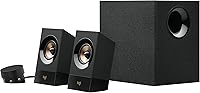
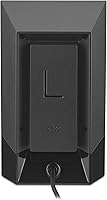
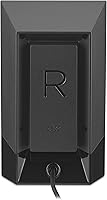
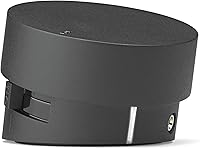
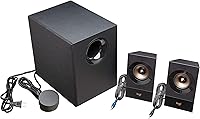
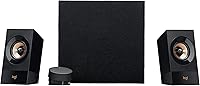
The Logitech Z533 is a mid-range 2.1 desktop speaker system from a company that has been building PC audio hardware for more than three decades. It runs at 60W RMS — the continuous power figure that actually reflects real-world performance, not the peak number you see in the headline specs. A front-facing 5.25-inch subwoofer handles the low end while two compact satellites cover the stereo field. Connectivity is broad: 3.5mm and RCA inputs let you hook up nearly any source device, from a desktop PC to a TV to a smartphone. The directional satellite drivers are specifically tuned for close-range desk listening, which shapes the entire experience.

Features & Benefits

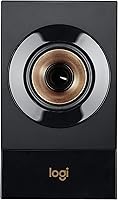
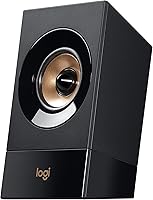
What separates the Z533 from cheaper desktop sets is mostly the subwoofer design. Because it faces forward rather than downward, bass travels directly toward the listener instead of getting absorbed by the floor — the difference is audible, especially at lower volumes. The wired control pod deserves mention: it sits wherever you place it and gives you instant access to power, volume, and bass levels, plus a headphone jack and an extra input when needed. The whole system is plug-and-play — no software installation, no driver updates. You connect the cables and it works, which is exactly how it should be.

Best For

This 2.1 desktop speaker set is a natural fit for PC gamers and home office users who want meaningful audio impact without building out a full surround system. It's also well-suited for anyone stepping up from built-in laptop or monitor speakers — the upgrade is immediate. Multiple inputs make it easy to run a gaming console and a computer through the same speakers without constant cable swapping. The forward-firing subwoofer is a practical choice for apartments or shared spaces where floor-transmitted bass would cause problems. If you want dependable, brand-backed audio without a complicated setup, this Logitech speaker system covers the ground well.

User Feedback

Owners consistently highlight two things: strong bass output and how reliably the system holds up over years of use. The control pod's convenience also gets genuine appreciation from daily users. On the other side, the satellite speakers do show their limits at higher volumes — treble can sound thin or compressed when you push things hard. Accidentally bumping the power switch on the pod is a recurring minor annoyance. It's also worth knowing that the advertised wattage is a peak figure, not a continuous one — real listening levels are more modest. Buyers who go in with that understanding tend to be consistently happy with the purchase.

Pros

  • Front-facing subwoofer delivers audible, room-filling bass even at lower volume levels.
  • Plug-and-play setup means you are listening within minutes of opening the box.
  • Dual inputs let you connect a PC and a console simultaneously without adapters.
  • The wired control pod keeps volume and bass adjustments within constant arm reach.
  • Long-term durability is well-reported, with many owners using the system for several years without issues.
  • Compact satellite speakers fit comfortably on most desks without crowding the monitor.
  • The headphone jack on the control pod makes late-night switching effortless.
  • Broad device compatibility covers everything from desktop PCs to TVs to smartphones.
  • Understated all-black design fits most desk setups without clashing aesthetically.

Cons

  • Treble quality noticeably thins out when volume is pushed past the midpoint.
  • No Bluetooth or wireless input option, which feels like a gap at this price level.
  • The power button on the control pod is easy to hit accidentally during normal desk use.
  • Peak wattage marketing is misleading — real-world continuous output is considerably lower.
  • Included cable kit does not contain an RCA cable despite RCA being a featured input.
  • Mid-range audio reproduction lacks depth, making vocal-heavy content sound slightly hollow.
  • Subwoofer unit is bulky enough to be awkward on compact or cluttered desk setups.
  • Satellite cable lengths limit placement flexibility for larger or more spread-out workstations.
  • Plastic finish scuffs easily and accumulates visible dust and fingerprints over time.

Ratings

The Logitech Z533 has been rated by our AI system after analyzing thousands of verified global user reviews, with spam, bot activity, and incentivized feedback actively filtered out. The scores below reflect an honest cross-section of real buyer experiences — strengths and frustrations included — to give you a transparent picture of where this 2.1 desktop speaker set genuinely delivers and where it falls short.

Bass Performance
86%
The front-facing subwoofer is the standout feature for most buyers. Users consistently describe bass as punchy and present without needing to crank the volume, which matters a lot for late-night gaming or apartment listening where floor vibration is a concern.
A minority of users with audiophile backgrounds find the bass slightly one-dimensional — more quantity than texture. At higher output levels, it can occasionally overpower the mid-range, muddying dialogue in movies or vocals in music.
Satellite Speaker Clarity
67%
33%
At moderate desk-level volumes, the satellites hold their own for casual music listening and gaming audio cues. Stereo separation is decent for a system in this class, and positional audio in games comes through clearly enough for everyday use.
The treble noticeably thins out when volume is pushed past the midpoint. Users who listen to detail-heavy music — acoustic, classical, or hi-res audio — tend to find the high-frequency reproduction underwhelming compared to the bass output.
Value for Money
82%
18%
Buyers upgrading from built-in laptop or monitor speakers repeatedly describe the difference as dramatic. For a branded system with a real subwoofer, the price sits comfortably in a range where the hardware feels proportionate to the investment.
Some reviewers feel the asking price edges into territory where dedicated bookshelf speakers with a separate amp could outperform it on sound quality alone. The value equation is strong for convenience buyers, less so for sound-quality seekers.
Build Quality & Durability
83%
Long-term owners are notably positive here. Multiple reviewers report using the system for four or more years without hardware failure or audible degradation, which is a meaningful endorsement for a product used daily across gaming and work sessions.
The plastic finish on the satellites scuffs and scratches without much provocation. A few users also noted that the control pod cable feels thinner than expected, raising questions about longevity if it gets regularly moved around a desk.
Control Pod Usability
78%
22%
The idea of a separate pod for volume, bass, power, and headphone access is well-executed in daily practice. Desk users appreciate being able to tweak bass during different content types — boosting it for gaming, dialing it back for video calls — without touching the speakers.
The power button placement on the pod is a recurring complaint. It sits close enough to the volume dial that accidental shutoffs happen more than they should, which becomes genuinely frustrating during gaming sessions or when the pod gets nudged.
Setup & Installation
94%
Plug-and-play functionality is legitimately hassle-free here. Users across all technical skill levels report being fully set up within minutes of opening the box, with no driver installation, app pairing, or configuration required whatsoever.
The cable lengths are fixed, which occasionally limits placement flexibility for larger desk setups or when the subwoofer needs to be positioned away from the main unit. A small number of users wanted more slack in the satellite cables.
Input Versatility
88%
Having both a 3.5mm and RCA input means the Z533 can handle a PC, a console, and a TV without an adapter in most setups. Users who run multiple devices through a single speaker system cite this as a key reason they chose this over competitors.
There is no Bluetooth or wireless connectivity option, which is an increasingly common expectation at this price tier. Buyers who wanted to occasionally stream from a phone without plugging in a cable found this limiting.
Subwoofer Design & Placement
81%
19%
The forward-facing subwoofer design means it can be tucked under a desk or placed beside it without losing bass impact, since the sound projects outward rather than relying on floor reflection. Apartment dwellers specifically appreciate this.
The subwoofer enclosure is fairly large relative to a compact desk setup. Users with limited floor space found it awkward to position, and a few noted that the unit visually dominates smaller workstations.
Volume Output
74%
26%
For a typical bedroom or home office, the system gets plenty loud. Gaming and movie sessions at conversational-to-loud volumes are handled without strain, and the sound stays relatively composed before you approach the upper end of the dial.
The headline 120W figure is a peak measurement — real continuous output is 60W RMS, and a few buyers felt misled when the speaker did not match the loudness they expected from the marketed spec. It is not a room-filling party speaker.
Mid-Range Reproduction
63%
37%
Vocals and mid-range instruments are passable for casual listening at moderate volumes. In gaming contexts, character dialogue and in-game sound effects come through clearly enough that most users do not actively notice a gap.
The mid-range is the weakest part of the frequency response. Users who play acoustic music, podcasts, or vocal-heavy content at length often describe it as slightly hollow or recessed, especially compared to how present the bass feels.
Aesthetic & Desk Presence
71%
29%
The all-black finish is understated and fits most desk setups without drawing attention. The satellite speakers are compact enough that they do not crowd a monitor, and the overall aesthetic reads as professional rather than gamer-flashy.
There are no RGB options or design variants for users who want their audio setup to match a themed desk build. The matte plastic also shows dust and fingerprints easily, requiring more frequent cleaning than a glossy or textured finish would.
Headphone Jack Convenience
79%
21%
Having the headphone output on the control pod rather than on the speakers themselves is a genuinely useful detail. Late-night switches from speakers to headphones take seconds, and the pod stays within arm's reach on a desk throughout the day.
The headphone output volume is tied to the main volume dial, so switching to headphones sometimes requires re-adjusting levels. A few users also noted slight audible hiss through sensitive headphones at lower volumes.
Compatibility Across Devices
91%
The Z533 connects to virtually any device that has a standard audio output. Reviewers use it with Windows and Mac desktops, PlayStation and Xbox consoles, smart TVs, tablets, and older audio equipment with RCA outputs without any compatibility issues.
The lack of USB or optical input means users with newer devices that are moving away from 3.5mm jacks may need an adapter. It is a minor friction point, but worth noting for buyers with USB-C-only laptops or newer consoles.
Packaging & Unboxing
76%
24%
The included accessories cover the basics well — a 3.5mm-to-3.5mm cable is included, and the documentation is clear enough that most buyers never need to search for setup guidance online. Everything arrives securely packed.
The included cable is on the shorter side, and some buyers wanted an RCA cable included alongside the 3.5mm option given that RCA is advertised as a featured input. It feels like a missed opportunity for a more complete out-of-box experience.

Suitable for:

The Logitech Z533 is a strong fit for PC gamers, home office workers, and general desktop users who want a meaningful audio upgrade without dealing with complex setups or surround sound configurations. If you are currently listening through built-in laptop speakers or cheap monitor audio, the jump in bass presence and overall volume will feel immediately significant. It works particularly well in smaller rooms and bedroom setups where a forward-facing subwoofer can fill the space without shaking the floor or disturbing neighbors. Multi-device users will appreciate the dual input options — having a console and a PC connected simultaneously without swapping cables is a genuine daily convenience. The wired control pod is a practical bonus for anyone who adjusts volume and bass frequently throughout the day. Long-term reliability is well-documented by owners, making this a sensible choice for buyers who want audio hardware that holds up over years of regular use.

Not suitable for:

Buyers who prioritize high-fidelity audio reproduction — especially in the upper frequencies — will likely find the Logitech Z533 limiting over time. The satellite speakers are tuned for general-purpose desk listening, not critical music playback, and the treble response starts to feel compressed when you push the volume higher or listen to detail-rich content like acoustic recordings or orchestral music. Audiophiles or home studio users expecting studio-monitor precision will be disappointed. Anyone hoping for wireless connectivity or Bluetooth pairing for casual phone streaming will also hit a wall — this is a fully wired system with no wireless option. If your desk space is particularly limited, the subwoofer footprint may also feel intrusive. And buyers drawn in by the peak wattage figure in the marketing should temper their expectations — the real continuous output is more modest, and this is not a speaker system designed to fill a large living room at party volumes.

Specifications

  • Configuration: 2.1 stereo system consisting of two satellite speakers and one subwoofer unit.
  • Peak Power: Total peak output is 120W across the full system.
  • RMS Power: Continuous RMS power output is 60W, which reflects real-world sustained listening performance.
  • Subwoofer Size: The front-facing subwoofer uses a 5.25-inch driver housed in a ported enclosure.
  • Satellite Drivers: Each satellite speaker contains a 2.25-inch full-range dynamic driver tuned for close-range stereo listening.
  • Frequency Response: The system covers a frequency range up to 20,000 Hz.
  • Impedance: System impedance is rated at 8 Ohm.
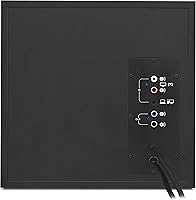
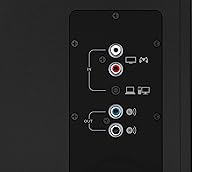
  • Inputs: Three wired inputs are provided: one 3.5mm aux input on the subwoofer, one RCA stereo input, and one additional 3.5mm input on the control pod.
  • Control Pod: The included wired control pod provides access to power, master volume, bass level, a 3.5mm input jack, and a headphone output jack.
  • Headphone Output: A dedicated 3.5mm headphone jack is located on the control pod for direct private listening without disconnecting speakers.
  • Connectivity: All connections are wired; no Bluetooth, Wi-Fi, or USB audio input is available.
  • Power Source: The system operates on corded AC power and does not support battery or USB bus power.
  • Dimensions: The overall system footprint measures 13.9″ deep by 9.7″ wide by 7.9″ high.
  • Weight: The complete system weighs 12.3 pounds including subwoofer and both satellite units.
  • Compatible Devices: Works with any audio source that has a 3.5mm or RCA output, including PCs, Macs, consoles, TVs, smartphones, and tablets.
  • Driver Type: Both satellite speakers use dynamic drivers for audio reproduction.
  • Color: Available in black with a matte plastic finish across all three units.
  • Included Items: Package includes the right satellite, left satellite, subwoofer, wired control pod, a 3.5mm-to-3.5mm cable, and user documentation.
  • Surround Sound: The system is stereo-only and does not support surround sound or virtual spatial audio processing.
  • Warranty: Covered by a manufacturer warranty; buyers should confirm current terms directly with Logitech at time of purchase.

Related Reviews

Logitech X-530
Logitech X-530
75%
82%
Sound Quality
80%
Bass Performance
86%
Dialogue / Center Channel
84%
Surround Imaging
75%
Build Quality
More
Logitech Wireless Touchpad
84%
80%
Performance
85%
Ease of Use
88%
Wireless Connectivity
83%
Build Quality
82%
Ergonomics
More
Logitech ERGO K860
Logitech ERGO K860
81%
93%
Ergonomic Comfort
89%
Wrist Rest Quality
84%
Typing Feel & Accuracy
67%
Adjustment Period
81%
Build Quality & Materials
More
Logitech POP Mouse
Logitech POP Mouse
82%
93%
Silent Click Performance
89%
SmartWheel Scrolling
87%
Multi-Device Connectivity
91%
Battery Life
71%
Ergonomics & Hand Fit
More
Logitech Pebble M350
88%
88%
Build Quality
85%
Ergonomics & Comfort
94%
Battery Life
90%
Connectivity Reliability
87%
Tracking Precision
More
Logitech Trackman Marble Trackball
86%
91%
Ergonomics & Comfort
88%
Precision & Tracking
85%
Ease of Use
94%
Build Quality
90%
Value for Money
More
Logitech Wireless Mouse M320
86%
91%
Value for Money
88%
Wireless Connectivity
84%
Ergonomics & Comfort
92%
Battery Life
89%
Portability & Size
More
Logitech M510
Logitech M510
81%
91%
Ergonomic Comfort
93%
Battery Life
88%
Wireless Reliability
79%
Tracking Accuracy
74%
Build Quality
More
Logitech H390 USB Computer Headset
83%
86%
Microphone Voice Clarity
93%
Value for Money
97%
Ease of Setup
68%
Long-Term Comfort
82%
In-Line Control Tactility
More
Logitech C270 HD Webcam
76%
94%
Ease of Setup
74%
Video Quality
51%
Low-Light Performance
63%
Built-in Microphone
67%
Build Quality & Durability
More

FAQ

No, none at all. The system is fully plug-and-play — you connect the cable to your device and it works immediately. There is no companion app, no driver installation, and no firmware setup involved.

Yes, as long as your console has a 3.5mm or RCA audio output available. Most consoles can route audio through either the TV optical out or directly via an RCA connection, both of which this system supports. It is a straightforward wired hookup.

Absolutely. Since it uses a standard 3.5mm analog connection rather than any proprietary digital interface, it works with any Mac that has a headphone or audio output port — no configuration needed on the Mac side.

Yes. The system has both a 3.5mm input on the subwoofer and an RCA input, so you can keep two sources connected simultaneously. Audio from both will play at the same time if both devices are outputting sound, so you may need to mute one source at the device level when switching.

It does not have to be on the floor, though most users place it there. Because the driver faces forward rather than downward, it projects bass outward and does not rely on floor reflection to work effectively. Under a desk or on a low shelf both work well.

Loud enough to comfortably fill a medium-sized bedroom or home office. The 60W RMS continuous output is what determines real listening levels — the 120W figure is a peak measurement under ideal conditions. For a desk setup or small room, the volume is more than sufficient; it is not designed to serve as a party or living-room speaker system.

Yes, inserting a headphone plug into the control pod jack mutes the satellite speakers and subwoofer, so audio is redirected privately. It works the same way as a standard headphone jack switch on most audio equipment.

At low volume settings the system is generally quiet. However, some users with sensitive headphones connected to the pod have reported a faint hiss at lower gain levels. Through the speakers themselves at normal desk volumes, background noise is not typically a noticeable issue.

The cable lengths are fixed, which works fine for most standard desk configurations. The satellite speaker cables and the subwoofer connection are not exceptionally long, so placement flexibility is somewhat limited if you need the subwoofer positioned further away. Cable management clips or ties help keep things tidy.

Long-term durability is one of the more consistently positive things buyers report. A number of users mention using the same unit for three to five years with no hardware failure or audible change in performance. The plastic finish does pick up scuffs and scratches over time, but the audio components appear to remain stable with regular use.