Logitech Signature M550 L



Overview
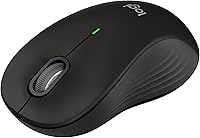
The Logitech Signature M550 L is built with one specific frustration in mind: full-sized hands crammed onto a mouse that was never designed for them. Launched in early 2024, it sits comfortably in the mid-range price bracket — not a budget throwaway, but far from premium territory. The result is a productivity-focused daily driver that connects via Bluetooth or a USB receiver and works across virtually every major operating system. With over 3,000 ratings and a 4.6-star average, early adoption has been strong. Just be clear on what it is: a comfort and reliability mouse, not a high-DPI gaming or precision design tool.
Features & Benefits
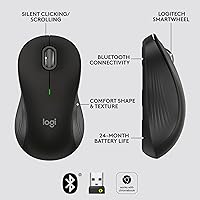
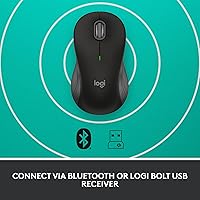
The SmartWheel scrolling is one of the first things you notice — a quick flick switches between precise line-by-line control and a faster free-spin mode, which is genuinely useful when jumping between a detailed spreadsheet and a long webpage. The M550 L also keeps things notably quiet, with its click-dampening cutting noise by around 90%, a real advantage in shared or open-plan spaces. Ergonomically, the contoured body includes a soft thumb rest and rubberized side grips that feel intentional rather than decorative. Connectivity is flexible, pairing via Bluetooth Low Energy or a Logi Bolt USB dongle, and a single AA battery powers this large-hand mouse for up to two years.
Best For
This wireless mouse hits its stride in everyday office and home-office use, particularly for people whose hands have always felt slightly too big for standard mice. If you regularly switch between a Windows laptop and a Mac, or bounce between a desktop and a tablet, the multi-device compatibility removes a lot of friction from your day. It also suits anyone working in a quiet shared environment — a library, a coworking space — where audible clicking draws unwanted attention. That said, if you need high-precision tracking for creative work or want programmable buttons for gaming, this mouse is simply not built for that kind of use.
User Feedback
Across a broad base of reviews, hand comfort and fit come up repeatedly as the standout strength — buyers with larger hands consistently report that the shape feels right from the first session, not just after an adjustment period. The silent clicks draw equally warm responses from people in open offices or shared home setups. On the critical side, some users find the scroll wheel feel slightly loose or plasticky for the price. A handful of reviewers note that multi-device switching requires Logitech's Options+ software, adding setup steps not everyone wants. Battery longevity rarely draws complaints, with most buyers finding the two-year estimate credible in real-world daily use.
Pros
- The contoured shape fits large hands naturally, reducing fatigue during long desk sessions.
- Silent clicks are quiet enough for shared offices and library environments without feeling unresponsive.
- Two-year battery life on a single AA cell means almost no maintenance for the average user.
- Connects via both Bluetooth and a USB dongle, giving you flexibility depending on your setup.
- Works across six operating systems, making it a practical choice for multi-platform households.
- The M550 L ships ready to use — battery included, no charging cable needed.
- SmartWheel dual-mode scrolling adapts well between detailed documents and fast web browsing.
- Rubber side grips and a soft thumb rest add tactile quality that feels above its price tier.
- Ranked among the top computer mice on Amazon with over 3,000 verified ratings backing its reputation.
- Lightweight enough at under four ounces to slip into a laptop bag without bulk.
Cons
- The scroll wheel feels plasticky and slightly loose compared to Logitech's higher-end models.
- Multi-device switching via Bluetooth requires Logitech Options+ software, which is not flagged clearly at purchase.
- The glossy top shell picks up fingerprints easily and shows surface wear over time.
- No battery level indicator on the mouse itself, so low power can catch users off guard.
- Side grip panels may show minor peeling after six or more months of heavy daily use.
- Linux users get limited multi-device functionality without full software support on that platform.
- Bluetooth reconnection after a device wakes from sleep can lag slightly without the USB dongle.
- Users coming from premium-tier mice will notice the build finish gap fairly quickly.
- Options+ software can be resource-intensive on older or lower-spec machines.
Ratings
The Logitech Signature M550 L has been scored by our AI rating engine after processing thousands of verified global buyer reviews, with spam, bot-submitted, and incentivized feedback actively filtered out before any score was calculated. The result is an honest, unvarnished picture of where this large-hand wireless mouse genuinely excels and where real users have run into friction. Both the strengths and the sticking points are reflected transparently in the category scores below.
Ergonomic Comfort
Silent Click Performance
Battery Life
Wireless Connectivity Reliability
Multi-Device Compatibility
Scroll Wheel Quality
Build Quality
Value for Money
Out-of-Box Setup
Portability & Weight
Optical Sensor Accuracy
Click Durability
Software & App Experience
Thumb Rest & Grip Texture
Suitable for:
The Logitech Signature M550 L was clearly designed with a specific type of user in mind, and if you fit that profile, it delivers reliably. Office professionals who spend five or more hours a day at a desk — particularly those who have quietly tolerated cramped, undersized mice for years — will notice an immediate difference in how natural the grip feels. The silent click feature makes it a strong fit for anyone sharing a workspace, whether that is an open-plan office, a library, or a home setup where a partner or child is nearby. It also works well for people who move between devices and operating systems regularly, since it handles Bluetooth and USB connectivity across Windows, macOS, Linux, Chrome OS, iPadOS, and Android without much fuss. Budget-conscious buyers who want a reputable brand with real ergonomic investment, rather than a generic wireless option, will find the value proposition here genuinely compelling.
Not suitable for:
There are buyers for whom the Logitech Signature M550 L simply is not the right tool, and it is worth being direct about that. If you need high-precision cursor control for illustration, photo retouching, or CAD work, the optical sensor here is a productivity-grade component — not a high-resolution one — and you will feel its limits quickly. Gamers looking for responsive, tactile clicks and customizable DPI settings should look elsewhere entirely; this mouse was not built for that kind of performance demand. Users who prefer audible, clicky feedback from their mouse buttons may also find the dampened clicks feel unsatisfying rather than refined. Those who want to avoid software dependencies should know that unlocking multi-device Bluetooth switching requires installing Logitech Options+, which adds a setup layer some users find unnecessary. Finally, if your hands fall on the smaller or average side of the scale, the full-size form factor may feel oversized and less comfortable than a standard mouse.
Specifications
- Form Factor: Full-size ergonomic right-handed mouse, designed specifically to accommodate larger hands comfortably over extended use.
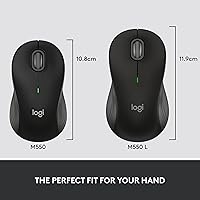
- Dimensions: The mouse measures 7.8 × 4.29 × 3.31 inches, providing a broad palm rest and wide button surface suited to bigger grips.
- Weight: The M550 L weighs 3.92 ounces without the battery, keeping it light enough for all-day desk use and easy transport.
- Connectivity: Connects wirelessly via Bluetooth Low Energy or through a Logi Bolt USB receiver, with both options supported simultaneously for flexible device switching.
- Battery: Powered by a single AA battery (included in the box), rated for up to 24 months of use under standard office conditions.
- Scroll Wheel: Features Logitech SmartWheel dual-mode scrolling, switchable between precise line-by-line control and a faster free-spin mode for long pages.
- Click Noise: SilentTouch technology dampens primary click noise by up to 90% compared to a standard mouse, measurably reducing audible disturbance in quiet environments.
- Sensor Type: Uses an optical sensor suitable for everyday productivity tasks on most common desk surfaces including wood, fabric, and frosted glass.
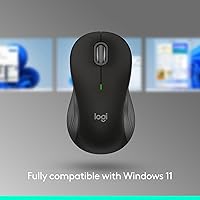
- Platform Support: Compatible with Windows, macOS, Linux, Chrome OS, iPadOS, and Android operating systems out of the box.
- Color: Available in Black, with a combination of matte and glossy plastic surfaces and rubberized side grip panels.
- Model Number: Official model number is 910-007238, part of the Logitech Signature M550 series launched in January 2024.
- Hand Target: Specifically engineered for users with large hands, with a body width and length that exceeds standard full-size mouse dimensions.
- Thumb Rest: Includes a dedicated soft-material thumb rest on the left side, designed to reduce lateral thumb strain during prolonged sessions.
- Side Grips: Rubberized grip panels run along both sides of the mouse body, providing secure hold and reducing slippage during extended use.
- Software: Optional Logitech Options+ software enables button remapping and multi-device Bluetooth switching; basic plug-and-play functionality requires no software installation.
- Receiver Type: Uses the Logi Bolt USB nano-receiver, which is compatible with other Logitech Bolt-enabled peripherals through a single dongle.
- BSR Ranking: Ranked number 14 in the Computer Mice category on Amazon, with a 4.6 out of 5 star average across more than 3,000 verified ratings.
- Warranty: Logitech provides a standard 2-year limited hardware warranty covering manufacturing defects for this product.
Related Reviews
Logitech Signature M650 L
Logitech Signature Wired M520 L for Business
Logitech M750 L
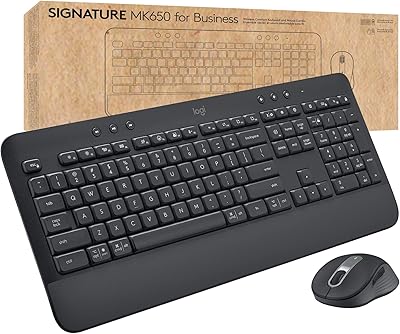
Logitech MK650 for Business
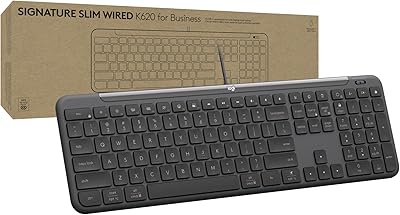
Logitech Signature Slim Wired K620 for Business
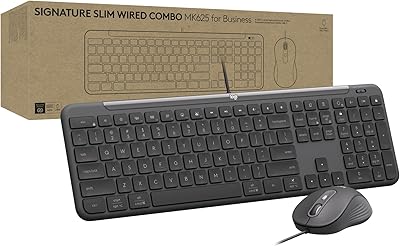
Logitech Signature Slim MK625 Wired Combo
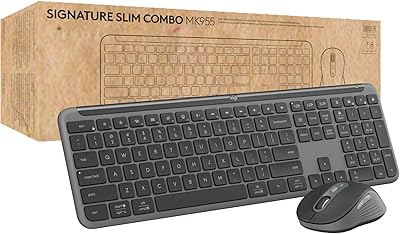
Logitech Signature Slim MK955 for Business

L.O.L. Surprise Kids Smartwatch

Logitech ERGO K860
