Overview

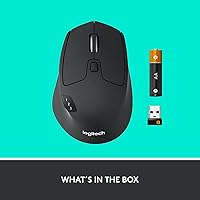
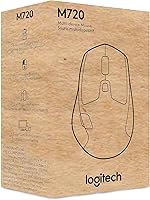
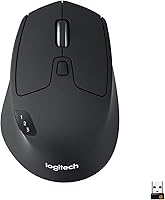
The Logitech M720 Triathlon is a full-sized wireless mouse built for people who regularly juggle more than one computer. Designed exclusively for right-hand use, this multi-device mouse pairs with up to three devices at once via Bluetooth or the USB Unifying Receiver — a practical edge over single-device alternatives. It covers virtually every major platform: Windows, macOS, ChromeOS, Linux, and iPadOS, making it one of the more versatile options at its price tier. Backed by over 12,000 ratings and a top-25 bestseller rank in its category, it has a track record that speaks for itself.
Features & Benefits

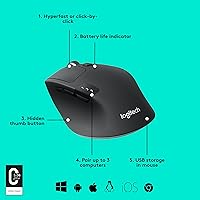
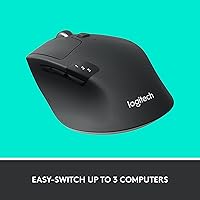
What sets this wireless mouse apart day-to-day is its device-switching setup. A small button on the base cycles through up to three paired computers instantly — no cable swaps, no fuss. Pair that with Logitech Flow, and you can drag files or copy text between machines, provided both are on the same network and running the Logitech Options software. The hyper-fast scroll wheel, which toggles between free-spin and click-to-click mode, is genuinely useful for navigating long spreadsheets or research pages. Six programmable buttons let you remap shortcuts to match your workflow, and the included AA battery is rated for up to 24 months — a surprisingly long run.

Best For

This multi-device mouse is a natural fit for anyone running a dual-monitor or multi-machine setup — think a MacBook for travel and a Windows desktop at the office. Remote workers who care about a tidy desk will appreciate that the Unifying Receiver consolidates multiple Logitech peripherals under one USB port. Heavy document workers, researchers, or anyone who spends long stretches scrolling through data will get real mileage from the scroll wheel. That said, left-handed users should look elsewhere; the sculpted grip is designed entirely for right-hand palm rest. If you want a low-maintenance daily driver across platforms, few options at this tier match what this wireless mouse delivers.

User Feedback

Among verified buyers, the device-switching reliability draws the most consistent praise — people who bounce between a laptop and desktop multiple times a day say it saves genuine time. The scroll wheel also gets frequent mentions, with many calling it the best they have used. On the critical side, a handful of buyers find the body too large for smaller hands, leading to fatigue on longer sessions. A subset of Linux users have encountered Bluetooth pairing issues, though the USB receiver connection tends to work without trouble. Battery longevity earns strong marks across the board, with many reporting it lasting well past the stated estimate.

Pros

  • Switching between up to three paired devices takes a single button press and happens almost instantly.
  • The hyper-fast scroll wheel with a click-stop toggle is among the best in its class for document-heavy work.
  • Battery life routinely exceeds a year in real-world use, making it one of the least demanding wireless mice to own.
  • Works natively across Windows, macOS, ChromeOS, iPadOS, and Android with no driver installation required for basic use.
  • The Unifying Receiver lets you connect up to six compatible Logitech peripherals through one USB port, keeping your desk tidy.
  • Six programmable buttons can be remapped via Logitech Options, allowing genuinely personalized shortcuts for different applications.
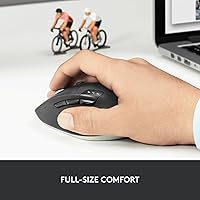
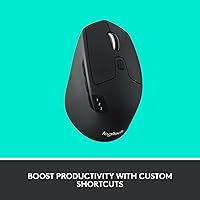
  • The rubber palm grip and sculpted right-hand shape feel comfortable through long work sessions for medium-to-large hands.
  • Logitech Flow enables drag-and-drop file transfers between connected computers when both run Logitech Options on the same network.
  • Build quality is solid with no flex or rattle, and the matte finish holds up well to daily wear over months of use.

Cons

  • Bluetooth connectivity can be unreliable after a computer wakes from sleep, requiring an occasional reconnect.
  • Linux users lose access to button customization and Flow entirely, as Logitech Options has no official Linux support.
  • The fixed 1000 DPI cannot be adjusted on the fly, which frustrates users who need precision switching during detailed work.
  • Full-sized dimensions and 4.8 oz weight make this a poor choice for frequent travelers seeking a compact carry option.
  • Flow requires both machines to be on the same local network with the software running — it does not work out of the box.
  • The design has not been visually updated since 2020 and looks noticeably dated next to newer peripheral releases.
  • Users with smaller hands report palm fatigue during extended sessions due to the large body dimensions.
  • The device-slot indicator light is small and hard to read in bright office lighting, making it easy to switch to the wrong machine.

Ratings

The Logitech M720 Triathlon has accumulated thousands of verified purchase reviews across global markets, and our AI rating system has analyzed that feedback in depth — filtering out incentivized posts, duplicate accounts, and bot activity — to surface what real daily users actually think. Scores reflect both the genuine strengths that keep buyers recommending this multi-device mouse and the friction points that temper an otherwise strong reception. Nothing is smoothed over; if a pattern of complaints exists, it shows up in the numbers.

Multi-Device Switching
91%
Users who work across a laptop and desktop daily consistently describe the device-switching button as one of the most time-saving features they have added to their setup. The transition between paired machines is near-instant, and the pairing process itself is straightforward enough that most people get all three slots configured within minutes.
A small number of users report that switching occasionally requires a second press before the cursor appears on the target screen, particularly after the mouse has been idle. It is a minor annoyance rather than a dealbreaker, but it comes up often enough to be worth noting.
Scroll Wheel Performance
93%
The hyper-fast scroll mode is the feature buyers mention most enthusiastically — flicking through a hundred-row spreadsheet or a long research document takes a fraction of the time compared to standard wheels. The toggle to a click-by-click mode is smooth and well-placed, so switching between precision and speed feels natural.
A handful of users find the free-spin mode slightly too sensitive during the first week of use, leading to occasional overshooting on shorter pages. It is largely a calibration habit rather than a defect, but those coming from a standard wheel may need a brief adjustment period.
Battery Life
94%
Very few wireless peripherals at this price tier can claim a two-year battery estimate, and in practice the M720 Triathlon tends to live up to it. Buyers regularly report going 12 to 18 months before the battery indicator becomes a concern, which removes battery anxiety almost entirely from the ownership experience.
The mouse runs on a single AA rather than a rechargeable internal cell, which some buyers find old-fashioned. While swapping one AA every year or two is hardly a burden, users accustomed to USB-C rechargeable mice may find this approach a step backward in convenience.
Ergonomics & Comfort
78%
22%
For right-handed users with medium to large hands, the sculpted palm-rest shape is comfortable through long work sessions. The rubber side panels provide enough grip that the mouse stays stable during rapid movements, and the overall weight feels substantial without being tiring.
The right-hand-only design immediately disqualifies the mouse for left-handed buyers, which is a hard limitation worth flagging upfront. Additionally, users with smaller hands report noticeable fatigue after extended sessions, as the body dimensions favor a larger grip span than many people have.
Connectivity Reliability
82%
18%
The USB Unifying Receiver connection is consistently praised for being rock-solid — plug it in and it simply works, with no dropout complaints tied to that mode. For users in office environments with a lot of wireless interference, the receiver provides a dependable fallback that Bluetooth alone cannot always match.
Bluetooth performance is less consistent across the board, with Linux users in particular reporting pairing failures or disconnections that require re-pairing. Even on macOS and Windows, a small percentage of buyers describe occasional Bluetooth lag, especially after the computer wakes from sleep.
Build Quality
79%
21%
The mouse feels solid in hand with no creaking or flex in the shell, and the matte rubber finish holds up well to daily contact without showing obvious wear after months of use. Button clicks have a firm, consistent feel that does not loosen noticeably over time.
The overall aesthetic is functional rather than premium — the plastic body looks workmanlike next to higher-end competitors. A few long-term owners have reported that the rubber side grip starts to attract oils and lint over time, requiring occasional cleaning to maintain its original feel.
Software & Customization
73%
27%
Logitech Options gives access to button remapping and enables the Flow cross-computer feature, and the interface is reasonably intuitive once installed. For power users who want dedicated shortcuts on each of the six programmable buttons, the depth of customization is genuinely useful.
Flow only works when both computers are on the same local network and have Logitech Options running, which catches some buyers off guard who expect it to work out of the box. The software itself is functional but feels dated compared to more modern peripheral configuration tools.
Value for Money
86%
Considering the multi-device connectivity, long battery life, and the quality of the scroll wheel together, the price sits at a reasonable point for what is on offer. Buyers who previously used separate mice for each machine often cite the consolidation alone as worth the cost.
Buyers focused purely on tracking accuracy or gaming-grade responsiveness will find cheaper or similarly priced options that outperform it on those specific metrics. The value proposition depends heavily on whether multi-device and battery life features are priorities — if they are not, the justification weakens.
Cross-Platform Compatibility
88%
Running this wireless mouse across a Windows PC and a MacBook in the same session is genuinely smooth, and the experience holds up on ChromeOS and iPadOS as well. Platform-switching users appreciate not having to reconfigure anything when moving between operating systems.
Linux support works at a basic level but lacks full software integration — the Logitech Options application is not officially supported on Linux, meaning button remapping and Flow are unavailable on that platform. For Linux-primary users, this is a meaningful gap in functionality.
Setup & Ease of Use
87%
Getting the mouse paired to three devices takes only a few minutes, and the physical button on the underside for switching device slots is well-labeled. Most buyers describe the out-of-box experience as requiring no instructions — plug in the receiver or enable Bluetooth and it connects quickly.
Pairing Bluetooth and USB simultaneously across three devices can create brief confusion about which slot is active if the LED indicator is not checked. The indicator light is small and easy to miss in bright office lighting, which occasionally leads to switching to the wrong device.
Portability
71%
29%
The Unifying Receiver is compact enough to leave plugged into a laptop permanently without fear of snapping it, and the mouse itself fits into most laptop bags without dedicated padding. For users who hot-desk or commute between locations, the minimal setup time at each destination is appreciated.
At 4.8 ounces and full-sized dimensions, this is not a mouse designed for travel minimalism. Buyers looking for something genuinely pocketable or ultralight for frequent travel will find the size impractical compared to dedicated travel mice.
Click Accuracy & Tracking
76%
24%
For standard office tasks — document editing, spreadsheet navigation, browser use — the 1000 DPI optical sensor performs reliably on most desk surfaces and mouse pads. Users doing everyday productivity work rarely have complaints about tracking consistency.
The fixed 1000 DPI with no on-the-fly adjustment is a limitation for users who want to toggle between precision and fast cursor movement without entering software settings. Designers or users who work with fine detail in creative applications may find the single DPI setting insufficiently flexible.
Button Placement & Feel
81%
19%
The two side thumb buttons are positioned naturally for a resting hand, and their click resistance is firm enough to prevent accidental presses during normal grip adjustments. The dedicated scroll-mode toggle button, just behind the wheel, becomes second nature after a day or two.
The six programmable buttons may feel crowded to users with shorter fingers, as some buttons require a deliberate stretch to reach. One or two buyers note that the back and forward buttons have a slightly hollow click sound that feels inconsistent with the otherwise solid construction.
Aesthetic Design
67%
33%
The all-black matte finish is understated and professional, fitting cleanly into most desk setups without drawing attention. For buyers who prefer peripherals that do not look conspicuous in a meeting-room or open-office context, the subdued appearance works in its favor.
The design has not been refreshed since launch and looks noticeably dated alongside newer peripheral releases. Users who care about desk aesthetics or who pair their setup with more visually refined gear may find the utilitarian look a weak point.

Suitable for:

The Logitech M720 Triathlon was built with a very specific type of user in mind: someone who works across multiple machines every day and is tired of the friction that comes with it. If you split your time between a personal laptop and a work desktop, or you regularly move between a MacBook and a Windows PC, this multi-device mouse removes a surprising amount of daily annoyance. Remote workers and home-office professionals who want a tidy desk with minimal USB clutter will also appreciate the Unifying Receiver, which lets you consolidate several Logitech peripherals onto a single dongle. Heavy document readers, analysts, and researchers will find the hyper-fast scroll wheel genuinely useful rather than just a spec on a box. Broad OS compatibility means cross-platform households — where one person uses macOS and another Windows — can share the setup without configuration headaches. If battery maintenance is something you prefer to think about as little as possible, the roughly two-year battery life on a single AA makes this wireless mouse an exceptionally low-maintenance daily tool.
Not suitable for:

There are real limitations here that will steer certain buyers toward other options, and it is worth being direct about them. The Logitech M720 Triathlon is sculpted exclusively for right-handed users — the grip shape is not ambidextrous, and left-handed buyers will find it uncomfortable within minutes. People with smaller hands should also take note: the full-sized body is proportioned for medium-to-large grips, and extended sessions can lead to noticeable fatigue if your hand does not fill the shell naturally. If you are primarily a Linux user expecting full software support, you will find the experience limited — Logitech Options does not officially run on Linux, which means button remapping and the Flow file-transfer feature are effectively unavailable on that platform. Gamers or graphic designers who need adjustable DPI on the fly will find the fixed 1000 DPI sensor lacking flexibility. Finally, buyers who prefer rechargeable mice with USB-C charging will find the replaceable AA cell an outdated approach, even if it does last a remarkably long time.
Specifications

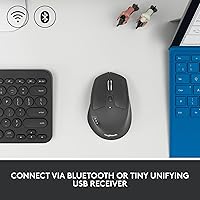
  • Connectivity: Connects via Bluetooth Low Energy or the included USB Unifying Receiver, supporting both modes independently.
  • Device Support: Pairs with up to 3 devices simultaneously, switchable via a dedicated button on the underside of the mouse.
  • Unifying Receiver: The included nano USB receiver supports up to 6 compatible Logitech peripherals sharing a single USB port.
  • Sensor Type: Uses an optical sensor with a fixed resolution of 1000 DPI for consistent cursor tracking on standard surfaces.
  • Programmable Buttons: Features 6 programmable buttons that can be remapped using the Logitech Options software on supported operating systems.
  • Scroll Wheel: Equipped with a hyper-fast scroll wheel that toggles between free-spinning and click-to-click modes via a button behind the wheel.
  • Battery: Powered by one AA battery (included), rated for up to 24 months of use under typical working conditions.
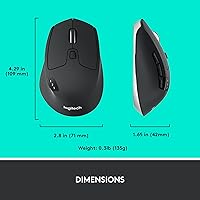
  • Weight: The mouse weighs 4.8 oz (approximately 135g), giving it a substantial feel without being heavy during extended sessions.
  • Dimensions: Measures 4.5″ long by 2.9″ wide, sized as a full-sized mouse designed for medium-to-large right hands.
  • Grip Style: Features a right-hand-only sculpted palm rest design with rubberized side panels for secure grip during long work sessions.
  • Compatible OS: Officially supports Windows 10 and 11, macOS 10.5 or later, ChromeOS, Linux (basic function only), iPadOS 13.4 or later, and Android 5.0 or later.
  • Software: Full button customization and the Logitech Flow cross-computer feature require the free Logitech Options software, available for Windows and macOS only.
  • Flow Feature: Logitech Flow allows cursor, text, and file movement between up to 2 connected computers on the same local network when Logitech Options is installed on both.
  • Color: Available in Black with a matte rubberized finish across the main body and side grip panels.
  • Power Source: Battery-powered with no rechargeable internal cell; the AA battery is user-replaceable and widely available.
  • Wireless Range: Operates at a standard wireless range of approximately 10 meters (33 feet) under typical unobstructed conditions.
  • Release Year: The M720 Triathlon was first made available in its current ASIN configuration in August 2020.
  • Manufacturer: Designed and manufactured by Logitech, a Swiss-American peripheral company with over four decades of input device experience.

Related Reviews

Logitech Pebble M350
88%
88%
Build Quality
85%
Ergonomics & Comfort
94%
Battery Life
90%
Connectivity Reliability
87%
Tracking Precision
More
Logitech ERGO K860
Logitech ERGO K860
81%
93%
Ergonomic Comfort
89%
Wrist Rest Quality
84%
Typing Feel & Accuracy
67%
Adjustment Period
81%
Build Quality & Materials
More
Logitech Wireless Touchpad
84%
80%
Performance
85%
Ease of Use
88%
Wireless Connectivity
83%
Build Quality
82%
Ergonomics
More
Logitech X-530
Logitech X-530
75%
82%
Sound Quality
80%
Bass Performance
86%
Dialogue / Center Channel
84%
Surround Imaging
75%
Build Quality
More
Logitech POP Mouse
Logitech POP Mouse
82%
93%
Silent Click Performance
89%
SmartWheel Scrolling
87%
Multi-Device Connectivity
91%
Battery Life
71%
Ergonomics & Hand Fit
More
Logitech K270 Wireless Keyboard
86%
91%
Battery Life
88%
Build Quality
85%
Typing Comfort
83%
Wireless Range
92%
Ease of Setup
More
Logitech MX Creative Console
86%
89%
Ease of Use
91%
Customization Options
94%
Software Integration
85%
Build Quality
88%
Tactile Controls
More
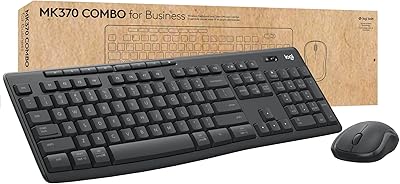
Logitech MK370 Combo for Business
80%
91%
Wireless Connectivity
93%
Ease of Setup
67%
Keyboard Typing Feel
88%
Mouse Comfort & Silence
74%
Build Quality
More
Logitech Slim Bluetooth Combo
86%
93%
Device Switching
88%
Typing Experience
82%
Build Quality
95%
Portability
85%
Battery Life
More
Logitech B910 HD Webcam
82%
87%
Video Quality
94%
Ease of Setup
80%
Audio Performance
82%
Build Quality
90%
Compatibility
More

FAQ

Yes, that is actually one of its strongest use cases. You can pair the mouse to a Mac on one device slot and a Windows PC on another, then switch between them by pressing the button on the underside. No re-pairing or configuration is needed after the initial setup.

Not quite — Flow requires the Logitech Options software to be installed and running on both computers, and both machines need to be connected to the same local network. Once that is set up, moving your cursor between the two screens and dragging files across feels natural, but it does not work out of the box without that software layer.

Unfortunately, no. The shape is sculpted specifically for right-hand palm grip, with contours and thumb buttons positioned for the right side only. Left-handed users would find the ergonomics uncomfortable fairly quickly, and Logitech does not offer a mirrored version of this model.

No, the core mouse functions work without any software on most operating systems — plug in the Unifying Receiver or pair via Bluetooth and it behaves like a standard mouse immediately. You only need Logitech Options if you want to remap the programmable buttons, adjust settings, or use the Flow feature.

The mouse has a small LED indicator near the device-slot button that changes color to signal a low battery. It is worth noting that the indicator can be easy to miss in bright environments, so some users set a calendar reminder after about 18 months as a backup prompt.

Yes, it connects via Bluetooth to iPadOS 13.4 or later and Android 5.0 or later. The USB Unifying Receiver is not usable with tablets in most cases, but Bluetooth pairing works reliably for basic cursor and scrolling functions on both platforms.

Yes — if you already own a Unifying Receiver from another Logitech device, you can pair this multi-device mouse to the same receiver using the Logitech Unifying software on your computer. One receiver can handle up to 6 compatible Logitech peripherals, which is useful for keeping USB ports free.

In free-spin mode the wheel is virtually silent since it spins without engaging the click mechanism. In click-to-click mode there is a light tactile click per notch, which is quieter than most standard scroll wheels. Overall it is considered one of the quieter scroll implementations in this price range.

In practice, switching takes roughly one to two seconds after pressing the device button — the cursor appears on the new screen quickly enough that most users describe it as near-instant. Occasionally, particularly after the mouse has been idle for a while, the switch may require a second button press to wake the connection.

The optical sensor performs best on a non-reflective surface, so a standard mouse pad or a matte desk surface works well. Pure glass or highly polished surfaces can cause tracking inconsistency, which is a common limitation of optical sensors at this specification level rather than a defect specific to this mouse.