Overview

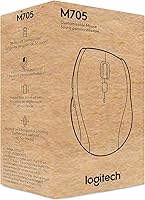
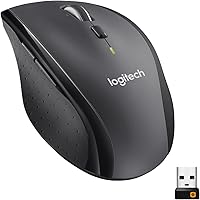
The Logitech M705 Marathon Wireless Mouse has carved out a reliable spot in the mid-range productivity segment, and it's not hard to see why. Built specifically for right-handed users — so left-handers, take note early — this Logitech mouse prioritizes comfort over long work sessions rather than flashy specs. The sculpted shape guides your hand into a natural resting position, and the Unifying receiver plugs in once and essentially disappears into your laptop. What really defines the M705 Marathon, though, is its battery longevity. For a mouse you use daily, the prospect of not thinking about power for years at a stretch genuinely changes how you interact with it.
Features & Benefits

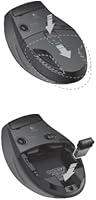
The headline here is the three-year battery life — powered by just two AA batteries that come included. For a busy office worker, that means buying a mouse and effectively forgetting it exists until sometime in a future calendar year. The hyper-fast scroll wheel is a close second highlight: a nearly frictionless metal wheel that lets you race through long spreadsheets or dense documents in seconds. Laser-grade tracking handles surfaces that trip up standard optical sensors, including polished desks and wood-grain tables. Toss in five programmable buttons, broad OS compatibility across Windows, macOS, Linux, and ChromeOS, and a Unifying receiver that pairs with other Logitech devices, and the value case is genuinely strong.

Best For

This wireless mouse is an easy recommendation for anyone who spends serious time doing productivity work — long days in Excel, cycling through dozens of browser tabs, or grinding through written reports. Remote workers who resent dealing with cables or charging routines will appreciate not needing to think about power management at all. If you already own other Logitech peripherals, the Unifying receiver is a real convenience, letting you consolidate multiple devices onto one dongle. Right-handed users with a preference for contoured grip shapes will feel at home immediately. It also travels well — light enough to drop into a laptop bag without a second thought.

User Feedback

Across close to 12,000 ratings at 4.4 stars, the M705 Marathon earns its standing mostly on two things: the battery genuinely lasts as advertised, and the scroll wheel draws consistent praise for how fast and smooth it feels in daily use. On the critical side, the strictly right-hand shape disappoints left-handed buyers who discover too late there is no ambidextrous version. A portion of users find the side buttons stiff out of the box, though most report this eases with regular use over time. The absence of Bluetooth is a recurring complaint from users who prefer not to occupy a USB port — a real limitation worth considering before purchasing.

Pros

  • Battery life regularly matches or beats the advertised multi-year claim in real daily use.
  • The hyper-fast metal scroll wheel is noticeably faster and smoother than what cheaper mice offer.
  • Laser tracking works reliably on polished, glossy, and wood-grain surfaces without a mouse pad.
  • The Unifying receiver pairs with multiple Logitech devices, reducing USB port clutter.
  • Five programmable buttons add genuinely useful shortcuts for browser and document navigation.
  • The sculpted right-hand shape reduces wrist fatigue during long office sessions.
  • Compatible with Windows, macOS, Linux, and ChromeOS straight out of the box.
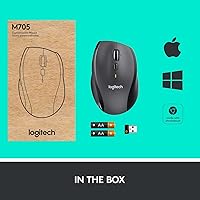
  • Batteries are included and the receiver comes pre-paired — ready in under a minute.
  • Compact and light enough to travel daily in a laptop bag without second thoughts.
  • Ranked in the top 35 in its category with over 11,000 ratings, reflecting proven reliability.

Cons

  • No Bluetooth option means you must sacrifice a USB port on every machine you use it with.
  • Side thumb buttons feel noticeably stiff fresh out of the box and require a break-in period.
  • The Logitech Options software feels dated and occasionally resets custom configurations after updates.
  • Left-handed users have no viable path with this mouse — the ergonomics are strictly one-sided.
  • No multi-device switching means swapping between a desktop and laptop requires replugging the dongle.
  • Linux users get no official software support, making programmable button features inaccessible.
  • The matte plastic exterior picks up oils and shows wear more visibly than some alternatives.
  • No dongle garage means the receiver must stay plugged in or be stored loose during travel.
  • Relies on disposable AA batteries with no option for built-in rechargeable power.
  • Default DPI feels sluggish to users coming from higher-sensitivity mice, requiring software adjustment.

Ratings

The Logitech M705 Marathon Wireless Mouse has been put through its paces by tens of thousands of verified buyers worldwide, and our AI rating engine has processed that feedback — actively filtering out incentivized, duplicate, and bot-generated reviews — to produce the scores below. What emerges is an honest picture of a genuinely capable productivity mouse that earns its ranking, alongside a few real-world limitations that matter depending on how you work. Both the strengths and the friction points are reflected transparently in every category score.

Battery Life
94%
This is the defining feature, and real-world users back it up: many report going well over two years before their first battery swap, which for a daily-use office mouse is practically unheard of. The two included AA batteries mean you are ready to go out of the box with no charging cable to manage.
A small number of users who left the receiver plugged in while the mouse was stored for extended periods reported faster-than-expected drain. The reliance on disposable AA batteries also draws some criticism from users who prefer eco-friendlier rechargeable solutions.
Scroll Wheel Performance
91%
The near-frictionless metal scroll wheel is one of the most consistently praised aspects across thousands of reviews. Users who work in long spreadsheets or dense PDF documents note that a single flick sends them flying through pages in a way that cheaper plastic wheels simply cannot match.
The hyper-fast mode lacks a middle-ground tactile setting, which means users who prefer deliberate, notch-by-notch scrolling sometimes overshoot their target. A handful of reviewers also noted that the wheel can feel slightly loose after extended use over many months.
Wireless Reliability
88%
The 2.4 GHz Unifying receiver delivers a consistently stable connection with no perceptible lag during everyday office tasks. Users frequently praise the plug-and-forget nature of the tiny dongle, which stays docked in a laptop port without needing to be removed when traveling.
A small subset of users in congested wireless environments, such as open-plan offices with many competing devices, reported occasional brief dropouts. The receiver is also easy to lose if removed, and Logitech does not always provide a straightforward replacement path.
Ergonomics & Comfort
83%
The sculpted right-hand shape fits naturally for medium-to-large hands during long work sessions, with the thumb rest and contoured side reducing wrist fatigue noticeably over hours of continuous use. Office workers who clock six or more hours daily at a desk tend to rate comfort very highly.
The design is strictly right-handed, which immediately disqualifies this mouse for left-handed users — a limitation that generates consistent frustration in reviews from buyers who did not notice this detail before purchasing. Smaller hands may also find the grip slightly wide.
Tracking Accuracy
81%
19%
Laser-grade tracking handles surfaces that defeat basic optical sensors, including polished glass-topped desks, high-gloss laminate, and wood-grain tables. For users who work without a mouse pad, this practical surface tolerance is a meaningful day-to-day advantage.
At this sensitivity level, the M705 Marathon is not suited for pixel-precise creative work like photo editing or illustration. Users coming from higher-DPI mice may find the tracking feels slightly sluggish at default settings, though software adjustment helps somewhat.
Button Customization
76%
24%
Five programmable buttons, including two dedicated thumb buttons, give productivity-focused users meaningful shortcuts for browser navigation, copy-paste workflows, and application switching. Users who configure these through Logitech Options software report a noticeable boost in daily efficiency.
The side buttons feel noticeably stiff out of the box, which is a recurring complaint across fresh-unit reviews. Several users also noted that Logitech Options, while functional, feels dated compared to competitors and occasionally requires reinstallation after OS updates.
Build Quality
78%
22%
The overall construction feels appropriately solid for a mid-range productivity mouse, with no creaking or flex in the shell during normal use. The scroll wheel and primary click buttons both deliver a satisfying, consistent feel that holds up well over years of daily use.
The matte plastic exterior is prone to showing wear, oils, and light scratches after extended use, which bothers detail-conscious users. A few reviewers noted that the battery compartment cover feels slightly cheaper relative to the rest of the body.
Connectivity Options
58%
42%
The Unifying receiver works reliably and supports pairing with multiple Logitech devices, which is a genuine convenience for users already invested in the Logitech ecosystem. Setup takes seconds and the dongle profile is small enough to stay in a laptop port permanently.
The complete absence of Bluetooth is a legitimate weakness compared to similarly priced competitors. Users with modern ultrabooks that have limited USB ports, or those who work across multiple computers, find the single-receiver-only setup a meaningful restriction that the competition handles better.
Software & Driver Experience
67%
33%
Logitech Options provides basic but functional control over button assignments and pointer speed, and it works across Windows and macOS without major issues for most users. Initial setup is straightforward and does not require technical knowledge.
The software has not kept pace with the hardware in terms of polish — it can feel clunky, and updates occasionally reset custom button configurations. Linux users get no official software support at all, meaning programmable button features are inaccessible on that platform.
Portability
79%
21%
At 4.8 oz and compact enough to drop into any laptop bag pocket, this wireless mouse travels well without adding noticeable weight to a commuter setup. The dongle stays docked in the laptop, so there is no loose accessory to track down before leaving the office.
The lack of a carrying pouch or dedicated storage slot for the receiver is a minor but noted inconvenience for frequent travelers. The mouse also lacks any secure dongle garage, so the receiver must stay plugged in or be stored separately during transit.
Multi-Device Compatibility
84%
Out-of-the-box support for Windows, macOS, Linux, and ChromeOS makes this mouse genuinely versatile for users who work across different machines or operating systems. Chromebook users in particular appreciate how rarely this category of peripheral supports their platform properly.
While OS compatibility is broad, true multi-device switching — the ability to hop between two computers with a button press — is not supported. Users who regularly switch between a desktop and a laptop will find this a notable gap versus Bluetooth-capable alternatives.
Value for Money
86%
When you factor in the years-long battery life and the broad feature set at this price point, the long-term cost of ownership is genuinely competitive. Users who have owned the mouse for three-plus years frequently note that it has cost them far less per year than cheaper alternatives replaced more often.
At its current price, buyers are paying for longevity and reliability rather than cutting-edge features. Users who prioritize Bluetooth, rechargeable power, or ambidextrous design will find better-matched options at similar or slightly higher price points from Logitech itself.
Out-of-Box Experience
82%
18%
Batteries are included and the Unifying receiver comes pre-paired, so the mouse is ready to use within about 30 seconds of opening the box. There are no mandatory software installs to get basic functionality working, which non-technical users consistently appreciate.
The packaging is functional but not particularly premium for a mid-range product. Some users also note that the default DPI setting feels slower than expected, requiring a visit to Logitech Options before the cursor speed feels right for their workflow.

Suitable for:

The Logitech M705 Marathon Wireless Mouse is built for right-handed productivity users who spend serious time at a desk and want a reliable tool that stays out of their way. If your workday involves long stretches in spreadsheets, cycling through browser tabs, or reviewing dense documents, the hyper-fast scroll wheel and contoured grip will feel purpose-built for exactly that. Remote workers who have grown tired of managing charging cables or hunting for batteries will particularly appreciate a mouse that runs for years on two AAs without any fuss. It also makes strong sense for anyone already in the Logitech ecosystem — the Unifying receiver lets you pair multiple devices to a single dongle, which tidies up a cluttered USB situation nicely. Laptop users who travel regularly will find it light and compact enough to throw in a bag daily, and the laser tracking means it works reliably on hotel desks, wood-grain conference tables, and glossy surfaces that cheaper optical mice handle poorly.

Not suitable for:

Left-handed users should stop here — the sculpted shape is designed exclusively for right-hand use and there is no ambidextrous version in this line, which makes it an instant mismatch regardless of how appealing the other specs sound. Buyers who prefer Bluetooth over a USB dongle will also find this Logitech mouse frustrating, since the Unifying receiver is the only connection method, occupying a port on machines that may already be stretched thin. Creative professionals who need precise, high-DPI tracking for photo editing, illustration, or design work will likely find the laser sensor underwhelming compared to mice purpose-built for that use case. Users who regularly switch between two or more computers and want a single button to hop between them will need to look at Logitech's MX-series lineup instead. Finally, anyone committed to rechargeable peripherals for environmental or convenience reasons will find the AA battery dependency a meaningful drawback, especially as the broader market moves toward built-in rechargeable options at similar price points.

Specifications

  • Connectivity: The mouse connects via a 2.4 GHz USB-A Unifying receiver with no Bluetooth option available.
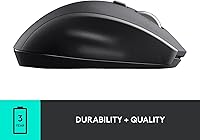
  • Battery Life: Powered by 2 AA batteries (included), with a manufacturer-rated battery life of up to 3 years under typical daily use.
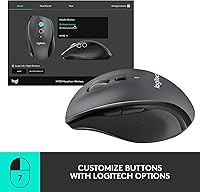
  • Buttons: Features 5 programmable buttons, including 2 dedicated thumb buttons and a customizable scroll wheel click.
  • Scroll Wheel: A near-frictionless metal hyper-fast scroll wheel enables rapid navigation through long documents and web pages.
  • Tracking: Uses a laser-grade optical sensor capable of accurate tracking on glossy, polished, and wood-grain surfaces.
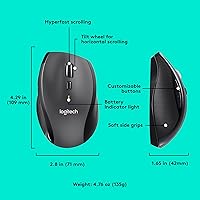
  • Dimensions: The mouse measures 4.29″ long by 2.8″ wide by 1.65″ tall.
  • Weight: The mouse weighs 4.8 oz, providing a solid but portable feel suitable for daily travel.
  • Hand Orientation: Designed exclusively for right-handed users with a sculpted ergonomic shape; no left-handed version exists in this series.
  • OS Support: Compatible out of the box with Windows 10 and 11, macOS 10.5 or later, Linux, and ChromeOS.
  • Wireless Range: Operates at a typical wireless range of up to 33 feet (10 meters) under normal working conditions.
  • Receiver Type: Uses Logitech's Unifying receiver technology, which supports pairing up to 6 compatible Logitech devices on a single dongle.
  • Color: Available in Black; the body uses a matte plastic finish with a contoured rubber grip along the right side.
  • Power Source: Battery-powered only; there is no built-in rechargeable battery or USB charging capability.
  • Model Number: Official model number is 910-006033, released under the M705 Marathon series by Logitech.
  • Software: Optional Logitech Options software enables button remapping and pointer speed adjustment on Windows and macOS.
  • Platform: Officially supported on Linux and ChromeOS for basic plug-and-play use, though software customization is not available on those platforms.
  • Item Weight: The complete packaged unit including batteries weighs approximately 4.8 oz as listed by the manufacturer.
  • Manufacturer: Designed and manufactured by Logitech, a Swiss-American company and one of the leading peripheral brands globally.

Related Reviews

Logitech Wireless Mouse M320
86%
91%
Value for Money
88%
Wireless Connectivity
84%
Ergonomics & Comfort
92%
Battery Life
89%
Portability & Size
More
Logitech Wireless Mouse M217
81%
91%
Value for Money
94%
Battery Life
92%
Ease of Setup
88%
Portability
85%
Tracking Accuracy
More
Logitech Wireless Mouse M275
85%
94%
Battery Life
88%
Ergonomics/Comfort
92%
Ease of Setup
85%
Tracking Performance
83%
Build Quality
More
Logitech M510
Logitech M510
81%
91%
Ergonomic Comfort
93%
Battery Life
88%
Wireless Reliability
79%
Tracking Accuracy
74%
Build Quality
More
Logitech M325 Wireless Mouse

86%
92%
Value for Money
89%
Comfort and Ergonomics
96%
Battery Life
88%
Connectivity and Performance
84%
Build Quality
More
Logitech M720 Triathlon
82%
91%
Multi-Device Switching
93%
Scroll Wheel Performance
94%
Battery Life
78%
Ergonomics & Comfort
82%
Connectivity Reliability
More
Logitech Wireless Anywhere Mouse MX
86%
94%
Tracking Performance
89%
Ergonomics/Comfort
72%
Battery Life
91%
Portability/Size
87%
Ease of Use/Setup
More
Logitech MX Vertical
79%
88%
Ergonomic Comfort
61%
Adjustment Period
83%
Build Quality
86%
Multi-Device Connectivity
91%
Battery Life
More
Logitech Signature M550 L
83%
93%
Ergonomic Comfort
91%
Silent Click Performance
89%
Battery Life
88%
Wireless Connectivity Reliability
84%
Multi-Device Compatibility
More
Logitech 910-004442 Wireless Mouse
87%
95%
Battery Life
90%
Comfort for Extended Use
92%
Value for Money
93%
Setup and Installation
88%
Compatibility with Platforms
More

FAQ

Yes, the M705 Marathon works as a plug-and-play device on all supported operating systems. You get full basic functionality — cursor movement, clicking, and scrolling — the moment you plug in the Unifying receiver. Logitech Options software is only needed if you want to remap buttons or fine-tune pointer speed.

Absolutely. This Logitech mouse is fully compatible with macOS 10.5 and later, including current versions of macOS. It connects via the USB-A Unifying receiver, so if your MacBook only has USB-C ports, you will need a USB-A to USB-C adapter, which is not included.

Most users report the battery lasting between 2 and 3 years with typical daily office use, which closely matches the advertised claim. A few heavy users see closer to 18 months, while lighter users have reported exceeding 3 years. Either way, battery anxiety is genuinely not a concern with this mouse.

Unfortunately, no. The sculpted shape is designed strictly for right-handed use, with the thumb buttons and contoured grip positioned for a right-hand hold. There is no left-handed or ambidextrous version in this product line, so left-handed buyers should look elsewhere.

Not in the way most people hope. The Unifying receiver pairs the mouse to one computer at a time, and switching to a different machine means physically moving the dongle. Unlike Logitech MX-series mice, the M705 Marathon does not support multi-device button switching.

Laser-grade tracking generally performs better on reflective surfaces than standard optical sensors, but smooth glass desks can still challenge any mouse sensor. A thin mouse pad is a safe fix if you experience occasional skipping on a pure glass surface.

You can order a replacement Unifying receiver directly from Logitech or through major retailers — it is sold separately. Since any Unifying receiver can be paired to your mouse using Logitech's free Unifying software, losing the original dongle is not a permanent problem, just a minor inconvenience.

Not really. Several users actually note the opposite — the side buttons feel a bit stiff out of the box, requiring deliberate pressure to activate. This stiffness tends to ease with regular use over the first few weeks, but accidental activation is rarely reported as an issue.

Yes, that is one of the more practical advantages of the Unifying system. A single receiver supports up to 6 compatible Logitech mice and keyboards simultaneously, which is handy if you want to reduce the number of USB ports occupied by peripherals on your laptop or desktop.

It is not designed for gaming and should not be positioned as one. The laser sensor and programmable buttons are solid, but the relatively modest DPI range and productivity-focused build mean it will not satisfy anyone who needs fast, precise tracking for competitive or fast-paced games. For everyday office and browsing use, though, it performs very well.