




Overview

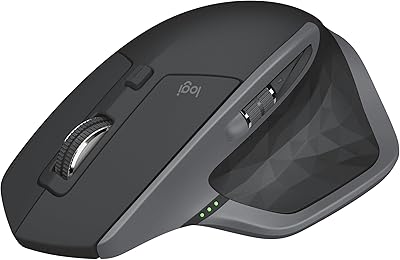
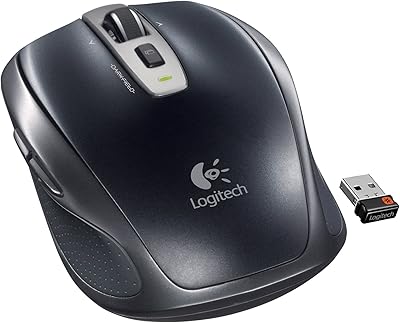
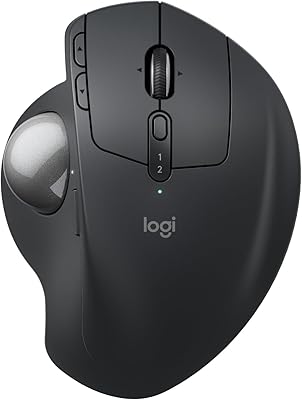
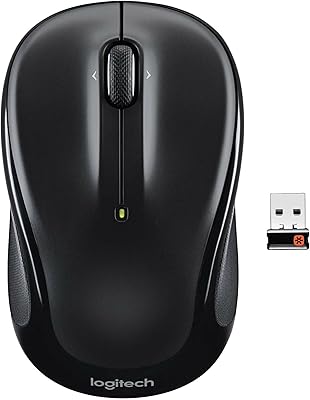
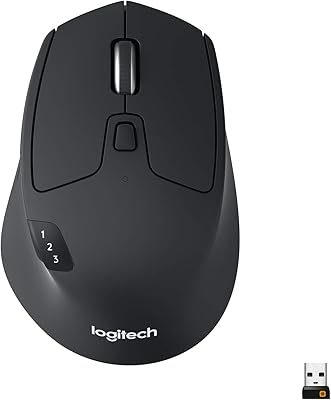
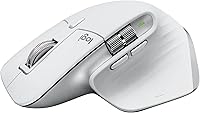
The Logitech MX Master 3S Wireless Mouse is a high-performance input device designed for both precision and comfort. This mouse features ultra-fast scrolling and a customizable 8K DPI sensor, making it perfect for tasks that require fine control. Its ergonomic design promotes long-lasting comfort, making it an ideal choice for professionals and gamers who spend extended hours at their desks. Whether you're working on design projects or browsing the web, this mouse provides excellent versatility. With its sleek build and practical features, the MX Master 3S delivers a superior user experience.

Features & Benefits

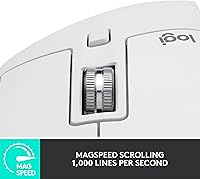
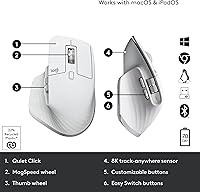
The Logitech MX Master 3S boasts a powerful 8K DPI sensor that allows precise tracking on any surface, even glass. One of its standout features is the MagSpeed scrolling, which provides fast, smooth, and almost silent scrolling, enhancing productivity. Additionally, the mouse offers seven fully customizable buttons, which can be programmed to streamline your workflow. Its ergonomic design helps reduce wrist strain, especially during long sessions, ensuring maximum comfort. Whether you're working on multiple projects or navigating complex documents, this mouse’s combination of features makes it an excellent tool for professionals.

Best For

This wireless mouse is perfect for professionals who demand precision, such as graphic designers, engineers, and anyone who works with detailed tasks. Its FLOW technology allows seamless switching between multiple computers, making it an ideal choice for those who juggle multiple devices. Users who spend long hours at their desk will appreciate the ergonomic comfort it provides, reducing strain on the wrist. If you value quiet performance, the MX Master 3S is also an excellent choice due to its quiet click technology, making it suitable for both office and home environments.

User Feedback

The Logitech MX Master 3S receives praise for its exceptional comfort, especially during long working sessions. Many users highlight the smooth and responsive tracking, even on difficult surfaces like glass. However, some report that the mouse may feel a bit bulky for users with smaller hands, although the ergonomic design works well for most. One of the most appreciated features is the quiet click mechanism, which reduces noise compared to standard mice. Overall, users value its precision and multi-device control, but a few suggest that it may take some time to get used to all the customizable features.

Pros

  • The ergonomic design provides excellent comfort for extended use, reducing wrist strain.
  • 8K DPI sensor delivers high precision, working on almost any surface, including glass.
  • MagSpeed scrolling is fast, smooth, and quiet, making navigation effortless and enjoyable.
  • Customizable buttons allow users to enhance productivity by tailoring the mouse to specific tasks.
  • FLOW technology seamlessly connects and controls multiple computers, making multitasking easier.
  • The full-size design feels sturdy and premium, perfect for users who need a reliable, heavy-duty mouse.

Cons

  • The full-size design might be uncomfortable for users with smaller hands or those who prefer a compact mouse.
  • Some users find the price point a bit high compared to other mice with similar functionality.
  • The learning curve for setting up customizable buttons and FLOW may be too much for casual users.
  • Not the best choice for those who need a lightweight, travel-friendly mouse for on-the-go use.
  • The mouse is not as portable as other options, making it less ideal for frequent travelers.
  • Bluetooth connectivity may experience occasional interference or pairing issues for some users.

Ratings

After analyzing verified user reviews worldwide across multiple languages and platforms, the Logitech MX Master 3S Wireless Mouse has earned strong praise for its performance and comfort. We filtered out spam, bot-generated, incentivized, duplicated, and exaggerated reviews to ensure that only authentic, high-quality feedback informed these scores. Both strengths and pain points are reflected in the ratings, giving prospective buyers a comprehensive view of what to expect from this device.

Ergonomics and Comfort
94%
Many users praise this wireless mouse for its highly ergonomic design, which promotes long-term comfort during extended work sessions. Its well-contoured shape reduces hand strain, making it an excellent choice for those who spend hours at the desk each day.
However, a few buyers feel the overall size of the mouse may not be ideal for smaller hands, potentially causing discomfort. Some users also wish for more padding on the side grips to improve overall comfort.
Tracking Precision (8K DPI)
91%
The 8K DPI sensor is widely appreciated for its exceptional precision, allowing users to track on any surface, including glass. Whether working on detailed design projects or navigating across multiple screens, this mouse offers smooth, responsive tracking.
Despite its high precision, some users report occasional sensitivity issues when using it on certain reflective or highly glossy surfaces. While it works well in most environments, a few find it less responsive on certain unconventional surfaces.
Build Quality
89%
The build quality of this wireless mouse is solid, with users noting that it feels premium and well-constructed. The materials used are durable, contributing to its long-lasting performance even with regular use.
A small number of users have raised concerns about the plastic body, feeling that it could have been sturdier. Some also mention slight creaking sounds when applying pressure to the sides, though this seems to be a rare issue.
Customization and Productivity
87%
With seven customizable buttons, this device is perfect for power users looking to streamline workflows. Many appreciate the ability to map shortcuts or functions to the buttons, significantly enhancing productivity for tasks like video editing and design work.
However, a few users find the customization software a bit clunky and not as intuitive as they would like. Some also note that while the button assignments are helpful, they occasionally require reconfiguration after software updates.
Quiet Click Mechanism
85%
The quiet click mechanism stands out as one of the most praised features, especially in shared workspaces. Users love the ability to click without disturbing others, making it ideal for office environments or late-night work sessions.
While generally praised, a few users feel the quiet clicks lack the tactile feedback of traditional mice, which may reduce the satisfaction of some who prefer a more distinct 'click' sound when operating their device.
Battery Life
92%
The impressive battery life of up to 70 days per charge makes this mouse extremely convenient for those who don't want to worry about frequent recharging. Many users find this feature particularly valuable during travel or long projects.
Some users note that, despite the long battery life, the mouse's performance can start to degrade slightly as the battery drains. A few also wish for a more convenient charging indicator to alert them when the battery is low.
FLOW Cross-Computer Control
88%
The FLOW feature is a major selling point, allowing seamless control across multiple computers. Many users find this functionality incredibly useful for managing tasks between different devices without the hassle of switching peripherals.
However, some users have reported occasional connectivity issues when using FLOW with certain operating systems or devices, requiring them to troubleshoot to ensure smooth performance.
Compatibility with Devices
83%
The mouse works well across a wide range of devices, including Windows, macOS, Linux, and Chrome OS, which is a major plus for those who use different operating systems. Bluetooth and Logi Bolt USB receiver options ensure broad compatibility.
A few users have experienced compatibility hiccups with certain older systems or custom OS configurations, leading to occasional connectivity problems. Some also find it difficult to get the mouse to work with specific Linux distributions.
Ease of Setup
90%
Setup is quick and easy, with users highlighting the smooth plug-and-play experience. Connecting via Bluetooth or the USB receiver is seamless, allowing users to start working right away with minimal hassle.
Some users have mentioned minor challenges during initial setup, especially with configuring the customizable buttons. While the process is generally straightforward, some additional instructions or tips could make it even more user-friendly.
Portability
80%
20%
The full-size design strikes a good balance between portability and comfort. Users appreciate its ability to be taken on the go for remote work or travel, without feeling too bulky in a laptop bag.
On the downside, a few users note that the size and weight make it less ideal for ultra-portable setups. It may not be as easy to carry around as smaller, more lightweight mice designed specifically for travel.
Value for Money
87%
For its high-performance features, ergonomic design, and extended battery life, this wireless mouse offers solid value for the price. Many users feel that the premium build and advanced functions justify the investment, especially for those needing productivity-enhancing features.
Some users feel the price is a bit high compared to other wireless mice with similar functions. While the quality is impressive, a few wish the cost was more competitive with other brands offering comparable features.
Customer Support
78%
22%
Logitech's customer support is generally responsive and offers helpful guidance for troubleshooting and setup. Many users have found the support team to be accessible and knowledgeable when resolving issues.
However, a few users have reported delays in receiving assistance or felt that the support team was unable to resolve specific concerns quickly. Some users wish for a more streamlined support process to address issues more efficiently.

Suitable for:

The Logitech MX Master 3S Wireless Mouse is ideal for professionals and creatives who require precision and comfort. Its 8K DPI tracking and customizable buttons make it a great choice for design, engineering, or multi-tasking work. Users who spend long hours at a desk will appreciate its ergonomic design, which reduces wrist strain. The seamless FLOW feature also benefits those working across multiple computers, allowing for smooth transitions between devices. Additionally, the quiet click mechanism makes it perfect for shared workspaces or environments where noise reduction is a priority.

Not suitable for:

This wireless mouse may not be the best option for those seeking a compact or lightweight design. Its full-size build can be uncomfortable for users with smaller hands or those who prefer more portable mice. Additionally, while its advanced features are appreciated by many, those on a tighter budget may find the price point a bit high compared to other mice with similar functionality. Users who primarily need a basic, plug-and-play mouse without the need for extensive customization might find the learning curve for configuring buttons and FLOW to be more effort than necessary.

Specifications

  • DPI: 8K DPI sensor for precise tracking on any surface, including glass.
  • Scroll Technology: MagSpeed scrolling allows for fast, quiet, and precise navigation.
  • Buttons: 7 customizable buttons to enhance productivity and streamline tasks.
  • Ergonomic Design: Ergonomically designed to reduce wrist strain during extended use.
  • Multi-Device Control: FLOW technology enables seamless control across multiple computers.
  • Connectivity: Supports both Bluetooth and Logi Bolt USB receiver for versatile connections.
  • Battery Life: Up to 70 days of usage on a single charge, depending on usage patterns.
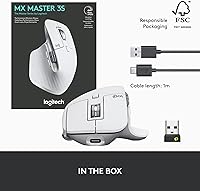
  • Charging: USB-C charging port for quick and convenient recharging.
  • Compatibility: Compatible with Windows, macOS, Linux, and Chrome OS.
  • Size: Full-size mouse designed for comfort during long work sessions.
  • Click Technology: Quiet Click technology provides a quieter clicking experience.
  • Color Options: Available in a Pale Grey color variant for a modern, sleek look.
  • Dimensions: Dimensions of 4.9 x 3.3 x 2 inches (124 x 84 x 51 mm) for a full-size form factor.
  • Weight: Weighs approximately 5.4 oz (153 grams) for a balanced feel.
  • Software: Customizable through Logitech Options software for advanced button mapping and settings.
  • Operating Range: Wireless range of up to 33 feet (10 meters) for flexible movement.
  • Sensor Type: Uses an advanced optical sensor for responsive and accurate tracking.
  • USB Receiver: Includes Logi Bolt USB receiver for reliable wireless connection on computers.
  • Warranty: Comes with a 1-year limited hardware warranty for peace of mind.

FAQ

The Logitech MX Master 3S offers ultra-fast MagSpeed scrolling, 8K DPI tracking for precise movement, and a highly ergonomic design, making it perfect for long work sessions and multitasking across multiple computers with its FLOW feature.

Setting up the mouse is simple: just plug in the USB receiver or connect via Bluetooth to your computer. For FLOW, install Logitech Options software to enable seamless control across multiple devices. It’s also compatible with Windows, macOS, Linux, and Chrome OS.

The FLOW feature allows you to control multiple computers with a single mouse. You can move your cursor between different devices effortlessly and even copy and paste content across them. It’s perfect for professionals who work on multiple screens or devices.

Yes, the 8K DPI sensor in the Logitech MX Master 3S works on any surface, including glass. This makes it highly versatile and ideal for use on various types of desks or workspaces.

The battery life of the Logitech MX Master 3S lasts up to 70 days on a full charge, depending on usage. When it runs low, it charges quickly via the included USB-C cable.

Yes, the ergonomic design is specifically built for comfort, reducing wrist strain even during extended use. Many users report that it feels natural and supportive, making it an excellent choice for long work sessions.

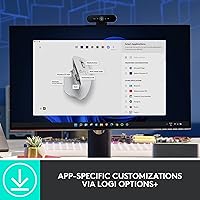
Yes, the mouse features customizable buttons, allowing you to assign specific functions or shortcuts to each button for greater productivity. The customization options are accessible through the Logitech Options software.

The Logitech MX Master 3S is compatible with Windows, macOS, Linux, and Chrome OS. It works well across multiple platforms, making it a versatile choice for users with mixed OS environments.

The main difference between the MX Master 3 and the MX Master 3S is the 8K DPI sensor in the 3S, which offers higher precision. The 3S also has quieter clicks compared to the MX Master 3, making it better for quiet work environments.

The Logitech MX Master 3S supports both Bluetooth and the included Logi Bolt USB receiver, providing flexibility in how you connect it to your devices. This makes it easy to switch between wired and wireless setups.