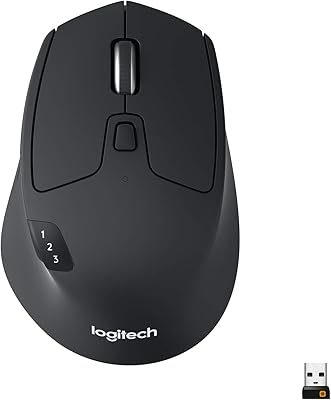
Logitech MX Master 2S Wireless Mouse
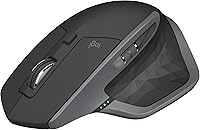
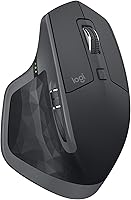

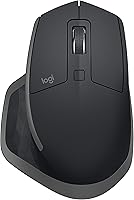
Overview
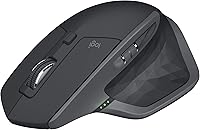
The Logitech MX Master 2S Wireless Mouse sits comfortably in the upper tier of productivity peripherals — not because of flashy specs, but because it solves real problems that serious desk workers face daily. Logitech has spent decades building a reputation for reliable, well-engineered input devices, and this wireless mouse reflects that experience. The headline feature is Logitech Flow, which lets you control up to three computers from a single mouse and even copy files between them. Add an ergonomic build and a rechargeable battery, and you have a mouse designed for people who spend long hours at a workstation. It launched in 2017 and, despite newer competition, still holds its ground.
Features & Benefits
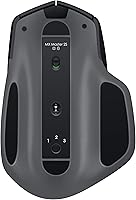
The dual-mode scroll wheel is one of those features you don't realize you needed until you've used it — flick it into hyper-fast mode and you can fly through thousands of rows in a spreadsheet in seconds, or switch to click-to-click precision when you need more control. The Darkfield optical sensor tops out at 4000 DPI and works reliably on most surfaces, including glass. Connectivity is flexible: pair via Bluetooth or the USB Unifying Receiver, and switch between up to three paired devices with a button press. Battery life is genuinely impressive — up to 70 days on a charge means plugging in is rarely a concern.
Best For
This Logitech peripheral earns its keep most for people who split their time between two or three machines — think a developer with a desktop and a work laptop, or a designer who switches between a Mac and a PC. The right-handed ergonomic shape also makes it a natural fit for anyone logging long hours at a desk; the contoured grip genuinely reduces the hand strain that flat mice tend to cause over time. Heavy scrollers — analysts, writers working in long documents, coders navigating large codebases — will get particular value from the hyper-scroll wheel. If you prefer a compact or ambidextrous mouse, look elsewhere.
User Feedback
With a 4.5-star average across more than 16,000 ratings, satisfaction with the MX Master 2S runs deep. Buyers consistently highlight build quality and the scroll wheel feel as standouts, and long-term owners report the mouse holding up well after years of daily use — a solid indicator of long-term durability. On the critical side, left-handed users are simply out of luck; the sculpted shape is firmly right-hand-only. The micro-USB charging port also draws complaints — in an era where most peripherals have moved to USB-C, it sticks out. The Flow feature earns praise but occasionally requires some network setup patience to get working across different machines.
Pros
- Logitech Flow lets you control up to three computers with one mouse and copy files between them effortlessly.
- The dual-mode scroll wheel switches between hyper-fast and precise click-to-click scrolling — genuinely useful for long documents.
- Battery life stretches up to 70 days on a single charge, so running out mid-workday is rarely a concern.
- The ergonomic right-hand contour reduces wrist strain noticeably during long working sessions.
- Connects via both Bluetooth and the USB Unifying Receiver, giving you flexibility depending on your setup.
- The Darkfield sensor performs reliably on a wide range of surfaces, including glass desks.
- Seven programmable buttons can be customized through Logitech Options software to match your specific workflow.
- Build quality is consistently praised by long-term owners — this mouse holds up well under heavy daily use.
- Wireless range of up to 33 feet gives you freedom to position yourself without connectivity issues.
- With over 16,000 ratings averaging 4.5 stars, buyer satisfaction is broad and sustained across many user types.
Cons
- The micro-USB charging port feels outdated in an era when most modern peripherals have switched to USB-C.
- Left-handed users have no viable option here — the sculpted shape is strictly right-hand-only.
- Logitech Flow requires both computers to be on the same network, which can complicate setup in some office environments.
- At its price point, buyers may reasonably wonder whether the newer MX Master 3 series better justifies the spend.
- The mouse is on the larger and heavier side, making it a poor fit for travel or compact desk setups.
- Customization through Logitech Options software adds value, but the app itself can feel clunky and resource-heavy.
- No USB-C fast charging means topping up the battery takes longer than with newer competing mice.
- The side scroll wheel, while useful, can be accidentally triggered during normal grip adjustments.
Ratings
The scores below reflect an AI-driven analysis of thousands of verified global reviews for the Logitech MX Master 2S Wireless Mouse, with spam, bot-generated, and incentivized submissions actively filtered out before any scoring was applied. Each category captures the honest consensus of real daily users — from power professionals juggling multiple machines to long-haul desk workers logging eight-hour sessions — so both the standout strengths and the genuine frustrations are represented here with equal weight.
Build Quality
Ergonomic Comfort
Scroll Wheel Performance
Logitech Flow (Multi-Device)
Battery Life
Sensor Accuracy
Connectivity Reliability
Software & Customization
Value for Money
Portability
Button Feel & Feedback
Setup & Out-of-Box Experience
Durability Over Time
Multi-Surface Tracking
Suitable for:
The Logitech MX Master 2S Wireless Mouse was built with a specific kind of user in mind: the professional who lives at their desk and demands more from a mouse than simple point-and-click. It shines brightest for people who regularly bounce between two or three machines — a developer managing a personal desktop alongside a work laptop, for instance, or a designer who runs a Mac and a PC side by side. The Logitech Flow feature makes that multi-computer workflow genuinely practical, allowing both cursor movement and file transfers across devices without reaching for a second mouse. Writers and analysts who spend hours navigating long documents will also find real value in the hyper-fast scroll wheel, which cuts through lengthy content far faster than a standard wheel allows. Add in the sculpted ergonomic shape and a battery that lasts weeks between charges, and this wireless mouse becomes a compelling daily driver for right-handed knowledge workers who prioritize comfort and efficiency over everything else.
Not suitable for:
The Logitech MX Master 2S Wireless Mouse, despite its strengths, is a poor match for a meaningful portion of buyers. Left-handed users should stop here — the shape is designed exclusively for right-hand use and cannot be adapted. Gamers are also not the target audience; the sensor and button layout are optimized for productivity tasks, not fast-paced, high-precision gaming. If you frequently travel or prefer a compact mouse that fits easily in a bag, the size and weight of this peripheral may feel cumbersome compared to more portable options. Budget-conscious shoppers or those who only use a single computer may find the premium price hard to justify when simpler mice cover their needs just fine. Finally, anyone who values modern connector standards should know that this model charges via micro-USB — a real sticking point if you have already standardized the rest of your setup on USB-C cables.
Specifications
- Connectivity: The mouse connects via Bluetooth or a 2.4 GHz Logitech Unifying USB receiver, supporting up to three paired devices simultaneously.
- Sensor: A Darkfield high-precision optical sensor delivers tracking up to 4000 DPI, adjustable in steps through the Logitech Options software.
- Battery Life: The built-in rechargeable battery lasts up to 70 days on a full charge under typical usage conditions.
- Charging Port: The mouse charges via a micro-USB port, and a short charge of about 3 minutes provides enough power for a full day of use.
- Scroll Wheel: The main scroll wheel operates in two modes: hyper-fast free-spinning and click-to-click precision, switchable with a single button press.
- Buttons: Seven programmable buttons are included, all configurable through the Logitech Options software on both Windows and macOS.
- Dimensions: The mouse measures 4.9 x 3.37 x 1.9 inches (L x W x H), sized for full-hand right-handed grip.
- Weight: The mouse weighs 5.1 oz, giving it a substantial feel without being heavy enough to cause fatigue.
- Wireless Range: Reliable wireless operation is supported up to 33 feet (approximately 10 meters) from the paired receiver or Bluetooth source.
- Multi-Device Flow: Logitech Flow allows the cursor to move between up to three computers on the same network, with cross-computer file and text transfer supported.
- Platform Support: The mouse is compatible with Windows 8 and Windows 10 natively, and with macOS via the Logitech Options software application.
- Hand Orientation: The sculpted ergonomic shape is designed exclusively for right-handed users and is not suitable for left-hand operation.
- Color: The mouse is available in Graphite, a dark matte finish that resists visible smudging during typical daily use.
- Receiver Type: The included Unifying USB receiver is compact and can also pair up to six compatible Logitech devices simultaneously to a single USB port.
- Side Scroll Wheel: A secondary horizontal scroll wheel is located on the left side of the mouse, useful for navigating wide spreadsheets or timelines.
Related Reviews
Logitech MX Master 3S Wireless Mouse
Logitech Wireless Anywhere Mouse MX

Logitech MX Vertical
Logitech MX Ergo S

Logitech M320 Wireless Mouse
Logitech M325 Wireless Mouse

Logitech M275 Wireless Mouse

Logitech M217 Wireless Mouse

Logitech M510