Logitech MX Anywhere 3 for Mac Mouse





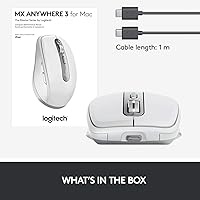
Overview
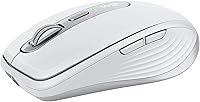
The Logitech MX Anywhere 3 for Mac Mouse is a compact, Bluetooth-only wireless mouse built from the ground up for macOS and iPadOS users. It occupies a genuinely premium spot in the portable mouse market — not aspirationally, but because it delivers real differentiators over cheaper alternatives. The MagSpeed electromagnetic scroll wheel alone sets it apart from anything in its class. It pairs with up to three devices and switches between them instantly, which matters when your iPad, MacBook, and desktop Mac all share the same desk. The Pale Grey finish is a subtle but deliberate choice — it sits naturally next to Apple hardware without trying too hard. One important note upfront: this is a right-handed design, so left-handed users should look elsewhere before going further.
Features & Benefits
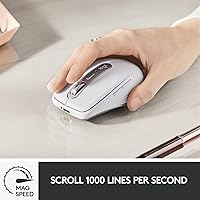
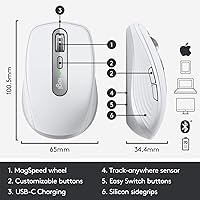
The MagSpeed scroll wheel is worth lingering on: it reads your scrolling speed and auto-shifts between a satisfying, clicky ratchet for line-by-line navigation and an almost frictionless free-spin that tears through long documents in seconds — no manual toggle required. The optical sensor handles glass and most unconventional surfaces reliably, though very thin or mirrored glass can occasionally cause tracking inconsistencies. Battery life is genuinely impressive; a full charge keeps it running for weeks, and a one-minute top-up buys several hours when you forget to charge overnight. No dongle needed is a quiet but real win for MacBook users with limited ports. Logi Options+ lets you assign different button functions per app — mapping a button to undo in Photoshop, for instance, saves noticeable time across a long editing session.
Best For
This compact Mac mouse makes the most sense for people whose work does not stay in one place. If you carry your MacBook between home, a coffee shop, and a client office, the ability to drop it in a bag and know it will track reliably on almost any surface — conference table, café counter, even a glass desk — is a practical advantage. Creative professionals working across Photoshop, Premiere Pro, or Final Cut Pro will get extra mileage from the customizable buttons. It is also a natural step up for anyone tired of the Apple Magic Mouse's flat surface and awkward charging position. That said, if your mouse never leaves your desk and you prefer a full-size grip, the compact shell may leave your hand wanting more during long sessions.
User Feedback
With a 4.7-star average across nearly 1,800 ratings, this travel-friendly wireless mouse has earned its reputation honestly. Buyers consistently single out the scroll wheel feel and glass-surface tracking as standout strengths — two areas where cheaper mice noticeably struggle. Battery longevity draws repeat praise as well. On the other side, left-handed users have no ergonomic option here, which is a real and unresolved gap. Some desk-bound reviewers report that the compact shell, while perfect for a bag, feels slightly small during marathon sessions that call for a fuller grip. A handful mention occasional Bluetooth reconnection pauses, though this appears less frequent than with some competing wireless mice. Road warriors and multi-device Mac users rate it very highly; desk-only users tend to be more divided on the size trade-off.
Pros
- The MagSpeed scroll wheel shifts automatically between precise and fast modes, making it genuinely more useful than a standard scroll wheel.
- Tracks reliably on glass and most unconventional surfaces, eliminating the need to carry a mouse pad.
- Battery life is exceptional — a full charge lasts for weeks of regular use.
- One-minute quick charge provides hours of emergency use, so a dead battery rarely means a lost work session.
- Connects to up to three devices and switches between them with a single button tap.
- Bluetooth-only setup keeps your MacBook ports free and your bag cable-light.
- Logi Options+ lets you assign different button actions per application, saving real time in creative workflows.
- The low-profile contoured shell with soft side grips holds up well during mobile use and casual drops.
- Pale Grey finish looks at home next to Apple hardware without feeling like an afterthought.
- A strong 4.7-star average across nearly 1,800 ratings suggests consistent satisfaction among verified buyers.
Cons
- Strictly right-handed ergonomics make this compact Mac mouse a non-starter for left-handed users.
- Bluetooth-only connectivity can introduce occasional reconnection delays, particularly in wireless-congested environments.
- The compact shell, while ideal for travel, can cause hand fatigue during extended desktop sessions for users with larger hands.
- No USB receiver option means you cannot fall back to a wired-style stable connection when Bluetooth acts up.
- Very thin or mirrored glass surfaces can still produce inconsistent tracking despite the general glass-compatibility claim.
- Logi Options+ software is required to unlock button customization — out of the box, the mouse offers limited configuration.
- Only one color option in the Mac-specific variant limits personalization for buyers who prefer darker or bolder hardware.
- The premium price is hard to justify if you primarily use the mouse at a fixed desk and do not need portability or multi-device switching.
Ratings
The scores below for the Logitech MX Anywhere 3 for Mac Mouse were generated by our AI after analyzing thousands of verified buyer reviews from global markets, with spam, bot activity, and incentivized feedback actively filtered out. Each category reflects both the genuine strengths users repeatedly praised and the real frustrations that surfaced across different usage patterns. Nothing has been glossed over — if buyers had a consistent pain point, the score reflects it.
Scroll Wheel Performance
Surface Tracking
Battery Life
Portability & Size
Bluetooth Reliability
Ergonomics & Comfort
Build Quality
Software & Customization
Multi-Device Switching
Charging Experience
macOS & iPadOS Integration
Value for Money
Aesthetics & Design
Suitable for:
The Logitech MX Anywhere 3 for Mac Mouse is purpose-built for Mac and iPad users who refuse to be tied to a single workspace. If you regularly move between a home desk, a coffee shop, and a client site — and you want one mouse that handles all three without fuss — this is a strong match. Creative professionals working in Photoshop, Premiere Pro, or Final Cut Pro will find real daily value in the per-app button profiles, which can quietly shave time off repetitive tasks over the course of a week. The Bluetooth-only design suits MacBook users particularly well since there is no dongle eating up a precious port. Anyone currently limping along with an Apple Magic Mouse and craving proper side grips, a real scroll wheel, and the ability to charge without flipping the mouse upside down will feel the upgrade immediately.
Not suitable for:
The Logitech MX Anywhere 3 for Mac Mouse has meaningful limitations that make it the wrong call for certain buyers. Left-handed users should stop here — the ergonomic shell is shaped exclusively for right-hand use, and there is no mirrored variant in this Mac-specific line. If your mouse never leaves your desk and you spend long hours in heavy-click workflows like CAD or data entry, the compact frame may cause hand fatigue that a full-size mouse would not. Gamers should also look elsewhere, as the sensor and button layout are built for productivity rather than fast-paced precision input. Users in environments with very thin tempered glass or highly reflective mirrored surfaces may encounter occasional tracking inconsistencies despite the strong general surface compatibility. Finally, if Bluetooth reliability is a hard requirement — say, in a wireless-congested open office — the lack of a USB receiver option is a real constraint worth weighing.
Specifications
- Connectivity: Connects exclusively via Bluetooth — no USB receiver or dongle is included or supported.
- Multi-Device: Pairs with up to three devices simultaneously and switches between them using the Easy-Switch button on the underside.
- Sensor: Uses a 4000 DPI optical sensor capable of tracking on glass and most non-standard surfaces.
- Scroll Wheel: Features MagSpeed electromagnetic scrolling with SmartShift, which auto-transitions between ratchet and free-spin modes based on scroll speed.
- Battery Life: A full charge supports up to 70 days of typical use, with a one-minute quick charge providing approximately three hours of operation.
- Charging Port: Charges via USB-C; a USB-C to USB-C cable is included in the box.
- Weight: Weighs approximately 3.49 ounces, keeping it light enough for daily bag carry.
- Dimensions: Measures 6.4 × 4.6 × 2.2 inches, placing it firmly in the compact mouse category.
- Form Factor: Low-profile, right-hand ergonomic shell with soft silicone side grips; no ambidextrous variant is available in this Mac-specific model.
- Compatibility: Officially supports macOS and iPadOS; functional on other Bluetooth-enabled operating systems but optimized software features require a Mac or iPad.
- Software: Logi Options+ enables per-application button remapping and ships with predefined profiles for apps including Photoshop, Premiere Pro, Final Cut Pro, Chrome, and Microsoft Office.
- Color: Available in Pale Grey only for the Mac-specific variant.
- Battery Type: Powered by a built-in lithium polymer battery; no replaceable AA or AAA cells are used.
- Surface Support: Tracks reliably on wood, fabric, plastic, and most glass surfaces, though very thin or highly reflective mirrored glass may cause occasional inconsistencies.
- Release Date: This Mac-optimized variant became available in September 2020.
Related Reviews
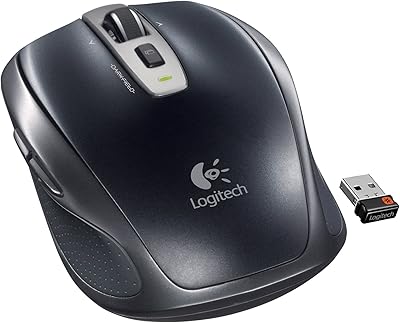
Logitech Wireless Anywhere Mouse MX

Logitech MX Vertical
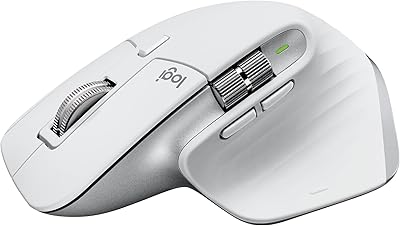
Logitech MX Master 3S Wireless Mouse
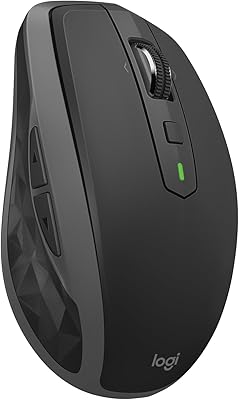
Logitech MX Anywhere 2S Bluetooth Edition
Logitech MX Master 2S Wireless Mouse
Logitech MX Ergo S

Logitech POP Mouse

Logitech M320 Wireless Mouse

Logitech M275 Wireless Mouse