Logitech MK540 Advanced


Overview
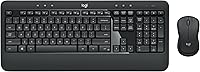
The Logitech MK540 Advanced sits comfortably in the mid-range of wireless keyboard-and-mouse combos, targeting everyday home and office users who want reliability without overspending. Logitech has built a solid reputation in peripherals over the years, and this wireless combo reflects that — practical, well-built, and straightforward to use. What sets it apart from cheaper compact options is its full-size keyboard layout with an integrated palm rest, giving your wrists somewhere to land during long typing sessions. A single Unifying USB receiver handles both devices, which is a small but genuinely useful detail for laptop users watching their available ports.
Features & Benefits
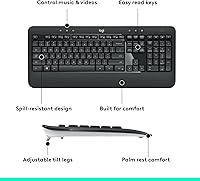
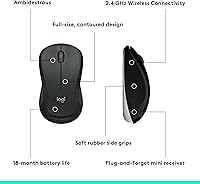
The keys have a quiet, cushioned feel that holds up well in shared spaces or when working late without disturbing others. That built-in palm rest is not an afterthought — it noticeably reduces wrist strain during extended use. The mouse is ambidextrous with rubber side grips, comfortable enough for most hand sizes on either side. Battery life is where this keyboard-and-mouse set genuinely stands out: up to three years in the keyboard and eighteen months in the mouse means you are rarely hunting for AAs. The dedicated hotkeys for media and quick functions add real daily convenience without requiring any driver installation.
Best For
This wireless combo works best for home office and student setups running Windows 10 or later, Windows 7 or 8, or Chrome OS — it is not designed for Mac users, and Linux is unsupported. If you are coming from a basic wired set and want wireless freedom without a steep learning curve, this keyboard-and-mouse set is a natural step up. It particularly suits people who loathe swapping batteries constantly, since the long-lasting power means you can essentially forget about that for months. Anyone after a straightforward, plug-and-play daily driver that just works will feel right at home here.
User Feedback
Buyers consistently highlight two things: how comfortable the typing experience is and how long the batteries actually last — both hold up against the marketing claims according to real-world use. The palm rest earns specific praise from people who type for hours at a stretch. Where the feedback gets more honest is around the mouse: several users describe it as feeling slightly lightweight and plasticky compared to a dedicated standalone mouse, and the scroll wheel lacks the firm, precise click some people prefer. These are fair criticisms. For the price tier, though, most buyers consider the trade-offs acceptable, and few report deal-breaking issues after extended daily use.
Pros
- Keyboard battery life regularly exceeds a year in real daily use — a genuine maintenance advantage.
- The built-in palm rest meaningfully reduces wrist fatigue during long typing sessions.
- Quiet, dampened keystrokes make this wireless combo considerate in shared spaces.
- Single Unifying USB receiver handles both devices, saving a precious port on laptops.
- Plug-and-play setup requires no drivers, software, or account — works straight out of the box.
- Ambidextrous mouse design works equally well for left- and right-handed users.
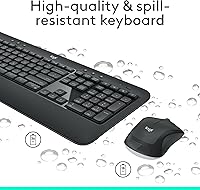
- Spill-resistant keyboard surface adds practical peace of mind for desk drinkers.
- Dedicated hotkeys for media and calculator cut down on minor daily interruptions.
- Wireless range holds reliably across a normal room without dropout or lag.
- Strong overall satisfaction among buyers at this price tier, with few serious complaints reported.
Cons
- The included mouse feels noticeably lightweight and plasticky compared to standalone mice at a similar price.
- Scroll wheel lacks tactile resistance, which becomes frustrating during long document or spreadsheet sessions.
- No rechargeable option means keeping a stock of AA batteries on hand indefinitely.
- Mac and Linux users are excluded entirely — OS compatibility is narrower than many buyers expect.
- No DPI adjustment on the mouse without downloading third-party software separately.
- The palm rest surface is firm rather than cushioned, which may disappoint users expecting soft padding.
- Mouse feet wear down faster than expected on rough or glass desk surfaces.
- Larger-handed users may find the mouse too small for comfortable extended sessions.
- No dedicated mute key, which is a real gap for users on frequent video calls.
- Keycap legends may show visible wear after a year or more of heavy daily typing.
Ratings
The Logitech MK540 Advanced scores here reflect a thorough AI analysis of verified global buyer reviews, with spam, bot activity, and incentivized feedback actively filtered out before scoring. The result is an honest composite picture of how real everyday users — home office workers, students, and long-hour typists — experience this wireless combo after weeks and months of actual use. Both the genuine strengths and the friction points are represented transparently in every category below.
Typing Comfort
Battery Life
Mouse Quality
Palm Rest & Ergonomics
Wireless Reliability
Build Quality
Setup & Ease of Use
Hotkeys & Shortcut Functionality
Value for Money
Keyboard Noise Level
Mouse Ergonomics
OS & Device Compatibility
Portability & Form Factor
Long-Term Durability
Suitable for:
The Logitech MK540 Advanced is a strong match for home office workers and students who spend several hours a day at a Windows PC or laptop and want a reliable, low-maintenance setup without paying a premium price. The integrated palm rest and quiet keys make it particularly well-suited to shared living situations — think a partner sleeping nearby, a roommate on a call in the next room, or a family member studying at the same desk. If you are upgrading from a basic wired keyboard and mouse for the first time and want wireless freedom without complicated setup, this combo delivers that transition with zero friction. Chrome OS users also sit squarely in the target audience, and the single Unifying receiver is a practical bonus for laptop users who are already short on USB ports. Anyone who dreads the ritual of constantly swapping batteries will also find the long-lasting power autonomy genuinely refreshing compared to most combos at this price tier.
Not suitable for:
The Logitech MK540 Advanced is not the right call for Mac users — compatibility is limited to Windows and Chrome OS, and those assuming it will work natively on macOS or Linux are likely to be frustrated. Creative professionals, designers, or anyone who relies on precise, responsive mouse movement for detailed work should also look elsewhere, as the included mouse is built for general productivity rather than accuracy-demanding tasks. If you are a fast or heavy typist who has used mechanical keyboards and expects satisfying tactile feedback, the soft membrane keys here will feel underwhelming. The combo is also not ideal for anyone building a compact portable setup — at full size, the keyboard is genuinely large and not practical to pack with a laptop regularly. Finally, buyers who want a rechargeable, cable-free experience without disposable batteries will need to consider alternatives, as there is no built-in charging option for either device.
Specifications
- Wireless Technology: Both the keyboard and mouse connect via a single 2.4 GHz Unifying USB receiver, providing a stable wireless link without Bluetooth pairing.
- Wireless Range: The combo operates reliably at distances of up to 33 feet from the connected receiver under typical indoor conditions.
- Keyboard Battery Life: The keyboard runs on 2 AAA batteries and is rated for up to 36 months of use before replacement is needed.
- Mouse Battery Life: The mouse uses 1 AA battery and is rated for up to 18 months of typical daily use.
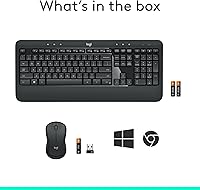
- Batteries Included: Both required batteries are included in the box, so the combo is ready to use immediately after unboxing.
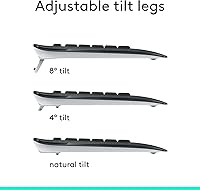
- Keyboard Layout: The keyboard is full-size with a standard key layout, an integrated palm rest along the bottom edge, and an adjustable two-position tilt leg system.
- Mouse Shape: The mouse features an ambidextrous body with textured rubber side grips designed to fit both left- and right-handed users comfortably.
- Hotkeys: The keyboard includes dedicated shortcut keys for media playback controls, a direct calculator launch key, and a battery level check function.
- Spill Resistance: The keyboard surface is spill-resistant, providing basic protection against minor liquid exposure during normal desk use.
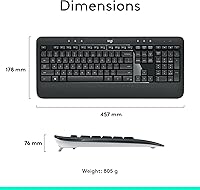
- Dimensions: The keyboard measures 17.5 x 6.5 x 3.5 inches, making it a standard full-size footprint suitable for most desk setups.
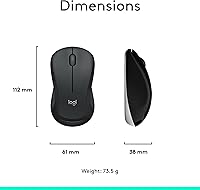
- Package Weight: The combined package weight of the keyboard and mouse is 1.79 pounds.
- Compatible OS: The combo officially supports Windows 7, Windows 8, Windows 10 or later, and Chrome OS; Mac and Linux are not officially supported.
- Connectivity: Setup is entirely plug-and-play via the USB receiver, with no driver installation or software download required for basic operation.
- Mouse Tracking: The mouse uses optical tracking technology suited for general productivity tasks on standard desk surfaces and mousepads.
- Color: The combo is available in black with dark grey accent tones across both the keyboard frame and mouse body.
- Model Number: The official Logitech model number for this combo is 920-012585, and the Amazon ASIN is B0CBPNWCVS.
- Manufacturer: The combo is designed and manufactured by Logitech, a Swiss-American peripheral brand with over four decades of product history.
- Date Available: This specific product configuration became available for purchase on January 1, 2024.
Related Reviews
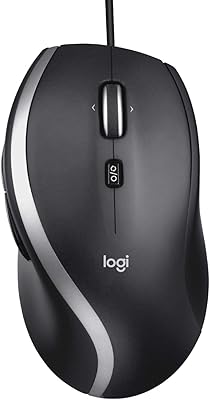
Logitech M500s
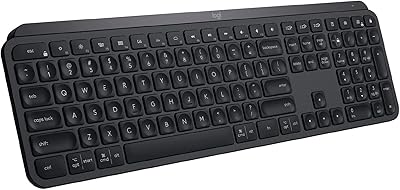
Logitech MX Keys

Logitech X-530

Logitech Pebble M350 Wireless Mouse

Logitech ERGO K860

Logitech Wireless Touchpad

Logitech POP Mouse
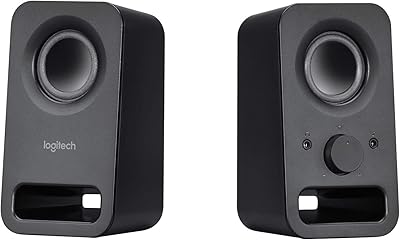

Logitech M217 Wireless Mouse
