
Overview
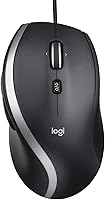
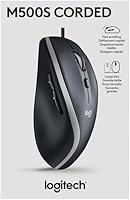
The Logitech M500s sits squarely in the mid-range of wired office mice — a category Logitech has owned for years. This is a full-size, right-handed mouse built around comfort during long work sessions, not speed or gaming precision. The design ships in updated sustainable retail packaging, a small but deliberate change from the original. What stands out immediately is the choice to stay wired: no Bluetooth pairing, no battery swaps, just plug in and work. If you want a reliable daily driver that won't fuss, this corded office mouse delivers exactly that kind of quiet, dependable competence for a full workday.
Features & Benefits
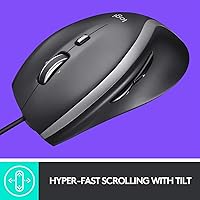
The standout here is the hyper-fast scroll wheel, which lets you fly through long spreadsheets or web pages with a single flick — then switch to click-to-click mode for careful, line-by-line navigation. The optical sensor covers a 400–4000 DPI range, so whether you're on a laptop screen or a wide external monitor, you can dial in the sensitivity you actually need. Horizontal scrolling via the tilt wheel saves constant key-combo gymnastics. Add seven programmable buttons through Logitech Options software, soft rubber side grips, and a sculpted palm rest, and this wired mouse covers a lot of practical ground for an everyday office setup.
Best For
This corded office mouse is a natural fit for people who spend most of their day inside documents, browsers, or large spreadsheets. The full-size ergonomic shape suits right-handed users who want genuine palm support through a long shift. If the thought of charging a mouse — or hunting for batteries — irritates you, the wired connection is a real selling point rather than a compromise. The programmable buttons also reward anyone who relies on repetitive shortcuts like copy-paste, browser navigation, or media controls. It is less suited for left-handed users or people who regularly move their setup between a desktop and a laptop.
User Feedback
Across a solid pool of ratings, the scroll wheel draws the most consistent praise — buyers describe it as one of the smoothest they have used at this price level. Long-session comfort comes up repeatedly, with several users noting their wrists feel noticeably less strained after switching from a cheaper mouse. On the downside, left-handed buyers are simply out of luck, and the cord does create minor friction for anyone hot-desking. A few reviewers flag that full button customization requires installing Logitech Options, which is a small but real extra step. Overall, buyer satisfaction is strong among office workers who came in with realistic expectations.
Pros
- The hyper-fast scroll wheel is one of the best in its price range for heavy document and spreadsheet work.
- Switching between hyper-fast and click-to-click scroll mode adds real precision when you need it.
- Plug-and-play USB setup means it works immediately on Windows, Mac, and Linux with zero configuration.
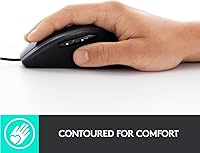
- Soft rubber side grips and a full palm-support shape reduce wrist strain during long desk sessions.
- Seven programmable buttons let you build a shortcut layout tailored to your actual daily workflow.
- The wired connection means zero latency, no battery anxiety, and one less thing to charge.
- Adjustable DPI between 400 and 4000 covers everything from careful cursor work to fast multi-monitor navigation.
- The tilt scroll wheel handles horizontal navigation without awkward keyboard combos.
- At its price point, the M500s delivers a feature set that outpaces most basic office mice noticeably.
- Compatible with Linux out of the box, which is a genuine advantage for developers and technical users.
Cons
- The design is right-hand only — left-handed users have no compatible version to consider.
- The click buttons are audibly loud, which can be disruptive in quiet shared office environments.
- Full button customization requires installing Logitech Options software and, on some platforms, creating an account.
- The unbraided cable is prone to fraying near the USB connector with prolonged daily use.
- Linux users lose access to button remapping through the software, limiting the programmable button benefit.
- The rubber side grips attract skin oils and dust visibly over time, requiring regular cleaning.
- Frequent travelers will find the loose cable tangles easily in a bag without a management solution.
- The scroll wheel can develop slight looseness after months of heavy use according to some long-term owners.
- Horizontal tilt scroll resistance feels stiff to users who rely on it repeatedly throughout the day.
- There is no silent-click or low-noise variant, which is a gap for open-plan or library work environments.
Ratings
The Logitech M500s has been evaluated by our AI rating system after analyzing thousands of verified global user reviews, with spam, bot activity, and incentivized feedback actively filtered out. What follows is an honest scorecard that reflects where this corded office mouse genuinely excels and where real buyers have run into friction — no inflated praise, no buried complaints.
Scroll Wheel Performance
Ergonomics & Comfort
Build Quality
Tracking & Sensor Accuracy
Button Customization
Wired Connectivity
Cable Quality & Length
Software Experience
Value for Money
Plug-and-Play Setup
Horizontal Scrolling
Weight & Portability
Compatibility
Noise Level
Suitable for:
The Logitech M500s is genuinely well-matched for right-handed office workers who spend the bulk of their day inside spreadsheets, long documents, or heavily tabbed browsers. If your work involves scrolling through dense data or reports, the hyper-fast scroll wheel alone will feel like a meaningful upgrade over a standard mouse. People who have grown tired of managing wireless peripherals — dead batteries during calls, pairing dropouts, charging schedules — will find the wired connection a deliberate relief rather than a step backward. The adjustable DPI range also makes it a practical choice for anyone working across a laptop display and a larger external monitor, since you can dial sensitivity up or down depending on the screen. Those who rely on repetitive shortcuts and want to automate them into physical buttons will get real productivity mileage from the programmable setup via Logitech Options.
Not suitable for:
Left-handed users should stop here — the sculpted ergonomic shape is built exclusively for right-hand use, and there is no mirrored variant available. If you regularly move between a home office, a co-working space, or a client site, the fixed cable adds friction that a compact wireless mouse handles far more gracefully. Gamers or anyone needing high-precision tracking above the 4000 DPI ceiling will find the M500s underpowered for that purpose; it was never designed with gaming in mind. People who prefer a truly minimal, software-free setup may be frustrated that unlocking all seven programmable buttons requires installing Logitech Options, which runs as a background application. Finally, buyers hoping for a silent-click experience — useful in quiet shared offices or library environments — should look elsewhere, as this corded office mouse does not offer quieted buttons.
Specifications
- Brand: Manufactured by Logitech, a Swiss-American peripheral brand with decades of experience in mice, keyboards, and input devices.
- Model: The M500s is the advanced successor to the original M500, updated with a higher-precision optical sensor and Logitech Options software support.
- Connectivity: Connects via a standard wired USB-A plug with no receiver, dongle, or pairing process required.
- Sensor Type: Uses an optical sensor for tracking, compatible with most desk surfaces without requiring a dedicated mousepad.
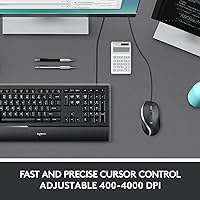
- DPI Range: Sensor resolution is adjustable between 400 and 4000 DPI, selectable through the Logitech Options software.
- Scroll Wheel: Features a hyper-fast scroll wheel with a toggle to switch between nearly frictionless free-spin mode and precise click-to-click stepping.
- Tilt Scroll: The scroll wheel tilts left and right to enable horizontal scrolling without holding any keyboard modifier keys.
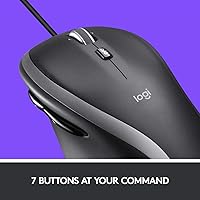
- Buttons: Includes 7 physical buttons, all of which are programmable via Logitech Options software for custom shortcuts and macros.
- Side Grips: Both sides of the mouse body are lined with soft rubber grips designed to reduce slipping and improve comfort during long sessions.
- Hand Orientation: Designed exclusively for right-handed use, with an asymmetric sculpted shell that supports natural palm positioning.
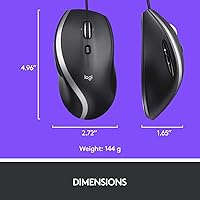
- Weight: The mouse weighs approximately 5.1 ounces, providing enough resistance to feel grounded without causing fatigue during extended use.
- Dimensions: The body measures 4.96 x 2.72 inches in length and width, classifying it as a full-size mouse suited to medium-to-large hands.
- Power Source: Draws power directly from the host computer via the USB connection, requiring no batteries or external charging.
- Compatibility: Works out of the box on Windows, macOS, and Linux operating systems; full software customization is best supported on Windows and Mac.
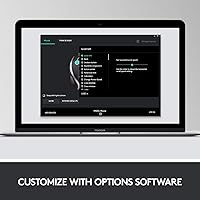
- Software: Optional Logitech Options software enables full DPI adjustment, button remapping, and profile management across supported platforms.
- Packaging: Ships in updated sustainable retail packaging, replacing the original M500s packaging as part of Logitech environmental initiatives.
- Warranty: Covered by a standard Logitech limited hardware warranty; duration varies by region but is typically one year from date of purchase.
- Cable: The USB cable is fixed and unbraided, designed for desktop use; exact cable length is approximately 6 feet, suitable for most standard desk setups.
Related Reviews

Logitech ERGO K860

Logitech Pebble M350 Wireless Mouse

Logitech X-530

Logitech Wireless Touchpad

Logitech POP Mouse
Logitech C310 HD Webcam

Logitech M320 Wireless Mouse
Logitech Slim Bluetooth Combo
Logitech H540