
Overview
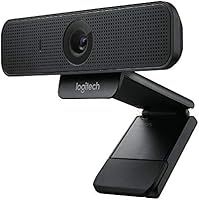
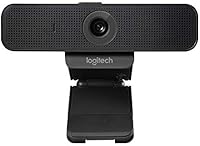
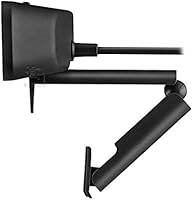
The Logitech C925e has been around since 2016, which in webcam years is a long time — yet it keeps showing up on shortlists for good reason. Built with enterprise video conferencing in mind, it carries certifications for Microsoft Teams, Skype for Business, Zoom, Google Meet, and Cisco WebEx, making it a straightforward choice for corporate environments. The compact clip-mount design works on laptops, monitors, or a tripod, and the built-in privacy shade is a genuinely useful touch rather than an afterthought. It sits firmly in the mid-range — not as bare-bones as a budget cam, not as feature-rich as a professional studio rig, but well-suited for anyone who needs reliable daily performance.
Features & Benefits
The RightLight 2 technology is one of the more practical inclusions here — it quietly adjusts exposure and white balance in the background, so you don't look washed out by a bright window or lost in shadow during an afternoon call. Autofocus handles itself reliably within the fixed 78° field of view, keeping faces sharp without any fussing. The dual omnidirectional mics do a decent job capturing clear voice audio within about a meter, which is enough for a solo desk setup — just don't expect them to replace a dedicated microphone. On machines with limited processing power, H.264 SVC encoding takes a real load off the CPU, and the Logi Tune app adds handy controls like zoom, color presets, and manual focus.
Best For
This business webcam makes the most sense for people who live on video calls — remote employees, hybrid workers, or freelancers who need to look composed and professional without building a whole home studio. IT teams managing shared devices will appreciate the broad enterprise certifications and UVC 1.1 support, which keeps deployment straightforward. If you're running an older laptop that struggles with video encoding, the CPU-offloading compression is a genuine benefit. For anyone seriously concerned about digital privacy, the physical privacy cover is a meaningful reason to choose this over a cam that relies on software alone. It's a no-fuss, office-oriented pick that doesn't demand much from the user.
User Feedback
Across more than 4,600 ratings, the C925e holds a 4.6-star average — a score that reflects sustained satisfaction rather than a short honeymoon period. Buyers regularly highlight how well it performs in normal office lighting, and many mention the mics are good enough to skip a headset in quiet rooms. The clip gets specific praise for gripping monitors securely without wobbling. On the critical side, 30fps and no 4K are the most common complaints from buyers comparing it to newer models at similar prices — fair points if image quality is your top priority. A smaller group has run into driver compatibility issues on certain Windows setups, though reports appear inconsistent rather than widespread.
Pros
- Certified for Teams, Zoom, Google Meet, Skype for Business, and Cisco WebEx out of the box.
- Physical privacy shade blocks the lens at the hardware level — no software workaround can undo it.
- RightLight 2 handles shifting office lighting automatically, keeping your image consistently usable.
- Autofocus stays locked during long calls without hunting or losing sharpness when you shift position.
- H.264 SVC encoding reduces CPU strain noticeably on older or underpowered laptops.
- The clip is sturdy and grips a wide range of monitor thicknesses without slipping or wobbling.
- Built-in mics are adequate for quiet solo calls, removing the need for a headset in many setups.
- Logi Tune app adds zoom, color, and focus controls that go beyond what the hardware exposes by default.
- Plug-and-play USB setup works on Windows, macOS, and Chrome OS with minimal configuration.
- A 4.6-star average across 4,600-plus verified ratings reflects years of consistent real-world satisfaction.
Cons
- 30fps cap feels limiting compared to newer webcams offering 60fps at similar or lower prices.
- No 4K support, which is increasingly standard among competing mid-range options released since 2020.
- Logi Tune app has reported stability issues — it occasionally fails to detect the camera or drops saved settings.
- A recurring minority of Windows users experience driver conflicts requiring manual troubleshooting to resolve.
- Fixed 78° field of view cannot be widened, making it unsuitable if you need to frame more than one person.
- Built-in mics struggle in noisy or open-plan environments and are not a replacement for a dedicated microphone.
- The plastic body shows fingerprints and dust readily, which can look untidy on a visible desk setup.
- At current pricing, newer competitors offer meaningfully better specs, making the value argument harder to justify on specs alone.
Ratings
The Logitech C925e scores here reflect AI analysis of thousands of verified global buyer reviews, with spam, bot-generated, and incentivized feedback actively filtered out before scoring. Ratings cover everything from image clarity and microphone usefulness to long-term reliability and value — both the strengths and the real frustrations buyers report are factored in equally. The result is an honest, well-rounded picture of where this business webcam excels and where it falls short compared to current expectations.
Video Quality
Low-Light Performance
Autofocus Accuracy
Microphone Quality
Privacy Shade
Build Quality & Design
Ease of Setup
Software & App (Logi Tune)
Compatibility & Certifications
CPU & Network Efficiency
Value for Money
Mounting & Placement Flexibility
Long-Term Reliability
Suitable for:
The Logitech C925e is a strong fit for remote workers, hybrid employees, and small business owners who spend a significant portion of their day on video calls and want a reliable, low-maintenance setup. If your conferencing stack includes Microsoft Teams, Zoom, Google Meet, Skype for Business, or Cisco WebEx, the formal certifications remove any compatibility guesswork — which matters whether you're a solo freelancer or an IT administrator rolling out devices across a department. People working on older laptops will find the H.264 SVC encoding genuinely useful, as it takes real encoding load off an aging CPU and keeps calls smooth where software-only solutions might struggle. The built-in privacy shade is worth singling out for anyone who is security-conscious or simply wants to know — with certainty — that the lens is physically blocked when not in use. For buyers who want a professional on-camera presence without building a studio or learning any software, this Logitech cam covers the basics well and stays out of the way.
Not suitable for:
Buyers chasing the sharpest possible image quality or the smoothest motion will find that the Logitech C925e shows its age in a few specific ways — no 4K output and a 30fps cap put it behind several current competitors that sit at similar price points. Content creators, streamers, or anyone recording video for an audience beyond a standard call will likely outgrow it quickly, as the fixed 78° field of view and modest sensor offer limited room to work with in post. If your workspace is regularly dark or relies on a single dim lamp, the RightLight 2 system will help but will not fully compensate — users in genuinely low-light environments may need to invest in a ring light or a camera with a more capable low-light sensor. Those hoping the built-in mics will replace a proper USB microphone for presentations, podcasts, or regular screen recordings will be disappointed; they are adequate for a quiet room call and not much beyond that. Anyone who has recently upgraded to a powerful modern laptop and is comparing spec-for-spec with newer webcam releases may find the value case harder to make at full retail price.
Specifications
- Video Resolution: Records and streams at 1080p Full HD at 30 frames per second for clear, detailed video during calls.
- Autofocus: Continuous autofocus keeps the subject sharp automatically without requiring any manual adjustment during use.
- Field of View: Fixed 78° diagonal field of view frames a standard single-person desk setup without distortion at the edges.
- Light Correction: RightLight 2 technology automatically adjusts exposure and white balance to compensate for variable ambient lighting conditions.
- Microphones: Dual integrated omnidirectional microphones capture voice audio up to one meter away from the camera.
- Video Encoding: Supports H.264 with Scalable Video Coding (SVC) and UVC 1.1 to offload encoding from the host CPU.
- Connectivity: Connects via USB; no external power supply or batteries are required for standard operation.
- Privacy Shade: A built-in physical lens cover slides over the lens and appears white when closed, providing hardware-level visual confirmation that the camera is blocked.
- Mounting Options: Ships with an adjustable clip for laptop screens and monitors, plus an integrated tripod thread for standalone mounting.
- Dimensions: Measures 1.3 × 1.2 × 5 inches, making it compact enough to sit on most monitor tops without obstructing airflow or screen edges.
- Weight: Weighs 6.2 ounces, which is light enough to clip onto a thin laptop lid without pulling or tipping the screen.
- OS Compatibility: Compatible with Windows 7 or later, macOS 10.7 or later, and Chrome OS without requiring third-party drivers for basic operation.
- Certifications: Formally certified for Microsoft Teams, Skype for Business, Zoom, Google Meet, and Cisco WebEx conferencing platforms.
- Companion App: The Logi Tune desktop app provides controls for digital zoom, color presets, color adjustment, manual focus, and firmware updates.
- Manufacturer: Designed and sold by Logitech, a Swiss-American peripheral manufacturer with global enterprise support infrastructure.
- Release Date: First made available in April 2016 and remains in active production with ongoing firmware support as of the current date.
- Model Number: The official model number is 960-001075, which is the reference used for procurement, warranty claims, and IT asset management.
- Color: Available in black only; no additional color variants are offered for this model.
Related Reviews

Logitech Wireless Touchpad

Logitech X-530

Logitech POP Mouse

Logitech Pebble M350 Wireless Mouse

Logitech ERGO K860

Logitech M510
Logitech H570e Mono USB Headset

Logitech M217 Wireless Mouse
Logitech C310 HD Webcam