Overview

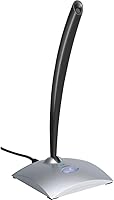
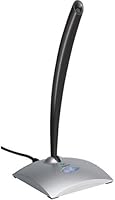
The Logitech USB Desktop Gooseneck Microphone has been sitting on desks since 2001 — and that kind of longevity in a fast-moving tech category says something. It's not flashy, and it doesn't try to be. What it offers is a straightforward, plug-and-play USB connection, a flexible metal gooseneck for positioning, and an on-device power switch that lets you cut your audio instantly without hunting through software menus. Built from metal and available in black and silver, it has a durability-first feel that cheaper plastic mics lack. Mid-range in price, it sits above webcam mics but well below professional studio territory.
Features & Benefits

The unidirectional polar pattern is probably the most practically useful spec here — it captures what's directly in front of it and mostly ignores what's happening behind, which reduces background noise during calls without needing a treated room. The 80 dB signal-to-noise ratio is adequate for speech; voices come through clearly without distracting hiss. That said, the 16 kHz frequency response is a ceiling worth knowing about — it covers the range needed for intelligible voice, but don't expect the warmth or detail that wider-range microphones produce. The gooseneck bends and holds its angle, letting you adjust positioning without shifting the entire base.

Best For

This gooseneck desk mic makes the most sense for people who spend hours on video calls and want a dedicated microphone that doesn't require any configuration. Students recording voice notes or joining online classes will appreciate that the plug-and-play setup works the moment it's plugged in — no driver installs, no audio interface required. Casual podcasters or part-time streamers looking for a step up from a headset's built-in mic will find it a reasonable choice. The physical on/off switch is also a genuine draw for anyone who's ever scrambled to locate a software mute button during an active meeting.

User Feedback

Across more than 550 ratings, this Logitech USB mic lands at 3.8 out of 5 — reliable, but not universally loved. Setup speed earns consistent praise, and voice clarity on calls gets frequent positive mentions from remote workers. Where the desktop microphone stumbles is with desk vibrations and keyboard noise bleed — heavy typists may find those sounds creep into recordings more than expected. Durability is genuinely mixed; some buyers report years of trouble-free use while others flag a loosening gooseneck or connector wear over time. It performs well as a voice communication tool, but falls short for anyone hoping to record music or produce polished audio content.

Pros

  • Plug-and-play USB setup works instantly on both PC and Mac with zero driver installation.
  • The physical on/off switch gives instant, tactile mute control without navigating software menus.
  • Unidirectional polar pattern meaningfully reduces ambient room noise during calls and meetings.
  • Metal construction feels noticeably more substantial than plastic mics in the same price range.
  • Flexible gooseneck holds its angle reliably, letting you position the mic precisely without shifting the base.
  • Voice clarity on calls is a clear improvement over webcam mics and built-in laptop audio.
  • Bus-powered via USB — no external power supply, batteries, or extra cables required.
  • Compact base keeps desk footprint small while the gooseneck provides enough reach for comfortable positioning.
  • Works across Windows, macOS, and even Chromebooks without any compatibility issues reported.

Cons

  • Desk vibrations and mechanical keyboard noise bleed into recordings more than many buyers expect.
  • The 16 kHz frequency response limits audio depth, making voices sound flat compared to wider-range mics.
  • No gain control on the device itself — quieter speakers must adjust input levels through system software.
  • Gooseneck joint can gradually loosen over time, reducing the ability to hold a precise position.
  • No LED indicator to confirm mute status, leaving users uncertain whether the mic is live or off.
  • USB connector wear has been flagged by multiple long-term reviewers as a reliability concern.
  • At its current price, newer competing mics offer better specs and similar ease of use.
  • Sensitive to surface-conducted noise, so placement on a shared or vibrating desk requires extra care.
  • Audio output is mono only, which can feel limiting for users expecting stereo capture or richer staging.

Ratings

The Logitech USB Desktop Gooseneck Microphone has been scored by our AI system after processing hundreds of verified global buyer reviews, with spam, bot submissions, and incentivized feedback actively filtered out. The result is an honest, balanced snapshot of where this gooseneck desk mic genuinely delivers and where it falls short — no inflated praise, no cherry-picked complaints.
Ease of Setup
93%
Buyers consistently highlight that this mic works the moment it's plugged in — no driver downloads, no software configuration, no restart required. For remote workers jumping on a last-minute call or students who just need something that works, that zero-friction setup is a real-world advantage that gets mentioned repeatedly.
A small number of users on older operating systems reported inconsistent initial recognition, requiring a USB port swap or system restart. It's rare, but worth knowing if you're running legacy hardware or an older version of macOS.
Voice Clarity
79%
21%
For everyday video calls, virtual meetings, and online classes, voice intelligibility is solid. Speakers come through clearly without the muffled or tinny quality that plagues webcam mics and cheaper clip-ons, and most call participants notice an audible improvement over headset microphones.
The 16 kHz frequency ceiling is a genuine limitation — the mic handles speech well but loses nuance and warmth in voices that benefit from fuller-range capture. It is decidedly a communication tool, not a recording instrument, and users who expected more were often disappointed.
Noise Isolation
71%
29%
The unidirectional polar pattern does a reasonable job of ignoring sounds coming from the sides and rear. In moderately quiet home offices, ambient room noise stays largely out of the recording, which is a meaningful step up from omnidirectional webcam or laptop mics.
Desk vibrations and mechanical keyboard noise are a recurring sore point among reviewers. The mic picks up surface-conducted sound more readily than many buyers expect, so heavy typists or people with vibrating desk fans sitting nearby often report audible interference during calls.
Build Quality
68%
32%
The metal body gives this gooseneck desk mic a noticeably more substantial feel than similarly priced plastic alternatives. It sits firmly on the desk and doesn't tip easily, and the overall construction inspires more confidence than budget options in this price range.
Long-term durability gets genuinely mixed reviews. Some buyers report the gooseneck gradually losing its ability to hold position after extended use, and connector wear has been flagged by users who move the mic frequently. It's not a universal problem, but it appears often enough to be a pattern.
Gooseneck Flexibility
82%
18%
The adjustable gooseneck is a practical convenience that buyers appreciate in daily use — you can angle the mic precisely toward your mouth without sliding the base around your desk. It holds its position well enough for stationary setups and makes desktop placement more forgiving.
The gooseneck range of motion, while adequate, won't satisfy users who need extreme angle adjustments or who place the base far from their seated position. Over time, some units develop looseness at the neck joint that reduces precision positioning.
Background Noise Rejection
66%
34%
In controlled environments — quiet home offices, private study rooms — the mic's directional pickup noticeably reduces the bleed of background sounds. Users on calls from relatively calm settings report that the other party rarely hears room noise during normal conversation.
The mic struggles in noisier environments. HVAC systems, street noise through open windows, and nearby conversations can bleed into recordings noticeably. It lacks any active noise-cancellation processing, so it relies entirely on placement and the polar pattern to manage ambient sound.
Physical Mute Switch
88%
The on-device power switch gets consistent praise, particularly from remote workers who value the instant, tactile confidence of knowing the mic is physically off. No searching through Zoom or Teams menus mid-conversation — one click and you're muted, full stop.
A few users noted the switch feel becomes slightly less crisp with extended use. There is also no LED indicator to confirm mute status at a glance, which means users occasionally second-guess whether the switch is in the on or off position during calls.
Value for Money
62%
38%
For buyers stepping up from a laptop's built-in mic or a basic headset, this desktop microphone delivers a real and noticeable improvement in perceived audio quality without requiring any additional equipment or technical knowledge. As a communication-focused device, it justifies its position.
At its current price point, the market has become more competitive since this mic launched. Several newer USB microphones offer wider frequency response, better noise handling, and similar plug-and-play simplicity for comparable or lower prices, which makes the value case harder to defend in 2024.
Platform Compatibility
91%
Works reliably across both Windows and macOS without any driver installation — reviewers on both platforms report identical setup experiences. The USB audio class compliance means it also works with Chromebooks and most Linux distributions without configuration.
There are very occasional reports of recognition issues with certain USB hubs or low-power USB ports, requiring connection directly to a computer port for reliable performance. This is a minor inconvenience but can catch users off guard in hub-heavy desk setups.
Audio Quality for Music or Singing
38%
62%
In a pinch, you can capture a rough voice memo or a quick reference recording for personal use. The mic at least avoids the worst digital distortion artifacts that very cheap mics introduce, so recordings are intelligible even if they lack character.
The 16 kHz frequency response and voice-grade SNR mean this mic has no realistic place in a music recording workflow. Singers and musicians who bought it based on the Amazon listing's mention of singing as a use case are frequently disappointed — the captured audio lacks depth, warmth, and dynamic range.
Desk Footprint
84%
The base is compact enough to fit comfortably on a busy desk without dominating the workspace. At 8 ounces it stays put without needing additional weight or mounting hardware, and the black and silver finish is neutral enough to blend into most desktop setups.
At 14 inches in total length, the extended gooseneck can feel intrusive on smaller or more cluttered desks. There is no cable management solution built in, and the USB cord hangs freely from the base, which contributes to desk cable clutter.
Long-term Durability
59%
41%
A meaningful portion of buyers report using this mic for multiple years without any functional degradation, which speaks to the basic reliability of the core USB audio hardware. The metal construction helps resist the kind of cracking and crumbling that affects plastic mic bodies over time.
Durability consistency is the main concern here. The gooseneck joint and the USB connector are the two most commonly cited failure points among longer-term reviewers, and the variation between units suggests quality control is not perfectly consistent across production runs.
Microphone Sensitivity
63%
37%
In a well-positioned setup — mic aimed directly at the speaker's mouth from roughly 6 to 12 inches away — pickup sensitivity is adequate for conversational volume levels. Users don't need to speak unnaturally loudly or lean uncomfortably close to be heard clearly.
The mic can struggle with quieter speakers or those who position the gooseneck further away than optimal. It also has no gain control on the device itself, so users with softer voices may need to adjust input levels through system software to avoid sounding distant on calls.

Suitable for:

The Logitech USB Desktop Gooseneck Microphone is a practical fit for anyone whose primary need is clear, reliable voice communication without the hassle of configuring audio hardware. Remote workers who spend their days in video meetings will appreciate that it plugs in and works immediately on both PC and Mac, with no drivers to install or settings to dig through. The physical mute switch is a genuinely useful feature for people who toggle in and out of conversations frequently and want the certainty of a tactile button rather than a software shortcut. Students recording lectures, participating in online classes, or capturing quick voice notes will find the audio quality a significant step up from a laptop's built-in mic. Casual podcasters or part-time streamers who want to sound more professional without investing in an audio interface or a more complex setup will also find this gooseneck desk mic a reasonable entry point. If your baseline is a headset microphone or a webcam's built-in audio, this desktop microphone will likely exceed your expectations for everyday spoken communication.

Not suitable for:

The Logitech USB Desktop Gooseneck Microphone has real limitations that make it the wrong choice for several buyer profiles, and it's worth being direct about those before you commit. Musicians, singers, and anyone planning to record vocals or instruments should look elsewhere — the 16 kHz frequency ceiling and voice-grade signal processing simply cannot capture the warmth, depth, or dynamic range that audio production requires. Content creators who need broadcast-quality audio for professional podcasting, YouTube, or streaming will quickly find that this Logitech USB mic sits below the standard that competitive audiences expect from polished productions. Heavy typists or people working in noisier environments should also be cautious, as the mic is known to pick up desk vibrations and keyboard noise more readily than many buyers anticipate. If long-term durability under daily heavy use is a priority, the mixed reports around gooseneck joint wear and connector reliability may give you reason to consider a sturdier alternative. Finally, buyers comparing options in today's market should know that the competitive landscape has shifted considerably since this mic launched — newer models at similar price points often offer broader frequency response and better noise handling.

Specifications

  • Connectivity: Connects via USB Type-A, functioning as a plug-and-play USB audio device with no drivers required on PC or Mac.
  • Polar Pattern: Unidirectional (cardioid) pickup pattern captures sound from directly in front while reducing noise from the sides and rear.
  • Form Factor: Gooseneck-style microphone mounted on a fixed base, allowing flexible directional adjustment without repositioning the entire unit.
  • Frequency Response: Captures audio across a 16 kHz range, optimized for voice intelligibility rather than full-spectrum music or instrument recording.
  • Signal-to-Noise Ratio: Rated at 80 dB, providing acceptably clean voice audio with minimal background hiss under normal desktop conditions.
  • Impedance: Output impedance is rated at 600 Ohm, compatible with standard USB audio input circuits found in most modern computers.
  • Power Source: Bus-powered entirely through the USB connection — no external power adapter, AA batteries, or separate power supply is needed.
  • Channels: Captures mono audio on a single channel, which is standard for voice communication and basic speech recording applications.
  • Material: Microphone body and gooseneck arm are constructed from metal, giving the unit more structural rigidity than comparable plastic-bodied mics.
  • Weight: The complete unit weighs 8 ounces, providing enough desk stability without being cumbersome or difficult to reposition.
  • Dimensions: Overall product dimensions measure 14 x 7.2 x 3 inches, accounting for the full extended gooseneck length and base footprint.
  • Platform Support: Fully compatible with Windows PCs and macOS systems, and also functions on Chromebooks and most Linux distributions via USB audio class drivers.
  • Mute Control: An on-device power switch is located on the microphone body, providing instant hardware-level mute without any software interaction.
  • Color Options: Available in a two-tone Black and Silver finish designed to blend neutrally into standard office or home desk environments.
  • First Available: This model was first listed for sale in October 2001, making it one of the longest-running USB microphones still actively sold by Logitech.
  • Manufacturer: Designed and sold by Logitech, a Swiss-American peripheral manufacturer with decades of experience in computer input and audio accessories.
  • Item Model Number: The official Logitech model number for this unit is 980186-0403, which can be used to verify compatibility or locate support resources.
  • Included Components: The package includes the microphone unit only; no additional cables, adapters, mounting hardware, or carrying cases are included in the box.

Related Reviews
Neat Microphones Skyline USB Desktop Condenser Microphone
89%
94%
Audio Quality
91%
Ease of Use
89%
Build Quality
90%
Mute Button Functionality
92%
Value for Money
More
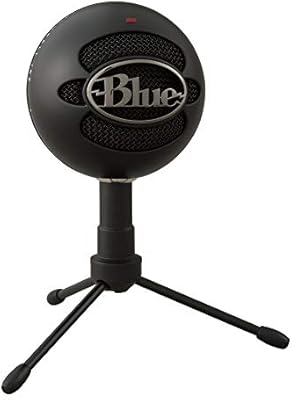
Logitech Blue Snowball USB Microphone
84%
88%
Sound Quality
94%
Ease of Setup
82%
Build Quality
75%
Noise Cancellation
85%
Versatility (Pickup Patterns)
More
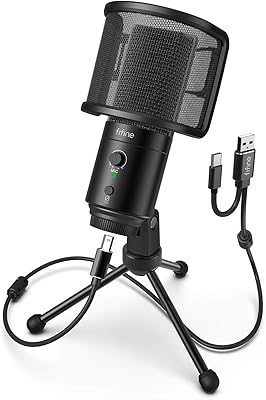
FIFINE K683A
FIFINE K683A
80%
83%
Audio Clarity
67%
Background Noise Rejection
84%
Build Quality
93%
Ease of Setup
88%
On-Body Controls
More
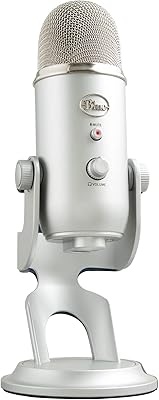
Blue Yeti USB Microphone
80%
91%
Audio Quality
96%
Ease of Setup
88%
Polar Pattern Versatility
89%
Build Quality
83%
Onboard Controls
More
Logitech Blue Snowball iCE USB Microphone
85%
89%
Sound Quality
93%
Ease of Setup
92%
Value for Money
82%
Build Quality
72%
Background Noise Rejection
More
ROCCAT Torch USB Microphone
86%
92%
Audio Quality
88%
Ease of Use
85%
Microphone Sensitivity
89%
Versatility (Pickup Patterns)
91%
RGB Lighting & Visual Feedback
More
Logitech H390 USB Computer Headset
83%
86%
Microphone Voice Clarity
93%
Value for Money
97%
Ease of Setup
68%
Long-Term Comfort
82%
In-Line Control Tactility
More
JLab Talk USB Microphone
89%
94%
Audio Clarity
91%
Directional Pattern Versatility
96%
Ease of Setup
82%
Build Quality
87%
Portability
More
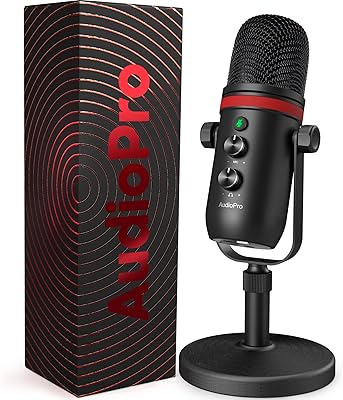
AUDIOPRO X5
AUDIOPRO X5
77%
94%
Ease of Setup
78%
Voice Clarity
67%
Background Noise Rejection
82%
Build Quality
88%
Onboard Controls
More
Samson Meteor USB Microphone
86%
89%
Audio Quality
95%
Ease of Use
83%
Build Quality
91%
Portability
94%
Setup Process
More

FAQ

Yes, it does. The Logitech USB Desktop Gooseneck Microphone is a standard USB audio class device, which means your computer recognizes it automatically when you plug it in. This applies to Windows, macOS, and even most Chromebooks. You may need to select it as your input device in your system sound settings, but there is no driver download involved.

It works on both. This gooseneck desk mic is fully compatible with macOS and Windows without any additional setup. A number of reviewers use it specifically on Mac for video calls and it performs the same way on both platforms.

It depends on your expectations. For casual podcasting or occasional streaming where clear voice communication is the goal, this Logitech USB mic will do the job adequately. However, if you are aiming for broadcast-quality audio that sounds polished to a professional audience, the 16 kHz frequency ceiling will likely feel limiting and you would be better served by a wider-range condenser microphone.

Technically you can plug it in and record vocals, but the results will disappoint most users. The microphone is tuned for speech clarity, not musical performance, and its frequency response does not capture the warmth or detail that singing requires. If music recording is your primary use case, a different microphone designed for that purpose would be a much better investment.

When new, the gooseneck holds its position well enough for everyday desk use. Over time, some users report that the joint gradually loses tension and the neck starts to drift, particularly with frequent readjustment. It is not a universal problem, but it does show up often enough in longer-term reviews that it is worth being aware of before purchasing.

This is one of the more commonly raised concerns in user reviews, and the honest answer is yes — it can. The mic is sensitive to surface-conducted vibrations, so mechanical keyboard users and people with fans or other vibrating equipment on the same desk may notice those sounds in their recordings. Placing the mic on a small foam pad or repositioning it away from the vibration source can help reduce this.

It is a standard toggle switch on the microphone body itself. Flip it one way to mute, flip it back to unmute. There is no LED indicator confirming the current state, which some users find inconvenient, but the physical action of the switch is simple and reliable for quickly cutting your audio during calls.

Neither. The desktop microphone draws all of its power directly from your computer through the USB connection. There are no batteries to replace and no wall adapter to manage — just the single USB cable that comes attached to the unit.

Logitech does not publish the exact cable length in the official specs, but based on user feedback the cable is generally sufficient for standard desktop setups where the PC tower is on or beside the desk. If your tower is floor-mounted some distance away, a USB extension cable would likely be needed.

That depends entirely on what you need it for. The core use case — a simple, durable, plug-and-play desk mic for voice calls — has not changed much since 2001, and this mic still performs that function reliably. Where the age shows is in audio quality and value compared to newer options at a similar price. If the market has moved and you can find a modern mic with better specs for the same money, it is worth comparing before defaulting to this one out of brand familiarity.