Overview

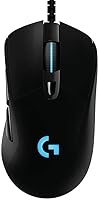
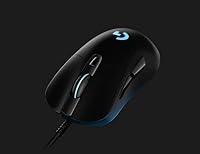
The Logitech G403 Hero sits squarely in the mid-range wired gaming mouse category, and it earns its place without pretending to be something it's not. Built for right-handed players, its ergonomic contoured shape molds naturally to a palm or claw grip, and at 87 grams it's light enough to game for hours without fatigue. The Hero 25K sensor upgrade brought genuinely improved tracking accuracy — no smoothing, no acceleration — which matters more in real use than any DPI number on a spec sheet. The braided USB cable and wired connection keep things simple and reliable. This is not a flagship ultralight, but it doesn't need to be.

Features & Benefits

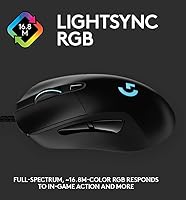
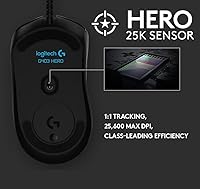
At the heart of this gaming mouse is the Hero 25K optical sensor, which tracks at up to 400 IPS with genuine 1:1 accuracy — no built-in smoothing or filtering muddying your inputs. The DPI range runs from 100 all the way to 25,600, and you can set up five presets and switch between them on the fly through G HUB software. Six programmable buttons give you room to map macros or in-game actions without much hassle. The spring-tensioned main buttons register with minimal actuation force, which pays off in fast-paced games. Lightsync RGB is a nice touch if you care about aesthetics, but performance-focused buyers will honestly spend little time thinking about it.

Best For

The G403 Hero makes the most sense for right-handed PC gamers with medium to large hands who game primarily on a wired setup. FPS and MOBA players in particular will appreciate the sensor's consistency — whether you're doing slow precise flicks or wide fast swipes, it holds up. It's also a strong pick for anyone upgrading from a basic office mouse; the jump in responsiveness is immediately noticeable. If you play wirelessly only, look elsewhere — but for anyone who values wired reliability and wants capable performance without stepping into premium price territory, Logitech's mid-range wired mouse covers the brief well.

User Feedback

Owners consistently point to sensor accuracy as the standout quality, with plenty of reports of smooth, predictable tracking across varied surfaces and mouse mats. The rubber side grips also get frequent praise for keeping things secure during extended sessions. On the downside, several users mention the braided cable being stiffer than expected, which can drag noticeably on slicker pads. The optional weight insert divides opinion — many competitive players pull it out immediately, while others genuinely prefer the added heft. G HUB draws the most consistent criticism, flagged as slow to install and occasionally temperamental on first setup. Despite that, overall buyer sentiment leans clearly positive.

Pros

  • The Hero 25K sensor delivers honest 1:1 tracking with zero artificial smoothing — exactly what competitive players need.
  • At 87 grams, this gaming mouse is comfortable for multi-hour sessions without feeling fatiguing.
  • Rubber side grips maintain reliable control even during intense or sweaty gaming sessions.
  • Five customizable DPI presets with on-the-fly switching keep the G403 Hero adaptable across game genres.
  • Spring-tensioned main buttons register cleanly and quickly, with a satisfying tactile feel.
  • The braided cable is durable and resists fraying far better than standard rubber cables at this price.
  • Six programmable buttons cover most gaming use cases without requiring awkward hand repositioning.
  • Strong value relative to its price tier — sensor quality alone justifies the cost for most buyers.
  • Compatible with both Windows and macOS out of the box, covering most desktop setups.

Cons

  • The braided cable is noticeably stiff and creates drag on slicker mouse pads, disrupting smooth movement.
  • G HUB software has a documented history of slow installs, occasional crashes, and higher-than-expected resource usage.
  • Long-term users report double-click issues developing in the main buttons after heavy use past the one-year mark.
  • The single-zone RGB coverage is limited compared to similarly priced mice with more elaborate lighting setups.
  • No wireless option exists, making it a hard pass for setups where cable-free use is a priority.
  • The optional weight insert leaves a hollow cavity that produces a faint resonant sound when clicking after removal.
  • Polling rate is capped at 1000Hz, falling behind newer wired competitors that offer 2000Hz or higher.
  • Strictly right-handed — left-handed or ambidextrous players have no version of this shape available to them.

Ratings

The scores below for the Logitech G403 Hero were generated by our AI system after analyzing thousands of verified global user reviews, with spam, bot-generated, and incentivized submissions actively filtered out. The result is an honest, data-driven snapshot that surfaces both what buyers genuinely love and where real frustrations show up. Nothing has been smoothed over — if a pattern of complaints exists, it's reflected in the numbers.

Sensor Accuracy
93%
The Hero 25K sensor is the clearest reason buyers recommend this mouse to friends. In FPS games especially, users report that cursor movement feels directly connected to hand motion — no lag, no drift, no artificial smoothing getting in the way during high-pressure moments.
A small number of users on very low-pile hard pads noticed occasional jitter at the absolute lowest DPI settings, though this appears edge-case specific. At typical gaming DPI ranges, complaints about sensor behavior are nearly nonexistent.
Build Quality
81%
19%
The shell feels solid without being heavy, and the buttons don't wobble or rattle after months of heavy use. The braided cable adds a sense of durability that cheaper mice in this price range typically skip, and the side grips hold their texture well over time.
The plastic finish on the top shell attracts fingerprints quickly and can look worn after extended sessions. A few long-term owners also noted that the main click buttons develop a very slight pre-travel feel after a year or more of daily competitive play.
Ergonomics & Comfort
84%
Right-handed players with medium to large hands consistently describe this mouse as easy to settle into, whether they palm grip or use a relaxed claw. The rubber side panels make a real difference during long gaming sessions, reducing the need to grip tighter as hands warm up.
Small-handed users and those who prefer a fingertip grip report that the shape feels a touch too bulky. It is strictly a right-handed design, so left-handed players are excluded entirely — a real limitation for a portion of the market.
Click Response
88%
The spring-tensioned main buttons register cleanly and quickly, which competitive players specifically call out in fast-paced titles where double-clicking or rapid fire inputs matter. The tactile feedback is satisfying without feeling mushy or overly stiff.
The side buttons feel slightly less premium than the main clicks — they work fine but have a softer, less defined actuation that some users find underwhelming. This rarely affects gameplay but does stand out when comparing to higher-end mice.
Weight & Balance
78%
22%
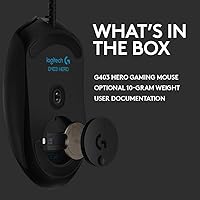
At 87 grams the base weight is genuinely comfortable for extended play, and the weight distribution feels natural through both sweeping and precise movements. The optional 10g insert is a smart inclusion for players who prefer slightly more resistance in their mouse.
Buyers who removed the weight insert immediately sometimes noted that the cavity left behind creates a faint hollow sound when clicking. The G403 Hero is also noticeably heavier than modern ultralight competitors, which matters if sub-70g performance is a priority.
Cable Quality
67%
33%
The braided cable is durable and holds up to daily desk tangling better than basic rubber cables at this price point. It does not fray easily, and the 2.1-meter length gives plenty of reach for most desk setups without looking excessive.
Stiffness is the consistent complaint. On slicker mouse pads the cable creates noticeable drag that disrupts smooth movement, and it lacks the near-weightless feel of paracord-style aftermarket cables. Some users eventually replace it, which adds to the effective cost.
Software (G HUB)
58%
42%
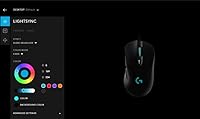
Once properly set up, G HUB gives full control over DPI presets, button mapping, and RGB customization in a reasonably clean interface. Users who invest time in configuring it do appreciate having five DPI slots and macro support accessible from a single dashboard.
First-install problems are reported frequently — from slow load times to the app failing to recognize the mouse until a reboot. It is also considered resource-heavy for what it does, which frustrates users on lower-spec systems or those who simply want plug-and-play simplicity.
DPI Range & Flexibility
89%
The 100 to 25,600 DPI range comfortably covers every realistic use case from ultra-precise sniping setups to fast arena shooters. On-the-fly switching between five saved presets is genuinely useful for players who switch between game genres or tasks without wanting to open software.
The upper DPI ceiling is largely theoretical for most players — very few competitive users operate above 3,200 DPI in practice. At the extreme high end, some users noted slightly reduced precision, though this is typical of optical sensors at maximum sensitivity.
RGB Lighting
72%
28%
Lightsync RGB works as advertised, responding to in-game events and syncing with other Logitech peripherals cleanly when configured through G HUB. The single RGB zone on the scroll wheel and logo produces a clean glow that looks good without being overdone.
The lighting zone coverage is limited compared to mice at a similar price with underglow or full-body illumination. Players who invest in a visually coordinated setup may find the single-zone approach underwhelming, and the dependence on G HUB to control it adds friction.
Polling Rate & Latency
91%
The 1ms report rate at 1000Hz is the competitive standard, and users consistently describe inputs as immediate and clean in fast-paced games. There are no practical complaints about input lag from the wired connection — it simply does what it promises.
The G403 Hero does not support higher polling rates like 2000Hz or 8000Hz, which some newer wired competitors are beginning to offer. For the vast majority of players this makes no real-world difference, but spec-focused buyers will notice the gap.
Programmable Buttons
76%
24%
Six buttons is a practical count for most gaming genres, and the placement of the two thumb buttons feels natural for actions like push-to-talk, grenade throws, or ability shortcuts. Users appreciate not having to stretch awkwardly to reach them mid-game.
The button layout does not include a sniper button or DPI shift button as a dedicated physical control the way some competitors do. Players coming from mice with eight or more buttons may find the G403 Hero's layout limiting for heavily macro-dependent games.
Value for Money
86%
Buyers repeatedly describe this mouse as punching above its price point, particularly because of the sensor quality. Compared to other wired options in the same budget range, the combination of accurate tracking, solid build, and Logitech's brand reliability is hard to argue with.
The stiff cable and G HUB frustrations chip away at the overall value story slightly, as both have practical costs — either in experience or time spent troubleshooting. A handful of users feel the price gap between this and higher-end Logitech models is small enough to warrant upgrading directly.
Surface Compatibility
80%
20%
The Hero 25K sensor tracks consistently across cloth, hard, and hybrid mouse pads at normal lift-off distances. Users who switch between pad types report that re-calibration is minimal, and the sensor adapts quickly without needing manual adjustments in G HUB.
On very thin or irregular hard surfaces, a small number of users reported slightly inconsistent lift-off distance behavior. This is not a widespread complaint, but it does suggest the mouse performs most reliably on purpose-made gaming pads rather than improvised surfaces.
Long-Term Durability
74%
26%
Most owners report the mouse holding up reliably through one to two years of daily gaming without significant degradation in button response or sensor behavior. The braided cable's resistance to fraying is frequently cited as an area where this mouse outlasts cheaper alternatives.
Double-click issues with the main buttons emerge as a recurring long-term complaint — a known weakness in the underlying switch used. This typically surfaces after heavy use past the one-year mark and represents the most common reason buyers eventually seek a replacement.

Suitable for:

The Logitech G403 Hero is a strong match for right-handed PC gamers who want a reliable wired mouse with a genuinely capable sensor and don't need to spend flagship money to get there. Competitive FPS and MOBA players will feel the difference the Hero 25K sensor makes compared to budget optical options — tracking stays consistent whether you're making slow, deliberate crosshair placements or wide, fast sweeps across the pad. Players with medium to large hands who use a palm or relaxed claw grip will find the ergonomic shell comfortable over long sessions, and the rubber side grips help maintain control even when hands get warm. It's also a smart upgrade for anyone currently using a basic office mouse who wants an immediate step up in responsiveness and button flexibility without a complicated setup. If you game primarily on a wired connection and want a mouse that simply works without wireless battery anxiety, this delivers exactly that.

Not suitable for:

The Logitech G403 Hero has a few real limitations that make it the wrong choice for certain buyers. Left-handed players are excluded entirely — the shape is strictly right-hand ergonomic with no ambidextrous option. Gamers who have moved toward ultralight mice in the sub-70g range may find 87 grams noticeably heavier in back-to-back comparisons, and this mouse won't satisfy that itch. If you rely heavily on software customization and expect a polished, plug-and-play experience, G HUB's history of buggy installs and resource usage may be a genuine frustration rather than a minor inconvenience. Wireless-only setups are also a dealbreaker here — there is no wireless variant of this model. Finally, small-handed players or those who prefer a fingertip grip style will likely find the dimensions too large for comfortable extended use.

Specifications

  • Sensor: Uses the Hero 25K optical sensor with 1:1 tracking accuracy, zero smoothing, and zero acceleration applied to cursor movement.
  • DPI Range: Adjustable sensitivity runs from 100 DPI at the lowest to 25,600 DPI at the ceiling, configurable in five saved presets.
  • Tracking Speed: The sensor is rated for tracking speeds exceeding 400 IPS, keeping up with fast sweeping movements without losing accuracy.
  • Report Rate: Operates at a 1ms report rate (1000Hz polling), ensuring inputs reach the system with minimal detectable latency over USB.
  • Weight: Base weight is 87g with a removable 10g optional insert included, allowing the total weight to be tuned to personal preference.
  • Dimensions: The mouse measures 6.9 x 4.6 x 2 inches (L x W x H), sized for medium to large right-handed grips.
  • Cable: Ships with a 2.1-meter (6.9-foot) braided USB cable designed for durability and resistance to fraying over extended use.
  • Buttons: Features 6 programmable buttons, all configurable through Logitech G HUB software for macros, DPI switching, or in-game actions.
  • Lighting: Lightsync RGB illumination covers the scroll wheel and logo zone, drawing from a palette of 16.8 million colors and syncing with G HUB.
  • Grip Material: Textured rubber panels are applied to both side surfaces of the shell to improve grip control during long or intense sessions.
  • Connection: Connects via wired USB; there is no wireless or Bluetooth mode available on this model.
  • Compatibility: Works with Windows 7 and newer as well as macOS X 10.11 El Capitan and later operating system versions.
  • Software: Full customization of DPI presets, button mapping, and RGB effects requires Logitech G HUB, available as a free download.
  • Hand Orientation: Designed exclusively for right-handed use with an asymmetric ergonomic contour; no left-handed variant is available.
  • Power Source: Powered entirely through the USB connection — no batteries are required or included for standard operation.
  • Model Number: The official Logitech model number for this mouse is 910-005630, which can be used to confirm compatibility and warranty details.
  • Release Date: This mouse was first made available in June 2019 and received its Hero 25K sensor upgrade via a free G HUB software update post-launch.

Related Reviews

Logitech POP Mouse
Logitech POP Mouse
82%
93%
Silent Click Performance
89%
SmartWheel Scrolling
87%
Multi-Device Connectivity
91%
Battery Life
71%
Ergonomics & Hand Fit
More
Logitech Wireless Touchpad
84%
80%
Performance
85%
Ease of Use
88%
Wireless Connectivity
83%
Build Quality
82%
Ergonomics
More
Logitech X-530
Logitech X-530
75%
82%
Sound Quality
80%
Bass Performance
86%
Dialogue / Center Channel
84%
Surround Imaging
75%
Build Quality
More
Logitech ERGO K860
Logitech ERGO K860
81%
93%
Ergonomic Comfort
89%
Wrist Rest Quality
84%
Typing Feel & Accuracy
67%
Adjustment Period
81%
Build Quality & Materials
More
Logitech Pebble M350
88%
88%
Build Quality
85%
Ergonomics & Comfort
94%
Battery Life
90%
Connectivity Reliability
87%
Tracking Precision
More
Logitech Wireless Combo MK520
88%
93%
Ease of Setup
94%
Battery Life
88%
Comfort & Ergonomics
91%
Wireless Connectivity
75%
Mouse Size & Design
More
Logitech Wireless Mouse M217
81%
91%
Value for Money
94%
Battery Life
92%
Ease of Setup
88%
Portability
85%
Tracking Accuracy
More
Logitech B910 HD Webcam
82%
87%
Video Quality
94%
Ease of Setup
80%
Audio Performance
82%
Build Quality
90%
Compatibility
More
Prepared Hero Privacy Pen
81%
88%
Value for Money
79%
Detection Performance
91%
Portability and Size
85%
Battery Life
65%
Build Quality
More
Logitech H570e USB Headset
84%
87%
Audio Quality
91%
Comfort for Long Sessions
88%
Noise-Canceling Microphone Performance
94%
Ease of Setup
82%
Build Quality
More

FAQ

It works plug-and-play right out of the box — just connect it via USB and your system will recognize it immediately. That said, if you want to customize DPI presets, remap buttons, or configure the RGB lighting, you will need to install Logitech G HUB. It is a free download, but be aware that some users report the initial installation being slow or requiring a restart before the mouse is properly detected.

Yes, it is a strong choice for competitive FPS titles. The Hero 25K sensor applies no smoothing or acceleration to your movement, which means what your hand does is exactly what appears on screen — a critical quality for precise aiming. The 1ms report rate keeps inputs fast, and the spring-tensioned main buttons register clicks with very little force, which matters in games where reaction time counts.

Palm and claw grips are where this mouse feels most natural, particularly for players with medium to large hands. The ergonomic right-handed shell has enough length and height to fully support a palm grip, while the rear hump sits comfortably under a claw hold. Fingertip grip users or people with smaller hands may find the shape slightly too large for comfortable control.

This comes down to personal preference — the base weight of 87g is well-balanced on its own and does not feel lacking without the insert. If you prefer a slightly heavier feel for more controlled, deliberate movements, keeping the 10g insert in makes sense. Most competitive players tend to remove it for a lighter, faster response, but there is no wrong answer here.

Honestly, yes — it can. The braided cable is durable and resists fraying well, but its stiffness creates noticeable drag on smoother or harder mouse pads. On a standard cloth pad the effect is less pronounced, but if you use a slick hard surface, the cable resistance may bother you during wide swipes. Some users address this by using a mouse bungee to lift the cable off the pad, which helps significantly.

It works on macOS — compatibility starts from OS X 10.11 El Capitan and extends to current macOS versions. Basic plug-and-play functionality runs without any software, though full button remapping and DPI customization require G HUB, which does have a macOS version available.

G HUB's reputation for being finicky is not entirely unfounded. The first-time installation can be slow and sometimes requires a reboot before the mouse is fully recognized. Once set up and running, most users find it functional and reasonably intuitive, but it does run heavier in the background than you might expect from a peripheral configuration app. If you only need basic DPI control, the mouse has an onboard DPI button that works fine without the software open.

For the first year or so of heavy use, most owners report no meaningful degradation in button response or sensor behavior. The braided cable and solid shell hold up well. The most common long-term issue that surfaces after a year or more of intense daily play is double-clicking — where the main buttons begin registering two clicks from a single press. This is a known weakness tied to the underlying switch and is something to keep in mind for high-volume competitive players.

Yes — the lighting will function in a default mode even without G HUB installed. However, customizing colors, effects, or syncing the lighting with in-game events requires the software. If RGB is not a priority for you, this is a non-issue.

It depends on what sensor your current mouse uses. If you are coming from a mouse with an older or lower-tier optical sensor, the step up in tracking accuracy with this gaming mouse will be noticeable. If you are already on a modern high-accuracy sensor, the difference will be smaller and the decision comes down to ergonomics, software preference, and build feel rather than raw performance. The value here is most compelling for buyers upgrading from budget or office-grade mice.