


Overview

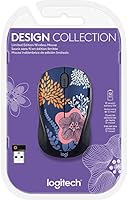
The Logitech Design Collection Wireless Mouse is one of those rare budget peripherals that actually makes you want to put it on your desk. While most mice at this price point come in matte black or dark grey, the Forest Floral limited-edition pattern gives it a genuinely distinctive look — the kind that draws comments during video calls. It works out of the box with Chromebooks, Windows laptops, and Linux PCs, with no drivers or setup software required. That said, it's worth being clear about what this is: a capable everyday mouse for browsing, studying, and general office tasks. Gamers and power users will want to look elsewhere.

Features & Benefits

The nano USB receiver plugs into any available port and connects instantly — no pairing, no fuss. The optical sensor handles most everyday surfaces well enough, tracking smoothly across desks, mouse pads, and laminate without any noticeable lag. What makes this wireless mouse genuinely practical, though, is the battery situation: a single included AA cell can last up to 12 months with typical use, so you're not constantly hunting for replacements. The symmetrical shape is a thoughtful touch — it fits naturally in either hand, which is still uncommon at this price. At just 4 ounces, it's light enough to use all day without tiring your wrist.

Best For

If you're a student or someone working from home who wants a functional mouse that doesn't look like it came from a bulk office supply order, this ambidextrous mouse is a genuinely good pick. It's also one of the few affordable options confirmed to work with Chromebooks right out of the box — handy if your school or employer issued one. Left-handed users in particular tend to struggle finding mice that fit comfortably without spending a lot, so the symmetric design here is a real practical win. It also makes a thoughtful gift — something that's actually useful but feels a little more considered than the usual plain-black peripheral.

User Feedback

Buyers have responded well to the Logitech Design Collection mouse, and the 4.7-star rating across nearly 100 reviews reflects fairly consistent satisfaction rather than a handful of enthusiastic outliers. The design gets mentioned often — people appreciate owning something that actually stands out on a desk. Battery life also comes up repeatedly as a genuine positive, with users reporting it tracks closely to the advertised claim. There are a couple of honest caveats worth knowing: the click feel is softer and quieter than what tactile-preference users might expect, and the optical sensor can struggle on highly patterned or reflective surfaces. Connectivity itself, though, has been reliably problem-free.

Pros

  • Plug-and-play nano USB receiver works immediately with no software installation on Chromebooks, Windows, or Linux.
  • The Forest Floral limited-edition design genuinely stands out — buyers consistently highlight it as a desk highlight.
  • A single AA battery lasts up to 12 months, making ongoing maintenance practically a non-issue.
  • At just 4 ounces, this wireless mouse stays comfortable during long study or work sessions.
  • Fully symmetrical shape means left-handed users can finally use an affordable mouse designed to fit their hand naturally.
  • Reliable RF connectivity draws no meaningful complaints about drops or pairing failures in real-world use.
  • Broad platform compatibility makes it a low-risk choice for mixed-device households or shared workspaces.
  • The scroll wheel handles tab switching and document navigation fluidly for everyday computing tasks.
  • Battery is included in the box — no need for a separate purchase before you can get started.
  • A 4.7-star rating across a solid review base suggests this is a consistent performer, not a lucky outlier.

Cons

  • No DPI adjustment or onboard settings mean you get one fixed sensitivity level, like it or not.
  • Click feel is noticeably soft and quiet — satisfying for some, but a let-down for users who prefer tactile feedback.
  • The optical sensor struggles on dark, glossy, or heavily patterned surfaces, which limits desk mat options.
  • No programmable side buttons or customization software, ruling it out for workflow-heavy or shortcut-dependent users.
  • No power switch means the battery drains passively when not in use, even if slowly.
  • Only one color variant is available in this listing, so buyers who dislike the floral pattern have no alternative within the same model.
  • The nano USB receiver occupies a port permanently — a minor but real inconvenience on laptops with limited USB-A slots.
  • Ambidextrous shape, while inclusive, offers no ergonomic contouring, which can feel neutral to the point of bland during extended sessions.

Ratings

Our AI-powered rating system analyzes verified buyer reviews for the Logitech Design Collection Wireless Mouse from global markets, actively filtering out bot-generated responses, suspected incentivized feedback, and duplicate submissions before any score is assigned. Each category below reflects real user sentiment — the genuine strengths that repeat across hundreds of reviews and the honest frustrations that a meaningful minority of buyers raise. The aim is a transparent, category-level breakdown so you can judge whether this wireless mouse fits your specific situation, not just a highlight reel of its best moments.

Design & Aesthetics
94%
The Forest Floral pattern is the single most praised aspect across buyer feedback — users repeatedly describe it as a standout on their desk compared to the sea of generic black office mice. It photographs well, draws comments on video calls, and gives even a basic home workspace a more considered, personal feel.
Because this is a limited-edition variant with no color alternatives in the same model family, buyers who dislike the floral pattern have nowhere to turn within this lineup. The decorative finish also shows fingerprints and light scuffs more visibly than a plain matte surface would over time.
Wireless Connectivity
88%
The RF nano receiver consistently earns praise for drop-free, lag-free performance at standard desk distances. Users working from home mention specifically that it held up reliably through long video calls and document-editing sessions without a single signal hiccup requiring attention.
There is no Bluetooth option, which is an immediate problem for users on newer laptops and ultrabooks that have dropped USB-A ports entirely. The receiver also occupies a port full-time, a small but real inconvenience on machines where available ports are already spoken for.
Battery Life
91%
Twelve months on a single included AA battery is a genuinely impressive figure at this price point, and real-world buyer feedback largely backs it up. Users who have owned the mouse for six or more months report no unexpected drop in performance, and the freedom from charging cables is consistently mentioned as a day-to-day convenience.
There is no low-battery warning — no indicator light, no software alert — so the battery running out mid-session is a realistic surprise rather than a managed event. The mouse also has no power switch, meaning passive drain occurs whenever the receiver is plugged in, even if the mouse is sitting idle.
Tracking Accuracy
71%
29%
On plain wooden desks, standard mouse pads, and light-colored laminate, the optical sensor tracks smoothly and predictably for everyday computing tasks. Most casual users find the performance perfectly adequate and never feel the need for anything more precise during browsing, writing, or video calls.
The sensor loses meaningful consistency on dark, glossy, or heavily patterned surfaces, and there is no DPI adjustment to compensate for tracking feel. Users who discover the default sensitivity doesn't suit their preference have no built-in mechanism to change it, which is a real limitation for anyone with specific speed expectations.
Value for Money
89%
At its budget-friendly price, this wireless mouse packages RF wireless connectivity, a distinctive design, and an exceptional battery life rating into a single purchase — a combination that competing options in the same bracket rarely match. Students and remote workers consistently describe it as overdelivering relative to what they paid.
The value argument holds firmly for casual, everyday users but starts to weaken quickly for anyone pushing toward more demanding workflows. Those who find themselves wanting DPI control, programmable buttons, or a firmer click feel will likely conclude that stretching the budget toward a mid-range mouse would have been the smarter move.
Build Quality
73%
27%
For the price tier, the construction feels durable enough for typical desk use, with no widespread reports of rattling buttons, wobbly scroll wheels, or premature cracking appearing consistently across buyer feedback. The lightweight plastic shell holds up adequately under normal daily handling conditions.
The all-plastic body lacks the dense, well-damped feel of mice in higher price brackets, and the exterior picks up fingerprints and light smudging fairly easily — especially noticeable around the patterned surface areas. Buyers expecting a more solid, premium-feeling chassis will find this falls short of that expectation.
Comfort & Ergonomics
76%
24%
At just 4 ounces, this ambidextrous mouse is light enough to use for extended stretches without causing wrist fatigue, which is a practical benefit for students and remote workers logging long hours at a desk. The proportions suit average-sized hands reasonably well without any awkward button reach.
The symmetrical shape, while inclusive for both hands, provides no palm arch, thumb groove, or lateral contouring — making it feel neutral to the point of generic during long sessions. Users with larger hands or any sensitivity to wrist strain may find the absence of ergonomic shaping becomes noticeable after an hour or more.
Click Feel & Feedback
62%
38%
The softer, quieter click profile works in favor of users in shared spaces — co-working environments, libraries, and open-plan offices where sharp mechanical clicks would be disruptive. In those contexts, the muted action is a practical feature rather than a flaw.
For buyers who prefer a firm, precise, tactile click — particularly those coming from gaming mice or more expensive office peripherals — the soft response feels imprecise and underwhelming. This is one of the more consistently mentioned disappointments in buyer reviews, often from users who didn't expect the action to feel as soft as it does.
Scroll Wheel
79%
21%
The scroll wheel handles routine everyday tasks — long document navigation, browser tab switching, and image zoom — reliably and without any reported resistance or skipping issues. For the casual computing workflows this mouse targets, it does everything asked of it without complaint.
The wheel is a basic single-direction unit with no horizontal scrolling capability, no free-spin mode, and no adjustable notch resistance, which makes it noticeably limited for spreadsheet-heavy work or users accustomed to higher-spec scroll implementations. It is functional but far from feature-rich.
Setup & Ease of Use
93%
Inserting the nano USB receiver into a compatible port is genuinely all the setup required — no app downloads, account creation, or driver installation involved at any point. Less tech-savvy users and students who just want a mouse that works immediately without troubleshooting consistently single this out as a highlight.
The same simplicity means there is zero customization available post-setup — no companion software, no button remapping, and no pointer speed adjustment. What ships in the box is the permanent, unchangeable configuration, which is a meaningful constraint for users who have specific workflow requirements.
Platform Compatibility
86%
Verified out-of-the-box compatibility with Chromebooks makes this wireless mouse a low-risk, dependable recommendation for Chrome OS users, where peripheral compatibility can be genuinely unpredictable. It also works across Windows and Linux systems without any additional configuration steps.
macOS is absent from the official compatibility list, creating real uncertainty for Mac users even though basic functionality often works via the USB receiver in practice. The lack of Bluetooth also means users on newer MacBooks or ultrabooks without USB-A ports face a connectivity barrier that requires a separate adapter.
Portability & Weight
84%
At 4 ounces, this ambidextrous mouse disappears into a laptop bag without adding noticeable weight — a practical daily benefit for students moving between campus locations or remote workers packing up a mobile workstation. The compact footprint pairs well with slim laptops in tight bag spaces.
The nano USB receiver is small enough to misplace easily during transit, and there is no onboard receiver storage slot on the mouse body to keep it secure between uses. Losing the receiver is effectively losing the mouse entirely, as replacement standalone receivers for this specific model are not readily sold separately.
Surface Versatility
64%
36%
On the surfaces most buyers actually use — standard mouse pads, plain wooden desks, and light-colored laminate — the optical sensor tracks reliably and smoothly for all everyday tasks. Users who already work on a neutral-toned surface are unlikely to experience any tracking issues worth noting.
The sensor struggles meaningfully on dark, glossy, and heavily patterned surfaces, which is an ironic limitation for a mouse sold largely on its decorative appeal. Users who pair it with a matching patterned or dark desk mat — a natural instinct given the design — may find the tracking becomes noticeably inconsistent.

Suitable for:

The Logitech Design Collection Wireless Mouse is a smart pick for anyone who wants a dependable daily driver without the usual visual monotony of budget peripherals. Students setting up a home workspace will find it particularly appealing — it handles all the fundamentals of note-taking, research browsing, and document editing while looking genuinely good on a desk. Chromebook users benefit from verified plug-and-play compatibility, making it one of the easier wireless options to recommend without worrying about driver headaches. Left-handed users, who are often stuck choosing between expensive ergonomic options or ill-fitting right-handed designs, will appreciate the truly symmetrical shape. It also works well as a gift for someone who uses a laptop daily but hasn't invested in a separate mouse — practical, polished, and a step above anything that comes bundled in a generic office kit.

Not suitable for:

If you spend long hours gaming, doing precision graphic design work, or depend on a high-sensitivity sensor for fast cursor movement, this ambidextrous mouse is not the right tool. The optical tracking is adequate for everyday tasks but won't satisfy users who need adjustable DPI settings or performance-grade accuracy. People who prefer a firm, tactile click response may find the buttons feel underwhelming compared to mice in higher price brackets. The scroll wheel and button layout are minimal by design — there are no programmable side buttons, no thumb rest, and no software customization, which rules it out for power users who rely on macro shortcuts. It also lacks a dedicated power switch, and while battery life is strong, users who are particular about surface compatibility should note the sensor can be inconsistent on dark or heavily patterned mouse pads.

Specifications

  • Brand: This mouse is manufactured by Logitech, a widely recognized brand in consumer computer peripherals.
  • Model Number: The official model identifier is 910-006552, specific to this variant within the Design Collection series.
  • Connectivity: The mouse connects via a 2.4 GHz RF wireless nano USB receiver included in the box.
  • Tracking Type: An optical sensor provides smooth and accurate cursor movement across most everyday computing surfaces.
  • Form Factor: The housing is fully symmetrical and ambidextrous, built to fit comfortably in either the left or right hand.
  • Scroll Wheel: A standard scroll wheel supports document navigation, zoom control, and quick tab switching without any additional software.
  • Battery Life: Logitech rates battery life at up to 12 months on a single AA battery under typical daily use conditions.
  • Battery Type: The mouse runs on one AA battery, which is included in the box at the time of purchase.
  • Weight: The mouse weighs 4 oz (approximately 113 g), keeping it light enough for extended work or study sessions.
  • Dimensions: Physical dimensions are 7.5 x 2.75 x 5 inches (L x W x H) as specified by the manufacturer.
  • Design: This variant features the Forest Floral limited-edition pattern, a decorative finish distinguishing it from standard office peripherals.
  • Compatible Platforms: Verified compatible with Chromebooks, Windows laptops, desktop PCs, and Linux-based systems.
  • OS Support: Officially supports Chrome OS, Windows, and Linux operating systems without requiring driver installation.
  • Power Source: The mouse is entirely battery-powered with no rechargeable or wired power option available.
  • Release Date: This product was first made available in May 2022 as part of the Design Collection Limited Edition series.

Related Reviews

Logitech M217 Wireless Mouse

76%
94%
Ease of Setup
88%
Battery Life
71%
Tracking Performance
62%
Ergonomics & Comfort
81%
Value for Money
More
Logitech M275 Wireless Mouse
76%
84%
Ergonomic Comfort
82%
Wireless Reliability
91%
Setup & Ease of Use
77%
Battery Life
79%
Value for Money
More
Logitech M320 Wireless Mouse
74%
94%
Ease of Setup
88%
Wireless Reliability
91%
Battery Life
62%
Tracking Performance
63%
Comfort & Ergonomics
More
Logitech M325 Wireless Mouse

82%
88%
Scroll Wheel Performance
93%
Battery Life
78%
Comfort & Ergonomics
81%
Wireless Reliability
84%
Value for Money
More
Logitech M510
Logitech M510
81%
91%
Ergonomic Comfort
93%
Battery Life
88%
Wireless Reliability
79%
Tracking Accuracy
74%
Build Quality
More
Logitech Signature M550 L
83%
93%
Ergonomic Comfort
91%
Silent Click Performance
89%
Battery Life
88%
Wireless Connectivity Reliability
84%
Multi-Device Compatibility
More
Logitech M325 Wireless Mouse
77%
91%
Value for Money
93%
Battery Life
94%
Ease of Setup
86%
Wireless Reliability
71%
Tracking Accuracy
More
Logitech M720 Triathlon
82%
91%
Multi-Device Switching
93%
Scroll Wheel Performance
94%
Battery Life
78%
Ergonomics & Comfort
82%
Connectivity Reliability
More
Logitech M705 Marathon Wireless Mouse
81%
94%
Battery Life
91%
Scroll Wheel Performance
88%
Wireless Reliability
83%
Ergonomics & Comfort
81%
Tracking Accuracy
More
Logitech MX Vertical
79%
88%
Ergonomic Comfort
61%
Adjustment Period
83%
Build Quality
86%
Multi-Device Connectivity
91%
Battery Life
More

FAQ

Yes, it does. Just plug the nano USB receiver into your Chromebook's USB-A port and the mouse is ready to use immediately. No drivers, no software, no setup steps — Logitech designed this one specifically with Chromebook compatibility in mind.

It really is. The symmetrical shape means neither side favors a right-handed grip, so left-handed users can hold this ambidextrous mouse naturally without any compromise. Finding a symmetrical mouse at this price point that actually works well is less common than you'd think, which makes this a solid option for lefties.

Pretty accurate, based on user reports. Most buyers who use this wireless mouse for standard daily tasks — browsing, document editing, occasional video calls — confirm the battery lasts a very long time, often close to the full 12 months. Heavy, all-day users may see shorter intervals, but it's still well above average for this category.

It performs most reliably on solid-colored or lightly textured surfaces like standard mouse pads, plain wooden desks, or light-colored laminate. The optical sensor can be inconsistent on dark, glossy, or heavily patterned surfaces. If you use a decorative or dark desk mat, it's worth testing the tracking before committing.

The Logitech Design Collection Wireless Mouse is officially listed for Chrome OS, Windows, and Linux — macOS is not on that list. In practice, plugging the receiver into a Mac will usually allow basic cursor movement and clicking to work, since macOS recognizes most HID-compatible mice automatically. Just don't expect any advanced software features or guaranteed support from Logitech if something doesn't work as expected on Mac.

No — there are no onboard DPI controls and no companion software for this mouse. It operates at a fixed sensitivity level. For everyday tasks like web browsing or writing, the default tracking speed feels natural for most users, but if precise sensitivity control matters to you, this model isn't built for that.

Typical RF wireless mice operate reliably up to around 10 meters (about 33 feet) in open conditions, and this one performs in line with that expectation. For standard desk use, range is never an issue. Walls and heavy radio interference can reduce effective range, but that rarely matters in a typical home or office setup.

You get the mouse, the nano USB receiver, and one AA battery already included. That's it — no software disc, no extra accessories. Everything you need to start using it immediately is there from the moment you open the box.

The click sound is on the softer, quieter side — not silent, but not the sharp, clicky sound some office mice produce. Most users in shared or quiet environments shouldn't find it disruptive. If you specifically need near-silent performance, this isn't a dedicated quiet mouse, but it's far from the loudest option either.

Unfortunately, no. This mouse uses a standard nano USB receiver that pairs only with this specific device, not Logitech's Unifying Receiver system that allows multiple peripherals to share one dongle. If consolidating USB connections is important to you, you'd need to look at Logitech models that specifically support the Unifying Receiver.