Logitech C930e


Overview
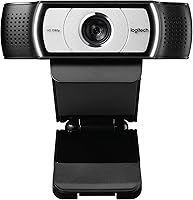
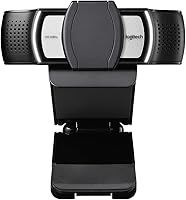
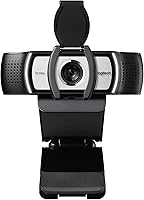
The Logitech C930e is a business-grade 1080p webcam that sits comfortably in the professional mid-range — not a budget grab, but not an enterprise-only luxury either. Launched in 2013, this conference camera has aged well precisely because it was built around practical needs rather than flashy specs. It belongs to Logitech's enterprise lineup, which means broader software certifications and a focus on long-term reliability. If you have used the consumer-facing C920, know upfront that this business webcam is a different product with different priorities — IT-friendly, UC-certified, and designed to work quietly day after day without any fuss.
Features & Benefits
The 90-degree field of view is arguably the most useful differentiator here — wide enough to frame a whiteboard behind you or include a colleague sitting nearby during a call. Built-in H.264 hardware encoding handles video compression inside the camera itself, which noticeably lightens the load on older laptops during extended video sessions. Two omnidirectional microphones pick up audio from multiple directions without requiring you to sit dead-center. Setup is plug-and-play on both Mac and PC, and the universal mounting clip handles everything from thin laptop lids to bulkier older monitors without wobbling or slipping mid-call.
Best For
This conference camera makes the most sense for remote professionals who spend a large part of their workday on video calls and need hardware that simply works without constant attention. Small business owners standardizing equipment across their team will find value in Logitech Sync for remote device management. Presenters who regularly share physical materials or sketch on whiteboards benefit directly from the extra-wide framing. It also suits Mac and PC users who want driver-free setup and have no interest in wrestling with proprietary software. What it is not built for is casual home streaming or content creation — that is a different category entirely.
User Feedback
Buyers consistently highlight image clarity in well-lit offices as a standout strength — sharp, stable, and dependable across thousands of daily calls. Users on older machines specifically mention that CPU load drops noticeably during video sessions, which is a practical win that does not show up in spec sheets. On the downside, low-light performance draws measured criticism — it is workable but far from impressive, and dim home offices will expose that limit quickly. The built-in microphones earn solid marks for calls, though many users pair this business webcam with a dedicated mic for anything beyond conferencing. The brown-box packaging also ships without retail software, which catches a few buyers off guard.
Pros
- Plug-and-play setup works immediately on both Mac and PC — no driver hunting required.
- The 90-degree field of view is genuinely wide enough to frame whiteboards and shared workspaces.
- Onboard H.264 encoding reduces CPU strain noticeably, especially on older or budget laptops.
- Sharp, stable 1080p video in well-lit office environments holds up well after years of daily use.
- Logitech Sync support makes remote firmware management practical for IT teams handling multiple units.
- The C930e carries enterprise UC certifications that give IT procurement teams real confidence.
- Dual omnidirectional mics handle call audio cleanly without requiring the speaker to stay perfectly centered.
- Universal clip mounts securely on laptops, LCD monitors, and older CRT screens alike.
- Tripod thread adds flexibility for presenters who need to position the camera away from the screen.
- Long product lifespan and consistent availability make it a reliable long-term standardization choice for teams.
Cons
- Low-light performance is a real weakness — dim rooms produce noticeably grainy, muddy footage.
- The industrial design is dated; it looks visibly older than most webcams released in the past few years.
- Brown-box packaging ships without retail software, which catches first-time buyers off guard.
- Built-in mics struggle with background noise in open-plan offices and busy home environments.
- Autofocus can lag when the subject moves significantly or the background is visually complex.
- Wide field of view works against solo users in cluttered spaces, making background management harder.
- The fleet management features add no practical value for individual buyers or very small teams.
- Microsoft Lync 2013 branding on the box feels misleading and confuses buyers researching current Teams compatibility.
- Newer competitors at a comparable price point offer better sensors and more modern autofocus systems.
- Optional camera control software must be downloaded separately, creating unnecessary friction at first setup.
Ratings
The Logitech C930e has been scored by our AI system after analyzing thousands of verified global user reviews, with spam, bot activity, and incentivized feedback actively filtered out before any score was calculated. The result is an honest, balanced picture of where this business webcam genuinely excels and where real buyers have run into frustration. Both the strengths and the pain points are reflected transparently in every category below.
Video Quality
Low-Light Performance
Field of View
Built-in Microphone Quality
CPU Load & Encoding Efficiency
Ease of Setup
Build Quality & Design
Mounting & Compatibility
Platform & Software Compatibility
Fleet Management & IT Value
Value for Money
Autofocus Performance
Audio-Video Sync
Packaging & Unboxing Experience
Suitable for:
The Logitech C930e is a strong match for remote professionals and small business teams who spend a meaningful portion of their workday on video calls and need hardware that holds up without constant troubleshooting. If your organization is standardizing webcams across multiple workstations, the combination of plug-and-play setup and Logitech Sync device management makes deployment and ongoing oversight far less painful than it sounds. Presenters who regularly share physical materials, sketch on whiteboards, or need to capture more of a room than a standard webcam allows will find the wide field of view genuinely useful rather than just a spec on paper. IT administrators managing distributed teams will appreciate the enterprise-grade certifications and the ability to push firmware updates remotely. This conference camera also suits users still running older hardware — the onboard H.264 encoding takes real pressure off the CPU, which makes a noticeable difference on machines that would otherwise struggle through a full day of video meetings.
Not suitable for:
The Logitech C930e is not the right pick if your primary concern is low-light performance — buyers working from dim home offices or rooms without solid overhead lighting will hit this wall quickly and consistently. Content creators, streamers, or anyone recording video for purposes beyond conference calls should look elsewhere, as both the image processing and the built-in microphones are tuned for call quality rather than production value. If you are comparing it directly against newer consumer-focused webcams at a similar price, you will find that more recent models offer better autofocus, improved low-light sensors, and more refined software experiences out of the box. Solo freelancers or individual remote workers who have no need for fleet management tools and want the best possible image for the money may find this business webcam over-engineered in some areas and under-powered in others. Finally, buyers who expect retail packaging, bundled software, or a polished unboxing experience should know upfront that this ships in a plain brown box with no extras included.
Specifications
- Resolution: Captures full HD video at 1080p and 30 frames per second for clear, stable image quality during video calls.
- Field of View: Features a 90-degree extended field of view, making it wider than most standard webcams in its class.
- Digital Zoom: Supports up to 4x digital zoom, controllable via the optional Logitech camera settings application.
- Pan & Tilt: Pan and tilt adjustments are available through software control, allowing flexible framing without physically moving the camera.
- Video Encoding: Uses UVC H.264 hardware encoding built into the camera itself, offloading compression work from the host machine's CPU.
- Microphones: Includes two omnidirectional built-in microphones designed to pick up audio from multiple directions during conference calls.
- Connectivity: Connects via Hi-Speed USB 2.0 and is USB 3.0 ready for forward compatibility with newer systems.
- Mounting: Ships with a universal clip that fits laptops, LCD monitors, and CRT monitors, and includes a standard tripod thread.
- Dimensions: Measures 3.7 x 3.7 x 0.95 inches, making it compact enough to sit unobtrusively on top of most monitors.
- Weight: Weighs 5.6 ounces, light enough that the mounting clip handles it without stress on monitor bezels.
- Platform Support: Compatible with both Mac and PC operating systems, with no driver installation required on most modern setups.
- UC Certifications: Certified for Microsoft Lync 2013 and Skype, and broadly compatible with most major unified communications platforms.
- Device Management: Supports Logitech Sync software, enabling IT administrators to monitor device status and push firmware updates remotely.
- Aperture: Operates at f/2.0 maximum aperture, which supports adequate light intake in standard office lighting conditions.
- Focal Length: Has a maximum focal length of 94 millimeters, suited for close to mid-range desk and room framing scenarios.
- Color: Available in black only, with a professional matte finish that blends into typical office monitor setups.
- Packaging: Ships in a plain brown box business edition that does not include retail software or printed quick-start documentation.
- Product Vintage: Originally launched in May 2013 and remains in active production, reflecting a long and stable product lifecycle.
Related Reviews

Logitech Pebble M350 Wireless Mouse

Logitech POP Mouse

Logitech Wireless Touchpad

Logitech X-530

Logitech ERGO K860
Logitech BRIO Stream Webcam
Logitech Wave Keys for Mac Ergonomic Keyboard
Logitech M570 Wireless Trackball
Logitech H540