


Overview

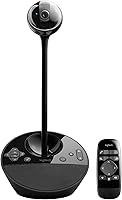
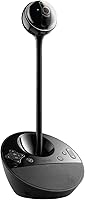
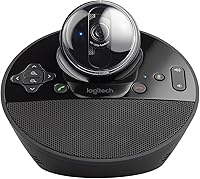
The Logitech BCC950 launched back in 2012 as one of the first all-in-one desktop conferencing devices to take both video and audio seriously in a single unit. Designed primarily for small groups — think a personal desk or a tight huddle space with up to four people — this conferencing unit pairs a Carl Zeiss lens with a built-in speakerphone to handle everything from solo calls to brief team check-ins. Setup is about as simple as it gets: plug it into a USB port and it works, no driver installation required, on both Windows and macOS. For professionals who just want something reliable and ready, that simplicity alone carries real weight.

Features & Benefits

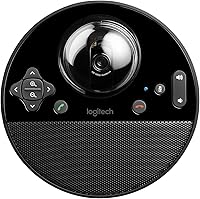
What makes the BCC950 stand out isn't the video — it's the audio performance. The full duplex speakerphone with omnidirectional, noise-cancelling microphone picks up voices from up to 8 feet away, meaning everyone seated around the desk gets heard clearly without hovering near the device. Echo cancellation keeps calls clean even in reflective office spaces. On the video side, the Carl Zeiss lens captures 1080p at 30fps with a 78-degree field of view, and a 1.2x digital zoom lets you adjust framing without touching the unit — controlled either from the base or with the included remote. It works reliably with Zoom, WebEx, and Skype for Business without any fuss.

Best For

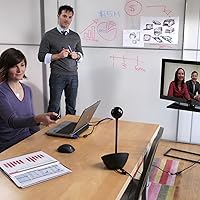
This desktop speakerphone-webcam combo makes the most sense for remote professionals who want a single, always-ready device handling both audio and video without cable clutter or compatibility headaches. It suits small teams of two to four people sharing a desk or compact meeting space — the kind of setup where a laptop webcam simply doesn't cut it for group calls. Executives who jump between Zoom, Teams, and WebEx throughout the day will appreciate there is nothing to configure between platforms. Offices moving toward hybrid work will also find the plug-and-play nature a real advantage when onboarding non-technical staff who just need it to work immediately.

User Feedback

Long-term owners speak highly of this conferencing unit, with speakerphone clarity being the most consistently praised attribute — many report it outperforms standalone USB microphones they have tried before. The remote control gets regular mentions as a practical touch that buyers didn't expect to use as often as they do. On the flip side, the camera is the most common criticism. Compared to webcams released in recent years, image quality can feel a step behind, particularly in low-light conditions. A handful of reviewers also flag the physical footprint as larger than anticipated for a desk. Long-term durability, however, appears to be a genuine strength — units from several years back are still widely reported as fully functional.

Pros

  • Speakerphone audio quality is consistently rated as exceptional — well above typical webcam-bundled mics.
  • Full duplex audio means both sides of a call can speak simultaneously without frustrating cutoffs.
  • USB plug-and-play setup works instantly on Windows and macOS with zero driver installation.
  • The included remote lets you pan, tilt, zoom, and mute without touching the device mid-call.
  • Echo cancellation keeps calls clean even in reflective or hard-surfaced office environments.
  • Long-term durability is a genuine strength — many units remain fully functional after five or more years of daily use.
  • Works reliably across Zoom, WebEx, and Skype for Business without reconfiguring settings between platforms.
  • Replaces two separate devices — webcam and speakerphone — with a single cable and a smaller overall footprint.

Cons

  • Camera image quality feels dated compared to dedicated webcams released in recent years.
  • Low-light performance is noticeably poor — poorly lit home offices or backlit windows cause visible image degradation.
  • Digital zoom tops out at 1.2x and shows pixelation at maximum magnification.
  • The physical unit is larger than product photos suggest, claiming meaningful real estate on a crowded desk.
  • No current Microsoft Teams certification, which may create friction in IT-managed corporate procurement.
  • The remote depends on a CR2 battery and has no app-based backup if it is lost or stops responding.
  • Single-speaker output can sound thin in anything larger than a small huddle room.
  • macOS users occasionally report the device losing its default audio output assignment after system updates.

Ratings

The Logitech BCC950 has accumulated years of real-world feedback from professionals across home offices, corporate huddle rooms, and hybrid work setups worldwide. The scores below were generated by AI after analyzing verified buyer reviews globally, with spam, bot activity, and incentivized feedback actively filtered out to reflect genuine user experiences. Both where this conferencing unit excels and where it falls short are represented transparently in every category.

Audio Clarity
91%
The built-in speakerphone is consistently the most praised aspect of this device. Users report that voices come through clean and natural even in moderately noisy office environments, and the full duplex capability means both sides of a call can speak without awkward cutoffs — something cheaper all-in-ones routinely fail at.
In larger rooms or spaces with hard floors and reflective walls, some users notice the echo cancellation working overtime, occasionally clipping words. It is a minor issue for most, but in acoustically challenging spaces it surfaces more than expected.
Microphone Performance
88%
The omnidirectional noise-cancelling mic picks up voices clearly from across a desk, which makes it genuinely useful for small group calls without everyone leaning in. Remote participants frequently comment that callers sound unusually present and clear compared to typical laptop microphones.
Background noise rejection, while solid, is not class-leading by current standards. In open-plan offices with significant ambient noise, the mic can pick up distracting sounds that more recent dedicated microphones would filter more aggressively.
Video Quality
67%
33%
The Carl Zeiss lens produces a decent 1080p image that holds up well in well-lit rooms, and the 78-degree field of view frames a small group naturally without distortion at the edges. For standard business calls where the goal is clear identification rather than cinematic quality, it does the job.
By today's standards the camera feels dated. Low-light performance is noticeably weaker than current webcam competitors, and the CCD sensor lacks the dynamic range buyers now expect. Users upgrading from a modern standalone webcam will likely notice a step down in image sharpness and color accuracy.
Ease of Setup
94%
Plug-and-play USB connectivity means there is genuinely nothing to install or configure. On both Windows and macOS, the device is recognized instantly and works across Zoom, WebEx, and Skype for Business without any manual input — a real advantage in office environments where IT support is not always available.
A very small number of users have reported needing to manually select the device as the audio output after plugging in, particularly on macOS. It is an edge case rather than a pattern, but worth knowing if your platform has strict default audio routing.
Build Quality & Durability
89%
This is one area where the BCC950 genuinely impresses for its age. Long-term owners frequently mention units that have been in daily use for five or more years without hardware failure, which speaks to the quality of materials Logitech used at this price tier.
The plastic casing, while sturdy, shows scuffs and wear with extended desk use. The base is heavier than the camera head, which helps stability, but the overall aesthetic has aged and it looks distinctly older than modern conferencing hardware.
Remote Control Usability
83%
The included remote is a differentiator that users genuinely appreciate. Being able to pan, tilt, zoom, mute, and answer calls without touching the device feels professional and is particularly useful when the unit sits at the back of a desk or on a shelf above monitor level.
The remote requires a CR2 battery and a few reviewers report losing it or finding it unresponsive after prolonged storage. There is no phone app alternative, so if the remote is lost, controlling the camera remotely becomes inconvenient.
Pan, Tilt & Zoom Controls
79%
21%
The physical pan, tilt, and zoom functions work smoothly and give users meaningful framing flexibility that fixed webcams cannot match. For someone who alternates between solo calls and small group discussions at the same desk, being able to quickly widen or tighten the shot is a practical advantage.
The 1.2x digital zoom limit is modest, and at maximum zoom image quality degrades noticeably — pixelation becomes visible in screen shares or recordings. Users expecting optical zoom-style quality at a distance will be disappointed with the results.
Platform Compatibility
86%
Verified performance across Zoom, Microsoft Teams, WebEx, and Skype for Business covers the vast majority of professional conferencing workflows. Most users report zero compatibility issues across platform switches, which matters in organizations that use multiple tools across departments.
The device was originally certified for older Microsoft Lync and Skype for Business versions, and while it functions fine on Teams, it does not carry modern Teams-certified status. In organizations with strict IT procurement requirements around certified hardware, this may be a consideration.
Desk Footprint & Design
62%
38%
The all-in-one form factor does eliminate cable clutter by consolidating webcam and speakerphone into one USB connection. For users with minimal desk space who currently run separate devices, the consolidation is a genuine improvement in physical organization.
The unit is larger than many buyers anticipate based on product photos — nearly 7 inches across the base. On a crowded desk it commands real estate, and its tall profile can feel imposing beside a laptop. Several reviewers specifically mention being surprised by the physical size on arrival.
Value for Money
72%
28%
For buyers who prioritize audio quality above all else in a conferencing setup, the price-to-audio-performance ratio holds up reasonably well. The durability track record also adds long-term value — if a unit lasts five-plus years in daily use, the per-year cost becomes more defensible.
At its current price point, buyers are competing against newer all-in-one solutions with better cameras, more modern designs, and updated platform certifications. The BCC950 makes sense if audio quality is the primary need, but as a complete package it is harder to justify against fresher alternatives.
Speakerphone Volume & Range
87%
The speakerphone output is loud enough to fill a small conference room without distortion, and the 8-foot microphone pickup radius means participants seated back from the device are still captured clearly. This makes it practical for two to four people without anyone needing to bunch together.
Beyond four participants or in larger rooms, the single speaker setup starts to show its limits. Volume at maximum can sound slightly thin in larger spaces, and the device was simply not designed for rooms bigger than a small huddle area.
Camera Framing Flexibility
77%
23%
The combination of a wide 78-degree field of view and motorized pan and tilt gives users more framing options than a fixed webcam at a similar size. For someone who uses the same device for both one-on-one calls and small group check-ins, the adjustability adds real practical value.
Motorized movements, while functional, are not whisper-quiet — some users notice a faint mechanical sound during live calls when adjusting the camera. It is a minor point, but in quiet office environments or sensitive call situations it can be momentarily noticeable.
Cross-Platform Audio Switching
81%
19%
Switching between conferencing platforms without reconfiguring audio settings is something users specifically call out as a strength. The device presents itself consistently to the operating system, so moving from a Zoom call to a WebEx session mid-day requires no manual audio output adjustment on most setups.
On some macOS configurations, particularly after system updates, users have reported the device defaulting back to built-in speakers. It is not a chronic issue but it does require occasional manual reassignment, which can be disruptive before a call.
Low-Light Performance
53%
47%
In standard office lighting conditions the image is acceptable for business purposes, and the Carl Zeiss optics do provide some degree of contrast and color fidelity that cheaper webcam lenses lack in normal conditions.
In dim environments — home offices with uneven lighting, evening calls, or rooms with backlit windows — image quality drops significantly. The CCD sensor struggles with low light compared to modern CMOS-based webcams, and there is no software brightness compensation included.

Suitable for:

The Logitech BCC950 is a strong fit for professionals who spend a significant portion of their workday on video calls and are tired of juggling a separate webcam and speakerphone. Remote workers and executives who need a dependable, always-ready setup will appreciate that it requires nothing more than a USB connection to get running on any Windows or macOS machine. Small teams of two to four people sharing a desk or compact huddle space benefit the most — the wide field of view and 8-foot microphone range mean everyone in the frame gets seen and heard without crowding the device. It also makes particular sense for professionals who prioritize audio clarity above camera aesthetics, since the speakerphone and noise-cancelling mic consistently outperform what most standalone webcams offer at a comparable price. Organizations transitioning to hybrid work will find the plug-and-play simplicity a practical advantage when equipping staff who are not technically inclined.

Not suitable for:

Buyers who care primarily about video image quality should think carefully before committing to the Logitech BCC950, because the camera — while functional — shows its age against webcams released in the last two to three years. The CCD sensor struggles in low-light environments, which means home office users with uneven lighting or backlit windows may find the image noticeably soft or washed out. Anyone expecting the digital zoom to deliver crisp close-ups will be disappointed; at maximum magnification, image degradation is visible. The physical footprint is also larger than many buyers expect, so if desk space is already tight, this conferencing unit may feel imposing next to a laptop. Teams larger than four people, or anyone using a mid-to-large conference room, will find the single speaker and microphone range insufficient for the space. Finally, buyers in organizations with strict hardware certification requirements for Microsoft Teams should verify compatibility with their IT team before purchasing, as the device does not carry current Teams-certified status.

Specifications

  • Video Resolution: Records and streams at 1080p Full HD at 30 frames per second for clear, smooth video during calls.
  • Lens: Uses a Carl Zeiss optics lens, which provides reliable color accuracy and contrast in standard office lighting conditions.
  • Field of View: Captures a 78-degree horizontal field of view, wide enough to frame two to four people seated at a desk.
  • Digital Zoom: Offers up to 1.2x HD digital zoom, adjustable via the remote control or base buttons without physically moving the unit.
  • Sensor Type: Uses a CCD image sensor, which performs adequately in well-lit environments but shows limitations in low-light conditions.
  • Microphone: Built-in omnidirectional noise-cancelling microphone picks up voices from up to 8 feet away from the base unit.
  • Speakerphone: Full duplex speakerphone allows simultaneous two-way audio without cutoffs, with echo cancellation to reduce audio artifacts.
  • Connectivity: Connects via a single USB cable with plug-and-play recognition — no drivers or additional software installation required.
  • Compatible OS: Works natively on Windows and macOS operating systems without additional configuration.
  • Platform Support: Verified compatible with Zoom, Skype for Business, WebEx, and Cisco Jabber for standard business conferencing workflows.
  • Camera Controls: Pan, tilt, zoom, mute, volume, and call answer or hang-up functions are accessible via the included remote or base buttons.
  • Dimensions: Measures 6.81 x 6.97 x 4.88 inches, making it larger than a typical webcam and requiring dedicated desk space.
  • Weight: Weighs 2.28 pounds, with most of the mass concentrated in the base for stable placement on a flat surface.
  • Remote Battery: The included remote control requires one CR2 battery, which is not rechargeable and must be replaced when depleted.
  • Suggested Room Size: Designed for small spaces accommodating up to four participants, such as personal desks or compact huddle rooms.
  • Audio Frequency: Microphone frequency response spans 200Hz to 8KHz, covering the full range of human speech for natural-sounding voice reproduction.
  • First Available: Originally released in May 2012, making it a mature product with a long track record but an aging hardware design.
  • Platform Certification: Carries certification for Skype for Business and was optimized for Microsoft Lync 2013, but does not hold current Microsoft Teams certification.

Related Reviews

Logitech Wireless Touchpad
84%
80%
Performance
85%
Ease of Use
88%
Wireless Connectivity
83%
Build Quality
82%
Ergonomics
More
Logitech X-530
Logitech X-530
75%
82%
Sound Quality
80%
Bass Performance
86%
Dialogue / Center Channel
84%
Surround Imaging
75%
Build Quality
More
Logitech Pebble M350
88%
88%
Build Quality
85%
Ergonomics & Comfort
94%
Battery Life
90%
Connectivity Reliability
87%
Tracking Precision
More
Logitech POP Mouse
Logitech POP Mouse
82%
93%
Silent Click Performance
89%
SmartWheel Scrolling
87%
Multi-Device Connectivity
91%
Battery Life
71%
Ergonomics & Hand Fit
More
Logitech ERGO K860
Logitech ERGO K860
81%
93%
Ergonomic Comfort
89%
Wrist Rest Quality
84%
Typing Feel & Accuracy
67%
Adjustment Period
81%
Build Quality & Materials
More
Logitech M510
Logitech M510
81%
91%
Ergonomic Comfort
93%
Battery Life
88%
Wireless Reliability
79%
Tracking Accuracy
74%
Build Quality
More
Logitech B910 HD Webcam
82%
87%
Video Quality
94%
Ease of Setup
80%
Audio Performance
82%
Build Quality
90%
Compatibility
More
Logitech K270 Wireless Keyboard
86%
91%
Battery Life
88%
Build Quality
85%
Typing Comfort
83%
Wireless Range
92%
Ease of Setup
More
Logitech Wireless Combo MK520
88%
93%
Ease of Setup
94%
Battery Life
88%
Comfort & Ergonomics
91%
Wireless Connectivity
75%
Mouse Size & Design
More
Logitech C270 HD Webcam
76%
94%
Ease of Setup
74%
Video Quality
51%
Low-Light Performance
63%
Built-in Microphone
67%
Build Quality & Durability
More

FAQ

Yes, it works with both platforms without any setup beyond plugging in the USB cable. Your computer will recognize it as an audio and video device automatically. Just make sure to select it as your camera and speaker input within Zoom or Teams settings the first time you use it.

No drivers or software installation is required. The BCC950 is a plug-and-play USB device that Windows and macOS both recognize natively. This makes it particularly straightforward to deploy in office environments where IT access is limited.

The omnidirectional microphone is rated to pick up clearly from up to 8 feet away from the base. In practice, most users find it works well for everyone seated around a standard desk or small conference table, though very quiet speakers at the far end of the range may occasionally be harder to hear.

It handles standard business calls acceptably in well-lit rooms, but it is worth being honest — the camera is showing its age. If crisp video in varied lighting conditions is a priority, newer dedicated webcams will outperform this unit. Where this device still holds up is audio quality, which remains competitive even against newer alternatives.

Yes, it is designed for groups of up to four people in a small room or huddle space. The wide field of view and 8-foot mic range mean everyone gets covered without crowding the device. For larger groups or bigger rooms, the single speaker and microphone will start to feel insufficient.

The remote lets you pan, tilt, and zoom the camera, as well as adjust volume, mute the mic, and answer or hang up calls — all without touching the unit. It is genuinely useful when the device sits at the back of a desk or on a shelf, and users frequently mention it as one of the more practical features of the Logitech BCC950.

The noise-cancelling microphone does a reasonable job filtering out moderate ambient noise, and the echo cancellation prevents the hollow, reverberant sound common on cheaper speakerphones. That said, it is not class-leading by today's standards — in open-plan offices with heavy background noise, some ambient sound will still come through.

Yes, the device works on both operating systems without reconfiguring anything. Simply unplug it from one machine and plug it into the other and it will be recognized automatically. Some macOS users have reported needing to reassign it as the default audio output after system updates, but this is an occasional issue rather than a consistent one.

It is functional for modest framing adjustments — going from a wide group shot to a tighter personal frame works fine at low zoom levels. At the maximum 1.2x zoom, image quality does degrade visibly due to it being a digital rather than optical zoom. For close-up detail, it is not reliable, but for general framing purposes it does the job.

Durability is one of the genuine strengths of this conferencing unit. Long-term owners regularly report units functioning reliably after five or more years of daily use, which is uncommon in this category. If you are buying for a professional environment where the device will be used heavily and you want to avoid frequent replacements, the track record here is genuinely reassuring.