Overview

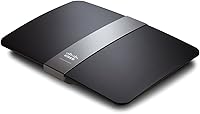
The Linksys EA4500 N900 Dual-Band Wi-Fi Router is a home networking device that launched back in 2012 and, somewhat surprisingly, still holds its own in certain households today. Its simultaneous dual-band design runs 2.4GHz and 5GHz at the same time, so your laptop can sit on the less congested 5GHz band while older gadgets chug along on 2.4GHz without slowing each other down. The physical footprint is wide and flat — nearly a foot across — and it runs on Linux-based firmware paired with a cloud management app that felt genuinely progressive for a home router when it launched. A built-in USB storage port rounds out the feature set, adding basic network-attached storage without extra hardware.

Features & Benefits

The EA4500's most notable hardware element is its 3x3 MIMO array, which works across both bands to extend signal further into the corners and hallways where cheaper routers tend to lose their grip. The four Gigabit LAN ports handle wired devices at full speed — handy for a desktop, a gaming console, or any gear that deserves a direct cable over wireless. Plug a USB drive into the router and Storage Link turns it into a shared network folder; the DLNA certification means a compatible smart TV can stream from that drive without any additional software. The Smart Wi-Fi app layers on remote management, parental controls, and a separate guest network, all controllable from a smartphone.

Best For

This dual-band router is a natural fit for households where several people are streaming HD video, video-calling, or gaming at once — keeping high-demand devices on the 5GHz band and background gadgets on 2.4GHz cuts down on congestion noticeably. The four Gigabit ports make it equally appealing for home offices where a desktop or printer needs wired reliability rather than wireless guesswork. Families who want parental controls and a guest network built in, rather than bolted on through a third-party app, will find both here without extra cost. Anyone curious about network-attached storage on a budget can use the USB port for light file-sharing duties. Just go in knowing this is an older 802.11n platform, not a Wi-Fi 6 upgrade.

User Feedback

Across more than 1,700 ratings, this Linksys router holds a 4.3-star average — solid for a product that has been around as long as it has. The most common praise centers on stable wireless range in medium-sized homes, with owners noting that the dual-band setup keeps things running smoothly for everyday streaming and browsing. Where buyers push back is on the Smart Wi-Fi app, which gets points for offering remote access and family controls but loses them for occasional crashes and a dated interface. The USB NAS feature draws a mixed reaction too — users appreciate having it, but flag that large transfers are slow. A recurring issue in negative reviews is friction during initial firmware setup, something to keep in mind if routers are not your comfort zone.

Pros

  • Simultaneous dual-band operation keeps high-demand devices and background gadgets from competing on the same frequency.
  • Four Gigabit LAN ports provide fast, stable wired connections for desktops, consoles, and printers.
  • The Smart Wi-Fi app lets you manage parental controls and guest access remotely from a smartphone.
  • Built-in DLNA media server streams content from a USB drive to compatible TVs and consoles without extra hardware.
  • Strong wireless range for medium-sized homes, with the 3x3 MIMO array reducing dead spots in corners and hallways.
  • A separate guest network keeps visitors on their own isolated connection without sharing your main credentials.
  • Solid 4.3-star average across a large number of real-world owners speaks to dependable everyday performance.
  • Linux-based firmware is stable and does not require a subscription or cloud account to function locally.
  • WPS button makes adding new devices quick and straightforward for users who dislike manual password entry.

Cons

  • The 802.11n wireless standard is two generations behind current Wi-Fi 6 hardware, limiting peak wireless throughput.
  • USB NAS file transfer speeds are slow enough to frustrate anyone moving large files or running regular backups.
  • The Smart Wi-Fi app has a history of bugs and occasional crashes that undercut the convenience it promises.
  • Firmware updates have caused configuration issues for some users, requiring a full reset to recover normal operation.
  • The wide, flat chassis takes up significant shelf or desk space compared to modern vertical router designs.
  • Initial setup can be tricky for less experienced users, with some reporting unclear documentation during first-time configuration.
  • No MU-MIMO or beamforming support means performance drops noticeably when many devices connect at once.
  • Security protocol support has not kept pace with current standards, which matters for privacy-conscious buyers.

Ratings

The scores below for the Linksys EA4500 N900 Dual-Band Wi-Fi Router were produced by our AI review engine after analyzing thousands of verified global buyer reviews, with spam, bot-generated, and incentivized submissions actively filtered out before scoring. Each category reflects the honest balance of what real owners praised and where they ran into frustration — nothing is glossed over. The result is a transparent, data-driven snapshot of how this dual-band router actually performs in everyday homes.

Wireless Performance
74%
26%
For everyday tasks like HD video streaming, web browsing, and video calls, the dual-band setup reliably keeps multiple devices running in parallel without obvious slowdowns. Owners in medium-sized homes consistently report stable connections on both bands, with the 5GHz channel handling demanding devices noticeably well.
The 802.11n standard shows its age against modern Wi-Fi 5 and Wi-Fi 6 routers, especially in dense device environments. Users on faster internet plans frequently find the wireless throughput becomes the limiting factor before their ISP connection does.
Wireless Range
78%
22%
The 3x3 MIMO antenna configuration gives the EA4500 a genuine range advantage over older single-antenna routers, and owners of single-story homes or mid-sized apartments regularly report solid signal throughout without needing a range extender.
Multi-story homes or larger floor plans expose its limits, with signal degradation reported through thick walls or across floors. It is not a replacement for a mesh system in homes above roughly 2,000 square feet.
Wired Connectivity
86%
The four Gigabit LAN ports are a practical strength that owners genuinely rely on, particularly home office users running desktops, NAS drives, or smart TVs via ethernet. Wired performance is consistently described as stable and fast regardless of the router's age.
There is only one USB port and no secondary WAN option, which limits flexibility for users who want to bond connections or add redundancy. Power users accustomed to more port variety on newer routers may find the layout sparse.
Setup Experience
61%
39%
For users who follow the browser-based setup flow, the process is reasonably guided and most straightforward home configurations are completed within fifteen to twenty minutes. The WPS button offers a quick shortcut for adding new wireless devices without navigating any menus.
A consistent thread in negative reviews involves difficulty during first-time firmware configuration, with some users needing a factory reset to recover after update failures. Less experienced buyers have flagged the documentation as unclear, and the app-based setup path occasionally stalls mid-process.
Smart Wi-Fi App
63%
37%
When it works reliably, the Smart Wi-Fi app is a genuinely useful tool — remote access to parental controls, guest network toggling, and device monitoring from a smartphone felt ahead of its time when the EA4500 launched and still covers the basics adequately today.
App stability is the most recurring complaint beyond hardware issues, with users reporting crashes, login problems, and an interface that has not aged gracefully alongside modern mobile operating systems. For some buyers, the app experience alone was enough to drop their overall rating.
USB NAS Performance
53%
47%
The Storage Link feature is a legitimate convenience for light use cases — sharing a document folder across household devices or giving family members access to a photo archive works without any additional hardware or subscriptions involved.
Transfer speeds over the USB NAS are slow enough that heavy workloads like large media libraries, continuous backups, or multi-user concurrent access quickly expose its ceiling. Multiple reviewers specifically caution against relying on it as a primary file server.
DLNA Media Server
71%
29%
DLNA certification means compatible smart TVs, game consoles, and media players can browse and stream files from an attached USB drive without any additional software setup, which is a genuinely handy feature for households already invested in DLNA-capable devices.
Streaming very large or high-bitrate files can stutter due to the same USB throughput constraints that affect NAS performance. Buyers with newer 4K-capable devices may find the pipeline too narrow for consistently smooth playback of demanding content.
Parental Controls
72%
28%
Built-in scheduling and per-device content restrictions cover the practical needs of most families without requiring a third-party subscription or additional hardware. Parents managing screen time for school-age children find the controls straightforward once the app cooperates.
The controls lack the granularity of dedicated parental platforms — category-based filtering is basic, and advanced features like per-app blocking or real-time usage dashboards are absent. App instability can also make accessing these settings unreliable when needed quickly.
Guest Network
79%
21%
The isolated guest network is easy to activate and assign a separate password, which is exactly what most home users need when hosting visitors or segmenting smart home devices from their primary network. Owners consistently describe it as one of the more dependable features.
Configuration options for the guest network are limited compared to what newer router firmware typically offers, with no bandwidth throttling or time-based access controls available for guest users specifically.
Build Quality & Design
67%
33%
The wide, flat chassis feels solid in hand and does not flex or creak, and the matte black finish holds up well over years of continuous operation without obvious wear or discoloration reported by long-term owners.
The footprint is genuinely large at just over a foot wide, which some buyers find awkward to place on a crowded shelf or entertainment unit. The design also lacks any mounting points, limiting placement options compared to more versatile modern router designs.
Value for Money
77%
23%
At its current price point, the EA4500 offers a feature set that would have cost significantly more at launch — dual-band wireless, four Gigabit ports, a guest network, and a DLNA media server together represent solid utility for buyers on a modest budget.
The value equation shifts if your internet speed exceeds what 802.11n can deliver, at which point paying for more is simply erased by the router's wireless ceiling. Buyers comparing it to similarly priced newer routers may find the generational gap harder to justify.
Firmware Stability
58%
42%
Under normal day-to-day operation, the Linux-based firmware runs quietly in the background without requiring frequent reboots, and many long-term owners report months of continuous uptime without intervention.
Firmware update events are a known risk area — a subset of users have experienced failed updates that rendered the router temporarily unusable, requiring a hard reset. Active firmware development for this model has also slowed considerably, leaving known issues unpatched.
Security Features
55%
45%
WPA2 encryption and the ability to run an isolated guest network provide a reasonable baseline for a home environment, and WPS adds quick-connect convenience for less technical household members.
The router's age means its security architecture predates several modern standards and threat models, and the pace of firmware security patches has declined. Privacy-conscious buyers or those running home offices with sensitive data should weigh this carefully against newer alternatives.
Heat Management
69%
31%
Under typical home workloads the unit runs warm but not hot, and the wide chassis provides enough passive surface area to dissipate heat adequately during continuous operation across multiple connected devices.
Heavy sustained use — particularly with USB storage active — can cause the unit to run noticeably warm, and a small number of long-term owners have attributed intermittent dropouts to thermal buildup in poorly ventilated spaces.

Suitable for:

The Linksys EA4500 N900 Dual-Band Wi-Fi Router is a practical choice for households that need reliable coverage across a medium-sized home without spending heavily on the latest hardware. Families with kids benefit from the built-in parental controls and separate guest network, both manageable through the Smart Wi-Fi app without touching a router menu. Home office users who run a desktop or printer over a wired connection will appreciate the four Gigabit LAN ports, which handle file transfers and video calls without the variability of wireless. If you have a smart TV or game console that supports DLNA, the router's media server feature lets you stream from a plugged-in USB drive with no extra hardware involved. For anyone whose internet plan tops out at speeds the 802.11n standard can still handle comfortably, this dual-band router punches well above its price point.

Not suitable for:

The Linksys EA4500 N900 Dual-Band Wi-Fi Router is not the right call for anyone upgrading to a high-speed gigabit internet plan or moving into a larger, multi-story home that demands wider and faster coverage. Its 802.11n wireless standard predates Wi-Fi 5 and Wi-Fi 6 by a generation, so it will become the bottleneck on fast modern connections rather than the solution. Power users who rely on heavy NAS workloads — think continuous backups, 4K video files, or multi-user access to shared storage — will find the USB NAS performance frustratingly slow for anything beyond occasional light transfers. Tech-shy buyers who want a quick, frictionless setup may also struggle, as a subset of owners have flagged firmware and initial configuration issues that require some patience to resolve. If you are planning to run a smart home with dozens of connected devices, newer routers with MU-MIMO or Wi-Fi 6 will manage that load far more efficiently than the EA4500.

Specifications

  • Brand: Manufactured by Linksys, a long-established home and small-business networking brand.
  • Model: The router's official model designation is EA4500, part of the Linksys E-series lineup.
  • Wi-Fi Standard: Operates on the 802.11n (Wireless-N) standard, also marketed as N900 for its combined dual-band throughput rating.
  • Frequency Bands: Runs 2.4GHz and 5GHz simultaneously, allowing devices to connect on whichever band suits them best.
  • Max Speed: Theoretical maximum throughput is 450Mbps on each band, for a combined ceiling of 900Mbps under ideal conditions.
  • Antenna Config: Uses a 3x3 MIMO dual-band antenna array to extend signal coverage and reduce dead spots throughout the home.
  • LAN Ports: Equipped with four Gigabit Ethernet LAN ports, delivering wired connectivity up to 1Gbps per port.
  • WAN Port: Includes one Gigabit Ethernet WAN port for connecting directly to a modem or gateway device.
  • USB Port: Features one USB port that supports the Storage Link function, turning attached drives into shared network storage.
  • Media Server: DLNA-certified media server functionality allows compatible smart TVs and consoles to stream files from a connected USB drive.
  • Remote Management: The Linksys Smart Wi-Fi cloud app provides remote access, parental controls, and guest network management from a smartphone.
  • Security: Supports WPS (Wi-Fi Protected Setup) for simplified device pairing, alongside standard WPA2 wireless encryption.
  • Firmware OS: Runs on a Linux-based operating system, providing a stable and customizable firmware foundation.
  • Dimensions: Physical dimensions measure 2.83″ high by 12.01″ wide by 9.17″ deep, giving it a wide, low-profile footprint.
  • Weight: The unit weighs 1.87 pounds, making it lightweight enough to reposition easily on a shelf or desk.
  • Color: Available in black with a smooth matte-style finish across the top and side panels.
  • Memory Type: Uses DRAM for system memory to handle routing tasks and connected device management.
  • Recommended Use: Designed primarily for home networking environments, including multi-device streaming, file sharing, and family internet management.
  • First Available: The EA4500 was first listed for sale in April 2012 and remains available as a current product.
  • Manufacturer Status: Linksys has not discontinued this model, and it continues to be sold through major retail and online channels.

Related Reviews
Linksys WRT1900AC Dual-Band Wi-Fi Router
77%
84%
Wireless Range
91%
Wired Performance
93%
Firmware Flexibility
58%
Stock Firmware Stability
88%
Build Quality
More
Linksys EA7500 AC1900 Dual-Band Router
76%
88%
Setup & Installation
83%
Signal Stability
67%
Wi-Fi Range & Coverage
81%
Multi-Device Performance
84%
Streaming Performance
More
Linksys EA7200 AC1750 Dual-Band Wi-Fi Router
76%
91%
Ease of Setup
63%
Wi-Fi Range
82%
Connection Stability
77%
Multi-Device Performance
84%
App & Management
More
NETGEAR WNDR3400 N600 Dual Band Wi-Fi Router
82%
85%
Performance
91%
Ease of Setup
87%
Dual-Band Performance
72%
Connection Stability
80%
Parental Controls
More
NETGEAR R6250 AC1600 Dual Band Wi-Fi Router
73%
91%
Ease of Setup
74%
Wi-Fi Performance
61%
Wi-Fi Range & Coverage
82%
Connection Stability
69%
Multi-Device Handling
More
ASUS RT-AX89X AX6000 Dual Band Wi-Fi Router
77%
91%
Wireless Performance
88%
Multi-Device Handling
86%
Build Quality
83%
10G Port Utility
84%
Security Suite
More
Linksys EA8300 Tri-Band Wi-Fi Router
77%
83%
Wireless Performance
67%
Coverage & Range
91%
Setup & Ease of Use
86%
Multi-Device Handling
58%
Firmware & Software Stability
More
TP-Link TL-WR3002X AX3000 Wi-Fi 6 Travel Router
81%
83%
Ease of Setup
88%
VPN Performance
79%
Captive Portal Handling
93%
Portability & Form Factor
74%
Wi-Fi Speed & Range
More
Linksys EA2700 Dual-Band Router
82%
84%
Wireless Performance
78%
Signal Coverage
88%
Setup & Installation
90%
Wired Connectivity
81%
Reliability
More
Linksys EA6900 AC1900 Dual-Band Wi-Fi Router
73%
91%
Ease of Setup
78%
Wi-Fi Speed & Performance
67%
Wireless Range
73%
Beamforming Effectiveness
74%
Build Quality & Design
More

FAQ

In almost all cases, yes. The EA4500 connects to your modem via a standard Gigabit WAN port and works with any ISP that uses a standard cable, DSL, or fiber modem. If your provider uses PPPoE authentication, you can configure that during setup through the web interface or the Smart Wi-Fi app.

It depends entirely on what you need. If your internet plan runs at moderate speeds and you have a medium-sized home, it still handles everyday tasks like HD streaming and video calls without breaking a sweat. That said, if you have a fast gigabit internet plan or a large number of smart home devices, a newer Wi-Fi 5 or Wi-Fi 6 router would serve you better in the long run.

You can set it up either way. The traditional method is connecting a laptop via ethernet, opening a browser, and navigating to the router's local setup page. Alternatively, the Linksys Smart Wi-Fi app walks you through the process on your phone. Most users find the browser route more reliable, especially if the app gives you trouble on first launch.

Most standard USB flash drives and external hard drives formatted in FAT32 or NTFS will work with the Storage Link feature. Just keep in mind that file transfer speeds over this USB NAS function are modest — perfectly fine for accessing documents or photos, but not fast enough for streaming large uncompressed video files or running continuous backups efficiently.

Yes, the guest network feature is built in and easy to configure through the Smart Wi-Fi app or the browser interface. You can set a separate password and restrict guest users from accessing devices on your main network, which is handy when you have visitors or want to isolate smart home gadgets on their own connection.

Parental controls are managed through the Smart Wi-Fi app or the web dashboard. You can block specific websites, restrict internet access by device, and set schedules that cut off internet access for certain devices at specific times — useful for limiting screen time for kids at night. The controls are not the most granular available, but they cover the basics well for a family environment.

In a typical single-story home or apartment up to around 1,500 to 2,000 square feet, the EA4500 generally provides solid coverage throughout. Thick concrete walls or multi-story layouts will reduce that range noticeably. The 3x3 MIMO antenna setup does help push signal into corners better than older single-antenna routers, but it is not a substitute for a mesh system in a large home.

Yes, if your smart TV or media player supports DLNA, this Linksys router acts as a certified DLNA media server when a USB drive is attached. You can browse and play compatible video, audio, and photo files directly on the TV without any additional software or hardware. Just note that very large or high-bitrate video files may occasionally stutter due to the USB transfer speed limitations.

Linksys has not formally discontinued the EA4500, but active firmware development for this model has slowed significantly given its age. For a home network where you are behind a modem or gateway provided by your ISP, the risk is manageable, but it is worth checking the Linksys support site for the latest available firmware version and applying it before regular use. Security-conscious users may prefer a more recently developed platform.

Linksys maintains a support page for the EA4500 with setup guides, firmware downloads, and a community forum where common issues are documented. Phone and chat support availability can vary, so the community forum and official knowledge base articles tend to be the most reliable resources. If you hit a firmware problem, a factory reset followed by a fresh manual setup typically resolves most configuration issues.

Where to Buy